How to Start a Local Business Directory: Complete 7-Day Launch Blueprint

Creating a local business directory isn’t just about building another website—it’s about becoming the trusted bridge between your community and the businesses that serve it. I remember launching my first directory three years ago, thinking it would take months to gain traction. Within six weeks, we had over 200 active listings and were fielding calls from businesses wanting premium placement. The secret? A systematic approach that prioritizes data quality, user experience, and genuine community value over everything else.

Most aspiring directory owners make the same critical mistake: they focus on building features before validating demand. They spend months perfecting search filters and map integrations while neglecting the single thing that matters most—accurate, comprehensive business data. If you want to understand how to start a local business directory that actually succeeds, you need to flip that script entirely.
TL;DR – Quick Takeaways
- Start with data validation – Your directory’s credibility depends entirely on listing accuracy
- Launch lean in 7 days – Perfect is the enemy of done; ship a functional MVP and iterate
- Mobile-first is mandatory – Over 60% of local searches happen on mobile devices
- Focus on one niche or geography – Broad directories can’t compete with Yelp or Google
- Monetize gradually – Build traffic and trust before asking businesses to pay
- Reviews drive engagement – User-generated content is your most valuable asset
Understanding the Local Directory Landscape in 2025
The local business directory market has evolved dramatically. Generic, broad-spectrum directories struggle to compete with established platforms, but specialized directories serving specific niches or tight geographic areas continue to thrive. The key differentiator? Depth over breadth.
When you’re learning how to start a local business directory, understanding current market dynamics is crucial. Consumers don’t need another place to find every business in America—they need curated, verified information about businesses in their specific community or industry. A directory of pet services in Austin will always outperform a directory of “all businesses in Texas” because it solves a specific problem for a defined audience.
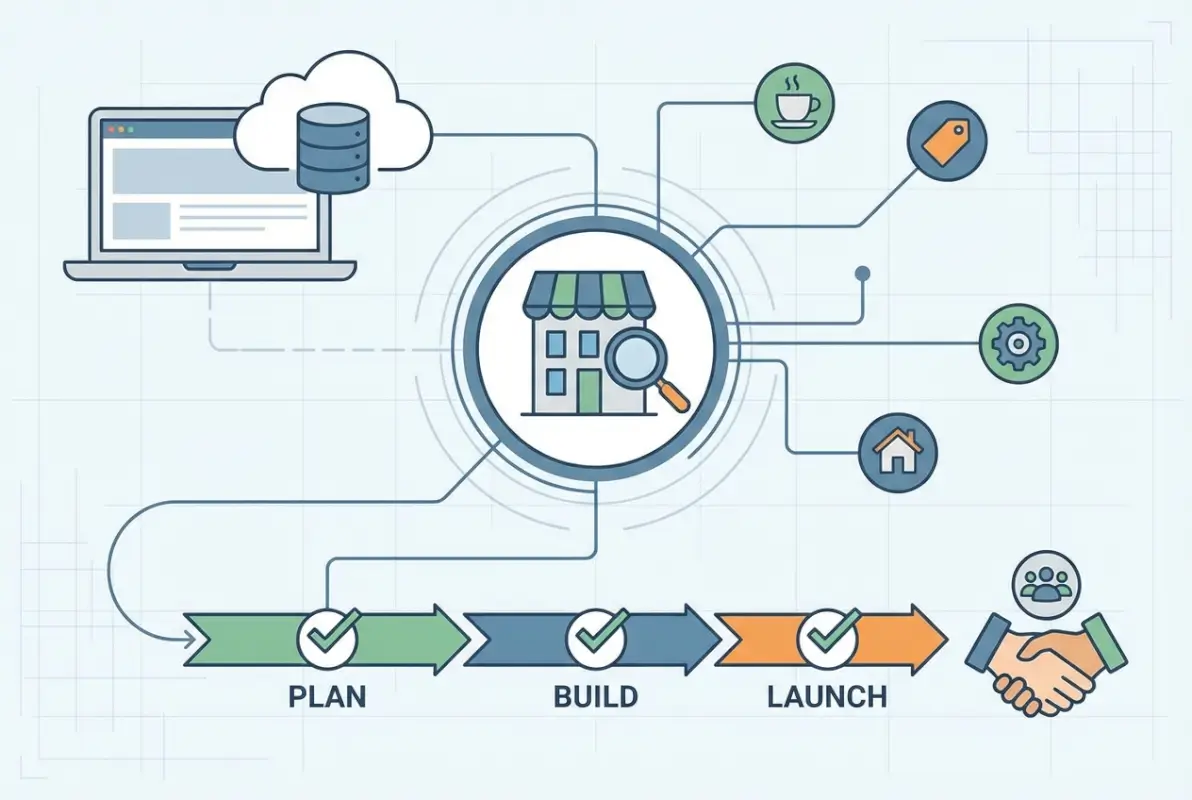
Modern directories succeed by offering three things that general search engines can’t: hyper-local expertise, community curation, and relationship-driven trust. Your directory isn’t competing with Google—it’s complementing it by providing the local context and verification that algorithmic search results lack.
Why Specialized Directories Still Win
The death of business directories has been greatly exaggerated. While generic Yellow Pages-style directories have declined, niche directories are experiencing a renaissance. According to Statista research on local search behavior, consumers increasingly prefer specialized platforms when searching for specific services or products.
Consider these successful models: a directory exclusively for farm-to-table restaurants in Portland, a platform connecting homeowners with licensed contractors in Denver, or a curated list of Black-owned businesses in Atlanta. Each succeeds because it serves a specific audience with specific needs that broad platforms inadequately address.
Current Search Behavior and Intent
Understanding search intent is fundamental to directory success. Users searching for local businesses exhibit four primary behavior patterns: immediate need (“plumber near me”), research mode (“best Italian restaurants in Chicago”), discovery (“things to do in Seattle”), and verification (“ABC Company reviews”).
Your directory should optimize for all four patterns. Immediate-need searches require prominent phone numbers and “open now” filters. Research-mode users need comprehensive information, photos, and reviews. Discovery seekers want curated lists and neighborhood guides. Verification seekers need robust review systems and business credentials.
The 7-Day Directory Launch Framework
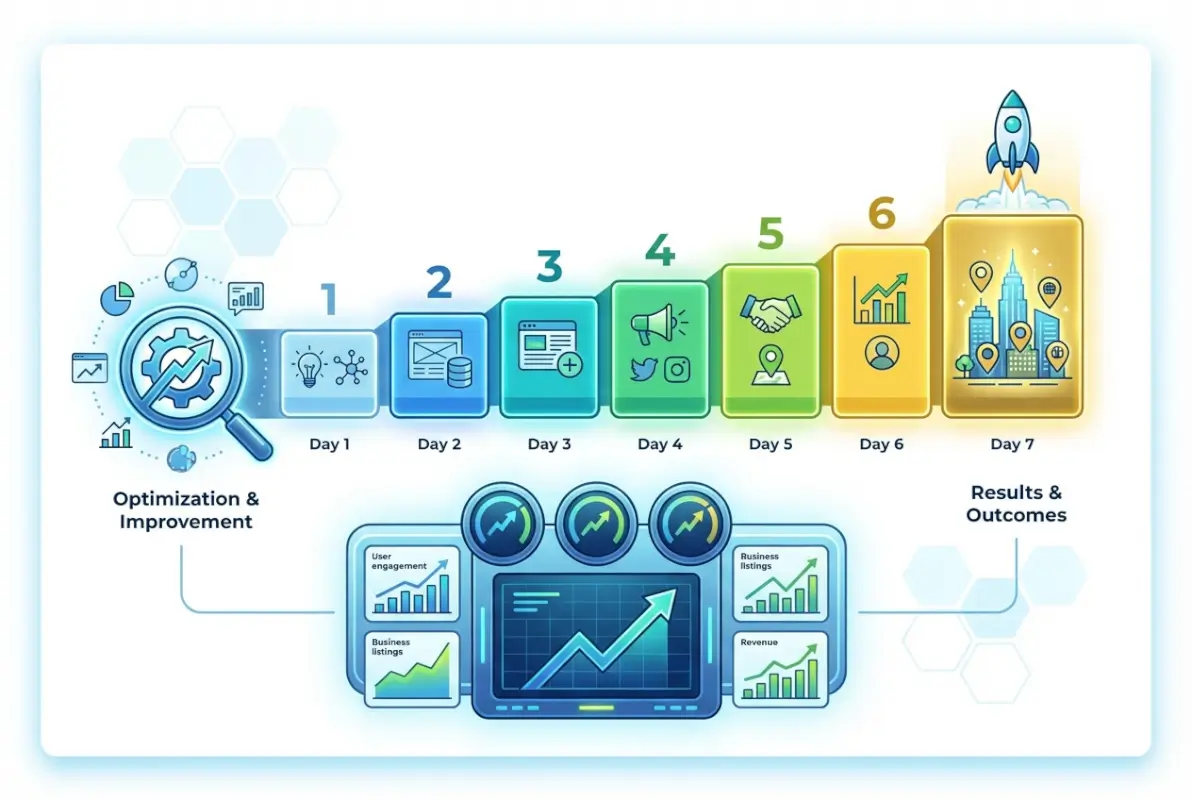
Building a functional local business directory in one week requires ruthless prioritization and a systematic approach. This framework focuses on launching a minimum viable product that delivers core value—comprehensive listings with verified data and basic search functionality. Advanced features can wait; accurate data and usability cannot.
I’ve used this exact framework to launch directories in three different industries. The first took me twelve days (I overengineered it), the second took nine days, and by the third, I had the process down to six and a half days. Your first attempt might take slightly longer, but following this blueprint will prevent the scope creep that kills most directory projects.

Day 1: Define Scope and Data Model
Start by making three critical decisions: geographic boundaries, industry focus, and target audience. Will you cover all businesses in a single neighborhood, or one business category across a metropolitan area? Both approaches work, but they require different strategies.
Define your data model before touching any technology. What information will each listing contain? Standard fields include business name, address, phone, website, hours, description, categories, and photos. Advanced fields might include accepted payment methods, accessibility features, language services, or specific amenities. Document this in a spreadsheet—it becomes your blueprint.
Create your category taxonomy carefully. Categories should be mutually exclusive where possible, specific enough to be useful, but not so granular that you have dozens of single-business categories. I typically aim for 15-30 main categories with 2-3 subcategories each for a city-wide directory.
| Day | Primary Tasks | Deliverable |
|---|---|---|
| Day 1 | Define scope, data model, categories | Documented data schema |
| Day 2 | Data collection and normalization | 50+ validated listings |
| Day 3 | Platform setup and configuration | Functional directory site |
| Day 4 | Design, UX, mobile optimization | User-ready interface |
| Day 5 | Quality control and testing | Bug-free experience |
| Day 6 | SEO, schema markup, content | Search-optimized pages |
| Day 7 | Launch prep and initial outreach | Live directory |
Day 2: Data Acquisition and Normalization
This is the day that separates successful directories from abandoned projects. Your goal is to collect and validate at least 50-100 business listings with complete, accurate information. Quality trumps quantity—ten perfect listings beat one hundred mediocre ones.
Start with publicly available sources: chamber of commerce member lists, government business registries, and existing online directories. Check Google Business Profile listings for each business to verify addresses and hours. Call businesses directly to confirm critical information—yes, this is time-consuming, but it’s also what will make your directory trustworthy.
Normalization is crucial. Standardize phone number formats, ensure addresses include proper formatting, verify URLs are complete and functional, and normalize business hours into a consistent format. Create a spreadsheet template that enforces this structure—it prevents errors before they enter your system.
Day 3: Platform Selection and Technical Setup
For a 7-day launch, WordPress with a directory plugin offers the best balance of speed and functionality. I recommend GeoDirectory or Business Directory Plugin—both provide robust features out of the box and can be customized as you grow.
Choose reliable hosting with good performance characteristics. Your directory will have multiple database queries per page load, so avoid bottom-tier shared hosting. A managed WordPress host or quality VPS will serve you better long-term.
Configure your directory structure: set up categories, define custom fields matching your data model, configure search parameters, enable maps integration, and establish URL structures. Import your normalized data using CSV upload tools (most directory plugins support this). Test thoroughly—verify that every field displays correctly and search functions work as expected.
Data Quality: Your Directory’s Foundation
I’ve consulted on directories that failed despite beautiful design and advanced features because their data was unreliable. Users forgive imperfect interfaces; they don’t forgive wrong phone numbers or outdated information. Data quality isn’t just important—it’s the entire ballgame.
Establishing rigorous data quality processes from day one prevents the credibility crisis that kills most directories within their first year. Every inaccurate listing erodes trust, and trust, once lost, is nearly impossible to rebuild.

Verification and Validation Processes
Implement multi-layer verification: automated validation for phone numbers and email addresses using validation APIs, address verification through geocoding services, business existence confirmation via public records, and manual spot-checks for high-visibility listings.
Create a business claim process that allows owners to verify and update their information. This serves dual purposes: it improves data accuracy and begins building relationships with business owners who may later purchase premium features. Send claim invitations via email or physical mail to businesses you’ve listed.
Set expiration dates on unverified listings. Information older than 12 months should be flagged for re-verification. Businesses change—they relocate, update hours, change phone numbers, or close entirely. Regular verification cycles keep your directory current.
Handling Reviews and User-Generated Content
Reviews transform directories from static lists into dynamic communities. However, reviews also introduce moderation challenges. Establish clear guidelines for acceptable content, implement reporting mechanisms for suspicious reviews, and create transparent processes for resolving disputes.
Encourage reviews through gentle prompts after users interact with businesses. However, never incentivize reviews with rewards—this violates guidelines established by major platforms and compromises review integrity. Authentic feedback is more valuable than volume.
Respond to business owner concerns about negative reviews professionally. Your role is neutral platform provider, not arbiter of business disputes. Remove reviews only when they violate clear policies (profanity, hate speech, unsubstantiated allegations), not simply because businesses find them unfavorable.
Deduplication and Data Integrity
Duplicate listings are the bane of directory quality. They confuse users, dilute reviews across multiple entries, and make your directory appear poorly maintained. Implement fuzzy matching algorithms that detect potential duplicates based on business name similarity, identical phone numbers, or matching addresses.
When duplicates are identified, merge them carefully. Combine reviews, preserve the oldest listing URL to maintain any external links, notify any claimed business owners about the consolidation, and redirect duplicate URLs to the canonical listing.
Prevention is easier than cleanup. Before allowing new listings (whether submitted by users or added by you), check for potential duplicates and require submitters to confirm their business isn’t already listed.
Design and User Experience Essentials
Your directory’s design should prioritize function over form—but that doesn’t mean it should be ugly. The best directory designs feel invisible; users accomplish their goals without thinking about the interface. They find what they need quickly, access information easily, and leave satisfied.
I’ve seen gorgeous directories with terrible usability fail while plain-looking directories with excellent search functionality thrive. Users don’t care about gradients and animations when they’re searching for a plumber at 11 PM on a Sunday because a pipe burst. They care about finding contact information immediately.
Mobile-First is Non-Negotiable
Design for mobile devices first, then adapt for desktop. Over 60% of local business searches occur on smartphones, and that percentage increases for immediate-need searches. Your mobile experience determines whether your directory succeeds or fails.
Mobile optimization means: touch-friendly buttons at least 44 pixels square, readable text without zooming (minimum 16px font size), simplified navigation with collapsible menus, prominent search bars accessible from every page, one-tap phone calling and directions, and fast loading times even on slower connections.
Test on actual mobile devices, not just browser emulators. I learned this lesson expensively when a directory I built looked perfect in Chrome’s mobile emulator but was nearly unusable on actual iPhones due to a Safari-specific rendering bug. Real device testing reveals real problems.
| Feature | Desktop Priority | Mobile Priority |
|---|---|---|
| Search functionality | High | Critical |
| One-tap phone calling | Low | Critical |
| Detailed descriptions | High | Medium |
| Map integration | Medium | High |
| Advanced filters | High | Medium |
| Photo galleries | Medium | Medium |
Search and Discovery Optimization
Your search functionality makes or breaks user experience. Implement autocomplete suggestions that help users refine queries before searching. Support multiple search modes: keyword search, category browsing, location-based search, and filtered searches combining multiple criteria.
Display search results with clear hierarchy: featured or verified listings first, followed by complete listings, then basic listings. Include essential information in search results (address, phone, rating, distance) so users can make decisions without clicking through to every listing.
Filter options should be prominent but not overwhelming. For a local directory, typical filters include distance/location, category, rating, price range, open now, and specific features or services. Allow users to combine filters but display how many results match each filter selection.
Business Profile Page Structure
Every business profile should follow a consistent, scannable structure. Lead with critical information: business name, category, rating, address, phone number, website, and hours. This should be visible without scrolling on both desktop and mobile.
Secondary information follows: detailed description, photo gallery, amenities or features, accepted payment methods, and special notes. Place reviews prominently—they’re often the primary reason users visit profile pages.
Include clear calls-to-action: “Call Now,” “Get Directions,” “Visit Website,” and “Write Review.” Make these buttons large, visually distinct, and action-oriented. Track which CTAs get clicked most frequently and optimize accordingly.
Launch Strategy and Marketing
Building a directory is the easy part. Getting people to use it—that’s where most projects stall. Your launch strategy determines whether you build momentum or launch into silence. I’ve seen well-built directories fail due to poor launches, and mediocre directories succeed through excellent marketing.
The key to learning how to start a local business directory that gains traction is understanding that you’re not just launching a website—you’re building a community resource and marketplace. Both businesses and consumers need to perceive value before they’ll participate.

Pre-Launch Business Outreach
Before your public launch, reach out to 20-30 high-quality businesses in your directory. Inform them they’ve been listed (with their public information), offer them the opportunity to claim and enhance their profiles, and gather feedback on your directory’s functionality and value proposition.
These early adopters become your advocates. If they claim their profiles, add photos, and engage with reviews, they’re signaling to other businesses that your directory is legitimate and worth their attention. Their participation also improves your content quality before public users arrive.
Consider offering “founding member” benefits: free premium features for six months, special badges, or priority placement. This costs you nothing but makes early adopters feel valued and invested in your success.
SEO and Local Visibility
Implement fundamental SEO from day one. Create unique, descriptive title tags and meta descriptions for every page. Use header tags hierarchically. Include structured data markup (LocalBusiness schema) on all business profiles. Submit your sitemap to Google Search Console.
Build location-specific landing pages for neighborhoods or districts within your coverage area. These pages should include curated lists of top businesses in each area, unique content about the neighborhood, and links to all businesses located there. This captures long-tail local searches.
Pursue local backlinks through partnerships, sponsorships, community event listings, and relationships with local bloggers or news outlets. Quality local backlinks signal relevance to search engines and drive targeted traffic.
Content Marketing for Directory Growth
Create content that showcases your directory’s value: “10 Best Coffee Shops in [Neighborhood],” “Complete Guide to [Service] in [City],” or “How to Choose a [Business Type] in [Area].” These articles attract search traffic and demonstrate your directory’s depth.
Interview business owners and publish their stories. This creates shareable content, strengthens relationships with listed businesses, and provides authentic insight into your community. Business owners will share articles featuring them, expanding your reach.
Develop neighborhood guides that highlight the character and offerings of specific areas. These become valuable resources for new residents, visitors, and anyone exploring different parts of your city.
Monetization Models That Work
The best time to plan monetization is before you launch, but the best time to implement it is after you’ve demonstrated value. Rushing monetization undermines trust; delaying it indefinitely leaves money on the table. The sweet spot? Launch with free listings, add premium options once you have consistent traffic, implement full pricing after proving ROI to businesses.
I’ve experimented with virtually every directory monetization model. Some failed spectacularly (charging for basic listings killed adoption immediately). Some succeeded beyond expectations (a lead generation commission model generated more revenue than premium listings). The right model depends on your niche, audience, and competitive landscape.
Freemium Listing Models
The freemium approach—free basic listings with paid premium options—works best for most directories. Free listings solve your critical early challenge: acquiring enough listings to make the directory valuable. Premium listings generate revenue without limiting your catalog.
Premium features that businesses will pay for include: enhanced profile placement in search results, additional photos and videos, priority customer support, analytics showing profile views and clicks, featured placement on homepage or category pages, removal of competitor ads from their profiles, and verified/trusted badges.
Pricing should reflect genuine value provided. I typically see premium listings priced between $20-100 per month depending on business type, competition level, and directory traffic volume. Start lower to encourage early adoption, then increase prices as you prove value.
| Revenue Model | Best For | Implementation Timing |
|---|---|---|
| Premium listings | Competitive markets | Months 4-6 |
| Banner advertising | High-traffic directories | After 5,000+ monthly visits |
| Lead generation | Service businesses | Months 6-12 |
| Affiliate partnerships | Specific niches | As partnerships develop |
| Booking commissions | Restaurants, services | After proving concept |
Alternative Revenue Streams
Beyond premium listings, consider advertising opportunities that don’t compromise user experience. Category sponsorships (where one business gets exclusive featured placement in their category) work well in non-competitive markets. Sponsored content—business spotlights or interviews marked clearly as sponsored—provides value to readers while generating revenue.
Lead generation creates win-win scenarios. If users can request quotes or consultations through your directory, charge businesses per qualified lead rather than for listing placement. This aligns incentives—businesses pay only for tangible value, and you’re motivated to drive quality traffic.
For specific niches, affiliate partnerships with complementary services can generate passive income. A restaurant directory might partner with reservation systems, a home services directory with warranty providers, or a retail directory with e-commerce platforms. According to industry research from Forrester, strategic affiliate partnerships can contribute significantly to directory revenue without compromising user experience.
Pricing Strategy and Positioning
Price premium features based on the value they provide businesses, not your costs. A featured listing that generates even one new customer per month is worth $100+ to most businesses. Your pricing should reflect a fraction of that value—making it an obvious positive ROI decision.
Offer annual subscriptions at a discount (typically 15-20% off monthly rates). This improves cash flow, reduces churn, and creates long-term commitment from business partners. Many businesses will choose annual plans if the discount is meaningful.
Create urgency through limited availability. “Only 3 premium spots available in this category” or “Founding member rates end in 30 days” motivate faster decisions. However, never use false scarcity—it destroys trust when discovered.
Frequently Asked Questions
How long does it realistically take to start a local business directory?
You can launch a functional directory in 7 days using WordPress and directory plugins, focusing on 50-100 verified listings and essential features. However, building a comprehensive, traffic-generating directory typically requires 2-3 months of consistent effort including data collection, SEO optimization, and community outreach. The 7-day framework gets you live; ongoing work makes you successful.
What makes a local business directory successful in competitive markets?
Successful directories differentiate through specialization (serving a specific niche or geography), superior data quality (verified, current listings), community integration (local partnerships and involvement), and user experience (fast, mobile-friendly, intuitive search). Generic broad directories can’t compete with established platforms, but specialized directories serving underserved niches consistently succeed.
Should I charge businesses for listings from the beginning?
No. Start with free basic listings to build critical mass—you need comprehensive coverage to provide user value. Introduce premium features after establishing traffic and proving value to businesses, typically 3-6 months after launch. Charging too early limits adoption and prevents you from building the comprehensive directory that attracts users.
How many listings do I need before launching publicly?
Aim for at least 50-100 verified listings before public launch, with representation across all major categories in your focus area. Quality matters more than quantity—50 complete, accurate listings are more valuable than 500 incomplete ones. Users need enough options to find what they’re looking for, but not so many that accuracy suffers.
What’s the best way to collect accurate business data?
Combine multiple sources: start with chamber of commerce lists and public records, verify against Google Business Profiles, supplement with direct business outreach via phone or email, and implement business claim processes for ongoing updates. Never rely on a single source, and always verify critical information like phone numbers and addresses before publishing.
How do I prevent spam and fake reviews on my directory?
Implement email verification for reviewers, require account registration before posting reviews, use rate limiting to prevent review bombing, monitor for suspicious patterns (multiple reviews from same IP, identical review text), employ moderation for first-time reviewers, and provide clear reporting mechanisms for users to flag suspicious content. Balance fraud prevention with ease of use—overly complex review processes reduce participation.
Can I build a directory without technical skills?
Yes, using WordPress with directory plugins like GeoDirectory or Business Directory Plugin requires minimal technical knowledge. You’ll need basic WordPress skills (available through countless free tutorials) and comfort with spreadsheets for data organization. Managed WordPress hosting handles technical complexities. If you can use social media and edit documents, you can build a directory.
How do I compete with Google Maps and Yelp?
Don’t try to compete directly—complement them instead. Succeed through specialization (narrow geographic focus or specific industry), community integration (local relationships and insider knowledge), enhanced curation (verified, detailed listings with local context), and niche features that broad platforms don’t offer. You’re providing depth and community expertise that algorithmic platforms can’t match.
What’s the most common mistake when starting a business directory?
The most common mistake is prioritizing features and design over data quality. Beautiful interfaces with inaccurate information fail quickly. Focus first on collecting comprehensive, verified business data, then on making that data easily searchable. Design polish and advanced features can wait—accurate information and basic usability cannot.
How much does it cost to start a local business directory?
Minimum viable costs include domain registration ($10-15/year), WordPress hosting ($10-30/month), premium directory plugin ($50-200 one-time or $100-300/year), and optional premium theme ($50-100 one-time). Total first-year costs range from $250-600 for basic setup. Additional costs may include data collection tools, maps API fees (after free tier), and marketing budget. Many successful directories launch for under $500.
Taking Action on Your Directory Vision
Understanding how to start a local business directory is one thing—actually doing it is another entirely. The gap between knowledge and execution is where most directory dreams die. You now have a complete blueprint; the only question is whether you’ll use it.
Start small, focus ruthlessly, and ship quickly. Don’t wait for perfection—launch with 50 great listings rather than waiting until you have 500 mediocre ones. Don’t build advanced features before validating basic demand. Don’t design for every possible use case before serving your core audience.
The directories that succeed aren’t always the most sophisticated or beautifully designed. They’re the ones that solve a real problem for a real community with reliable information and straightforward usability. They’re built by people who valued shipping over perfecting, iteration over planning, and user feedback over personal assumptions.
Your Week 1 Action Items
- Define your geographic scope and niche focus (Day 1)
- Document your data model and category structure (Day 1)
- Collect and verify 50-100 business listings (Day 2)
- Set up WordPress hosting and install directory plugin (Day 3)
- Configure categories, fields, and import your data (Day 3)
- Customize design and optimize mobile experience (Day 4)
- Test all functionality across devices (Day 5)
- Implement basic SEO and schema markup (Day 6)
- Launch and begin business outreach (Day 7)
Remember that launching is just the beginning. Your directory will evolve based on user feedback, business needs, and market opportunities you can’t anticipate today. Build flexibility into your systems, maintain relationships with your business partners, and stay obsessively focused on data quality and user experience.
The local business directory landscape needs more specialized, community-focused platforms built by people who care about their communities. Generic algorithms and national platforms can’t replace local expertise and curation. That’s where your opportunity lies—not in competing with Google or Yelp, but in serving the specific needs they overlook.
Your community is waiting for the resource you’re about to build. The businesses in your area need better visibility. The consumers in your market need better information. And you now have everything you need to connect them. The only thing left is to start.