How to Set Up Servant Keeper Online Directory: A Step-by-Step Guide

Setting up an online directory for your church isn’t just about creating a digital contact list, it’s about building a secure, accessible hub that strengthens community connections while respecting privacy boundaries. If you’ve been wrestling with scattered spreadsheets, outdated phone trees, or members who can’t find contact information when they need it, the Servant Keeper Online Directory offers a solution that many church administrators overlook until they experience how much time and frustration it saves. Unlike generic contact management tools, this platform was specifically designed for churches and ministries, which means it handles the unique challenges you face—like family groupings, ministry roles, and varying levels of information visibility—right out of the box.
TL;DR – Quick Takeaways
- Servant Keeper Online Directory provides real-time, device-friendly access to member information with customizable privacy controls and passkey protection
- Successful setup requires planning – define goals, clean your data, and establish role-based permissions before you begin
- Seven core steps take you from initial access to full deployment: module access, permissions, field customization, data import, user setup, privacy controls, and testing
- Integration matters – the directory works seamlessly with other Servant Keeper modules for giving, attendance, and events to create a unified church management ecosystem
- Ongoing maintenance includes regular data hygiene, security reviews, and training to keep your directory accurate and secure over time
I remember when our church tried managing member information through a combination of printed directories (updated once a year if we were lucky) and email chains that seemed to multiply like rabbits. The pastor would ask for someone’s phone number during a pastoral emergency, and we’d spend twenty minutes tracking down outdated information. That experience taught me something important: the technical setup of a directory is only half the battle. The real value comes from thoughtful planning around who needs to see what, how to keep information current, and making the system so easy that people actually use it instead of reverting to old habits.
Understanding Servant Keeper Online Directory
Before diving into configuration settings and data imports, it’s worth understanding exactly what Servant Keeper Online Directory is and why churches choose it over alternatives. This isn’t just a feature tacked onto church management software as an afterthought, it’s a core component designed to solve real problems that ministry leaders face every day.
What It Is and Why Churches Use It
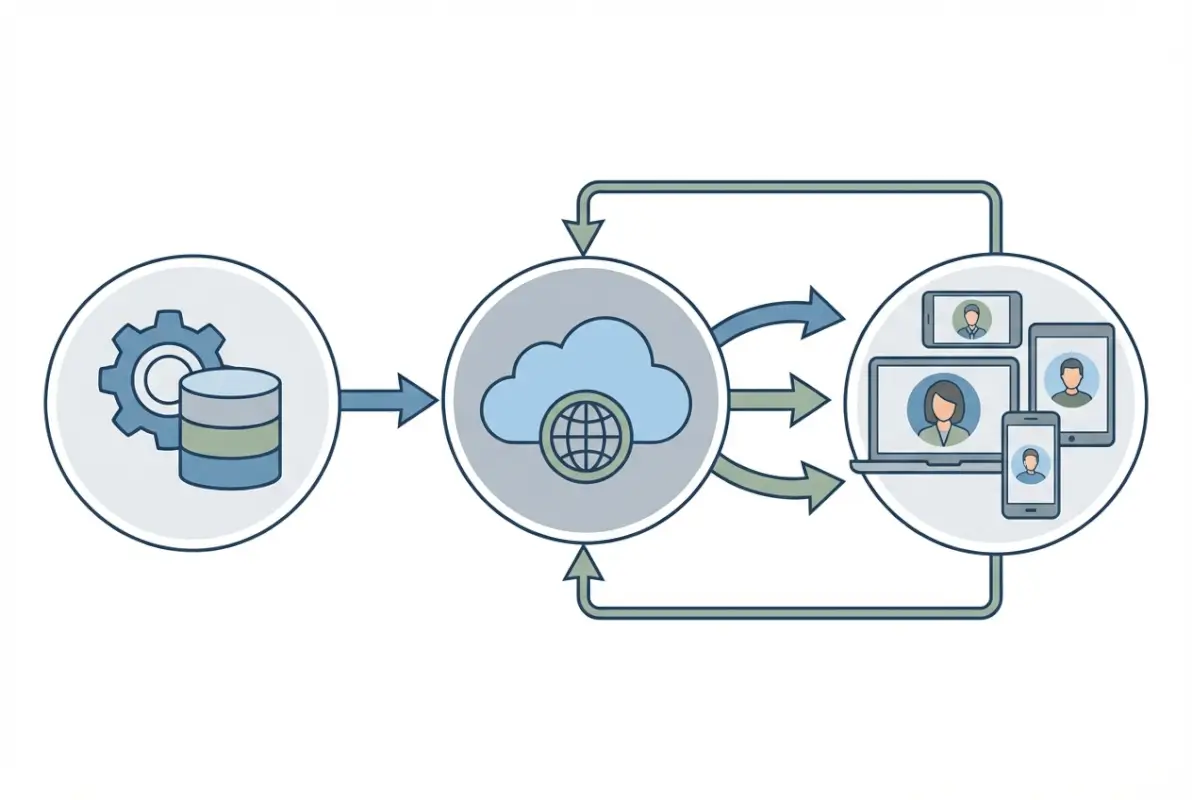
Servant Keeper Online Directory functions as a centralized, cloud-accessible database of your church members and their families, integrated directly into the broader Servant Keeper Church Management ecosystem. Unlike static PDF directories or standalone contact apps, this directory updates in real-time when administrators or authorized users make changes. When someone moves to a new address or gets a new phone number, that update propagates across the entire system immediately—no waiting for next year’s printed directory.
The key benefits that draw churches to this platform include real-time synchronization across all devices (desktop, tablet, smartphone), controlled visibility that lets families decide what information they want to share, and device compatibility that works whether your members use iPhones, Android devices, or computers. According to Pew Research Center studies on religious organizations, churches that adopt digital member management tools report significantly higher engagement rates and reduced administrative burden compared to those using paper-based systems.
What makes this particularly valuable for ministries is the permission structure. Not everyone needs to see everything, and the directory respects that reality. A small group leader might need access to contact information for their group members, while keeping financial giving data completely separate and visible only to authorized staff. This layered approach to information sharing mirrors how churches actually operate rather than forcing everyone into a one-size-fits-all model.
Core Features Relevant to Setup
When you’re planning your directory setup, certain features will directly impact your configuration decisions. Passkey protection allows you to share access credentials with members while maintaining security—think of it like a building key that you can change if needed. The filtered search functionality lets users find people by name, ministry involvement, family relationships, or custom fields you define (like skills, interests, or volunteer availability).
Customizable fields are where Servant Keeper Online Directory really shines compared to generic contact management tools. Your church might track things like baptism dates, spiritual gifts, small group participation, or volunteer certifications. The directory schema can expand to include whatever data points matter to your ministry context. This flexibility connects directly to other Servant Keeper modules for tracking giving patterns, attendance trends, and event participation, creating a unified view of each person’s engagement with your church community.
The integration with other modules means that when someone makes a pledge in the giving system, serves at an event tracked in the events module, or attends a service logged in attendance tracking, all that activity connects to their directory profile. This creates powerful insights for pastoral care and ministry planning without requiring duplicate data entry across multiple systems, similar to how comprehensive business directory platforms consolidate information across different service categories.
Typical Deployment Models and Hosting
Servant Keeper offers both cloud-hosted and on-premises deployment options for the Online Directory, though cloud hosting has become the standard recommendation for most churches. The cloud model means Servant Keeper handles all the server maintenance, security updates, and backup procedures while you focus on using the system. Your data lives on their secure servers with automatic backups, and members access the directory through a web browser or mobile app.
On-premises deployment, where you install and maintain the software on your own servers, makes sense primarily for larger churches with dedicated IT staff and specific data residency requirements. Most small to mid-sized congregations find the cloud option more practical because it eliminates the need for technical expertise on staff and reduces the total cost of ownership when you factor in server hardware, maintenance, and security management.
The hosting decision impacts your setup process mainly in terms of initial configuration and ongoing administration. Cloud-hosted directories typically offer faster deployment since Servant Keeper provisions your environment and handles the technical infrastructure. You’ll focus on the ministry-side decisions—permissions, data structure, and user training—rather than wrestling with server configurations and network security.
Preparation and Planning (Before You Begin)
The difference between a directory that becomes an indispensable ministry tool and one that languishes unused often comes down to planning rather than technical configuration. I’ve seen churches rush into setup without clear goals and end up with systems that don’t serve anyone well. Taking time upfront to answer fundamental questions saves countless hours of reconfiguration later.
Define Goals for Your Directory
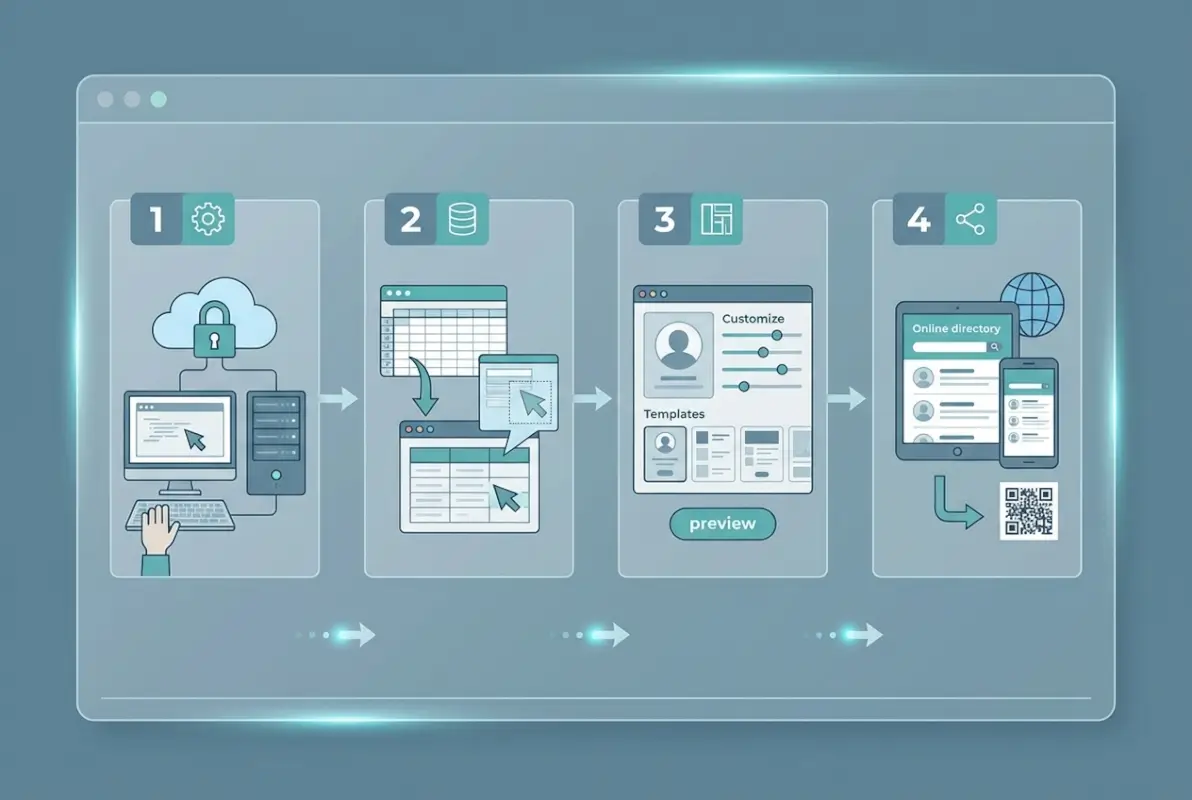
Start by articulating what you want your directory to accomplish. Are you primarily trying to help members connect with each other for fellowship and support? Do you need ministry leaders to coordinate volunteers efficiently? Are you looking to reduce the administrative burden of keeping contact information current? Different goals will drive different decisions about what data to collect and who can access it.
Consider what data actually needs to be in the directory versus what might be tracked elsewhere, much like how strategic business directories carefully curate which information provides the most value. Core contact information (names, phone numbers, email addresses, physical addresses) forms the foundation. Family relationships and household groupings help people understand connections within your congregation. Ministry involvement, spiritual gifts, and volunteer interests support leadership in recruiting and coordinating service opportunities.
Privacy and consent considerations deserve serious thought during this planning phase. Some members feel comfortable sharing their cell phone numbers broadly while others prefer that only staff have access. Photo directories enhance connection but require explicit permission to publish someone’s image. According to Federal Trade Commission guidance on data privacy, organizations should collect only the information they genuinely need and give people meaningful control over how their data is used and shared.
Think through visibility rules for different types of information. Financial giving data should be extremely restricted—typically only senior staff and authorized finance committee members. Contact information might have tiers: basic info visible to all members, detailed info visible to ministry leaders, and sensitive information (like home addresses for members with security concerns) visible only to designated staff.
Gather Prerequisites
Data cleanliness makes or breaks directory adoption. Before you import anything into Servant Keeper Online Directory, audit your existing member records. Look for duplicate entries (the same person listed multiple times), incomplete records (missing email addresses or phone numbers), and outdated information (people who moved years ago but never updated their address). Cleaning this mess before import prevents you from embedding errors into your new system.
Decide how you’ll structure family versus individual records. Churches typically organize around households—the Smith family includes John, Mary, and their children—but some individuals prefer separate records even when they share a household. Servant Keeper handles both approaches, but you need a consistent policy. Will college students away at school be listed under their parents’ household or as separate records? What about adult children still living at home?
Review your existing access controls if you’re migrating from another system. Who currently has permission to view and edit member data? Are those permission levels still appropriate, or does the transition to Servant Keeper present an opportunity to tighten security? Document your current state so you can make intentional decisions about the future state rather than just recreating what you’ve always done.
Stakeholder Roles and Access Levels
Map out the different roles people will have in your directory system. Administrators need full access to configure the system, manage permissions, and oversee data quality. Ministry leaders require access to contact information for people in their areas of responsibility—the children’s ministry director needs to reach parents, the small group coordinator needs to contact group leaders and members. General members need the ability to look up contact information for fellow church members while respecting privacy boundaries.
Role-based permissions prevent information overload and protect sensitive data. A volunteer coordinating the church picnic doesn’t need to see giving records or pastoral counseling notes. The finance committee doesn’t need access to volunteer scheduling details. By defining clear roles before setup, you can configure permissions that give people exactly what they need without exposing them to irrelevant or confidential information, similar to how professional association directories carefully control member access based on membership level and role.
Think about volunteer versus staff access. Staff members typically need broader permissions because they support multiple ministry areas and handle sensitive pastoral care situations. Volunteers might have narrower, more focused access tied to their specific roles. A Sunday school teacher needs contact information for students’ families but not for the entire congregation.
Step-by-Step Setup Guide
Now we get to the practical work of actually configuring your Servant Keeper Online Directory. This section walks through each step in sequence, though you might find yourself circling back to refine earlier steps as you discover requirements later in the process. That’s normal and even expected—iterative refinement produces better results than trying to make every decision perfectly the first time.

Step 1 — Access the Online Directory Module
First, verify that your Servant Keeper subscription includes the Online Directory module. Not all subscription tiers include every feature, so confirm your access before you invest time in planning and preparation. Log into your Servant Keeper account through the web interface or desktop application, depending on your deployment model. Navigate to the modules or features section and look for the Online Directory option.
If you’re on a cloud-hosted plan, the module should appear in your dashboard once it’s activated for your account. Contact Servant Keeper support if you don’t see the Online Directory even though your subscription should include it—sometimes activation requires a manual step on their end. For on-premises installations, you may need to enable the module through your local configuration settings.
Take a few minutes to explore the interface before making changes. Click through the various menu options, open a few sample records if available, and get a feel for how information is organized. This orientation prevents confusion later when you’re trying to locate specific settings or features. The interface typically includes sections for member records, family groupings, custom fields, permissions, and reporting.
Step 2 — Configure Directory Visibility and Permissions
Permission configuration is where your earlier planning pays off. Servant Keeper Online Directory uses a role-based access control system that lets you define what different user types can do. Start by creating your core roles: Administrator (full access), Staff (broad access with some restrictions), Ministry Leader (focused access to relevant areas), and Member (basic directory lookup).
For each role, specify whether users can search the directory, view detailed contact information, edit records, and export data. Administrators typically get all permissions. Staff might have view and edit rights but restricted export capabilities to prevent bulk data downloads. Ministry leaders usually get view-only access to their specific ministry areas. General members often receive search and basic view permissions with no editing or export rights, helping maintain the kind of controlled access you see in well-managed professional business directories.
Passkey protection adds an additional security layer. When enabled, users must enter a passkey to access the directory even after logging into Servant Keeper. This prevents casual browsing of member information and ensures that only people with legitimate ministry reasons access contact data. You can set organization-wide passkeys or create different passkeys for different access levels. Consider how you’ll communicate these passkeys to authorized users and how you’ll handle passkey resets when people forget them.
Field-level visibility controls let you specify which roles can see which pieces of information. Financial giving data might be visible only to Administrators and specific finance staff. Home addresses could be visible to Staff and Ministry Leaders but not general Members. Email addresses and phone numbers might be visible to all authenticated users. These granular controls respect privacy while still enabling connection and coordination.
Step 3 — Customize Fields and Data Schema
Standard contact fields (name, address, phone, email) come pre-configured, but your church’s unique needs likely require additional custom fields. Access the field configuration or schema management section to add, remove, or modify fields. Common additions include baptism date, membership class completion, spiritual gifts assessment results, volunteer interests, dietary restrictions (for event planning), and emergency contact information.
Family relationship fields deserve special attention. Servant Keeper allows you to link individuals into household units and define relationships (spouse, child, parent, etc.). Configure how you want these relationships displayed in the directory. Some churches prefer a household view where one entry shows the whole family with members indented beneath. Others prefer individual entries with clickable links to family members.
Custom notes or comments fields provide space for contextual information that doesn’t fit into structured fields. A ministry leader might note that someone prefers email communication over phone calls, or that a family has a new baby and could use meal support. These informal notes complement the structured data and support personalized ministry, though you’ll need to decide who can view and edit these notes based on privacy considerations.
Field validation rules help maintain data quality. Set phone number fields to require a specific format, mark email fields to validate proper email syntax, and create dropdown menus for categories rather than free-text entry (which leads to inconsistent variations). These small technical controls prevent data quality degradation over time.
Maintaining and Evolving the Directory
Setting up your Servant Keeper Online Directory is only the beginning. To maximize its value for your church community, you need a sustainable plan for ongoing maintenance, data quality, and integration with your broader ministry operations. This section walks through the critical tasks that keep your directory accurate, secure, and aligned with your church’s evolving needs.


Regular data hygiene
Data quality degrades naturally over time as members move, phone numbers change, and family structures evolve. Without routine hygiene practices, your directory can quickly become cluttered with outdated contact information, duplicate records, and orphaned entries that erode user trust and utility.
Schedule quarterly data audits to systematically review and clean your directory. During each audit, identify and merge duplicate records, verify that family relationships are correctly linked, and flag entries with missing or incomplete critical fields (such as primary phone numbers or email addresses). Servant Keeper’s built-in search and filtering tools make it easy to isolate records that need attention—for example, you can filter for individuals without a valid email address or families with no primary contact listed.
Deduplication is particularly important in churches that receive member data from multiple sources (online forms, event registrations, manual entry). Use Servant Keeper’s duplicate-detection features to find potential matches based on name, address, or phone number, then carefully merge confirmed duplicates to preserve giving history, attendance records, and group memberships. Always back up your database before performing bulk merges or deletions.
Privacy reviews should be part of every data hygiene cycle. Verify that members who have requested restricted visibility or opt-outs are correctly flagged in the system, and audit any custom fields that might contain sensitive information (medical notes, pastoral care flags, financial assistance records) to ensure they are not inadvertently exposed in the public directory view. Document your privacy policies and review them annually with your church leadership to stay aligned with nonprofit best practices and any applicable data-protection regulations.
| Data Hygiene Task | Frequency | Who Owns It | Tools / Methods |
|---|---|---|---|
| Duplicate detection and merge | Quarterly | Database administrator | SK duplicate-finder, manual review |
| Verify family relationships | Quarterly | Admin or volunteer coordinator | Filter reports, spot-check families |
| Update contact info (moves, new numbers) | Ongoing / as reported | Office staff, ministry leaders | Member self-service portal, manual entry |
| Privacy and opt-out compliance check | Quarterly | Database administrator, pastor | Audit custom fields, review visibility flags |
| Archive inactive / deceased members | Annually | Database administrator | Status filters, backup before archival |
Establish a process for members to update their own information. Servant Keeper’s online directory allows members to log in and edit certain fields (typically phone, email, address, and photo), which reduces the administrative burden on your office staff and ensures that contact data stays current. Communicate this self-service capability through announcements, bulletin inserts, and onboarding materials for new members.
Integrations with other Servant Keeper modules
The Online Directory is most powerful when it serves as the single source of truth for member data across all of Servant Keeper’s modules—giving, attendance tracking, event management, volunteer scheduling, and communications. Proper integration eliminates duplicate data entry, reduces errors, and gives you a unified view of each member’s engagement with your church.
When a member updates their contact information in the directory, that change automatically propagates to their giving records, attendance history, and any ministry groups they belong to. This real-time synchronization means that a change of address entered once is instantly reflected in contribution statements, event registrations, and email distribution lists. You avoid the common pitfall of sending mail to outdated addresses or emails bouncing because a phone number was updated in one module but not another.
Attendance and group management modules pull directly from the directory’s family and individual records. When you take attendance at a service or small group, you’re selecting from the same set of names and photos that appear in the directory, ensuring consistency and making it easy to spot new visitors or guests who haven’t yet been added to the system. Volunteer coordinators can search the directory by skills, availability, or ministry interests (if you’ve added custom fields for those attributes) and assign roles without re-entering contact details.
The giving module benefits particularly from tight directory integration. Contribution statements, tax receipts, and donor acknowledgments draw contact information, family relationships, and preferred communication channels directly from the directory. If a family has opted to receive statements via email rather than print, that preference is stored once in the directory and respected across all financial communications. This integration also supports household giving, where multiple individuals contribute under a single family record and receive consolidated year-end statements.
Communications and email campaigns leverage directory data to segment audiences and personalize outreach. You can send targeted messages to specific groups—parents of children in youth ministry, small group leaders, volunteers with upcoming shifts, or members who joined in the past six months—all filtered from directory attributes. Servant Keeper’s communication tools respect privacy settings, so members who have restricted their contact information or opted out of certain communications are automatically excluded from those lists.
Event management and check-in systems use the directory for registration and attendance. When you set up an event (a church picnic, a mission trip, a workshop), you can pre-populate the guest list from directory records, allow online registration tied to member accounts, and use mobile check-in apps that pull names and photos from the directory for fast, accurate tracking on event day. Post-event follow-up (thank-you emails, feedback surveys, photo sharing) is streamlined because all attendee data is already linked to their directory profiles.
Security and access reviews
Even with strong initial permissions, security and access controls need regular review to stay effective. Staff turnover, evolving ministry roles, and changes in member status all create opportunities for permissions to drift out of alignment with actual needs. Schedule a formal access review every six months to verify that each user’s permissions still match their current responsibilities.
During the review, list every active user account—administrators, ministry leaders, office staff, and any volunteers with elevated privileges—and confirm that each person still requires the level of access they currently have. Remove accounts for staff who have left the church or volunteers who have stepped down from leadership roles. Downgrade permissions for users whose ministry assignments have changed (for example, a small-group leader who is no longer leading a group should lose edit rights to group rosters).
Enforce password hygiene and multi-factor authentication (if your Servant Keeper subscription and deployment model support it). Encourage or require users to update passwords periodically, use strong, unique passwords (not shared across other sites), and enable two-factor authentication for administrator accounts. Document your password policy in your church’s data-security handbook and train users on recognizing phishing attempts or suspicious login prompts.
Monitor login activity and audit logs for unusual patterns. Servant Keeper tracks who logs in, when, and what actions they perform. Review these logs quarterly to spot anomalies—such as logins from unexpected locations, mass data exports by non-administrators, or repeated failed login attempts that might indicate an unauthorized access attempt. If you detect suspicious activity, immediately reset the affected user’s password, review recent changes to the database, and notify your IT support or Servant Keeper’s technical team if you suspect a breach.
Keep your software and hosting environment up to date. If you host Servant Keeper on-premises, apply security patches and software updates promptly. If you use Servant Keeper’s cloud hosting, verify that automatic updates are enabled and that you receive notifications of any security advisories. Subscribe to Servant Keeper’s support bulletins and security alerts so you’re informed of any vulnerabilities or recommended configuration changes.
Document your security policies and communicate them to all users. Your policy should cover acceptable use (no sharing of login credentials, no accessing records outside of official duties), incident reporting (how to report a suspected breach or data leak), and consequences for policy violations. Make this policy part of onboarding for new staff and volunteers who receive directory access, and revisit it annually in training sessions.
Practical Use Cases and Examples
Theory and setup instructions are essential, but seeing how real churches use Servant Keeper Online Directory in day-to-day ministry brings the platform to life. This section presents concrete scenarios that illustrate the directory’s impact on member engagement, administrative efficiency, and privacy-first operations.

Member engagement and communication
A mid-sized church in the Midwest wanted to improve connection among members who attended different services and rarely interacted outside of Sunday morning. They launched the Online Directory with high-quality member photos, family groupings, and optional fields for hobbies and ministry interests. Within the first month, small-group coordinators used the directory to identify members with shared interests (photography, hiking, book clubs) and invited them to new affinity groups. Attendance at mid-week activities rose by 30 percent, and members reported feeling more known and connected.
The directory became the hub for event announcements and follow-up. When the church scheduled a family retreat, staff filtered the directory by families with children ages 5–12 and sent targeted email invitations with pre-filled registration links. Because the directory stored dietary preferences and emergency contacts, event organizers could plan meals and safety protocols without additional data collection. Post-event, they uploaded group photos to family records and sent thank-you messages that included personalized photo albums—all managed through integrated directory and communication tools.
Prayer chains and pastoral care teams use the directory to coordinate support quickly. When a member requests prayer or reports a need, the pastoral care coordinator can instantly pull contact information for the relevant ministry leaders, small-group members, or neighbors (based on geographic filters in the directory). This speed and coordination mean that casseroles, rides to appointments, and prayer support arrive within hours, not days, strengthening the church’s reputation for compassionate, responsive care.
Administrative efficiency
A growing church with multiple campuses struggled with duplicated data entry and inconsistent records across worship sites. Each campus maintained its own spreadsheet of members, leading to conflicting contact information, missed communications, and frustration among staff. After migrating to Servant Keeper Online Directory and training campus administrators on centralized data management, the church achieved a single, authoritative member list that all campuses accessed in real time.
Financial reporting became dramatically simpler. The finance team no longer reconciled multiple donor lists or chased down updated addresses for year-end statements. Because the directory fed directly into the giving module, every contribution was linked to the correct family record, and statements were generated with accurate, current contact details. The annual giving-statement mailing process, which previously took two weeks of staff time and numerous corrections, now completes in under two days with minimal errors.
Volunteer scheduling and event management saw similar gains. Ministry leaders could filter the directory by skills, availability, and past volunteer history to recruit for upcoming events. When a children’s ministry leader needed three additional helpers for Sunday school, she searched the directory for members who had previously volunteered with children, sent them a recruitment email through the integrated communication tool, and had her team confirmed within 24 hours—all without leaving the Servant Keeper interface or re-entering contact information.
The directory also streamlined new-member onboarding. When a visitor completed a connect card, office staff created a new directory record and flagged the individual for follow-up. The system automatically added the new member to a “Recent Visitors” group, triggered a welcome email series, and notified the connections pastor. Previously, this workflow involved three separate systems (a paper card, a spreadsheet, and an email client); now it happens in one integrated platform with audit trails and task reminders.
| Administrative Task | Before Directory Integration | After Directory Integration | Time Saved |
|---|---|---|---|
| Year-end giving statements | 2 weeks (manual reconciliation, corrections) | 2 days (automated generation) | ~85% |
| Event registration and check-in | 3 hours (paper forms, manual entry) | 30 minutes (online signup, mobile check-in) | ~85% |
| Volunteer recruitment for ministry | 1 day (searching spreadsheets, sending emails) | 1 hour (filtered search, integrated messaging) | ~85% |
| New member follow-up workflow | Multiple steps across 3 systems | Single integrated workflow with auto-triggers | ~70% |
| Updating contact info (member moves) | Update in 4 places (donor DB, email list, directory, events) | Update once; syncs everywhere | ~75% |
Privacy-first patterns
A church in a metropolitan area serves a diverse congregation that includes public figures, individuals in sensitive professions (law enforcement, social work, healthcare), and members escaping abusive situations. Privacy is not optional; it is a core ministry value. The church configured Servant Keeper Online Directory with granular visibility controls that allow each member to choose what information appears in the public directory and what remains accessible only to pastoral staff.
Members log into the directory portal and set their own privacy preferences: some choose to display full contact information and family photos to all other members; others limit visibility to name and email only; a few opt out of the public directory entirely but remain visible to pastors and small-group leaders. This user-controlled model respects individual needs while maintaining enough shared information to foster community.
The church also implemented role-based access. Small-group leaders see contact details for their group members but not for members of other groups. Children’s ministry volunteers see names and parent contacts for the children they serve but cannot export or print that data. Only senior pastors and the database administrator have full directory access. This compartmentalized approach minimizes risk: even if one volunteer account is compromised, the exposure is limited to a small subset of records.
Sensitive fields—such as pastoral care notes, financial assistance history, or safeguarding flags—are stored in custom fields that are never visible in the online directory, even to administrators. These fields are accessible only through the desktop Servant Keeper application and are protected by additional password requirements and audit logging. This separation ensures that private pastoral information stays private, while still allowing the directory to serve its community-building function.
When the church hosts public events or shares directory-based photo albums on social media, staff first filter out any members who have requested photo opt-outs. The directory’s flag system makes this simple: a custom checkbox labeled “No photos in public media” is honored in all communications and event materials. This discipline has built deep trust with members, who appreciate that their boundaries are consistently respected.
Troubleshooting and Common Questions (Setup Phase)
Even with careful planning, you may encounter challenges during or immediately after your directory setup. This section addresses the most common issues churches face and provides practical fixes, along with guidance on where to get help when you need more support.
Common setup issues and quick fixes
Problem: Some members cannot log in or see the directory. This is usually a permissions or passkey issue. First, verify that the affected users have been granted access in the Online Directory module’s user-management settings. Check that they are logging in with the correct email address or username (Servant Keeper typically uses email as the login ID). If your directory is protected by a passkey, confirm that users have the current passkey and are entering it correctly (passkeys are case-sensitive). If you recently changed the passkey, send a bulk notification to all members with the new code.
Problem: Photos and images are not displaying correctly on mobile devices. Image-display issues often stem from file size or format. Servant Keeper recommends JPEG images under 2 MB for member photos. Large or high-resolution images can fail to load on slower mobile connections. Re-save and re-upload images at a web-optimized resolution (typically 800×800 pixels or smaller). Also check that your directory’s mobile view is enabled in settings—some churches accidentally disable mobile access during initial configuration.
Problem: Data imported from another system has mismatched or duplicate records. Data-import mismatches usually occur when field mappings are incorrect or when the source data contains inconsistencies (for example, some records use “Street” and others use “St.” in addresses). Use Servant Keeper’s duplicate-detection tool immediately after import to identify and merge duplicates. Review your field-mapping settings in the import wizard and re-import if necessary, using a test database first to verify that mappings are correct before applying to your production environment. Always back up your database before running large imports or merges.
Problem: Custom fields are not appearing in the directory view. Custom fields must be explicitly enabled for directory display. In the Online Directory configuration, navigate to field settings and check the box to make each custom field visible (and optionally editable by members). Remember that some fields may be set to admin-only visibility; if you want members to see or edit a custom field, adjust its permissions accordingly. After changing field visibility, log out and log back in to see the updated view.
Problem: The directory is slow to load or search. Performance issues can result from a very large database, inefficient queries, or hosting-environment limitations. If you have thousands of records, enable pagination (display 50 or 100 members per page rather than loading the entire directory at once) and optimize your search filters to narrow results quickly. If you host on-premises, check that your server meets Servant Keeper’s recommended specifications (sufficient RAM, modern processor, reliable network). For cloud-hosted directories, contact Servant Keeper support to investigate server-side performance.
Problem: Members receive “access denied” errors for specific records or features. This is typically a role-based permissions issue. Review the user’s assigned role (member, leader, administrator) and verify that the role has permission to view or edit the specific record type or field they are trying to access. Also check whether the record in question has individual privacy flags set (some members restrict their own profiles, which can block access even for users who normally have broad permissions).
| Symptom | Likely Cause | Quick Fix |
|---|---|---|
| Cannot log in | Incorrect username/passkey, missing permissions | Verify email/passkey, check user access settings |
| Photos not displaying | File too large, wrong format, mobile view disabled | Resize/re-upload as JPEG <2MB, enable mobile view |
| Duplicate or mismatched records | Import field mapping error, inconsistent source data | Run duplicate finder, review/re-map import fields |
| Custom fields missing | Field visibility not enabled | Enable field in directory settings, log out/in |
| Slow performance | Large database, no pagination, server limits | Enable pagination, optimize search, check hosting specs |
| “Access denied” errors | Role permissions or individual privacy flags | Review role settings, check record privacy flags |
Where to get help
Servant Keeper offers multiple support channels to help you resolve issues and get the most from your directory. The official support site provides a searchable knowledge base with setup guides, troubleshooting articles, video tutorials, and FAQ documents. Start here for self-service help on common questions.
If you need personalized assistance, contact Servant Keeper’s support team via phone or email. Support hours and contact details are available on the Servant Keeper website. When you reach out, have your church’s account information ready (account number, primary administrator contact, software version) and provide a clear description of the issue, including any error messages, steps to reproduce the problem, and screenshots if helpful. The support team can often diagnose and resolve configuration issues remotely or guide you through more complex fixes step by step.
Servant Keeper also hosts webinars and training sessions on a regular schedule. These live sessions cover topics like initial setup, advanced features, integration with other modules, and best practices for data management. Webinars are a great opportunity to ask questions in real time and learn tips from experienced users and Servant Keeper trainers. Recordings of past webinars are typically available in the resources library for on-demand viewing.
Peer support and community forums can be valuable, but verify information before applying advice from non-official sources. Some churches share tips and workarounds through user groups, blogs, or social media, but not all community advice reflects current best practices or Servant Keeper’s official recommendations. When in doubt, confirm with Servant Keeper support or consult the official documentation.
If your church has an IT partner or consultant, involve them early in the setup process. They can help with hosting decisions, network configuration, user training, and ongoing maintenance. Make sure your IT partner is familiar with Servant Keeper’s requirements and best practices; Servant Keeper’s support team can provide technical specifications and implementation guidance for consultants.
Compliance, Privacy, and Ethical Considerations
A church directory is more than a technology tool—it is a trust instrument. Members share personal information with the expectation that it will be used ethically, protected carefully, and governed transparently. This section outlines the compliance, privacy, and ethical responsibilities that come with managing a directory, and how to align your practices with nonprofit governance best practices.
Align with nonprofit governance best practices
Nonprofit organizations, including churches, are held to high standards of transparency, accountability, and responsible stewardship. These principles apply directly to how you manage member data in your directory. The National Council of Nonprofits and Independent Sector both emphasize that data privacy, informed consent, and transparent governance are core best practices for all nonprofits.
Start with a written data-privacy policy that explains what data you collect, how it is used, who has access to it, and how members can request corrections or opt-outs. Make this policy available on your church website, in new-member onboarding materials, and within the directory portal itself. Review and update the policy annually, and communicate any changes to your congregation clearly and promptly.
Obtain informed consent before adding personal information to the directory, especially for sensitive fields like photos, phone numbers, or family relationships. While churches often operate on an implicit-consent model (members expect to be listed in a directory), explicit opt-in for public visibility and photo use is a higher standard that builds trust. Consider including a directory-consent checkbox on connect cards, membership forms, and online registration pages, and honor opt-outs without question or delay.
Designate a data steward or privacy officer—typically your database administrator or a member of your pastoral staff—who is responsible for enforcing privacy policies, handling data-access requests, and responding to concerns. This person should receive training on data-protection principles, understand the legal and ethical obligations of your organization, and have the authority to make decisions about data use and access.
Conduct a privacy impact assessment when you launch the directory and whenever you make significant changes (adding new fields, integrating new modules, changing access permissions). The assessment should identify what data you collect, where it is stored, who can access it, what risks exist (unauthorized access, data loss, misuse), and what safeguards are in place. Document the findings and address any gaps before going live.
Align your practices with applicable laws and regulations. In the United States, churches are generally exempt from many commercial data-privacy regulations, but you should still follow principles of fair information practices (notice, choice, access, security, accountability). If your church has international members or operates in jurisdictions with stricter data-protection laws (such as the European Union’s GDPR or California’s CCPA), consult legal counsel to ensure compliance. Even when not legally required, adopting high standards for data protection demonstrates integrity and respect for your members.
Accessibility and inclusivity
A directory that is difficult to use or inaccessible to certain members undermines the very purpose of building community. Design your directory with accessibility and inclusivity in mind from the start, ensuring that all members—regardless of age, technical skill, disability, or language—can participate fully.
Follow web accessibility standards (WCAG 2.1 Level AA at minimum) when configuring your online directory. This means providing text alternatives for images (alt text for member photos, meaningful labels for icons), ensuring sufficient color contrast for text and backgrounds, supporting keyboard navigation (so users who cannot use a mouse can still navigate the directory), and making forms and search fields screen-reader friendly. Servant Keeper’s cloud-hosted directory should meet many of these standards by default, but verify accessibility in your specific configuration and customize where needed.
Offer multiple access methods to accommodate varying levels of digital literacy and technology access. Not all members have smartphones or reliable internet at home. Provide a printed directory (updated quarterly or annually) for members who prefer or need paper, and make sure the printed version respects the same privacy settings as the online directory. Offer training sessions—both in-person and via video tutorials—to help less tech-savvy members learn to log in, search, and update their own information. Consider setting up a help desk or volunteer tech-support team that members can call or email for assistance.
Make the directory available in multiple languages if your congregation is multilingual. Servant Keeper allows custom field labels and interface text; work with bilingual members to translate key terms and instructions. If full translation is not feasible, at minimum provide a quick-start guide in the primary languages spoken by your congregation.
Respect diverse family structures and identities. The directory should accommodate single-parent families, blended families, multigenerational households, and non-traditional living arrangements without forcing everyone into a nuclear-family template. Use inclusive language in field labels (for example, “Primary Contact” rather than “Head of Household”; “Partner” or “Spouse” rather than assuming gender). Allow members to self-identify relationships and household composition, and avoid making assumptions based on last names or addresses.
Provide alternative communication channels for members who cannot or prefer not to use the online directory. Some members may have concerns about digital privacy, lack access to devices, or simply prefer phone calls and printed materials. Ensure that your church office can still provide directory information via phone, email, or in-person requests, and that members who opt out of the online directory are not excluded from church communications or community life.
Frequently Asked Questions
What is Servant Keeper Online Directory, and how does it differ from other directories?
Servant Keeper Online Directory is a cloud-based member directory integrated with Servant Keeper’s church management system. Unlike standalone directories, it offers real-time updates, passkey protection, customizable fields, and seamless integration with giving, attendance, and event modules, providing comprehensive church administration in one platform.
How do I enable passkey protection and control who can view contact details?
Navigate to the Online Directory settings in Servant Keeper and select “Permission Settings.” Enable passkey protection for the directory, then configure field-level visibility by role (administrator, member, or public). You can restrict sensitive fields like addresses or phone numbers to authorized users only.
Can I customize the fields and data shown in the directory?
Yes. Servant Keeper Online Directory allows you to add, remove, or modify fields to match your church’s needs. You can include custom fields for ministry roles, family relationships, birthdays, or any demographic data. Configuration happens through the Directory Setup module with simple drag-and-drop field management.
How do I import existing member data into Servant Keeper Online Directory?
Use the data import wizard in Servant Keeper to upload member records from spreadsheets or migrate from another church management system. Map columns to corresponding fields, verify family relationships and contact details, then run a validation check before final import to ensure data integrity and completeness.
What training resources does Servant Keeper offer for new users?
Servant Keeper provides video tutorials, quick-start guides, webinars, and a comprehensive knowledge base. Their support team also offers personalized onboarding sessions. The Resources section on their website includes specific training materials for Online Directory setup, emphasizing rapid adoption and ease of use.
What are best-practice privacy considerations for church directories?
Follow nonprofit governance principles: obtain explicit consent before publishing personal data, provide opt-out options, limit access based on roles, and conduct regular privacy audits. Align with data protection standards by restricting sensitive fields, using passkeys, and documenting your privacy policy clearly for all members.
Is the Online Directory accessible on mobile devices?
Yes. Servant Keeper Online Directory is fully responsive and accessible on smartphones, tablets, and desktops. Members can search contacts, view profiles, and update their own information from any device with internet access, making it convenient for on-the-go church administration and member engagement.
How does the directory integrate with other Servant Keeper modules?
The Online Directory shares a unified database with Servant Keeper’s giving, attendance, events, and communications modules. Updates in one area automatically reflect across all modules, eliminating duplicate data entry. You can link member profiles to donation records, event registrations, and ministry participation seamlessly.
What costs are involved for using Servant Keeper Online Directory?
Pricing depends on church size and subscription tier. Servant Keeper offers tiered plans that include the Online Directory as part of their church management software. Contact their sales team for a custom quote based on your member count, feature requirements, and hosting preferences.
Are there privacy controls for different user roles?
Yes. Servant Keeper allows role-based permissions for administrators, staff, ministry leaders, and general members. You can configure which roles can view, edit, or export directory data, and set field-level visibility to protect sensitive information. This ensures appropriate access for each user group.
Take Action and Transform Your Church Directory Today
Setting up Servant Keeper Online Directory is more than a technical project—it’s an investment in your church community’s connectivity and administrative efficiency. By following the structured approach outlined in this guide, you’ll create a secure, accessible, and dynamic directory that serves your members and staff for years to come.
The key to success lies in thorough planning before you begin. Define clear goals for what your directory should accomplish, who needs access to which information, and how you’ll protect member privacy. Take time to clean your existing data, establish role-based permissions, and configure field visibility to match your church’s unique needs. These upfront steps prevent costly rework and ensure a smooth rollout.
Remember that your directory is a living resource that will evolve with your congregation. Regular data hygiene, ongoing training, and periodic privacy reviews keep your directory current and trustworthy. Leverage Servant Keeper’s integration capabilities to connect your directory with giving, attendance, and event management for a truly unified church management experience.
Don’t let implementation paralysis hold you back. Start small with a pilot group, gather feedback, iterate on your configuration, and expand gradually. The benefits of centralized member information, reduced administrative burden, and improved communication will compound quickly as adoption grows.
Ready to Launch Your Online Directory?
Access Servant Keeper’s setup resources, schedule a demo with their team, or begin configuring your directory today. Equip your church with the tools for better member engagement, streamlined administration, and data-driven ministry decisions.
Next Steps: Log into your Servant Keeper account, navigate to the Online Directory module, and follow Steps 1-7 from this guide. Your church community is ready for the connection and convenience a well-designed directory provides.
The churches that thrive in ministry are those that invest in systems supporting their mission rather than hindering it. Servant Keeper Online Directory removes the friction from member communication and data management, freeing your staff and volunteers to focus on what matters most—building relationships and serving your community.
Apply these principles, adapt them to your context, and watch as your directory becomes an indispensable tool for everyone in your church. The setup work you do today will pay dividends in efficiency, engagement, and trust for years ahead.