
5 Simple Steps to Start a Free Directory Website in 2025
Choose language
Opens a Google-translated copy of this article in a new tab.
Listen to article
TL;DR – Quick Takeaways
- Free doesn’t mean zero investment – You can launch a directory website without upfront costs, but plan for hosting and scalability expenses as you grow
- Niche focus is everything – Successful directories solve specific problems for defined audiences rather than trying to list everything for everyone
- Data quality trumps quantity – Ten verified, complete listings outperform a hundred half-filled entries riddled with broken links
- Monetization starts on day one – Even free directories should have a revenue strategy baked in from launch
- SEO makes or breaks directories – Without proper structured data and local optimization, your listings won’t appear where people search
Define Your Niche, Goals, and Success Metrics
Before you install a single plugin or register a domain, you need absolute clarity on what you’re building and why. The graveyard of failed directory sites is filled with projects that tried to be “Yelp for everything” or “Yellow Pages but online.” Specificity wins in the directory space.Pick a Focused Niche (Geography, Industry, or Audience)
Your directory should solve a genuine discovery problem. That might be geographic (best coffee shops in Portland), industry-specific (freelance graphic designers), or audience-focused (kid-friendly restaurants). The narrower your initial focus, the easier it becomes to dominate search results and build authority.Consider these questions: Are people actively searching for this type of listing? Is the information currently hard to find or scattered across multiple sources? Can you reasonably compile and verify these listings yourself initially? If you’re answering no to any of these, reconsider your niche.
Define Success Metrics (Number of Listings, Daily Active Users, Revenue Per Listing)
What does success actually look like for your directory? Be specific and measurable. “Getting popular” isn’t a metric, but “reaching 100 verified listings and 500 monthly unique visitors within three months” is.
💡 Pro Tip: Track both supply-side metrics (number of listings, completeness of profiles) and demand-side metrics (searches, clicks to business websites, review submissions). A directory with 1,000 listings but zero user engagement is essentially worthless.
Early-stage success metrics might include listing submission rate, average listing completeness percentage, return visitor rate, and time on site. As you scale, you’ll shift focus to revenue metrics like conversion rate on premium listings, average revenue per listed business, and customer lifetime value.Set a Launch Plan and Timeline
Directories benefit from momentum. A realistic 30-day launch timeline might look like this: Days 1-3 for platform setup, Days 4-10 for initial content creation (categories, first 20-30 seed listings), Days 11-20 for design polish and SEO foundation, Days 21-25 for testing and refinement, and Days 26-30 for soft launch and initial outreach.The key is shipping something functional quickly rather than perfecting everything before launch. Your first version should have solid fundamentals—accurate data, clear navigation, mobile responsiveness—but it doesn’t need every fancy feature you’ve imagined. You can always layer in premium features once you’ve validated that people actually want what you’re building.Choose a Platform and a “Free” Tech Stack
The platform decision shapes everything else, so it’s worth understanding your options thoroughly. The good news? Several legitimate paths exist for starting completely free.No-Code/Low-Code Options (Free Tiers You Can Start With)
No-code platforms like Airtable combined with Softr, or dedicated directory builders with free tiers, let you launch without writing a line of code. These tools handle the database, user interface, and basic functionality out of the box.The tradeoff is limited customization and eventual platform lock-in. Free tiers typically restrict the number of listings or monthly page views, which means you’ll need to upgrade once you gain traction. That’s not necessarily bad—it’s actually validation that your directory has found product-market fit. However, make sure the pricing at paid tiers remains sustainable for your monetization model before you’ve built too much on the platform.WordPress + Directory Plugins (Free Core Options, With Paid Add-ons as Needed)
WordPress remains the most flexible free-start option for directories. The core software is genuinely free and open-source, with directory-specific plugins like Business Directory Plugin or GeoDirectory offering free versions with surprisingly robust features.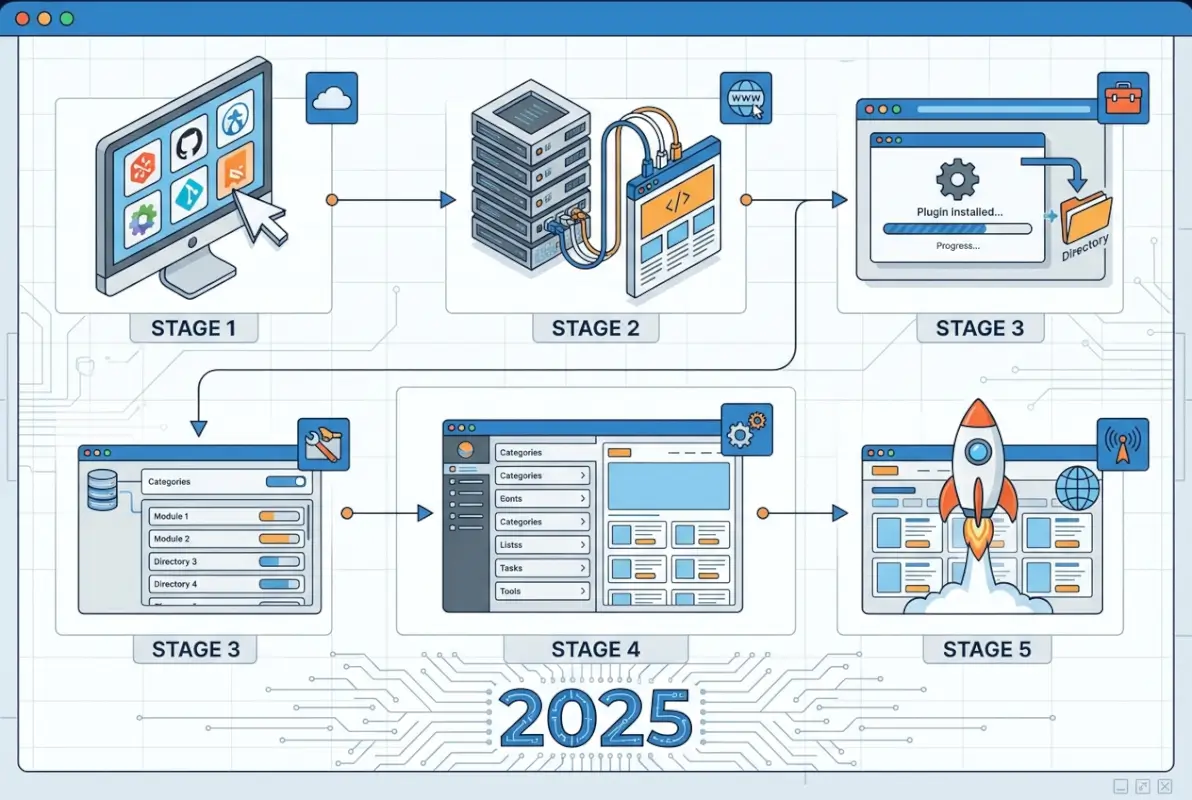
| Approach | Best For | Free Tier Limits | Upgrade Cost |
|---|---|---|---|
| No-Code Builders | Speed, non-technical users | 50-100 listings, branded | $20-50/month |
| WordPress + Free Plugin | Control, customization | Unlimited (hosting costs only) | $5-30/month hosting |
| Custom Code | Unique requirements | None (DIY time investment) | Variable development time |
AI-Assisted Site Builders and Lightweight Boilerplates (Pros/Cons of Starting Free)
AI-powered website builders have entered the directory space, offering to generate layouts and even initial content based on prompts. These can dramatically accelerate setup, though the results often need significant refinement.Lightweight boilerplates—pre-built directory templates you can clone and customize—split the difference between fully custom and no-code. GitHub hosts several open-source directory projects you can deploy for free, though you’ll need basic technical skills to configure them properly.The con of any free-start approach is that you’ll eventually hit limitations. Features like advanced search filters, map integration, payment processing for premium listings, or review management often live behind paywalls. Budget for these costs mentally from day one, even if you’re not paying them immediately.Desktop/Mobile Considerations and Hosting Basics for a Free-Start Project
Over 60% of directory searches happen on mobile devices, especially for local businesses and services. Your directory absolutely must work flawlessly on smartphones, or you’ll hemorrhage traffic to competitors. Test every feature on actual mobile devices, not just your desktop browser’s responsive preview mode.For hosting, shared hosting starts around $3-5 monthly and works fine for early-stage directories with limited traffic. Free hosting exists but typically comes with forced ads, unreliable uptime, and poor performance. When you’re trying to build credibility, those tradeoffs aren’t worth the savings.Data Model, Architecture, and Listing Schema
The structure of your listing data determines both user experience and search visibility. Get this foundation right, and everything else becomes easier.Required Fields for Listings (NAP: Name, Address, Phone; Category; Location; Description; Images; Hours)
At minimum, every listing needs accurate NAP data—name, address, and phone number. This isn’t just user-friendly, it’s crucial for local SEO. Inconsistent NAP information across the web confuses search engines and tanks your rankings.
⚠️ Important: Make critical fields mandatory while keeping optional fields truly optional. If you require too many fields, you’ll get fabricated data as users rush through submission. Better to have five accurate fields than fifteen half-empty ones.
Structured Data and SEO Basics (Schema.org, LocalBusiness, and Review Markup)
Structured data is the secret weapon that most directory owners overlook. By implementing schema.org markup—specifically LocalBusiness and Organization schemas—you help search engines understand and display your listings in rich results.When someone searches for “Italian restaurants near me,” Google can pull your directory listing into local pack results if you’ve properly marked up the business name, address, hours, and rating data. This is basically free traffic if you implement it correctly.Review markup using the AggregateRating schema lets your star ratings appear directly in search results. Those gold stars dramatically improve click-through rates. Most directory plugins include some schema support, but verify the output using Google’s Rich Results Test tool. Clean, valid schema markup can double your organic traffic over time.Data Quality, Validation Workflows, and Onboarding for Business Owners
Garbage data destroys trust faster than anything else. Invest time upfront in validation workflows—even simple ones like confirming email addresses, verifying phone numbers actually connect, and checking that addresses exist on Google Maps.Consider a tiered verification system. Basic listings get minimal vetting, while premium or featured listings receive manual verification. This creates an incentive for businesses to upgrade while maintaining baseline quality across all listings.For onboarding, provide crystal-clear submission instructions with examples of good versus poor listings. A simple PDF guide showing what makes a complete, high-quality listing reduces support requests and improves data quality. Many business owners genuinely want to do it right but don’t know what “right” looks like in your specific directory context.Free-to-Start Setup Process (Step-by-Step)
Let’s walk through the practical mechanics of getting your directory live. This process assumes you’re using WordPress with a free directory plugin, but the principles apply to most platforms.Domain, Hosting, and Environment (Which Free Tiers Work for Quick Launch)
Your domain is your brand, so choose carefully. Exact-match domains (like “ChicagoPizzaDirectory.com”) used to carry SEO weight but matter less now. Brandable, memorable names often work better long-term. Domain registration costs around $10-15 annually—not truly free, but unavoidable for credibility.
Install/Configure the Directory System (Themes/Plugins or Builder Widgets)
For WordPress, start by installing a directory-optimized theme or a flexible theme like Astra or GeneratePress that works well with directory plugins. Then add your directory plugin—Business Directory Plugin and GeoDirectory both have solid free versions.The initial configuration wizard walks you through essentials: default categories, required versus optional listing fields, submission settings, and display options. Don’t overthink this stage. Accept sensible defaults and refine later based on actual usage patterns.Enable user registration so business owners can claim and manage their listings. Configure email notifications for new submissions so you can moderate effectively. Set up basic payment options even if you’re launching with all free listings—having the infrastructure ready makes monetization easier later.Create Categories, Locations, and Initial Listings
Categories organize your directory and drive navigation. Start with 5-10 broad categories and expand based on actual listing distribution. Too many categories with one or two listings each looks sparse and unprofessional.For location-based directories, decide on your geographic structure. City-level? Neighborhood-level? ZIP code-based? Consistency matters more than the specific choice. Users need to reliably predict how to find listings in their area.Create 20-30 seed listings yourself before opening submissions. These demonstrate the quality you expect, provide content for search engines to index, and make your directory look established rather than empty. Verify every detail in your seed listings—they set the standard for everything that follows.
✅ Key Insight: Empty directories don’t attract submissions. The first 30 listings are your responsibility to create. Think of it as priming the pump—once there’s critical mass, organic submissions accelerate naturally.
Basic Site Polish (Templates, Responsive Design, Accessibility)
Your design doesn’t need to win awards, but it must be clean, professional, and functional. Remove default WordPress widgets that don’t serve your directory purpose. Customize your header with a clear value proposition and simple navigation.Test thoroughly on mobile devices. Can users search, browse categories, view listing details, and submit their own listing entirely from a smartphone? If any step frustrates mobile users, fix it immediately. Mobile functionality isn’t optional for directories—it’s where most of your traffic lives.Basic accessibility—readable font sizes, sufficient color contrast, keyboard navigation support, alt text on images—benefits everyone and improves SEO. Screen reader compatibility might seem like a nice-to-have until you realize accessibility features often overlap with search engine crawlability.First Content & Onboarding (How-To Guides, Data Sources, Initial Owners)
Create a “How to Submit Your Listing” page with screenshots walking through every step. Write a “How to Claim Your Listing” guide for businesses already in your directory. These resources reduce support burden and improve listing quality.For data sources, start with what you can personally verify. Local directories benefit from walking your target neighborhood. Industry directories can pull from professional associations, LinkedIn profiles, or existing marketplaces. Always verify and enhance any sourced data rather than copying it wholesale—that’s plagiarism and hurts SEO.Reach out personally to your first 20-30 listed businesses. Let them know they’re included, offer to help them claim and enhance their listing, and ask for feedback. This builds relationships that become testimonials, case studies, and word-of-mouth promotion later. If you’re creating a comprehensive business directory from the ground up, these early relationships form your foundation.SEO, Discovery, and User Trust for a Free-Directory Launch
A directory with perfect listings but zero traffic is basically a well-organized filing cabinet in an empty building. SEO drives discovery, and discovery drives everything else.Local SEO Basics (NAP Consistency, Google Business Profile Links, Local Schema)
For location-based directories, local SEO is your primary traffic driver. Ensure every listing has consistent NAP data that matches the business’s own Google Business Profile. Inconsistencies confuse search algorithms and dilute ranking signals.
Page-Level Optimization for Directory Content (Titles, Meta Descriptions, Rich Snippets)
Every listing page needs a unique, descriptive title tag following this pattern: “[Business Name] – [Primary Service/Category] in [Location]”. Meta descriptions should highlight what makes this particular business notable and include a call-to-action like “View hours, reviews, and contact information.”Category pages rank for broader terms like “Italian restaurants in Chicago.” Optimize these with comprehensive introductions that genuinely help users understand their options rather than keyword-stuffed paragraphs that read like robot vomit.Target featured snippets aggressively. Questions like “What’s the best [category] in [location]?” or “How to choose a [service provider]” can be answered with well-structured content on your category pages. Use clear headings, concise answers, and bulleted lists to increase snippet-worthiness.User Reviews, Moderation, and Trust Signals
Reviews transform directories from static listings to dynamic communities. They provide fresh content that search engines love, social proof that converts visitors, and engagement that brings users back.Implement a clear review policy and moderate aggressively, especially early on. Nothing tanks credibility like obvious fake reviews or unaddressed spam. Verified purchase or visit badges help, though they require infrastructure to confirm someone actually patronized the business.Display trust signals prominently: number of verified listings, total reviews, your own credentials or local expertise, and any partnerships with business organizations or chambers of commerce. These subtle indicators help new visitors decide whether your directory is worth trusting.
Section Summary: SEO success for directories hinges on structured data, local optimization, and user-generated content like reviews that signal freshness and authority to search algorithms.
Mobile Usability and Core Web Vitals Implications for Directories
Google’s mobile-first indexing means the mobile version of your directory is what gets ranked. Page speed matters enormously—listing pages that load slowly lose both rankings and visitors. Optimize images, minimize plugins, and consider a caching solution even on free hosting.Core Web Vitals—Largest Contentful Paint, First Input Delay, and Cumulative Layout Shift—directly impact rankings. For directories, common issues include images without dimensions causing layout shifts, heavy map widgets slowing initial load, and poorly optimized listing filters creating input delays.Test your directory with Google PageSpeed Insights and address any flagged issues. Simple fixes like properly sizing images, deferring non-critical JavaScript, and using a content delivery network (CDN) can dramatically improve scores without costing anything.PAA (People Also Ask) Alignment: How to Structure Content So Google and Users See Your Answers Prominently
People Also Ask boxes dominate directory-related searches. Questions like “How do I find a reliable [service]?” or “What should I look for in a [business type]?” appear constantly in directory-relevant queries.Structure your content to answer these questions directly. Use the exact question as an H3 heading, then provide a concise 40-60 word answer immediately below. Expand with additional detail afterward, but lead with the snippet-worthy summary. This technique significantly increases your chances of appearing in PAA boxes, which drive substantial traffic according to research on PAA optimization strategies.Monitor Google Search Console for queries where you rank on page 1 but not in position 1-3. These are prime PAA opportunities. Create dedicated FAQ or guide content addressing the underlying question comprehensively.Monetization and Free-Start Considerations
A free directory can generate revenue from day one if you plan thoughtfully. The key is balancing monetization with user experience so you don’t kill the goose laying golden eggs.Free Listings vs. Paid Listings; Freemium Models
The classic directory model offers free basic listings with paid upgrades for enhanced features. Free listings might include basic NAP data, a short description, and one photo. Paid tiers add unlimited photos, video, priority placement, social media integration, or featured status in search results.Pricing depends heavily on your niche and the value you provide. Local service directories might charge $10-30 monthly for premium listings. Specialized B2B directories serving high-value industries can command $100-500 annually. Research competitors and survey your listed businesses to find sustainable pricing.Some directories start entirely free to build critical mass, then introduce paid tiers once they’ve demonstrated traffic value. This approach works but requires discipline—don’t monetize prematurely and kill momentum, but don’t wait so long that users expect everything free forever.15-25%
typical conversion rate from free to paid listings in established niche directories
Ad Partners, Featured Listings, and Promo Placements
Display advertising provides passive revenue but pays modestly unless you’re driving significant traffic. Google AdSense remains the easiest option for beginners, though niche-specific ad networks often pay better if they exist for your market.Featured listings or sponsored placements let businesses pay for top positioning in search results or category pages. This works well when done transparently—users accept that businesses pay for visibility as long as search results remain relevant and useful.Promotional partnerships with complementary businesses can generate income while adding value. A restaurant directory might partner with a reservation system, earning commission on bookings made through directory listings. Choose partners carefully to maintain credibility and user trust.Balancing User Experience With Monetization in Early Stages
The mistake most directory owners make is aggressive monetization before they’ve delivered value. Users tolerate ads and paywalls when they’re getting something valuable in return. Push monetization too hard too early, and you’ll simply drive traffic to competitors.Start with subtle monetization: one or two well-placed ads, a clearly marked featured listings section, or optional premium upgrades. Monitor user behavior religiously. If time on site drops or bounce rate spikes after introducing monetization, you’ve pushed too hard.Think long-term. Building a directory with 10,000 monthly visitors takes time, but it’s far more valuable than a heavily monetized directory that never escapes 500 monthly visitors because the user experience is terrible. Many successful free business directories monetize gradually as they prove value to both users and listed businesses.Benchmark Figures for Directory-Related Monetization (Typical Pricing Ranges, Uptake Rates)
Industry benchmarks vary wildly by niche, but some general patterns emerge. Local service directories typically see 10-20% of listed businesses willing to pay for premium placement. B2B directories serving professional services often achieve 25-35% paid conversion rates because the customer value is higher.Average revenue per listed business ranges from $5-15 monthly for basic local directories to $50-200 monthly for specialized professional directories. High-value niches like legal services or financial advisors can sustain even higher pricing if traffic quality justifies it.Display ad revenue typically generates $2-8 per thousand page views (RPM) for directory sites, though niche sites with valuable audiences can earn significantly more. Affiliate commissions vary dramatically by program but often contribute 20-40% of total revenue for directories that integrate them thoughtfully.Growth, Content Governance, and Community Engagement
The technical foundation matters, but sustainable growth comes from community and content strategy. Directories are networks—they become more valuable as more people participate.Encouraging User-Generated Listings and Reviews
Make submission as frictionless as possible while maintaining quality standards. A simple, mobile-friendly submission form with real-time validation catches errors before they’re submitted. Offer immediate value upon submission—even if listings go to moderation queue, send a confirmation with estimated approval time and tips for optimization.Incentivize reviews through email follow-ups after someone uses your directory to contact a business. Keep it simple: “Did you visit [Business Name]? Share your experience with other users.” Offer small incentives like entry into monthly drawings, but avoid paying directly for reviews—that’s an ethical and legal minefield.Gamification works surprisingly well. Leaderboards showing most-reviewed businesses, badges for businesses with 10+ excellent reviews, or “verified local expert” status for users who submit quality reviews all drive engagement without feeling manipulative.Moderation Policies and Quality Control
Clear community guidelines prevent most problems before they start. Spell out what makes an acceptable listing, what types of reviews you’ll remove, and how you handle disputes between businesses and reviewers.Automated filters catch obvious spam—duplicate submissions, listings with excessive keywords, reviews with prohibited language—but human judgment remains essential for nuanced decisions. Budget time weekly for moderation, more frequently as submissions increase.Dealing with fake reviews and unethical SEO manipulation is an ongoing battle. Require email verification for all user accounts. Monitor for patterns like multiple glowing reviews from new accounts created on the same day. When in doubt, err on the side of removing questionable content—trust is harder to rebuild than revenue is to replace.Promotion Channels (Local Partnerships, Content Marketing, Directories as a Backlink Strategy)
Partner with local business associations, chambers of commerce, or industry groups. Offer free listings to their members and ask them to promote your directory as a resource. These partnerships provide bulk listings, credibility, and built-in promotion.Content marketing for directories means creating genuinely useful guides related to your niche. A home services directory might publish “10 Questions to Ask Before Hiring a Plumber” or “How to Spot Roofing Scam Red Flags.” This content ranks for informational queries and positions your directory as an authority, not just a listing aggregator.Other directories and niche websites need quality outbound links. Reach out offering to be a resource for relevant content. A Facebook business directory optimization guide, for instance, might naturally link to complementary web directories.Data Protection and Compliance Basics (Privacy, Terms)
Even small directories need privacy policies and terms of service. These aren’t just legal protection—they’re trust signals. Template generators exist online, but have them reviewed by someone with legal knowledge in your jurisdiction.GDPR applies if you have EU visitors, CCPA if you serve California. Both essentially require transparency about data collection, clear opt-in for marketing emails, and user rights to access or delete their data. Compliance isn’t as complex as it sounds for basic directories, but ignoring it creates real liability.Secure user data appropriately. Use HTTPS everywhere, hash passwords properly (most modern platforms handle this automatically), and limit access to sensitive information. Data breaches destroy trust and create legal exposure that can kill a directory permanently.Maintenance, Security, and Long-Term Viability
Directories aren’t set-and-forget projects. Ongoing maintenance ensures listings stay current, the platform stays secure, and users continue trusting your information.Regular Data Cleanups and Backups
Businesses close, phone numbers change, and websites go offline. Stale data is worse than no data because it frustrates users and signals to search engines that your content isn’t maintained. Schedule quarterly data verification runs, prioritizing your most-viewed listings.Automate what you can—plugins exist that check for broken links or disconnected phone numbers. For the rest, consider outsourcing to virtual assistants who can call businesses to verify hours and services. The cost is modest compared to the credibility hit from widespread outdated information.Back up your entire directory weekly at minimum. Database backups should be stored off-site from your hosting server. When something breaks—and eventually something will—you need the ability to restore quickly. Many hosts offer automated backups for a few dollars monthly, a worthwhile investment for peace of mind.Software Updates and Plugin Compatibility
Keep WordPress core, themes, and plugins updated. Yes, updates occasionally break things, but running outdated software creates security vulnerabilities. Adopt a sensible update cadence: check for updates weekly, test on a staging site if possible, then deploy to production.Before major updates, read changelogs and user forums. If other directory owners report issues with a particular plugin update, wait for a patch before updating. It’s fine to lag a few days behind the bleeding edge—better than being the canary in the coal mine who discovers compatibility problems first.Maintain a rollback plan. If an update breaks critical functionality, you need to revert quickly. This is where backups become essential. Document your current software versions before any update so you know exactly what to restore if necessary.Scaling Considerations When Traffic and Listings Grow
Shared hosting works until it doesn’t. Monitor your hosting metrics—if CPU usage regularly maxes out or page load times degrade during peak traffic, you’ve outgrown your current plan. Upgrading to VPS or managed WordPress hosting becomes necessary as you scale, typically when you’re consistently exceeding 10,000 monthly visitors or 1,000+ listings.Database optimization matters more for directories than most sites because listing searches query the database heavily. Regular optimization, proper indexing, and query caching prevent slowdowns. Most directory plugins include optimization features—use them.Consider a content delivery network (CDN) once you’re serving significant traffic. CDNs cache static content globally, dramatically improving load times for geographically distributed users. Many CDNs offer free tiers that work well for growing directories.Risk Management (Spam, Fake Listings, Fraud Prevention)
Spam evolves constantly. What worked last year won’t stop this year’s tactics. CAPTCHA on submission forms remains a baseline defense, though sophisticated spammers bypass it. Honeypot fields—invisible fields that humans leave blank but bots fill in—catch many automated submissions.Fake listings damage credibility severely. Require business verification for high-risk categories. Email or phone verification catches casual fakers. For premium listings, consider requiring documentation like business licenses or incorporation papers.Fraud in directories typically involves fake reviews or competitors submitting negative reviews. Implement dispute processes allowing businesses to flag suspicious reviews for manual review. Document your decision-making process to defend against accusations of bias.Launch Checklist and Quick-Start Toolkit
Theory is useful, but execution requires concrete steps. Here’s your actionable roadmap to go from concept to live directory in 30 days.30-Day Launch Milestone Plan With Daily/Weekly Tasks
Week 1: Foundation – Day 1-2: Choose niche, define success metrics, research competitors – Day 3-4: Register domain, set up hosting, install WordPress – Day 5-7: Install and configure directory plugin/theme, set up categoriesWeek 2: Content Creation – Day 8-10: Create 20-30 seed listings with complete information – Day 11-12: Write submission guidelines, FAQ, and about page – Day 13-14: Implement basic SEO (schema markup, meta descriptions, sitemap)Week 3: Polish and Test – Day 15-17: Mobile testing and optimization – Day 18-19: Set up analytics, search console, monitoring tools – Day 20-21: Security hardening, backup configuration, GDPR complianceWeek 4: Soft Launch – Day 22-24: Invite first 20 businesses to claim/enhance listings – Day 25-27: Soft launch to limited audience, gather feedback – Day 28-30: Refine based on feedback, prepare marketing materials, official launchThis timeline is aggressive but achievable if you’re dedicated. Expect to invest 2-3 hours daily during the month. Adjust based on your available time and technical comfort level.Minimal Viable Feature Set for Early Listings
Launch with core functionality only. Must-haves include: listing search (by category and location), individual listing pages with complete business information, user submission forms, basic review system, and mobile-responsive design.Nice-to-haves that can wait: advanced search filters, map integration, social sharing buttons, user profiles, messaging between users and businesses, and payment processing for premium listings. Add these based on actual user requests rather than assumptions about what people want.The minimal viable directory layout prioritizes clarity over features. Users should immediately understand how to search, browse, and find what they need without documentation.
💡 Pro Tip: Launch with 80% of the polish you want. Perfectionists never launch because there’s always one more feature to add. Ship something good enough to be useful, then iterate based on real user feedback rather than hypothetical concerns.
Essential Analytics Setup (Traffic, Listings Performance, Conversions)
Install Google Analytics 4 and Google Search Console before launch. These free tools provide crucial insights into user behavior, traffic sources, and search performance. Set up conversion tracking for key actions: listing submissions, review posts, clicks to business websites, and any payment conversions.Monitor which categories and locations drive the most traffic. Double down on what’s working. If one category accounts for 40% of your traffic, consider creating additional resources around that category to capitalize on demonstrated interest.Track listing completeness as a proxy for quality. Compare user engagement metrics (time on page, bounce rate, outbound clicks) for complete versus incomplete listings. Use this data to encourage listing owners to fill out optional fields that correlate with engagement.Quick-Start Resources (Templates, Sample Listings, Starter Content)
Create reusable templates for common listing types in your niche. A restaurant template might include fields for cuisine type, price range, dietary options, and reservation information. Service provider templates might emphasize certifications, service area, and availability.Build a library of sample listings demonstrating quality. Show what excellent photos look like, how much detail descriptions should include, and how to present business hours clearly. Visual examples teach better than written guidelines.Develop starter content packages: category descriptions, location pages, and FAQ responses you can customize and deploy quickly. This front-loaded work accelerates your ability to scale as the directory grows.Compliance, Ethics, and Accessibility
Responsible directory operation isn’t just about avoiding lawsuits—it’s about building a sustainable platform that serves all users effectively.Accessibility Basics for Directory Pages
Accessible design benefits everyone, not just users with disabilities. Ensure sufficient color contrast between text and backgrounds. Use semantic HTML with proper heading hierarchy. Provide alt text for all images, especially business logos and photos.Keyboard navigation must work flawlessly. Users should be able to search, filter, and navigate listings entirely without a mouse. Test this yourself by unplugging your mouse and trying to use your directory with keyboard only.Screen reader compatibility requires proper ARIA labels on interactive elements and logical content structure. Automated testing tools like WAVE identify many issues, though manual testing with actual screen readers catches nuances automated tools miss.Data Rights and Usage Terms
Be transparent about data collection and usage. Your privacy policy should clearly state what information you collect, how you use it, who you share it with, and how users can control their data.Listing data ownership can be murky. Clarify in your terms whether businesses own their listing information or grant you a license to display it. Address what happens to listings if businesses request removal or if you shut down the directory.User-generated content like reviews creates additional considerations. Your terms should specify that users grant you a license to display their reviews and that they’re responsible for the accuracy of their statements. Include a DMCA takedown process for copyright claims.Compliance Considerations for User-Generated Content
Section 230 in the US provides broad immunity for user-generated content, but you still need moderation policies and takedown procedures. Don’t ignore clear violations—defamatory reviews, illegal content, or harassment—even if you have legal protection.In practice, respond promptly to takedown requests with legitimate legal backing. Consult with legal counsel for significant disputes rather than making judgment calls that could expose you to liability. Document everything—requests, your decisions, and reasoning.Age restrictions matter if your directory includes age-restricted businesses (bars, cannabis dispensaries, adult services). Implement age gates where legally required and verify listed businesses comply with local licensing requirements.External Resources and Further Reading
To deepen your understanding of directory development and management, these authoritative sources provide additional context:Schema.org Structured Data Guidelines – The official resource for implementing structured data markup that helps search engines understand your directory content. Schema.org provides detailed documentation for LocalBusiness, Organization, and Review schemas essential for directory SEO.Google Search Central SEO Best Practices – Google’s official guidance on search optimization, including local SEO factors critical for directory visibility. Google Search Central updates regularly with algorithm changes and ranking factor clarifications.W3C Web Content Accessibility Guidelines – The international standard for web accessibility, covering everything from color contrast to keyboard navigation. WCAG 2.1 Quick Reference offers practical implementation checklists.Mozilla Web Security Guidelines – Comprehensive security best practices for web applications, including authentication, data protection, and common vulnerability prevention. Mozilla Security Guidelines are accessible and practical for non-security specialists.GDPR Compliance Overview – Official European Union guidance on data protection requirements that affect any directory serving EU users. The GDPR.eu resource center translates regulatory language into actionable steps.Frequently Asked Questions
How hard is it to start a directory website for free?
Starting a free directory website is technically straightforward with modern tools—WordPress with directory plugins can be live in under an hour. The difficulty lies in creating quality content, attracting listings, and building traffic, not the technical setup itself.What are the best free platforms or tools to launch a directory site quickly?
WordPress with Business Directory Plugin or GeoDirectory offers the most flexibility for free launches. No-code options like Airtable with Softr or dedicated builders like DirectoryEasy work well if you prioritize speed over customization and don’t mind eventual platform lock-in.Can a free directory site generate revenue, and how fast can it scale?
Free directories generate revenue through premium listing upgrades, display ads, and affiliate partnerships. Scaling typically takes 6-12 months to reach sustainable income, requiring consistent listing growth and traffic development before monetization becomes significant. Expect modest earnings initially—$50-200 monthly is realistic for first-year niche directories.How do I ensure data quality and avoid listing spam?
Implement email verification on all submissions, use CAPTCHA or honeypot fields to block automated spam, and manually review initial listings to set quality standards. Regular data audits—quarterly verification of contact information and business status—maintain quality as your directory grows.What SEO strategies are most effective for directory sites?
Implement LocalBusiness schema markup on all listing pages, create unique location-specific category pages targeting “[category] in [location]” queries, and encourage user reviews for fresh content signals. NAP consistency and proper internal linking structure between location and category pages drive the most significant SEO gains.How important are reviews and ratings in a directory’s success?
Reviews are critical for both user engagement and SEO performance. Directories with active review systems see 3-5 times higher user retention and significantly better search rankings due to fresh, unique content generation. Reviews also build credibility that converts browsers into users who contact businesses.What is the role of People Also Ask (PAA) in optimizing directory content?
PAA boxes appear frequently in directory-related searches and drive substantial click-through when you capture them. Structure content to directly answer common questions using the question as a heading followed by concise 40-60 word answers. This positions your content for featured snippet and PAA inclusion.How much does hosting cost for a directory website?
Basic shared hosting adequate for new directories starts at $3-5 monthly. As traffic grows beyond 10,000 monthly visitors or 1,000 listings, expect to upgrade to VPS or managed WordPress hosting at $15-30 monthly. Free hosting exists but typically includes forced advertising and poor performance that hurts credibility.Should I allow all business types in my directory or specialize?
Specialization nearly always outperforms general directories. Focused directories rank better for niche searches, build stronger community engagement, and attract higher-quality listings. General directories compete with established players like Yelp and Google Business Profile—tough competition for new entrants without specialized value propositions.How do I handle disputes between businesses and negative reviewers?
Create clear dispute policies before conflicts arise. Allow businesses to flag reviews for manual review, verify both parties’ identities, and make decisions based on evidence rather than who complains loudest. Document everything and remain neutral—your credibility depends on fair, transparent processes that serve users rather than business interests.Taking Your Directory From Concept to Reality
You’ve now got the complete blueprint for launching a free directory website. The technical barriers are lower than ever, with genuinely free tools capable of powering professional directories. What separates successful directories from abandoned projects isn’t technical sophistication—it’s consistent execution and genuine value creation.Start narrow and deep rather than broad and shallow. The temptation to build “Yelp for everything” is strong, but niche focus wins in competitive markets. Your first 50 listings matter far more than theoretical features you’ll add someday. Real businesses with complete, verified information create compounding value that attracts users, which attracts more listings, which attracts more users.Remember that “free” means free to start, not free forever. Plan your monetization strategy from day one, even if you don’t implement it immediately. Understand your path from zero to sustainable revenue so you’re making strategic decisions rather than reactive scrambles when hosting bills increase.The directories that thrive treat listed businesses as partners rather than inventory. Build relationships with your first 30 listings. Ask for feedback. Help them optimize their presence. These early adopters become case studies, testimonials, and word-of-mouth promoters worth far more than paid advertising.Most importantly, ship something imperfect rather than waiting for perfect. Your directory will never feel completely ready. Launch with good-enough functionality, then iterate based on actual user behavior rather than imagined requirements. The fastest way to build a valuable directory is to put something useful in front of real users and improve based on their actual needs.The tools are free. The knowledge is in your hands. The only thing standing between you and a live directory is execution. Start today.Was this article helpful?