
5 Steps to Create an Online Directory for Your HOA
Opens a Google-translated copy of this article in a new tab.
If you’re an HOA board member or property manager, you already know that keeping residents informed, managing vendor relationships, and maintaining governance transparency can feel like juggling chainsaws while riding a unicycle. The old methods—printed directories that go stale in a month, email chains that spiral into chaos, and document requests that require treasure-hunting through filing cabinets—just don’t cut it anymore. What if there was a better way?
An online directory isn’t just a digital Rolodex (yes, I’m dating myself here). When designed thoughtfully, it becomes the central nervous system of your community: a place where residents control their own privacy, vendors connect efficiently, and important documents are accessible 24/7. With tens of millions of Americans living in HOAs and industry projections showing continued growth through 2026, the demand for better community-management tools has never been higher.
Here’s the thing most guides won’t tell you: building an online directory isn’t primarily a technology challenge—it’s a governance and trust challenge. The platform you choose matters far less than how you handle privacy, who gets to see what, and whether residents feel their data is respected. Get those fundamentals right, and the technical pieces fall into place surprisingly easily.
TL;DR – Quick Takeaways
- Start with governance, not technology – Define privacy policies and access controls before choosing any platform
- Resident opt-in is non-negotiable – Build trust by giving homeowners granular control over their visibility
- No-code platforms can do 90% of what you need – Custom builds are overkill for most HOAs under 500 units
- Integration matters more than features – Your directory should connect to calendars, document storage, and payment systems
- Implementation takes 8-12 weeks – Plan for discovery, testing, rollout, and iteration phases
Define the Directory’s Purpose, Scope, and Governance
Before you write a single line of code or sign up for any platform, you need crystal clarity on what problem you’re solving. I’ve seen HOA boards jump straight to “we need an app!” without answering basic questions about who the directory serves and what success looks like. That path leads to abandoned projects and wasted budgets.

Core Purposes: What Your Directory Should Actually Do
A well-designed HOA directory serves multiple constituencies simultaneously. For residents, it’s the go-to place for finding neighbors (with their permission), accessing meeting minutes and governing documents, checking event calendars, and viewing dues payment status. For board members and committee chairs, it’s a management console for tracking volunteer participation, distributing announcements, and maintaining accurate unit records. For approved vendors and contractors, it’s a portal to review work orders, submit invoices, and access property-specific information.
The key is defining these purposes upfront and getting board consensus. Write them down in a one-page charter document that you can reference throughout the project. This charter becomes your north star when feature creep inevitably tries to derail your timeline (and it will, trust me on this one).
Privacy Controls and Data Governance
Here’s where most HOA directories fail: they treat privacy as an afterthought instead of a foundational design principle. Residents need to opt in to sharing any personal information beyond what’s legally required for HOA governance. That means explicit consent workflows, not pre-checked boxes or assumed agreement.
Your privacy framework should answer these questions: Who can view resident contact information? Can neighbors see each other’s email addresses by default? How do residents update their visibility preferences? Who has edit rights to modify directory data? What happens when a property changes hands? How long do you retain information for former residents?
According to CAI’s Community Association Fact Book, the HOA sector encompasses hundreds of thousands of associations serving diverse communities with varying expectations around privacy. Your policy needs to reflect your community’s culture, but err on the side of more privacy controls rather than fewer.
Deciding on the Directory Model
You’ve got two basic architecture choices: a private resident-only directory accessible through a secure portal, or a hybrid model with some information publicly visible and other sections password-protected. Most HOAs should start with the fully private model, it reduces risk and builds trust during the initial rollout.
The private model means every user must authenticate (prove who they are) before accessing any directory information. The hybrid model might show basic HOA information, meeting schedules, and approved vendor lists publicly while keeping resident contact information and documents behind a login wall. There’s no one-size-fits-all answer here, your governing documents and state laws may influence which approach makes sense.
Platform and Architecture Decisions
Now we get to the fun part—choosing how to actually build this thing. The good news is that in the last few years, no-code and low-code platforms have matured to the point where most HOAs can launch a functional directory without hiring a developer or spending five figures. The bad news is that you’ll be tempted to over-engineer the solution, adding features “just in case” that you’ll never actually use.

Platform Choices: No-Code vs. Custom Build
Let’s be blunt: unless your HOA has more than 500 units, complex commercial components, or extremely unusual governance requirements, you don’t need a custom-built directory. No-code platforms like Airtable with portal extensions, Knack, or purpose-built HOA management systems with directory modules will handle 90% of use cases at a fraction of the cost and implementation time. For smaller communities looking to establish their digital presence, exploring options to create personal online directory solutions can be a practical starting point.
| Factor | No-Code Platform | Custom Build |
|---|---|---|
| Setup Time | 2-4 weeks | 3-6 months |
| Initial Cost | $500-$2,000 | $15,000-$50,000 |
| Monthly Maintenance | $50-$300 | $500-$2,000 |
| Customization | Limited but sufficient | Unlimited |
| Technical Skill Required | Basic computer literacy | Developer expertise |
The dirty secret about custom builds is that most of the development time goes into reinventing features that already exist in mature platforms—user authentication, permission systems, email notifications, mobile responsiveness. You’re paying developers to solve problems that were solved years ago instead of focusing on what makes your HOA unique.
Data Model and Schema Design
Whether you choose no-code or custom, you need to map out your data structure. At minimum, you’ll have these entities: Residents (individuals with contact preferences), Units (properties with addresses and owners), Vendors (approved contractors with specialties), Committees (groups with membership rosters), Documents (files with access permissions), and Events (calendar items with RSVP capability).
The relationships matter more than the individual tables. A Unit might have multiple Residents (think co-owners or renters). A Resident might serve on multiple Committees. A Vendor might be approved for multiple service categories. A Document might be visible to all residents or restricted to board members only. Sketch these relationships on a whiteboard before you start configuring anything in your chosen platform.
Security and Privacy Foundations
Authentication—proving you are who you say you are—is non-negotiable. At minimum, implement two-factor authentication for any user with edit permissions (board members, property managers). For regular residents, require strong passwords and consider offering 2FA as an option.
Data encryption should happen both in transit (when information moves between the user’s browser and your server) and at rest (when it’s stored in the database). Any reputable platform handles this automatically, but verify it before committing. Ask specifically about SSL/TLS certificates, database encryption, and backup security.
Disaster recovery isn’t exciting, but imagine explaining to 200 angry homeowners that five years of meeting minutes vanished because nobody set up automated backups. Your platform should automatically back up data daily, store those backups in a geographically separate location, and let you test restoration periodically.
Integration and Automation
A directory that stands alone is only marginally useful. The magic happens when it connects to your other systems. Calendar integration means residents can subscribe to HOA events in their personal calendars. Document repository integration means board meeting minutes automatically appear in the directory when they’re approved. Payment system integration means residents can see their dues balance without logging into a separate portal.
Notification pipelines keep people engaged without overwhelming them. When a new document is posted, residents who opted in for notifications get an email. When a maintenance request is assigned to a vendor, they get an in-app alert. When the annual meeting is two weeks away, everyone gets a reminder. Configure these thoughtfully—too many notifications and people tune out, too few and the directory becomes a ghost town.
Data Governance, Privacy, and Opt-In Mechanics
This is where the rubber meets the road on trust. You can have the slickest interface and the most robust platform, but if residents feel their privacy is being violated or their preferences ignored, adoption will crater. Data governance isn’t just about compliance—it’s about demonstrating respect for the people who live in your community.
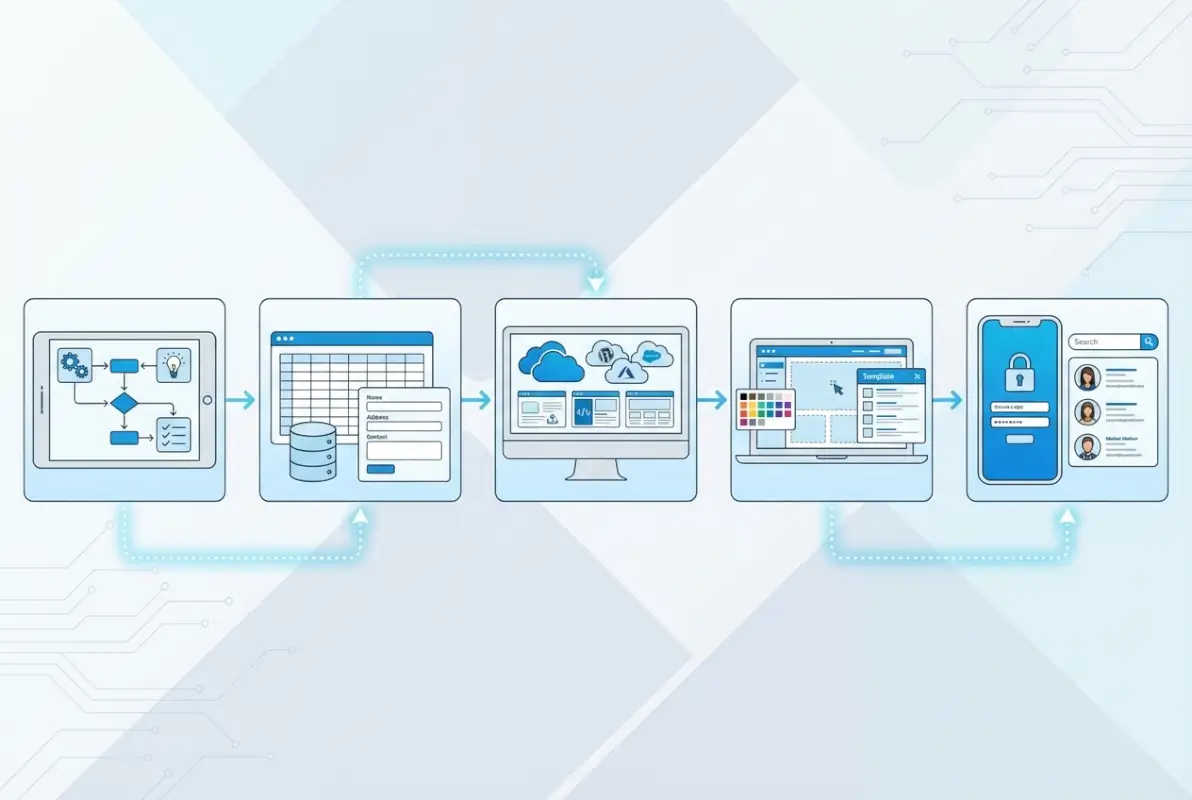
Opt-In and Opt-Out Workflows
The gold standard is granular opt-in: residents explicitly choose which pieces of information to share and with whom. This might include separate checkboxes for sharing email address with neighbors, allowing phone visibility, including photos in the directory, and appearing in the online roster at all.
Some HOAs worry that too much privacy control means empty directories. In practice, when you explain the controls clearly and demonstrate that you respect preferences, most residents share at least basic contact information. It’s the forced visibility that triggers resistance and legal complaints.
Opt-out should be just as easy as opt-in, ideally a single click in the user’s profile settings. Document who changed what and when—not to punish people for exercising their rights, but to maintain an audit trail if questions arise later. Store these preference changes in a log that board members can review but not edit.
Data Accuracy and Upkeep
Garbage in, garbage out. A directory is only as useful as it is accurate, and accuracy requires ongoing maintenance. Implement annual verification prompts that ask residents to review and update their information. Make it painless—pre-fill the form with existing data and ask them to correct anything that’s changed.
For out-of-date records, establish remediation workflows. When mail bounces or phone numbers disconnect, flag that record for manual review. Assign someone (usually the property manager or a board member) to follow up and obtain current information. Set a policy for how long unverified records remain in the system before being archived.
Governance Roles and Approvals
Who can do what in your directory? A typical HOA needs at least three permission levels: residents (view their own data and community information they’ve been granted access to), committee members or administrators (edit certain sections like event calendars or vendor lists), and super-administrators (board members or property managers who can modify resident records and access all data).
Consider designating a privacy officer—doesn’t have to be a separate person, often it’s a board member who takes point on data protection questions. This person reviews access requests, investigates privacy concerns, and ensures compliance with your own policies. It’s another unglamorous role that prevents major headaches down the line.
Vendor access deserves special attention. Approved vendors should see only the information necessary for their work—property addresses, work order details, and contact information for the property manager, not full resident directories. Periodic reviews (quarterly or semi-annually) ensure vendor permissions stay current and terminated vendors lose access promptly.
Content, Structure, and Resident Experience
You’ve nailed the governance and picked a platform. Now comes the part users actually interact with: what they see, how they navigate, and whether the experience is delightful or frustrating. User experience design isn’t about aesthetics—it’s about whether someone can accomplish their goal in under three clicks and without needing to call for help.

Directory Structure and Navigation
Searchability makes or breaks a directory. Residents should be able to search by name, unit number, street address, or committee membership. Filters let users narrow results—show only active residents, only HOA-approved vendors, only people who opted in to social events. The search box should be prominent on every page, not buried in a dropdown menu.
Organize the main navigation around tasks, not organizational structure. Instead of “Administration → Documents → Meeting Minutes,” try “Meeting Minutes” as a top-level link. Instead of “Residents → Search → Directory,” make “Resident Directory” immediately accessible. Think about what people come to the directory to do, then minimize the clicks to get there.
Access to Governing Documents and Minutes
This is legally required in most jurisdictions, so make it easy and transparent. Create a dedicated Documents section with clear categories: Governing Documents (CC&Rs, bylaws, articles of incorporation), Financial Records (budgets, reserve studies, audits), Meeting Minutes (board meetings, annual meetings, special meetings), and Policies (pet policies, rental restrictions, architectural guidelines).
Permissions matter here. Some documents (annual budgets, meeting minutes) are typically viewable by all residents. Others (legal correspondence, personnel matters) might be board-only. Mark document visibility clearly so users understand why they can or cannot access certain files. Include upload dates and version numbers to avoid confusion when documents are updated.
Events, Notices, and Announcements
A calendar view with filtering options helps residents find what matters to them. Board meetings, community events, trash pickup schedule changes, and facility reservations can all live in one calendar with color coding by category. Allow residents to subscribe to specific event types—maybe they care about board meetings but not social events, or vice versa.
For announcements, implement a tiered system: urgent (pool closure due to maintenance), important (upcoming board election), and general (reminder about parking rules). Each tier gets different notification treatment. Urgent might trigger immediate email and in-app alerts, important gets a daily digest, general appears only in the directory feed.
Vendor Directory and Approvals
An approved vendor directory saves residents time and reduces liability headaches for the HOA. List contractors who’ve been vetted, are properly insured, and understand the community’s requirements. Include vendor specialties (plumbing, electrical, landscaping), contact information, and any special notes (“preferred for complex roof work” or “familiar with architectural review process”).
Make it clear that “approved” doesn’t mean “endorsed” or “warrantied by the HOA”—it simply means the vendor meets basic criteria and is familiar with the community. Include a feedback mechanism where residents can share experiences (positive or negative) to help others make informed decisions. Similar approaches are used in broader contexts, such as when organizations maintain local business directories to connect communities with trusted service providers.
Mobile and Accessibility Considerations
More than half your residents will access the directory primarily from mobile devices. If your platform isn’t mobile-responsive, you’ve already lost the battle. Test everything on actual phones and tablets—buttons that work fine on desktop might be impossibly small on mobile, navigation that’s clear on a big screen might be confusing on a 5-inch display.
Accessibility isn’t just nice to have, in many cases it’s legally required. At minimum, ensure your directory meets WCAG 2.1 Level AA standards: sufficient color contrast for text, keyboard navigation for all functions, alt text for images, and proper heading hierarchy for screen readers. Many no-code platforms handle this automatically, but verify rather than assume.
Implementation Blueprint and Milestones
Theory is great, but let’s talk about actually getting this thing built and launched. A realistic implementation takes 8-12 weeks for a medium-sized HOA (100-300 units), with careful sequencing to build momentum and manage risk. Rush it and you’ll face resistance and errors; drag it out too long and enthusiasm wanes.

Phase 1: Discovery and Design (Weeks 1-2)
Start with stakeholder interviews—board members, property manager, a few engaged residents, and maybe a vendor or two. Ask what frustrates them about current communication, what they wish existed, and what concerns they have about an online directory. Document these insights ruthlessly; they’ll guide every subsequent decision.
Inventory your existing data. Where do resident records live now? Spreadsheets? Old software? Filing cabinets? What’s the quality and completeness of that data? Be brutally honest here—if your unit roster hasn’t been updated in three years, you’ve got work to do before importing anything.
Review your governing documents for any provisions that touch on resident privacy, document access, or electronic communication. Some older CC&Rs require paper notice for certain items, which might affect how you use the directory for official communications. Align your implementation plan with these requirements to avoid challenges later.
Phase 2: Build and Test (Weeks 3-6)
Configure your chosen platform with the data model and permissions you’ve designed. Start simple—get resident and unit records working correctly before adding fancy features. Import a small subset of data (maybe 20-30 units) and test thoroughly. Can residents log in? Can they update their preferences? Do permission controls work as intended?
Recruit a pilot group of 5-10 residents who represent different demographics in your community—tech-savvy and tech-averse, longtime residents and newcomers, owners and renters if applicable. Give them real tasks (“find the last board meeting minutes” or “update your contact preferences”) and watch where they struggle. Their confusion highlights design problems you can fix before the wide rollout.
This is also when you build out any integrations—connecting your calendar, setting up document storage, configuring notification rules. Test each integration independently before testing the whole system together. Seems tedious, but it makes troubleshooting infinitely easier when something breaks.
Phase 3: Rollout and Training (Weeks 7-9)
Communication makes or breaks adoption. Three weeks before launch, announce the coming directory with a clear explanation of benefits and privacy protections. Two weeks before, send detailed instructions for accessing the platform. One week before, offer live or recorded training sessions.
Stagger onboarding if your HOA is large—maybe start with board and committee members, then open to all residents a week later. This gives you a chance to work out remaining kinks before the full community hits the system. Provide multiple support channels: email, phone, and ideally a few in-person help sessions for less tech-comfortable residents.
For vendors, schedule one-on-one onboarding calls to walk through their access, explain what they can and can’t see, and answer questions. The personal touch here pays dividends in vendor cooperation and reduces support requests later. Organizations expanding their reach can learn from practices seen in contexts where business directories facilitate international growth by carefully managing stakeholder onboarding.
Phase 4: Evaluation and Iteration (Weeks 10-12)
Two weeks after launch, survey residents about their experience. What’s working? What’s confusing? What features do they wish existed? More importantly, pull actual usage data—how many people have logged in, which sections get the most traffic, where do people get stuck in the navigation.
Based on this feedback, prioritize a short list of quick wins (small improvements that deliver outsized value) and deeper fixes (structural changes that require more work). Make quick wins happen immediately to show residents you’re listening. Schedule deeper fixes for a version 2.0 release a few months out.
Adjust permissions and access controls based on what you’ve learned. Maybe you were too restrictive and can open up certain document categories. Maybe you need to tighten controls because something unexpected happened. Iteration based on real-world use beats perfect planning every time.
Phase 5: Scale and Maintenance (Ongoing)
After the initial launch excitement fades, the directory needs ongoing care. Assign clear responsibility for regular tasks: updating the calendar, posting meeting minutes within X days of approval, reviewing vendor status quarterly, prompting annual data verification from residents.
Schedule quarterly reviews with the board to assess directory health. Look at adoption trends, usage patterns, support request volumes, and resident satisfaction. Are there features nobody uses that you can deprecate? Are there pain points that keep surfacing in support requests?
Data hygiene rituals prevent the slow decay that dooms many directories. Monthly, review new resident registrations and follow up on incomplete profiles. Quarterly, audit vendor access and remove anyone who’s no longer actively working in the community. Annually, prompt all residents to verify their information and preferences.
Operational Considerations and Best Practices
The technical implementation is only half the battle—maybe less than half, actually. How you manage the human and organizational dimensions determines whether your directory thrives or becomes shelf-ware. These operational practices separate successful directories from abandoned ones.
Change Management and Communication
People resist change, especially when it involves their personal information and requires learning something new. Counter this with over-communication and empathy. Announce the directory project months before launch, explain the “why” clearly (not just “it’ll be convenient” but specific pain points it solves), and acknowledge that there will be a learning curve.
Create a comprehensive FAQ before launch and update it based on actual questions you receive. Film short tutorial videos (2-3 minutes each) showing common tasks. Offer multiple training formats—live sessions for people who like to ask questions, recorded videos for people who learn at their own pace, written guides for people who prefer text.
Designate directory champions—tech-savvy residents who can help their neighbors and provide peer-to-peer support. Often younger residents or those who work in tech are happy to volunteer a few hours to help the community. Their assistance is often more effective than official support because it comes from a neighbor, not “the HOA.”
Security Hygiene and Incident Response
No system is perfectly secure, which means you need both preventive measures and a response plan. Preventive hygiene includes quarterly access reviews (does everyone who has elevated permissions still need them?), mandatory password updates every six months, and regular software updates from your platform provider.
Incident response planning feels paranoid until you need it. Document what happens if: someone reports unauthorized access to their account, a vendor’s credentials are compromised, your platform provider suffers a breach, or a laptop containing resident data is stolen. Who gets notified? What communications go out? What steps do you take to contain the damage?
For most HOAs, the incident response plan can be a simple two-page document. The key is having it written down before an emergency, when people are panicking and making hasty decisions. Include contact information for your platform provider’s security team, your HOA’s attorney, and any state agencies that require breach notification.
Cost Considerations and ROI
Let’s talk money. A no-code directory for a 200-unit HOA typically costs $800-$1,500 in setup (platform configuration, data import, training materials) plus $150-$400 monthly for platform fees and ongoing maintenance. A custom-built solution runs $20,000-$40,000 initial build plus $800-$1,500 monthly for hosting, security updates, and support.
The ROI is harder to quantify but real. Property managers report saving 5-10 hours monthly on information requests that are now self-service. Board members spend less time fielding “where can I find…” questions. Document requests that once took days now happen instantly. Vendor coordination becomes smoother when contractors can access property information without playing phone tag.
There are softer benefits too—transparency builds trust, which reduces conflicts and legal disputes. Engaged residents who can easily access information are more likely to volunteer and participate in governance. Event attendance often increases when registration is simple and calendars are integrated. These aren’t easily measured in dollars, but they make communities healthier and more pleasant places to live.
Case Studies and Benchmarks
A 180-unit suburban HOA in Colorado implemented a no-code directory and saw 72% resident registration within three months, with average logins of 2.3 times monthly. Their board meeting minutes downloads increased 300%, suggesting residents were actually reviewing governance documents for the first time in years. The property manager reported cutting phone and email support volume by roughly 40%.
A 420-unit urban condo association in California took a different approach, building a custom directory integrated tightly with their existing building management system. Initial investment was significantly higher, but after 18 months they reported excellent results: 88% resident adoption, vendor response times improved by 50%, and maintenance request tracking became dramatically more efficient. The lesson isn’t that custom is better, but that the right approach depends on your specific context and resources. In some communities, particularly those with unique needs, learning how to create personal online directory infrastructure from scratch makes sense.
According to South Carolina’s seven-year HOA complaint data, communication failures and document access disputes rank among the top resident grievances. HOAs with robust online directories report significantly fewer complaints in these categories, suggesting that transparency tools genuinely reduce friction.
Compliance, Standards, and External References
Your directory doesn’t exist in a vacuum—it operates within a framework of laws, industry standards, and evolving best practices. Understanding this context helps you make better decisions and avoid costly missteps.
Legal and Regulatory Context
Data privacy laws vary by state, but trends are toward stricter requirements. California’s CCPA gives residents explicit rights to know what data you collect, request deletion, and opt out of sharing. Other states are following suit with similar legislation. Even if your state hasn’t passed comprehensive privacy laws yet, designing your directory with these principles in mind future-proofs your investment.
HOA-specific regulations touch on document access and disclosure. Most states require associations to provide certain documents (budgets, minutes, financial statements) to residents upon request, and many now specify “reasonable electronic access” as an acceptable method. Your directory can help you meet these requirements efficiently while maintaining necessary confidentiality for sensitive matters.
Accessibility requirements under the ADA apply if your HOA counts as a “public accommodation,” which is a complex legal determination. Even if technically exempt, following WCAG accessibility guidelines protects you from complaints and lawsuits while making your directory more usable for everyone, including aging residents with vision or mobility challenges.
Industry Standards and Recommended Practices
The Community Associations Institute provides extensive guidance on governance best practices, including recommendations for electronic communication and document management. While not legally binding, CAI’s standards represent the collective wisdom of thousands of associations and offer a framework for responsible directory implementation.
Professional property management certifications increasingly include competencies around technology adoption and data governance. If your HOA works with a management company, verify that they understand modern approaches to resident data and electronic communication—not just old-school paper-and-phone methods.
Future-Proofing and Scalability
Technology changes fast, but your directory’s core principles should remain stable. Build on standards (like OAuth for authentication, REST APIs for integrations) rather than proprietary approaches that lock you into a single vendor. Choose platforms with export functionality so you can migrate data if you ever need to switch.
Plan for growth even if you don’t expect it. Your HOA might annex adjacent properties, merge with a neighboring association, or simply need to track more data types as governance evolves. A flexible data model and platform that scales without a complete rebuild saves headaches down the line. Communities expanding their reach can draw lessons from how gateway church business directories manage growth and maintain structure as their networks expand.
Rollout Templates and Appendices
Practical tools accelerate implementation and reduce errors. Here are the essential templates and frameworks you should create before launch.
Project Plan Templates
A stakeholder map identifies everyone affected by the directory: board members (decision-makers and heavy users), property manager (primary administrator), committee chairs (moderate users and content contributors), residents (end users with varying technical comfort), and vendors (limited users with specific access needs). For each group, document their needs, concerns, and how you’ll address them.
Your risk register lists what could go wrong and your mitigation strategy. Common risks include low adoption (mitigate with strong communication and training), data quality issues (mitigate with verification processes), privacy complaints (mitigate with granular opt-in controls), and technical failures (mitigate with backup systems and vendor SLAs). Update this register as you move through implementation.
A milestone tracker keeps the project on schedule. Key milestones typically include: governance policies approved (week 2), platform selected (week 3), data model finalized (week 4), pilot testing complete (week 6), training materials ready (week 7), soft launch to pilot group (week 8), full launch to all residents (week 9), and first evaluation complete (week 12).
Data Inventory and Field Definitions
Create a data dictionary that defines every field in your directory. For example, “Primary Phone” might be defined as: “Resident’s preferred contact number, visible only to other residents who the resident has approved via privacy settings, required field with format (XXX) XXX-XXXX.” This precision prevents confusion during implementation and ensures consistent data entry.
Your data inventory maps where information currently lives and where it will move to. Track current location (spreadsheet, filing cabinet, old software), data quality (high/medium/low), completeness (percentage of records with this field populated), and migration priority (must-have for launch, nice-to-have for version 2.0).
Training Materials
Quick-start guides should be single-page, visually focused documents showing the 3-5 most common tasks: logging in, updating your profile, finding meeting minutes, searching the resident directory, and contacting support. Use screenshots with numbered callouts rather than dense paragraphs of text.
Video tutorials work well for visual learners but need to be short—nobody watches a 20-minute tutorial. Create separate 2-3 minute videos for each major function. Film them on an actual computer screen using simple screen-recording software, with clear narration and on-screen text highlighting where to click.
Support contacts should include multiple channels: email for non-urgent questions, phone for urgent issues, and possibly scheduled “office hours” (virtual or in-person) where residents can get hands-on help. Be realistic about response times—if you promise same-day email responses, make sure someone can actually deliver that.
Common Pitfalls and How to Avoid Them
Learn from others’ mistakes rather than making them yourself. These are the traps that catch even well-intentioned HOA boards.
Privacy Overexposure and Data Corruption Risks
The biggest privacy mistake is making resident contact information visible by default, forcing people to opt out rather than opt in. This generates immediate backlash and erodes trust that takes months to rebuild. Always default to maximum privacy and let residents choose to share more.
Data corruption happens when too many people have edit access without clear ownership. If five board members can all modify resident records, errors creep in and nobody knows who changed what. Restrict edit permissions to one or two designated administrators, with read-only access for everyone else.
Mixing personal and HOA data causes problems. Keep resident personal information (contact details, preferences) separate from property information (unit numbers, architectural modifications). This prevents headaches when properties change hands and makes it easier to respect privacy while maintaining property records.
Resistance to Adoption and How to Drive Engagement
The “if you build it, they will come” assumption kills many directories. Launching the platform is only the beginning—you need ongoing tactics to drive engagement. Regular, valuable content is key: post meeting minutes promptly, share upcoming events weekly, announce community news through the directory before other channels.
Make the directory necessary, not optional. If residents can get the same information via email or paper notice, many will never log in. Gradually shift important communications to directory-first (with fallback notifications that information is available, not the full content). For example, “March meeting minutes are now available in the directory” rather than attaching a PDF to an email.
Gamification sounds gimmicky but works. Recognize “directory champions” who help neighbors get onboarded. Celebrate milestones like “80% of residents now registered!” Track participation in directory-based activities (event sign-ups, committee volunteer lists) and highlight community engagement.
Measurement, Iteration, and Long-Term Governance
Success isn’t a one-time achievement, it’s a continuous process of measuring, learning, and improving. Directories that thrive have built-in feedback loops and governance rituals.
Ongoing Evaluation Cadence
Quarterly metrics reviews keep you honest about what’s working. Track adoption rate (percentage of residents with active accounts), engagement rate (percentage logging in at least monthly), content usage (which sections get the most traffic), support volume (tickets or calls requesting help), and satisfaction scores (periodic surveys asking residents to rate their experience).
Look for trends rather than absolute numbers. Adoption slowly climbing quarter-over-quarter is great, even if you’re only at 60%. Engagement dropping despite high adoption signals that the directory isn’t delivering value anymore—time to refresh content or add features.
Governance audits happen semi-annually and focus on compliance and risk. Review who has access to what—are permissions still appropriate? Check data quality—how many records are outdated or incomplete? Verify backup and security processes—when did you last test restoration? Assess vendor access—are all active vendors still properly credentialed and do terminated vendors still have access they shouldn’t?
Use audit findings to adjust policies and procedures. Maybe you discover that annual data verification prompts aren’t working and need to switch to a different approach. Maybe permission creep has given too many people edit access and you need to tighten controls. Regular audits catch these issues before they become crises.
Change Log and Versioning
Documenting what changed and when serves multiple purposes: it helps troubleshoot problems (did that bug appear after we added the vendor portal?), communicates improvements to residents (look at all the features we’ve added!), and provides institutional memory when board members turn over.
Keep a public-facing change log that residents can access, showing major feature releases, policy updates, and significant improvements. Format it simply: date, change category (new feature, bug fix, policy update), and brief description. For example, “June 15: Added calendar export functionality allowing residents to subscribe to HOA events in their personal calendars.”
Maintain a more detailed internal version log that includes minor changes, technical updates, and background information useful for administrators but not relevant to residents. This becomes invaluable when onboarding new board members or troubleshooting issues that arise months after implementation.
Frequently Asked Questions
What is an HOA directory and what information should it include?
An HOA directory is a secure online database that organizes community information. Essential data includes resident contact details (with privacy controls), unit information, governing documents, meeting minutes, event calendars, committee rosters, and approved vendor lists. Privacy should be paramount, with residents controlling their own visibility.
Can residents control who sees their information in the directory?
Absolutely, and they should. Best-practice directories give residents granular opt-in controls to choose exactly what information appears and who can view it. Options might include visibility settings for email, phone, photo, and social preferences. Default to maximum privacy and let residents choose to share more.
How secure is an HOA online directory?
Security depends on the platform and implementation. Look for encrypted data transmission and storage, two-factor authentication for administrators, regular automated backups, role-based access controls, and compliance with relevant data protection standards. Reputable platforms handle most security automatically, but verify these protections before committing.
Do I need to build a directory from scratch or can I use a template?
Most HOAs under 500 units can use no-code platforms or existing HOA management systems with directory modules, which cost 90% less and launch 10 times faster than custom builds. Custom development makes sense only for very large communities or those with extremely unique requirements.
What data should we collect first and what can wait?
Start with unit information, resident names and contact methods (with privacy controls), and access to governing documents and minutes. These deliver immediate value. Committee rosters, vendor portals, event calendars, and payment integration can wait for version 2.0 after you’ve proven the basic directory works.
How do we handle opt-outs and updated consent?
Make opting out as easy as opting in—ideally a single click in profile settings. Log all consent changes with timestamps and user IDs for audit purposes. Periodically prompt residents to review and update their preferences, typically during annual verification. Never assume silence means consent.
How often should we audit directory data?
Conduct full data quality audits semi-annually, checking for outdated records, inappropriate access permissions, and compliance with your privacy policies. Perform lighter monthly reviews of new registrations and quarterly vendor access reviews. Prompt residents annually to verify their information.
How do we keep the directory synchronized with new residents or changes?
Establish clear workflows for onboarding new residents—typically triggered when the property manager processes a sale or new lease. Include directory registration in your welcome packet. For changes, make self-service updates easy through resident profile settings, with administrator verification for critical fields like unit ownership.
How do we integrate the directory with minutes, budgets, and events?
Most no-code platforms support file uploads and calendar integrations. Upload approved minutes to a designated Documents section with appropriate permissions. Link budgets similarly. For events, use built-in calendar tools or integrate with Google Calendar or Outlook. Notification systems can alert residents when new documents or events are posted.
What are typical costs and expected benefits?
No-code implementations for 200-unit HOAs typically cost $800-$1,500 setup plus $150-$400 monthly. Benefits include 5-10 hours monthly saved on information requests, increased document access and transparency, improved event participation, streamlined vendor coordination, and reduced governance conflicts from better communication.
How long does it take to implement a basic directory?
Plan 8-12 weeks for a complete implementation: 2 weeks for discovery and design, 4 weeks for build and testing, 2-3 weeks for rollout and training, and 2-3 weeks for initial evaluation and iteration. You can launch a minimal viable directory faster (4-6 weeks) if you limit initial scope.
Take the First Step Toward Better Community Communication
Creating an online directory for your HOA isn’t about jumping on a technology trend—it’s about solving real problems that make community governance harder than it needs to be. When residents can’t find meeting minutes, when vendors don’t have access to the information they need, when half your calls are people asking “where can I find…” questions, you’re wasting time and building frustration.
The directory you build doesn’t have to be perfect from day one. Start with the essentials: secure access, privacy controls residents can trust, governing documents available 24/7, and a searchable way to connect with neighbors who’ve opted in. Everything else can evolve based on what your community actually uses, not what seemed like a good idea in the planning phase.
Here’s what I’ve learned after helping dozens of HOAs through this process: the technology challenges are the easy part. The hard part is building consensus, respecting privacy, communicating change effectively, and establishing governance practices that outlast any particular board. Invest more energy in those human elements than in finding the perfect platform, and your directory will thrive.
Your Next Steps
Ready to move forward? Here’s your 30-day action plan:
- Week 1: Interview 5-10 stakeholders about their pain points and concerns
- Week 2: Draft a one-page directory charter defining purpose, scope, and privacy principles
- Week 3: Evaluate 2-3 platform options with free trials
- Week 4: Present proposal to the board with projected costs, timeline, and success metrics
The communities that successfully implement directories share one trait: they start. Not with perfect planning or unlimited budgets, but with a commitment to improving how they communicate and govern. Your residents deserve transparency and easy access to information. Your board deserves tools that make governance less painful. An online directory, implemented thoughtfully with privacy at its core, delivers both.
Stop tolerating communication chaos. Start building your directory.
Was this article helpful?