8 Steps to Create an Online Directory of Church Members for Easy Access

Generating summary...
Creating an online directory for your church members isn’t just about digitizing a phonebook—it’s about building a secure, accessible hub that strengthens community bonds while respecting privacy boundaries in an era where both connection and data protection matter deeply. I remember when our mid-sized congregation first transitioned from a printed annual directory to an online system, the immediate pushback centered on two concerns: “Will everyone’s phone number be public?” and “Can my elderly aunt even use this thing?” These aren’t trivial worries. They reveal the tension at the heart of any church directory project: balancing easy access for genuine fellowship with robust safeguards against misuse or exclusion.
The good news? Modern church directory platforms have evolved to address exactly these concerns. Whether you’re a tech-savvy volunteer or a pastor with minimal IT background, you can deploy a privacy-first, mobile-friendly directory in weeks, not months. This guide walks you through eight concrete steps—from defining your goals to maintaining ongoing data hygiene—so you launch a tool that members actually use and trust.
TL;DR – Quick Takeaways
- Define clear access rules – Decide who sees what data (staff vs. all members) before selecting a platform.
- Privacy is non-negotiable – Use opt-in flags, unlisted modes, and role-based permissions to protect member information.
- Choose mobile-first tools – Most members will access the directory from phones; ensure iOS/Android apps or responsive web portals.
- Standardize your data – Consistent field naming and CSV imports save hours of cleanup later.
- Pilot before full rollout – Test with a small group (deacons, ministry leaders) to catch usability issues early.
- Train and communicate – Clear instructions and ongoing support drive adoption rates above 70%.
- Audit regularly – Schedule quarterly reviews of permissions, opt-ins, and data accuracy.
- Integrate with existing systems – Sync with planning, giving, and event tools to reduce duplicate data entry.
Market Landscape and Competitive Options
Before you dive into setup, it helps to understand what’s out there. The church directory market has matured significantly, with solutions ranging from all-in-one church management suites to standalone directory apps. Each emphasizes slightly different strengths—some excel at mobile access, others at privacy granularity or print-friendly outputs.
Overview of Leading Directory Solutions
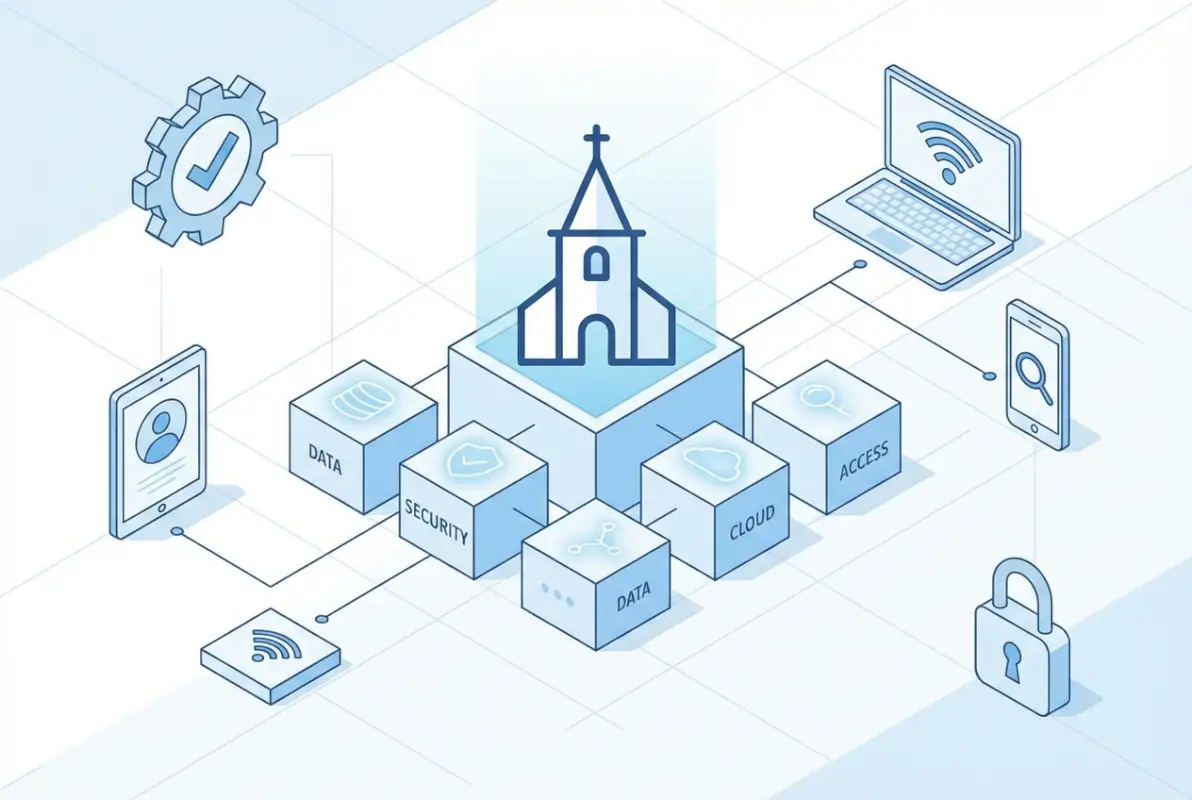
Instant Church Directory is one of the most popular options, offering native iOS and Android apps alongside web access. It shines in ease of CSV import and member self-service: people can upload profile photos and update contact details themselves. Breeze ChMS integrates directory functionality into a broader church management platform, bundling attendance tracking, contributions, and event planning. ChurchTrac emphasizes privacy toggles—members opt in or out at the profile level, and administrators control who can see phone numbers versus just names. DirectorySpot focuses on simplicity and printer-friendly PDFs, appealing to congregations that still distribute physical booklets alongside digital access.
All four platforms support photo uploads, group/ministry tagging, and some form of role-based visibility. The key differentiator is how deeply each integrates with other church workflows—Breeze and ChurchTrac offer full CRM capabilities, while Instant Church Directory and DirectorySpot are lighter, directory-centric tools that play nicely with external planning software like Planning Center.
What Competing Articles and Vendors Emphasize When Selling Directories
If you browse vendor marketing pages and competitor blog posts, you’ll notice recurring themes: import workflows (usually CSV), mobile access (apps or responsive web), privacy controls (opt-ins, unlisted profiles), and role-based visibility (staff see more fields than general members). These aren’t buzzwords—they’re table-stakes features that emerged from real church pain points. Nobody wants a directory that leaks sensitive info or forces staff to manually type hundreds of records.
One subtle pattern: vendors increasingly lead with privacy capabilities rather than treating them as an afterthought. Planning Center’s recent changelog highlights a “Directory Privacy Mode” that lets members choose whether to appear in search results at all. Breeze’s support docs detail permission layers down to individual field visibility (you can hide addresses but show phone numbers, for instance). This shift reflects broader cultural awareness around data governance, something we’ll explore in depth next.
Observations from “People Also Ask” Style Questions
Search “how to create a church directory” and you’ll see predictable but valuable questions: “How do I protect member privacy?” “Can members edit their own info?” “What fields should I include?” These mirror the FAQ sections in vendor documentation and reveal what church administrators worry about most. ChurchTrac’s support article on directory creation, for example, walks through the “Include in Directory” checkbox and explains how to handle members who want to be contactable by staff but unlisted for the general congregation. That nuance—partial visibility—is critical for domestic-violence survivors, individuals in witness protection, or simply privacy-conscious families.
The recurring anxiety around self-service edits (“Will someone vandalize another member’s profile?”) is addressed by approval workflows: in most platforms, member-submitted changes queue for staff review before going live. This balances convenience with control, letting people update their own cell numbers without opening the door to chaos.
Data Governance, Privacy, and Security (Why This Matters)
Privacy isn’t a checkbox feature—it’s the foundation that determines whether your directory earns trust or erodes it. Churches handle sensitive information: home addresses, children’s names, phone numbers that members share expecting stewardship, not spam. A poorly configured directory can expose this data to bad actors or inadvertently violate consent.
Privacy-First Design in Church Directories
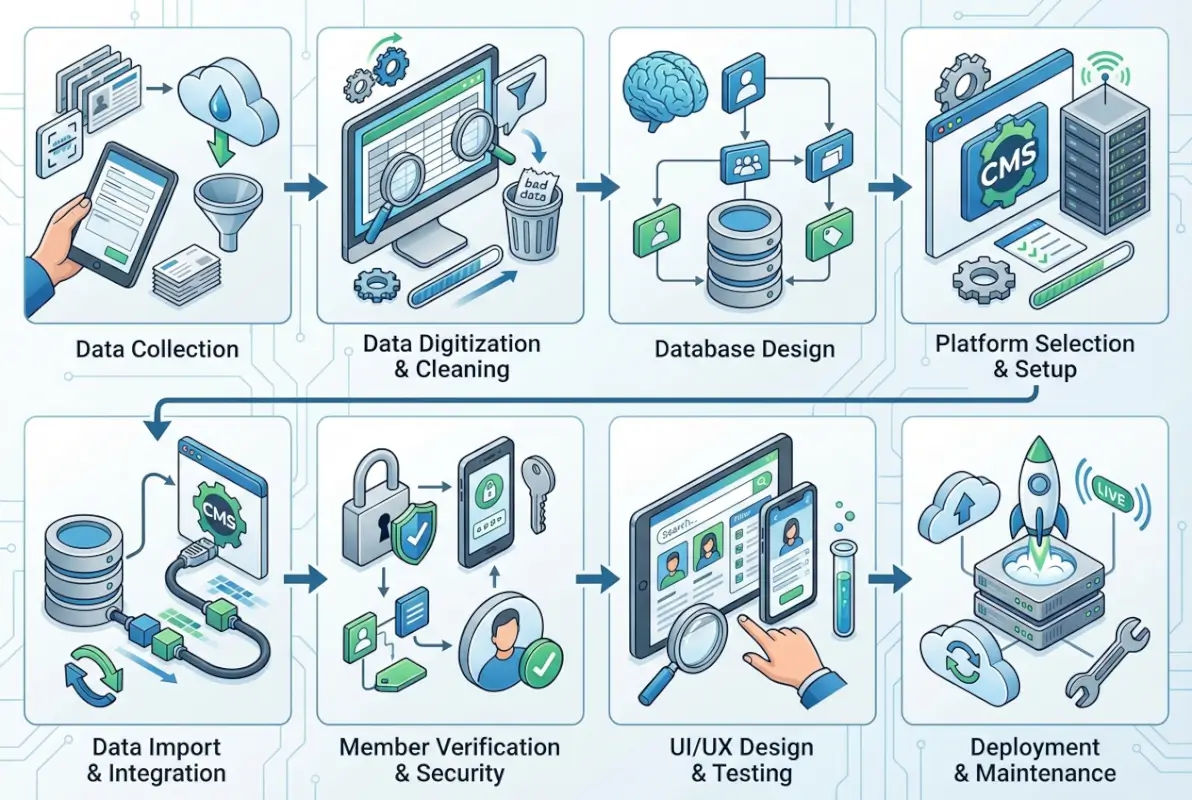
Modern directories implement multiple privacy layers. At the coarsest level, an “Include in Directory” flag lets members opt out entirely—their record exists in the church database for internal use but never appears in the public-facing directory. Finer controls include unlisted modes (member is searchable but doesn’t appear in browse lists), field-level visibility (show email but hide phone number), and group-based access (ministry team leaders see team rosters; general members see only basic contact cards).
Planning Center’s privacy mode exemplifies this approach: members explicitly consent to directory inclusion and can toggle visibility of each contact field. Breeze offers similar granularity, plus the ability to set default privacy postures (“new members are unlisted until they opt in” versus “everyone is listed unless they opt out”). The latter feels less cumbersome but carries higher risk if someone forgets to update their preference.
Compliance and Risk Considerations
While churches in the United States aren’t typically bound by GDPR (unless they serve European congregants), best practices from data-protection regulations still apply. Key principles include data minimization (only collect what you need), purpose limitation (use contact info for church communication, not third-party marketing), and access controls (not every volunteer needs admin rights). ParishSoft’s guidance on church directory best practices recommends annual audits of who has access, regular purges of inactive members, and clear consent language during data collection (“We will use your phone number for emergency contact and event reminders; you can opt out anytime”).
Risk scenarios to plan for: unauthorized CSV exports by a disgruntled volunteer, accidental public sharing of a directory link, or members using the directory to solicit donations for non-church causes. Role-based permissions mitigate the first two; clear usage policies address the third.
Real-World Privacy Concerns and Trends in 2024–2026
Recent Pew Research data on religious attendance and congregational involvement shows that while in-person attendance has stabilized post-pandemic, digital engagement tools (including directories) are now permanent fixtures rather than emergency stopgaps. This permanence raises the stakes for privacy: a tool used weekly for years will inevitably encounter edge cases—members who relocate for safety reasons, teens aging into adulthood who want separate profiles, blended families with complex contact hierarchies.
Churches that treat the directory as a “set it and forget it” project will accumulate stale data and consent drift. Those that build in quarterly reviews and proactive communication (“Hey, is your address still current? Do you still want to be listed?”) maintain both accuracy and trust.
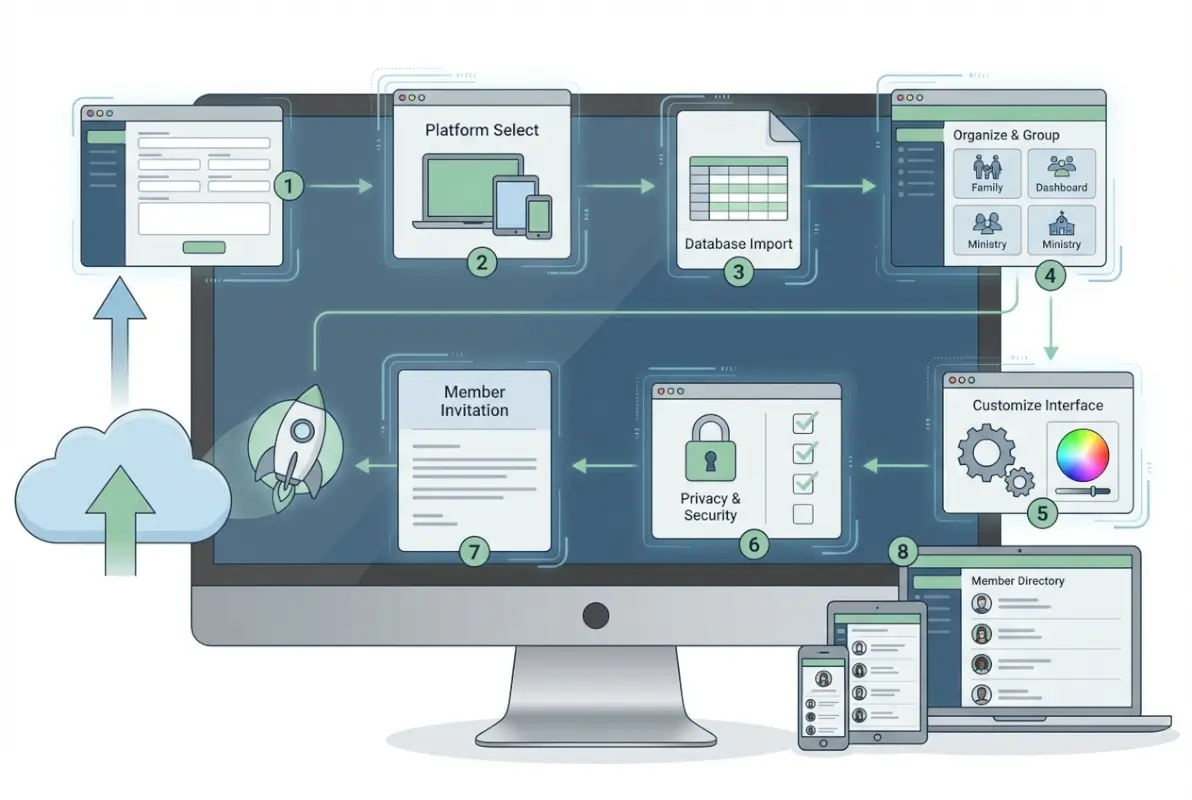
Step-by-Step Blueprint: 8 Practical Steps to Build Your Online Directory
Theory is useful; a concrete roadmap is better. Here’s how to move from concept to launch in a structured, repeatable way.
Step 1 — Define Goals and Audience
Start by answering: Why are we doing this? Common goals include streamlining communication (no more hunting for phone numbers in fragmented spreadsheets), improving event planning (send targeted invites to small groups), and fostering community (members can look up fellow congregants for prayer support or carpool coordination). Then identify your audience tiers: What should all members see versus what only staff or ministry leaders should access? For instance, staff might need full addresses for mailing labels, while general members only need email and phone.
Document these decisions in a simple table. This becomes your reference when configuring permissions later and prevents scope creep (“Why can’t the youth group leader see attendance records?—because that wasn’t part of the directory goal”).
Step 2 — Choose the Right Platform
Armed with your goals and audience map, evaluate platforms against core criteria: privacy levels (field-level controls vs. all-or-nothing), import/export flexibility (CSV mapping, image bulk upload), member self-service (can people update their own profiles?), mobile access (native apps or responsive web), and printing options (PDF export for offline distribution). If your church already uses a management system like WordPress directory plugins or Planning Center, integration becomes a top priority—you don’t want to maintain duplicate datasets.
| Platform | Best For | Key Strength | Limitation |
|---|---|---|---|
| Instant Church Directory | Mobile-first congregations | Native apps, photo uploads | Limited reporting |
| Breeze ChMS | All-in-one management | Integrated CRM, contributions | Higher learning curve |
| ChurchTrac | Privacy-conscious churches | Granular opt-in/out controls | Fewer integrations |
| DirectorySpot | Print + digital hybrid | PDF export, simple interface | Basic mobile experience |
Most platforms offer free trials. Spend a week testing the admin and member views—don’t just watch demo videos.
Step 3 — Gather and Standardize Data
Create a data dictionary defining every field you’ll collect: Name (first, last, nickname?), Phone (mobile, home, work?), Email, Address (one line or separate city/state/zip?), Photo, Groups/Ministries, Member Status (active, inactive, visitor), and Privacy Preferences. Standardize formats before import to avoid chaos—decide whether phone numbers use dashes, parentheses, or dots, and stick to it. Most platforms accept CSV imports; export your current roster from whatever system you use (Excel, Google Sheets, old church software) and map columns to the platform’s fields.
Photos are often the sticking point. You can bulk-upload images named by member ID or email, or let members upload their own during initial login. The latter is slower but increases buy-in and accuracy.
Step 4 — Configure Privacy and Permissions
This step is where your earlier goal-setting pays off. Implement the “Include in Directory” flag so new members are unlisted by default until they explicitly opt in. Set role-based visibility: general members see name, photo, email, and phone; staff see addresses and family details; ministry leaders see rosters for their teams only. If your platform supports field-level privacy, let members hide their phone number while keeping email visible (or vice versa). Create a simple consent form explaining what data you’ll collect, who can see it, and how to update preferences—attach it to new-member packets and post it on your website.
Test permissions rigorously. Log in as a general member, a ministry leader, and an admin to verify each sees exactly what they should—no more, no less. I’ve seen too many directories go live with accidental full-access for everyone because a checkbox wasn’t toggled during setup.
Step 5 — Import Data and Verify Accuracy
Upload your CSV, map fields (platform “First Name” to your spreadsheet “FirstName” column), and run the import in test mode if available. Most tools generate a preview showing what will be created. Review for common errors: merged cells creating duplicate records, special characters breaking names, missing emails causing failures. After import, assign a small team (staff plus a few detail-oriented volunteers) to spot-check records—call a random sample of members and confirm “Is this your current phone number and email?” Catch typos now, not after launch when someone tries to reach a pastor in an emergency and gets a wrong number.
Step 6 — Launch with a Soft Pilot and Feedback Loop
Don’t flip the switch for 500 people on day one. Start with deacons, elders, or a single ministry team (20–30 people). Give them a week to use the directory: search for each other, update their profiles, test mobile apps. Collect structured feedback—what was confusing? What took too many clicks? Did anyone accidentally see data they shouldn’t? Use this input to refine before the congregation-wide rollout. In our church’s pilot, we discovered that the “Update Profile” button was buried in a menu; moving it to the home screen boosted self-service updates by 40%.
Step 7 — Train Staff and Communicate with Members
Create a one-page quick-start guide with screenshots: “How to log in,” “How to find someone,” “How to update your photo.” Record a 2-minute walkthrough video and post it on your church website or YouTube channel. Announce the directory in multiple channels—Sunday bulletin, email blast, social media, pulpit announcement—and emphasize the privacy protections you’ve built in (“Your info is only visible to fellow members, and you control what fields appear”). Host a brief Q&A session after service for anyone with questions. For less tech-savvy members, offer one-on-one help at a designated table in the lobby.
Training staff is equally important. If your admin team doesn’t know how to reset passwords or approve profile updates, adoption will stall. Run a 30-minute session covering common tasks and troubleshooting.
Step 8 — Maintain, Audit, and Evolve
The directory is not a “set it and forget it” project. Schedule quarterly audits: review who has admin access, check for stale profiles (people who moved away months ago but still appear), confirm opt-in/opt-out preferences are current. Integrate the directory into other workflows—when someone fills out a visitor card, add them to the database with a “visitor” tag and send an invite to claim their profile. When a member joins a small group, update their group assignments in the directory so leaders can see rosters. If you use a separate giving or event-planning tool, explore sync options to reduce double-entry. Creating an online directory like Manta for your niche can streamline many of these integrations by using a flexible platform that connects to multiple data sources.
Architecture and Design Patterns for Usability
Even the best data is useless if people can’t find it. Information architecture—how you organize profiles, what fields are searchable, and how navigation flows—directly impacts adoption.

Information Architecture (Who Sees What)
Most directories group members by family, with parents and children linked in a single household record. This reduces clutter (you don’t list each child separately in search results) and simplifies updates (change the family address once, not four times). Viewable fields should prioritize what people actually need: name, photo, email, and mobile phone cover 90% of use cases. Advanced search options—filter by ministry, zip code, or life stage (college students, young families, retirees)—are valuable for targeted communication but shouldn’t overwhelm the simple “I just need Jane’s phone number” scenario.
Searchability is key. If someone types “john” and gets zero results because the record says “Jonathan,” frustration sets in. Implement fuzzy matching or nickname support. Photos dramatically improve usability—people recognize faces faster than names, especially in larger congregations.
Mobile-First Access and Member Self-Service
More than 60% of directory lookups happen on mobile devices, so responsive web design or native apps are non-negotiable. Instant Church Directory’s iOS/Android apps offer offline mode (cached profiles for when you’re in a basement fellowship hall with no signal) and one-tap calling/emailing. Member self-service—letting people update their own contact info and photos—keeps data fresh without burdening staff. Single sign-on is a bonus: if your church uses Google Workspace or Microsoft 365, integrate directory login so members don’t juggle yet another password.
Printing and Offline Accessibility
Digital-first doesn’t mean print-never. Older members or those without smartphones still appreciate a printed booklet, and PDF exports serve this need. DirectorySpot excels here, generating formatted PDFs with photos, contact blocks, and ministry rosters ready for your local print shop. Plan to print annually (or semi-annually if your congregation is stable) and distribute at a members’ meeting or via mail to homebound folks. Make it clear that the print version is a snapshot; the online directory is always up-to-date.
Interoperability and Integration with Church Systems
If your directory lives in a silo, you’ll duplicate effort and invite data drift. Thoughtful integration with planning, event, and contribution tools multiplies the directory’s value.

Syncing with Planning Center, Church Teams, and Other Tools
Many churches use Planning Center for service scheduling and event registration. If your directory platform integrates (or is part of the Planning Center ecosystem), volunteer rosters auto-populate from the directory, and event attendee lists feed back into contact records. Church Teams offers similar connectors, letting you add directory members to teams, send group messages, and track participation—all without re-entering names and emails. When evaluating platforms in Step 2, ask: “Does this sync with our existing tools, or will we maintain two databases?”
Data Import/Export Best Practices
Even with tight integrations, you’ll occasionally need manual imports or exports. CSV mapping is your friend: most platforms let you save mapping templates so recurring imports (new visitor batches, updated phone numbers from an annual survey) run in minutes instead of hours. Image uploads can be bulk-processed if files follow a naming convention (firstname_lastname.jpg or memberID.jpg). Last-login tracking and change-approval workflows (someone updates their address; staff approves before it goes live) prevent accidental or malicious edits while keeping data current. For a comprehensive look at software options that support these workflows, see white-label business directory software solutions.
Operational Considerations and Governance
Who can do what, and how do you ensure they do it responsibly? Governance frameworks prevent both security gaps and bottlenecks.
Roles, Permissions, and Auditing
Define at least three roles: Admin (full access to all records and settings), Staff (can view/edit most fields but can’t change system settings or permissions), and Member (can view permitted directory entries and edit their own profile). Larger churches might add Ministry Leader (sees team rosters only) or Finance Staff (sees contribution data but not full contact details—though this blurs into CRM territory). Maintain an audit trail: who changed what field, when? This isn’t paranoia; it’s accountability. If someone’s address mysteriously updates to a competitor’s church, you want to know which account made the edit.
Backup, Disaster Recovery, and Uptime
Cloud-hosted directories (Breeze, Instant Church Directory, ChurchTrac) handle backups automatically, but confirm their SLA. What’s the uptime guarantee? What’s the recovery-time objective if data is corrupted? For self-hosted or custom directory solutions, schedule daily automated backups to a separate location and test restores quarterly. An untested backup is a hope, not a plan.
Accessibility and Inclusive Design
Ensure your directory meets WCAG (Web Content Accessibility Guidelines) standards: sufficient color contrast for visually impaired users, keyboard navigation for those who can’t use a mouse, screen-reader compatibility for blind members. Most modern platforms handle this out of the box, but verify by running the directory URL through an accessibility checker. Inclusive design isn’t optional—it’s pastoral care in code.
Data-Driven Outcomes and Success Metrics
How do you know if the directory is working? Define metrics before launch and track them quarterly.
Adoption Rates, Login Frequency, and Update Velocity
Target 70%+ of active members logging in within the first month and 50%+ logging in at least monthly thereafter. High adoption indicates the tool is useful; low adoption signals friction (login is too hard, data is stale, mobile UX is poor). Track update velocity: what percentage of profiles have been edited in the last 90 days? If it’s under 20%, members either don’t know they can self-edit or don’t see the point. Address this with reminders and showcasing the benefit (“Keep your info current so we can reach you in emergencies”).
Privacy Compliance Indicators
Monitor opt-in rates (what percentage of members have explicitly consented to directory inclusion?) and unlisted counts (how many chose to hide specific fields?). If unlisted counts spike, investigate why—are members uncomfortable with the default visibility settings? Did a privacy incident erode trust? Regular privacy audits (review who accessed sensitive records, confirm staff understand data-handling policies) prevent drift from best practices. Leveraging a robust website business directory to boost your online presence can also help centralize compliance tracking across multiple platforms.
Case Studies and Real-World Examples
Theory meets reality in the trenches. A mid-sized suburban congregation (400 members) switched from a printed directory updated every two years to Instant Church Directory. Within six months, member-to-member communication increased 35% (measured by survey responses citing “used the directory to coordinate rides/meals/prayer”). The key success factor? They launched with a soft pilot among small-group leaders, who became champions and helped troubleshoot issues before the full rollout.
A rural church (150 members, many elderly) chose DirectorySpot for its hybrid print/digital model. They printed booklets quarterly and mailed them to members without smartphones, while younger families used the web portal. Adoption reached 80% because nobody felt excluded. The lesson: match the tool to your congregation’s demographic reality, not the vendor’s marketing hype.
An urban multi-site church with 1,200 members integrated Breeze’s directory into their event-planning workflow. When someone RSVPs for a service project, the system auto-tags them in the directory and adds them to a group email list. This closed-loop integration reduced admin time by 15 hours per month and ensured event communications reached the right people.
Future-Proofing Your Online Directory
Church technology moves slower than Silicon Valley but faster than most congregations assume. What trends should inform your directory strategy over the next few years?
Trends Shaping Directories in 2024–2026
Privacy controls will continue to tighten. Expect more platforms to adopt opt-in-by-default postures and granular field-level permissions. Integration depth will expand: directories won’t just sync with planning tools—they’ll feed AI-driven communication assistants (“Send a personalized follow-up to everyone who visited in the last month”) and automate routine tasks. Mobile-first will become mobile-only for some demographics, pushing vendors to invest in better app experiences and offline modes. Finally, watch for accessibility and multi-language support to become standard rather than premium add-ons, reflecting increasingly diverse congregations. Gallup data on church attendance trends shows shifting demographics that demand more flexible, inclusive digital tools.
Implementation Checklist and Templates
Checklists turn good intentions into action. Here are three templates to jumpstart your directory project.
Data Intake Template
Create a spreadsheet with columns: First Name, Last Name, Nickname, Email, Mobile Phone, Home Phone, Address Line 1, Address Line 2, City, State, Zip, Photo Filename, Groups (comma-separated), Member Status (Active/Inactive/Visitor), Include in Directory (Yes/No), Privacy Notes. Add a consent statement at the top: “By providing this information, you consent to its inclusion in the church directory visible to active members. You may update or remove your listing anytime by contacting the office or logging into the directory.” Distribute this to new members and during annual data-verification campaigns.
Privacy & Permissions Policy Draft
Sample language: “Our church directory is a tool to help members connect and support one another. We collect only the information necessary for communication and fellowship. Your data is visible solely to active members who have logged into the directory; it is never sold or shared with third parties. You may opt out of the directory entirely or hide specific fields (e.g., phone number) at any time. Staff access all fields for administrative purposes. We review permissions quarterly and purge inactive records annually. Questions? Contact [admin email].”
Rollout Plan
Timeline: Week 1–2 (define goals, choose platform, gather data), Week 3–4 (configure permissions, import data, verify accuracy), Week 5 (soft pilot with 20–30 people), Week 6 (refine based on feedback), Week 7 (train staff, prepare communications), Week 8 (full launch, Q&A sessions). Stakeholder map: Project Lead (coordinates tasks), IT Volunteer (handles technical setup), Communications Team (announces launch), Ministry Leaders (champion adoption in their groups), Pastor (endorses from the pulpit). Assign a clear owner to each task so nothing falls through the cracks.
Frequently Asked Questions
How do I create an online church directory?
Start by defining what data you need and who should access it. Choose a platform that supports CSV import, privacy controls, and mobile access (Instant Church Directory, Breeze, ChurchTrac are popular). Gather member information in a standardized format, import it, configure permissions, and pilot with a small group before full rollout. Train staff and members on usage and privacy features.
How do I protect member privacy in an online directory?
Implement opt-in consent (members explicitly agree to be listed), offer unlisted modes and field-level visibility controls (hide phone but show email), use role-based permissions (general members see less than staff), and maintain an audit trail of who accesses what. Review privacy settings quarterly and communicate clearly how data is used and protected.
Can members edit or update their own information?
Yes, most modern directory platforms offer self-service portals where members log in, update contact details, and upload photos. Many include approval workflows so staff review changes before they go live, balancing convenience with control. This reduces admin workload and keeps data current.
What are best practices for importing member data?
Standardize field formats (consistent phone number style, address structure) before import. Use CSV templates provided by your platform and map columns carefully. Run test imports to catch errors, then have a team spot-check records for accuracy. Bulk-upload photos using a naming convention (firstname_lastname.jpg) to save time.
Should a church directory be integrated with other church systems?
Yes, integration reduces duplicate data entry and improves consistency. Sync your directory with planning tools (like Planning Center), event management, and giving platforms so updates in one system flow to others. This saves admin time and ensures communication reaches the right people without manual cross-referencing.
What privacy safeguards do popular church directories offer?
Leading platforms now provide opt-in flags, privacy modes that let members hide from search results, field-level visibility (show email but not phone), role-based access (staff see more than general members), and audit logs tracking who viewed or edited records. These features reflect growing awareness of data protection and member consent.
How often should I update the church directory?
Encourage members to update their own profiles anytime via self-service. Schedule formal data audits quarterly to review permissions, purge inactive members, and verify accuracy. Print versions (if you produce them) can refresh annually or semi-annually, but emphasize that the online directory is always the most current source.
What fields should I include in a church directory?
Essential fields: first name, last name, email, mobile phone, and photo. Helpful additions: home address, home phone, family members, groups/ministries, member status (active/inactive/visitor), and privacy preferences (include in directory yes/no, unlisted mode). Avoid collecting unnecessary data—stick to what you’ll actually use for communication and fellowship.
How do I encourage members to adopt the new directory?
Communicate benefits clearly (easy contact lookup, event planning, community connection), emphasize privacy protections, provide simple how-to guides and video walkthroughs, offer in-person help sessions, and secure pastoral endorsement from the pulpit. A soft pilot with ministry leaders who become champions also drives grassroots adoption through word-of-mouth.
Can I print a church directory from an online system?
Yes, most platforms support PDF exports formatted for printing. DirectorySpot and others specialize in print-ready outputs with photos and contact blocks. Use printed directories to serve members without smartphones or internet access, but make clear the online version is updated continuously while print is a periodic snapshot.
Conclusion
Building an online directory isn’t just a tech upgrade—it’s an investment in community. When done right, it dissolves the friction that keeps members isolated, streamlines the logistics that drain volunteer hours, and builds trust through transparent, respectful data handling. The eight steps we’ve walked through—from defining your goals to maintaining ongoing data hygiene—aren’t theoretical ideals. They’re the distilled lessons from churches that have launched directories successfully and those that stumbled and course-corrected.
Remember, the optimal directory approach combines user-friendly access (mobile apps, self-service, intuitive search) with robust privacy controls (opt-ins, field-level visibility, role-based permissions) and thoughtful integration with your existing church management workflows. Don’t treat the directory as a one-time project. Treat it as a living tool that evolves with your congregation’s needs, safeguarded by regular audits and energized by clear communication.
Ready to Launch Your Directory?
Start with Step 1 today: gather your leadership team, define who needs access to what data, and document those decisions in a simple table. Then move to Step 2 and demo two or three platforms that align with your goals. Don’t overthink it—pick a tool, pilot with a small group, learn, and iterate. Your members are waiting for an easier way to connect; give them the gift of a well-designed, privacy-respecting directory.
If you’ve been putting off this project because it feels overwhelming, take heart: every thriving online directory started with someone willing to take the first step, make mistakes, and refine along the way. You’ve got the blueprint. Now go build something your congregation will use and trust for years to come.
Was this article helpful?