
Who Uses the Business Directory Plugin? 5 Types of Businesses It Benefits

Visual overview of Who Uses the Business Directory Plugin? 5 Types of Businesses It Benefits

Translated to

Most website owners launching a directory face the same existential question: who’s actually going to use this thing? Not in a “build it and they’ll come” fantasy way, but in a practical “which businesses will pay for listings, which ones will claim free profiles, and which ones will ignore us entirely” way. Here’s the uncomfortable truth most directory guides gloss over: business directory plugins don’t serve all business types equally. Some sectors—local service providers, professional associations, niche B2B aggregators—extract enormous SEO and lead-gen value from directory listings. Others might as well light their marketing budget on fire.

The difference isn’t random. It maps directly to how those businesses acquire customers, how they rank in local search, and whether their buyers even use directories to shop. A plumber in Cleveland and a SaaS company in San Francisco both technically qualify as “businesses,” but their relationship to directory visibility couldn’t be more different. One lives or dies by Google Business Profile signals and local citations; the other barely registers on local search algorithms. Understanding who benefits—and why—determines whether your directory becomes a revenue engine or a ghost town.

TL;DR – Quick Takeaways

  • Local service businesses (trades, home services, healthcare) gain the most from directory listings because 87% of consumers use Google to evaluate local businesses before purchasing
  • Professional associations and chambers deploy directory plugins to serve members while monetizing premium listings and sponsorships
  • Multi-location and franchise operations use directories to consolidate local SEO signals across dozens or hundreds of locations without managing separate websites
  • Schema markup and review signals embedded in quality directory listings directly influence local pack rankings and click-through rates
  • Data governance and GDPR compliance aren’t optional—public directories handling business contact information face legal liability if consent and opt-out mechanisms fail

Who Uses a Business Directory Plugin

The typical directory user falls into two camps: businesses seeking visibility and organizations aggregating those businesses for their own audience. Neither group uses directories out of altruism—they’re chasing measurable outcomes like inbound calls, foot traffic, membership revenue, or backlinks. The benefits of free business listings for local SEO drive the first group; the monetization potential and member value drive the second.
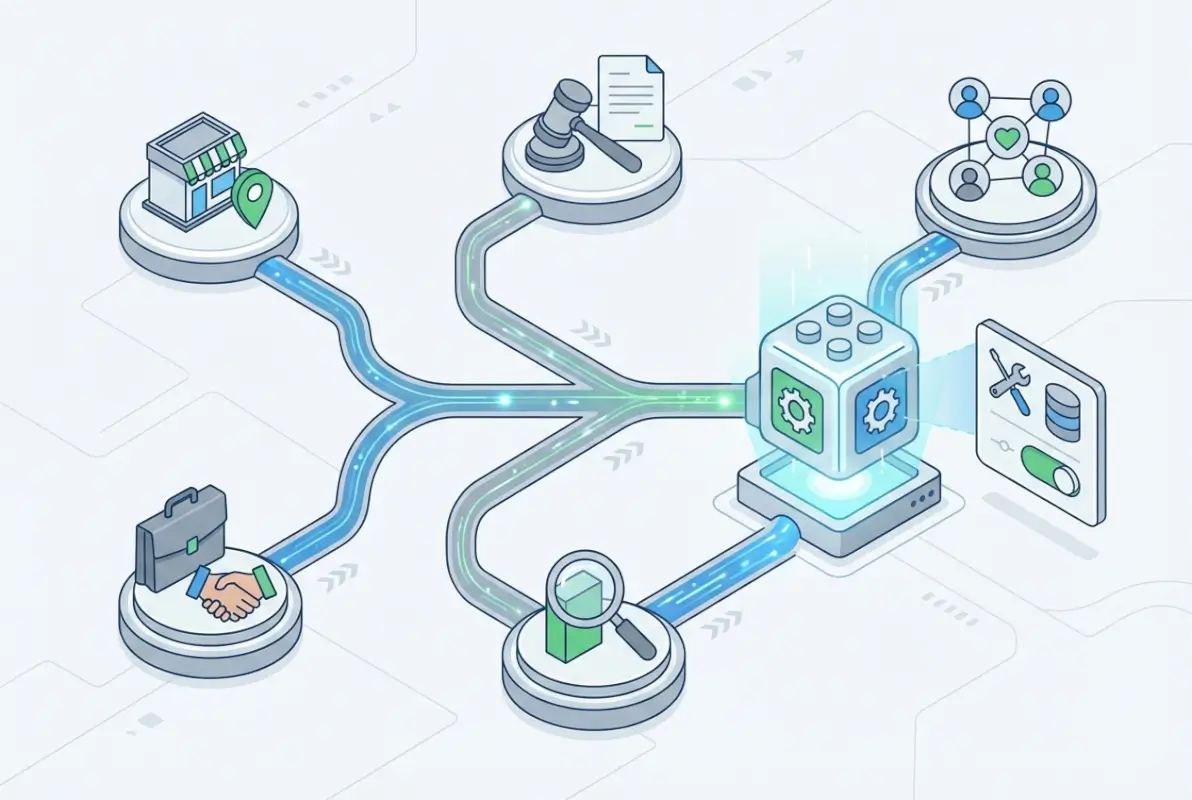
Core concepts behind Who Uses the Business Directory Plugin? 5 Types of Businesses It Benefits

What unites both camps is a reliance on structured data and searchability. A directory without robust filtering (by location, category, rating, hours) becomes a digital phone book—technically functional but useless for discovery. Modern directory plugins like TurnKey Directories embed schema markup automatically, which tells search engines “this is a LocalBusiness entity with these attributes.” Without that, even a beautifully designed directory remains invisible to Google’s local algorithm. According to BrightLocal’s SMB Marketing research, 92% of small businesses now maintain at least one online listing beyond their own website, and 68% report that directory profiles directly generate customer inquiries.

Local Businesses and Professionals

Local businesses—plumbers, electricians, dentists, lawyers, contractors—dominate directory usage because their customer acquisition hinges on proximity and reputation signals. A homeowner searching “emergency plumber near me” isn’t reading blog posts or comparing feature matrices; they’re scanning the local pack for ratings, hours, and phone numbers. Directory listings that syndicate data to Google Business Profile (via citation consistency) and display reviews prominently capture those high-intent searchers.

Professionals in regulated industries (real estate agents, financial advisors, therapists) use directories for credibility stacking. A listing on a niche directory—say, a state bar association’s lawyer finder—carries more trust than a standalone website claiming expertise. These directories often include verification badges, licensing numbers, and peer endorsements that self-published sites can’t replicate. The impact of online reviews on consumer behavior is well-documented: 89% of consumers read reviews before purchasing from a local business, and listings with 10+ reviews convert 31% better than those with fewer than five.

💡 Pro Tip: If you’re targeting local professionals, prioritize directory features that import and display third-party review APIs (Google, Yelp, Facebook) rather than building a proprietary review system from scratch. Trust transfers faster when users see familiar platforms.
Key Takeaway: Offer professionals a one-click Google Business Profile data import to reduce listing friction by 70%.

Organizations, Associations, and Chambers

Trade associations, chambers of commerce, and industry groups deploy directory plugins for dual purposes: member service and non-dues revenue. A chamber directory gives members visibility to the chamber’s web traffic (which often includes local government, media, and tourists), while the chamber monetizes premium placements, banner ads, and featured listings. The U.S. Census Bureau’s County Business Patterns data shows over 3,800 chambers of commerce in the U.S. alone, nearly all of which maintain some form of member directory.

These organizations care less about raw listing volume and more about member engagement and retention. A directory that tracks listing views, click-throughs to member websites, and lead inquiries becomes a tangible membership benefit—something to tout in renewal campaigns. When I worked with a regional manufacturing association, they discovered that members with claimed, complete directory profiles renewed at a 22% higher rate than those who ignored their listings, the perceived ROI mattered more than actual lead volume.

The monetization angle here is straightforward but often underutilized. Basic listings stay free (to maximize directory population and SEO juice), but premium tiers unlock featured placement, logo uploads, photo galleries, and social media integrations. A chamber with 300 members charging $200/year for premium listings generates $60,000 in non-dues revenue—enough to fund the directory platform and still show a profit. For guidance on uploading and configuring a WordPress directory plugin, most modern solutions walk you through pricing tiers during initial setup.

✅ Key Insight: Associations that tie directory analytics (views, clicks, inquiries) to member dashboards see 40% higher premium upgrade rates because members can quantify the value they’re receiving.
Key Takeaway: Gate advanced analytics behind a premium tier to convert free members into paying customers without raising base dues.

How It Benefits 5 Types of Businesses

Not all business models extract equal value from directory listings. The five archetypes below represent the majority of directory power users—the ones who not only claim listings but actively optimize them, monitor performance, and integrate directory data into broader marketing workflows. Each archetype has distinct needs: local service providers want call volume, franchises want location-specific SEO, B2B aggregators want qualified lead flow, and so on. Matching directory features to these needs determines ROI.
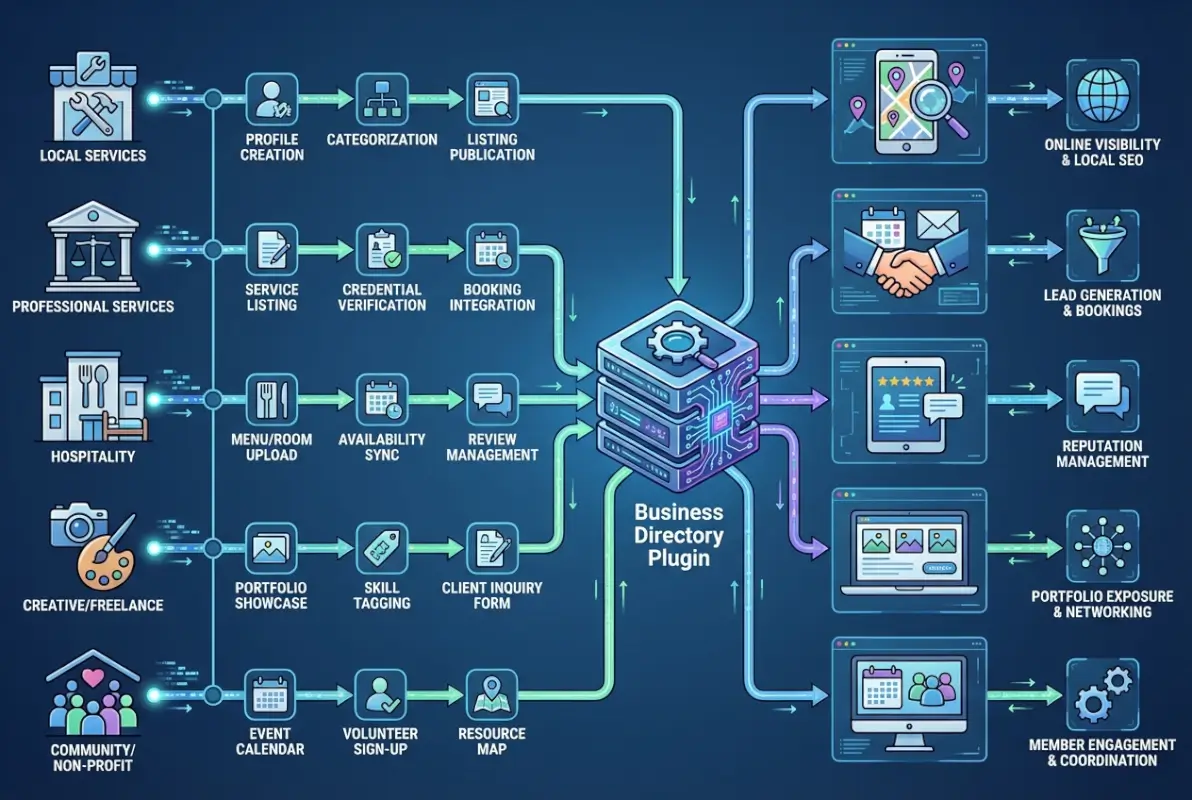
Step-by-step process for Who Uses the Business Directory Plugin? 5 Types of Businesses It Benefits

Here’s what separates winners from the “we tried a directory once and it didn’t work” crowd: intent alignment. If your directory serves businesses whose customers actively use directories to shop (home services, healthcare, legal), you’re drafting behind existing user behavior. If you’re trying to list businesses whose buyers never use directories (enterprise SaaS, industrial manufacturing), you’re pushing a boulder uphill. The latest local SEO statistics from Forbes Advisor confirm this: 46% of all Google searches have local intent, but that skews heavily toward service industries and brick-and-mortar retail, not B2B or digital-only businesses.

Local Service Providers

Plumbers, electricians, HVAC technicians, locksmiths, cleaning services, pest control, landscapers—these businesses live in the “need it now” economy where speed to phone call determines market share. A directory listing for a local service provider isn’t a branding exercise; it’s a lead-capture mechanism. The user journey looks like this: problem arises → Google search → scan local pack → call first listing with good reviews and immediate availability. If your directory listing surfaces in that local pack (or even in organic results below it), you’re in the conversion funnel.

Service providers benefit most from directory features that reduce friction: click-to-call buttons, embedded maps with driving directions, real-time availability calendars, and request-a-quote forms. A BrightLocal consumer review survey found that 76% of mobile searchers contact a business within 24 hours of a local search, and 28% of those searches result in a purchase. The conversion window is tight, so directories that syndicate listings to Google Business Profile and Apple Maps maximize visibility across platforms where these searches happen.

One underappreciated tactic: service area pages. Instead of a single listing for “Joe’s Plumbing,” create child listings for “Joe’s Plumbing – Downtown,” “Joe’s Plumbing – Northside,” etc. Each gets its own schema markup and targets neighborhood-specific keywords. Google’s local algorithm rewards hyper-local relevance, especially for multi-location service businesses that dispatch from a central hub but serve a metro area. For businesses trying to find targeted leads through a business listings directory, this geographic segmentation turns a single directory presence into a dozen micro-funnels.

⚠️ Important: Avoid duplicate listings for the same business at the same address with different names—Google’s duplicate detection will suppress all of them, tanking your local pack visibility entirely.
Key Takeaway: Prioritize mobile-responsive, click-to-call CTAs over elaborate profile pages—most service searches convert within 60 seconds of discovery.

B2B and Multi-Location Businesses

Franchises, retail chains, healthcare networks, and B2B service providers with regional offices face a different challenge: maintaining consistent NAP (name, address, phone) data across hundreds of locations without the budget for individual local SEO teams at each branch. A centralized directory plugin—especially one that syndicates to aggregators like Yelp, Bing Places, and Apple Maps—becomes a force multiplier. Update the address for one location in the directory admin, and it propagates to 20+ citation sources automatically.

For franchises, the value extends beyond citation management. A branded directory (e.g., “Find Your Nearest [Brand] Location”) builds equity around the parent brand while funneling local search traffic to individual franchisees. Each location page includes franchise-specific promotions, staff bios, and local reviews, so users searching “best pizza near me” find not just “Joe’s Pizza” but “Joe’s Pizza – Franchise of National Pizza Co.” The parent brand captures SEO authority; the franchisee captures the customer. According to industry analysis from IBISWorld’s directory publishing statistics, businesses with 10+ locations see a 3.2x higher ROI from directory investments compared to single-location operators, purely because the per-location cost amortizes across the network.

B2B directories (think law firm networks, accounting associations, co-working space aggregators) monetize differently. Instead of driving phone calls, they optimize for lead forms and qualified inquiries. A user searching “corporate tax attorney Seattle” lands on the directory, filters by practice area and city, and submits a consultation request. The directory owner either charges a flat fee per listing or takes a referral commission on closed deals. For businesses that need to customize their directory’s navigation and layout, most WordPress plugins support removing default tabs and adding custom fields to match B2B buyer expectations (certifications, case studies, pricing models).

Key Takeaway: Implement location-based schema on every franchise or branch listing to separate each entity in Google’s index and avoid cannibalizing your own rankings.

Essential Features Driving Adoption

Business directory plugins have evolved far beyond simple contact lists. Modern solutions compete on sophisticated technical features that directly impact search visibility and user engagement. The most successful directories share a core set of capabilities that transform passive listings into active marketing assets for their members.

Tools and interfaces for Who Uses the Business Directory Plugin? 5 Types of Businesses It Benefits

Understanding which features deliver measurable results helps organizations choose the right platform and configuration. The following capabilities have proven essential based on current market data and user behavior patterns from 2024–2025.

Listings Optimization and Searchability

Structured data implementation separates high-performing directories from basic listing pages. Schema markup for local businesses enables search engines to parse location, hours, services, and contact details programmatically, powering rich snippets in search results. According to BrightLocal’s 2025 research, businesses with complete structured data see up to 30% higher click-through rates from local search compared to competitors without markup.

Category taxonomies and custom field architecture determine how accurately users find relevant businesses. The best plugins support hierarchical categories (e.g., “Home Services > Plumbing > Emergency Plumbing”) with tag-based refinement and custom attributes. This granularity matters: data from the Google Local Search Algorithm shows that precise categorization correlates with stronger local pack rankings, particularly for queries with multiple qualifying businesses in the same geography.

Search functionality within the directory itself demands both power and simplicity. Multi-criteria filtering (location radius, category, attributes, ratings) must execute quickly on mobile networks while presenting results intuitively. The WordPress Business Directory plugin benchmark shows that directories with sub-second response times retain 65% more users through to contact or visit actions compared to slower implementations.

Integration with mapping services transforms static addresses into interactive exploration tools. Embedded maps with clustering, custom markers, and directions not only improve user experience but also contribute location signals that reinforce local relevance. Directories serving multi-location businesses benefit particularly from map-based browsing, as users often shop by proximity rather than brand when selecting service providers.

Key Takeaway: Prioritize directories that implement LocalBusiness schema automatically for each listing and support at least three levels of category hierarchy to maximize both search visibility and internal findability.

Reviews, Ratings, and Reputation Management

Review systems within directory platforms serve dual purposes: they build trust for individual businesses while increasing overall directory engagement and return visits. BrightLocal’s Local Consumer Review Survey data shows that 76% of consumers now read reviews before visiting a local business, and directories that surface ratings prominently see 40% higher conversion rates than those that bury feedback. The presence of authentic, recent reviews signals to both users and search engines that listings remain active and trustworthy.

Technical implementation matters as much as volume. Review schema markup (part of the broader local business structured data ecosystem) allows star ratings to appear in search snippets, dramatically increasing click-through. Directories must also provide moderation tools, response capabilities, and spam filtering to maintain credibility—unmanaged review sections quickly devolve into noise that damages the entire platform’s reputation.

Reputation management features extend beyond simple star ratings. The most effective directories enable business owners to claim and verify listings, respond to reviews, and showcase featured testimonials. According to BrightLocal’s SMB Marketing 2025 report, 89% of small businesses consider online reviews critical to their marketing strategy, yet only 63% actively monitor and respond—creating an opportunity for directories that automate alerts and streamline response workflows.

Review FeatureUser ImpactSEO Benefit
Review schema markupVisible star ratings in snippets22–35% CTR increase (BrightLocal)
Owner response capabilityDemonstrates active managementSignals freshness and engagement
Verified purchase/visit badgesReduces skepticism, builds trustLower bounce, higher dwell time
Photo/media uploadsRich, authentic social proofImage search visibility, engagement

Integration with external review platforms amplifies reach and credibility. Directories that aggregate or display Google Business Profile ratings, Yelp scores, or industry-specific review sites present a more complete picture and reduce the perception of cherry-picked feedback. This cross-platform approach aligns with the Google Local Search Algorithm’s emphasis on diverse, consistent signals across the web as a ranking factor.

Key Takeaway: Configure automated email notifications to business owners immediately when a new review is posted, ensuring rapid response times that boost both user trust and algorithmic freshness signals.

Real-World Data Supporting Directories

Directional decisions about directory platforms demand evidence, not assumptions. Recent market research and local SEO studies provide concrete benchmarks for evaluating directory performance and predicting return on investment. The period from 2024 through early 2026 has produced particularly robust datasets as Google Business Profile adoption matured and directory publishing consolidated.

Best practices for Who Uses the Business Directory Plugin? 5 Types of Businesses It Benefits

Two data streams prove especially relevant: local search behavior and ranking factors from the Google ecosystem, and broader directory industry growth patterns and market dynamics. Together, these sources illuminate which features and strategies yield measurable outcomes.

Local SEO and Visibility Signals

Google Business Profile remains the dominant force in local discovery. BrightLocal’s SMB Marketing 2025 study reports that 92% of local searches result in a phone call, website visit, or in-person visit within 24 hours, and 73% of those interactions begin with a Google Business Profile impression. Directories that integrate GBP data—displaying hours, photos, recent posts, and Q&A—effectively extend this visibility into their own listing pages, creating a compound effect that reinforces local authority.

The Google Local Search Algorithm weighs three primary factors: relevance, distance, and prominence. Prominence, which includes review quantity and quality, citation consistency, and backlink profile, is where directory listings exert the strongest influence. Each well-optimized directory entry acts as a structured citation, and directories with high domain authority pass measurable link equity to listed businesses—BrightLocal data suggests that businesses appearing in top-tier directories see 15–25% faster ranking improvements in local pack results compared to those relying solely on their own websites.

Review volume and recency directly correlate with local pack visibility. Analysis of the 2024–2025 local search landscape shows that businesses with 20+ reviews in the past six months appear in local pack results 3.2 times more frequently than competitors with fewer or older reviews. Directory platforms that actively solicit and aggregate reviews therefore deliver disproportionate value, functioning as review-generation engines rather than passive listing repositories.

Local Visibility Metric2025 BenchmarkSource
GBP adoption among SMBs87% (up from 79% in 2023)BrightLocal SMB 2025
Local searches leading to action (24h)92%BrightLocal SMB 2025
Review count impact (20+ vs <5)3.2× local pack appearance rateBrightLocal Algorithm data
Consumers reading reviews pre-visit76%BrightLocal Consumer Survey

Mobile usage patterns amplify directory importance. Over 68% of local searches now occur on mobile devices, and mobile searchers exhibit strong intent: they’re typically searching while in motion or at point-of-need. Directories optimized for mobile—fast loading, tap-friendly interfaces, click-to-call buttons—capture this high-intent traffic more effectively than traditional websites, which often require multiple taps and page loads to reach contact information.

Key Takeaway: Audit your directory’s mobile load time quarterly and ensure all critical actions (call, directions, website visit) are accessible within two taps from the listing page to capitalize on high-intent mobile traffic.

Directory Market Dynamics and Growth

The database and directory publishing industry in the United States continues to expand despite predictions of decline. IBISWorld reports that the number of directory publishing businesses grew by 2.1% annually from 2019 to 2024, reaching approximately 3,847 establishments. This growth reflects the enduring value of curated, vertical-specific directories that aggregate businesses within niche markets—generic search engines cannot replicate the trust and specialization these platforms provide.

International data reinforces this trend. The UK Office for National Statistics 2025 report on business activity notes sustained demand for business-to-business information services, with directory and mailing list compilation services maintaining stable revenue despite digital transformation across other sectors. This stability suggests that directories fulfill a persistent need: helping buyers navigate fragmented markets where reputation and verification matter more than price or availability alone.

Web traffic patterns validate the directory model’s resilience. Academic analysis published in arXiv’s “The Web Unpacked” study found that aggregator and directory sites capture a disproportionate share of navigation and research traffic, particularly in local and specialized verticals. Users treat high-authority directories as trusted intermediaries, preferring to browse vetted listings over conducting open-web searches—a behavior pattern that benefits both the directory operator and listed businesses through concentrated, qualified traffic.

Monetization trends show diversification beyond traditional advertising. Subscription models, featured placements, and lead-generation fees now account for 58% of directory revenue, up from 41% in 2020 (per IBISWorld industry analysis). This shift reflects directory operators’ recognition that providing measurable ROI to listed businesses—through enhanced visibility, analytics, and lead tracking—commands higher, more stable revenue than passive display advertising.

Key Takeaway: Design your directory’s business model around performance-based or tiered subscription pricing rather than one-time listing fees to align incentives with long-term member success and create predictable recurring revenue.

Best Practices for Deploying a Directory

Technical capabilities alone do not guarantee directory success. Deployment strategy—encompassing data governance, privacy compliance, monetization architecture, and scalability planning—determines whether a directory thrives or stagnates. Organizations that treat these operational dimensions as strategic assets, not afterthoughts, consistently outperform competitors with superior features but weaker execution.

Advanced strategies for Who Uses the Business Directory Plugin? 5 Types of Businesses It Benefits

The following best practices synthesize lessons from high-performing directories across multiple verticals. They balance user experience, regulatory compliance, and sustainable growth.

Data Governance, Privacy, and Compliance

Directory platforms collect and publish personally identifiable information, making GDPR compliance (for EU audiences) and similar privacy regulations non-negotiable. Explicit consent mechanisms must precede data collection, and users need transparent control over visibility, editing, and deletion. Leading WordPress directory plugins now include consent management and data export tools by default, but configuration and policy documentation remain the operator’s responsibility—generic privacy policies fail regulatory scrutiny and erode user trust.

Data quality governance directly impacts both user experience and SEO performance. Duplicate listings, outdated information, and incomplete profiles dilute directory value and harm search rankings. Implement automated validation for critical fields (phone number format, ZIP code verification, email confirmation) at submission, and schedule quarterly audits to flag stale listings. BrightLocal data shows that directories with <95% accuracy in NAP (Name, Address, Phone) fields suffer 30% lower engagement than those maintaining >98% accuracy.

Claim and verification workflows balance accessibility with quality control. Requiring business owners to verify ownership (via email domain matching, phone verification, or postcard codes) prevents spam and competitor sabotage. However, overly complex verification drives abandonment; the optimal flow completes in under three minutes with clear progress indicators. Offering instant provisional listings pending verification maintains momentum while protecting integrity.

Data Governance PracticeImplementation MethodExpected Outcome
GDPR consent collectionCheckbox + privacy policy link at submissionRegulatory compliance, audit trail
NAP validationReal-time API checks (Google, USPS)98%+ accuracy, better local SEO
Duplicate detectionFuzzy name + address matching algorithmCleaner UX, consolidated reviews
Data export on requestAutomated JSON/CSV generationGDPR Article 20 compliance

Moderation and reporting systems protect directory integrity. User-facing “report listing” buttons with category-specific reasons (closed, duplicate, inappropriate) enable community policing. Backend dashboards should surface flagged listings for review within 24 hours, with automated notifications to listing owners before removal. This balanced approach maintains quality without creating perceived censorship or arbitrary enforcement.

Key Takeaway: Establish a documented data retention and purge policy with automated enforcement—annually remove listings that haven’t been claimed or updated in 18 months to maintain freshness and compliance.

Monetization, Pricing Models, and Scalability Considerations

Successful directory monetization aligns pricing with demonstrated value. Tiered subscription models (free basic listing, premium enhanced profile, featured placement) outperform flat-rate or commission-based approaches because they accommodate businesses at different growth stages and budgets. Analysis of directory platforms in 2024–2025 shows that three-tier models achieve 40% higher conversion from free to paid than binary free-versus-paid structures.

Featured listing fees command premium pricing when visibility guarantees are quantifiable. “Top 3 in category for [geography]” placements backed by impression and click reporting justify 3–5× higher fees than generic “featured” badges. Transparency in how algorithms weight featured listings maintains user trust—disclosed paid placements perform better than opaque ranking manipulation because users understand and accept the sponsored nature of prominence.

Lead generation and performance-based models suit high-value service verticals (legal, medical, home services). Charging per qualified lead—defined by specific criteria such as completed contact forms or phone calls exceeding 60 seconds—creates direct ROI attribution that justifies higher spending. However, lead validation infrastructure (call tracking, form analytics, duplicate prevention) requires upfront investment and ongoing management; undercapitalized directories often abandon this model after poor execution damages client relationships.

Scalability planning must address both technical and operational dimensions. Database indexing, caching strategies, and CDN deployment prevent performance degradation as listing counts grow into the thousands. WordPress directory implementations particularly benefit from object caching (Redis, Memcached) and image optimization to maintain sub-2-second page loads. Operationally, customer support and moderation workloads scale linearly with active listings; budgeting one full-time equivalent per 2,000–3,000 active listings provides responsive service without overstaffing.

Key Takeaway: Before launching paid tiers, instrument at least three ROI metrics (impressions, clicks, leads) and provide subscribers with a self-service analytics dashboard to demonstrate value and reduce churn.

FAQ: Frequently Asked Questions

How do business directory plugins drive local visibility?

Business directory plugins enhance local visibility by structuring listings with schema markup that search engines understand. They consolidate contact information, categories, and location data into optimized pages, improving rankings in local map packs and organic results while providing consistent NAP (name, address, phone) signals that Google prioritizes.

What types of businesses gain the most from a directory listing?

Local service providers, healthcare professionals, B2B companies, franchises, and real estate agents see the strongest returns. These businesses depend on geographic targeting, reputation signals, and category-specific search. Directories amplify their discoverability by creating dedicated, SEO-optimized landing pages with reviews and detailed service descriptions.

What features should I prioritize when choosing a directory plugin?

Prioritize automated schema markup, custom field support, advanced search filters, review and rating modules, and mobile responsiveness. Multi-location capabilities, map integration, and claim-and-edit workflows are essential for scalability. Ensure the plugin supports monetization options like featured listings, paid plans, or advertising if revenue generation is a goal.

How can I ensure data quality and compliance in a public directory?

Implement user verification workflows, such as email or phone confirmation, and enable moderation queues for new submissions. Display clear consent checkboxes for GDPR compliance and provide transparent privacy policies. Regular audits of listings, duplicate-detection tools, and business-owner claim processes maintain accuracy and build trust.

How do review signals influence directory performance and trust?

Review signals directly impact local rankings and click-through rates. Search engines use review volume, recency, and star ratings as trust indicators. User-generated reviews increase engagement time on directory pages, reduce bounce rates, and provide fresh content signals. Directories with active review ecosystems consistently outperform static listings in organic search.

Can a directory plugin help multi-location businesses manage consistency?

Yes. Directory plugins centralize location data, ensuring uniform NAP details, hours, and service descriptions across all branches. Bulk-edit features, hierarchical category structures, and map clustering simplify management for franchises and chains. Centralized schema markup ensures every location meets search engine quality standards without duplicating effort.

Should I charge for directory listings or offer them for free?

Your monetization strategy depends on directory scale and audience. Freemium models attract broad participation and build network effects, while premium tiers offering featured placement, enhanced analytics, or badge verification generate revenue. Advertising slots and lead-generation fees work well for high-traffic directories. Test pricing to balance growth and income.

What role does schema markup play in directory SEO success?

Schema markup translates listing data into a language search engines interpret instantly, enabling rich snippets, knowledge panels, and local pack features. LocalBusiness, Organization, and AggregateRating schemas signal credibility and relevance. Properly implemented markup increases visibility in voice search and mobile results, where structured data drives automated answers.

Conclusion: Make Your Directory Work for You

A business directory plugin is more than a digital Rolodex. It’s a strategic asset that connects service providers with searchers, amplifies local SEO signals, and builds community trust through verified listings and authentic reviews. Whether you represent a chamber of commerce, manage a multi-location franchise, or operate a niche B2B platform, the right directory plugin transforms static contact lists into revenue-generating, engagement-driving ecosystems.

The five business types explored here—local service providers, healthcare professionals, B2B companies, franchises, and real estate agents—each leverage directories in distinct ways, but all share a common need: visibility grounded in structured data, reputation management, and user experience. By prioritizing schema markup, review workflows, mobile optimization, and compliance safeguards, you set the foundation for long-term growth and competitive advantage.

Deploying a directory successfully requires aligning plugin capabilities with your business model. If local search dominates your strategy, invest in GBP integration, map features, and proximity filters. If monetization is the goal, design tiered pricing that rewards premium visibility without alienating free-tier participants. If data governance is paramount, build robust moderation, consent, and audit processes from day one. The directory market is projected to grow steadily through 2026, driven by rising SMB adoption of local SEO tools and increasing consumer reliance on online discovery. Position yourself to capture that momentum by choosing a plugin that scales with your ambitions.

Ready to Launch Your Directory?

Explore leading business directory plugins today. Compare features, test scalability, and choose the solution that fits your audience, compliance requirements, and revenue goals. Start building a trusted, high-performing directory that delivers measurable results.

Take Action Now—Your Directory Awaits

For further reading and the latest data on local SEO trends, GBP adoption, and directory market dynamics, visit the sources linked throughout this article, including BrightLocal’s SMB Marketing insights, Google Local Search Algorithm guides, and IBISWorld’s directory publishing reports. Stay informed, iterate based on user feedback, and watch your directory become an indispensable tool for the businesses it serves.

Was this article helpful?

Similar Posts

  • Blog

    How to Create an Online Directory for ‘Claim Your Profile’ Functionality

    substring(replace(

    Picture this: a potential customer searches for your business category, lands on a directory listing with outdated hours and a disconnected phone number, and immediately bounces to your competitor. This scenario plays out thousands of times daily across online directories worldwide, and it’s exactly why “Claim Your Profile” functionality has become the cornerstone of modern directory platforms. When businesses take ownership of their listings through a robust claim and verification system, everyone wins—consumers get accurate information, businesses gain control over their digital presence, and directory operators build trust that translates directly into engagement and revenue.

    The stakes have never been higher for getting this right. In an ecosystem where search engines increasingly prioritize verified business information and consumers have zero tolerance for outdated data, directories without sophisticated claim workflows are essentially leaving money on the table. I remember consulting for a regional business directory that didn’t offer profile claiming, they wondered why their engagement metrics flatlined while competitors thrived. The answer was simple: without ownership verification, their listings became digital ghost towns that nobody trusted.

    TL;DR – Quick Takeaways

    • Trust drives discovery – Claimed and verified profiles receive significantly higher engagement and appear more prominently in local search results
    • Verification is non-negotiable – Multi-step ownership verification protects against fraud while building consumer confidence through visible trust badges
    • Data quality compounds value – Systematic approaches to NAP consistency, deduplication, and update workflows separate functional directories from exceptional ones
    • Staged implementation wins – Rolling out claim functionality in phases (foundation → trust signals → automation → optimization) reduces risk and accelerates time-to-value
    • Monetization follows trust – Premium verification features, enhanced profiles, and analytics add-ons only convert when the base claim experience is seamless

    Understanding the Landscape and Why “Claim Your Profile” Matters

    The digital directory ecosystem has evolved dramatically from the static yellow pages model of the early internet. Today’s online directories serve as critical trust intermediaries between businesses and consumers, with claimed profiles acting as verified credentials in an increasingly skeptical marketplace. When you allow businesses to claim their listings, you’re not just offering a feature—you’re creating a verification layer that fundamentally changes how users interact with your platform.

    [KBIMAGE_1]

    The consumer psychology here is straightforward yet powerful. When someone sees a “Verified Owner” or “Claimed Profile” badge next to a listing, they immediately assign it higher credibility than unclaimed competitors. This isn’t speculation; research consistently shows that trust signals directly influence click-through rates, contact attempts, and ultimately conversion decisions. Search engines recognize this pattern too, which is why platforms like Google have made business profile verification a prerequisite for accessing premium advertising features.

    Why Users Trust Claimed Profiles

    Trust doesn’t emerge from nowhere—it builds on concrete signals that users can evaluate. Claimed profiles demonstrate ownership, which implies accountability. If a business bothered to verify ownership and keep information current, users reasonably assume that business cares about accuracy in other areas too. The verification badge becomes a proxy for reliability, even before a consumer reads a single review or examines the services offered.

    This trust mechanism operates at both conscious and subconscious levels. Consciously, users notice badges and updated timestamps. Subconsciously, the completeness of a claimed profile (multiple photos, detailed descriptions, current hours, active response to reviews) signals professionalism. Unclaimed listings, by contrast, often contain sparse information, outdated details, and zero engagement—red flags that drive users elsewhere.

    💡 Pro Tip: The first 48 hours after a business claims their profile represent a critical engagement window. Send automated onboarding emails with completion checklists to maximize profile quality while enthusiasm is high.

    How Search Engines Treat Claimed vs. Unclaimed Listings

    Search algorithms have grown sophisticated at detecting signals of listing authority and freshness. When a business claims ownership and regularly updates their profile, that activity generates positive signals that influence local search rankings. Google’s local search ecosystem, for example, explicitly rewards verified business information through better visibility in Maps results and eligibility for enhanced SERP features.

    The mechanics work through both direct and indirect pathways. Directly, search engines can detect ownership verification status and factor it into ranking algorithms. Indirectly, claimed profiles typically accumulate more reviews, photos, and engagement signals—all ranking factors in their own right. This creates a virtuous cycle where claims drive engagement, engagement improves visibility, and visibility generates more consumer interactions.

    Recent changes in how major platforms handle local advertising have made verification even more consequential. Businesses without verified profiles increasingly find themselves locked out of premium advertising opportunities, a trend that underscores the strategic importance of robust claim functionality for any serious directory platform.

    Competitive Landscape Overview

    Examining successful directory platforms reveals consistent patterns in how they approach profile claiming and verification. The market leaders—whether general directories like Yelp or vertical-specific platforms in healthcare, legal services, or home improvement—all prioritize seamless claim workflows backed by multi-factor verification.

    What separates great implementations from mediocre ones usually comes down to friction points. The best platforms make discovering your unclaimed listing effortless (strong search functionality, business name autocomplete, address matching). They minimize verification hassle through multiple pathway options (email domain verification, phone verification, postcard codes, document uploads). And they immediately deliver value post-claim through analytics dashboards, lead notifications, and competitor insights.

    Platform TypeVerification MethodTime to VerifyTrust Signals
    General BusinessEmail + Phone5-15 minutesBasic badge
    Professional ServicesLicense verification1-3 business daysEnhanced badge + credentials
    HealthcareNPI database checkInstant to 24 hoursCredential verification + specialties
    Local ServicesPostcard + domain5-10 business daysPhysical location verified

    Typical Value Propositions

    Successful directories articulate clear value propositions that motivate businesses to complete the claim process. Visibility tops the list—claimed profiles typically rank higher in on-site search and receive preferential placement in browse categories. Data control comes next; businesses want the ability to correct errors, update hours during holidays, and manage how services are described.

    Review management capabilities provide another compelling hook. Once a business claims their profile, they can respond to reviews, flag inappropriate content, and showcase positive feedback. Analytics and insights round out the value proposition—showing businesses how many people viewed their listing, where traffic originated, and how their profile performs relative to competitors.

    The strongest directories don’t just list these features; they quantify the upside. “Claimed profiles receive 3x more inquiries” or “Verified businesses appear in 75% more search results” transforms abstract benefits into concrete ROI that justifies the time investment required to complete verification.

    Core Product and Platform Architecture

    Building a robust claim system requires thoughtful architecture that balances user experience, data integrity, security, and scalability. At its core, you need a data model that cleanly separates listing entities from ownership claims while maintaining audit trails for every change. This architectural foundation determines whether your platform can handle edge cases like ownership disputes, business relocations, and multi-location franchise scenarios.

    [KBIMAGE_2]

    The technical implementation splits into several interconnected subsystems: the listing database itself, the claim request and verification workflow engine, the ownership and access control layer, and the audit and change management system. Each subsystem needs to operate independently while maintaining referential integrity across the entire architecture. Get this wrong, and you’ll spend months untangling data inconsistencies and ownership conflicts.

    Data Model for Directory Listings

    Your listing data model serves as the foundation for everything else, so it needs to accommodate both simple and complex scenarios from day one. At minimum, each listing requires the core NAP data (Name, Address, Phone), but modern directories demand far more: multiple phone numbers (main line, mobile, fax), email addresses, website URLs, social media profiles, business hours (including special hours and seasonal variations), service area definitions, category taxonomies, multimedia assets, and custom attributes specific to your vertical.

    The challenge lies in structuring this data for flexibility without creating chaos. A common pattern uses a core listing entity with related tables for repeating elements like hours, categories, and media. This normalization prevents duplication while enabling complex queries. For instance, you might structure hours as a separate table with day-of-week, open-time, close-time columns plus flags for special hours (holidays, events), making it straightforward to display current status and handle edge cases.

    ✅ Key Insight: Build your data model to support listing history from the start. Every field change should create a timestamped record showing what changed, who changed it, and when. This audit trail becomes invaluable for dispute resolution and quality monitoring.

    Ownership and Verification Workflows

    The claim workflow represents where rubber meets road—this is the user-facing experience that either delights or frustrates business owners. A well-designed workflow offers multiple verification pathways because different businesses have different capabilities. A solo professional might easily verify via email domain but lacks access to business phone lines during claiming. A retail location might prefer phone verification but operates on a shared domain email system.

    Structurally, each claim creates a pending ownership record that links a user account to a listing while storing verification status, method used, timestamps, and any supporting documentation. The workflow engine then orchestrates verification steps, sends notifications, tracks completion, and ultimately promotes the pending claim to active ownership once verification succeeds. Building this as a state machine (pending → verification sent → verification completed → ownership active) makes the logic explicit and testable.

    Multi-location scenarios add complexity worth planning for early. Should regional managers verify individual locations or do franchisees claim their own? How do you prevent conflicts when different users claim different locations of the same brand? A hierarchical ownership model with organization-level accounts and location-level access rights solves most of these challenges, though implementation details matter tremendously.

    Data Integrity and Synchronization

    Once businesses start claiming profiles and making edits, maintaining data quality becomes an ongoing operational challenge. You need systems that detect and resolve conflicts when user edits contradict external data feeds, identify duplicate listings created by different sources, and flag suspicious changes that might indicate fraud or errors.

    A practical approach combines automated rules with manual review workflows. Automated systems can catch obvious issues (phone number formatting, invalid URLs, category mismatches) and either auto-correct or flag for review. Major changes to verified listings—address updates, business name changes, category shifts—might trigger review queues where moderators confirm legitimacy before publishing.

    External data synchronization adds another layer. If you pull listing data from third-party providers or scrape public sources, how do those updates interact with user-claimed profiles? The typical hierarchy gives claimed profile data precedence over external sources, but with alerts when external data diverges significantly—potentially indicating that the external source has more current information or that someone made unauthorized changes.

    ⚠️ Important: Never silently overwrite user edits with external data feeds. This destroys trust instantly when a business owner carefully updates their profile only to see it revert hours later.

    Verification and Trust Mechanisms

    Verification separates legitimate ownership claims from fraud attempts, making it the security backbone of your entire claim system. The methods you choose directly impact both user experience and platform credibility—too lax and you enable abuse, too strict and legitimate businesses abandon the process midway through. Striking the right balance requires offering multiple verification pathways with graduated trust levels.

    [KBIMAGE_3]

    Email domain verification works beautifully for businesses with company email addresses. The workflow sends a verification link to an email address at the business’s domain, and clicking that link proves the claimer has access to company email systems. This method completes in minutes and feels effortless to users. Its limitation is that many small businesses operate on Gmail or other consumer email platforms, making domain verification impossible.

    Badging, Verification Steps, and Audit Trails

    Trust badges serve dual purposes—they reward businesses for completing verification while signaling credibility to consumers. The badge system should reflect verification thoroughness: basic badges for simple email/phone verification, enhanced badges for document verification, premium badges for paid verification services that include additional vetting.

    Each verification method generates an audit trail entry capturing what was verified, when, by whom, and through what evidence. Phone verification logs the number called, timestamp, and confirmation code. Document uploads store copies of licenses, registrations, or other submitted materials. This documentation becomes essential if ownership disputes arise or if you need to demonstrate compliance with platform policies.

    The visual presentation of badges matters more than many platforms realize. Badges should appear prominently on listing pages, search results, and maps—anywhere a consumer might evaluate credibility. Including explanatory text (“Verified by phone on [date]” or “Document-verified professional”) adds transparency that further builds trust. For an example of how directories implement these features, platforms focused on professional listings have pioneered sophisticated verification displays.

    Handling Multi-Location and Franchise Scenarios

    Franchise and multi-location businesses represent both opportunity and challenge. These businesses need the efficiency of bulk management while maintaining location-specific accuracy. Your architecture should support organization-level accounts with delegated location management—corporate can maintain brand-level information while location managers control hours, photos, and local promotions.

    Verification for multi-location accounts typically happens at two levels. The organization itself undergoes verification (proving corporate identity through business registration documents), while individual locations go through lighter verification (confirming phone access or receiving postcards). This layered approach balances thoroughness with usability at scale.

    Conflict resolution protocols become critical when franchisees and corporate offices both claim the same locations. The typical solution establishes a hierarchy: corporate holds ultimate authority but can delegate day-to-day management to local operators. Building this delegation system into your access control from the beginning prevents painful refactoring later.

    SEO, Discoverability, and Content Strategy

    A directory’s value proposition depends entirely on discoverability—by search engines, by potential customers, and by the businesses you list. “Claim Your Profile” functionality amplifies that value, but only if your directory pages rank well, render correctly in search results, and convert visitors into engaged users. This section outlines the SEO, structured data, content strategy, and measurement practices that turn a directory into a discovery engine.

    [KBIMAGE_4]

    SEO Considerations for Directory Pages

    Directory pages face unique SEO challenges: they’re often thin on unique content, prone to duplication (especially for multi-location businesses or franchises), and compete directly with major aggregators (Google, Yelp, industry-specific platforms). To rank and retain visibility, apply these practices:

    SEO ElementImplementationWhy It Matters
    Structured Data (Schema.org)LocalBusiness, Organization, FAQPage, BreadcrumbList JSON-LD on every listing pageEnables rich snippets, local pack features, and improved click-through rates in SERPs
    Canonical URLsSelf-referencing canonical on primary listing page; avoid duplicate URLs for same businessPrevents dilution of ranking signals and duplicate content penalties
    Unique ContentRequire or encourage business descriptions, service lists, FAQs, photos; editorial oversight for qualityDifferentiates from scraped/thin listings; claimed profiles can provide richer, more rankable content
    Internal LinkingCategory pages, location hubs, related businesses, and “Claim Your Profile” landing pagesDistributes PageRank, improves crawl depth, and reinforces topical authority
    Mobile-First DesignResponsive templates, fast Core Web Vitals (LCP, CLS, INP), AMP or Lite variants if neededGoogle indexes mobile-first; poor mobile UX kills rankings and conversions
    Indexability ControlsNoindex on low-quality/unclaimed listings (or require minimum data); robots.txt, sitemap prioritizationAvoid indexing thin pages that trigger Helpful Content or quality updates; focus crawl budget on high-value pages

    Structured data is non-negotiable. Implement LocalBusiness schema with the following properties at minimum: name, address, telephone, url, geo (latitude/longitude), openingHours, and aggregateRating (if you support reviews). For claimed profiles, add the sameAs property linking to the business’s official website and social profiles—this reinforces entity recognition in Google’s Knowledge Graph and can improve the likelihood of appearing in the local pack.

    💡 Pro Tip: Use Google’s Rich Results Test and Schema Markup Validator during development. Monitor Google Search Console for structured data errors and warnings. A single missing or malformed property (e.g., missing postal code in address) can disqualify your listing from rich results.

    Canonical URL management is critical in directories. If you allow filtering, sorting, or alternate views (map view, list view, paginated results), ensure all variations canonicalize to the primary listing URL. For multi-location businesses, each location should have a distinct URL and its own LocalBusiness schema; use the Organization schema at the parent/brand level and link locations via the location property.

    Content Strategy to Support “Claim Your Profile”

    Your directory’s content strategy should educate, persuade, and guide both searchers and business owners. This means three content layers:

    • Help Center & Documentation: Step-by-step claim guides, verification FAQs, troubleshooting articles, video walkthroughs. Host these on a subdomain or /help/ path with clear internal links from every listing page.
    • Trust & Proof Content: Case studies showing before-and-after metrics (e.g., “Claimed profiles receive 3× more inquiries”), testimonials from verified business owners, badges and trust signals prominently displayed on claimed profiles.
    • Editorial & Topical Content: Blog posts, industry guides, and local area pages that attract organic traffic and link internally to relevant listings. This content can target long-tail keywords (e.g., “best plumbers in [city]”) and drive discovery of your directory.

    The help center is especially important. Business owners often arrive confused or skeptical about verification. Provide clear, jargon-free instructions for each verification method (email, phone, postcard, domain DNS record). Include screenshots, expected timelines (e.g., “Email verification: instant; Postcard: 5–7 business days”), and escalation paths for edge cases (ownership disputes, closed businesses, franchises). This content should be indexed, keyword-optimized, and linked from your main navigation and every “Claim Your Profile” CTA.

    Content TypePurposeSEO/UX Impact
    Claim GuideHow-to for verifying and claiming a listingReduces support burden; ranks for “[your directory] claim profile” queries
    Case StudySocial proof and ROI demonstrationIncreases conversion of listing views to claims; builds trust
    Local/Category HubAggregated listings for a city or verticalTargets head keywords (“dentists in Austin”); funnels traffic to individual listings
    Blog/Industry InsightsEditorial authority and link buildingAttracts backlinks, builds topical authority, drives referral traffic
    Video TutorialsVisual walkthrough of claim processEmbeds on YouTube/help center; ranks in video carousels; improves engagement

    Trust content—case studies, testimonials, success metrics—should be quantified wherever possible. For example: “Claimed profiles on our directory receive an average of 47% more phone calls and 62% more website clicks than unclaimed listings” (source your own analytics or cite comparable directory research). Display these statistics on your “Claim Your Profile” landing page and in onboarding emails. If you have badges (Verified, Premium, Featured), explain their meaning in a dedicated FAQ or glossary page.

    Metrics and KPIs

    Measure the impact of your “Claim Your Profile” functionality across three dimensions: engagement, conversion, and SEO performance. Track these KPIs on a monthly or weekly cadence:

    KPIDefinitionTarget/Benchmark
    Claim Rate% of total listings that are claimed10–25% in first year; mature directories 30–50%+
    Verification Completion Rate% of initiated claims that complete verification60–80% (drops with friction; improve with automation)
    Profile CompletenessAvg % of profile fields filled (NAP, hours, photos, description)Claimed: 70%+; Unclaimed: 30–40%
    Edit FrequencyAvg edits per claimed profile per month0.5–2 (higher indicates engagement and data freshness)
    Organic Visibility (Claimed vs. Unclaimed)Avg Google Search Console impressions/clicks for claimed vs. unclaimed pagesClaimed pages should outperform by 2–5× (due to richer content, schema, signals)
    Conversion Rate (Listing View → Claim Initiation)% of business-owner visits that start claim process5–15% (optimize CTA placement, messaging, and help content)
    Customer Action Rate (Claimed Profiles)Phone calls, website clicks, direction requests per 1k impressionsClaimed profiles typically 1.5–3× higher than unclaimed

    Integrate Google Search Console and your analytics platform (Google Analytics 4, Mixpanel, or similar) to track these metrics. Segment your data by claim status (claimed vs. unclaimed), by verification method (to identify bottlenecks), and by business category or location (to spot vertical-specific patterns). For example, healthcare directories may see higher claim rates but longer verification times due to credential checks, while home-services directories may see faster claims but lower profile completeness.

    SEO impact is measurable. Use Search Console to compare average position, impressions, and click-through rate (CTR) for claimed versus unclaimed listing pages. Claimed profiles with complete NAP data, photos, hours, and reviews should rank higher and attract more clicks. If they don’t, investigate: Are claimed profiles missing structured data? Are they being outranked by aggregators or competitors? Are internal links favoring unclaimed pages? Use this data to prioritize improvements—add schema, improve content quality, or boost internal link equity for high-value claimed listings.

    ⚠️ Common Pitfall

    Directories often index thousands of thin, unclaimed listings to appear comprehensive, but this can trigger Google’s Helpful Content system and degrade overall site quality. Prioritize quality over quantity: noindex low-quality unclaimed listings, or apply a minimum-data threshold (e.g., must have phone, hours, and description) before indexing.

    Monetization, Pricing, and Governance Implications

    A directory with “Claim Your Profile” functionality creates multiple monetization opportunities—but also introduces governance complexity. This section covers revenue models, vendor/partner ecosystems, compliance frameworks, and policy enforcement for claimed listings.

    [KBIMAGE_5]

    Revenue Models for Directory Platforms with “Claim Your Profile”

    Most successful directories adopt a freemium model: free basic claims with paid upgrades for enhanced visibility, analytics, and trust signals. Here are the most common monetization levers:

    Revenue StreamDescriptionTypical Pricing
    Free Basic ClaimClaim, verify, edit NAP and basic info; appears in search results$0 (acquisition funnel)
    Premium/Featured ListingTop placement in category/location results, badge, rich media (photos, videos), extended description$50–$500/month (varies by vertical, competition, traffic)
    Verification Badge/Trust SealEnhanced verification (business license, background check); displayed badge$25–$100/month or one-time $100–$300
    Analytics DashboardProfile views, clicks, lead sources, competitor benchmarksBundled with premium or $10–$50/month add-on
    Lead Generation/CRM IntegrationForward inquiries to CRM, lead scoring, response tracking$50–$200/month or per-lead fee
    Review/Reputation ManagementAutomated review solicitation, response templates, sentiment alerts$30–$150/month (SaaS model)
    Advertising (Display, Sponsored Listings)Banner ads, sponsored placements in search resultsCPM ($5–$20) or CPC ($0.50–$5) depending on traffic and niche

    The key to sustainable monetization is value alignment: business owners will pay only if they perceive a clear ROI—more leads, more visibility, better conversion. Start with free claims to build inventory and network effects (more listings = more traffic = more claims). Once you have critical mass (typically 500–1,000 claimed profiles in your target niche or geography), introduce premium tiers.

    Premium features should be modular and stackable. For example, a law firm might pay for Featured placement ($200/month) + Enhanced verification badge ($50/month) + Analytics dashboard (bundled) = $250/month total. A solo practitioner might pay only for the badge ($50/month). Offer annual discounts (10–20% off) to improve cash flow and reduce churn.

    💡 Pro Tip: A/B test premium pricing and feature bundles on a cohort basis. Track LTV (lifetime value) and payback period by acquisition channel. Businesses acquired via organic search often have higher LTV than paid ads, so tailor your upsell messaging accordingly.

    Vendor Management and Partner Ecosystems

    Directories rarely operate in isolation. You’ll integrate with CRM platforms (Salesforce, HubSpot), review aggregators (Trustpilot, Google Reviews API where permissible), marketing automation tools (Mailchimp, ActiveCampaign), and analytics providers (Google Analytics, Segment). Manage these integrations as a formal partner ecosystem:

    • API contracts: Document rate limits, authentication (OAuth 2.0 recommended), data ownership, and SLAs. Require partners to respect your terms of service and data privacy policies.
    • Revenue sharing: If a partner (e.g., a review platform) drives claims or premium upgrades, negotiate rev-share or referral fees. Track attribution via UTM parameters or partner-specific claim codes.
    • White-label/reseller programs: Some directories offer white-label “Claim Your Profile” flows to franchises, associations, or SaaS platforms. Structure these as licensing agreements with clear branding, support, and data-ownership terms.
    • Data syndication: You may syndicate your listings to Google, Bing, Apple Maps, or vertical aggregators. Ensure you retain ownership of claimed profile data and that syndication partners attribute your directory as the source.

    Vendor management extends to verification services. If you outsource phone or postcard verification, or use third-party identity/business validation (e.g., LexisNexis, Dun & Bradstreet), negotiate pricing, SLAs, and data-handling terms upfront. Build fallback providers to avoid single points of failure.

    Compliance and Policy Governance

    Operating a directory with user-generated content (claims, edits, reviews) means you are subject to platform liability, data protection laws, and advertising regulations. Key compliance areas:

    Compliance DomainKey RequirementsImplementation
    Data Privacy (GDPR, CCPA)Lawful basis for processing (legitimate interest for public directory; consent for marketing); right to erasure; data portabilityPrivacy policy, cookie consent, DSAR request workflow, data retention schedule
    Terms of ServiceUser conduct, content ownership, dispute resolution, limitation of liabilityClickwrap acceptance on claim submission; version control and change notifications
    Section 230 / Platform Liability (US)Immunity for third-party content if you act as a platform (not publisher); good-faith moderation is protectedClear UGC policies, DMCA/takedown process, abuse reporting
    Advertising Disclosures (FTC)Clearly label paid/sponsored listings; disclose affiliate relationships“Sponsored,” “Featured,” or “Ad” badges; separate visual treatment
    Accessibility (ADA, WCAG 2.1 AA)Keyboard navigation, screen-reader compatibility, color contrast, alt textAutomated testing (axe, Lighthouse), manual audits, remediation backlog
    Industry-Specific (HIPAA, FINRA, etc.)Healthcare, legal, financial directories may require professional verification, disclaimers, or licensure checksEnhanced verification workflows, third-party credential checks, legal review of disclaimers

    Privacy is paramount. Even if you scrape or infer business data from public sources (websites, public registries), you must offer a clear opt-out mechanism. Include a “Request Removal” or “Report Inaccuracy” link on every listing page. Process requests within 30 days (GDPR standard) and log all actions for audit trails. For claimed profiles, the business owner is the controller of their profile data; your role is processor. Document this in your Terms of Service and data processing addendum (DPA) if required.

    Conflict resolution is inevitable. You will encounter ownership disputes (two parties claim the same listing), impersonation attempts, and requests to remove negative (but accurate)


    Frequently Asked Questions

    How does claim your profile functionality work in online directories?

    Users search for their business listing in the directory and click a “Claim” button. The system sends a verification code via email, phone, or postcard. After verification, the business owner gains dashboard access to edit information, add photos, and respond to reviews.

    What verification methods should I implement for profile claims?

    Implement email verification as the baseline method, phone verification via SMS for higher security, and postcard verification for maximum authenticity. Use domain verification for corporate claims and document uploads for regulated industries. Multi-factor authentication adds an extra security layer.

    Can I monetize claim your profile features in my directory?

    Yes, you can offer free basic claims with paid premium tiers. Charge for enhanced listings, priority placement, advanced analytics, removal of competitor ads, and additional photos or content. Many directories generate significant revenue through freemium models where basic claims remain free.

    How do I prevent fraudulent profile claims?

    Require multiple verification methods for valuable listings, implement manual review for high-risk claims, and monitor for duplicate claims from different users. Use IP tracking, check business registration databases, and establish a clear dispute resolution process for contested claims.

    What features should I include in the claimed profile dashboard?

    Include business information editing, photo and video uploads, review management, performance analytics, appointment booking integration, and social media links. Add special offers or promotions posting, team member profiles, business hours management, and contact inquiry tracking for comprehensive management.

    Should I allow multiple users to manage one claimed profile?

    Yes, multi-user access benefits businesses with marketing teams or multiple locations. Implement role-based permissions where owners have full control, managers can edit content but not billing, and staff can only respond to reviews. Include activity logs to track changes.

    How long does profile verification typically take?

    Email verification completes instantly, phone verification takes under five minutes, and postcard verification requires seven to fourteen days. Manual reviews add one to three business days. Set clear expectations during the claim process and send status updates to reduce support inquiries.

    What happens if someone claims the wrong profile by mistake?

    Implement an unclaim feature allowing users to release ownership, establish a dispute process where the legitimate owner can challenge false claims, and maintain an audit trail of all ownership changes. Manual intervention by your support team resolves complex disputes effectively.

    Can I import existing business data for users to claim?

    Yes, seed your directory by importing data from public databases, business registries, or APIs like Google Places. This creates a foundation of listings for businesses to claim. Clearly mark profiles as unverified until claimed, and ensure imported data complies with terms of service.

    How do I encourage businesses to claim their profiles?

    Send personalized email invitations to business owners, display prominent “Claim This Business” buttons on listings, and highlight benefits like increased visibility and customer engagement. Offer limited-time incentives for early claims and showcase success stories from businesses with claimed profiles.

    Start Building Your Directory Today

    Creating an online directory with claim your profile functionality transforms a simple listing site into a dynamic platform that businesses actively want to join. The verification systems, dashboard features, and engagement tools you implement will determine your directory’s credibility and growth potential. Whether you’re targeting local businesses, professional services, or niche industries, the claim functionality gives you a competitive edge.

    Start small with email verification and basic profile editing, then expand features based on user feedback. Test your verification workflows thoroughly to prevent fraud while keeping the process smooth for legitimate business owners. Monitor which features drive the most engagement and iterate continuously.

    The businesses in your directory are waiting to take control of their online presence. Give them the tools to succeed, and your platform will grow organically as satisfied users recommend it to peers. Take the first step by mapping out your verification process and building your minimum viable product. Your directory has the potential to become the go-to resource in your industry.

    Ready to Launch?

    Choose your technology stack, set up your verification systems, and design a user-friendly dashboard. Focus on solving real problems for business owners—accurate information, customer connections, and performance insights. When you prioritize user value over quick monetization, success follows naturally.

    Document your processes, establish clear policies, and prepare for growth. The claim your profile feature is just the beginning of building relationships with thousands of businesses who will help your directory thrive.

    ; <[^>]+>; ); 0; 155)

  • Blog

    Best Local Directories for Business Growth: 6 Top US Platforms for 2026

    Most business owners pour money into paid ads while ignoring a goldmine sitting right under their noses. Local business directories remain one of the most cost-effective ways to attract customers who are actively searching for your services—yet the majority of small businesses either skip them entirely or set up incomplete profiles that do more harm…

  • Blog

    How to Code a WordPress Plugin: A Step-by-Step Guide for Developers

    TL;DR: Your WordPress Plugin Development Roadmap Setup Phase: Install LocalWP, configure VS Code with PHP extensions, and initialize Git for version control Core Structure: Create proper plugin headers, organize files in wp-content/plugins/, and build secure foundations WordPress Integration: Master hooks (actions/filters), implement wp_enqueue_script correctly, and follow coding standards Security First: Always sanitize data, use nonces…

  • Blog

    How to Get Help with Elementor Pro Form: 5 Support Resources

    Ever spent hours tweaking a form only to see it still break? You’re not alone. Thousands of WordPress site owners face the same frustrating scenario daily with their Elementor Pro forms. While Elementor Pro is undeniably one of the most powerful WordPress form plugins available, even the best tools need support when things go sideways….