How to Create a Business Directory Website: 7 Must-Have Features
Opens a Google-translated copy of this article in a new tab.
Picture this: you’re scrolling through yet another generic business directory website, squinting at cluttered listings and fighting with broken search filters. Frustrating, right? Now imagine being the solution to that problem while building a profitable online business that serves your local community (or any niche you choose).
Business directory websites have quietly become some of the most lucrative digital ventures in today’s market. Unlike flashy e-commerce sites or content-heavy blogs, directories solve a fundamental human need: finding the right business at the right time. They’re the digital equivalent of the old Yellow Pages, but infinitely more powerful and profitable.
Here’s what most entrepreneurs don’t realize: a well-executed directory website can generate multiple revenue streams simultaneously—subscription fees, advertising revenue, featured listings, and affiliate commissions all flowing from a single platform. Ready to turn local listings into a revenue stream?
TL;DR – Quick Takeaways
- 7 Essential Features: User-friendly interface, robust listing management, advanced search filters, payment integration, review systems, mobile responsiveness, and SEO optimization
- Planning is Everything: Define your niche, research competitors, and establish clear monetization goals before coding a single line
- Multiple Revenue Streams: Combine advertising, featured listings, subscriptions, and affiliate partnerships for maximum profitability
- SEO Drives Success: Implement schema markup, local SEO strategies, and structured data to dominate search results
- Launch Smart: Test extensively, gather beta user feedback, and focus on content marketing for initial growth
7 Must-Have Features of a Business Directory Website
Let’s dive into the core features that separate successful directories from abandoned digital graveyards. These aren’t just “nice-to-have” additions—they’re the foundation that determines whether your directory thrives or dies.
Feature 1: User-Friendly Interface
Your directory’s success hinges on one critical factor: can users find what they need in under 30 seconds? A user-friendly interface isn’t about pretty colors or fancy animations—it’s about intuitive navigation that feels natural.
Focus on clear call-to-action buttons that guide users through their journey. Whether someone’s searching for a plumber or submitting their own business listing, the path should be obvious. I’ve seen directories fail simply because the “Add Your Business” button was buried in a dropdown menu nobody could find.
Feature 2: Business Listing Management
Your admin dashboard needs to handle everything from bulk imports to individual listing approvals without breaking a sweat. Business owners should be able to update their information, upload photos, and manage their listings independently—reducing your workload while improving user satisfaction.
The bulk import/export functionality is particularly crucial when you’re trying to populate your directory quickly. Nobody wants to manually enter hundreds of businesses one by one (trust me, I learned this the hard way).
Feature 3: Search & Filter Functionality
This is where directories live or die. Your search filter functionality needs to work like Google—fast, accurate, and intuitive. Users should be able to search by keywords, filter by categories, narrow down by location, and sort by ratings or distance.
Advanced filtering options like price range, business hours, and customer ratings can set your directory apart from competitors. The goal is helping users find exactly what they need without endless scrolling.
Feature 4: Payment Gateway Integration
Money talks, and your payment gateway integration needs to speak fluently. Whether you’re charging for recurring subscription plans or one-time featured listing upgrades, the payment process should be seamless and secure.
Consider implementing multiple payment options—credit cards, PayPal, and even newer solutions like Apple Pay. The easier you make it for businesses to pay you, the more revenue you’ll generate. For those interested in WordPress solutions, learning how to create a business directory in wordpress essential steps can provide valuable insights into payment integration options.
Feature 5: Review & Rating System
Reviews are the lifeblood of any directory website. They provide social proof, improve SEO through fresh content, and keep users engaged with your platform. However, you need robust moderation tools to prevent spam and fake reviews.
Implement features like verified customer badges, response options for business owners, and clear guidelines for appropriate reviews. This builds trust and credibility—two things that are priceless in the directory business.
Feature 6: Mobile Responsiveness
Here’s a sobering statistic: over 60% of directory searches happen on mobile devices. If your directory doesn’t work flawlessly on smartphones and tablets, you’re essentially turning away the majority of your potential users.
Mobile responsive design goes beyond just fitting content on a smaller screen. Load times need to be lightning-fast, buttons need to be finger-friendly, and the search functionality needs to work perfectly even on a slow connection.
Feature 7: SEO Optimization
SEO optimization is your directory’s growth engine. This includes schema markup for business listings, XML sitemaps for better indexing, and on-page SEO that helps individual listings rank in search results.
Each business listing should be optimized with unique meta descriptions, proper heading structures, and local SEO elements. When done correctly, your directory becomes a traffic magnet that attracts both users and businesses organically.
Planning Your Business Directory Website
Before you get excited about website features and design elements, let’s talk strategy. Planning your directory is like laying the foundation for a building—get it wrong, and everything else crumbles.
Start by defining your target audience with laser precision. Are you targeting local service businesses in your city? Professional services nationwide? Niche industries like wedding vendors or fitness professionals? The more specific you get, the better you can serve that market.
Market research isn’t just about checking out your competitors (though that’s important too). Look at what existing directories are doing wrong, what features users complain about, and what gaps you can fill. I once discovered that most restaurant directories in my area had terrible mobile experiences—that insight led to a successful local food directory.
Setting clear goals and revenue models upfront prevents scope creep and keeps you focused. Will you charge businesses monthly subscription fees? Offer free basic listings with paid premium options? Focus on advertising revenue? Different models require different features and marketing approaches.
Consider conducting surveys or interviews with potential users. Ask local business owners what they struggle with when it comes to online visibility. Their pain points become your opportunities.
Designing Your Business Directory Website
Design isn’t just about making things look pretty—it’s about building trust and guiding user behavior. Your color scheme and typography choices should reflect reliability and professionalism. Think banks and insurance companies, not nightclubs and gaming sites.
Wireframing is absolutely crucial before you start any development work. Map out your key pages: the homepage with its search functionality, listing category pages, individual business detail pages, and the business submission process. Each page should have a clear purpose and logical flow to the next step.
Mobile-first design isn’t optional anymore—it’s mandatory. Start designing for mobile devices and then scale up to desktop. This approach ensures your directory works perfectly on the devices most users actually use. For developers interested in custom solutions, exploring how to create a business directory in php a developers guide can provide valuable technical insights.
Don’t forget about accessibility. Use proper contrast ratios, alt text for images, and keyboard navigation support. Not only is this the right thing to do, but it also improves your SEO and expands your potential user base.
Developing Your Business Directory Website
Now we get to the technical meat and potatoes. Choosing the right CMS (Content Management System) can make or break your directory project. WordPress is the most popular choice, and for good reason—it’s flexible, has tons of directory-specific plugins, and most developers are familiar with it.
WordPress pros include easy content management, extensive plugin ecosystem (like Business Directory Plugin or GeoDirectory), and strong community support. The cons? It can become slow with lots of listings, and you’re dependent on third-party plugins for core functionality.
Custom development gives you complete control but requires more time, money, and technical expertise. Consider this route if you have specific requirements that existing solutions can’t meet, or if you’re planning to scale to thousands of listings.
For WordPress users, you’ll need plugins for listings management, payment processing, user reviews, and SEO optimization. Popular choices include WP Job Manager (adaptable for business listings), WooCommerce for payments, and WP Review for rating systems.
Performance and scalability should be top priorities from day one. Implement caching, optimize images, and choose hosting that can handle growth. Nothing kills a directory faster than slow load times when users are trying to find local businesses quickly.
Launching and Promoting Your Directory Website
Pre-launch testing is where perfectionist tendencies actually pay off. Conduct thorough UX testing with real users—not just your friends and family. Watch how they navigate your site, where they get confused, and what features they ignore completely.
An SEO audit before launch can save months of optimization work later. Check for broken links, missing meta descriptions, proper heading structure, and mobile-friendliness. Tools like Screaming Frog or SEMrush can automate much of this process.
Consider a soft launch with beta users first. Reach out to local business owners you know and ask them to create listings in exchange for honest feedback. This helps you identify issues while building an initial database of listings.
For promotion tactics, content marketing should be your primary focus initially. Create helpful guides for local businesses, SEO tips, and industry insights. Local SEO is particularly important—make sure your directory appears when people search for “businesses in [your city].”
Social media advertising can be effective, but target business owners rather than consumers initially. You need listings before you can attract users searching for those listings. Which channel will bring you the first 100 listings? Often, it’s direct outreach combined with compelling content marketing.
Monetization Strategies for Your Directory
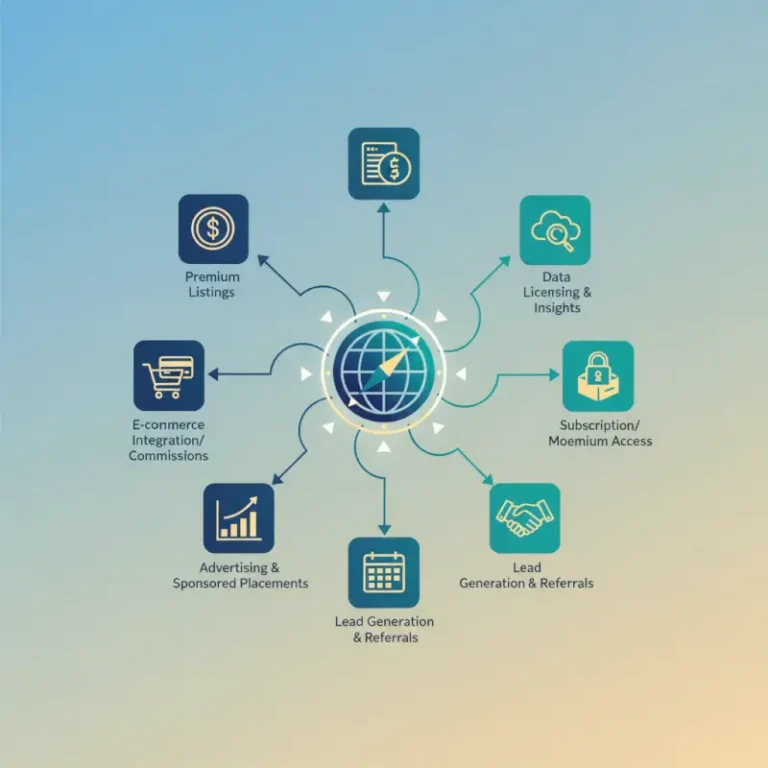
Let’s talk about turning your directory into a money-making machine. The beauty of directory websites is that they support multiple revenue streams simultaneously.
Advertising revenue includes traditional banner ads and Google AdSense integration. However, be careful not to overwhelm users with ads—they should enhance rather than disrupt the user experience. Contextual ads related to business services tend to perform better than generic display advertising.
Sponsored and featured listings are often your most lucrative revenue source. Businesses pay premium prices to appear at the top of search results or in highlighted sections. Consider tiered pricing models: basic featured listing, premium with photos and extended descriptions, and enterprise with priority placement and analytics.
Subscription plans work well for ongoing services. Offer free basic listings with limited features, then charge monthly fees for enhanced listings, multiple photos, customer inquiry management, and analytics dashboards. Many businesses prefer predictable monthly costs over one-time large payments.
Affiliate partnerships can provide additional income streams. Partner with complementary services like website builders, marketing tools, or payment processors that your listed businesses might need. For businesses looking to establish their online presence, you might guide them to resources on how to create a free business listing online simple steps.
Ongoing SEO Optimization and Maintenance
SEO for directory websites is an ongoing process, not a one-time setup. Implementing structured data using Schema.org Business markup helps search engines understand your listings better, potentially earning rich snippets in search results. Proper directory website SEO implementation can significantly boost your search visibility.
Regular content updates are crucial for maintaining search rankings. Encourage businesses to update their information regularly, add new photos, and respond to reviews. Fresh content signals to search engines that your directory is active and valuable.
Link building for directories focuses on local partnerships and industry relationships. Reach out to local chambers of commerce, business associations, and complementary websites for mutual linking opportunities. Guest posting on local blogs or business publications can also drive quality backlinks.
Performance monitoring should include both technical metrics (site speed, uptime, mobile performance) and business metrics (new listings, user engagement, conversion rates). Tools like Google Analytics, Google Search Console, and specialized directory analytics help track your success.
Don’t forget about regular maintenance tasks: updating plugins, backing up data, monitoring for spam listings, and responding to user inquiries. A well-maintained directory builds trust and keeps users coming back.
Frequently Asked Questions
What are the essential features of a business directory website?
The seven essential features include a user-friendly interface with intuitive navigation, comprehensive business listing management tools, advanced search and filter functionality, secure payment gateway integration, robust review and rating systems, mobile-responsive design, and built-in SEO optimization features. These features work together to create a platform that serves both businesses and consumers effectively.
How do I plan a business directory website?
Start by defining your target audience and choosing a specific niche rather than trying to serve everyone. Conduct thorough market research to understand your competitors and identify gaps in the market. Set clear goals for user acquisition and revenue generation, then choose a monetization model that aligns with your audience’s needs and willingness to pay.
What are the best practices for designing a business directory website?
Focus on mobile-first design since most users will access your directory on mobile devices. Use a clean, professional color scheme that builds trust, and ensure your navigation is intuitive. Create wireframes for all key pages before development, implement strong search functionality on the homepage, and ensure fast loading times across all devices.
How do I develop a business directory website?
Choose between WordPress with directory plugins for faster deployment or custom development for unique requirements. WordPress offers solutions like Business Directory Plugin or GeoDirectory, while custom development provides complete control. Prioritize performance optimization, implement proper database structure for scalability, and ensure secure payment processing from the start.
How can I monetize a business directory website?
Implement multiple revenue streams including subscription plans for enhanced listings, featured listing fees for premium placement, advertising revenue through banner ads and Google AdSense, and affiliate partnerships with complementary services. Many successful directories combine free basic listings with paid premium options to maximize both user adoption and revenue.
What’s the difference between WordPress and custom development for directories?
WordPress offers faster deployment using existing plugins and themes, lower development costs, and easier content management for non-technical users. Custom development provides complete control over functionality, better performance optimization, and unique features that competitors can’t easily replicate, but requires more time and technical expertise.
How long does it take to build a successful business directory?
The technical development typically takes 2-6 months depending on complexity and features. However, building a successful directory with substantial traffic and revenue usually takes 12-18 months of consistent marketing, content creation, and relationship building with local businesses. Success depends more on marketing execution than technical development speed.
What are the biggest challenges in running a directory website?
The chicken-and-egg problem is the biggest challenge: you need businesses to attract users and users to attract businesses. Other challenges include maintaining data quality, preventing spam listings, competing with established directories like Google My Business, and keeping up with local SEO algorithm changes. Consistent content moderation and community building are ongoing requirements.
Building a successful business directory website isn’t just about code and features—it’s about creating genuine value for your local business community while building sustainable revenue streams. The entrepreneurs who succeed in this space focus relentlessly on user experience, maintain high-quality listings, and never stop improving their platform based on real user feedback.
Your directory journey starts with a single decision: will you build something truly valuable that solves real problems, or just another generic listing site that gets lost in the crowd? The businesses in your community are waiting for a better solution. Whether you’re exploring how to create an employee directory in wordpress plugin code options for corporate clients or considering broader applications like how to create an ebay listing template essential elements for e-commerce integration, the principles remain the same: focus on user value, implement robust features, and execute consistently.
Ready to start building your directory empire? Choose your niche, download a CMS or contact a developer, and take the first step toward creating a valuable resource that generates passive income for years to come. Your future self will thank you for starting today.
Was this article helpful?