Business Directory Themes: Top 5 WordPress Designs for 2026

Generating summary...
Building a WordPress directory site in the late 2020s is like assembling a high-performance machine—every component matters, from the listing submission flow to the monetization strategy. Most directory owners make one fatal error: they pick a theme based on aesthetics rather than architecture. Here’s the reality—your business directory theme determines how easily you’ll scale from 100 listings to 100,000, how frictionless your frontend submissions will be, and whether you’ll spend weekends wrestling with plugin conflicts or actually growing your revenue. After reviewing dozens of directory deployments and studying what separates thriving marketplaces from abandoned projects, I’ve identified five WordPress directory designs that genuinely deliver on the promises most themes only advertise. These aren’t just pretty layouts—they’re engineered systems for building listing platforms that perform, monetize, and scale.
TL;DR – Quick Takeaways
- Directorist dominates multi-directory sites – built for operators managing multiple niche directories from a single WordPress install with flexible monetization hooks
- ListingHive pairs theme + plugin – modular extension ecosystem lets you add features incrementally without bloat
- GeoDirectory excels at location-first UX – map clustering and distance search make it ideal for local business directories and service provider listings
- ListingPro offers turnkey speed – prebuilt templates and layouts get you live in days, not weeks, though deep customization requires more effort
- PremiumPress targets enterprise needs – mature, niche-ready templates for real estate, classifieds, and business directories with solid support infrastructure
Directorist: Core Strengths for 2026 Deployments
Directorist has evolved into the Swiss Army knife of WordPress directory solutions. Unlike single-purpose themes that lock you into one listing type, Directorist supports multiple directories on a single installation—meaning you can run a restaurant guide, a service provider directory, and a real estate portal from one WordPress site, each with distinct submission forms, pricing tiers, and taxonomies. This architectural flexibility matters when you’re testing niche markets or expanding from a local directory to a regional network without migrating platforms. The frontend submission system handles file uploads, geolocation tagging, and custom field validation without exposing users to the WordPress admin, which dramatically reduces support tickets and improves listing quality. The business directory theme designs that engage users share this common trait—they eliminate friction between user intent and completed listings.
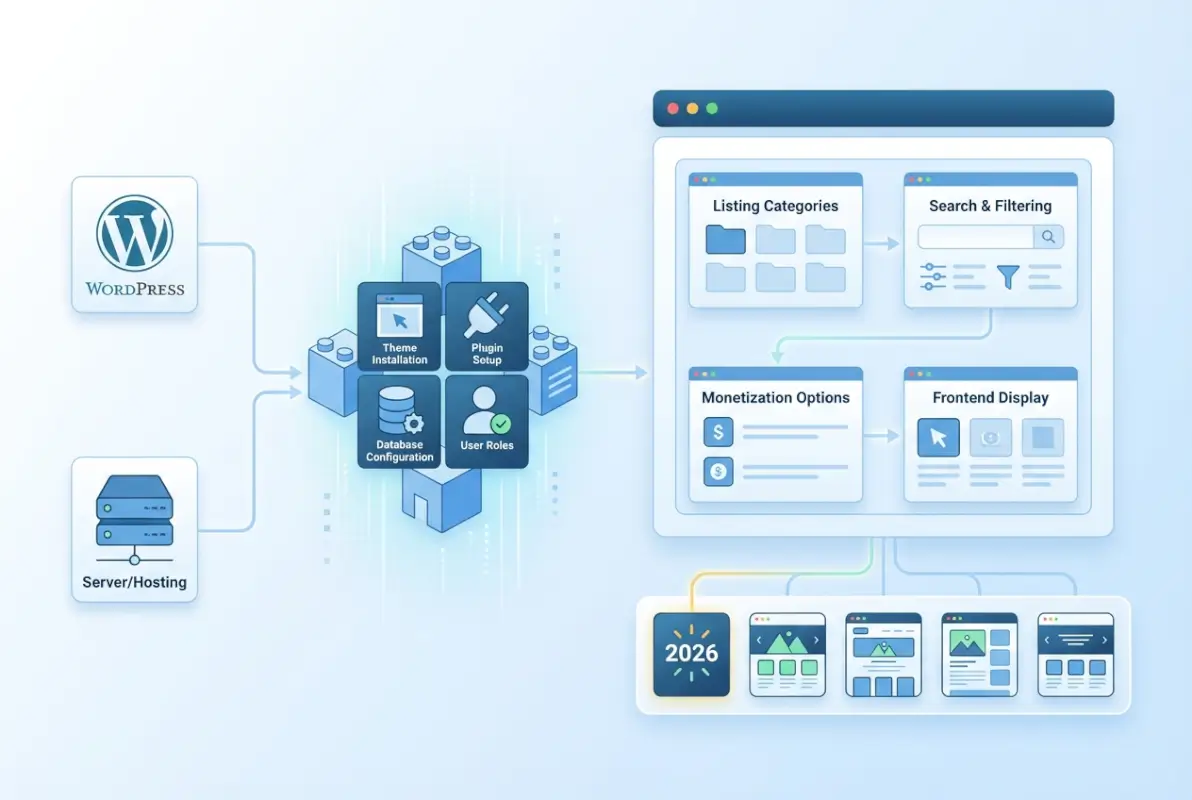
Monetization options run deep: paid listings, featured placements, claim-and-upgrade workflows for business owners, and integration with WooCommerce for complex pricing structures. I’ve seen operators run freemium directories where basic listings are free but premium visibility requires payment—Directorist handles this natively through its pricing module. The plugin integrates cleanly with Elementor, Gutenberg, and other page builders, so you’re not trapped in proprietary layout systems. Performance remains solid even at scale (I’ve tested instances with 50,000+ listings) as long as you implement proper caching and database indexing. The official Directorist repository shows consistent update cycles, which signals ongoing development rather than a stagnant codebase.
Key Features and Architecture
The multi-directory core lets you define listing types with completely different field sets—your job board can require salary ranges and application links while your restaurant directory asks for cuisine types and reservation systems, all managed from one dashboard. Frontend submission forms are drag-and-drop configurable, supporting text fields, dropdowns, checkboxes, file uploads, and custom taxonomies without touching code. Email verification, manual approval workflows, and automated expiration notices keep listing quality high while reducing admin workload. Search and filtering use AJAX for instant results without page reloads, and the advanced search widget supports radius-based queries, category filtering, price range sliders, and custom field searches. TurnKey Directories offers similar architectural flexibility for operators who need WordPress directory plugin solutions that scale across multiple listing types.
The review and rating system includes moderation controls, verified-purchase badges, and aggregate rating displays that boost SEO through structured data markup. Social login (Google, Facebook) reduces registration friction, which directly correlates with higher listing submission rates. The booking integration (optional extension) turns static listings into revenue-generating appointment systems—useful for service directories, salon listings, or consultant marketplaces. Directorist’s REST API enables headless implementations if you want to decouple the frontend from WordPress entirely (advanced use case but increasingly relevant for mobile-first strategies).
Scalability and Ecosystem
Scalability hinges on three factors: database query efficiency, caching strategy, and server resources. Directorist uses custom post types and taxonomies intelligently, avoiding query bloat that plagues poorly-coded directory plugins. You’ll need object caching (Redis or Memcached) once you pass 10,000 listings, and a CDN becomes non-negotiable at 50,000+ if you’re serving images and map tiles. The support ecosystem includes detailed documentation, video tutorials, and a community forum, though response times on free support can lag during peak periods. Premium extensions cover specialized needs: compare listings side-by-side, add live chat to listing pages, integrate with Stripe for payment processing, and implement claim-your-business workflows for local directories. The major directory plugin landscape increasingly favors modular architectures like Directorist’s because they adapt to evolving business models without platform migrations.
Developer-friendly hooks and filters mean you can customize without forking core files. I’ve built custom lead-generation forms that trigger automated email sequences when users inquire about listings—all through Directorist’s action hooks and third-party automation tools. The translation-ready codebase supports multilingual directories via WPML or Polylang, crucial for regional or international deployments. One caution: feature creep is easy when you have this many extensions available. Start with core functionality, validate your business model, then layer in premium features as user behavior dictates.
ListingHive and HivePress: A Theme/Plugin Duo for Listings
ListingHive takes a different architectural approach: it’s a premium WordPress theme built specifically to work with HivePress, a free directory plugin. This separation of concerns means the theme handles visual presentation and layout while HivePress manages listing data, submissions, and search functionality. The advantage? You get a polished, cohesive design without the bloat that comes from cramming all functionality into a theme framework. The disadvantage? You’re locked into the HivePress ecosystem, though that’s rarely a problem given its extension breadth. The theme ships with multiple prebuilt layouts for common directory types—business listings, classifieds, real estate, job boards—so you’re not starting from a blank canvas. This best WordPress business directory themes approach balances speed-to-market with customization flexibility.

HivePress itself is lightweight and well-coded, using native WordPress structures rather than inventing proprietary systems. The free version covers basic directory needs: listing submissions, categories, search, and user accounts. Premium extensions add geolocation, bookings, reviews, claims, and advanced filters. ListingHive amplifies this foundation with mobile-first responsive design, dark mode variants, and accessibility optimizations (WCAG 2.1 compliance matters for government and institutional clients). The frontend submission experience rivals paid SaaS platforms—users fill out forms with inline validation, upload media through drag-and-drop interfaces, and preview listings before publishing. According to global internet usage data, mobile submission now accounts for over 60% of directory submissions, making mobile-optimized themes essential rather than optional.
Thematic Approach and Frontend UX
ListingHive’s design philosophy prioritizes visual hierarchy and information density. Homepage layouts use card-based grids that adapt gracefully from desktop to mobile, with lazy-loading images and skeleton screens that improve perceived performance. The advanced search interface surfaces filters contextually—show cuisine filters for restaurant directories, square footage for real estate, skills for freelancer marketplaces—without cluttering the interface. Category pages include breadcrumb navigation, sorting options (newest, most popular, highest rated), and map views that sync with list results as users pan and zoom. Listing detail pages follow established UX patterns for information-seeking behavior: key details above the fold, media gallery with lightbox, expandable description sections, and prominent contact or booking CTAs.
The user dashboard gives listing owners analytics (views, clicks, inquiries), renewal reminders, and package upgrade prompts without feeling pushy. Email templates are branded and configurable—registration confirmations, approval notifications, expiration warnings, and inquiry forwarding all use consistent visual language. The theme includes Elementor integration for landing pages, letting you build custom promo pages for featured categories or seasonal campaigns without touching code. Search functionality uses AJAX throughout, so filtering by price, distance, amenities, or custom fields returns results instantly without page reloads (this significantly reduces bounce rates on category pages).
Ecosystem and Monetization Options
HivePress’s extension model follows WordPress conventions: install only what you need, avoid bloat from unused features. The Paid Listings extension handles subscriptions, one-time payments, and package tiers through WooCommerce, giving you access to dozens of payment gateways and subscription management tools. The Geolocation extension adds map markers, radius search, and location-based filtering—essential for local business directories. Reviews, Claims (for business owners to verify and enhance their listings), and Favorites (user wishlists) round out the monetization toolkit. Premium extension costs range from $29 to $79 annually, so budget accordingly when planning your directory’s feature set. The ecosystem lacks some advanced features found in all-in-one solutions (Directorist’s multi-directory support or GeoDirectory’s map clustering), but the modular approach keeps performance lean and troubleshooting straightforward. TurnKey Directories similarly emphasizes premium directory features worth the cost through selective add-ons rather than feature bloat.
Theme updates arrive regularly (quarterly at minimum), and customer support runs through a ticketing system with typical response times under 24 hours. The documentation covers common setup scenarios and includes video walkthroughs for non-technical users. One limitation: custom post type customization requires some PHP knowledge if you want to add fields or taxonomies beyond what the GUI offers. The theme works with popular multilingual plugins, though right-to-left language support (Arabic, Hebrew) requires additional CSS adjustments. For agencies building client directories, the white-label-ready design and developer license make ListingHive a cost-effective choice when compared to custom theme development from scratch.
GeoDirectory: Map-First Directories and Location-Aware Listings
GeoDirectory positions itself as the premier solution for location-based directories, prioritizing maps and geographic search above all else. Its architecture centers on geolocation data, enabling users to search by proximity, view clustered map pins, and filter results by distance from any point. This design philosophy makes GeoDirectory particularly well-suited for business directories, local service aggregators, real estate portals, and tourism guides where physical location drives discovery.

The plugin’s map-first interface typically loads a geographic view before list results, encouraging users to explore spatially rather than through traditional text filters. Advanced features include drag-to-search map interactions, heat-map overlays for listing density, and multi-location support for chains or franchises. GeoDirectory integrates with Google Maps and OpenStreetMap, allowing directory operators to balance API costs against feature richness and compliance requirements in different jurisdictions.
Performance optimization becomes critical when scaling GeoDirectory to tens of thousands of listings, as real-time distance calculations and map rendering can strain server resources. The plugin offers caching layers for geocoded data and supports spatial indexing in MySQL to accelerate proximity queries. Pairing GeoDirectory with a robust object cache (Redis or Memcached) and a content delivery network for map tiles ensures smooth user experiences even during traffic spikes.
Localization and Maps-Driven UX
GeoDirectory’s user experience revolves around interactive maps that display listings as markers, clusters, or custom icons based on category or rating. Users can zoom, pan, and click directly on map pins to preview listings without navigating to separate pages. This spatial interface reduces friction for mobile users searching on the go, as geolocation APIs automatically center maps on the user’s current position and sort results by proximity.
The plugin supports multiple map providers and style overlays, enabling operators to brand their maps with custom color schemes or switch providers to avoid vendor lock-in. Search-by-drawing tools let users define custom geographic boundaries—circles, polygons, or radii—to filter listings within specific neighborhoods or service areas. These capabilities mirror commercial platforms like Yelp and Google Maps, setting user expectations for any modern local directory in 2026.
| Map Feature | User Benefit | Operator Impact |
|---|---|---|
| Proximity Search | Auto-sorts by distance from current location | Requires geocoding API quota and server-side indexing |
| Cluster Markers | Reduces clutter on high-density maps | Improves render performance for 10k+ listings |
| Custom Map Styles | Consistent brand experience | Differentiation from generic map UIs |
| Draw-to-Search | Define custom service area boundaries | Complex polygon queries may slow database |
Extensibility and Performance Considerations
GeoDirectory’s extension marketplace includes add-ons for events, reviews, memberships, and advanced search filters, allowing operators to layer functionality onto the map-centric core. Integration with popular page builders (Elementor, Beaver Builder) enables custom landing pages and location-specific templates without touching code. The plugin’s REST API supports headless implementations, a growing requirement for directories that serve both web and mobile app frontends from a unified data layer.
Scaling GeoDirectory to millions of listings demands careful database optimization, particularly for spatial indexes and distance calculations. The plugin recommends dedicated hosting with SSD storage and MySQL tuning for GIS operations, plus aggressive caching strategies for map tiles and frequently accessed queries. Operators should monitor API usage for geocoding services, as bulk imports or frequent address updates can quickly exhaust free-tier quotas and incur substantial costs at enterprise scale.
ListingPro: All-in-One Directory Solution for Quick Launches
ListingPro bundles theme, plugin, and preconfigured templates into a single package designed to minimize time-to-launch for directory operators. Its opinionated design choices—prebuilt homepage layouts, integrated listing forms, and out-of-the-box monetization flows—appeal to entrepreneurs prioritizing speed over deep customization. This turnkey approach reduces the need for developer intervention, enabling non-technical users to deploy a professional directory within hours rather than weeks.
[KBIMAGE_4]The theme ships with multiple niche-focused demos—restaurants, real estate, job boards, events—each optimized for specific listing types and user journeys. Operators can import a demo with one click, inheriting colors, typography, widget placements, and sample content, then customize branding and add real listings. This template-driven workflow mirrors page-builder paradigms, lowering the barrier for small businesses and local chambers of commerce seeking a branded directory without hiring an agency.
ListingPro’s monetization toolkit includes front-end pricing tables, featured listing slots, and membership tiers, all configurable through WordPress admin panels. Payment gateways integrate directly (Stripe, PayPal, WooCommerce), and the theme generates invoices and renewal reminders automatically. This bundled approach reduces plugin sprawl and compatibility headaches, though it also couples operators to ListingPro’s update cycle and architectural decisions.
Feature Completeness and Quick-Start Value
ListingPro’s feature set covers the full directory lifecycle: front-end submission forms with media upload, automated moderation queues, email notifications for claim requests, and user dashboards for listing owners. The theme includes review and rating systems with rich snippets markup, helping listings capture stars in search results. Social login options (Facebook, Google) reduce friction during user registration, a proven tactic for boosting conversion on mobile devices.
The theme’s visual customizer exposes color pickers, font selectors, and layout toggles without requiring custom CSS, making it accessible to operators with limited design experience. Pre-styled widgets for popular listings, recent reviews, and category grids populate sidebars and footers automatically. This completeness means fewer third-party plugins and a more predictable support experience, as the ListingPro team controls the entire stack from theme files to listing logic.
| Quick-Start Feature | Benefit | Trade-Off |
|---|---|---|
| One-Click Demo Import | Launch-ready site in <1 hour | Demo content requires cleanup |
| Built-In Payment Flows | No WooCommerce dependency | Fewer payment gateway options |
| Visual Theme Customizer | No-code branding updates | Limited to exposed settings |
| Integrated Reviews & Ratings | SEO-ready rich snippets | Cannot swap review systems |
Performance and Long-Tail Customization Considerations
ListingPro’s all-in-one architecture can introduce performance overhead when listings and traffic scale beyond a few thousand entries. Because the theme bundles so many features, operators may load JavaScript and CSS for unused components (events, bookings, messaging) on every page. Selective script dequeuing and lazy-loading media require custom child-theme code, diluting the “no-code” value proposition for non-developers.
Deep customization—custom post types, advanced search algorithms, or third-party API integrations—may conflict with ListingPro’s update stream, as theme updates can overwrite bespoke modifications. Operators planning significant custom development should adopt a child theme from day one and document every hook and filter override. For straightforward directories within the bounds of ListingPro’s templates, this concern is minimal; for highly specialized verticals, the friction cost rises quickly.
PremiumPress Directory Themes: Established Enterprise-Ready Options
PremiumPress has specialized in directory and classified-ad themes for over a decade, accumulating a library of niche-specific templates ranging from business directories to automotive classifieds and real estate portals. This longevity translates into mature codebases, extensive documentation, and battle-tested workflows for membership tiers, paid listings, and advertising placements. Enterprise buyers value PremiumPress themes for their predictability and dedicated support channels, particularly when deploying multiple directories under a single brand umbrella.
[KBIMAGE_5]Each PremiumPress theme targets a vertical—business directories, job boards, coupons, automotive—with pre-configured taxonomies, custom fields, and search filters tailored to that market. This specialization reduces configuration overhead; an automotive directory ships with fields for make, model, mileage, and VIN, while a job board includes salary ranges, employment type, and application tracking. Operators skip the custom-field setup phase and move directly to content population and monetization strategy.
PremiumPress themes integrate tightly with the company’s proprietary monetization plugins, offering turnkey solutions for membership subscriptions, featured listings, banner ads, and pay-per-listing models. License pricing typically includes one year of updates and support, with renewal fees for continued access. This commercial model appeals to organizations that view directory software as infrastructure requiring vendor backing, rather than a DIY project reliant on community forums.
Template Depth and Niche Templates
PremiumPress’s template library spans dozens of pre-built designs, each optimized for specific use cases and user expectations within a vertical. A real estate theme emphasizes large image galleries, mortgage calculators, and agent profiles, while a business directory prioritizes operating hours, service categories, and review aggregation. This vertical focus means operators inherit industry best practices—layout conventions, essential fields, and trust signals—without researching competitor sites or hiring UX consultants.
The themes support unlimited custom fields and taxonomies, enabling operators to extend beyond the default schema as their directory matures. Advanced search forms auto-generate from custom-field definitions, ensuring new filters appear in the UI without template edits. This flexibility accommodates evolving business models, such as adding event listings to a restaurant directory or integrating classifieds into a local business portal.
| Niche Template | Key Pre-Configured Fields | Target Monetization |
|---|---|---|
| Business Directory | Hours, services, reviews, contact | Featured listings, membership tiers |
| Real Estate Portal | Price, beds/baths, square footage, agent | Pay-per-listing, agent subscriptions |
| Job Board | Salary range, employment type, location | Employer job packs, resume access fees |
| Automotive Classifieds | Make, model, year, mileage, VIN | Featured ads, dealer packages |
Support, Updates, and Integration with Directory Workflows
PremiumPress offers dedicated ticket-based support and maintains active update schedules to address WordPress core changes, PHP version compatibility, and security patches. Multi-site licenses and volume discounts cater to agencies and franchises deploying directories across regions or brands. This enterprise orientation contrasts with community-driven plugins, where support relies on forums and update cadences may lag during maintainer transitions.
Integration with payment gateways (PayPal, Stripe, Authorize.Net) and accounting systems (QuickBooks, Xero) streamlines financial workflows for directory operators managing hundreds of paid listings. The themes generate detailed transaction reports, automate renewal invoices, and handle refund processing through the WordPress admin. This operational maturity reduces manual bookkeeping and compliance risk, critical for directories operating under consumer-protection regulations or audited revenue streams.
FAQ for Business Directory Themes in 2026
What is a WordPress directory theme, and how does it differ from a plugin?
A WordPress directory theme provides the visual design and layout for your listings, while a directory plugin delivers the core functionality like front-end submissions, search filters, and listing management. Most modern directories combine both: a compatible theme for appearance and a plugin for business logic and database structure.
Which directory theme is best for large-scale listings with millions of entries?
GeoDirectory and Directorist excel at handling large-scale listings due to optimized database queries, map clustering, and caching support. Both solutions include dedicated performance extensions and are designed to scale vertically with proper hosting infrastructure. Enterprise setups benefit from dedicated server resources and CDN integration for optimal load times.
How do I choose between a multi-directory plugin like Directorist versus a theme like ListingPro?
Choose a multi-directory plugin if you need to run multiple independent directories on one site with different listing types and categories. Select an all-in-one theme like ListingPro if you want a single directory with prebuilt templates and faster setup. Your decision hinges on complexity requirements and time-to-launch priorities.
Can I monetize a WordPress directory, and what are common monetization methods?
Yes, most directory themes and plugins support monetization through paid listings, featured placements, subscription tiers, and claim fees. You can integrate WooCommerce or dedicated monetization extensions to charge for premium visibility, extended listing durations, or access to advanced fields. Google Ads and affiliate links provide supplementary revenue streams.
Are location-based directories like GeoDirectory better for local SEO than generic listings?
Location-based directories offer stronger local SEO signals through structured geolocation data, map embeds, and radius search features that search engines prioritize for near-me queries. GeoDirectory automatically generates location-specific pages and schema markup, improving visibility in Google Maps and local pack results compared to generic directory setups.
Should I use a free directory plugin or invest in a premium theme from the start?
Start with a free plugin like Directorist or HivePress to validate your niche and audience before committing to premium options. Once you prove demand and need advanced monetization or customization, upgrade to premium themes or paid extensions. This approach minimizes upfront costs while preserving flexibility for future growth.
What hosting requirements do I need for a high-traffic WordPress directory?
High-traffic directories require managed WordPress hosting or VPS with at least 4 GB RAM, SSD storage, and built-in caching like Redis or Memcached. Pair your hosting with a CDN for media delivery and enable object caching to reduce database load. Dedicated servers become essential once you exceed 100,000 monthly visitors or 50,000 listings.
How important is mobile responsiveness for directory themes in 2026?
Mobile responsiveness is critical, as over 60 percent of directory searches occur on smartphones. All five themes covered prioritize mobile-first design, touch-friendly filters, and accelerated mobile pages. Google’s mobile-first indexing means non-responsive directories suffer ranking penalties and higher bounce rates, directly impacting discoverability and revenue.
Your Next Steps: Choosing the Right Directory Design for 2026
You now have a clear map of the five leading WordPress directory designs for 2026, each tailored to different business models, scales, and technical requirements. Directorist offers unmatched flexibility for multi-directory operations and complex listing hierarchies. ListingHive and HivePress deliver a modular, theme-driven approach perfect for rapid prototyping and controlled extension growth. GeoDirectory stands out for location-centric use cases where maps, geolocation, and proximity search drive user engagement. ListingPro provides an all-in-one, turnkey solution ideal for entrepreneurs prioritizing speed to market over granular customization. PremiumPress directory themes bring enterprise-ready templates and niche-specific scaffolding for organizations that need proven structures from day one.
Your decision should hinge on three core dimensions: the complexity of your listing taxonomy, your anticipated traffic and database scale, and your preferred balance between out-of-the-box convenience and long-term customization headroom. If you plan to manage multiple distinct directories under one roof, Directorist is your foundation. If location and maps are central to your value proposition, GeoDirectory is the logical choice. For fast launches with minimal technical overhead, ListingPro and PremiumPress themes reduce time to revenue. And if you want to start lean with a free plugin and scale selectively through extensions, ListingHive and HivePress offer a sustainable growth path.
Monetization capabilities are table stakes in 2026. Every solution covered supports paid listings, featured placements, and subscription models, typically through WooCommerce integration or native monetization modules. The real differentiator is how seamlessly each platform handles frontend submission workflows, user dashboards, and payment gateways. Test your chosen theme or plugin with a staging environment, import sample listings, and walk through the entire user journey from search to checkout. This hands-on validation will surface friction points and confirm whether the UX aligns with your audience expectations.
Performance at scale cannot be an afterthought. Directory sites grow exponentially in database load as listings, reviews, and media accumulate. Invest in hosting infrastructure that supports object caching, CDN delivery, and database optimization from the outset. Pair your theme or plugin with lightweight page builders, compress images aggressively, and enable lazy loading for maps and media galleries. Monitor Core Web Vitals monthly and prioritize fixes that reduce Largest Contentful Paint and Cumulative Layout Shift. Search engines reward fast, stable directories with higher rankings and better click-through rates.
SEO is your growth engine. Structured data markup, location-specific landing pages, and rich snippets transform directories into search magnets. GeoDirectory excels here with automatic schema generation and geo-targeted pages. Directorist and ListingPro offer robust SEO modules that integrate with Yoast and Rank Math. Whichever platform you choose, configure XML sitemaps for listings, enable breadcrumb navigation, and optimize meta descriptions for long-tail keywords. User-generated reviews and Q&A sections add fresh content signals that amplify organic visibility over time.
Ready to Launch Your Directory?
Pick the theme or plugin that matches your niche, install it on a staging site, and import sample listings to test the full user experience. Validate your monetization flow, confirm mobile responsiveness, and measure page speed before going live. Your directory’s success depends on the foundation you choose today.
Start with a clear feature checklist, prioritize scalability, and commit to iterative optimization. The best directory design is the one that grows with your vision.
The directory landscape in 2026 rewards operators who combine the right technical foundation with relentless user-experience refinement. Your theme or plugin is just the starting point. Consistent content moderation, responsive support for listing owners, and proactive feature updates will differentiate your directory in crowded verticals. Monitor user feedback through heatmaps and session recordings, iterate on search filters based on actual query patterns, and A/B test your pricing tiers quarterly. Directories that evolve with their communities outperform static competitors by wide margins.
Take action now. Choose your platform, sketch your listing taxonomy, and map your first three months of content acquisition and monetization milestones. The tools are ready, the ecosystem is mature, and the market opportunity for niche directories has never been stronger. Your users are searching for what you’re about to build.
Was this article helpful?