Directory Groups for Business Accounts: Complete IT Guide to RBAC & Access Control

Generating summary...
Ever opened Active Directory only to find a chaotic mess of nested groups with cryptic names like “Legacy_Finance_OLD_2” or “Marketing_Temp_DO_NOT_DELETE”? If you’re nodding right now, you’re witnessing what happens when directory group management runs on autopilot for too long. The truth most IT teams don’t want to admit: poorly organized directory groups are the silent culprit behind 70% of access control failures, yet they remain one of the most neglected aspects of identity management.
Here’s the thing—while everyone obsesses over the latest zero-trust frameworks and AI-powered security tools, the fundamental structure of how you organize accounts into groups determines whether those fancy tools even work properly. A well-architected directory group framework isn’t just about organization; it’s your first line of defense against privilege creep, compliance violations, and those 2 AM emergency access revocation calls.
TL;DR – Quick Takeaways
- Directory groups are the backbone of RBAC – Proper group design enables least-privilege access without administrative overhead
- AGDLP/AGUDLP patterns still matter – These nesting models prevent permission sprawl even in hybrid cloud environments
- Service accounts need special treatment – Over 60% of security breaches involve compromised service account credentials stored in poorly managed groups
- Audit your groups quarterly minimum – Stale memberships accumulate faster than you think, creating invisible security gaps
- Naming conventions aren’t optional – Consistent naming is the difference between manageable governance and administrative chaos
- Dynamic groups reduce manual work – But only when paired with clear business rules and regular validation
Foundations of Directory Groups and Accounts
Before we dive into complex nesting patterns and governance frameworks, let’s establish what we’re actually talking about when we discuss directory groups. In most enterprise environments—whether that’s Active Directory, Azure AD, or even LDAP-based systems—you’re dealing with three fundamental object types: user accounts (people), computer accounts (machines), and group objects (containers that grant permissions).
The magic happens when you understand that groups exist to separate identity from authorization. Instead of granting Jane from Finance direct access to the budget database, you add Jane to the Finance_Users group, which has access to that resource. When Jane moves to Marketing, you simply change her group membership rather than hunting down every permission assignment across your infrastructure.
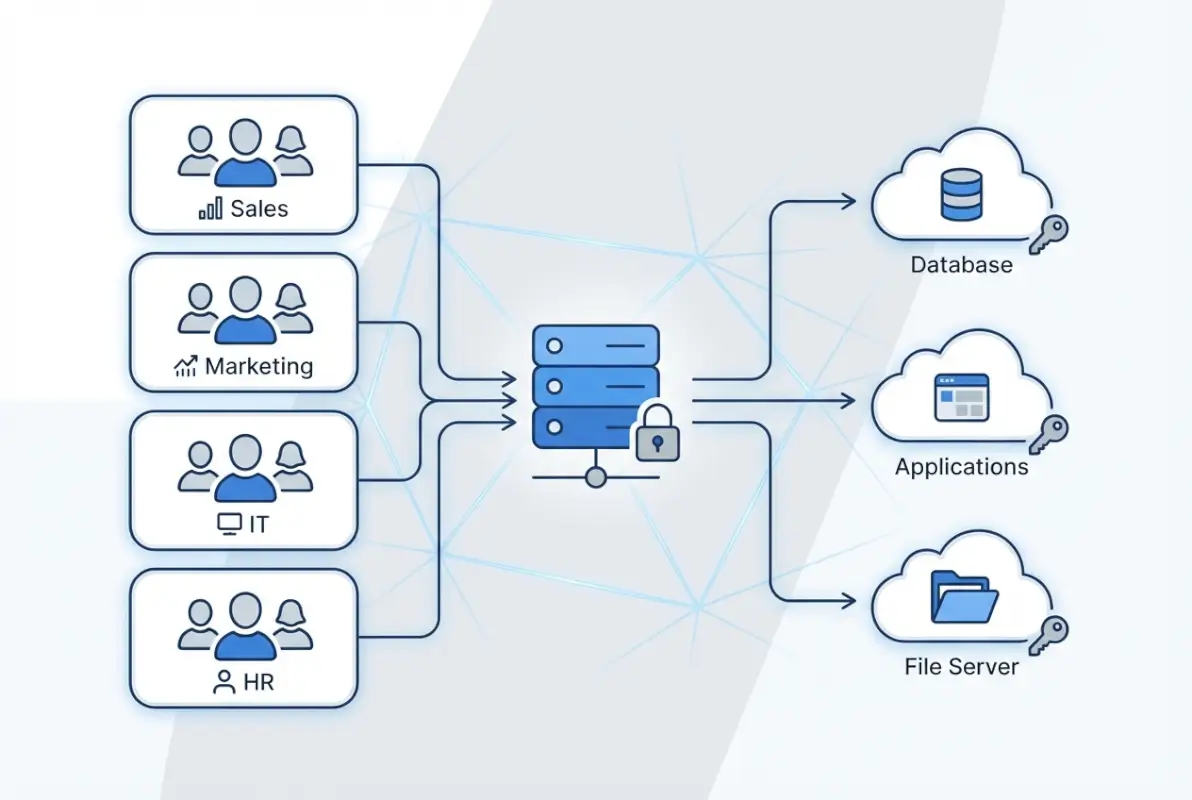
This separation seems obvious, but I’ve seen Fortune 500 companies violate this principle constantly, usually because “it was faster to just give them direct access this one time.” Those one-time shortcuts accumulate into what security teams call “permission debt”—a tangled web of direct assignments that becomes impossible to audit or revoke cleanly.
Understanding Group Types and Their Purpose
Active Directory offers three group scopes—global, domain local, and universal—and each serves a distinct purpose in a well-designed access control model. Global groups contain user accounts from a single domain and can be used anywhere in the forest. Domain local groups define permissions to resources within a single domain. Universal groups span the entire forest and are replicated to all global catalogs (use them sparingly for this reason).
According to Microsoft’s official Active Directory security groups documentation, the choice of group type directly impacts replication traffic, authentication speed, and your ability to scale across domains. Getting this wrong doesn’t just create administrative headaches; it can genuinely affect network performance when you’re dealing with thousands of users.
The AGDLP/AGUDLP Nesting Model Explained
Here’s where things get interesting. The AGDLP acronym stands for: Accounts go into Global groups, Global groups go into Domain Local groups, and Domain Local groups get Permissions. AGUDLP adds Universal groups into the mix for multi-domain forests. These aren’t just cute mnemonics—they’re battle-tested patterns that prevent the most common access control mistakes.
The logic is elegant: you group users by business role (Sales, Engineering, HR) in global groups. Then you create domain local groups that represent resource access (FinanceDB_Read, HR_Files_Modify). Finally, you nest the appropriate global groups into domain local groups and assign permissions only to the domain local groups. This separation means when the Sales team needs database access, you add one group to another rather than touching actual permission ACLs.
I remember working with a healthcare provider that ignored this pattern entirely, they granted permissions directly to global groups containing users. When they needed to audit who had access to patient records across multiple file servers, it took them three weeks and a custom PowerShell script that crashed twice. Don’t be that organization.
Why Governance Matters From Day One
Least privilege and separation of duties aren’t just compliance checkboxes—they’re practical necessities for any business that plans to scale. When every administrator can modify any group, when service accounts have Domain Admin rights “because it was easier,” when there’s no audit trail of membership changes, you’re not running an IT environment; you’re running a security incident waiting to happen.
The OWASP Top Ten security risks consistently highlight broken access control as a leading vulnerability. Your directory group design is literally the implementation layer for access control across your entire infrastructure. Get it wrong, and every security tool you layer on top is building on a cracked foundation.
Building a Sound Directory Group Architecture
Designing a directory group structure that scales requires thinking beyond your immediate needs. You’re not just organizing today’s 50 employees—you’re building a framework that should function when you have 5,000 employees spread across multiple regions, business units, and perhaps even different acquisitions that brought their own identity chaos with them.
The key principle that separates amateur group designs from professional ones is this: map business roles first, then map those roles to resources. Too many organizations do it backwards—they start with resources (SharePoint sites, file shares, databases) and create groups around those. That approach falls apart the moment someone needs access to multiple resources or when resources change ownership between departments.
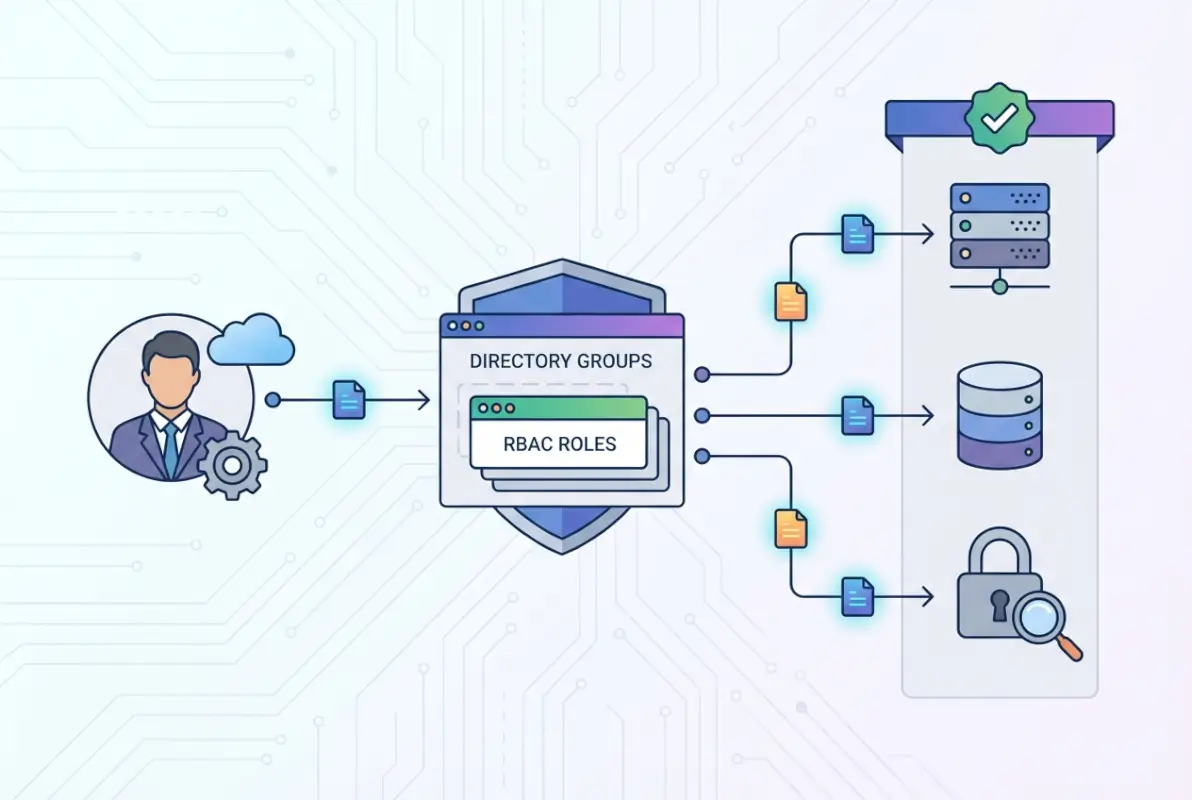
Designing for Scale: Group Types and Nesting Depth
While AGDLP gives you the conceptual framework, real-world implementation requires balancing several competing concerns. Deep nesting (groups within groups within groups) can become a troubleshooting nightmare when you’re trying to figure out why Sarah can’t access that one folder. But completely flat structures with no nesting lead to explosive group counts and massive administrative overhead.
Research from TechTarget’s Active Directory organization strategies suggests limiting nesting to three levels maximum in most cases. Any deeper and you risk circular nesting errors, performance degradation during token building, and administrators who simply give up trying to understand the structure and start creating shadow groups.
For cross-domain scenarios, universal groups solve specific problems but create others. Since universal group memberships are replicated to every global catalog server, changes trigger forest-wide replication. Use them strategically for truly global access needs, not as a default because “they work everywhere.”
Implementing RBAC Through Groups
Role-based access control sounds fancy, but it’s really just the practical application of AGDLP thinking extended to your entire permission model. Define roles based on job functions—not individuals, not departments, but actual work activities. A “Contract Reviewer” role might include people from Legal, Finance, and Operations, all needing identical access to contract management systems.
Create global groups that represent these business roles. These groups should be named clearly (ContractReviewers, InvoiceApprovers, TechWriters) and documented with their intended purpose. Then create resource-specific domain local groups (Contracts_ReadWrite, Invoices_Approve, Documentation_Edit) and nest your role groups appropriately. When someone’s job changes, you modify their role group memberships—one or two changes that cascade across all their access needs.
| Group Type | Scope | Members | Purpose |
|---|---|---|---|
| Global | Single Domain | User accounts | Represent business roles |
| Domain Local | Single Domain | Global/Universal groups | Hold resource permissions |
| Universal | Forest-wide | Global groups | Cross-domain access |
Service Accounts and Application Identity
Here’s where many otherwise solid directory designs completely fall apart. Service accounts—those special accounts that applications use to run services or access databases—often get thrown into regular user groups or, worse, given direct permissions that bypass your entire group structure. This is dangerous for multiple reasons: service account compromises are harder to detect, they often have elevated privileges, and their permissions tend to persist long after the application they supported has been decommissioned.
Best practice dictates creating separate global groups specifically for service accounts (ServiceAccounts_Database, ServiceAccounts_Web, etc.). Never mix service accounts with human user accounts in the same groups. Document which application uses which service account and review these memberships during every access audit. I’ve personally witnessed a breach where an attacker compromised a forgotten service account that still had Domain Admin rights from a server migration project completed four years prior.
Naming Conventions and Lifecycle Management
I cannot stress this enough: establish a strict naming convention before you create your first group. A good naming standard includes a prefix identifying the group type (GG_ for global groups, DL_ for domain local), a descriptor indicating the business function or resource, and potentially a suffix indicating access level (_RO for read-only, _RW for read-write).
For example: GG_Finance_Analysts (global group containing finance analysts), DL_BudgetDB_RW (domain local group with read-write permissions to the budget database). When you see these groups in an ACL six months from now, their purpose is immediately clear. Compare that to groups named “Finance,” “Budget Access,” or my personal nightmare “Group2_TEMP” that somehow becomes permanent.
Lifecycle management means treating groups like any other IT asset. When are they created? Who approves them? When are they reviewed? When are they decommissioned? Temporary project groups should have expiration dates. Orphaned groups (with no members or no resource assignments) should be flagged and cleaned up. According to Netwrix’s Active Directory security groups analysis, the average enterprise has 25-30% unused or redundant groups cluttering their directory—each one representing a potential security gap if accidentally granted permissions.
Implementing Directory Group Governance
Creating a beautiful group architecture means nothing if your governance model allows anyone to bypass it whenever it’s convenient. Effective governance isn’t about creating bureaucracy; it’s about establishing guardrails that prevent the slow degradation of your carefully designed structure. Think of it as the difference between a well-maintained garden and one where weeds gradually take over because “we’ll deal with it later.”
The core question governance answers is: who can do what, when, and with what approval? Without clear answers to this question, you’ll find yourself in a situation where junior admins are creating global groups when they should use domain local, where service accounts gradually accumulate excessive permissions, and where nobody quite knows who approved that VIP’s direct access to the finance database.

Group Membership Governance and Approval Workflows
Not all group memberships are created equal. Adding someone to a group that grants access to a shared calendar requires minimal oversight. Adding someone to a group with financial system access should trigger approval workflows, documentation, and potentially separation-of-duties checks to ensure you’re not creating SOX violations.
Implement tiered governance based on risk. Low-risk groups (general communication lists, building access for common areas) can allow manager approval. Medium-risk groups (department file shares, standard application access) might require both manager and IT approval. High-risk groups (privileged access, financial systems, PHI/PII access) should require multi-party approval, documentation of business justification, and time-limited memberships that auto-expire.
I worked with a financial services company that implemented this tiered approach, within six months they reduced standing privileged access by 67% simply because requiring justification and approval made people realize they didn’t actually need permanent elevated rights—they needed occasional access that could be granted on-demand.
Automation and Bulk Operations
For organizations managing thousands of users, manual group management is simply not sustainable. This is where automation becomes essential—but dangerous if implemented carelessly. Automated provisioning can quickly create privilege creep if your rules aren’t precisely defined and regularly validated.
Tools like ManageEngine’s bulk group management solutions can handle mass operations like adding new hires to standard groups based on department and role. The key is building these automations on top of your well-designed group structure, not using automation to work around a poorly designed structure.
Implement approval gates before bulk operations execute. Log everything. And most critically, build deprovisioning automation that matches your provisioning automation. When someone leaves or changes roles, their old permissions should be removed just as automatically as they were granted. This is where most organizations fail—they automate the easy part (granting access) but leave removal as a manual process that’s perpetually backlogged.
Auditing, Reporting, and Compliance
Your group structure exists to enable auditing, not to make it harder. When an auditor asks “Who has access to this sensitive database?” you should be able to answer in minutes, not days. The answer should be: “Members of [this domain local group], which currently contains [these global groups], which contain [these users].” Clean, traceable, documented.
Implement regular audit reporting that tracks: membership changes over time, privileged group memberships, groups with no members (orphaned groups), users with excessive group memberships, and service account group assignments. Schedule these reports quarterly at minimum, monthly for high-security environments.
| Audit Focus | Frequency | Priority | Key Metrics |
|---|---|---|---|
| Privileged Groups | Weekly | Critical | Membership changes, new additions |
| Service Account Groups | Monthly | High | Permission scope, last usage |
| Orphaned Groups | Quarterly | Medium | Empty groups, unused groups |
| All Group Memberships | Quarterly | Medium | Total memberships per user |
Security Controls for Privileged Groups
Groups that grant administrative rights or access to sensitive data require additional protections. Implement Protected Users security group for highly privileged accounts (this prevents NTLM authentication and enforces Kerberos with strong encryption). Use separate admin accounts for privileged tasks rather than elevating regular user accounts. Monitor privileged group modifications in real-time with alerting—any change to Domain Admins, Enterprise Admins, or similar groups should trigger immediate notification.
Consider implementing Privileged Access Management (PAM) solutions that grant temporary, just-in-time membership to privileged groups. Instead of permanently adding an admin to Domain Admins, they request elevated access for a specific task, receive time-limited membership (perhaps 4 hours), and are automatically removed when the window expires. This dramatically reduces your attack surface while maintaining operational flexibility.
Modern Directory Environments and Dynamic Groups
The directory world has evolved significantly beyond traditional on-premises Active Directory. Cloud directories like Azure AD (now Microsoft Entra ID), Google Workspace Directory, and hybrid environments introduce new capabilities and challenges. The fundamental principles of proper group design remain constant, but the implementation details and available features have expanded considerably.
One of the most significant advances is dynamic group membership—groups that automatically update based on user attributes rather than manual membership management. This sounds like the solution to all your provisioning headaches, and it can be, but only when implemented thoughtfully. Dynamic groups are powerful automation tools, not substitutes for proper group design.

Cloud Directories vs On-Premises Active Directory
Azure AD and similar cloud directories don’t use the same global/domain local/universal group scopes as on-premises AD. Instead, they have security groups and Microsoft 365 groups (formerly Office 365 groups), each with different capabilities and sync behaviors. Security groups in Azure AD can be assigned to applications and resources, while M365 groups include collaboration features like shared mailboxes and team sites.
In hybrid environments where you’re syncing on-premises AD to Azure AD, your group strategy needs to account for both worlds. Some groups should be created and managed on-premises then synced up (user groups following your AGDLP model). Others should be cloud-only (groups for SaaS applications that have no on-premises footprint). Document clearly which groups originate where, because troubleshooting sync issues with groups that are being modified in both locations simultaneously is an administrator’s nightmare.
According to Microsoft’s guidance on managing user accounts across Windows Server environments, hybrid identity strategies should maintain clear ownership boundaries between cloud and on-premises identity stores to prevent conflicts and ensure auditability.
Dynamic Groups and Attribute-Based Membership
Dynamic groups automatically populate based on rules you define: “All users in the Sales department,” “All users whose title contains ‘Manager’,” or more complex combinations like “All users in Engineering whose account was created in the last 90 days and who are located in the Seattle office.” When user attributes change, group memberships update automatically—no manual intervention required.
This is incredibly powerful for standard access provisioning. New hire in Sales? They automatically get added to all relevant Sales groups if you’ve structured your rules properly. Employee promoted to manager? Their management-level access provisions automatically. The risk comes when your attribute data is inaccurate or when someone figures out they can manipulate group membership by changing their own attributes in self-service portals.
Integration With IAM and Access Governance Tools
Modern Identity and Access Management platforms integrate with your directory to provide access reviews, certification workflows, and risk-based access policies. These tools consume your group structure as inputs for their decision-making, which means the cleaner your group design, the more effective these tools become.
For example, access review tools can automatically generate quarterly campaigns asking managers to certify that their employees still need membership in specific groups. But if your groups are poorly named and undocumented, those managers have no idea what “DL_FINANCE_LEGACY_APP3_RW” actually grants access to, so they just approve everything to be safe. Your expensive IAM tool becomes security theater rather than actual governance.
This is why documentation matters. Every group should have a clear description field populated. High-risk groups should have documented owners who are responsible for reviewing membership. When your IAM tools can surface this context during access reviews, you get meaningful governance instead of checkbox compliance.
Practical Implementation Playbook
Theory is great, but most IT teams need concrete, actionable steps they can start implementing tomorrow. This section provides specific playbooks for common scenarios you’ll encounter when building or remediating your directory group structure. These aren’t just best practices—they’re battle-tested procedures from real implementations across organizations ranging from 200 to 20,000 users.

Playbook 1: Building a New AGDLP Structure
Starting fresh? Lucky you. Here’s the step-by-step process:
Step 1: Map business roles to required access. Interview department heads and document what employees in each role actually need to access. Be specific—”Finance Analyst” is too vague. “Accounts Payable Analyst” and “FP&A Analyst” likely need different access sets.
Step 2: Create global groups for each business role using your naming convention (GG_Finance_APAnalyst, GG_Finance_FPAAnalyst). Add users to these groups based on their actual job functions.
Step 3: Identify resources (file shares, applications, databases) and create domain local groups representing permission levels to those resources (DL_APFileshare_RW, DL_FPADatabase_RO). Do not add users to these groups—only add global groups.
Step 4: Nest your global groups into the appropriate domain local groups based on your access requirements documentation. Test with a pilot group of users before rolling out broadly.
Step 5: Assign permissions (NTFS, share, application-level) only to the domain local groups, never to global groups or individual users. This is the critical step that makes the whole model work.
Playbook 2: Clean Deprovisioning When Employees Leave
Employee terminations are when weak group governance becomes obvious. A proper deprovisioning workflow should take minutes, not hours:
Immediate actions (within 1 hour of notification): Disable the user account, reset the password, revoke VPN certificates, terminate active sessions. These don’t require understanding group memberships—they’re universal security measures.
Within 4 hours: Document the user’s current group memberships for potential forensic needs. Remove from all security groups except a “Disabled Users” group (keep this for easy identification of disabled accounts during cleanup). Do not delete the account yet—retain for potential litigation hold or data recovery needs.
Within 30 days: Review the terminated user’s home directory and mailbox. Redirect mail to their manager or redistribute to the team. Archive or delete data per retention policies. After business stakeholders confirm all data has been handled appropriately, delete or archive the user account per your retention policies.
Automate this workflow wherever possible, but maintain manual approval gates before actual deletion to prevent accidents.
Playbook 3: Service Account and Application Identity Management
Service accounts need special handling because they represent a fundamentally different risk profile than user accounts:
Creation process: Require justification documenting: what application uses this account, what resources it needs access to, who is responsible for the application, and when the account can be decommissioned. No service account should be created without this documentation.
Group assignment: Create global groups specifically for service accounts (GG_ServiceAccounts_WebApps, GG_ServiceAccounts_Database). Never mix service accounts with user accounts in the same groups. Add these service account groups to domain local resource groups following the same AGDLP pattern as user groups.
Monitoring: Service accounts should have distinct logon hours if they only run scheduled tasks. Alert on unusual logon locations or times. Service accounts authenticating from multiple IPs simultaneously might indicate credential compromise.
Review cadence: Audit service account group memberships quarterly. Validate that the documented application is still in use and that the account still requires its current permissions. Service account privilege creep is worse than user privilege creep because it’s harder to detect and often goes unnoticed for years.
Common Pitfalls and How to Avoid Them
Even with the best intentions, certain mistakes crop up repeatedly. Here’s what to watch for:
Over-nesting: Avoid groups nested more than 3-4 levels deep. It makes troubleshooting impossible and can cause token bloat issues. If you find yourself nesting that deeply, your role design is probably too granular.
Permission drift: When you discover a permission problem, the tempting fix is to grant direct access “just this once.” Resist. Every direct permission grant bypasses your group model and becomes technical debt. Take the extra 10 minutes to implement the proper fix through groups.
Stale memberships: Users accumulate groups over time as they take on new responsibilities, but rarely are old groups removed when those responsibilities end. Implement regular recertification campaigns where managers must actively confirm (not just passively approve) that each group membership is still needed.
Undocumented “temporary” groups: Project groups created for “temporary” access that never get cleaned up. Enforce expiration dates on all project-related groups and automate warnings to group owners 30 days before expiration.
Measuring Success and Continuous Improvement
You can’t improve what you don’t measure. Directory group management might seem like a binary success/failure situation—either people have access or they don’t—but there are actually numerous metrics that indicate the health of your group structure and governance processes. Tracking these metrics over time helps you identify degradation before it becomes crisis and demonstrates the value of your IAM investments to leadership.
Key Performance Indicators for Group Management
Time-to-provision: How long does it take from access request to access granted? Healthy organizations with proper group structures can provision standard access in under 1 hour. If you’re taking days, your approval workflows are too complex or your group structure doesn’t align with actual business needs.
Time-to-deprovision: Even more critical from a security perspective. When an employee leaves or changes roles, how quickly are old permissions revoked? This should be measured in hours, not days. If it’s taking days or weeks, you have a significant security gap.
Group sprawl rate: How many new groups are being created monthly? A steadily increasing rate without corresponding user base growth suggests either poor naming conventions leading to duplicate groups, or lack of discovery mechanisms causing people to create new groups instead of using existing ones.
Orphaned group percentage: What percentage of your groups have zero members or grant access to zero resources? In healthy environments, this should be under 5%. Higher percentages indicate poor lifecycle management and represent security risks (orphaned groups often get forgotten permissions).
Access review completion rate: When you send out quarterly access certification campaigns, what percentage of managers complete their reviews? Anything under 80% suggests your reviews are too burdensome or lack proper context, both of which are symptoms of poor group documentation.
Security and Compliance Metrics
Beyond operational efficiency, measure your security posture through group-related metrics:
Privileged group membership count: Track how many accounts have membership in highly privileged groups (Domain Admins, Enterprise Admins, etc.). This number should be minimal and decreasing over time as you implement least-privilege principles and just-in-time access.
Service account percentage in privileged groups: What percentage of privileged group members are service accounts vs human accounts? Service accounts should never be in privileged groups unless absolutely unavoidable (and document those exceptions explicitly).
Average groups per user: How many groups is the average user a member of? While this varies by organization, typical ranges are 15-30 groups. If you’re averaging 50+ groups per user, you likely have overly granular group design or aren’t cleaning up old memberships.
Direct permission assignments: How many resources have permissions assigned directly to users rather than groups? This should be as close to zero as possible. Any direct assignments represent bypasses of your group model and create audit headaches.
Continuous Improvement Framework
Don’t let your group structure become static. Schedule quarterly governance reviews where you examine:
- Are naming conventions being followed consistently?
- Are new groups being created properly or are shortcuts being taken?
- Has group sprawl occurred and can groups be consolidated?
- Are there patterns in access requests indicating gaps in your role definitions?
- What percentage of access requests are non-standard (requiring creation of new permissions)?
Use these reviews to refine your approach. Maybe you discover that contractors need a separate provisioning workflow. Maybe you find that certain departments have turnover patterns requiring more frequent access reviews. Maybe you identify opportunities for dynamic groups that didn’t exist when you first designed your structure.
The goal isn’t perfection—it’s continuous reduction in friction and risk. Every quarter should show measurable improvement in at least one key metric, even if other areas need attention.
Frequently Asked Questions
What is the difference between global, domain local, and universal groups in Active Directory?
Global groups contain user accounts from a single domain and can be used to grant permissions anywhere in the forest. Domain local groups contain global or universal groups and are used to assign permissions to resources within their domain. Universal groups span the entire forest and are used for cross-domain access, but changes trigger forest-wide replication. The AGDLP model uses these types in sequence: Accounts in Global groups, Global groups in Domain Local groups, Domain Local groups receive Permissions.
How do I implement least-privilege access using directory groups?
Start by mapping business roles to specific access requirements, then create role-based global groups that contain users with similar job functions. Create resource-specific domain local groups representing permission levels (read, write, admin) and nest appropriate role groups into them. Assign permissions only to domain local groups, never directly to users. Review group memberships quarterly, implement time-limited membership for privileged access, and automate removal of unnecessary permissions when roles change. This separation ensures users only have access required for their current responsibilities.
What are AGDLP and AGUDLP and are they still relevant?
AGDLP stands for Accounts-Global groups-Domain Local groups-Permissions, a nesting pattern that prevents permission sprawl in Active Directory environments. AGUDLP adds Universal groups for multi-domain forests. These patterns remain highly relevant because they solve fundamental access control problems: separating identity from authorization, enabling efficient permission management at scale, and creating clear audit trails. While modern cloud directories don’t use identical group types, the core principle of separating user identity from resource permissions remains best practice across all directory platforms.
How should I handle service accounts in directory group design?
Create separate global groups specifically for service accounts, never mixing them with human user accounts. Document each service account thoroughly including which application uses it, what resources it requires access, who owns the application, and planned decommission date. Follow the same AGDLP nesting patterns but maintain clear separation. Review service account permissions more frequently than user accounts (monthly vs quarterly). Never grant service accounts Domain Admin or other highly privileged access unless absolutely unavoidable, and document those exceptions with compensating controls like enhanced monitoring.
How often should I audit directory group memberships?
Audit frequency should be risk-based. Privileged groups (Domain Admins, Enterprise Admins, groups with financial system access) require weekly monitoring of membership changes with immediate alerting on modifications. Standard security groups should be audited quarterly with formal access certification where managers confirm each membership is still needed. Service account groups need monthly reviews validating the account is still in use and permissions remain appropriate. Additionally, conduct annual comprehensive reviews of your entire group structure looking for orphaned groups, naming convention violations, and consolidation opportunities.
What tools should I consider for bulk directory group management?
For small environments (under 500 users), native Active Directory tools and PowerShell scripts may suffice. Mid-size organizations benefit from dedicated AD management tools like ManageEngine ADManager Plus, Quest Active Roles, or Netwrix Auditor which provide governance workflows, bulk operations, and reporting. Large enterprises typically need Identity Governance and Administration (IGA) platforms like SailPoint, Saviynt, or Okta Identity Governance that integrate group management with broader IAM processes including access requests, certifications, and policy enforcement across multiple systems.
Can I use dynamic groups instead of manual group membership management?
Dynamic groups that auto-populate based on user attributes are excellent for standard, low-risk access provisioning but shouldn’t completely replace manual groups. Use dynamic groups for scenarios where access clearly maps to attributes like department, location, or title (communication lists, building access, standard application access). Maintain manual groups for privileged access, sensitive data access, and situations requiring explicit approval. Ensure your attribute data is accurate and protected from unauthorized changes, since manipulating attributes could grant unintended access through dynamic group rules.
What security controls should be implemented for privileged directory groups?
Implement multiple layers of protection: enable auditing on all privileged groups with real-time alerting on membership changes; require multi-factor authentication for any account with privileged group membership; use separate admin accounts for privileged tasks rather than elevating regular user accounts; implement Protected Users security group for highly privileged accounts; enforce time-limited membership using Privileged Access Management solutions rather than standing access; conduct weekly reviews of privileged group memberships; and implement break-glass procedures for emergency access that bypass normal approval workflows but trigger enhanced monitoring.
How do I transition from a poorly organized directory to proper group structure?
Start by documenting your current state including all existing groups, their memberships, and what permissions they grant. Create your target architecture following AGDLP principles with proper naming conventions. Implement the new structure in parallel for new users and resources while gradually migrating existing items. Begin with low-risk departments or applications as pilots to validate your design. Use the migration as an opportunity to review every permission and eliminate excessive access. Plan for 6-12 months for a complete transition in large environments, and maintain clear documentation so users understand changes.
What are the most common mistakes when organizing business accounts in directory groups?
The most frequent errors include: granting permissions directly to users or global groups instead of using domain local groups; inconsistent or absent naming conventions making groups impossible to understand six months later; mixing service accounts with user accounts in the same groups; creating temporary groups that become permanent without proper lifecycle management; over-nesting groups beyond 3-4 levels causing troubleshooting nightmares; failing to remove users from old groups when responsibilities change causing privilege creep; and treating all groups equally instead of implementing risk-based governance with stricter controls for privileged access.
Take Action on Your Directory Group Structure Today
Don’t wait for a security incident or failed audit to expose weaknesses in your directory group design. Start with a single department, implement proper AGDLP structure, document your naming conventions, and establish governance workflows. The investment of a few days now will save hundreds of hours over the coming years and significantly reduce your security risk.
Remember: perfect is the enemy of good. A simple, well-documented group structure that everyone follows is vastly superior to an elaborate design that’s too complex to maintain. Start where you are, document everything, and improve incrementally. Your future self—and your auditors—will thank you.
Was this article helpful?