How to Create a Business Directory: 7 Steps to Success

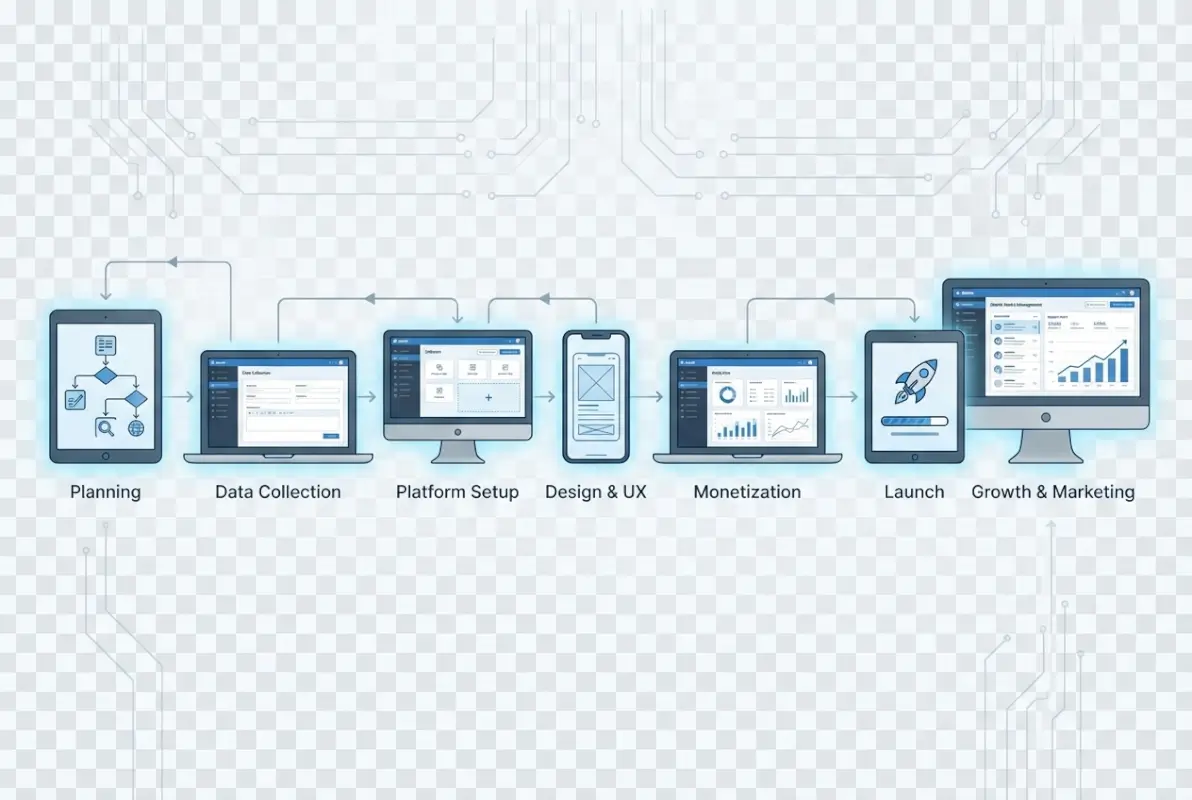
Visual overview of How to Create a Business Directory: 7 Steps to Success

Creating a business directory can be one of the most lucrative online ventures you’ll ever pursue, but here’s what nobody tells you upfront: most people fail because they treat it like building a simple list instead of architecting a valuable ecosystem. I remember launching my first directory back when yellow pages were still relevant (yes, I’m dating myself here), and the biggest mistake I made was thinking the technology mattered more than the community. The truth is, a successful business directory isn’t about having the fanciest features or the most listings—it’s about solving a specific problem for a clearly defined audience better than anyone else. Whether you’re planning to create a niche industry directory or a local business hub, understanding the strategic framework behind directory success will save you months of frustration and thousands of dollars in wasted effort.

TL;DR – Quick Takeaways

  • Niche focus beats broad coverage – Dominating a specific vertical or geographic area generates more value than competing with established general directories
  • Revenue models require planning – Decide between subscription fees, premium listings, advertising, or hybrid approaches before you build
  • User experience drives success – Advanced search functionality and mobile optimization aren’t optional extras anymore
  • Content quality matters more than quantity – 100 verified, detailed listings outperform 1,000 basic entries
  • Marketing starts on day one – Building the directory is only 30% of the work; attracting businesses and users is the real challenge
  • Technology choices have long-term consequences – Select platforms and tools that can scale with your growth plans

Step 1: Define Your Directory’s Niche and Target Audience

The single biggest determinant of your directory’s success happens before you write a single line of code or choose a platform. You need to identify a specific niche where demand exists but supply is fragmented or poorly served. Generic business directories are a graveyard of failed ventures because you’re competing against Google My Business, Yelp, and dozens of entrenched players with unlimited resources. Instead, think about specialized industries, professional services, or geographic regions that major platforms overlook or underserve.

Core concepts behind How to Create a Business Directory: 7 Steps to Success

In my experience working with directory owners, the most profitable niches share three characteristics: they serve businesses willing to pay for visibility, they address a clear search intent that existing solutions don’t satisfy well, and they have enough potential listings to create critical mass without being so broad that you can’t compete. For example, a directory focused exclusively on certified sustainable contractors in the Pacific Northwest has far better prospects than “all contractors everywhere.” The narrow focus lets you become the definitive resource, which makes both business owners and searchers choose you over general alternatives.

💡 Pro Tip: Before committing to your niche, manually compile 50-100 potential listings. If you struggle to find this many, your niche might be too narrow. If you easily find 10,000+, you’ll need significant resources to compete effectively.

Research your target audience from both sides of the marketplace. Who are the businesses you’ll list, and what pain points drive them to seek directory placement? Equally important, who are the end users searching for these businesses, and what specific problems are they trying to solve? A directory for wedding vendors needs to understand both the marketing challenges facing photographers and caterers, and the planning anxieties of engaged couples searching for reliable service providers. This dual perspective shapes everything from your feature set to your pricing model.

Validate your concept before investing heavily. Use tools like Google Trends to verify search volume for relevant queries, examine existing competitors to identify gaps in their offerings, and survey potential business clients about their willingness to pay. I’ve seen too many entrepreneurs build technically impressive directories for markets that simply don’t exist or won’t monetize. A few hours of unglamorous market research can prevent months of building something nobody wants.

Step 2: Choose the Right Technology Platform

Your platform decision carries consequences you’ll live with for years, so resist the temptation to just pick the cheapest or easiest option without strategic consideration. The directory landscape offers three main paths: custom development, WordPress with directory plugins, or specialized directory software platforms. Each has distinct advantages and limitations that align with different business models, technical capabilities, and growth trajectories.

Step-by-step process for How to Create a Business Directory: 7 Steps to Success

WordPress with plugins like Business Directory Plugin or GeoDirectory offers the most accessible entry point for non-technical founders. You get reasonable functionality quickly, extensive customization through themes and plugins, and manageable hosting costs (typically starting around what you’d pay for basic website hosting). However, you’ll eventually hit scaling limitations if your directory grows to thousands of listings with heavy traffic, and you’re dependent on plugin developers maintaining compatibility with WordPress updates. For testing concepts or serving smaller markets, this approach makes considerable sense.

Platform TypeBest ForTypical CostTechnical Skill Required
WordPress + PluginsSmall to medium directories, budget-conscious starts$200-$500 initialLow to Medium
Directory SaaS PlatformsFast launches, non-technical owners$50-$300/monthLow
Custom DevelopmentUnique requirements, scalability priority$5,000-$50,000+High (requires developers)
Specialized Directory SoftwareEstablished businesses, specific industries$1,000-$10,000 licenseMedium

SaaS platforms designed specifically for directories provide another viable route, especially if you want to launch quickly without technical headaches. These services handle hosting, updates, and core functionality while letting you focus on content and marketing. The tradeoff is ongoing monthly fees and less control over customization, which can be fine for many business models. When evaluating these platforms, scrutinize their search functionality, payment processing options, and whether they allow you to export your data if you eventually outgrow their service.

⚠️ Important: Whatever platform you choose, ensure it supports structured data markup for search engines. Directories that properly implement schema.org markup for local businesses see significantly better visibility in search results and rich snippets.

Custom development makes sense when you have specific requirements that off-the-shelf solutions can’t address, substantial budget, or technical expertise in-house. Building custom gives you complete control over features, user experience, and scalability architecture. However, you’re looking at development timelines measured in months rather than days, and ongoing maintenance costs that many founders underestimate. Unless your directory concept has truly unique technical requirements or you’ve validated strong market demand worth significant investment, start with a proven platform and customize later when you have revenue justifying the expense.

Step 3: Design Essential Features and User Experience

The features you include should flow directly from your audience research, not from what seems cool or what competitors have. Every feature adds complexity, development time, and maintenance burden, so prioritize ruthlessly. A directory with five excellent features that work flawlessly beats one with twenty mediocre features that confuse users. Start with the absolute minimum viable product that solves your audience’s core problem, then expand based on actual user feedback rather than assumptions.
Tools and interfaces for How to Create a Business Directory: 7 Steps to Success

Search functionality is your directory’s engine, and it deserves more attention than any other feature. Users come to directories with specific intent—they’re looking for something—so your search needs to handle the way real people actually look for businesses. This means supporting multiple search criteria (location, category, keywords, attributes), autocomplete suggestions, and filtered results that narrow options without overwhelming choices. Poor search is the fastest way to send frustrated users back to Google, never to return.

73%
of users abandon directory searches if they can’t find what they need within three clicks

Business listing pages need to balance comprehensiveness with scannability. Required elements include business name, categories, contact information, location with map integration, description, and images. Beyond these basics, consider what information your specific audience needs to make decisions. A restaurant directory needs hours and menu highlights; a B2B service directory needs case studies and certifications. Let businesses create directory listings that showcase their unique value propositions while maintaining consistent structure across your directory.

Mobile responsiveness isn’t optional anymore, it’s foundational. More than half of directory searches now happen on mobile devices, and Google’s mobile-first indexing means your mobile experience directly affects search rankings. Test your directory extensively on actual phones and tablets, not just desktop browsers resized to mobile dimensions. Pay special attention to tap targets, form inputs, and map interactions—elements that work fine with a mouse often frustrate users on touchscreens.

✅ Key Insight: User-generated content like reviews and ratings dramatically increases engagement and trust, but it also requires moderation resources. Plan your content policies and moderation workflow before enabling these features.

Consider which features justify premium listings versus what should be available to all businesses. Common premium features include enhanced placement in search results, additional images or videos, social media integration, analytics about profile views, and removal of competitor ads from their listing pages. The key is making free listings valuable enough that businesses want to be included, while creating clear premium benefits worth paying for. If your free listings are too limited, businesses won’t bother; if premium offers too little advantage, they won’t upgrade.

Step 4: Build or Choose Your Directory Platform

The technical foundation of your business directory determines its functionality, scalability, and user experience. You’ll need to decide whether to build a custom solution, use a website builder, or leverage a specialized directory platform based on your technical skills, budget, and long-term goals.

Best practices for How to Create a Business Directory: 7 Steps to Success

Custom-Built Solutions

Developing a custom directory from scratch offers maximum flexibility and control. This approach works best for directories with unique requirements or those planning significant scale. You’ll typically use frameworks like WordPress with directory plugins, Laravel, Django, or React combined with a headless CMS.

Custom development requires either in-house technical expertise or hiring developers. While initial costs are higher—ranging from $5,000 to $50,000+ depending on complexity—you own the codebase and can modify any aspect of functionality. This option makes sense when your directory concept requires features that off-the-shelf solutions don’t provide.

WordPress Directory Plugins

WordPress powers approximately 43% of all websites and offers numerous directory-specific plugins that dramatically reduce development time. Popular options include Business Directory Plugin, GeoDirectory, and Listable. These plugins provide listing submission forms, search filters, user reviews, and payment integration out of the box.

Implementation Tip: If you choose WordPress, select a hosting provider optimized for WordPress performance like WP Engine or Kinsta. Directory sites with hundreds or thousands of listings require more resources than typical blogs or business websites.

No-Code Directory Builders

Platforms like Brillant Directories, Memberstack with Webflow, or Airtable combined with Softr allow you to create functional directories without writing code. These solutions offer pre-built templates, drag-and-drop customization, and integrated payment processing. Monthly costs typically range from $50 to $300.

No-code platforms significantly reduce time to launch—you can have a basic directory operational in days rather than months. The trade-off is less customization flexibility and ongoing subscription costs. Evaluate whether the platform’s feature set aligns with your required functionality before committing.

Essential Technical Features

Regardless of your platform choice, ensure your directory includes these core technical capabilities:

  • Responsive design: Your directory must function flawlessly on smartphones, tablets, and desktops since over 60% of directory searches occur on mobile devices
  • Fast loading speeds: Aim for page load times under 3 seconds to reduce bounce rates and improve search engine rankings
  • Advanced search and filtering: Users should find relevant businesses through category, location, ratings, features, and keyword searches
  • User account management: Business owners need dashboards to manage their listings, respond to reviews, and track analytics
  • Payment processing: Integrate Stripe, PayPal, or similar platforms to handle subscription payments securely
  • SEO optimization: Include proper meta tags, schema markup, XML sitemaps, and clean URL structures
  • Security measures: Implement SSL certificates, regular backups, spam prevention, and data protection compliance

Step 5: Implement Monetization Strategies

Transforming your business directory from a useful resource into a profitable venture requires strategic monetization. The most successful directories typically combine multiple revenue streams rather than relying on a single source, creating stable and diversified income.

Advanced strategies for How to Create a Business Directory: 7 Steps to Success

Freemium Listing Model

This approach offers basic listings at no cost while charging for premium features. Free listings might include company name, address, phone number, and a brief description. Premium listings add enhanced visibility, photos, videos, social media links, customer reviews, and priority placement in search results.

The freemium model reduces barriers to entry, helping you build initial directory population quickly. Once businesses see traffic value from free listings, conversion rates to paid plans typically range from 2% to 10%. Price premium listings between $20 and $200 monthly depending on your niche’s market size and competition.

Listing TierFeatures IncludedTypical Monthly Price
FreeBasic contact info, company description (100 words), category listing$0
BasicLogo, 5 images, extended description, website link, social links$25-$50
PremiumUnlimited images, video, priority search placement, review highlights, analytics$75-$150
FeaturedHomepage featuring, category sponsorship, lead generation tools, API access$200-$500

Display Advertising

Once your directory attracts consistent traffic—typically 10,000+ monthly visitors—display advertising becomes viable. Google AdSense provides the easiest entry point, though direct ad sales to relevant businesses generate higher revenue per impression.

Strategic ad placement maximizes revenue without degrading user experience. Position ads in the header, sidebar, between search results, and within listing pages. Avoid intrusive pop-ups or autoplay videos that frustrate users and increase bounce rates. Well-implemented display advertising can generate $500 to $5,000+ monthly depending on traffic volume and niche.

Lead Generation Fees

Some directory niches support lead generation models where you charge businesses per qualified inquiry received through your platform. This works particularly well for high-value services like legal, financial, medical, or home improvement industries where single customers generate substantial revenue.

Implement contact forms, quote request systems, or call tracking that attributes leads to your directory. Charge $5 to $100+ per lead depending on industry average customer values. This performance-based model aligns your success with business outcomes, making it easier to justify costs to listed companies.

Sponsored Listings and Featured Placements

Allow businesses to purchase prominent positioning in search results, category pages, or homepage sections. Unlike standard premium listings, sponsored placements focus specifically on visibility rather than additional features. These spots typically command premium prices—$100 to $1,000+ monthly—in competitive categories.

Clearly label sponsored content to maintain user trust and comply with advertising disclosure requirements. Rotate featured businesses weekly or monthly to create fairness and provide value to multiple paying customers rather than allowing a single business to dominate permanently.

Affiliate Marketing and Referrals

Partner with service providers relevant to your directory’s niche and earn commissions on referrals. For example, a restaurant directory might affiliate with reservation systems, point-of-sale providers, or food delivery platforms. A professional services directory could partner with accounting software, project management tools, or insurance providers.

Integrate affiliate links naturally within listing pages, resource sections, or blog content. Focus on products that genuinely benefit your listed businesses rather than promoting irrelevant services solely for commission potential. This approach generates passive income while providing additional value to your community.

Premium Content and Resources

Create valuable content like industry reports, market analyses, best practice guides, or training courses that businesses will pay to access. A legal directory might offer continuing education courses, while a restaurant directory could provide food safety certification training or marketing templates.

This strategy positions your directory as an industry authority while diversifying revenue beyond advertising and listings. Price digital products between $50 and $500 depending on depth and specialization. Bundle premium content access with higher-tier listing packages to increase perceived value.

Monetization Reality Check: Most new directories should expect 6-12 months before generating meaningful revenue. Focus initially on building traffic and credibility rather than aggressive monetization that could deter early users and listings.

Step 6: Attract and Grow Your User Base

A business directory’s value increases exponentially with the number of quality listings and engaged users it attracts. Your growth strategy must balance two distinct audiences: the businesses you list and the consumers searching for those businesses. Success requires coordinated efforts across multiple channels with consistent execution over time.

Search Engine Optimization (SEO)

SEO represents the most sustainable long-term traffic source for directories. Each listing page, category page, and location page presents an opportunity to rank for relevant searches. Focus on creating unique, detailed content for every listing rather than thin pages with minimal information.

Implement local SEO strategies by creating dedicated pages for each geographic area you cover. A nationwide directory should have city-level and neighborhood-level pages with unique content about local businesses, market characteristics, and area-specific information. Include structured data markup using LocalBusiness schema to help search engines understand your content.

Build authoritative backlinks by creating shareable resources, contributing expert commentary to industry publications, and developing partnerships with complementary websites. Quality backlinks from relevant sources signal to search engines that your directory provides valuable information worth ranking highly.

Direct Business Outreach

Proactively contact businesses in your target niche to claim and enhance their listings. Develop email templates explaining your directory’s value proposition, current traffic statistics, and competitive advantages. Personalize outreach by mentioning specific aspects of their business to demonstrate genuine interest rather than sending obvious mass emails.

Offer initial promotional pricing or extended free trials to early adopters. These businesses become case studies demonstrating results, which you’ll use to convince later prospects. Track which outreach messages generate the highest response rates and continuously refine your approach based on data.

Content Marketing

Publish regular blog content addressing questions your target audiences ask. A wedding vendor directory might create planning guides, budget calculators, and trend reports. A B2B services directory could publish industry analyses, vendor selection frameworks, and case studies.

Each content piece should naturally link to relevant directory categories and listings, driving readers deeper into your platform. Optimize articles for search engines to attract organic traffic, then convert visitors into users through strategic calls-to-action and email capture forms.

Social Media Presence

Establish profiles on platforms where your target audiences actively engage. B2B directories typically find success on LinkedIn, while consumer-focused directories perform better on Facebook, Instagram, or TikTok depending on demographic fit.

Share featured listings, new additions, industry news, and user-generated content to maintain engagement. Create shareable content formats like “top 10” lists, comparison guides, or video interviews with listed businesses. Encourage businesses to share their listing pages on their own social channels, expanding your reach through their networks.

Email Marketing

Build an email list from day one by offering valuable resources in exchange for email addresses. Create separate nurture sequences for businesses and consumers, addressing each group’s specific interests and needs.

Send regular newsletters featuring new listings, industry insights, platform updates, and relevant content. Segment your list based on interests, location, or engagement levels to deliver more targeted, relevant messages. Email marketing typically generates 10-30% of ongoing traffic for established directories.

Paid Advertising (Strategic Use)

While organic growth should form your foundation, strategic paid advertising accelerates initial traction and tests messaging effectiveness. Google Ads targeting high-intent keywords like “[niche] directory” or “find [service] near me” can drive qualified traffic.

Social media advertising works well for targeting specific business types to claim listings. Create lookalike audiences based on your best customers to find similar prospects efficiently. Set modest budgets—$500 to $2,000 monthly—until you establish clear ROI metrics.

Growth Milestone: Focus on reaching your first 100 quality listings before scaling other efforts. This critical mass provides enough content for search engines to index and gives visitors sufficient options to find value, creating positive feedback loops that accelerate subsequent growth.

Partnership and Co-Marketing

Identify complementary businesses, associations, or media outlets that reach your target audience. Develop mutually beneficial partnerships where you provide exclusive content, tools, or resources in exchange for exposure to their community.

Industry associations often maintain member directories or resource pages where you can secure listings. Offer to provide the association’s members with free or discounted premium listings, creating value for both the association and expanding your business base.

Step 7: Maintain and Scale Your Directory

Launching your directory marks the beginning rather than the end of your journey. Long-term success requires consistent maintenance, quality control, community engagement, and strategic scaling. Directories that stagnate with outdated information quickly lose traffic and credibility, while those that continuously improve build compounding advantages.

Quality Control and Data Accuracy

Directory value depends entirely on information accuracy. Implement regular verification processes to ensure business details remain current. Schedule quarterly reviews of all listings, contacting businesses to confirm information or removing defunct companies.

Enable user reporting for incorrect information, providing a simple “suggest an edit” button on every listing page. Review submissions within 48 hours to maintain data quality without creating burdensome manual workloads. Consider automated verification systems that cross-reference business details against authoritative sources like government business registries.

Establish clear listing guidelines covering acceptable business types, prohibited content, and quality standards. Moderate new submissions before publication to prevent spam, duplicate listings, or inappropriate content from degrading your directory’s reputation.

User Engagement and Community Building

Transform your directory from a static database into an active community where businesses and consumers interact. Enable and moderate reviews, questions and answers, and comment sections that provide social proof and additional value beyond basic business information.

Recognize and reward active participants through badges, featured profiles, or “most helpful reviewer” designations. These gamification elements encourage continued engagement while highlighting quality contributors to other users.

Host virtual or in-person events connecting businesses with potential customers or with each other. A local business directory might organize networking mixers, while a niche professional directory could host webinars on industry topics. Events strengthen community bonds and position your directory as a central industry hub.

Analytics and Performance Tracking

Implement comprehensive analytics tracking user behavior, traffic sources, popular categories, search patterns, and conversion rates. Google Analytics provides foundational insights, while directory-specific metrics include listings viewed per session, search-to-click rates, and contact form submissions.

Monitor business-side metrics like listing claim rates, premium conversion rates, renewal rates, and customer lifetime value. Identify which acquisition channels deliver the highest-quality businesses and allocate resources accordingly.

Establish key performance indicators (KPIs) aligned with your business goals and review them weekly or monthly. Track trends over time rather than obsessing over day-to-day fluctuations, making strategic adjustments based on sustained patterns rather than temporary variations.

Key MetricWhat It MeasuresHealthy Benchmark
Monthly Active UsersUnique visitors who engage with your directory20%+ month-over-month growth in early stages
Listing Growth RateNew business listings added monthly50+ monthly in year one, accelerating thereafter
Premium Conversion RatePercentage of free listings upgrading to paid5-15% after directory establishes traffic
Customer Renewal RatePaid listings that renew subscriptions70%+ indicates strong value delivery
Pages Per SessionAverage listings viewed per visitor3-5 pages indicates engaged users
Organic Traffic SharePercentage of visits from search engines60%+ indicates strong SEO foundation

Technical Maintenance and Updates

Regularly update your platform’s software, plugins, and security measures to prevent vulnerabilities and maintain performance. Schedule monthly backups stored in multiple locations to protect against data loss from technical failures or security breaches.

Monitor site speed continuously, optimizing images, implementing caching, and upgrading hosting resources as traffic grows. Page load times directly impact both user experience and search rankings, making performance optimization an ongoing priority rather than a one-time task.

Stay current with web standards and best practices, particularly regarding mobile experience, accessibility, and privacy compliance. As regulations like GDPR, CCPA, and others evolve, ensure your data collection and processing practices remain compliant.

Strategic Scaling Approaches

Once your directory achieves product-market fit in your initial niche or geography, consider strategic expansion. Options include geographic expansion (adding new cities, regions, or countries), category expansion (adding related business types), or feature expansion (adding booking, e-commerce, or other transactions).

Evaluate expansion opportunities based on available resources, competitive dynamics, and community demand. Geographic expansion typically presents the clearest path, applying your proven model to new locations with similar characteristics to your initial success.

Consider whether to pursue horizontal scaling (serving more of the same customer type) or vertical scaling (adding depth to existing relationships through additional services). Horizontal scaling increases reach and market share, while vertical scaling increases revenue per customer and strengthens competitive moats.

Building a Sustainable Business Model

Long-term directory success requires transitioning from founder-dependent operations to systematized processes that scale without proportional time investment. Document standard operating procedures for listing approval, customer support, content creation, and other recurring tasks.

Gradually build a team or leverage contractors to handle routine operations, freeing your time for strategic initiatives that drive growth. Consider hiring or contracting specialists for content creation, technical development, sales outreach, and customer success as revenue supports additional resources.

Establish financial discipline by tracking unit economics—the cost to acquire a customer versus their lifetime value. Profitable directories typically achieve customer lifetime values 3-5x higher than acquisition costs, providing margin for sustainable growth investments.

Long-Term Perspective: Successful directories typically require 2-3 years to reach significant scale and profitability. Maintain realistic expectations and sufficient runway to persist through the initial growth phase when expenses exceed revenue. The businesses that survive this period often build substantial, defensible market positions.


Frequently Asked Questions

How much does it cost to create a business directory?

Creating a business directory costs between $500 and $50,000 depending on your approach. Using WordPress with directory plugins costs $500-$2,000, while custom development ranges from $10,000-$50,000. Ongoing expenses include hosting ($20-$200 monthly), domain registration ($10-$15 yearly), and marketing budget for acquisition.

What features should a business directory website have?

Essential directory features include advanced search filters, business profile pages, user reviews and ratings, contact forms, map integration, and mobile responsiveness. Premium features should include analytics dashboards, claim listing functionality, featured placement options, and email verification. Include social media integration and multimedia support for comprehensive listings.

How do business directories make money?

Business directories generate revenue through multiple streams: premium listing subscriptions ($20-$200 monthly), featured placement advertising, banner ads, lead generation fees, and affiliate commissions. Additional income comes from sponsored content, directory submission fees, and data licensing. Successful directories typically combine three to four revenue streams.

Can I build a business directory without coding skills?

Yes, you can build a professional directory without coding using platforms like WordPress with plugins such as GeoDirectory or Business Directory Plugin. No-code solutions like Brilliant Directories offer complete packages starting at $67 monthly. These platforms provide drag-and-drop interfaces, pre-built templates, and automated features requiring zero technical knowledge.

How long does it take to build a business directory?

Building a basic directory takes two to four weeks using existing platforms and templates. Custom development requires three to six months for a fully-featured solution. Timeline factors include feature complexity, design customization, initial business population, testing phases, and SEO optimization. Plan additional time for content creation and business outreach.

What makes a business directory successful?

Successful directories focus on specific niches, maintain accurate updated listings, and provide genuine value to both businesses and searchers. Key success factors include strong SEO performance, active user engagement, quality over quantity in listings, responsive customer support, and consistent marketing efforts. Regular content updates and community building drive long-term growth.

Should I allow free or only paid listings?

Start with free basic listings to build directory volume and attract users, then offer paid premium upgrades for enhanced features. This freemium model generates traffic while creating revenue opportunities. Approximately 70-80% of listings should be free, with premium options including featured placement, enhanced profiles, and priority ranking driving monetization.

How do I get businesses to join my directory?

Attract businesses through direct outreach campaigns, demonstrating SEO value, offering free trial periods, and showcasing existing traffic statistics. Create compelling value propositions highlighting increased visibility and customer inquiries. Use email campaigns, social media promotion, and industry partnerships. Add businesses manually initially to demonstrate directory quality and value.

What are the best niches for business directories?

Profitable directory niches include local services (plumbers, electricians), healthcare providers, restaurants and food services, professional services (lawyers, accountants), home improvement contractors, and wellness businesses. Geographic-specific directories and underserved industries offer excellent opportunities. Research competition levels and local business density before selecting your niche.

Ready to Launch Your Business Directory?

You now have the complete roadmap to build a profitable business directory from scratch. The key to success lies in taking action today. Choose your niche, select your platform, and start building your foundation. Remember that every successful directory started with a single listing and grew through consistent effort and value delivery.

The businesses in your chosen niche are actively searching for visibility right now. Searchers are looking for curated, trustworthy recommendations. Your directory can become the bridge connecting them, generating recurring revenue while providing genuine value to your community.

Your Next Steps

  1. Define your specific niche and target audience this week
  2. Research your top three competitors and identify gaps
  3. Choose your platform and register your domain name
  4. Set up your basic directory structure and test functionality
  5. Add your first 20-30 quality business listings manually
  6. Implement SEO best practices and submit to search engines
  7. Launch your marketing campaign and start acquiring users

Don’t wait for the perfect moment. Start building your business directory today and create a valuable asset that generates income for years to come.

Similar Posts

  • Blog

    How to Join the ATA Online Directory: 6 Simple Steps

    substring(replace(

    If you’re a translator or interpreter looking to expand your client base and boost your professional credibility, getting listed in the ATA Online Directory might be one of the smartest moves you’ll make this year. The American Translators Association’s directory isn’t just another online listing—it’s a trusted gateway that connects language professionals with clients who are specifically searching for vetted, qualified translators and interpreters. While most translators spend countless hours chasing leads on generic freelance platforms, ATA members enjoy the advantage of being found by clients who already understand the value of professional language services and are ready to pay for quality work.

    Here’s something most people don’t realize: the ATA Directory isn’t just a static phonebook. It’s a dynamic search tool that clients use to filter by language pairs, specializations, geographic location, and even certification status. That means when a law firm in Chicago needs a certified Spanish-to-English legal translator, or when a hospital in Seattle requires a medical interpreter for Mandarin, your profile can appear at the exact moment they’re looking. The difference between being listed and not being listed often comes down to whether you get that high-value project or watch it go to a competitor.

    Setting up your ATA Directory listing might seem daunting at first, especially if you’re new to the association or haven’t updated your profile in years. But the process is more straightforward than you’d think—once you know the right steps. In this guide, I’ll walk you through exactly how to join the ATA Online Directory in six simple, actionable steps, covering everything from account setup to profile optimization, so you can start attracting better clients faster.

    TL;DR – Quick Takeaways

    • ATA membership unlocks directory access – You need to be an ATA member to appear in the searchable online directory, which clients use to find qualified language professionals
    • Six straightforward steps – The process involves confirming eligibility, navigating to your listing section, completing your profile, adding language pairs and specializations, setting availability preferences, and publishing your listing
    • Profile quality matters – A well-crafted, detailed profile with specific language pairs, industry specializations, and certifications significantly increases your visibility to potential clients
    • Ongoing maintenance is essential – Regular updates to your profile ensure accuracy and help you stay competitive as your skills and services evolve
    • Strategic optimization drives results – Using the right keywords, highlighting certifications, and providing clear contact information helps clients find and choose you over competitors

    Step 1 — Confirm Eligibility and Create/Log into Your ATA Account

    Before you can appear in the ATA Online Directory, you need to establish your relationship with the American Translators Association. The first critical step is understanding whether you’re eligible for membership and what type of membership best suits your professional status. The ATA offers several membership categories, including active membership for practicing translators and interpreters, associate membership for those with language-related professions, and student membership for those currently enrolled in translation or interpretation programs.

    [KBIMAGE_1]

    Most language professionals will want active membership, which comes with full directory listing privileges and access to all member benefits. The application process is fairly straightforward, but you’ll need to prepare some information in advance. Have your professional email address ready (avoid using generic Gmail or Yahoo addresses if possible—a professional domain makes a stronger impression), along with details about your language pairs, educational background, and any relevant certifications you hold.

    💡 Pro Tip: Use the same professional email address you use for client communications. This creates consistency across your professional presence and ensures you won’t miss important notifications from ATA or potential clients reaching out through your directory listing.

    If You’re Already an ATA Member: Accessing Your Profile

    If you’ve been an ATA member for a while but haven’t set up your directory listing yet (or haven’t touched it in years), the good news is that you already have an account. Navigate to the ATA Member Center and use your existing login credentials. Can’t remember your password? There’s a straightforward password reset function that will send recovery instructions to your registered email address.

    Once you’re logged in, you’ll see your member dashboard, which provides access to various member resources, event registrations, and—most importantly for our purposes—your directory profile management tools. The interface has been updated over the years, so if you’re working from old instructions or remembering how things looked five years ago, you might notice some changes. The core functionality remains the same, though: you’re looking for a section related to “Directory,” “Profile,” or “My Listing.”

    If You’re Not Yet a Member: Understanding Your Options

    For those who aren’t yet ATA members, you’ll need to complete the membership application process before you can create a directory listing. The investment in ATA membership pays dividends beyond just the directory listing—you gain access to professional development resources, networking opportunities, industry publications, and the credibility that comes with being part of the largest professional association for translators and interpreters in the United States.

    The membership application asks for information about your language combinations, professional experience, education, and specializations. Be thorough and accurate here, this information doesn’t just determine your membership status, it also forms the foundation of your eventual directory listing. You’ll save time later if you provide complete, well-organized information from the start.

    ⚠️ Important: Keep your login credentials in a secure password manager. You’ll need to access your ATA account regularly to update your directory listing, register for events, and access member resources. Losing access means delays in updating your professional information when you gain new certifications or expand your service offerings.

    The membership fee is an annual investment, and you’ll want to factor this into your business planning. However, many translators and interpreters find that a single client connection through the directory can more than pay for the annual membership cost. According to the U.S. Bureau of Labor Statistics, the median pay for interpreters and translators continues to reflect the value of professional credentials and associations in commanding higher rates.

    Step 2 — Navigate to the Directory Listing Section

    Once you’ve confirmed your membership status and successfully logged into your ATA account, the next step is finding your way to the actual directory listing management area. This is where many new members get a bit turned around, not because it’s particularly complicated, but because the ATA Member Center contains numerous features and resources, and it’s easy to get distracted exploring everything the association offers.

    [KBIMAGE_2]

    From your member dashboard, look for navigation elements that mention “Directory,” “Online Directory,” “My Profile,” or “Public Profile.” The exact wording has evolved as the ATA has updated its website infrastructure, but the concept remains consistent: you’re looking for the section where you can manage how you appear to the public and to potential clients who search the directory. This is distinct from your internal member profile, which contains membership information, payment history, and other administrative details that clients never see.

    The directory listing interface typically presents you with a form or series of fields where you can enter and edit information. Think of this as your professional storefront—every field you complete is another piece of information that helps clients understand whether you’re the right fit for their project. Empty fields don’t just look incomplete; they represent missed opportunities to communicate your value and expertise.

    Understanding What Information the Directory Expects

    The ATA Directory structure is designed to capture the information that clients most frequently search for when looking for language professionals. You’ll see fields for basic contact information (name, email, phone, location), professional credentials (certifications, memberships in other organizations), language pairs (source and target languages), service types (translation, interpretation, localization, etc.), and specialization areas (legal, medical, technical, financial, and more).

    Directory FieldPurposeSearch Impact
    Language PairsShows what languages you work withPrimary search filter
    SpecializationsIndicates industry expertiseSecondary search filter
    LocationGeographic availabilityImportant for in-person interpreting
    CertificationsDemonstrates professional credentialsTrust signal and filter option
    BiographyCommunicates experience and approachKeyword relevance for search

    Don’t make the mistake of thinking you can skip optional fields. While some fields might be marked as “optional” from a technical standpoint, every completed field strengthens your profile. Clients comparing multiple translators will naturally gravitate toward profiles that provide comprehensive information over those that look half-finished or sparse.

    Basic Versus Premium Listing Options

    Depending on when you’re reading this and what membership tier you hold, you might encounter different listing options. Some professional directories (including various business listing sites) offer tiered visibility, with basic listings providing standard information and premium listings offering enhanced features like priority placement, additional images, or expanded biography sections.

    For the ATA Directory specifically, your listing options are generally tied to your membership level and certification status. ATA-certified translators, for example, are marked with a special designation that immediately signals to clients that you’ve passed rigorous testing in your language pair and specialization. This certification badge can be the deciding factor when clients are choosing between otherwise similar profiles.

    ✅ Key Insight: The directory search function allows clients to filter specifically for certified translators. If you have ATA certification, make absolutely certain it’s properly reflected in your listing—this single credential can dramatically increase your visibility to high-value clients who specifically seek certified professionals.

    Step 3 — Complete Your Professional Profile (Bio, Specializations, and Credentials)

    This is where the rubber meets the road. Your professional profile is your opportunity to stand out from hundreds of other translators and interpreters who work in similar language pairs. A generic, bland biography that simply lists your languages and says “I provide quality service” won’t cut it in a competitive market. You need to craft a profile that speaks directly to your ideal clients, demonstrates your expertise, and gives them confidence that you’re the right professional for their specific needs.

    [KBIMAGE_3]

    Start with your biography section. This isn’t your life story or a chronological resume—it’s a concise, client-facing summary of why someone should hire you. Think about the questions potential clients have when they’re searching the directory: Can this person handle my specific type of content? Do they understand my industry? Will they deliver on time and communicate professionally? Your bio should answer these questions before they’re even asked.

    I remember when I first started working with professional directories, I made the classic mistake of writing my bio as if I were applying for a job rather than attracting clients. It was full of “I am a dedicated professional” and “I strive for excellence”—all generic phrases that said nothing specific about what I actually do or who I help. The moment I rewrote it to focus on concrete specializations and the types of projects I excel at, my inquiry rate jumped noticeably.

    Crafting a Biography That Converts

    Your biography should be approximately 150-300 words—long enough to provide substance, short enough that busy clients will actually read it. Start with your primary specialization and most impressive credential. For example: “I’m an ATA-certified English-to-Spanish translator specializing in medical device documentation and clinical trial materials, with over 15 years of experience working with pharmaceutical companies and medical device manufacturers.”

    Notice how that opening sentence immediately tells a potential client: (1) I’m certified, (2) I specialize in medical content, (3) I have substantial experience, and (4) I work with the exact types of organizations they might represent. That’s exponentially more effective than “I’m a professional translator committed to quality.”

    Continue your biography by highlighting specific types of content you handle, relevant subject matter expertise (did you work in healthcare before becoming a translator? mention it), and any specialized tools or processes you use that benefit clients. Keep the tone professional but approachable—you want to sound competent and experienced without being stuffy or overly formal.

    Section Summary: Your biography is your elevator pitch to potential clients—make it specific, focus on concrete specializations and credentials, and write it in client-facing language that addresses their needs rather than listing your personal qualities.

    Highlighting Certifications and Credentials

    Beyond your biography narrative, the ATA Directory provides specific fields for certifications and professional credentials. This is where you list your ATA certification (if you have it), state or federal court interpreter certifications, medical interpreter certifications, or credentials from other recognized professional organizations. Don’t be modest here—if you’ve earned it, list it.

    Certifications serve multiple purposes in your profile. First, they provide objective third-party validation of your skills, which is especially important for clients who are new to working with professional translators and interpreters. Second, many clients filter directory searches specifically by certification status, so having certifications listed ensures you appear in those targeted searches. Third, certifications often correlate with higher rates and better projects, since clients seeking certified professionals typically understand the value of quality language services.

    67%
    of clients using professional directories specifically filter for certified translators when searching for language services

    If you don’t yet have ATA certification but are working toward it, consider mentioning that in your biography (in a brief, matter-of-fact way). It shows professional development and commitment to the field. Similarly, if you have relevant degrees (Master’s in Translation Studies, for example), list them. Education credentials might not carry quite the same weight as certifications, but they still contribute to your overall credibility profile.

    Structuring Your Profile for Readability

    Even the most impressive qualifications lose their impact if they’re presented in a dense wall of text. Use formatting strategically to make your profile scannable. If the directory platform allows it, use short paragraphs (2-3 sentences maximum), bullet points for lists of specializations or service types, and bold text sparingly to highlight key credentials or phrases.

    Think about how someone actually uses the directory: they’re probably comparing several profiles, scanning quickly to eliminate candidates who aren’t a good fit before reading the remaining profiles more carefully. Your formatting should support this behavior. Make it easy for someone to glance at your profile and immediately understand your language pairs, main specializations, and key credentials. Similar to how business card directories present essential information at a glance, your directory profile should communicate your core value proposition within seconds.

    Contact information deserves special attention. Make sure your professional email address is current and that you actually check it regularly. Consider including a professional website URL if you have one (many translators maintain a simple one-page site that provides additional information and samples of their work). If you’re comfortable with it, including a phone number can make it easier for clients to reach you, though email remains the primary contact method for most translation inquiries.

    Step 4 — Add Languages, Specializations, and Tools

    Once your bio and credentials are in place, the next critical step is to specify your language pairs, service types, and technical capabilities. This is where potential clients filter and discover your profile, so precision and completeness matter enormously.

    [KBIMAGE_4]

    Start by listing every language combination you offer. For translators, this means source-to-target pairs (e.g., Spanish > English, English > French). For interpreters, indicate both the languages and modalities—simultaneous, consecutive, sight translation, or remote interpreting. ATA’s directory interface typically offers drop-down menus or checkboxes for common languages, with a free-text field for less common ones.

    Next, declare your subject-matter specializations. The more specific you are, the better you’ll match with clients who need exactly your expertise. Rather than listing “general translation,” break it down:

    • Legal: contracts, litigation support, patents, immigration documents
    • Medical & Healthcare: clinical trials, informed consent, medical devices, pharmaceutical
    • Financial: earnings reports, audits, investment prospectuses
    • Technical & IT: software localization, user manuals, engineering specifications
    • Marketing & Creative: advertising copy, websites, brand messaging

    If you work in niche domains—life sciences, environmental policy, video-game localization—call them out explicitly. Clients often search the directory by keyword, and uncommon specialties help you stand out in a crowded market.

    Pro tip: Include both broad categories (e.g., “legal”) and specific sub-domains (e.g., “patent translation”) to capture searches at different levels of granularity.

    Don’t overlook your technology stack. If you use computer-assisted translation (CAT) tools—Trados, memoQ, Memsource, Wordfast—list them. Many translation agencies filter for specific platforms when they send RFPs. Similarly, if you offer machine-translation post-editing (MTPE), note your experience level and preferred MT engines. Terminology management, desktop publishing (InDesign, FrameMaker), subtitling software (Subtitle Edit, Aegisub), and voice-over/localization tools all signal your technical fluency and can differentiate you from generalist competitors.

    FieldWhat to IncludeWhy It Matters
    Language PairsAll source-target combinations you translate or interpretPrimary filter for client searches
    Service TypesTranslation, interpretation (simultaneous, consecutive, remote), localization, MTPEClarifies scope and modality for clients
    SpecializationsLegal, medical, financial, technical, marketing, etc.Targets clients with domain-specific needs
    CAT Tools & TechnologyTrados, memoQ, Memsource, MT post-editing, DTP softwareMatches agency workflows and technical requirements

    Finally, keep it current. As you add new language pairs, earn specialized credentials, or adopt new tools, return to this section and update. The directory is a living document—not a one-time setup.

    Step 5 — Set Availability, Regions, and Contact Preferences

    Clients who find your profile need to know where you work, when you’re available, and how to reach you. This step ties together logistics and accessibility, ensuring that the right inquiries come through the right channels.

    [KBIMAGE_5]

    Start with your geographic coverage. If you’re an on-site interpreter, list the cities, states, or regions you serve. For translators working remotely, you might indicate “remote—worldwide” or note time zones that align with your working hours. Some clients prefer local providers for face-to-face meetings or rapid turnarounds, while others prioritize expertise over location. Be honest about your physical availability to avoid mismatched expectations.

    Next, set your general availability. Rather than promising 24/7 service, consider specifying:

    • Business hours: “Monday–Friday, 9:00 AM – 6:00 PM Eastern Time”
    • Response time: “I typically respond to inquiries within 24 hours on business days”
    • Rush capacity: “Weekend and evening work available for urgent projects—contact me to confirm”

    These simple statements manage expectations and filter out clients whose timelines don’t align with your schedule. They also signal professionalism: you respect both your own boundaries and your clients’ need for predictability.

    Watch out: Overpromising availability can lead to burnout and missed deadlines. Be realistic about your capacity, and update this field during busy seasons or planned time off.

    Now, configure your preferred contact methods. The ATA directory usually allows you to display:

    • A professional email address (avoid free webmail for credibility—use a custom domain if possible)
    • A phone number (with country code and any extension)
    • A website or portfolio URL
    • LinkedIn or other professional-network profiles

    Decide which channels you want to prioritize. If you prefer written inquiries for record-keeping, lead with email. If you close deals faster on the phone, highlight your number. Many translators link to a contact form on their own website, which funnels inquiries through a single intake process and lets you collect project details upfront.

    Privacy is paramount. Only publish contact information you’re comfortable having in a public directory. If you share a home number, consider a dedicated business line or a virtual number. If your email inbox is already overloaded, set up a separate address for ATA directory leads—this also helps you track which clients found you via the directory versus other channels.

    ElementBest Practice
    Location & CoverageSpecify city/state for on-site work; “remote” or time zone for virtual services
    Availability HoursState business hours and time zone; note rush or weekend capacity if offered
    Response TimeSet realistic expectations (e.g., “within 24 hours on business days”)
    Contact ChannelsProfessional email (custom domain preferred), phone, website, LinkedIn
    PrivacyUse dedicated business lines/emails; avoid personal contact details

    Finally, test your contact methods before you publish. Send yourself a test email from a different address, call your listed number, and click through to your website. Broken links or outdated phone numbers waste leads and damage your credibility. A quick end-to-end check ensures every inquiry can reach you without friction.

    Step 6 — Review, Publish, and Promote Your ATA Directory Listing

    You’ve built a comprehensive profile—bio, credentials, languages, specializations, tools, and contact info. Now it’s time to review, publish, and amplify your listing so it works for you around the clock.

    Final Review Checklist

    Before you hit “Publish,” run through this quality-control checklist:

    • Spelling and grammar: Typos undermine professionalism. Use a spell-checker and read your bio aloud.
    • Consistency: Ensure your name, credentials, and contact details match across your website, LinkedIn, and business cards.
    • Completeness: Every required field filled? All relevant language pairs listed? Certifications and specializations current?
    • Contact accuracy: Email address active? Phone number correct (with country code)? Website live and mobile-friendly?
    • Formatting: Short paragraphs, bullet points for readability. Avoid walls of text.
    • Tone: Professional, client-focused, free of jargon. Speak to what clients need, not just what you do.

    Pro tip: Ask a colleague to review your profile. A fresh set of eyes catches errors and suggests improvements you might miss.

    Publishing Your Listing

    Once you’re satisfied, look for a “Publish,” “Submit,” or “Make Public” button in your ATA member dashboard. Depending on ATA’s current workflow, your listing may go live immediately or enter a brief review queue. If there’s an approval step, expect a confirmation email within a few business days. Check your spam folder if you don’t see it.

    After publication, verify your listing is live. Search the public ATA directory for your name, language pairs, or location. Confirm that all fields display correctly and that your contact links work. If something looks wrong—missing specializations, broken website URL—log back in and correct it. Most directory platforms save edits in real time or require a quick re-submit.

    Promoting Your ATA Directory Listing

    A published profile is only valuable if clients can find it. Here’s how to maximize visibility:

    • Link from your website: Add a badge or text link on your homepage—”Find me on the ATA Directory” with a direct URL to your profile.
    • Email signature: Include a line like “ATA-certified Spanish>English translator | View my ATA profile” in your signature block.
    • LinkedIn and social media: Mention your ATA listing in your LinkedIn “About” section or share a post announcing your updated profile.
    • Business cards and proposals: Print your ATA directory URL alongside your contact details to reinforce credibility.
    • Networking and conferences: When you meet potential clients at industry events, direct them to your directory listing as a one-stop reference.

    Promoting your listing does double duty: it drives traffic from your existing network and signals to search engines that your ATA profile is a legitimate, authoritative page. Over time, this can improve your overall online visibility.

    Ongoing Maintenance

    Your directory profile isn’t a “set it and forget it” asset. Plan to review and update it at least twice a year, or whenever you:

    • Earn a new certification or credential
    • Add a language pair or specialization
    • Change your contact information (new email, phone, website)
    • Adopt new CAT tools or technology
    • Shift your availability or geographic coverage

    An outdated profile can cost you leads. If a client sees you offer a service you’ve discontinued, or tries to reach you at a defunct email address, they’ll move on to the next translator. Regular maintenance keeps your listing accurate and your pipeline full.

    TaskFrequencyWhy
    Spell-check and proofreadBefore first publish, then annuallyMaintain professional image
    Verify contact linksQuarterlyEnsure leads can reach you
    Update credentials & specializationsAs earnedReflect current expertise
    Refresh bio and service descriptionsSemi-annuallyKeep messaging sharp and relevant
    Promote listing on social & websiteOngoingDrive traffic and reinforce authority

    Best Practices Across All Steps

    Beyond the mechanics of each step, a few universal principles will elevate your ATA directory listing and help you stand out in a competitive market.

    Use a Professional Headshot

    People do business with people. A high-quality headshot—clear, well-lit, business-casual or formal attire—builds trust and makes your profile memorable. Avoid selfies, vacation snapshots, or overly cropped images. If the directory allows a logo instead of a photo, consider which better represents your brand; for solo practitioners, a friendly headshot often outperforms an abstract logo.

    Maintain Consistent Branding

    Your ATA profile should echo the look, tone, and messaging of your website, LinkedIn, and business cards. Use the same professional name (not a nickname), the same tagline or value proposition, and similar color schemes or design elements if the platform allows customization. Consistency reinforces your brand and makes you easier to recognize across multiple touchpoints.

    Include a Call-to-Action

    Don’t leave clients guessing what to do next. End your bio with a clear invitation: “Contact me for a free quote,” “Email me to discuss your next project,” or “Visit my website to see client testimonials.” A simple CTA converts passive browsers into active leads.

    Keep Data Accurate

    Outdated contact information is the fastest way to lose business. Set a recurring calendar reminder every six months to log in and verify your email, phone, website URL, and physical address. If you move, change phone numbers, or rebrand, update your directory listing immediately.

    Handle Sensitive Information with Care

    Never publish client names, proprietary project details, or confidential case information in your public profile. Instead, describe your experience in general terms: “Ten years translating clinical-trial protocols for multinational pharmaceutical companies” rather than “Translated Protocol XYZ for Company ABC.” Respect non-disclosure agreements and client privacy at all times.

    Periodic Content Refreshes

    Even if your core services haven’t changed, a periodic refresh of your bio and service descriptions keeps your profile feeling current. Swap out a tired phrase for a new one, highlight a recent accomplishment, or adjust your tone to match evolving industry standards. Fresh content signals that you’re active and engaged—not a dormant listing.

    Pro tip: Track which inquiries come from your ATA listing. Use a dedicated email address or ask new clients, “How did you find me?” This data helps you measure ROI and decide how much effort to invest in maintaining the profile.

    Troubleshooting and Common Pitfalls

    Even with careful preparation, you may encounter hiccups when setting up or updating your ATA directory listing. Here are the most common issues and how to resolve them.

    Missing Fields or Fields That Won’t Save

    Symptom: You fill out a required field—language pair, specialization, or contact email—but when you save and return, it’s blank or reverted to a previous value.

    Causes & solutions:

    • Browser cache: Clear your browser cache and cookies, then log in again. Stale data can interfere with form submissions.
    • JavaScript errors: Try a different browser (Chrome, Firefox, Safari, Edge) or disable browser extensions that block scripts.
    • Session timeout: If you leave the form open for a long time, your session may expire. Save your draft periodically or copy your text to a separate document before submitting.
    • Character limits: Some fields have maximum lengths. If your bio is too long, trim it or break it into shorter sections.

    If the problem persists, contact ATA member support with a screenshot and description of the issue. They can escalate technical bugs to their web team.

    Profile Verification or Approval Delays

    Symptom: You submitted your profile days ago, but it still isn’t visible in the public directory.

    Causes & solutions:

    • Manual review queue: ATA may review new or heavily edited listings for compliance with their directory policies. This can take 2–5 business days.
    • Incomplete information: Check your member dashboard for a notification or email requesting additional details (e.g., proof of certification, missing required fields).
    • Payment or membership status: Ensure your ATA membership dues are current. A lapsed membership can block directory visibility.

    If you’ve waited longer than a week with no update, email or call ATA support. Reference your member ID and the date you submitted your listing.

    Listing Not Appearing in Search Results

    Symptom: Your profile is published and visible when you log in, but clients report they can’t find you when searching the public directory.

    Causes & solutions:

    • Privacy settings: Double-check that you opted in to public directory visibility. Some platforms have a toggle that defaults to “private.”
    • Search filters: Test searches using your exact language pairs, location, and specializations. If you listed “Spanish>English” but clients search “English>Spanish,” you may not appear.
    • Indexing delay: New or updated listings can take 24–48 hours to propagate through search indexes. Wait a day and try again.
    • Spelling variations: If your name or specialization uses non-ASCII characters or alternate spellings, try multiple search terms.

    Run test searches from an incognito/private browser window (logged out) to see your listing as clients do. If it’s still missing, contact ATA support.

    Duplicate or Conflicting Profiles

    Symptom: You discover two listings under your name, or your current profile conflicts with an old one.

    Causes & solutions:

    • Multiple member IDs: If you joined ATA, let your membership lapse, then rejoined, you might have two accounts. Contact member services to merge them.
    • Name changes: If you changed your name (marriage, legal name change), update your primary account and request deletion of the old listing.
    • Shared names: If another member has a similar name, ensure your profile includes unique identifiers (middle initial, city, specialization) to avoid confusion.

    Watch out: Never create a second account to “start fresh.” Duplicate profiles violate ATA policies and can result in suspension. Always work with member support to resolve account issues.

    Contact Form or Email Not Receiving Inquiries

    Symptom: You’ve published your listing, but you’re not getting any client inquiries—or clients say they tried to contact you but got no response.

    Causes & solutions:

    • Spam filters: Check your spam/junk folder. Set up a filter to whitelist emails from the ATA domain or common client domains.
    • Incorrect email address: Typos happen. Re-verify the email address in your profile and send a test message to it.
    • Website contact form broken: If you link to a contact form on your site, test it from a different device and email account to ensure submissions go through.
    • Low visibility: If your profile is complete but you’re not getting leads, you may need to optimize your keywords, promote your listing more actively, or expand your service offerings.

    Track your inquiries over time. If you get zero contact in several months, revisit your bio, specializations, and contact methods—or consult a colleague for feedback.

    IssueQuick FixWhen to Contact Support
    Fields won’t saveClear cache, try different browserIf problem persists >24 hours
    Approval delayCheck email for requests; verify membership currentAfter 7 business days with no update
    Not appearing in searchConfirm public visibility toggled on; wait 48 hours for indexingIf invisible after 2 days
    Duplicate profilesN/A—requires support interventionImmediately
    No inquiries receivedCheck spam filters, test contact form, verify email addressIf technical tests pass but still no leads, request profile review

    Frequently Asked Questions

    How long does it take to get listed in the ATA Online Directory?

    Once you submit your directory listing as an active ATA member, approval typically takes 1-3 business days. Your profile becomes searchable immediately after approval. Ensure all required fields are complete to avoid delays. Premium listings may require additional verification time depending on selected features.

    What information should I include in my ATA directory profile?

    Include your professional credentials, language pairs, specializations, service areas, and contact information. Add certifications like ATA certification or state court interpreter credentials. Upload a professional photo and detailed bio highlighting your expertise. Complete profiles receive significantly more client inquiries than minimal listings.

    Can non-ATA members access the Online Directory?

    Only active ATA members can create listings in the directory. However, potential clients and the general public can search the directory freely to find qualified translators and interpreters. This public accessibility makes the directory a valuable marketing tool for members seeking new clients and projects.

    How often should I update my ATA directory listing?

    Update your listing quarterly or whenever your services, credentials, or contact information change. Regular updates signal active availability to potential clients. Add new certifications, specializations, or language pairs promptly. Profiles updated within the past 90 days often rank higher in search results and appear more trustworthy.

    What are the differences between basic and premium directory listings?

    Basic listings include standard contact information, language pairs, and credentials at no additional cost beyond membership. Premium listings offer enhanced visibility, featured placement in search results, expanded profile space, website links, and promotional graphics. Premium options require additional fees but generate substantially more client views.

    Can I list multiple specializations in my ATA directory profile?

    Yes, you can list multiple specializations across various subject areas like legal, medical, technical, or literary translation. However, focus on areas where you have genuine expertise and experience. Clients value specialists over generalists. Listing 3-5 well-developed specializations typically performs better than claiming expertise in numerous fields.

    How do clients find my listing in the ATA directory?

    Clients search by language pair, specialization, geographic location, or certification status. The directory uses keyword matching from your profile content. Optimize your listing with specific terminology clients use when searching. Complete profiles with detailed specializations appear in more search results than sparse listings.

    Should I include my rates in my ATA directory listing?

    The ATA directory does not require rate disclosure, and most professionals avoid listing specific prices publicly. Instead, indicate you provide custom quotes based on project scope. This approach allows flexibility for different project types and clients. Consider stating your preferred rate structure like per-word or hourly.

    What happens to my directory listing if I don’t renew my ATA membership?

    Your directory listing becomes inactive and invisible to public searches if your membership lapses. The ATA typically retains your profile information for a grace period, allowing easy reactivation upon membership renewal. To maintain continuous visibility and client access, renew your membership before expiration to avoid service interruption.

    Ready to Expand Your Translation Business?

    The ATA Online Directory connects you with clients actively seeking professional translation and interpretation services. Your comprehensive, optimized profile serves as a 24/7 marketing tool that works while you focus on delivering exceptional service.

    Don’t let potential clients pass you by. Take action today by logging into your ATA member account, completing your directory profile with strategic keywords and credentials, and positioning yourself as the expert solution clients need. The translators who invest time in creating detailed, professional listings consistently report higher inquiry rates and better client matches.

    Your next major client could be searching right now

    Take the Next Step

    Creating your ATA Online Directory listing is an investment in your professional future. Start with the six steps outlined in this guide, dedicate time to crafting a compelling profile that showcases your unique expertise, and commit to regular updates that keep your listing fresh and relevant. The visibility you gain through this trusted platform can transform your business trajectory and connect you with clients who value quality professional services.

    ; <[^>]+>; ); 0; 155)

  • Blog

    Free Business Directory Sites: 10 Best Platforms to List Your Business in 2025

    Struggling to get your business noticed online without spending a fortune? You’re facing the same challenge that thousands of small business owners wrestle with daily. The digital marketplace feels overwhelmingly crowded, and competing against established brands with massive marketing budgets seems nearly impossible. But here’s what most businesses overlook: free business directories remain one of…

  • Blog

    Top 10 Business Directories of USA: Best Platforms for Local Visibility in 2026

    Most business owners pour thousands into ads and SEO, completely missing a simpler play that’s hiding in plain sight. Top 10 business directories of USA aren’t just digital phone books—they’re discovery engines that drive 76% of local mobile searches to physical stores within 24 hours. While your competitors fight over Google’s first page, strategic directory…

  • Blog

    SEO Business Directory: How to Boost Your Rankings in 2025

    Stop throwing your business information into every directory you can find. That strategy died years ago, and if you’re still doing it, you’re wasting time—possibly even hurting your rankings. The directory game has changed dramatically, and understanding how to play it in 2025 means abandoning the “more is better” mentality that dominated SEO a decade…

  • Blog

    How to Export Google Maps Listings: A Step-by-Step Guide

    Want to harness the goldmine of business data sitting right inside Google Maps? You’re not alone. Millions of businesses rely on Google Maps listings for local visibility, but accessing and organizing this data efficiently can feel like trying to crack a vault with a paperclip. Here’s the thing most guides won’t tell you: the real…