How to List Your Business on Yelp for Free: 5 Simple Steps
Think about the last time you searched for a restaurant, plumber, or coffee shop nearby. Chances are, you ended up on Yelp. With millions of users turning to this platform every month to discover local businesses, having a presence here isn’t optional anymore—it’s essential. Here’s the thing most business owners don’t realize: you can claim and optimize your Yelp listing completely free, without spending a dime on ads or upgrades. Yet many businesses either skip this step entirely or do it halfway, missing out on massive visibility opportunities. In this guide, I’ll walk you through exactly how to list your business on Yelp for free using five straightforward steps, plus share optimization tactics that actually work (based on real data and current best practices).

TL;DR – Quick Takeaways
- Free listing, real impact – Yelp lets you create and claim business pages at zero cost, with access to 20+ free tools for photos, reviews, and customer engagement
- Five core steps – Search for your business, claim or create your page, verify ownership, optimize with media and details, then maintain accuracy over time
- Claims can shift dynamics – Recent research shows claiming your page may affect review patterns, so stay engaged and responsive after claiming
- Optimization beats ads – High-quality photos, complete NAP details, and regular review responses often outperform paid advertising for local discovery
- Consistency matters – Keep your Yelp information aligned with your website and other directories to maximize local SEO benefits
Why List Your Business on Yelp (For Free)
Before diving into the mechanics, let’s talk about why Yelp deserves your attention. Local discovery platforms like Yelp act as digital storefronts, and in many industries, they drive more initial customer contact than Google Maps or even your own website. When someone searches for “Italian restaurant downtown” or “emergency locksmith near me,” Yelp’s results often appear at the top of search engines, giving you instant visibility.

Benefits of a Free Yelp Business Page
The free version of Yelp for Business provides more value than most paid directory listings elsewhere. You get a professional page that includes your business name, address, phone number, website link, photos, hours of operation, and categories—all the essentials customers need to make a decision. Beyond static information, you can respond to reviews, answer customer questions through the Q&A feature, and track basic analytics showing how many people viewed your page or clicked your website link.
What surprised me when I first claimed a client’s Yelp page years ago was how much credibility it added instantly. Customers told us they chose that business specifically because the Yelp profile looked “more legitimate” than competitors who hadn’t claimed theirs. That perception shift alone can drive conversions, especially in service industries where trust matters.
Free Tools vs. Paid Ads: What You Get Without Spending a Dime
Yelp offers a clear distinction between free features and paid advertising. With a free account, you can upload unlimited photos, respond to every review, add business attributes (like “wheelchair accessible” or “outdoor seating”), post special hours for holidays, and even add a portfolio showcasing your work. You also get access to Yelp’s downloadable marketing assets, including “Find Us on Yelp” stickers and window decals.
Paid options include Yelp Ads (sponsored placements that appear above competitors in search results) and enhanced profile features like slideshow banners and call-to-action buttons. While these can amplify visibility, the vast majority of small businesses see strong results from the free tier alone—especially when they invest time in optimization. I’ve seen coffee shops and consultants alike build robust customer bases purely through free Yelp engagement, without ever touching the ad platform. For strategic guidance on maximizing directory exposure, check out business directory picks for maximum exposure.
When and Why to Consider Upgrades Later
That said, there are scenarios where paid features make sense. If you’re in a hyper-competitive market (think pizza delivery in Manhattan or auto repair in Los Angeles), ads can help you stand out when dozens of similar businesses crowd search results. Similarly, if you’re launching a new location and need rapid awareness, a short-term ad campaign might accelerate traction. The key is to establish your free presence first, monitor performance, and only spend money once you understand what’s working organically.
What “Free” Means in Practice (Claims, Ownership, and Verification)
The term “free” is straightforward on Yelp—there’s no hidden paywall to create or claim a business page. However, you do need to verify ownership, and that process involves a few administrative steps that can take a couple of days.
The Claim Process: Verify Ownership, Update Business Details
Claiming your Yelp page proves to the platform (and customers) that you’re the actual owner or authorized representative. Yelp typically sends a verification code via phone call or text to the business number listed, or sometimes through a postcard mailed to your physical address. Once you enter that code, you unlock the ability to edit information, respond to reviews, and access analytics. Without claiming, your business might still appear on Yelp (listings can be user-generated), but you won’t control the content or engage with customers effectively.
How to Add a Business That Isn’t Listed and How to Claim if Already Listed
If your business doesn’t exist on Yelp yet, you’ll create a new page from scratch by providing basic details—name, address, phone, category, and website. If it already exists (perhaps added by a customer), you’ll see an option to claim it during your search. Both paths lead to the same verification step. The process is designed to prevent fraud while keeping it accessible, so even non-technical owners can navigate it in under 10 minutes.
The Role of Verification in Trust and Discoverability
Verified businesses display a checkmark or “claimed” badge on their profile, which customers associate with legitimacy. Yelp’s algorithm also tends to prioritize claimed listings in search results, since verified owners are more likely to keep information current. Think of verification as your digital handshake with potential customers—it signals you’re present, responsive, and serious about your reputation.
Quick Reality Check: Data and Risks
Now for some nuance that most guides skip: claiming your Yelp page can change the dynamics of your reviews. It’s not all sunshine and five-star ratings once you hit “claim.”
Academic and Industry Observations on Listing Claims and Review Dynamics
A study from Florida International University found that claiming a business page on review platforms can unintentionally alter customer review behavior. The research suggests that once a business claims its page and starts responding to reviews, the average rating distribution sometimes shifts—often because previously silent customers (both happy and unhappy) feel more compelled to leave feedback. In some cases, businesses saw an uptick in critical reviews after claiming, as customers perceived the owner would now read and respond.
Common Misconceptions About “Free” vs. “Paid” Optimization
Many owners assume free listings are somehow inferior or that you need to pay to rank well. That’s false. Yelp’s search algorithm prioritizes relevance, completeness, and engagement—not ad spend. A free listing with dozens of high-quality photos, detailed service descriptions, and timely review responses will outperform a paid ad with sparse content. The misconception often comes from seeing competitors’ ads at the top of results, but scroll down and you’ll find organic listings driving just as much traffic. For more on leveraging directories effectively, explore business directory strategies to generate leads.
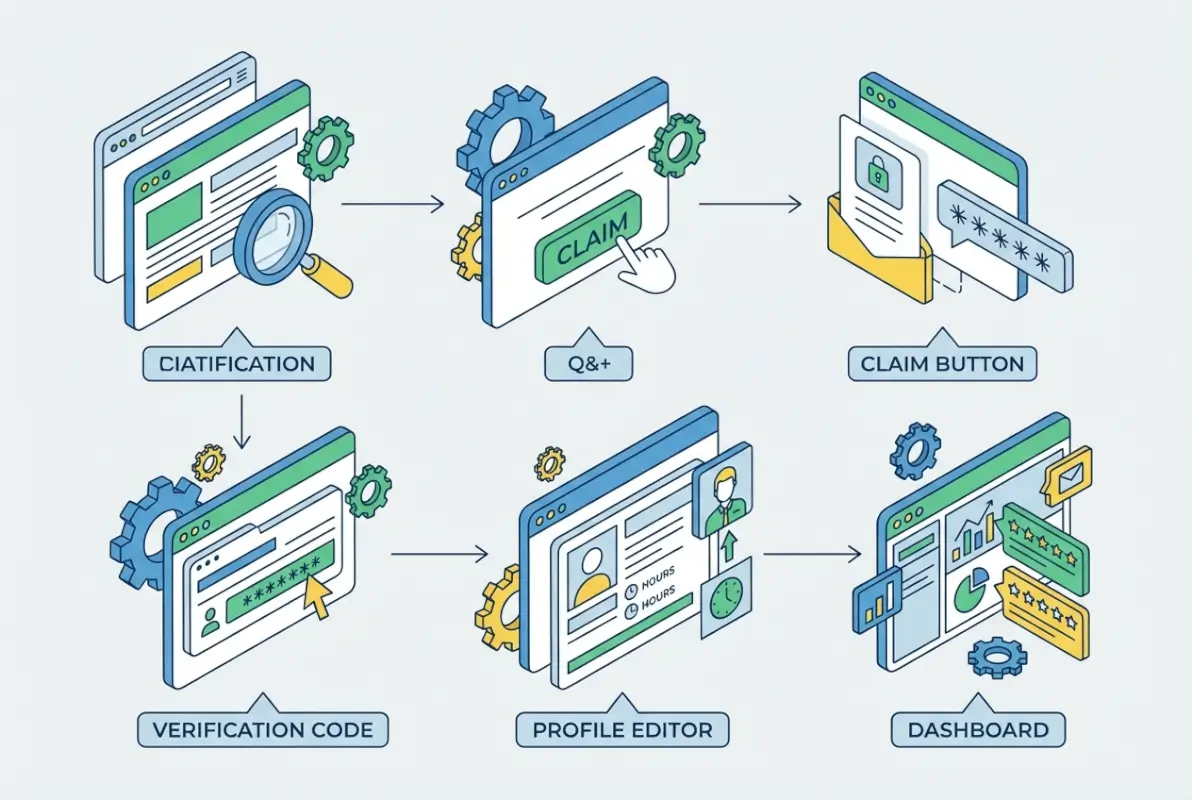
Step-by-Step: 5 Simple Steps to List Your Business on Yelp for Free
Alright, let’s get into the actual process. These five steps take most people 20–30 minutes total, assuming you have your business details and a few photos ready.
Step 1—Check if Your Business Already Exists on Yelp
Start by searching Yelp.com for your business name and location. Type it exactly as customers would (including city or neighborhood). If your business appears, great—you’ll claim it. If not, you’ll create a new listing.
Search by Name, Location, and Category; What to Do if It Exists vs. If It Doesn’t
When searching, pay attention to variations of your business name. For example, “Joe’s Pizza” might be listed as “Joe’s Pizzeria” or “Joe’s NY Pizza.” If you find a match, click through to the page and look for a link that says “Claim this business” or “Is this your business?” If you don’t find your business at all after thorough searching, you’ll click “Add a Business” from the Yelp for Business homepage.
In my experience helping local shops set up profiles, about 60% discover they already have a page—often created by a customer who checked in or left a review. That’s actually a good sign; it means you already have some organic traction.
If It Exists, Option to Claim; If Not, Option to Add as New
Claiming an existing page preserves your review history and any user-generated content (photos, check-ins). Creating a new page lets you control everything from scratch but starts at zero reviews. Either way, the next steps are similar. Official guidance from Yelp’s resource center walks through both scenarios in detail.
Step 2—Create or Claim Your Yelp Business Page
Once you’ve identified your path (claim or create), you’ll go through a short form asking for core business information.
Free Creation and Basic Details to Fill (NAP, Website, Hours, Categories)
NAP stands for Name, Address, Phone—the holy trinity of local listings. Enter these exactly as they appear on your website and Google Business Profile to maintain consistency. Add your website URL (if you have one), select your primary business category (be specific—”Italian Restaurant” beats generic “Restaurant”), and fill in your hours of operation for each day of the week. Yelp also lets you add special hours for holidays, which is useful for service businesses that close early on certain days.
How to Indicate Ownership and Complete the “Claim Your Page” Flow
After submitting basic details, Yelp will prompt you to verify ownership. You’ll choose between phone verification (instant code via call or SMS) or postal mail (a postcard with a code arrives in 7–10 days). Phone verification is faster and works for most businesses. Enter the code when it arrives, and boom—you’re the verified owner. This unlocks your dashboard, where you can edit details, upload media, and start engaging with customers.
Verification Options and What to Expect Post-Claim
Expect a confirmation email once verified, along with a welcome message introducing you to Yelp’s free tools. You’ll also see prompts to complete your profile (add photos, write a business description, etc.). Don’t skip these prompts; Yelp’s algorithm rewards complete profiles with better search placement. For a comprehensive walkthrough, see how to list your business on Yelp.
Step 3—Optimize Your Listing with Free Tools
This is where most businesses stop too early, leaving their profile half-baked. Full optimization transforms a basic listing into a conversion machine.

Upload Photos, Add Services/Products, Specialties, Business Hours, and Attributes
Start with photos—Yelp suggests at least 10–15 images covering your storefront, interior, products, and team. High-resolution images (at least 1000px wide) perform best. If you’re a restaurant, include menu items; if you’re a service business, show your work environment or completed projects. Next, add attributes like “accepts credit cards,” “has Wi-Fi,” “dog-friendly,” or “wheelchair accessible.” These filters help customers narrow searches, and they signal to Yelp’s algorithm what makes your business unique.
Fill out the “Specialties” section with specific offerings—don’t just say “plumbing,” list “emergency pipe repair, water heater installation, drain cleaning.” The more detailed, the better your chances of appearing in niche searches.
Respond to Reviews, Answer Questions via the Community Q&A Feature
Yelp’s Q&A feature lets potential customers ask questions directly on your page (like “Do you have vegan options?” or “Is parking available?”). You can answer these publicly, and they stick around for future visitors to see. This is incredibly valuable for addressing common concerns without fielding the same phone call repeatedly. As for reviews, respond to every one—positive or negative. Thank happy customers and address complaints with empathy and solutions. Research consistently shows that businesses responding to reviews see higher conversion rates than those who stay silent.
Use Free Stickers and Marketing Assets (Find Us on Yelp, Etc.)
Yelp provides downloadable “Find Us on Yelp” decals, social media badges, and email signature graphics. Stick the decal on your front door or window—it’s free advertising and encourages customers to check your reviews or leave their own. Include the Yelp link in your email footer and on your website’s contact page. Cross-channel visibility reinforces your presence and makes it easier for satisfied customers to spread the word.
Step 4—Engage with Customers (Free Engagement Methods)
Optimization isn’t a one-time task; engagement is ongoing. The businesses that thrive on Yelp treat it like a living platform, not a static billboard.
Responding to Reviews (Tone, Timeliness)
Aim to respond within 24–48 hours of a review being posted. For positive reviews, keep it warm but concise—”Thanks for the kind words, Sarah! We’re glad you enjoyed the coffee. Hope to see you again soon!” For negative reviews, acknowledge the issue, apologize if warranted, and offer to resolve it offline. Avoid getting defensive or arguing publicly; it looks bad to future customers reading the exchange. I’ve watched businesses turn one-star reviews into loyal customers simply by responding professionally and following up with a direct fix.
Managing Questions via the Ask the Community/QA Feature
Monitor your Q&A section regularly. Yelp notifies you when someone posts a question, but sometimes notifications get buried. Set a calendar reminder to check weekly. Customers can also answer questions on your behalf, which is great for community engagement but means you should verify those answers are accurate. If someone posts incorrect info (like wrong hours), you can add your own authoritative answer as the business owner. More details on this feature are available in Yelp’s support documentation.
Encouraging Reviews Ethically (Best Practices, Avoiding Incentives That Violate Rules)
Yelp strictly prohibits paying for reviews, offering discounts in exchange for reviews, or selectively asking only happy customers to review. Violating these rules can get your page flagged or penalized. Instead, encourage reviews broadly: add a line on receipts like “Share your experience on Yelp,” train staff to mention it verbally, or send a follow-up email after service asking for feedback (without conditions). The goal is organic, unbiased reviews that reflect real customer experiences. Strategies for building review volume are covered in ranking higher on business directories.
Step 5—Maintain Accuracy and Monitor Performance (Free Analytics)
Once your page is live and optimized, maintenance keeps it effective over time.

Basic Metrics You Can See on the Profile
Yelp’s free dashboard shows page views, user actions (clicks to your website, calls, directions), and review trends. You can see which days of the week get the most views and how your traffic compares month-over-month. These metrics help you understand what’s working. If you notice a spike in views after adding new photos, that’s a signal to keep your visuals fresh. If website clicks are low despite high page views, maybe your CTA needs work.
Regular Updates to Keep the Listing Current (Hours, Location, Menus/Services)
Outdated information kills conversions. If you change your hours seasonally, close for renovations, or add new services, update Yelp immediately. Customers who show up to a closed business or call a disconnected number rarely give you a second chance. Set a quarterly reminder to audit your entire profile—check photos, hours, website link, categories, and attributes. This also helps with local SEO, as search engines cross-reference your Yelp data with other directories.
When to Consider Paid Options (Ads, Upgrades) and How to Weigh ROI
If you’re consistently maxing out free tools (profile 100% complete, active review responses, frequent updates) and still want more visibility, that’s when to test ads. Start small—a trial budget of $300–500 over 30 days—and track whether ad-driven leads convert at a rate that justifies the cost. Compare cost-per-lead from Yelp Ads to other channels (Google Ads, Facebook, etc.). Yelp’s ad platform integrates with your free account, so you can pause or cancel anytime without losing your organic presence.
Best Practices for a Free Yelp Listing (Optimization Without Spending)
Let’s zoom into specific tactics that separate high-performing free listings from mediocre ones.
Content and Media
Quality over quantity, but aim for quantity too. Upload 15–20 photos minimum, covering every angle of your business. Include action shots (staff helping customers, dishes being prepared) and not just static product images. Video clips (30–60 seconds) showcasing your space or process can set you apart, since few businesses use video on Yelp. For descriptions, be specific and benefit-focused: instead of “We sell flowers,” try “We design custom bouquets for weddings and events, featuring locally sourced blooms.”
High-Quality Images, Video Clips, and Compelling Descriptions
Invest in basic photography if needed—smartphone cameras work fine with good lighting. Natural light and clean backgrounds make a huge difference. Avoid overly filtered or stock-photo-looking images; customers want authenticity. Your business description (visible at the top of your profile) should be 100–150 words, highlighting what makes you different and including a subtle call-to-action like “Visit us today” or “Book your appointment online.”
Clear Calls to Action (CTA) and Service Descriptions
Every section of your profile is an opportunity to guide customer action. In your hours section, note “Call ahead for off-hours appointments.” In your services list, link phrases like “schedule online” to your booking page. The more friction you remove between interest and action, the higher your conversion rate.

NAP Consistency and Local SEO Alignment
NAP consistency might sound boring, but it’s foundational for local search rankings.
Align Yelp NAP with Website and Other Directories
Your Name, Address, and Phone number should match exactly across Yelp, Google Business Profile, Facebook, your website footer, and any other directories. Even minor differences (like “Street” vs. “St.” or using a different phone number) confuse search engines and dilute your local SEO. Use the same format everywhere, down to punctuation and spacing.
Consistency Checks to Reduce Confusion for Customers
Run a quarterly audit using a spreadsheet: list all platforms where your business appears (Yelp, Google, Apple Maps, industry directories) and check NAP, hours, and website URL for consistency. Fix discrepancies immediately. This also prevents customer frustration—imagine someone calling a disconnected number found on an old directory listing. That’s a lost sale and potential negative review. For comprehensive directory management tips, visit business directory advantages for your business.
| Element | Why It Matters | Common Mistake |
|---|---|---|
| Business Name | Search engines match exact names | Adding keywords (e.g., “Joe’s Pizza Best in Town”) |
| Address | GPS accuracy and local ranking | Abbreviating “Street” differently across platforms |
| Phone Number | Customer contact and tracking | Using tracking numbers on some listings, not others |
| Hours | Prevents customer frustration | Forgetting to update seasonal or holiday hours |
Reputation Management
Your Yelp reviews directly impact revenue, research shows businesses with higher ratings see measurably more foot traffic and online conversions.
Encouraging Genuine Reviews, Responding to Feedback
Build review generation into your customer journey. For brick-and-mortar businesses, train staff to mention Yelp when customers express satisfaction. For service businesses, include a Yelp link in post-service emails or invoices. Make it easy—provide a direct URL to your review page. And always, always respond. Even a simple “Thanks for your review!” shows you’re listening and builds rapport with future customers reading the thread.
Handling Negative Feedback Professionally
Negative reviews sting, but they’re also opportunities. A thoughtful response can salvage the relationship and demonstrate professionalism to others. Acknowledge the issue (“I’m sorry your experience didn’t meet expectations”), explain what went wrong if appropriate (without making excuses), and offer a solution (“Please contact me directly so we can make this right”). Then follow up privately to resolve it. If you fix the problem, the customer might update their review to reflect that—turning a one-star into a four-star with a note about excellent follow-up.
Research from Brookings Institution highlights how online reviews can disproportionately impact certain communities and business types, underscoring the importance of active reputation management for all business owners.
What if You’re Not Getting Found or Converting (Free Tools Only)
Sometimes you do everything right and still don’t see traction. Here’s how to troubleshoot.
Diagnosing Visibility Issues on Yelp
First, check profile completeness—Yelp scores this internally. If you’re missing photos, attributes, or have vague category selections, you’ll rank lower. Next, search for your business using terms customers would use (not just your business name). Are you appearing? If not, your categories might be too broad or your address unverified. Reach out to Yelp support if verification is stuck; sometimes technical glitches need manual fixes.
Common Friction Points (Incomplete Profiles, Sparse Photos, Weak Categories)
Weak category choices are a silent killer. If you’re a bakery specializing in gluten-free goods but only select “Bakery” as your category, you miss out on searches for “gluten-free bakery.” Add secondary and tertiary categories to capture niche searches. Sparse photos also hurt; profiles with fewer than five images often get ignored. Customers scroll past them assuming the business is inactive.
When to Escalate or Consider Paid Options
If you’ve optimized everything and still lag behind competitors with similar offerings, it might be market saturation. In crowded niches, paid ads can push you above the fold. Alternatively, double down on differentiation—highlight unique services, update photos monthly, or launch a limited-time promotion and feature it prominently on your page. Sometimes creativity beats budget.
Integrating Yelp with Broader Local Marketing
Yelp shouldn’t exist in a vacuum; it’s part of a broader local marketing ecosystem.
Cross-Listing on Other Directories for Reach
List your business on Google Business Profile, Apple Maps, Bing Places, and industry-specific directories (like Houzz for contractors or OpenTable for restaurants). Each listing reinforces the others, and links back to your website from multiple authoritative sources boost SEO. Plus, different demographics prefer different platforms—some customers default to Google, others to Yelp.
Linking Yelp to Your Website and Calendar/Booking Systems
Embed your Yelp reviews widget on your website to showcase social proof. Include a prominent “Find Us on Yelp” button in your footer or contact page. If you use online booking (like Calendly, OpenTable, or a custom scheduler), link to it directly from your Yelp profile. Reducing friction between discovery and booking increases conversions. More strategies on multi-platform presence are explored in U.S. Chamber of Commerce resources.
Data and Trends
Let’s talk about what recent research reveals about Yelp and review platforms more broadly.
What Researchers Say About Listing Claims and Reviews
The FIU study mentioned earlier found that claiming a business page can shift review dynamics. Specifically, after claiming, businesses often see an increase in review volume (both positive and negative) and a slight decline in average star rating—not because service worsened, but because more customers felt compelled to share honest feedback once they knew the owner was listening. This isn’t a reason to avoid claiming; it’s a call to engage authentically and address concerns quickly.
Selected Findings on How Claiming a Yelp Page Can Influence Ratings and Review Dynamics
Another insight: businesses that respond to reviews (especially negative ones) tend to stabilize or improve their average rating over time, as future customers see the owner cares. Non-responsive businesses, even with a higher initial rating, often see gradual decline because unresolved complaints accumulate. The takeaway? Engagement matters more than perfection.
The Broader Impact of Review Platforms on Small Businesses
Review platforms have democratized visibility—small businesses can compete with chains purely on merit and customer satisfaction. However, they’ve also introduced new pressures (constant reputation monitoring, the need for digital literacy). Recognizing this, Harvard Business School research has explored how online listings correlate with local economic activity, providing valuable context for business owners considering their digital strategy.
Local Economy and Listing Data
Credible sources have used Yelp data to track local economic trends, underscoring the platform’s significance.
How Data Sources Frame the Role of Listings Like Yelp in Local Business Visibility
Economic researchers use aggregated Yelp listings to gauge business openings and closures, providing real-time insights into local economies. This means your Yelp presence isn’t just marketing—it’s part of a larger data ecosystem that economists, urban planners, and policymakers analyze. For example, a surge in new restaurant listings in a neighborhood signals gentrification or economic revitalization.
Implications for Local Business Owners Planning Digital Presence
Understanding this broader context helps you see Yelp as infrastructure, not just advertising. Maintaining an accurate, active listing contributes to your community’s economic data and reinforces your legitimacy in the eyes of both customers and institutions (like banks evaluating loan applications).
Common Mistakes to Avoid (Free Listing Only)
Even with the best intentions, business owners often stumble on a few predictable pitfalls.
Overreliance on Free Tools Without Updates
Some owners claim their page, fill it out once, and never touch it again. That’s like painting your storefront and expecting it to stay pristine for a decade. Markets change, competitors evolve, and customer expectations shift. Set a quarterly reminder to refresh photos, update services, and check for unanswered questions or reviews.
Inaccurate Information or Inconsistent Contact Details
This one’s a conversion killer. If your phone number is wrong, customers can’t reach you. If your hours are outdated, they show up when you’re closed. Accuracy isn’t glamorous, but it’s non-negotiable. Triple-check every field before hitting “save.”
Failing to Respond to Reviews or Engage with the Community
Silence signals indifference. Customers interpret unresponded reviews (good or bad) as evidence you don’t care. Even a brief acknowledgment (“Thanks for stopping by!”) makes a difference. Similarly, unanswered Q&A questions leave potential customers hanging, often sending them to a more responsive competitor.
When to Consider Paid Options (Brief, for Context)
While this guide focuses on free tactics, understanding paid features helps you make informed decisions.
What Paid Features Exist on Yelp (Ads, Enhanced Profiles)
Yelp Ads place your business above organic results when users search relevant terms. You pay per click (CPC model), and you can target by geography, category, and customer intent. Enhanced profiles offer features like slideshow galleries and call-to-action buttons (like “Book Now”) that stand out visually. There’s also Yelp Deals, where you offer discounts directly on your page, and Yelp Reservations for restaurants.
How to Evaluate ROI and Budget for Local Marketing
Before spending, calculate your customer lifetime value (CLV) and compare it to acquisition cost. If a Yelp ad costs $5 per click and 10% of clicks convert to customers, your cost-per-acquisition is $50. If your CLV is $500, that’s a solid ROI. If your CLV is $75, you’re underwater. Run a pilot for 30 days, track leads meticulously, and decide based on data—not guesswork.
Quick Notes on Ad Dashboards and Integration
Yelp’s ad dashboard is user-friendly, showing impressions, clicks, and conversions. You can pause campaigns anytime, which makes it low-risk to test. Integration with your free account is seamless; ads amplify your existing profile, so optimization work you’ve done (photos, reviews, complete info) carries over and improves ad performance.
Action Checklist (Printable)
Here’s a quick-start guide you can follow step-by-step or print out for reference.
10-Minute Quick-Start Checklist
- Search Yelp for your business by name and location
- Claim or create your page via Yelp for Business
- Verify ownership using phone or postal code
- Complete NAP (name, address, phone) accurately
- Add categories (primary + 2–3 secondary/niche options)
- Upload 10–15 photos (storefront, interior, products, team)
- Fill in hours for each day, including special hours if applicable
- Write a business description (100–150 words, benefit-focused)
- Add attributes (parking, accessibility, payment methods, etc.)
- Enable notifications for new reviews and Q&A, set reminder to check weekly
Quick Reminder to Monitor and Respond to Recent Activity
Set a recurring calendar event every Monday morning to check your Yelp page. Spend 5–10 minutes reading new reviews, answering questions, and updating any outdated info. Consistency in monitoring pays off exponentially over time.
Regional and Industry Variations (Optional Subsection)
Yelp usage and customer expectations vary by industry and geography, so tailor your approach accordingly.
How Yelp Use May Vary by Industry (Restaurants, Services, Professional Practices)
Restaurants see the highest Yelp engagement—customers expect dozens of reviews and frequent photo updates. For professional services (lawyers, accountants), fewer reviews are normal, but they carry more weight. Home services (plumbers, electricians) benefit from detailed before-and-after project photos. Healthcare providers face stricter regulations around patient reviews but can still maintain a presence by highlighting office amenities and staff credentials.
Local Norms Around Reviews and Photos
In dense urban markets like New York or San Francisco, competition is fierce and customers expect near-perfect profiles. In smaller towns, having any presence on Yelp can set you apart, even with modest review counts. Adapt your optimization effort to your market—a coffee shop in Brooklyn needs 50+ reviews to compete, while one in rural Montana might dominate with 10.
Examples of Industry-Specific Optimization Tips
Restaurants should highlight menu items in photos and list dietary accommodations (vegan, gluten-free) in attributes. Salons and spas benefit from showcasing finished styles and offering online booking links. Contractors should feature completed projects with descriptions of the work done. Tailor your content to answer the questions your specific customer base asks most often.
Frequently Asked Questions
Is listing my business on Yelp free?
Yes, creating and claiming a business page on Yelp is completely free. You can upload photos, respond to reviews, add business details, and access basic analytics without spending money. Paid advertising options exist but are optional.
How do I claim my Yelp business page?
Search for your business on Yelp.com, click “Claim this business” if it exists, and follow the prompts to verify ownership via phone or postal mail. Once verified, you’ll gain full control over your profile and can edit all information.
Can I edit my business information after claiming?
Absolutely. After claiming and verifying, you can update your business name, address, phone, hours, photos, categories, and more anytime through the Yelp for Business dashboard. Regular updates are encouraged to keep information accurate.
How many photos should I add to my Yelp listing?
Aim for at least 10–15 high-quality photos covering your storefront, interior, products, and team. More is better—profiles with 20+ photos tend to see higher engagement and conversion rates than those with fewer images.
How do I respond to reviews on Yelp?
Log into your Yelp for Business account, navigate to your reviews section, and click “Add comment” beneath each review. Respond promptly (within 24–48 hours), keep it professional, and thank customers or address concerns respectfully.
Are there any risks to claiming my Yelp page (e.g., impact on ratings)?
Research suggests claiming your page can increase review volume, which may slightly lower your average rating as more customers (including unhappy ones) feel compelled to leave feedback. However, active engagement typically stabilizes or improves ratings over time.
What if my business isn’t showing up on Yelp searches?
Ensure your profile is complete, including accurate NAP, categories, and photos. Verify your listing is claimed and visible (not hidden). Search using terms customers would use, not just your business name. Contact Yelp support if technical issues persist.
Can I upgrade later to paid advertising, and is it worth it?
Yes, you can add Yelp Ads anytime without losing your free profile. Whether it’s worth it depends on your customer lifetime value and local competition. Test a small budget (30 days, $300–500) and track cost-per-acquisition before committing.
How does Yelp compare to other directories for visibility?
Yelp excels for restaurants, retail, and local services, often ranking high in Google search results. Google Business Profile offers broader reach across Maps and Search. Apple Maps and Bing Places capture niche audiences. Use multiple directories for maximum visibility.
Where can I find official Yelp guidance for business owners?
Visit business.yelp.com for official guides, support articles, and step-by-step tutorials. Yelp’s resource center covers everything from claiming pages to responding to reviews and using free marketing tools effectively.
Take Action and Claim Your Yelp Presence Today
Listing your business on Yelp for free isn’t just smart marketing—it’s foundational for local visibility. The five steps outlined here (search, claim, optimize, engage, maintain) take less than an hour upfront and require minimal ongoing effort, yet they unlock access to millions of potential customers actively searching for businesses like yours. Whether you’re a solo consultant or a multi-location retailer, a complete, accurate, and actively managed Yelp profile levels the playing field and amplifies your credibility.
The biggest mistake? Waiting. Every day your business isn’t on Yelp (or is listed but unclaimed), you’re handing visibility to competitors. Start today—search for your business, claim your page, upload photos, and respond to your first review. Then commit to quarterly updates and weekly check-ins. Over time, that consistency compounds into real revenue growth.
Remember, Yelp is a living platform—update it regularly, engage authentically, and watch as local discovery transforms from a trickle into a steady stream of qualified leads. Your next customer is out there searching right now. Make sure they find you.