How to Keep Your Business Listing on Google Maps: 5 Simple Steps

Think of your Google Business Profile as your digital storefront—except this one has the potential to be seen by millions of local searchers every month without you spending a dime on advertising. While most business owners obsess over their social media followers or website traffic, they completely overlook the fact that Google Maps listings often appear before organic search results, capturing customers at the exact moment they’re ready to take action. Here’s what nobody tells you: maintaining a prominent Google Maps listing isn’t just about filling out forms and waiting for magic to happen. It’s a strategic, ongoing process that combines verification excellence, data consistency, visual storytelling, and continuous optimization. The businesses dominating local search right now aren’t necessarily the biggest—they’re the ones treating their Google Business Profile as a living, breathing marketing asset.

TL;DR – Quick Takeaways
- Verification is non-negotiable – Unverified listings perform dramatically worse and lose customer trust immediately
- Consistency trumps volume – Your NAP (Name, Address, Phone) must match perfectly across all platforms, or Google penalizes your visibility
- Visual content drives engagement – Profiles with regular photo updates and posts receive significantly more customer actions than static listings
- Q&A and attributes expand reach – Proactively managing these sections helps you appear for more relevant local searches
- Maintenance is forever – Top-ranking businesses treat GBP optimization as a quarterly ritual, not a one-time project
Step 1: Claim, Verify, and Secure Your Google Business Profile
Here’s the brutal truth that catches most new business owners off guard: anyone can suggest edits to your business listing on Google Maps, but only verified owners can fully control it. I’ve seen restaurants lose hundreds of potential customers because someone maliciously changed their hours or phone number, and without verification, there was no quick way to fix it. Verification isn’t just a bureaucratic hoop to jump through—it’s the foundation of your entire local search presence.

Google offers several verification methods depending on your business type and location: postcard verification (they mail you a PIN code), phone or text message verification, email verification for certain established businesses, and increasingly, video verification where you record a walkthrough of your physical location. The postcard method remains most common, taking 5-7 business days to arrive. During that waiting period, your listing exists in limbo—visible but unverified, which Google’s algorithm treats with significantly less trust than verified competitors.
The verification process begins at business.google.com where you’ll search for your business name and address. If your business already appears in Google’s database, you’ll see an option to claim it; if not, you’ll create a new listing from scratch. Pay careful attention during this step because the name and address you enter must match your official business registration and other online citations exactly. Even minor discrepancies like “Street” versus “St.” or including/excluding suite numbers can create what’s called a citation conflict, which confuses Google’s matching algorithms and weakens your ranking potential.
Once you’ve completed verification, immediately enable two-factor authentication on your Google account. Business profile hijacking is more common than you’d think, with competitors or malicious actors attempting to gain control of successful listings. Google’s official support documentation emphasizes that security should be your first priority after verification, yet most businesses skip this step entirely. Add multiple users with different permission levels—manager, owner, and site manager roles—so if one account is compromised, you maintain access through backup administrators.
Step 2: Complete and Standardize Your Business Information
The difference between a mediocre Google Business Profile and one that consistently ranks in the top three local results often comes down to profile completeness. Google’s algorithm explicitly rewards comprehensive listings because complete information improves the user experience—people can make informed decisions without needing to visit your website or call. Yet research consistently shows that over 60% of business profiles remain incomplete, with missing hours, unclear service descriptions, or vague category selections.
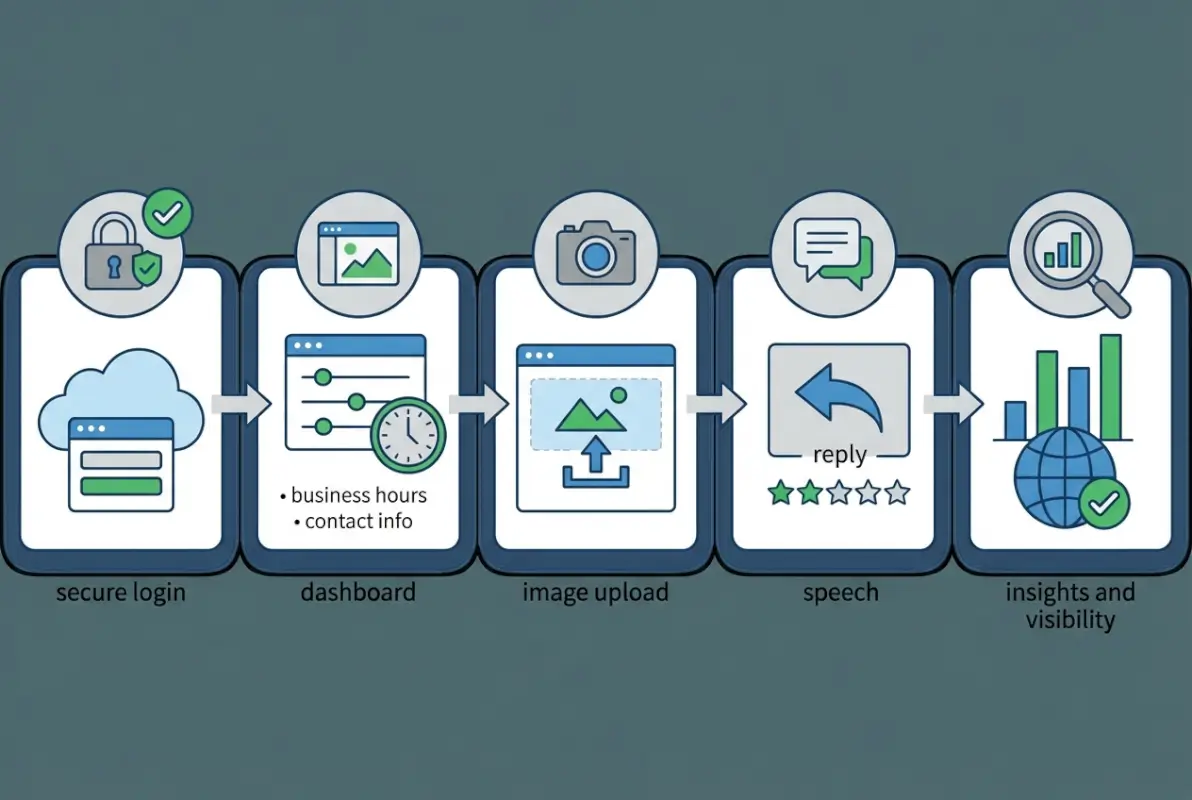
Start with your core details: business name (exactly as it appears on your storefront and legal documents), complete physical address including suite numbers if applicable, primary phone number that’s answered during business hours, and your website URL. Your business hours deserve special attention because Google uses this data to determine when to show your listing prominently, and incorrect hours are the number one complaint in negative reviews. If your hours vary seasonally or you offer special holiday hours, update these proactively rather than waiting for customers to complain about finding you closed.
Category selection represents one of the most powerful ranking signals in local search, and it’s where I see businesses make catastrophic mistakes. You’ll choose one primary category and can add multiple secondary categories. The primary category should be the most specific, accurate description of what you do—not what you wish you did or what sounds impressive. A family restaurant shouldn’t select “Fine Dining Restaurant” just because it sounds premium; Google will match you against irrelevant searches and you’ll underperform. The University of New Hampshire Extension guide provides excellent frameworks for thinking through category selection strategically.
Attributes and services sections get overlooked constantly, but they’re goldmines for visibility. Attributes let you signal important details like “wheelchair accessible entrance,” “outdoor seating,” “women-owned business,” “veteran-owned,” or “LGBTQ+ friendly.” Google uses these attributes to match your listing with specific user preferences and filter searches. Similarly, the services section (for service-based businesses) allows you to list specific offerings with descriptions, which expands the range of search queries you’ll appear for. A plumber who lists “emergency drain cleaning,” “water heater installation,” and “bathroom remodeling” as separate services will rank for more specific searches than one who just lists “plumbing services.”
NAP consistency across the web isn’t optional—it’s foundational. Keeping your business directories updated ensures Google sees consistent signals about your business identity. Scan major directories like Yelp, Facebook Business, Apple Maps, and industry-specific platforms to ensure your name, address, and phone number are identical everywhere. Even your website’s contact page should match exactly. This consistency builds what SEO professionals call “citation authority,” which directly influences your local search rankings.
Step 3: Optimize Visuals and Engage with Posts and Reviews
If Step 2 is about the skeleton of your listing, Step 3 is about bringing it to life. Human psychology hasn’t changed—we’re visual creatures who make snap judgments based on what we see. Google’s data shows that businesses with photos receive 42% more requests for directions and 35% more clicks through to their websites than businesses without photos. Yet the average business uploads 3-5 photos and never updates them, while top performers maintain libraries of 50+ images that they refresh quarterly.

Your photo strategy should cover multiple categories: exterior shots that help customers find you (especially important for street-level retail), interior ambiance photos that set expectations, product or service photos showcasing what you offer, team photos that humanize your business, and action shots of your work or your business in operation. High-resolution images (at least 720 pixels wide) perform best, and Google’s algorithm favors recent uploads over older ones. I learned this the hard way when a competitor’s regularly updated photos pushed them above my client’s listing despite our superior review score—freshness matters.
Google Posts function like mini social media updates within your Business Profile. You can announce special offers, upcoming events, new products, or general updates, and these posts appear directly in your Knowledge Panel when people search for your business. Posts remain visible for seven days (or until the event date for event posts), which means maintaining a consistent posting cadence—ideally weekly—keeps your profile appearing active and engaged. Posts with images outperform text-only posts dramatically, and those that include a call-to-action button (“Learn More,” “Sign Up,” “Buy”) generate more measurable engagement.
Review management separates amateur business owners from professionals. Every review—positive, negative, or neutral—deserves a response, and not generic copy-paste responses either. When you respond thoughtfully to a five-star review, you’re not really talking to that reviewer; you’re performing for the hundreds of future customers who will read that exchange. When you respond professionally and helpfully to a one-star review, you demonstrate to prospects that you care about customer satisfaction and take feedback seriously. Google’s algorithm tracks response rate and response time as ranking factors, rewarding businesses that engage consistently.
The Insights tab (accessible from your Google Business Profile dashboard) reveals which photos get the most views, how customers found your listing (direct searches for your name versus discovery searches for categories or services), what actions they took (calls, website visits, direction requests), and how your performance compares to similar businesses. Check this data monthly at minimum, quarterly for most businesses. If you notice your “discovery searches” declining, it might indicate you need to refresh your category selection or add more detailed service descriptions. Understanding what local business directories do in your broader marketing ecosystem helps contextualize these insights.
Step 4: Leverage Q&A, Attributes, and Service Areas for Relevance
The Questions & Answers section on your Google Business Profile is simultaneously one of the most powerful features and the most neglected. Anyone can ask questions publicly, and anyone—including your competitors—can answer them. I’ve watched businesses lose customers because someone asked “Do you offer gluten-free options?” and a competitor posing as a helpful local answered “No, they don’t, but [Competitor Name] does.” If you’re not monitoring and proactively managing your Q&A section, you’re leaving the door wide open for misinformation and competitive sabotage.

The proactive strategy involves anticipating the questions customers always ask and posting them yourself with detailed, helpful answers. For a gym, that might include “What are your monthly membership rates?”, “Do you offer childcare during workouts?”, “Is there guest parking available?”, and “What COVID safety protocols do you follow?”. By asking and answering these questions yourself, you control the narrative and provide immediate value to researchers. Google’s algorithm recognizes this engagement and may surface your answers prominently, sometimes even in voice search responses.
Attributes deserve a second, deeper look beyond what we covered in Step 2. Google continually adds new attribute options, and enabling relevant ones as soon as they become available gives you an edge. Accessibility attributes (wheelchair accessible entrance, parking, restroom, seating) help you appear when users specifically filter for accessible businesses. Amenity attributes (free Wi-Fi, outdoor seating, dog-friendly, good for kids) match specific user preferences. Business attributes (women-owned, veteran-owned, Black-owned, LGBTQ-owned) increasingly influence search visibility as Google emphasizes diversity in local results.
| Service Area Setting | Best For | Visibility Impact |
|---|---|---|
| Physical location only | Restaurants, retail stores, gyms | Highest for searches near your address |
| Service area (hide address) | Plumbers, electricians, mobile services | Broader geographic reach, lower precision |
| Hybrid (location + service area) | Contractors with offices who travel to clients | Balanced visibility across service territory |
Service area businesses face unique challenges. If you’re a mobile service provider—plumber, electrician, cleaning service, mobile pet grooming—you need to carefully define your service areas to appear in relevant local searches without diluting your relevance. Google allows you to specify service areas by city, ZIP code, or radius from your business address. The key consideration: don’t overextend. Claiming to serve a 50-mile radius when you realistically serve a 20-mile radius spreads your relevance thin and may actually hurt your rankings in your core service area. Forbes research confirms that hyper-local relevance beats broad coverage for most service businesses.
Product catalogs and menu integration (for restaurants) provide yet another layer of searchability. When you upload product information with descriptions and prices, or integrate your menu through Google’s partners, this content becomes searchable. Someone searching “pizza near me gluten-free crust” might find your restaurant specifically because you listed your gluten-free pizza in your product catalog, while competitors without detailed menu data get passed over. This alignment with broader business directory website strategies ensures maximum visibility across platforms.
Step 5: Monitor, Maintain, and Adapt Through Data-Driven Optimization
The businesses that dominate local search long-term treat their Google Business Profile like a garden that needs regular tending, not a sign they installed once and forgot about. Google’s local search algorithm updates constantly, user behavior evolves, and your competitors aren’t standing still. What worked six months ago might be less effective today, and what works today might be table stakes tomorrow. The only way to stay ahead is through consistent monitoring and willingness to adapt based on data.

Your Google Business Profile Insights dashboard should become part of your monthly business review process. Track your key performance indicators: total search impressions (how often you appeared in search results), the ratio of direct searches (people looking for your business by name) versus discovery searches (people finding you while searching for a category or service), customer actions taken (calls, website clicks, direction requests), and photo views. When you spot trends—maybe direction requests spike on weekends but phone calls dominate weekdays—you can adjust your strategy accordingly, perhaps by updating your Google Posts schedule to match when users are most engaged.
The freshness factor matters more than most businesses realize. Google’s algorithm gives preferential treatment to recently updated profiles because fresh information better serves users. This doesn’t mean you need to make changes daily, but quarterly reviews should be standard practice. Update your photos to reflect seasonal changes or new inventory, refresh your business description if you’ve expanded services, add new posts highlighting recent achievements or upcoming events, and audit your existing information to ensure everything remains accurate. I’ve seen rankings improve by 2-3 positions simply from refreshing a profile that had been static for months, signaling to Google that the business is active and engaged.
Competitor analysis should inform your optimization strategy. Identify the businesses consistently ranking in the top three positions for your target keywords and study their profiles. What categories did they choose? How many photos do they maintain? How frequently do they post? What’s their review response rate? You’re not copying them—you’re identifying the current baseline for competitive performance in your market. If top competitors maintain 100+ photos while you have 12, that’s a clear action item. If they post weekly and you post monthly, there’s your gap.
Cross-platform citation consistency deserves ongoing attention because data drift happens naturally. You change your phone number, update your hours, add a new location—unless you systematically update every directory where you’re listed, inconsistencies accumulate. Schedule a quarterly “citation audit” where you check your NAP information across major platforms: Yelp, Facebook, Apple Maps, Bing Places, industry-specific directories, and any local business directories relevant to your area. The Mississippi State Extension guide provides practical checklists for this maintenance work. Remember that business directories serve broader purposes beyond just Google Maps visibility, so maintaining accurate information everywhere compounds your overall digital presence.
Track your local search rankings manually or through tools that monitor your position for key search terms. Search Google Maps for your most important keywords—your service plus your location—and note where you rank. Do this monthly from different devices and locations if possible, because rankings can vary based on the searcher’s exact location and search history. When rankings drop, investigate immediately: did a competitor update their profile? Did you receive new negative reviews? Did Google release an algorithm update? Understanding the “why” behind ranking changes allows you to respond strategically rather than panic randomly.
Optional but Valuable Enhancements
Beyond the core five steps, several advanced tactics can further strengthen your Google Maps presence, particularly for businesses in competitive markets or those with unique operational models. These enhancements aren’t strictly necessary for every business, but they create meaningful advantages when implemented thoughtfully.
Multiple location optimization requires a different mindset. Each location should have its own distinct Google Business Profile with unique content—not duplicate descriptions and photos across all locations. Local content matters: photos should show the actual location, posts should mention location-specific events or offers, and reviews should be managed separately. Google’s algorithm can detect duplicate content across locations and may suppress profiles it views as less authentic or localized.
Product catalog depth transforms your profile from a basic directory listing into a browsable marketplace. For retail businesses, uploading your full product inventory with accurate descriptions, prices, and photos allows Google to show your products directly in search results and Shopping surfaces. Restaurants with detailed menu listings (including prices, ingredients, and dietary information) appear more complete and trustworthy. Service businesses can list individual services as “products” with descriptions and pricing ranges, expanding the search queries they match.
Booking and reservation integration removes friction from the customer journey. If you’re a restaurant, salon, medical practice, or any business that takes appointments, enabling booking through Google (via integrated partners like OpenTable, Schedulicity, or direct API integration) lets customers book directly from your Maps listing without visiting your website. This convenience improves conversion rates significantly and sends positive engagement signals to Google’s algorithm.
The messaging feature allows customers to text your business directly through Google Maps. While this requires monitoring yet another communication channel, it can be valuable for businesses where customers have quick questions or prefer text communication. Response time matters—Google tracks how quickly you respond to messages, and fast responders gain a “Responds quickly” badge that builds trust.
Video content remains underutilized despite its engagement advantages. A 30-60 second video tour of your business, a brief introduction from the owner, or a showcase of your services in action makes your profile more engaging and memorable. Videos don’t need professional production quality—authentic, well-lit smartphone videos often outperform overproduced content because they feel more genuine.
Frequently Asked Questions
How do I claim my Google Business Profile if it already exists?
Visit business.google.com and sign in with your Google account. Search for your business name and address, then click “Claim this business” or “Own this business?” Follow the verification process Google provides, which typically involves receiving a PIN by mail. Complete verification within 30 days to maintain your claim and gain full editing access.
How often should I post to my Google Business Profile?
Weekly posting delivers optimal results for most businesses, keeping your profile fresh without overwhelming your capacity. Posts remain visible for seven days, so weekly updates ensure continuous content presence. During slower periods, bi-weekly posts are acceptable, but monthly is too infrequent to signal active management to Google’s algorithm.
Why is my verified Google Business Profile not appearing in Google Maps?
Common causes include incomplete profile information (less than 70% complete), incorrect or broad category selection, NAP inconsistencies across the web, or recent verification that hasn’t fully propagated through Google’s systems. Check your profile completeness, ensure your primary category precisely matches your business, and verify your address is identical across major directories.
What kind of photos should I upload to Google Maps?
Upload high-resolution exterior photos showing your entrance and signage, interior photos highlighting ambiance and space, product or service photos demonstrating what you offer, team photos introducing staff, and action shots of your work. Aim for at least 10 photos at launch and add 3-5 new photos monthly to maintain freshness.
How do reviews affect my Google Maps ranking?
Review quantity, velocity (how quickly you gain new reviews), rating average, keyword relevance in review text, and owner response rate all influence rankings. Recent reviews matter more than old ones. Responding to reviews—especially negative ones professionally—improves your ranking and conversion rate by demonstrating active management and customer care.
Should I use service-area business settings or show my physical address?
Show your physical address if customers visit your location (retail, restaurants, offices). Use service-area settings and hide your address only if you exclusively serve customers at their locations (plumbers, mobile services). Businesses with both an office and field service should show their address and define service areas to maximize visibility across their territory.
What are the best practices for choosing Google Business Profile categories?
Select the most specific primary category that accurately describes your core business—not aspirational or broad categories. Add secondary categories for additional services you offer. Research what categories top-ranking competitors use for your target keywords. Category selection is one of the strongest ranking factors, so precision matters more than comprehensiveness.
Can I manage multiple Google Business Profiles from one account?
Yes, a single Google account can manage multiple business profiles, which is useful for multi-location businesses or consultants managing client profiles. Add locations through business.google.com and grant different permission levels (owner, manager, site manager) to team members. Each location requires separate verification regardless of ownership.
How long does Google Business Profile verification take?
Postcard verification (most common) takes 5-7 business days for mail delivery plus your time to enter the PIN. Phone and text verification happen instantly if available. Email verification processes within minutes. Video verification typically reviews within 3-5 business days. Start verification immediately upon claiming to avoid visibility delays.
What happens if I don’t maintain my Google Business Profile?
Inactive profiles decline in rankings as Google prioritizes businesses showing engagement signals. Outdated information (wrong hours, old photos, unanswered reviews) damages customer trust and increases bounce rates. Competitors who actively optimize will eventually overtake your position regardless of your review count or history. Maintenance is not optional for sustained visibility.
Taking Control of Your Local Search Presence
Your Google Business Profile isn’t just another item on your marketing checklist—it’s often the first impression potential customers have of your business, appearing before they visit your website, before they see your ads, and before they encounter you anywhere else online. The businesses winning in local search right now understand something fundamental: optimization is not a destination but a continuous practice. They claim and verify with urgency, complete every available profile section with precise accuracy, engage consistently with photos and posts, proactively manage Q&A and attributes, and treat monthly data reviews as essential business operations.
1. Audit your current GBP completion percentage (aim for 100%)
2. Schedule a recurring calendar reminder for monthly GBP reviews
3. Set up a system for collecting and responding to reviews within 48 hours
4. Document your current rankings for key search terms to track progress
The competitive advantage goes to those who move faster and maintain consistency longer than everyone else. While your competitors are still figuring out verification or wondering why their listing isn’t ranking, you’ll be executing a systematic optimization strategy that compounds over time. Start with Step 1 today—claim and verify if you haven’t already—then move methodically through the remaining steps over the next two weeks. The visibility gains won’t happen overnight, but within 30-60 days of consistent implementation, you’ll notice improved rankings, increased customer actions, and the quiet satisfaction that comes from knowing you control one of the most valuable pieces of digital real estate for your business. If you’re building out a comprehensive online presence, understanding how to build a business directory website can complement your Google Maps strategy perfectly.
Remember: your competitors aren’t sitting still, Google’s algorithm keeps evolving, and customer expectations for accurate, comprehensive business information keep rising. The businesses that thrive are the ones that treat local search optimization as an ongoing strategic priority, not a one-time technical task. Your Google Maps listing is waiting—make it count.