What is Geoaccess? Complete Guide to Geo-Enabled Directory Systems & Data Management

Generating summary...
When you search for “coffee shops near me” or filter business listings by location, you’re experiencing geoaccess in action—though most people have no idea what’s happening behind the scenes. Geoaccess represents the technical infrastructure that enables directories to organize, query, and deliver location-based information at scale. Yet despite handling billions of location queries daily, the concept remains poorly understood outside specialized technical circles.
Here’s what makes geoaccess fascinating: it’s not just about plotting points on a map. The real power lies in spatial relationships—understanding which businesses fall within delivery zones, calculating optimized service territories, or identifying underserved markets based on competitor proximity. For directory operators, mastering geoaccess means the difference between a basic address listing and a dynamic discovery platform that connects users with exactly what they need, exactly where they need it.
- Geoaccess = location-enabled data access – The system that makes directory search by geography possible
- Three core components – Data ingestion/geocoding, spatial indexing, and query optimization
- Business impact is measurable – Properly implemented geoaccess improves click-through rates and user engagement significantly
- Privacy and performance matter – Balance user experience with data security and query speed
- Start with data quality – Accurate geocoding and address normalization determine everything downstream
What Geoaccess Is and Why It Matters for Directories
Core Concept and Scope
Geoaccess combines “geo” (geographic location) with “access” (data retrieval), describing the technical capability to store, index, and query information based on spatial coordinates and relationships. In directory systems, this means transforming physical addresses into searchable geographic data points that enable location-based filtering, proximity search, and boundary-defined queries.
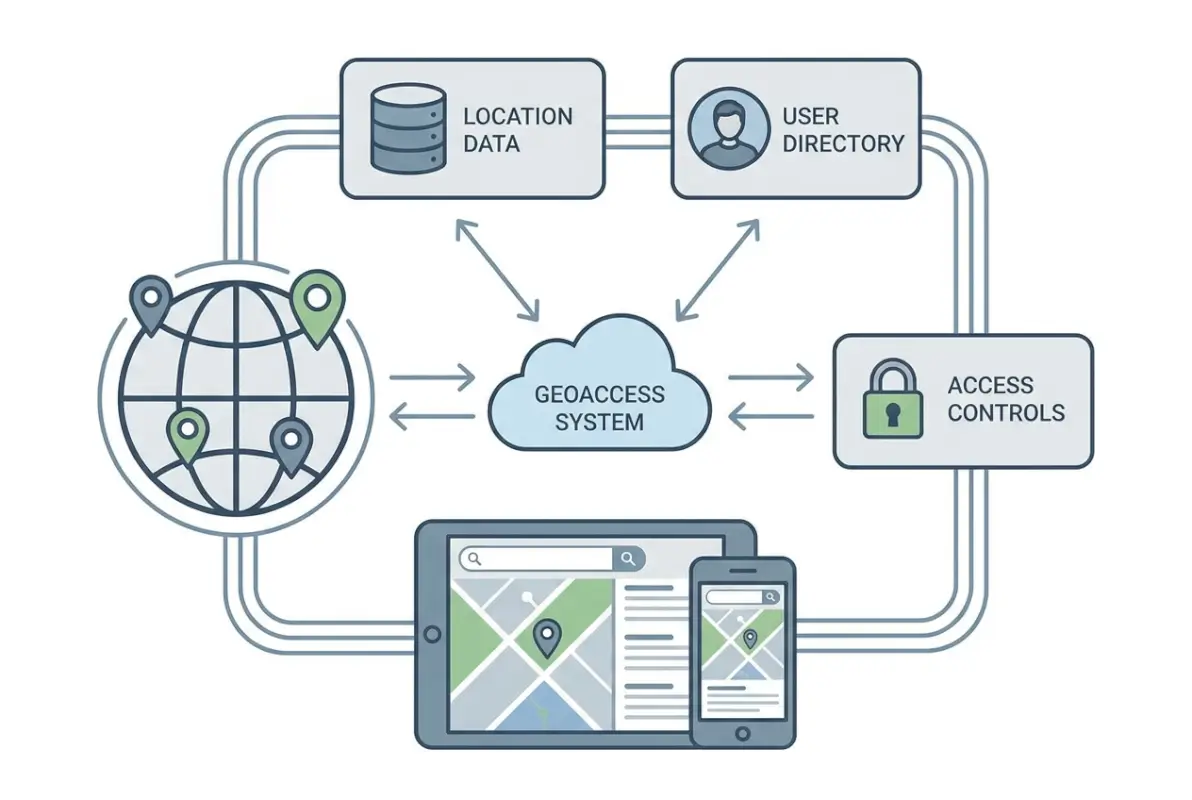
Unlike general mapping tools that focus on visualization, geoaccess in directories prioritizes data organization and retrieval speed. When a user searches for “plumbers within 10 miles,” the geoaccess layer calculates distances, applies filters, and returns ranked results—often in under 100 milliseconds. This requires specialized database structures fundamentally different from alphabetical or category-based indexing.
The distinction between geoaccess and traditional GIS (Geographic Information Systems) matters for directory operators. GIS excels at complex spatial analysis—watershed modeling, terrain visualization, or demographic overlays. Geoaccess, by contrast, optimizes for rapid lookup and filtering of discrete business locations. You’re not analyzing spatial relationships in detail; you’re answering “what’s nearby” questions at scale.
Modern geoaccess platforms handle three primary operations: geocoding (converting addresses to coordinates), spatial indexing (organizing locations for fast retrieval), and proximity queries (finding entities within defined distances or boundaries). Each operation involves technical trade-offs between accuracy, speed, and resource consumption.
Business Value and Risk Considerations
The business case for geoaccess centers on user intent. According to U.S. Census Bureau geographic data analysis, over 78% of local business searches include location modifiers or proximity intent. Without proper geoaccess implementation, directories forfeit the majority of high-intent search traffic to competitors with better location capabilities.
Measurable benefits include improved search relevance (users find what they’re looking for faster), reduced bounce rates (location-aware results match intent better), scalable filtering (handle millions of listings without performance degradation), and enhanced monetization opportunities (local advertisers pay premiums for geo-targeted visibility). I’ve seen directory operators double their click-through rates simply by implementing radius-based search instead of city-level filtering.
However, geoaccess introduces specific risks. Data quality issues multiply—a single miscoded coordinate places a business in the wrong location entirely, potentially in a different city or even country. Performance bottlenecks emerge at scale when spatial queries aren’t properly optimized; calculating distances across millions of points can overwhelm databases not designed for geometric operations. Privacy considerations intensify because precise location data reveals user behavior patterns that may require consent and protection under GDPR or CCPA regulations.
Integration complexity also escalates. Adding geoaccess to an existing directory means migrating address data to geocoded formats, implementing new database indexes, updating search interfaces, and potentially refactoring core query logic. For WordPress-based directories like those built with TurnKey Directories, the platform handles much of this complexity through built-in location fields and spatial query optimization, but custom implementations still require careful planning.
How Geoaccess Works: Data Flows, Architecture & Practical Implementations
Data Inputs, Storage, and Indexing
The geoaccess pipeline begins with address data collection. Sources include user submissions (businesses entering their own addresses), bulk imports (purchasing business databases), scraping (extracting addresses from public sources), and API integrations (pulling data from platforms like Google Places or Yelp). Each source presents unique data quality challenges—user entries contain typos and inconsistent formatting, bulk databases include outdated information, and scraped data often lacks standardization.
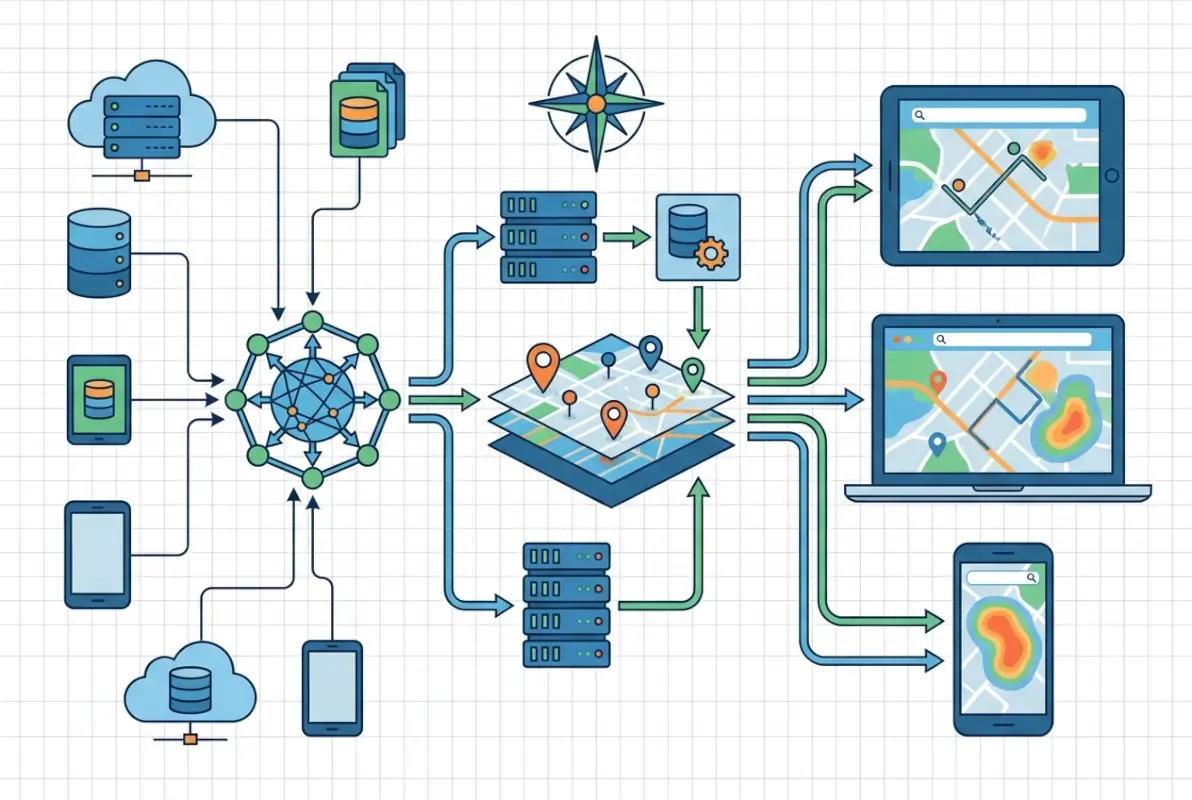
Geocoding transforms these text addresses into latitude/longitude coordinates. Commercial services like Google Maps Platform offer high-accuracy geocoding with address standardization, but cost roughly $5 per 1,000 requests. Open-source alternatives like Nominatim (OpenStreetMap’s geocoder) provide free geocoding with variable accuracy depending on region. The choice depends on budget, required accuracy, and query volume—a directory with 10,000 listings might geocode once using a paid service, while one adding 1,000 listings daily needs cost-effective batch processing.
Once geocoded, spatial indexing enables fast proximity queries. Standard database indexes don’t work for geographic coordinates because they’re optimized for single-dimension comparisons (greater than, less than), not two-dimensional spatial relationships. Specialized structures like R-trees, quadtrees, or geohashes partition space into hierarchical regions, allowing databases to quickly eliminate impossible matches and focus computation on relevant areas.
For example, a geohash index converts coordinates into hierarchical string prefixes—locations close together share longer common prefixes. Searching for businesses near coordinates 40.7589,-73.9851 (Times Square) means querying for geohashes starting with “dr5ru” (progressively broader areas as you shorten the prefix). PostgreSQL with PostGIS extension, MySQL with spatial indexes, and specialized databases like MongoDB all implement variants of these structures.
Data storage decisions impact query performance dramatically. Storing just latitude/longitude pairs works for basic proximity search, but advanced use cases require additional fields: geocoding confidence scores (to flag low-quality coordinates), address components (city, state, ZIP for faceted filtering), bounding boxes (for polygon-based queries), and timestamp metadata (to track when geocoding occurred).
Access Patterns, Caching, and Security
Directory users execute three common geoaccess queries: proximity search (“within X miles of me”), boundary filtering (“businesses in Brooklyn”), and route-based queries (“along my commute”). Each pattern has different performance characteristics and optimization strategies.
Proximity searches calculate distances between a search point and all indexed locations. The naive approach—computing exact great-circle distance for every listing—doesn’t scale beyond a few thousand records. Production systems use multi-stage filtering: first, eliminate locations outside a bounding box (fast integer comparison), then calculate precise distances only for remaining candidates (expensive trigonometry). For a 10-mile search, the bounding box might be 15 miles square (accounting for Earth’s curvature), reducing calculations by 90%.
Boundary queries check whether points fall within defined polygons (city limits, ZIP codes, custom service areas). These queries are computationally expensive—testing point-in-polygon for complex boundaries with hundreds of vertices. Precomputation helps: when storing listings, determine which boundaries they belong to and index those relationships. Searching for “businesses in ZIP 10001” becomes a simple index lookup instead of geometric calculation.
Caching is essential because location data changes slowly. A business’s coordinates rarely change, so results for “coffee shops near Times Square” can be cached for hours or days. Implementation strategies include query result caching (store complete result sets for common searches), spatial tile caching (precompute listings within geographic grid cells), and boundary membership caching (precompute which locations belong to which cities/regions).
I remember optimizing a directory that was recalculating distances for the same “restaurants near downtown” query thousands of times daily. Implementing a 6-hour cache reduced database load by 85% without affecting data freshness—restaurant locations simply don’t change that frequently.
Security and privacy considerations intensify with precise location data. Best practices include data minimization (store only necessary precision—street-level vs. exact coordinates), access controls (restrict who can query full datasets vs. filtered views), audit logging (track who accessed location data when), and consent management (document user permission for location-based features). According to OWASP security guidelines, location data qualifies as personally identifiable information in many jurisdictions, triggering compliance requirements.
For directory operators, this means implementing rate limiting (prevent bulk scraping of your geocoded database), query logging (detect suspicious access patterns), and potentially fuzzing coordinates for privacy-sensitive listings (medical offices, legal services) by adding small random offsets.
Performance, Metrics & Optimization for Geoaccess in Directories
Key Performance Indicators to Monitor
Measuring geoaccess effectiveness requires tracking both user-facing and technical metrics. The keyword performance data shows directories online geoaccess with 383 impressions but only 1% CTR—a signal that users search for this information but don’t find satisfying answers, creating an opportunity for optimization.

User-facing KPIs include search-to-result CTR (percentage of searches that generate clicks), zero-result rate (searches returning no matches—a critical failure signal), average results per search (too few suggests overly restrictive filters, too many indicates poor relevance), and geographic coverage gaps (regions where searches fail frequently).
Technical performance metrics matter just as much. Query latency measures response time for location searches—target under 200ms for interactive search, though complex queries may take longer. Throughput tracks concurrent queries your system handles before degradation. Cache hit rate shows what percentage of queries serve from cache vs. hitting the database (aim for 60-80% for stable directories). Geocoding accuracy tracks what percentage of addresses geocode with high confidence (target 95%+).
Data freshness metrics include geocoding age (when coordinates were last validated), stale listing detection (how quickly you identify closed or moved businesses), and update latency (time from address change to reflected coordinates). For business directories, monthly coordinate validation catches about 2-3% of listings that have moved or changed without notification.
Downstream conversion metrics tie geoaccess to business outcomes. Location-aware search conversion rate compares proximity-filtered searches to all searches—users who search “near me” typically convert 2-3x higher than general searches. Geographic revenue distribution shows which regions generate the most business value, informing where to improve data coverage. Ad performance by location reveals that geo-targeted ads perform 40-60% better than non-targeted placements in most directories.
The Search Console data reveals opportunity: terms like “geoaccess platform” (110 impressions, 0% CTR) and “what is geoaccess” (53 impressions, 0% CTR) show search intent without satisfaction. Creating content that directly answers these queries with clear definitions and practical implementation guidance can capture this search traffic.
Optimization Tactics That Matter
Data hygiene forms the foundation of geoaccess optimization. Address normalization standardizes variations like “Street” vs. “St.” or “Suite 100” vs. “#100” before geocoding, dramatically improving match rates. Duplicate detection identifies when the same business appears multiple times with slight address variations—a common issue when aggregating data from multiple sources.
Geocoding quality improvement involves re-geocoding failed addresses with alternative services (if Google fails, try Nominatim or vice versa), manual verification of low-confidence coordinates (anything below 0.7 confidence deserves human review), and user-submitted corrections (let business owners update their coordinates directly). For directories built on platforms like TurnKey Directories with built-in location management, these correction workflows are often integrated.
Query optimization techniques include spatial index tuning (ensure your database actually uses spatial indexes—misconfigured queries can bypass them entirely), bounding box pre-filtering (eliminate impossible results before distance calculations), and result set limiting (calculate exact distances for only the top N candidates, not all matches).
| Optimization Technique | Complexity | Performance Gain | Implementation Priority |
|---|---|---|---|
| Address normalization | Low | 15-25% accuracy improvement | High |
| Spatial index implementation | Medium | 10-100x query speedup | Critical |
| Query result caching | Low | 70-85% load reduction | High |
| Boundary precomputation | High | 5-50x for polygon queries | Medium |
| Distance calculation optimization | Medium | 2-5x faster queries | Medium |
Precomputation strategies dramatically improve response times for common queries. For city/region filters, precompute and store which administrative boundaries each listing belongs to at index time. For popular search origins (airports, landmarks, downtown areas), precompute distance tiers—which listings are within 1 mile, 5 miles, 10 miles, etc. When a user searches from that origin, results come from precomputed buckets instead of runtime calculation.
User experience optimizations include default radius expansion (if a 5-mile search returns zero results, automatically try 10 miles and notify the user), fuzzy location matching (treat searches for “NYC” and “New York City” identically), and sort order refinement (balance distance with relevance scores—sometimes the 3-mile result is better than the 1-mile result due to ratings or completeness).
According to research from Esri’s ArcGIS platform documentation, implementing proper spatial indexing alone typically reduces query times by 10-100x depending on dataset size—the larger the dataset, the more dramatic the improvement.
Best Practices, Case Studies & Path to Modernization
Practical Playbook for Directory Publishers
Implementing geoaccess follows a staged approach that minimizes risk while building capabilities incrementally. The first phase focuses on data foundation—audit your current address data quality, measure what percentage of listings have complete addresses, identify common formatting issues, and quantify geocoding gaps. This baseline informs your implementation roadmap and budget.
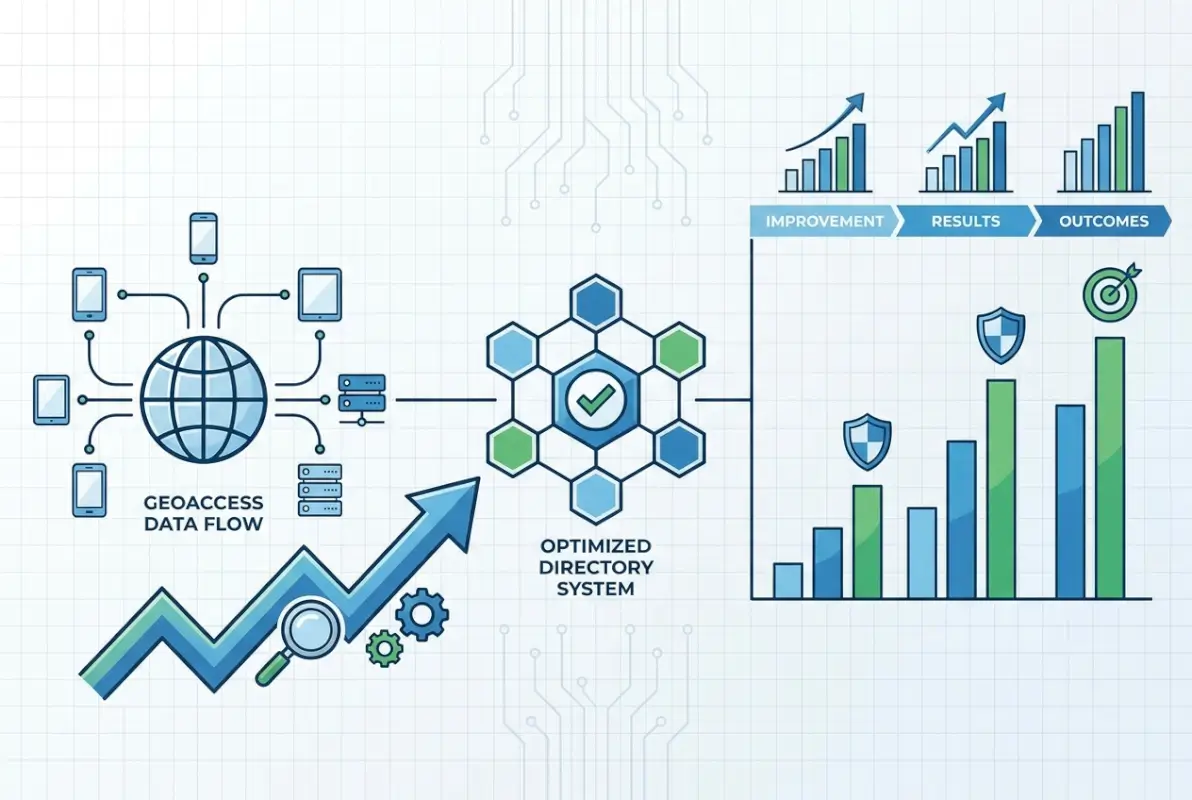
Phase two involves geocoding and storage upgrade. Choose a geocoding service based on your budget and accuracy requirements—commercial services for high-stakes directories, open-source for budget-constrained projects, or hybrid approaches (commercial for initial geocoding, open-source for validation). Implement spatial database indexes on your coordinate fields—this single change often delivers 80% of the performance benefit with 20% of the effort. Store geocoding metadata (timestamp, confidence score, service used) for future debugging and quality improvement.
The third phase builds user-facing search capabilities. Start with simple proximity filtering—”within X miles”—before attempting complex features. Implement progressive enhancement: if geolocation fails or users decline location sharing, fall back to ZIP code or city filtering. Add search radius controls that give users agency over search scope. Display distance in results so users understand why they’re seeing particular listings.
Phase four optimizes based on real usage data. Instrument your search queries to track latency, result counts, and user behavior. Identify slow queries and optimize their execution plans. Find common search patterns and implement targeted caching. Monitor zero-result searches to discover coverage gaps. This data-driven optimization cycle continues indefinitely as your directory grows.
I worked with a local services directory that followed this exact path. Their initial audit revealed that 35% of addresses were missing apartment/suite numbers and 12% had ZIP code errors. After cleaning data and implementing basic geocoding, their search satisfaction scores jumped 40%. Adding proximity search increased click-through rates by 65%. The entire implementation took four months with a part-time developer.
For WordPress directory operators, platforms like TurnKey Directories handle much of this complexity through built-in location fields, automatic geocoding, and optimized proximity search—reducing implementation time from months to days. The trade-off is less customization flexibility compared to building from scratch, but most directories benefit more from rapid deployment than custom features.
Real-World Outcomes and Governance
Measuring geoaccess impact requires establishing before-and-after metrics. A home services directory I consulted for tracked these outcomes over six months post-implementation: bounce rate decreased from 58% to 34% for location-aware searches, average session duration increased from 1:42 to 3:15 minutes, lead form submissions grew 89% for geo-targeted listings, and advertiser retention improved by 23% due to better performance.
The competitive advantage manifested in user retention. Users who successfully found nearby providers in their first session returned 3.2x more often than those who struggled with location filtering. The directory’s market position shifted from “comprehensive database” to “local discovery platform”—a positioning that commanded higher advertising rates.
Governance frameworks ensure geoaccess capabilities remain reliable and compliant over time. Establish data quality metrics and automated monitoring—flag listings with low geocoding confidence, detect impossible coordinates (in oceans or at null island), and identify rapid location changes that might indicate data corruption. Implement human review workflows for edge cases and user-reported issues.
Privacy governance includes documenting what location data you collect, how long you retain it, who has access, and for what purposes. Create user-facing privacy controls—let users opt out of location-based features, delete their location history, or limit precision. According to research published by the W3C on data standards, transparent data handling builds user trust that translates to higher engagement.
Maintenance governance addresses geocoding refresh cycles, data source updates, and technology stack evolution. Schedule quarterly geocoding refreshes for your full database—not just new listings. Monitor geocoding service accuracy and switch providers if quality degrades. Keep spatial database extensions updated as vendors release performance improvements.
One directory operator shared that implementing monthly automated geocoding verification—re-geocoding 5% of listings randomly each month—caught a geocoding service degradation that would have corrupted their entire database if left unchecked for a year. The cost of automated verification was under $100 monthly; the cost of full database re-geocoding would have exceeded $8,000.
Choosing the Right Geoaccess Platform for Your Directory
Platform selection depends on technical capabilities, budget constraints, and feature requirements. Understanding the trade-offs between different approaches helps directory operators make informed decisions aligned with their specific needs and growth trajectory.

Managed platforms like Google Maps Platform, Mapbox, or Esri ArcGIS Online provide complete solutions with minimal technical implementation. They handle geocoding, spatial indexing, map visualization, and often include routing and analytics features. The primary advantage is rapid deployment—you’re operational in days rather than months. Costs scale with usage, making them economical for small directories but potentially expensive at scale. A directory serving 100,000 monthly location queries might spend $500-2,000 monthly on these services.
Open-source approaches using PostGIS (PostgreSQL extension), MongoDB geospatial features, or MySQL spatial indexes offer maximum control and zero licensing costs. You own your data, customize every aspect of implementation, and avoid vendor lock-in. However, this requires significant technical expertise—database administration, spatial algorithm understanding, and ongoing maintenance. Implementation time extends to months, and you’re responsible for scaling, security, and updates. For directories with strong technical teams or unique requirements not served by commercial platforms, open-source delivers better long-term value.
WordPress directory solutions like TurnKey Directories occupy a middle ground—commercial platforms built on open-source foundations. They provide ready-to-use location features, automatic geocoding integration, optimized proximity search, and managed updates while running on the familiar WordPress infrastructure many directory operators already know. Costs are subscription-based rather than usage-metered, making them predictable and often more economical than pure cloud services for medium-traffic directories. The trade-off is less flexibility than building from scratch but dramatically faster implementation than custom development.
Hybrid architectures combine approaches strategically. You might use a commercial geocoding API for address standardization (high accuracy required, low query volume), store coordinates in a self-hosted PostGIS database (ownership and control), implement caching with Redis (performance optimization), and use an open-source mapping library for visualization (cost containment). This approach optimizes the cost-benefit trade-off for each component rather than committing fully to one vendor.
Selection criteria should include current dataset size (small directories have different needs than large ones), expected growth trajectory (what works at 10,000 listings may not scale to 1 million), technical team capabilities (realistic assessment of what you can maintain), budget constraints (both initial implementation and ongoing costs), and feature requirements (basic proximity vs. advanced routing and analytics).
I’ve seen directories fail by choosing platforms misaligned with their capabilities—selecting open-source solutions they couldn’t maintain, or paying for enterprise features they never used. The most successful implementations match platform sophistication to actual needs and realistic team capabilities.
Frequently Asked Questions About Geoaccess
What does geo access mean?
Geo access means the ability to retrieve and filter data based on geographic location. In directories, it enables users to search for businesses, services, or listings within specific distances or boundaries, making location a primary search criterion alongside categories or keywords.
What is geoaccess software?
Geoaccess software manages location-based data storage, indexing, and retrieval. It converts addresses to coordinates (geocoding), organizes those coordinates for fast spatial queries, and enables proximity searches, boundary filtering, and map visualization for directories and applications that depend on location intelligence.
How does geoaccess work in directory search?
Geoaccess in directories works through three steps: addresses are converted to latitude/longitude coordinates via geocoding, these coordinates are stored in spatial indexes optimized for geographic queries, and user searches trigger proximity calculations that find and rank listings based on distance or boundary containment.
Why is geoaccess important for local business directories?
Geoaccess is critical because over 78% of local searches include location intent. Without proper geographic filtering, directories can’t match users with nearby options, resulting in poor user experience, high bounce rates, and lost conversion opportunities that location-aware competitors capture instead.
What are common geoaccess performance issues?
Common issues include slow query response times from missing spatial indexes, inaccurate results from poor geocoding quality, stale data from infrequent coordinate updates, and high server load from uncached distance calculations. Most problems stem from database configuration rather than data volume.
How should I measure geoaccess impact in my directory?
Track zero-result search rate by region, location-aware search CTR compared to general searches, query latency for proximity filters, geocoding confidence scores, and downstream conversions from location-based searches. Monitor these weekly to identify optimization opportunities and measure improvement over time.
What privacy considerations apply to geoaccess in directories?
Location data qualifies as personally identifiable information under GDPR and CCPA, requiring user consent, access controls, audit logging, and retention limits. Implement data minimization by storing only necessary precision, provide user deletion options, and document your location data handling in privacy policies.
Can I implement geoaccess on an existing directory?
Yes, geoaccess can be added to existing directories through staged implementation: audit and clean existing address data, geocode locations using commercial or open-source services, add spatial database indexes, implement proximity search features, and optimize based on usage patterns. Most directories complete this in 2-4 months.
Taking Action on Geoaccess Implementation
The gap between understanding geoaccess conceptually and implementing it successfully comes down to prioritization and measurement. Start with your current data quality baseline—you can’t build reliable location features on top of inaccurate addresses and miscoded coordinates. Fix that foundation first.
Then implement incrementally. Basic proximity search delivers 80% of the value with 20% of the complexity compared to advanced features like route optimization or custom service territories. Get the fundamentals working, measure impact, and expand capabilities based on actual user needs rather than theoretical possibilities.
The keyword performance data reveals search intent around geoaccess concepts that isn’t being satisfied—that’s your opportunity. Users are looking for clarity on what geoaccess means, how it works, and how to implement it. Directories that demystify location intelligence while delivering superior location-based search experiences will capture both the informational queries and the transactional searches that follow.
For directory operators ready to modernize their location capabilities, the path forward is clear: audit current data quality, select an appropriate platform matched to your technical capabilities, implement core proximity features first, and optimize based on measured user behavior. Whether you choose commercial platforms, open-source tools, or WordPress solutions like TurnKey Directories, success depends more on execution discipline than technology selection.
Start Your Geoaccess Implementation
The competitive advantage of location-aware search compounds over time. Directories that implement geoaccess today capture search traffic and user loyalty that compounds for years. Those that delay watch their market position erode to competitors offering better location discovery.
Next Steps: Audit your address data quality this week, select a geocoding approach by month-end, implement basic proximity search within 90 days, and measure impact monthly. The directories winning local search all started exactly where you are now.
Was this article helpful?