
7 Steps to Build an Online Directory Website That Attracts Visitors

Visual overview of 7 Steps to Build an Online Directory Website That Attracts Visitors

Translated to

Building an online directory website isn’t just about creating a list of businesses or services—it’s about becoming the trusted hub where people turn first when they’re looking for solutions. In my experience working with directory sites, I’ve seen how the right structure can transform a simple listing platform into a revenue-generating asset that grows organically. The difference between directories that fade into obscurity and those that dominate search results comes down to seven strategic steps that prioritize data quality, user experience, and smart SEO. If you’re ready to build a directory that actually attracts visitors (and keeps them coming back), you’re about to learn a framework that balances human curation with scalable automation.

TL;DR – Quick Takeaways

  • Narrow your niche – Focused directories outrank generalist ones because they signal expertise and relevance
  • Structure matters – Clean information architecture with schema markup dramatically improves visibility
  • Quality over quantity – Verified, curated listings build trust faster than thousands of unvetted entries
  • Local SEO wins – Location-based pages and NAP consistency remain core ranking factors
  • Content drives traffic – Editorial guides and FAQ content capture long-tail searches competitors miss
  • Measure everything – Track listing activation, organic traffic, and retention to identify what actually works

Step 1 — Define Your Niche, Value Proposition, and Monetization Model

The biggest mistake I see with new directory builders is trying to be everything to everyone. Generic directories compete with established giants like Yelp and Yellow Pages, and you simply won’t win that battle. Instead, you need to carve out a specific niche where you can become the authoritative source.

Core concepts behind 7 Steps to Build an Online Directory Website That Attracts Visitors

Narrow the Focus to Ensure Signal-to-Noise Ratio

Think about who you’re serving and what problem you’re solving. Are you creating a directory of sustainable businesses in the Pacific Northwest? A curated list of freelance graphic designers specializing in healthcare branding? The more specific you get, the easier it becomes to define editorial standards and attract both quality listings and targeted visitors.

Consider these questions when narrowing your niche: What industries or professions have fragmented information? Where do people struggle to find vetted providers? What geographic area or specialty lacks a trusted directory? Your sweet spot sits at the intersection of market demand and competitive gaps.

Identify Buyer Personas

You’re actually serving three distinct groups, and understanding each one shapes your entire strategy. First, there are the businesses or professionals who want to be listed—they need clear value propositions and pricing transparency. Second, the searchers looking for services need intuitive filtering and trust signals. Third, if you’re selling premium listings or ads, you need to understand who’s willing to pay and why.

💡 Pro Tip: Create detailed personas for each group. Give them names, motivations, and pain points. When you’re making decisions about features or pricing, ask yourself whether it serves “Sarah the searcher” or “Mike the business owner.”

Value Proposition and Differentiation

What makes your directory worth visiting instead of doing a Google search? This is where editorial standards become your competitive advantage. Curated listings with verification badges, detailed profiles with rich media, editor picks, and quality ratings all signal that you’re not just scraping data—you’re providing vetted recommendations.

The format of your listings matters too. Will you include pricing information? Customer reviews? Portfolio samples? Video introductions? The more structured and comprehensive your listing fields, the more valuable your directory becomes. Just don’t overwhelm users with too many fields that remain empty.

Monetization Model

You need to know how you’ll make money before you build, not after. Common models include flat listing fees (one-time or annual), tiered subscription plans with premium features, display advertising, featured placements, or partnership commissions. Many successful directories use a freemium model—basic listings are free (which helps build volume), while premium features like enhanced profiles, top placement, or analytics require payment.

Budget for both acquisition (getting your first 100-500 listings) and retention (keeping them updated and paying). Your monetization model should align with the value you’re providing, if premium listings don’t offer measurable benefits, businesses won’t renew.

73%
of directory sites using freemium models see higher listing volumes than paid-only directories

Success Metrics for Step 1

At this planning stage, define what success looks like. How many listings do you want to acquire in month one? Month three? What’s an acceptable activation rate (percentage of businesses that complete their profile after starting)? What does early retention look like—are businesses renewing their annual listings at 60%, 70%, or higher?

Step 2 — Build a Scalable Information Architecture and Listing Schema

Information architecture sounds technical, but it’s really just the organizational skeleton of your directory. Get this right, and everything else—SEO, user experience, scalability—becomes exponentially easier. Get it wrong, and you’ll be fighting uphill battles with confusing navigation and poor search rankings.

Step-by-step process for 7 Steps to Build an Online Directory Website That Attracts Visitors

IA Design for Directory Clarity

Your category taxonomy needs to be logical, comprehensive, and not too deep. Most directories work best with 2-3 levels of categorization—for example, “Home Services > Plumbing > Emergency Plumbers” or “Health > Dentistry > Cosmetic Dentistry.” Beyond three levels, you risk confusing users and diluting link equity.

Location pages deserve equal attention. If you’re building a directory with geographic scope, each city or region should have its own page. This isn’t just for user convenience—it’s a cornerstone of local SEO strategy. URL structure should be clean and predictable, like yourdirectory.com/category/city or yourdirectory.com/city/category, whichever makes more logical sense for your niche.

Consistent naming conventions matter more than you might think. If you refer to categories as “categories” in one place and “services” in another, or if location slugs use different formatting, you’re creating friction that hurts both users and search engines.

Listing Schema and Metadata

Every listing should capture core fields that provide both user value and SEO signals. At minimum, you need NAP data (Name, Address, Phone), contact details, category assignments, operating hours, and space for descriptions. Beyond that, consider fields for website URLs, social profiles, pricing indicators, certifications, and media galleries.

Rich structured data using schema.org markup (specifically LocalBusiness or ProfessionalService schemas) tells search engines exactly what each listing represents. Implement this as JSON-LD in your template, and you’ll see enhanced search results with star ratings, hours, and other rich snippets that improve click-through rates.

⚠️ Important: NAP consistency across your directory and other citations is critical for local SEO. Even small variations like “St.” versus “Street” can dilute ranking signals.

Content Types Beyond Listings

The best directories aren’t just databases—they’re content destinations. Create editorial guides that help users understand how to choose providers in your niche. Write “how to use this directory” articles that explain your rating system or how to evaluate different options. This content serves dual purposes: it helps users make better decisions, and it captures long-tail search traffic that pure listings can’t.

User-generated contributions like reviews and submission forms add freshness and social proof, but they require moderation. Set clear guidelines, implement spam filters, and have a human review process for new submissions. The qualities of great online directories consistently include robust moderation systems that maintain quality standards.

Step 3 — Create a Listing Acquisition and Verification Process

You can build the most beautiful directory website in the world, but without listings, you have nothing. The challenge is acquiring quality listings at scale while maintaining editorial standards. This step requires both strategic thinking and operational discipline.

Tools and interfaces for 7 Steps to Build an Online Directory Website That Attracts Visitors

Data Acquisition Strategy

You have several options for populating your directory, each with tradeoffs. Manual curation gives you maximum quality control but doesn’t scale well—you might personally research and add your first 50-100 listings to establish credibility. Self-service submission forms scale better but require robust validation and moderation workflows to prevent spam.

Some directories start with licensed data from industry associations or business databases, which provides volume quickly but often lacks the detailed information that makes listings truly valuable. A hybrid approach often works best: seed your directory with foundational data, then enhance it through verification calls and encourage businesses to claim and complete their profiles.

Verification and Quality Control

This is where many directories fail. A verification workflow ensures every listing meets your standards before going live. This might include checking that phone numbers work, websites are active, addresses are valid, and business information is current. For professional directories, you might verify licenses or certifications.

Anti-spam measures are non-negotiable. Implement CAPTCHA on submission forms, use email verification, and watch for duplicate submissions or suspicious patterns. Set up automated flags for listings with missing critical fields or placeholder content, then route them through manual review before publication.

✅ Key Insight: Ongoing data validation is just as important as initial verification. Set up quarterly audits to check if businesses are still operating, if contact information is current, and if there are outdated listings dragging down your quality.

Partnerships and Data Licensing

Partnering with niche associations, industry bodies, or regional business groups can accelerate your listing acquisition dramatically. These organizations often have member directories that they’re willing to share or cross-promote. In exchange, you might offer their members discounted premium listings or co-branding opportunities.

Data licensing agreements can give you access to verified business information, but read the terms carefully—some providers restrict how you can display or monetize their data. Make sure any partnership aligns with your monetization model and doesn’t compromise your editorial independence.

Onboarding for New Listings

When a business submits a listing or you add one on their behalf, the onboarding experience sets the tone for the relationship. Send a welcome email that explains the benefits of a complete profile, outlines your verification process, and provides clear next steps. If you offer premium tiers, this is your opportunity to upsell by demonstrating the value of enhanced placement or additional features.

Clear pricing communication prevents surprises that lead to disputes or chargebacks later. If you’re offering a free trial of premium features, make the terms explicit. The smoother your onboarding funnel, the higher your activation rate will be.

Step 4 — Build a Conversion-Focused Website and UX

Your directory’s design needs to serve two masters: human visitors who want to find information quickly, and search engines that need clear signals about your content. The good news is that these goals align more than they conflict—fast, accessible, well-structured sites perform better on both dimensions.
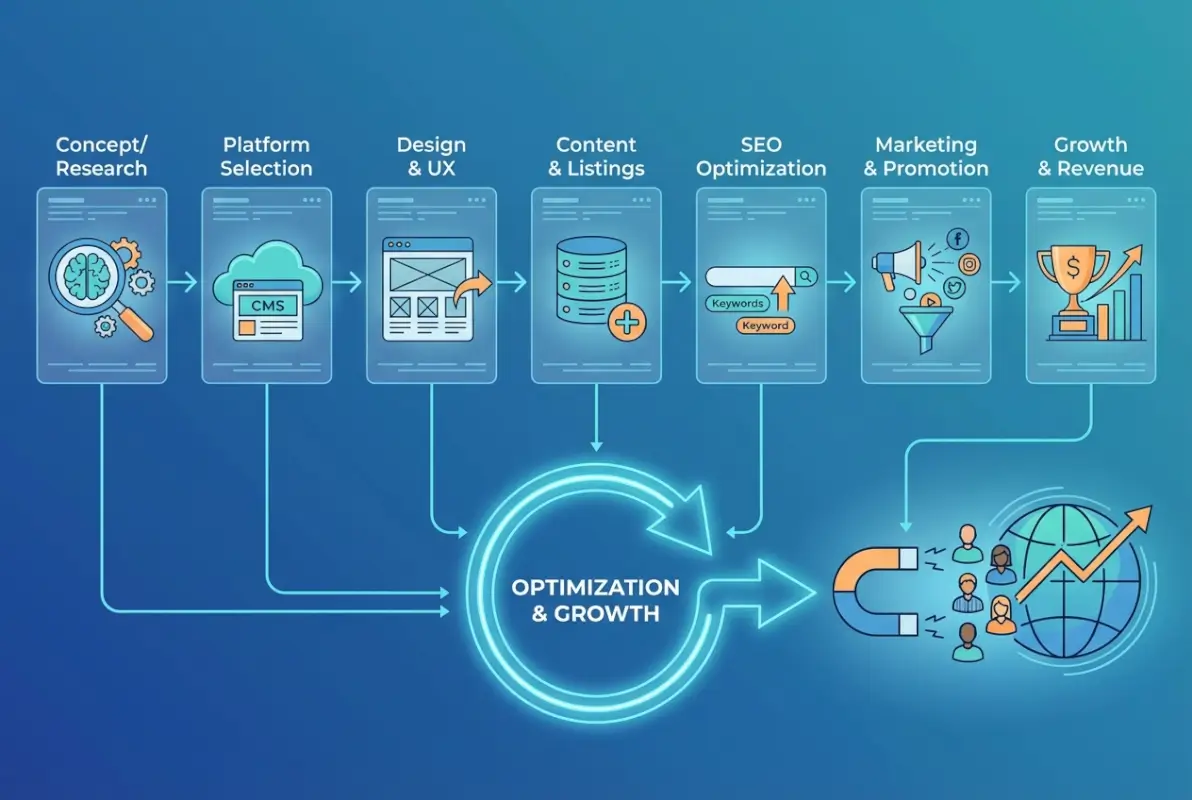
Best practices for 7 Steps to Build an Online Directory Website That Attracts Visitors

Core Pages and UX Principles

Your homepage should immediately communicate what your directory offers and guide visitors toward either searching or browsing. Location pages and category pages form the backbone of your internal linking structure—each should have unique, descriptive content (not just a list of results) that provides context and helps with SEO.

Individual listing pages need to balance comprehensive information with scanability. Use clear headings, bullet points for key details, and prominent calls-to-action (contact, visit website, get directions). Internal linking between related listings, relevant categories, and location pages distributes authority and helps visitors discover more content.

Mobile-friendly design isn’t optional anymore—the majority of directory searches happen on phones. Test your design on actual devices, not just browser simulators. Click targets need to be large enough for thumbs, text needs to be readable without zooming, and forms need to be simple enough to complete on a small screen.

Search, Filters, and Ranking Signals

Your search functionality should support both keyword queries and location-based searches. “Find plumbers near me” and “emergency plumbing in Austin” should both return relevant results. Filters let users narrow by category, rating, price range, distance, or any other structured field you collect.

Be transparent about how you rank listings. If you’re mixing organic results with paid placements, label them clearly. Default sort orders might prioritize verified listings, then ratings, then completeness of profile—whatever combination serves user intent. Allow users to re-sort by different criteria if they prefer.

Ranking FactorUser ValueSEO Impact
Profile CompletenessMore information helps decision-makingRich content provides indexable text
Verification StatusTrust signal reduces riskQuality indicator for algorithms
User ReviewsSocial proof influences choiceFresh content and keyword diversity
RecencyRecently updated likely still operatingFreshness factor in search rankings

Performance optimization directly impacts both user experience and SEO. Target page load times under three seconds. Optimize images, minify CSS and JavaScript, leverage browser caching, and consider a content delivery network (CDN) if you’re serving a geographically distributed audience. Google’s Core Web Vitals—specifically Largest Contentful Paint, First Input Delay, and Cumulative Layout Shift—are ranking factors you can’t ignore.

Trust, Reviews, and Social Proof

User reviews are powerful trust signals, but they require active management. Implement a review system that allows verified users to rate and comment on listings. Respond to reviews (both positive and negative) to show that you’re engaged. Editor picks or featured listings add another layer of curation that helps users navigate choices.

Case studies or success stories from businesses that benefited from your directory create social proof that encourages more listings and premium upgrades. Testimonials from users who found great services through your directory reinforce value for searchers.

Accessibility and Compliance

Accessibility isn’t just ethical—it’s legally required in many jurisdictions and expands your potential audience. Follow WCAG guidelines: use semantic HTML, provide alt text for images, ensure sufficient color contrast, make navigation keyboard-accessible, and test with screen readers. These practices also improve SEO, since they create clearer structure and content hierarchy.

Privacy and data protection requirements vary by location, but at minimum, you need a clear privacy policy, secure handling of user data, and compliance with regulations like GDPR or CCPA if applicable. If you’re collecting payment information, use established payment processors that handle PCI compliance rather than building it yourself.

Step 5 — Implement a Content and SEO Strategy That Attracts Organic Traffic

This is where the magic happens. A well-executed content and SEO strategy transforms your directory from a static database into an organic traffic magnet. The key is understanding that you’re not just optimizing listing pages—you’re creating an ecosystem of content that captures intent at every stage of the user journey.

Advanced strategies for 7 Steps to Build an Online Directory Website That Attracts Visitors

Keyword and Topic Strategy

Start with core keywords that describe your directory’s focus—these are typically category + location combinations like “Portland wedding photographers” or “emergency plumbers Seattle.” But the real opportunity lies in long-tail keywords that indicate specific intent: “how to choose a wedding photographer,” “questions to ask a plumber before hiring,” or “average cost of emergency plumbing.”

Place-intent pages targeting “near me” searches and specific neighborhoods capture high-intent local traffic. If you’re building a directory for a major metro area, create pages for each neighborhood or district, not just the city level. These hyperlocal pages often face less competition than broader city-level terms.

“People Also Ask” boxes in search results are gold mines for content ideas. Look at what questions appear for your core keywords, then create comprehensive FAQ content that directly answers those queries. This positions you for featured snippets—those answer boxes at the top of search results that drive significant traffic.

💡 Pro Tip: Use tools like AnswerThePublic or examine PAA boxes manually to build a list of 50-100 question-based keywords. Create dedicated pages or FAQ sections that target these questions with concise, direct answers.

On-Page SEO for Directory Pages

Every page type—homepage, category pages, location pages, individual listings—needs optimized title tags and meta descriptions that include relevant keywords while remaining compelling to human readers. Header structure (H1, H2, H3) should create clear content hierarchy and include keyword variations naturally.

Image SEO often gets overlooked in directories, but it’s crucial. Use descriptive file names, include alt text with relevant keywords, compress images for fast loading, and consider implementing image sitemaps. If your listings include photos, encourage businesses to provide high-quality images with descriptive captions.

Internal linking strategy deserves dedicated attention. Link from category pages to relevant location pages and vice versa. Link from blog content to relevant listings or categories. Use descriptive anchor text that includes keywords naturally. This web of internal links helps search engines understand your site structure and distributes authority to important pages.

Content Marketing and Link Acquisition

Editorial content—guides, how-to articles, industry insights—serves multiple purposes. It attracts organic traffic from informational queries, establishes your authority, provides link targets for external sites, and keeps visitors engaged beyond just browsing listings. Think about creating ultimate guides, comparison articles, local area profiles, and industry trend analysis.

Link building for directories should focus on ethical, sustainable approaches. Reach out to local business associations, chamber of commerce sites, industry publications, and complementary directories for partnership opportunities. Guest posting on relevant industry blogs, creating linkable assets like research reports or infographics, and participating in local community initiatives all build legitimate backlinks.

Avoid buying links, participating in link schemes, or using automated link-building tools—these tactics can result in penalties that tank your rankings. Quality over quantity applies to link building just as much as to listing acquisition. Understanding active directory business use cases can inform your outreach strategy by identifying organizations that might value partnering with your directory.

Local and Localized Content

City and region pages shouldn’t just list businesses—they should provide context. Include information about the local market, neighborhood characteristics, or regional considerations that affect the category you cover. For example, a home services directory in coastal areas might discuss salt air corrosion issues; a professional directory in a tech hub might reference industry-specific expertise.

Local signals extend beyond content to technical factors. Ensure your Google Business Profile (if applicable) is complete and consistent with your directory’s information. Encourage businesses listed in your directory to maintain NAP consistency across all platforms. Build citations in other local directories and business listing sites, since citation consistency reinforces local authority.

Ongoing Content Cadence

Search engines reward sites that publish fresh, relevant content regularly. Develop an editorial calendar that balances different content types: new or updated listings, blog posts, seasonal guides, industry news, and user-generated content. Even publishing 2-4 new pieces per month signals to search algorithms that your site is active and maintained.

Content audits should happen quarterly or semi-annually. Review existing pages for accuracy, update outdated information, identify underperforming content that could be improved or consolidated, and look for keyword cannibalization where multiple pages compete for the same terms.

68%
of organic search clicks go to the top three results, making first-page rankings essential

Step 6 — Acquisition, Engagement, and Retention Strategies

Building traffic is only half the equation. You also need to convert visitors into engaged users and keep them coming back. This step focuses on the full funnel—from first visit to repeat user to potential advocate who recommends your directory to others.

Traffic Acquisition Channels

Organic search should be your primary long-term channel, but diversification reduces risk. Email marketing works well for directories—send curated newsletters featuring new listings, seasonal guides, or category spotlights. Segment your list between businesses (listing owners) and consumers (searchers) since they have different interests.

Social media effectiveness varies by niche. Professional directories might find LinkedIn valuable, while local service directories might do better on Facebook community groups or neighborhood-focused platforms. Don’t spread yourself too thin—focus on one or two platforms where your audience actually spends time.

Partnerships and cross-promotion with complementary businesses or organizations can drive targeted traffic. If you run a wedding vendor directory, partner with wedding venues or planners. If you run a professional directory, partner with industry associations or certification bodies.

Engagement Tactics

Subscription features turn casual visitors into regular users. Offer saved searches, favorites lists, or personalized recommendations based on browsing history. Premium listings might include enhanced features like priority placement, analytics dashboards, or lead capture forms that justify the upgrade cost.

Email alerts for new listings in categories or locations users care about keep your directory top-of-mind. Curated newsletters that showcase high-quality listings or provide genuinely useful content (not just promotional emails) maintain engagement without being spammy.

Interactive features like comparison tools, cost calculators, or “request quotes from multiple providers” functionality increase time on site and provide value that pure listing browsing doesn’t offer. Just make sure any features you add genuinely serve user needs rather than just adding complexity.

Retention and Validation

For listing businesses, retention means renewals. Regular data update requests keep information current and give you a reason to stay in touch. Send quarterly or semi-annual emails asking businesses to verify their information, update photos, or add new services. This ongoing communication reinforces value and increases renewal rates when subscription periods end.

Feedback loops help you improve. Survey businesses about their experience with your directory—did they receive inquiries? What features would they value? Survey users about their search experience—did they find what they needed? What would make the directory more useful? This data informs your roadmap and helps prioritize improvements.

Community and Network Effects

The best directories create network effects where more listings attract more searchers, which attracts more listings, in a virtuous cycle. Reviews and user-generated content accelerate this—every review adds value for future visitors and creates activity that boosts SEO.

For businesses, knowing that potential customers actually use your directory motivates them to maintain quality listings. Share success metrics (anonymized if necessary) that demonstrate traffic and engagement. Highlight businesses that receive positive reviews or high engagement as case studies that encourage others to invest in premium features.

Step 7 — Measurement, Iteration, and Scale

What gets measured gets managed. The final step in building a successful directory is establishing metrics, running experiments, and scaling what works while pruning what doesn’t. This isn’t a one-time activity—it’s an ongoing discipline that separates hobby projects from sustainable businesses.

Key Metrics to Track

Organic traffic is your primary health indicator for SEO effectiveness. Track overall sessions, but also segment by page type (category pages, location pages, individual listings, blog content) to understand what’s driving visits. Look at landing pages to see which content successfully attracts new visitors.

Unique listings and listing growth rate show whether your acquisition strategy is working. But don’t just count quantity—track activation rate (percentage of submitted listings that get completed and published) and average profile completeness score. A hundred incomplete listings provide less value than fifty detailed, verified profiles.

Churn rate for paid listings tells you whether businesses see value in maintaining their presence. If churn is high, investigate why—is the pricing wrong? Are businesses not receiving inquiries? Is the interface confusing? Revenue per listing and customer lifetime value inform how much you can afford to spend on acquisition and what features justify premium pricing.

MetricWhat It MeasuresWhy It Matters
Organic TrafficSEO effectivenessPrimary sustainable growth channel
Activation RateListing quality and completionIncomplete profiles provide little value
User EngagementTime on site, pages per visitIndicates usefulness and relevance
Conversion RateVisitor to action (contact, visit)Demonstrates directory delivers value
Churn RatePaid listing renewalsIndicates business ROI perception

Experimentation and A/B Testing

Don’t guess—test. Run experiments on critical elements like homepage layout, default search sort order, pricing page structure, or call-to-action button copy. Even small changes can have significant impacts on conversion rates or user behavior.

A/B testing pricing models or feature packages helps you optimize revenue without alienating customers. You might test whether monthly versus annual pricing generates higher lifetime value, or whether three tiers versus two tiers improves upgrade rates. Document your hypotheses, run tests with sufficient sample sizes, and implement winners while learning from losers.

UI and UX changes should be data-driven. Use heatmaps and session recordings to understand how users actually interact with your site. Where do they click? Where do they drop off? What elements never get used? This behavioral data often reveals opportunities that analytics numbers alone miss.

Tooling and Automation

Analytics platforms like Google Analytics, Plausible, or Fathom provide essential traffic and behavior data. Set up goal tracking for key conversions (listing submission, contact clicks, premium upgrades). Create custom dashboards that surface your most important metrics at a glance.

SEO tooling from platforms like Ahrefs, SEMrush, or Moz helps you track keyword rankings, monitor backlinks, identify technical issues, and analyze competitors. These tools aren’t free, but they pay for themselves by revealing opportunities and problems you wouldn’t catch manually.

Data validation automation reduces manual work as you scale. Build or integrate tools that periodically check phone numbers, verify website URLs are still active, flag duplicate listings, or identify incomplete profiles. The more you can automate quality control, the more time you can spend on strategic improvements.

✅ Key Insight: Automation should enhance human judgment, not replace it entirely. Use automation for repetitive tasks and flagging potential issues, but keep humans in the loop for editorial decisions and quality control.

Scaling with Integrations

As your directory grows, integrations become critical for efficiency. CRM systems help manage relationships with listing businesses, track communication history, and automate renewal reminders. Payment gateways handle subscriptions, invoicing, and financial reporting without custom development.

API-based listing ingestion allows businesses or partners to push data directly into your directory, reducing manual entry and keeping information current. If you’re working with industry-specific data providers, API integration might be the only scalable way to maintain freshness across thousands of listings.

Marketing automation platforms can segment your email lists, trigger behavioral emails (like follow-ups after listing submission), and run drip campaigns that nurture free users toward premium upgrades. These tools scale personalized communication that would be impossible to handle manually.

Optional Core Add-Ons for Scale and Monetization

Once your core directory is stable and growing, these advanced features can accelerate scale and open new revenue streams.

Internationalization and Localization

If your niche has international potential, consider multi-language support and region-specific versions. This isn’t just translating content—it involves currency localization, local payment methods, region-appropriate imagery, and potentially different category structures that reflect local market characteristics.

API Access for Partners

Offering API access to your directory data creates partnership opportunities and potential licensing revenue. Other platforms might want to display your curated listings, driving referral traffic and creating additional touchpoints. Set clear usage terms, implement rate limiting, and consider tiered API pricing based on call volume.

Premium Features and Upsells

Advanced features like appointment scheduling, lead capture forms, analytics dashboards, or priority customer support justify premium pricing tiers. Bundle features strategically—you want clear differentiation between tiers without making the basic tier feel crippled.

Compliance, Data Governance, and Security

As you scale, invest in robust security practices: regular backups, SSL certificates, secure authentication, data encryption, and regular security audits. Data governance policies define how you collect, use, store, and delete user information, ensuring compliance with evolving privacy regulations. If you’re working with business directories, exploring how to add business to phone directory systems properly can inform your data management approach.

Implementation Roadmap

Theory is great, but execution requires a practical timeline. Here’s a realistic roadmap for bringing your directory from concept to sustainable operation.

0–30 Days: Planning, IA, and Initial Listings

Finalize your niche definition, complete competitive research, and document your value proposition. Build your information architecture and category taxonomy. Select and set up your platform (custom build, WordPress with directory plugin, or dedicated directory software). Create templates for key page types and implement basic SEO structure. Manually curate and add your first 20-50 verified listings to establish credibility. Set up analytics and tracking.

31–90 Days: Content, SEO Groundwork, and Early Traffic

Launch self-service listing submissions with moderation workflows. Create 5-10 pieces of editorial content targeting informational keywords. Build location and category landing pages with unique content. Start basic link-building outreach to local organizations and industry groups. Implement schema markup across all page types. Reach 100-200 total listings through a mix of curation and submissions. Begin email list building for both businesses and users.

3–6 Months: Growth Experiments and Monetization Tests

Launch premium listing tiers if you haven’t already, and run pricing experiments. Scale listing acquisition through partnerships or bulk data imports (with verification). Expand content calendar to weekly or bi-weekly publishing. Implement user reviews and ratings. Run your first A/B tests on key conversion points. Analyze traffic patterns and double down on highest-performing content types. Reach 500+ listings and establish consistent organic traffic growth.

6–12 Months: Scale, Partnerships, and Global Direction

Automate repetitive tasks through integrations and tooling. Develop strategic partnerships that drive both listings and traffic. Consider expansion to adjacent categories or geographic areas. Implement advanced features based on user feedback and data. Achieve profitability or demonstrate clear path to profitability with unit economics. Set vision for year two based on what’s proven to work.

Roadmap Summary: The first 30 days establish foundation, 2-3 months prove concept and acquire initial traction, 3-6 months test monetization and scale content, and 6-12 months optimize for sustainable growth and profitability.

Frequently Asked Questions

What is an online directory website, and why build one in the current market?

An online directory website is a curated database of businesses, services, or professionals organized by category and location, helping users find and compare options. Building one makes sense when you can provide better curation, verification, or niche focus than existing generalist directories, creating value for both searchers and listed businesses while generating revenue through listings, ads, or partnerships.

How do I acquire listings quickly without sacrificing quality?

Use a hybrid approach: manually curate your first 50-100 listings to establish standards, then open self-service submissions with robust verification workflows including email confirmation, phone validation, and editorial review. Partner with industry associations for bulk member data, but always verify and enhance before publishing. Automation should flag issues, while humans make final quality decisions.

What is the best way to structure category pages for SEO?

Category pages should include unique descriptive content (150-300 words minimum) explaining what the category covers, why it matters, and what to look for, followed by well-organized listings. Use clear H1 headers with target keywords, implement breadcrumb navigation, include relevant internal links to location pages and related categories, and add schema markup. Avoid thin content that’s just a list of results.

How can I ensure listing data remains accurate over time?

Implement quarterly validation emails asking businesses to confirm their information, automate checks for broken website links and disconnected phone numbers, encourage users to flag outdated information through reporting features, and make it easy for businesses to update their own listings. Consider annual renewal requirements for paid listings that force data review. Set up automated alerts for listings that haven’t been updated in 12+ months.

What are effective monetization strategies for a directory site?

The freemium model works well: offer basic free listings to build volume, then charge for premium features like enhanced profiles, top placement, analytics, or priority support. Subscription tiers ($20-200/month depending on niche) often outperform one-time fees. Display advertising and affiliate partnerships provide supplementary revenue. Featured placements or sponsored categories work for high-value niches. Match your model to the value you provide and your audience’s ability to pay.

How important are reviews and ratings for directory trust?

Extremely important—reviews provide social proof that helps users make confident decisions and signals to search engines that your directory provides genuine value. Implement verified review systems where possible, moderate to prevent spam while allowing authentic negative feedback, respond to reviews to show engagement, and make ratings visible in search results and listings. Directories with robust review systems consistently see higher engagement and trust metrics.

Which on-page SEO signals matter most for directory pages?

Structured data (schema.org LocalBusiness or ProfessionalService markup) is critical for rich results. Unique, descriptive content on category and location pages prevents thin content issues. Optimized title tags and meta descriptions with target keywords improve click-through rates. Clean URL structure and internal linking distribute authority effectively. Page speed and mobile-friendliness affect both rankings and user experience. NAP consistency across all listings supports local SEO signals. For professional directories, understanding how lawyers directory structures work can provide helpful examples of effective on-page optimization.

How long does it take to see SEO results for a directory site?

Expect 3-6 months before seeing meaningful organic traffic if you’re starting from scratch, with continued growth accelerating in months 6-12 as your content library and backlink profile mature. Quick wins might come sooner from low-competition long-tail keywords or local searches. Building domain authority takes time, directories benefit from compound effects where each new quality listing and piece of content strengthens overall performance.

How do I drive local traffic to location pages?

Create unique content for each city or region highlighting local market characteristics, not just listings. Build local citations by submitting to regional directories and business listing sites. Develop partnerships with local organizations, chambers of commerce, or community groups. Create hyperlocal content targeting neighborhood-level keywords. Encourage listed businesses in each area to link back to their directory profiles. Leverage local backlinks from community websites, news sites, or regional blogs.

What are common mistakes to avoid when launching a directory?

Launching with too few listings (aim for at least 50 quality listings in your core niche), trying to cover too broad a market without establishing authority first, neglecting mobile optimization, allowing thin or duplicate content on category pages, failing to implement proper schema markup, using automated scraping without verification (creating quality issues), not having clear monetization from the start, and underestimating the ongoing work required for content creation and data maintenance. When thinking about structure, reviewing business phone menu directory options can help you avoid common navigation mistakes.

Building Your Directory Success Story

The seven steps we’ve covered form a repeatable framework that balances strategic planning with tactical execution. From defining your niche and value proposition through building scalable information architecture, acquiring and verifying listings, creating conversion-focused UX, implementing content-driven SEO, engaging and retaining users, to measuring and iterating for growth—each step builds on the previous one.

The directories that succeed long-term aren’t necessarily the biggest or the flashiest. They’re the ones that provide genuine value through curated listings, maintain data accuracy through ongoing validation, establish trust through editorial standards and reviews, and attract organic traffic through thoughtful content strategy. They balance human judgment with automation to scale quality, not just quantity.

Your next 30 days should focus on three priorities: finalize your information architecture and category structure, manually curate your first 20-50 verified listings that exemplify the quality you’re aiming for, and set up your base SEO infrastructure including schema markup, analytics, and a content plan. These foundations determine whether the rest of your effort builds something sustainable or just creates another directory that fades into obscurity.

Ready to Build Your Directory?
Start with a clearly defined niche, focus on quality over quantity, implement proper SEO structure from day one, and commit to ongoing content creation and data validation. The directories that win aren’t built in a day—they’re built through consistent execution of these seven steps over months and years.

The opportunity in online directories hasn’t disappeared, it’s just evolved. Users still need trusted sources to find services and businesses. Search engines still reward well-structured, authoritative content. The difference between success and failure comes down to execution—are you willing to do the work that most directory builders skip? If you follow this framework with discipline and patience, you’ll build more than just a website; you’ll build a genuine resource that attracts visitors, serves their needs, and generates sustainable revenue.

Was this article helpful?

Similar Posts

  • Blog

    How to Get Your Google Business Listing on the First Page: 7 SEO Tips

    Ever wondered why some local businesses dominate Google’s first page while others stay hidden in the digital shadows? The answer lies in mastering Google Business Listing SEO – a game-changing strategy that can transform your business visibility overnight. While most business owners focus solely on their website SEO, the smart ones understand that your Google…

  • Blog

    How to Export a Business Directory: 5 Simple Methods

    Business directories are digital goldmines that most entrepreneurs never fully tap into. While millions of businesses list their information across platforms like Google My Business, Yelp, and Yellow Pages, only a fraction understand how to extract and leverage this wealth of data for strategic advantage. The ability to export business directory information isn’t just a…

  • Blog

    How to Create an Online Directory for ‘Claim Your Profile’ Functionality

    substring(replace(

    Picture this: a potential customer searches for your business category, lands on a directory listing with outdated hours and a disconnected phone number, and immediately bounces to your competitor. This scenario plays out thousands of times daily across online directories worldwide, and it’s exactly why “Claim Your Profile” functionality has become the cornerstone of modern directory platforms. When businesses take ownership of their listings through a robust claim and verification system, everyone wins—consumers get accurate information, businesses gain control over their digital presence, and directory operators build trust that translates directly into engagement and revenue.

    The stakes have never been higher for getting this right. In an ecosystem where search engines increasingly prioritize verified business information and consumers have zero tolerance for outdated data, directories without sophisticated claim workflows are essentially leaving money on the table. I remember consulting for a regional business directory that didn’t offer profile claiming, they wondered why their engagement metrics flatlined while competitors thrived. The answer was simple: without ownership verification, their listings became digital ghost towns that nobody trusted.

    TL;DR – Quick Takeaways

    • Trust drives discovery – Claimed and verified profiles receive significantly higher engagement and appear more prominently in local search results
    • Verification is non-negotiable – Multi-step ownership verification protects against fraud while building consumer confidence through visible trust badges
    • Data quality compounds value – Systematic approaches to NAP consistency, deduplication, and update workflows separate functional directories from exceptional ones
    • Staged implementation wins – Rolling out claim functionality in phases (foundation → trust signals → automation → optimization) reduces risk and accelerates time-to-value
    • Monetization follows trust – Premium verification features, enhanced profiles, and analytics add-ons only convert when the base claim experience is seamless

    Understanding the Landscape and Why “Claim Your Profile” Matters

    The digital directory ecosystem has evolved dramatically from the static yellow pages model of the early internet. Today’s online directories serve as critical trust intermediaries between businesses and consumers, with claimed profiles acting as verified credentials in an increasingly skeptical marketplace. When you allow businesses to claim their listings, you’re not just offering a feature—you’re creating a verification layer that fundamentally changes how users interact with your platform.

    [KBIMAGE_1]

    The consumer psychology here is straightforward yet powerful. When someone sees a “Verified Owner” or “Claimed Profile” badge next to a listing, they immediately assign it higher credibility than unclaimed competitors. This isn’t speculation; research consistently shows that trust signals directly influence click-through rates, contact attempts, and ultimately conversion decisions. Search engines recognize this pattern too, which is why platforms like Google have made business profile verification a prerequisite for accessing premium advertising features.

    Why Users Trust Claimed Profiles

    Trust doesn’t emerge from nowhere—it builds on concrete signals that users can evaluate. Claimed profiles demonstrate ownership, which implies accountability. If a business bothered to verify ownership and keep information current, users reasonably assume that business cares about accuracy in other areas too. The verification badge becomes a proxy for reliability, even before a consumer reads a single review or examines the services offered.

    This trust mechanism operates at both conscious and subconscious levels. Consciously, users notice badges and updated timestamps. Subconsciously, the completeness of a claimed profile (multiple photos, detailed descriptions, current hours, active response to reviews) signals professionalism. Unclaimed listings, by contrast, often contain sparse information, outdated details, and zero engagement—red flags that drive users elsewhere.

    💡 Pro Tip: The first 48 hours after a business claims their profile represent a critical engagement window. Send automated onboarding emails with completion checklists to maximize profile quality while enthusiasm is high.

    How Search Engines Treat Claimed vs. Unclaimed Listings

    Search algorithms have grown sophisticated at detecting signals of listing authority and freshness. When a business claims ownership and regularly updates their profile, that activity generates positive signals that influence local search rankings. Google’s local search ecosystem, for example, explicitly rewards verified business information through better visibility in Maps results and eligibility for enhanced SERP features.

    The mechanics work through both direct and indirect pathways. Directly, search engines can detect ownership verification status and factor it into ranking algorithms. Indirectly, claimed profiles typically accumulate more reviews, photos, and engagement signals—all ranking factors in their own right. This creates a virtuous cycle where claims drive engagement, engagement improves visibility, and visibility generates more consumer interactions.

    Recent changes in how major platforms handle local advertising have made verification even more consequential. Businesses without verified profiles increasingly find themselves locked out of premium advertising opportunities, a trend that underscores the strategic importance of robust claim functionality for any serious directory platform.

    Competitive Landscape Overview

    Examining successful directory platforms reveals consistent patterns in how they approach profile claiming and verification. The market leaders—whether general directories like Yelp or vertical-specific platforms in healthcare, legal services, or home improvement—all prioritize seamless claim workflows backed by multi-factor verification.

    What separates great implementations from mediocre ones usually comes down to friction points. The best platforms make discovering your unclaimed listing effortless (strong search functionality, business name autocomplete, address matching). They minimize verification hassle through multiple pathway options (email domain verification, phone verification, postcard codes, document uploads). And they immediately deliver value post-claim through analytics dashboards, lead notifications, and competitor insights.

    Platform TypeVerification MethodTime to VerifyTrust Signals
    General BusinessEmail + Phone5-15 minutesBasic badge
    Professional ServicesLicense verification1-3 business daysEnhanced badge + credentials
    HealthcareNPI database checkInstant to 24 hoursCredential verification + specialties
    Local ServicesPostcard + domain5-10 business daysPhysical location verified

    Typical Value Propositions

    Successful directories articulate clear value propositions that motivate businesses to complete the claim process. Visibility tops the list—claimed profiles typically rank higher in on-site search and receive preferential placement in browse categories. Data control comes next; businesses want the ability to correct errors, update hours during holidays, and manage how services are described.

    Review management capabilities provide another compelling hook. Once a business claims their profile, they can respond to reviews, flag inappropriate content, and showcase positive feedback. Analytics and insights round out the value proposition—showing businesses how many people viewed their listing, where traffic originated, and how their profile performs relative to competitors.

    The strongest directories don’t just list these features; they quantify the upside. “Claimed profiles receive 3x more inquiries” or “Verified businesses appear in 75% more search results” transforms abstract benefits into concrete ROI that justifies the time investment required to complete verification.

    Core Product and Platform Architecture

    Building a robust claim system requires thoughtful architecture that balances user experience, data integrity, security, and scalability. At its core, you need a data model that cleanly separates listing entities from ownership claims while maintaining audit trails for every change. This architectural foundation determines whether your platform can handle edge cases like ownership disputes, business relocations, and multi-location franchise scenarios.

    [KBIMAGE_2]

    The technical implementation splits into several interconnected subsystems: the listing database itself, the claim request and verification workflow engine, the ownership and access control layer, and the audit and change management system. Each subsystem needs to operate independently while maintaining referential integrity across the entire architecture. Get this wrong, and you’ll spend months untangling data inconsistencies and ownership conflicts.

    Data Model for Directory Listings

    Your listing data model serves as the foundation for everything else, so it needs to accommodate both simple and complex scenarios from day one. At minimum, each listing requires the core NAP data (Name, Address, Phone), but modern directories demand far more: multiple phone numbers (main line, mobile, fax), email addresses, website URLs, social media profiles, business hours (including special hours and seasonal variations), service area definitions, category taxonomies, multimedia assets, and custom attributes specific to your vertical.

    The challenge lies in structuring this data for flexibility without creating chaos. A common pattern uses a core listing entity with related tables for repeating elements like hours, categories, and media. This normalization prevents duplication while enabling complex queries. For instance, you might structure hours as a separate table with day-of-week, open-time, close-time columns plus flags for special hours (holidays, events), making it straightforward to display current status and handle edge cases.

    ✅ Key Insight: Build your data model to support listing history from the start. Every field change should create a timestamped record showing what changed, who changed it, and when. This audit trail becomes invaluable for dispute resolution and quality monitoring.

    Ownership and Verification Workflows

    The claim workflow represents where rubber meets road—this is the user-facing experience that either delights or frustrates business owners. A well-designed workflow offers multiple verification pathways because different businesses have different capabilities. A solo professional might easily verify via email domain but lacks access to business phone lines during claiming. A retail location might prefer phone verification but operates on a shared domain email system.

    Structurally, each claim creates a pending ownership record that links a user account to a listing while storing verification status, method used, timestamps, and any supporting documentation. The workflow engine then orchestrates verification steps, sends notifications, tracks completion, and ultimately promotes the pending claim to active ownership once verification succeeds. Building this as a state machine (pending → verification sent → verification completed → ownership active) makes the logic explicit and testable.

    Multi-location scenarios add complexity worth planning for early. Should regional managers verify individual locations or do franchisees claim their own? How do you prevent conflicts when different users claim different locations of the same brand? A hierarchical ownership model with organization-level accounts and location-level access rights solves most of these challenges, though implementation details matter tremendously.

    Data Integrity and Synchronization

    Once businesses start claiming profiles and making edits, maintaining data quality becomes an ongoing operational challenge. You need systems that detect and resolve conflicts when user edits contradict external data feeds, identify duplicate listings created by different sources, and flag suspicious changes that might indicate fraud or errors.

    A practical approach combines automated rules with manual review workflows. Automated systems can catch obvious issues (phone number formatting, invalid URLs, category mismatches) and either auto-correct or flag for review. Major changes to verified listings—address updates, business name changes, category shifts—might trigger review queues where moderators confirm legitimacy before publishing.

    External data synchronization adds another layer. If you pull listing data from third-party providers or scrape public sources, how do those updates interact with user-claimed profiles? The typical hierarchy gives claimed profile data precedence over external sources, but with alerts when external data diverges significantly—potentially indicating that the external source has more current information or that someone made unauthorized changes.

    ⚠️ Important: Never silently overwrite user edits with external data feeds. This destroys trust instantly when a business owner carefully updates their profile only to see it revert hours later.

    Verification and Trust Mechanisms

    Verification separates legitimate ownership claims from fraud attempts, making it the security backbone of your entire claim system. The methods you choose directly impact both user experience and platform credibility—too lax and you enable abuse, too strict and legitimate businesses abandon the process midway through. Striking the right balance requires offering multiple verification pathways with graduated trust levels.

    [KBIMAGE_3]

    Email domain verification works beautifully for businesses with company email addresses. The workflow sends a verification link to an email address at the business’s domain, and clicking that link proves the claimer has access to company email systems. This method completes in minutes and feels effortless to users. Its limitation is that many small businesses operate on Gmail or other consumer email platforms, making domain verification impossible.

    Badging, Verification Steps, and Audit Trails

    Trust badges serve dual purposes—they reward businesses for completing verification while signaling credibility to consumers. The badge system should reflect verification thoroughness: basic badges for simple email/phone verification, enhanced badges for document verification, premium badges for paid verification services that include additional vetting.

    Each verification method generates an audit trail entry capturing what was verified, when, by whom, and through what evidence. Phone verification logs the number called, timestamp, and confirmation code. Document uploads store copies of licenses, registrations, or other submitted materials. This documentation becomes essential if ownership disputes arise or if you need to demonstrate compliance with platform policies.

    The visual presentation of badges matters more than many platforms realize. Badges should appear prominently on listing pages, search results, and maps—anywhere a consumer might evaluate credibility. Including explanatory text (“Verified by phone on [date]” or “Document-verified professional”) adds transparency that further builds trust. For an example of how directories implement these features, platforms focused on professional listings have pioneered sophisticated verification displays.

    Handling Multi-Location and Franchise Scenarios

    Franchise and multi-location businesses represent both opportunity and challenge. These businesses need the efficiency of bulk management while maintaining location-specific accuracy. Your architecture should support organization-level accounts with delegated location management—corporate can maintain brand-level information while location managers control hours, photos, and local promotions.

    Verification for multi-location accounts typically happens at two levels. The organization itself undergoes verification (proving corporate identity through business registration documents), while individual locations go through lighter verification (confirming phone access or receiving postcards). This layered approach balances thoroughness with usability at scale.

    Conflict resolution protocols become critical when franchisees and corporate offices both claim the same locations. The typical solution establishes a hierarchy: corporate holds ultimate authority but can delegate day-to-day management to local operators. Building this delegation system into your access control from the beginning prevents painful refactoring later.

    SEO, Discoverability, and Content Strategy

    A directory’s value proposition depends entirely on discoverability—by search engines, by potential customers, and by the businesses you list. “Claim Your Profile” functionality amplifies that value, but only if your directory pages rank well, render correctly in search results, and convert visitors into engaged users. This section outlines the SEO, structured data, content strategy, and measurement practices that turn a directory into a discovery engine.

    [KBIMAGE_4]

    SEO Considerations for Directory Pages

    Directory pages face unique SEO challenges: they’re often thin on unique content, prone to duplication (especially for multi-location businesses or franchises), and compete directly with major aggregators (Google, Yelp, industry-specific platforms). To rank and retain visibility, apply these practices:

    SEO ElementImplementationWhy It Matters
    Structured Data (Schema.org)LocalBusiness, Organization, FAQPage, BreadcrumbList JSON-LD on every listing pageEnables rich snippets, local pack features, and improved click-through rates in SERPs
    Canonical URLsSelf-referencing canonical on primary listing page; avoid duplicate URLs for same businessPrevents dilution of ranking signals and duplicate content penalties
    Unique ContentRequire or encourage business descriptions, service lists, FAQs, photos; editorial oversight for qualityDifferentiates from scraped/thin listings; claimed profiles can provide richer, more rankable content
    Internal LinkingCategory pages, location hubs, related businesses, and “Claim Your Profile” landing pagesDistributes PageRank, improves crawl depth, and reinforces topical authority
    Mobile-First DesignResponsive templates, fast Core Web Vitals (LCP, CLS, INP), AMP or Lite variants if neededGoogle indexes mobile-first; poor mobile UX kills rankings and conversions
    Indexability ControlsNoindex on low-quality/unclaimed listings (or require minimum data); robots.txt, sitemap prioritizationAvoid indexing thin pages that trigger Helpful Content or quality updates; focus crawl budget on high-value pages

    Structured data is non-negotiable. Implement LocalBusiness schema with the following properties at minimum: name, address, telephone, url, geo (latitude/longitude), openingHours, and aggregateRating (if you support reviews). For claimed profiles, add the sameAs property linking to the business’s official website and social profiles—this reinforces entity recognition in Google’s Knowledge Graph and can improve the likelihood of appearing in the local pack.

    💡 Pro Tip: Use Google’s Rich Results Test and Schema Markup Validator during development. Monitor Google Search Console for structured data errors and warnings. A single missing or malformed property (e.g., missing postal code in address) can disqualify your listing from rich results.

    Canonical URL management is critical in directories. If you allow filtering, sorting, or alternate views (map view, list view, paginated results), ensure all variations canonicalize to the primary listing URL. For multi-location businesses, each location should have a distinct URL and its own LocalBusiness schema; use the Organization schema at the parent/brand level and link locations via the location property.

    Content Strategy to Support “Claim Your Profile”

    Your directory’s content strategy should educate, persuade, and guide both searchers and business owners. This means three content layers:

    • Help Center & Documentation: Step-by-step claim guides, verification FAQs, troubleshooting articles, video walkthroughs. Host these on a subdomain or /help/ path with clear internal links from every listing page.
    • Trust & Proof Content: Case studies showing before-and-after metrics (e.g., “Claimed profiles receive 3× more inquiries”), testimonials from verified business owners, badges and trust signals prominently displayed on claimed profiles.
    • Editorial & Topical Content: Blog posts, industry guides, and local area pages that attract organic traffic and link internally to relevant listings. This content can target long-tail keywords (e.g., “best plumbers in [city]”) and drive discovery of your directory.

    The help center is especially important. Business owners often arrive confused or skeptical about verification. Provide clear, jargon-free instructions for each verification method (email, phone, postcard, domain DNS record). Include screenshots, expected timelines (e.g., “Email verification: instant; Postcard: 5–7 business days”), and escalation paths for edge cases (ownership disputes, closed businesses, franchises). This content should be indexed, keyword-optimized, and linked from your main navigation and every “Claim Your Profile” CTA.

    Content TypePurposeSEO/UX Impact
    Claim GuideHow-to for verifying and claiming a listingReduces support burden; ranks for “[your directory] claim profile” queries
    Case StudySocial proof and ROI demonstrationIncreases conversion of listing views to claims; builds trust
    Local/Category HubAggregated listings for a city or verticalTargets head keywords (“dentists in Austin”); funnels traffic to individual listings
    Blog/Industry InsightsEditorial authority and link buildingAttracts backlinks, builds topical authority, drives referral traffic
    Video TutorialsVisual walkthrough of claim processEmbeds on YouTube/help center; ranks in video carousels; improves engagement

    Trust content—case studies, testimonials, success metrics—should be quantified wherever possible. For example: “Claimed profiles on our directory receive an average of 47% more phone calls and 62% more website clicks than unclaimed listings” (source your own analytics or cite comparable directory research). Display these statistics on your “Claim Your Profile” landing page and in onboarding emails. If you have badges (Verified, Premium, Featured), explain their meaning in a dedicated FAQ or glossary page.

    Metrics and KPIs

    Measure the impact of your “Claim Your Profile” functionality across three dimensions: engagement, conversion, and SEO performance. Track these KPIs on a monthly or weekly cadence:

    KPIDefinitionTarget/Benchmark
    Claim Rate% of total listings that are claimed10–25% in first year; mature directories 30–50%+
    Verification Completion Rate% of initiated claims that complete verification60–80% (drops with friction; improve with automation)
    Profile CompletenessAvg % of profile fields filled (NAP, hours, photos, description)Claimed: 70%+; Unclaimed: 30–40%
    Edit FrequencyAvg edits per claimed profile per month0.5–2 (higher indicates engagement and data freshness)
    Organic Visibility (Claimed vs. Unclaimed)Avg Google Search Console impressions/clicks for claimed vs. unclaimed pagesClaimed pages should outperform by 2–5× (due to richer content, schema, signals)
    Conversion Rate (Listing View → Claim Initiation)% of business-owner visits that start claim process5–15% (optimize CTA placement, messaging, and help content)
    Customer Action Rate (Claimed Profiles)Phone calls, website clicks, direction requests per 1k impressionsClaimed profiles typically 1.5–3× higher than unclaimed

    Integrate Google Search Console and your analytics platform (Google Analytics 4, Mixpanel, or similar) to track these metrics. Segment your data by claim status (claimed vs. unclaimed), by verification method (to identify bottlenecks), and by business category or location (to spot vertical-specific patterns). For example, healthcare directories may see higher claim rates but longer verification times due to credential checks, while home-services directories may see faster claims but lower profile completeness.

    SEO impact is measurable. Use Search Console to compare average position, impressions, and click-through rate (CTR) for claimed versus unclaimed listing pages. Claimed profiles with complete NAP data, photos, hours, and reviews should rank higher and attract more clicks. If they don’t, investigate: Are claimed profiles missing structured data? Are they being outranked by aggregators or competitors? Are internal links favoring unclaimed pages? Use this data to prioritize improvements—add schema, improve content quality, or boost internal link equity for high-value claimed listings.

    ⚠️ Common Pitfall

    Directories often index thousands of thin, unclaimed listings to appear comprehensive, but this can trigger Google’s Helpful Content system and degrade overall site quality. Prioritize quality over quantity: noindex low-quality unclaimed listings, or apply a minimum-data threshold (e.g., must have phone, hours, and description) before indexing.

    Monetization, Pricing, and Governance Implications

    A directory with “Claim Your Profile” functionality creates multiple monetization opportunities—but also introduces governance complexity. This section covers revenue models, vendor/partner ecosystems, compliance frameworks, and policy enforcement for claimed listings.

    [KBIMAGE_5]

    Revenue Models for Directory Platforms with “Claim Your Profile”

    Most successful directories adopt a freemium model: free basic claims with paid upgrades for enhanced visibility, analytics, and trust signals. Here are the most common monetization levers:

    Revenue StreamDescriptionTypical Pricing
    Free Basic ClaimClaim, verify, edit NAP and basic info; appears in search results$0 (acquisition funnel)
    Premium/Featured ListingTop placement in category/location results, badge, rich media (photos, videos), extended description$50–$500/month (varies by vertical, competition, traffic)
    Verification Badge/Trust SealEnhanced verification (business license, background check); displayed badge$25–$100/month or one-time $100–$300
    Analytics DashboardProfile views, clicks, lead sources, competitor benchmarksBundled with premium or $10–$50/month add-on
    Lead Generation/CRM IntegrationForward inquiries to CRM, lead scoring, response tracking$50–$200/month or per-lead fee
    Review/Reputation ManagementAutomated review solicitation, response templates, sentiment alerts$30–$150/month (SaaS model)
    Advertising (Display, Sponsored Listings)Banner ads, sponsored placements in search resultsCPM ($5–$20) or CPC ($0.50–$5) depending on traffic and niche

    The key to sustainable monetization is value alignment: business owners will pay only if they perceive a clear ROI—more leads, more visibility, better conversion. Start with free claims to build inventory and network effects (more listings = more traffic = more claims). Once you have critical mass (typically 500–1,000 claimed profiles in your target niche or geography), introduce premium tiers.

    Premium features should be modular and stackable. For example, a law firm might pay for Featured placement ($200/month) + Enhanced verification badge ($50/month) + Analytics dashboard (bundled) = $250/month total. A solo practitioner might pay only for the badge ($50/month). Offer annual discounts (10–20% off) to improve cash flow and reduce churn.

    💡 Pro Tip: A/B test premium pricing and feature bundles on a cohort basis. Track LTV (lifetime value) and payback period by acquisition channel. Businesses acquired via organic search often have higher LTV than paid ads, so tailor your upsell messaging accordingly.

    Vendor Management and Partner Ecosystems

    Directories rarely operate in isolation. You’ll integrate with CRM platforms (Salesforce, HubSpot), review aggregators (Trustpilot, Google Reviews API where permissible), marketing automation tools (Mailchimp, ActiveCampaign), and analytics providers (Google Analytics, Segment). Manage these integrations as a formal partner ecosystem:

    • API contracts: Document rate limits, authentication (OAuth 2.0 recommended), data ownership, and SLAs. Require partners to respect your terms of service and data privacy policies.
    • Revenue sharing: If a partner (e.g., a review platform) drives claims or premium upgrades, negotiate rev-share or referral fees. Track attribution via UTM parameters or partner-specific claim codes.
    • White-label/reseller programs: Some directories offer white-label “Claim Your Profile” flows to franchises, associations, or SaaS platforms. Structure these as licensing agreements with clear branding, support, and data-ownership terms.
    • Data syndication: You may syndicate your listings to Google, Bing, Apple Maps, or vertical aggregators. Ensure you retain ownership of claimed profile data and that syndication partners attribute your directory as the source.

    Vendor management extends to verification services. If you outsource phone or postcard verification, or use third-party identity/business validation (e.g., LexisNexis, Dun & Bradstreet), negotiate pricing, SLAs, and data-handling terms upfront. Build fallback providers to avoid single points of failure.

    Compliance and Policy Governance

    Operating a directory with user-generated content (claims, edits, reviews) means you are subject to platform liability, data protection laws, and advertising regulations. Key compliance areas:

    Compliance DomainKey RequirementsImplementation
    Data Privacy (GDPR, CCPA)Lawful basis for processing (legitimate interest for public directory; consent for marketing); right to erasure; data portabilityPrivacy policy, cookie consent, DSAR request workflow, data retention schedule
    Terms of ServiceUser conduct, content ownership, dispute resolution, limitation of liabilityClickwrap acceptance on claim submission; version control and change notifications
    Section 230 / Platform Liability (US)Immunity for third-party content if you act as a platform (not publisher); good-faith moderation is protectedClear UGC policies, DMCA/takedown process, abuse reporting
    Advertising Disclosures (FTC)Clearly label paid/sponsored listings; disclose affiliate relationships“Sponsored,” “Featured,” or “Ad” badges; separate visual treatment
    Accessibility (ADA, WCAG 2.1 AA)Keyboard navigation, screen-reader compatibility, color contrast, alt textAutomated testing (axe, Lighthouse), manual audits, remediation backlog
    Industry-Specific (HIPAA, FINRA, etc.)Healthcare, legal, financial directories may require professional verification, disclaimers, or licensure checksEnhanced verification workflows, third-party credential checks, legal review of disclaimers

    Privacy is paramount. Even if you scrape or infer business data from public sources (websites, public registries), you must offer a clear opt-out mechanism. Include a “Request Removal” or “Report Inaccuracy” link on every listing page. Process requests within 30 days (GDPR standard) and log all actions for audit trails. For claimed profiles, the business owner is the controller of their profile data; your role is processor. Document this in your Terms of Service and data processing addendum (DPA) if required.

    Conflict resolution is inevitable. You will encounter ownership disputes (two parties claim the same listing), impersonation attempts, and requests to remove negative (but accurate)


    Frequently Asked Questions

    How does claim your profile functionality work in online directories?

    Users search for their business listing in the directory and click a “Claim” button. The system sends a verification code via email, phone, or postcard. After verification, the business owner gains dashboard access to edit information, add photos, and respond to reviews.

    What verification methods should I implement for profile claims?

    Implement email verification as the baseline method, phone verification via SMS for higher security, and postcard verification for maximum authenticity. Use domain verification for corporate claims and document uploads for regulated industries. Multi-factor authentication adds an extra security layer.

    Can I monetize claim your profile features in my directory?

    Yes, you can offer free basic claims with paid premium tiers. Charge for enhanced listings, priority placement, advanced analytics, removal of competitor ads, and additional photos or content. Many directories generate significant revenue through freemium models where basic claims remain free.

    How do I prevent fraudulent profile claims?

    Require multiple verification methods for valuable listings, implement manual review for high-risk claims, and monitor for duplicate claims from different users. Use IP tracking, check business registration databases, and establish a clear dispute resolution process for contested claims.

    What features should I include in the claimed profile dashboard?

    Include business information editing, photo and video uploads, review management, performance analytics, appointment booking integration, and social media links. Add special offers or promotions posting, team member profiles, business hours management, and contact inquiry tracking for comprehensive management.

    Should I allow multiple users to manage one claimed profile?

    Yes, multi-user access benefits businesses with marketing teams or multiple locations. Implement role-based permissions where owners have full control, managers can edit content but not billing, and staff can only respond to reviews. Include activity logs to track changes.

    How long does profile verification typically take?

    Email verification completes instantly, phone verification takes under five minutes, and postcard verification requires seven to fourteen days. Manual reviews add one to three business days. Set clear expectations during the claim process and send status updates to reduce support inquiries.

    What happens if someone claims the wrong profile by mistake?

    Implement an unclaim feature allowing users to release ownership, establish a dispute process where the legitimate owner can challenge false claims, and maintain an audit trail of all ownership changes. Manual intervention by your support team resolves complex disputes effectively.

    Can I import existing business data for users to claim?

    Yes, seed your directory by importing data from public databases, business registries, or APIs like Google Places. This creates a foundation of listings for businesses to claim. Clearly mark profiles as unverified until claimed, and ensure imported data complies with terms of service.

    How do I encourage businesses to claim their profiles?

    Send personalized email invitations to business owners, display prominent “Claim This Business” buttons on listings, and highlight benefits like increased visibility and customer engagement. Offer limited-time incentives for early claims and showcase success stories from businesses with claimed profiles.

    Start Building Your Directory Today

    Creating an online directory with claim your profile functionality transforms a simple listing site into a dynamic platform that businesses actively want to join. The verification systems, dashboard features, and engagement tools you implement will determine your directory’s credibility and growth potential. Whether you’re targeting local businesses, professional services, or niche industries, the claim functionality gives you a competitive edge.

    Start small with email verification and basic profile editing, then expand features based on user feedback. Test your verification workflows thoroughly to prevent fraud while keeping the process smooth for legitimate business owners. Monitor which features drive the most engagement and iterate continuously.

    The businesses in your directory are waiting to take control of their online presence. Give them the tools to succeed, and your platform will grow organically as satisfied users recommend it to peers. Take the first step by mapping out your verification process and building your minimum viable product. Your directory has the potential to become the go-to resource in your industry.

    Ready to Launch?

    Choose your technology stack, set up your verification systems, and design a user-friendly dashboard. Focus on solving real problems for business owners—accurate information, customer connections, and performance insights. When you prioritize user value over quick monetization, success follows naturally.

    Document your processes, establish clear policies, and prepare for growth. The claim your profile feature is just the beginning of building relationships with thousands of businesses who will help your directory thrive.

    ; <[^>]+>; ); 0; 155)

  • Blog

    How to Add a Listing to MLS: Complete Guide for Real Estate Agents

    For real estate agents, mastering the Multiple Listing Service (MLS) is an essential skill that can make or break your success in the industry. Whether you’re a newly licensed agent or a seasoned professional looking to streamline your listing process, knowing how to properly add listings to the MLS is crucial for maximizing property visibility…

  • Blog

    7 Best Global Business Listing Sites for Worldwide Exposure in 2026

    Most businesses never realize they’re invisible to 80% of their potential customers. While you’re optimizing for local search, your competitors are building international presence on global business listing sites that reach millions of decision-makers across continents. The difference between regional obscurity and worldwide exposure often comes down to strategic placement on the right platforms. Here’s…

  • Blog

    How to Find a Company’s Staff Directory: 6 Essential Methods That Work

    Ever tried reaching the right person at a company only to hit a wall of automated phone trees and generic contact forms? You’re not alone. Finding a company’s staff directory – whether you’re a job seeker trying to connect with hiring managers, a sales professional seeking decision-makers, or simply someone needing to reach a specific…