Create a Business Directory Without Typing Anything: 5 Simple Methods

Let’s be honest: building a business directory the traditional way is mind-numbing. Hours of copying and pasting business names, addresses, phone numbers, websites—it’s the kind of work that makes you question your life choices. But here’s what most people don’t realize: you can create a comprehensive, professional-looking business directory without typing a single piece of data. Zero. Nada. Nothing.

I’m not talking about some theoretical possibility or future technology. Right now, there are five distinct methods that let you build scalable directories while you sip your coffee and focus on strategy instead of data entry. The key is understanding that in our current data ecosystem, information wants to be automated—and the tools to make that happen have finally matured enough to trust them.
What makes this moment unique is the convergence of three factors: no-code platforms have gotten genuinely smart, AI can now generate structured content that doesn’t sound robotic, and public data sources have become more accessible than ever. Whether you’re a local marketing agency trying to stand out, a SaaS founder building a niche directory, or a franchise network needing to organize locations, these methods will save you hundreds of hours.
TL;DR – Quick Takeaways
- No-code AI builders – Create entire directories using visual interfaces and automated data population with zero manual typing
- Smart scrapers – Harvest thousands of listings from public directories legally and ethically in minutes
- Bulk imports – Transform existing spreadsheets into fully functional directories with automated field mapping
- AI-generated content – Let templates create unique business descriptions and listing pages automatically
- Auto-syndication – Publish once, distribute everywhere across multiple platforms simultaneously
- Quality matters – All methods require validation workflows to ensure accuracy and compliance
Method 1: No-code AI Directory Builders (Plug-and-Play Platforms)
The no-code revolution isn’t just about building apps anymore, it’s transformed how we handle structured data at scale. Modern AI-powered directory builders let you design your entire schema visually, connect to data sources, and watch as listings populate themselves. It’s honestly a bit magical when you see it work for the first time.

These platforms have matured significantly beyond simple database frontends. They now incorporate intelligent field mapping, automatic categorization, and even predictive data enrichment. When you’re exploring options to find comprehensive business directory solutions, the plug-and-play approach often provides the fastest path to launch.
What It Is and When to Use It
No-code AI builders are visual platforms that let you construct directories through drag-and-drop interfaces, form builders, and pre-built templates. Think of them as the WordPress of directory creation, but with artificial intelligence handling the heavy lifting of data population. You define what fields you need—business name, address, phone, categories, hours, services—and the platform handles the rest.
This approach shines when you’re starting from scratch and need both structure and content. It’s ideal for local service directories (plumbers, electricians, restaurants), franchise networks organizing their locations, or niche industry catalogs where you want control over the user experience. The learning curve is minimal, making it accessible even if you’ve never touched a database before.
Step-by-Step Flow
First, you’ll create your schema by selecting from pre-made templates or customizing fields. Most platforms offer industry-specific templates—retail, healthcare, professional services—that already include the relevant fields. You’re essentially designing a form that the AI will fill out thousands of times.
Next comes the connection phase, where things get interesting. You link the platform to data sources like Google Maps, public business registries, industry databases, or even competitor websites. The AI learns patterns from these sources and begins suggesting matches for your directory. Some platforms use natural language prompts—you literally tell the AI “find all Italian restaurants in Brooklyn with outdoor seating” and it goes to work.
Automation kicks in through scheduled tasks. You set rules for how often to refresh data (weekly, monthly), what to do with duplicates (merge or flag for review), and how to handle missing information (skip, estimate, or mark as incomplete). The system runs these tasks in the background, continuously improving your directory without human intervention.
Pros, Cons, and Pitfalls
The advantages are compelling: speed to market is measured in days not months, technical skills aren’t required, and most platforms include hosting and basic SEO features. You’re also getting regular updates and new AI capabilities without having to rebuild anything. Cost is typically subscription-based, which means predictable monthly expenses rather than large upfront development investments.
However, customization can be limited compared to building from scratch. You’re working within the platform’s constraints, which might not accommodate highly specialized directory features. There’s also vendor lock-in to consider—migrating your directory to another platform later can be complicated if the export options are limited.
The biggest pitfall is trusting the AI too much. I’ve seen directories launch with embarrassing errors because nobody reviewed the automated population results. Always implement a sample review process where you manually check a random selection of listings before going live. Data quality issues caught early save massive reputation damage later.
Real-World Use Cases
A local chamber of commerce used this method to create a member directory in under a week. They connected to their membership database, let the AI pull in business information from public sources, and launched with 400+ verified listings. The time savings meant their staff could focus on member services instead of data entry.
Franchise networks love this approach because it maintains brand consistency across hundreds of locations while allowing individual franchisees to manage their own details. The parent company controls the template and data standards, local operators update their specific information, and everything stays synchronized automatically.
Method 2: Public Directory Harvesting with “Smart Scrapers” (No Typing Needed)
Web scraping has come a long way from the sketchy reputation it once had. Modern smart scrapers are sophisticated tools that respect rate limits, honor robots.txt files, and focus on publicly available information. They’re designed to extract structured business data from sources like Google Maps, Yelp, Yellow Pages, and industry-specific directories without you touching a keyboard.

The term “smart” isn’t marketing fluff, these tools use machine learning to adapt to website changes, identify duplicate entries across sources, and even validate data quality as they collect it. When done ethically and legally, this method can populate a directory with thousands of accurate listings in hours rather than months.
How It Works
Smart scrapers operate by mimicking human browsing behavior but at machine speed. They navigate to your target source, identify the relevant data elements (business names, addresses, categories, contact information), extract them into structured fields, and store the results in your preferred format. The “smart” aspect means they can handle variations in page structure, missing data, and even CAPTCHA challenges through legitimate API connections.
Modern scraping tools often come with visual selectors—you click on the elements you want to extract, and the tool figures out the underlying code pattern. This makes them accessible even without programming knowledge. The better platforms include built-in data normalization, so addresses get standardized, phone numbers formatted consistently, and categories mapped to your taxonomy automatically.
Key Steps
Start by defining your target sources strategically. Google Maps is the obvious choice for comprehensive coverage, but niche directories often have richer data for specific industries. If you’re building a restaurant directory, Yelp and local food blogs provide information Google might miss. For B2B directories, LinkedIn company pages and industry association listings are goldmines.
Configure your extraction fields carefully. Beyond basic name and address, consider grabbing business descriptions, operating hours, price ranges, review counts, photos, and social media links. The more tips locate staff directory business information you collect now, the less manual enrichment you’ll need later. Just make sure you’re only collecting publicly displayed information.
Deduplication and normalization are where smart scrapers prove their value. Businesses appear differently across sources—”Joe’s Pizza” on Google might be “Joe’s Pizzeria” on Yelp. Good scraping tools use fuzzy matching algorithms to identify likely duplicates based on address similarity, phone numbers, and name variations. You set confidence thresholds (high matches auto-merge, low matches flag for review) and let the system handle the heavy lifting.
Compliance and Ethics Considerations
This is where many directory builders get into trouble, so pay attention. Just because data is publicly visible doesn’t mean it’s freely usable for commercial purposes. Read the terms of service for every source you scrape. Some explicitly prohibit automated collection, others allow it for non-commercial use only, and a few actively encourage it through official APIs.
Respect rate limits obsessively. Aggressive scraping can overload servers and get your IP address banned. Smart scrapers include built-in throttling, but configure conservative delays between requests (2-5 seconds minimum). Yes, it takes longer, but the alternative is getting blocked mid-collection and losing hours of progress.
The legal landscape around web scraping continues evolving through court cases. As a general rule, stick to factual business information (names, addresses, contact details) rather than copyrighted content (photos, detailed descriptions, reviews). When in doubt about a particular use case, understanding regulations around how to fix business info directory engines maintain helps clarify what’s permissible.
Consider implementing opt-out mechanisms in your directory. Even if you’ve collected data legally, businesses should have the ability to request removal or updates. This isn’t just good ethics, it’s practical—businesses appreciate directories that respect their preferences and are more likely to engage positively with your platform.
| Data Source | Coverage Quality | API Available | Best For |
|---|---|---|---|
| Google Maps | Excellent | Yes (Places API) | General business directories |
| Yelp | Good | Yes (Fusion API) | Consumer services, restaurants |
| Yellow Pages | Moderate | Limited | Traditional businesses |
| Industry Associations | High (for niche) | Rarely | Professional services, B2B |
Method 3: Import-Based Population (CSV/Excel Uploads)
Sometimes the data you need already exists, it’s just trapped in spreadsheets, membership databases, or legacy systems. Import-based population is the most straightforward no-typing method when you have access to existing business catalogs. The magic happens in the automated field mapping and enrichment that transforms raw data into a polished directory.
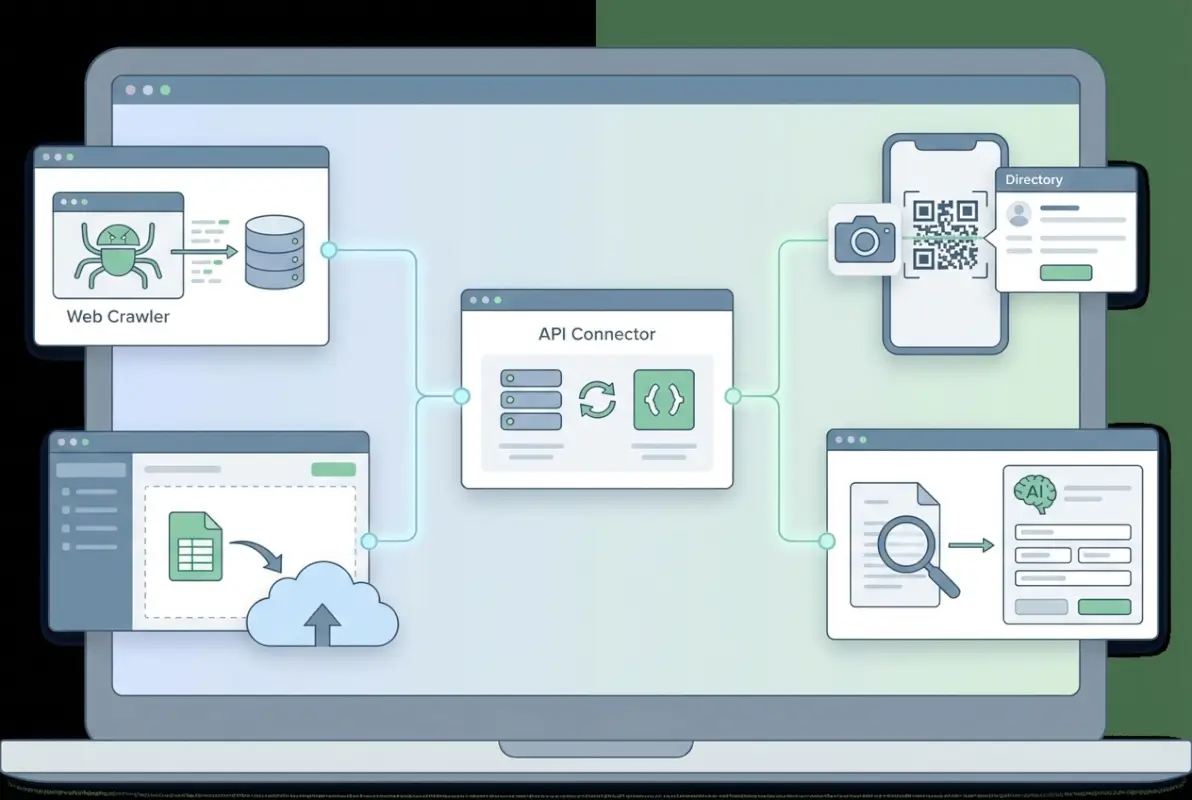
This method appeals to organizations already sitting on valuable data assets. Chambers of commerce have member lists, franchise systems have location databases, industry groups maintain supplier catalogs. Rather than rebuilding from scratch, you leverage what exists and enhance it through intelligent processing.
When This Is Ideal
Bulk imports make sense when you’re working with pre-curated datasets that someone else has already compiled and maintained. The data might be incomplete or inconsistently formatted, but the core information is there. You’re essentially trading data collection time for data cleaning and enrichment time—usually a favorable trade.
This approach works particularly well for membership organizations transitioning from static PDF directories to searchable online platforms. The member data exists in their CRM or accounting system, it just needs to be extracted and structured properly. Similarly, businesses expanding to new markets often start with purchased business lists that require processing before publication.
Large-scale directories (5,000+ listings) benefit enormously from bulk imports. The alternative methods become unwieldy at that scale, while a well-prepared CSV can populate thousands of entries in seconds. The time investment shifts to upfront data preparation and validation rule creation rather than per-listing data entry.
How to Structure for Minimal Typing
The key to successful imports is standardizing your data format before uploading. Create a template with required fields, recommended fields, and optional fields clearly marked. Required typically includes business name, category, and location (at minimum city/state). Recommended adds contact information, website, and description. Optional might include social media links, hours, photos, and custom attributes.
Use consistent formatting rules throughout your spreadsheet. Addresses should follow a standard format (street, city, state, zip in separate columns or a standardized combined format). Phone numbers need consistent formatting (remove or standardize parentheses, dashes, and spaces). Categories must match your taxonomy exactly—provide a dropdown list of valid categories to whoever is preparing the data.
Include a unique identifier column, even if it’s just a sequential ID number. This becomes crucial later when updating records or managing duplicates. Without unique IDs, you’re forced to match on business names (which change) or addresses (which have variations), leading to messy duplicate detection.
Validation, Dedup, and Enrichment
Automated validation catches errors before they pollute your directory. Set rules that check for required fields, validate email and website formats, ensure phone numbers have the correct digit count, and verify zip codes match city/state combinations. Most import tools let you define these rules visually—no coding required—and will flag problematic records for review rather than rejecting the entire upload.
Duplicate detection needs to be fuzzy rather than exact. Businesses might appear as “ABC Company Inc.”, “ABC Company,” and “ABC Co.” in different sources. Good import systems use algorithms that calculate similarity scores based on multiple factors—name resemblance, address proximity, phone number matches. You set a threshold (say, 85% similarity) and the system highlights potential duplicates for human review or automatic merging based on your confidence level.
Enrichment is where imports really shine compared to manual entry. Once your base data is in the system, automated enrichment services can append missing information. Submit business names and addresses to data providers who return phone numbers, websites, social media profiles, photos, operating hours, and even customer review counts. This transforms sparse listings into comprehensive profiles without typing a single character.
The economics of data enrichment have improved dramatically. What used to cost dollars per record now runs pennies at scale through API services. For directories considering the cost join online directory pricing comparison platforms, enrichment APIs represent a small incremental expense with significant value addition.
Method 4: AI-Powered Content Generation for Directory Pages (Templates + Auto-Generated Descriptions)
Having business data is one thing, turning it into compelling directory pages is another. This is where AI-powered content generation becomes a game-changer. Modern language models can transform dry structured data (name, category, address, services) into readable, unique descriptions that actually help users make decisions. And yes, without you writing a single word.

The technology here has reached a genuinely useful inflection point. Earlier AI writing attempts produced generic, robotic text that users immediately recognized as fake. Current generation AI, when properly prompted and constrained, creates content that’s genuinely helpful while maintaining factual accuracy. The key is treating AI as a structured content assembly system rather than a creative writer.
Template Design
Effective AI-generated directory content relies on well-designed templates that maintain consistency while allowing for variation. Think of templates as Mad Libs for business listings—you create the structure with blanks, and AI fills in the appropriate content based on each business’s data.
A typical business listing template includes several standardized sections: overview (2-3 sentence introduction), services or products (bulleted list or short paragraph), location description (neighborhood context, accessibility notes), and contact information (formatted phone, website, hours). Each section gets its own prompt that instructs the AI on tone, length, and what data points to incorporate.
The overview section might use a prompt like: “Write a 2-3 sentence introduction for [Business Name], a [Category] located in [Neighborhood], [City]. Mention that they specialize in [Services] and have been serving customers since [Year Founded if available]. Tone: professional but friendly, factual and helpful.” The AI generates unique variations for each business while following this structural guidance.
Services sections work best as semi-structured content. Rather than asking AI to invent services (which leads to hallucinations), provide the actual service list from your data and have AI create a brief descriptive paragraph connecting them: “Generate a short paragraph (40-60 words) describing the services offered: [Service List]. Focus on variety and how these services benefit customers in [City].”
Data Feeding Strategies
The quality of AI output depends entirely on the quality and structure of input data. This is where your earlier data collection and enrichment pays dividends. The more structured fields you have—specialties, years in business, customer types served, unique selling points—the more material AI has to work with when generating descriptions.
Use conditional prompts that adapt based on available data. If a business has a founding year, include it in the description; if not, skip that element. If customer reviews are available, prompt the AI to weave in notable positive feedback; without reviews, focus on services and location instead. This creates natural variation in listing length and depth based on real information availability.
Batch processing is essential for directories with hundreds or thousands of listings. Set up your AI generation as an automated workflow that processes listings in groups, applies the appropriate template based on business category, and outputs completed pages. Most platforms with AI integration can process 50-100 listings per minute once configured.
Quality Controls
AI-generated content needs human oversight, period. Even the best systems occasionally produce awkward phrasing, factual errors, or inappropriate content. Implement a review workflow where every AI-generated listing goes through at least spot-checking before publication.
A practical review process involves sampling—check every 10th listing in detail during initial rollout, then move to random sampling (5-10% of new listings) once you’ve validated your prompts are working well. Look specifically for factual errors (wrong services, incorrect locations), tone problems (too formal, too casual, too salesy), and repetitive phrasing that makes the AI authorship obvious.
Build feedback loops that improve your templates over time. When reviewers flag issues, analyze whether it’s a prompt problem (needs better instructions), a data problem (missing or incorrect input), or an AI limitation (requires human writing instead). Adjust your templates and re-generate affected listings in batches rather than manually rewriting them one by one.
For businesses aware of how to get your business listed in Brooklyn directory or similar platforms, AI-generated descriptions that they can edit post-publication provide value while maintaining accuracy. Give businesses access to review and modify their AI-generated content as part of the claiming process.
Method 5: Automated Syndication to Multiple Directories (Sync Once, Publish Everywhere)
Once you’ve built a solid business directory dataset using any of the previous methods, why limit it to one platform? Automated syndication lets you distribute your listings across multiple directories, review sites, social platforms, and industry-specific catalogs simultaneously. Update once, publish everywhere—this is the ultimate no-typing multiplier.

The syndication approach recognizes that your directory data has value beyond a single website. Businesses want visibility across multiple platforms, and maintaining separate listings on each one is exactly the manual nightmare we’re trying to avoid. Syndication platforms act as a central hub that pushes data to multiple endpoints automatically.
Why Syndication Reduces Manual Entry
Traditional multi-platform publishing meant logging into each directory separately, copying and pasting business information, and praying you didn’t introduce typos along the way. Then when a business changed phone numbers or moved locations, you’d repeat the process across every platform. It’s a maintenance nightmare that ensures your data becomes outdated quickly.
Syndication reverses this model. You maintain one authoritative source of truth—your master directory database—and syndication tools handle the distribution. Change a business’s phone number once, and that update propagates to Google Business Profile, Yelp, Facebook, industry directories, and anywhere else you’ve configured distribution. The time savings compound with every business and every platform you syndicate to.
This method particularly benefits businesses themselves who need presence across multiple directories but lack time or expertise for manual management. Many small businesses struggle to keep their information current on even three or four platforms, let alone dozens. Syndication services solve this problem, which is why they’ve become a popular service offering for marketing agencies and directory operators.
How to Set Up Synchronization Rules and Checks
Effective syndication starts with field mapping between your source database and target platforms. Each directory has slightly different fields and requirements—some require business hours in a specific format, others need category selections from their proprietary taxonomy, some want descriptions under 250 characters while others allow 1,000. Your syndication setup maps your standardized fields to each platform’s specific needs.
Create platform-specific rules for what gets syndicated where. Not every business should go to every directory. A high-end attorney might want presence on professional directories and Google but skip Yelp. A casual restaurant needs Yelp, Google, and food-specific sites but probably not LinkedIn. Build intelligence into your syndication that respects business preferences and platform appropriateness.
Implement validation before syndication to prevent pushing bad data to multiple platforms simultaneously. Check that required fields for each target platform are populated, verify data formats match requirements, and flag any businesses with incomplete information. It’s better to hold back a listing from syndication than publish incomplete or incorrect information across the internet.
Schedule synchronization frequency based on how often your data changes and each platform’s update policies. Some platforms accept real-time updates via API, others prefer batch updates once daily or weekly. High-velocity directories (where businesses frequently update hours, menus, or services) need more frequent syncs. Relatively static directories (professional services, established businesses) can sync less frequently.
Handling Updates and Deletions Across Sources
Updates are syndication’s primary value proposition, but they introduce complexity. When a business changes its name, address, or phone number, how quickly does that change propagate? What happens if a business disputes an update and wants to revert? Your syndication system needs clear policies for handling update cascades.
Implement change tracking that logs every modification with timestamps and user attribution. This creates an audit trail for disputed changes and helps diagnose synchronization issues. When a business complains that their phone number is wrong on Google but correct on Yelp, your logs should reveal exactly when, how, and why those differences emerged.
Deletions require special care because they’re often irreversible. When a business closes or requests removal from your directory, should you automatically remove them from all syndicated platforms? Maybe, but consider that the business might have claimed and enhanced their listing on some platforms independently. A heavy-handed deletion could erase their self-managed content. Better practice: flag for business owner review before syndicated deletion.
Conflict resolution rules become essential when dealing with data from multiple sources. If your directory says a business closes at 8 PM but Google Business Profile shows 9 PM (perhaps updated directly by the owner), which is correct? Your syndication system needs logic to determine source authority—usually prioritizing owner-verified information over third-party data and recent updates over stale information.
| Syndication Target | Update Frequency | API Quality | Special Considerations |
|---|---|---|---|
| Google Business Profile | Real-time | Excellent | Verification required, owner can override |
| Facebook Business | Real-time | Good | Requires page admin permissions |
| Yelp | Batch (daily) | Moderate | Limited update permissions, owner claims prioritized |
| Industry Directories | Varies widely | Poor to Good | Often manual approval processes |
Cross-Cutting Considerations for All Five Methods
Regardless of which no-typing method you choose (or combine—most successful directories use multiple approaches), certain fundamental considerations apply universally. These aren’t optional nice-to-haves; they’re essential operational requirements that determine whether your directory succeeds or becomes a liability.
Data Quality and Normalization
Garbage in, garbage out—this old programming adage applies perfectly to automated directory creation. Without quality controls, you’ll quickly accumulate a database full of duplicate listings, inconsistent formatting, incorrect information, and outdated entries. Users lose trust immediately when they encounter wrong phone numbers or permanently closed businesses.
Standardization should happen at ingestion. Addresses need consistent formatting (spell out “Street” or use “St.”—pick one and enforce it), phone numbers should follow a uniform pattern (parentheses or not, spaces or dashes), and business names should follow title case unless the company deliberately uses all caps or lowercase branding. These rules sound trivial until you’re looking at a directory where the same business appears three times with slight variations.
Duplicate detection gets more sophisticated with scale. Basic exact-match detection catches obvious duplicates, but fuzzy matching algorithms identify entries that are probably the same business despite differences in data. Phone number matching is highly reliable—if two listings share a phone number, they’re almost certainly the same business. Address matching requires more intelligence to handle variations like “123 Main St.” versus “123 Main Street” versus “123 E Main St” (different addresses or same street with typo?).
Regular data audits should be scheduled, not optional. Run monthly reports on listings without phone numbers, expired websites, businesses marked as temporarily closed for over 90 days, and entries with unusually high bounce rates. These reports surface quality issues systematically rather than relying on user complaints.
Compliance and Permissions
The legal landscape around business data collection and publication continues evolving, and ignorance isn’t a defense. Every directory operator needs to understand applicable regulations in their jurisdiction and establish clear policies before launching.
Data privacy laws vary significantly by location. European GDPR applies if you’re collecting data on EU businesses or users, even if your company is elsewhere. California’s CCPA extends similar protections. These regulations give businesses rights around their data—access, correction, deletion—that you must honor with documented processes.
Terms of service compliance matters even if you disagree with them philosophically. When you scrape data from another directory or platform, you’re often accepting their TOS by using the site. Violations can result in legal action, even if the data itself is publicly visible. The safer path is always using official APIs with explicit permission, even if they cost money or impose rate limits.
Business owner verification and claiming processes provide both legal protection and data quality benefits. Allow businesses to claim their listings, verify ownership (through phone verification, postcard codes, or email confirmation), and update their information directly. This shifts responsibility for accuracy to the business owner while giving them incentive to keep data current.
Data Enrichment and Monetization Options
Basic directory listings (name, address, phone) provide utility but limited competitive advantage. Data enrichment—adding photos, detailed descriptions, service menus, operating hours, payment options, accessibility features, and customer reviews—transforms your directory from commodity to valuable resource.
Enrichment can be automated through multiple channels. Photo enrichment services pull images from business websites, social media, and public photo databases. Review aggregation platforms consolidate feedback from multiple sources into unified ratings. Business hours can be extracted from Google Business Profile or directly from company websites using parsing tools.
Premium listing tiers create natural monetization opportunities. Basic free listings include name, address, phone, and category. Enhanced listings add photos, descriptions, and links for a monthly fee. Featured placements appear at the top of search results or category pages for higher fees. This freemium model dominates successful directory businesses because it aligns incentives—businesses that benefit most from visibility pay for enhanced presence.
Data licensing represents another revenue stream if your directory achieves comprehensive coverage in a niche. Other companies may pay to access your curated, normalized business database rather than compiling their own. This works particularly well for industry-specific directories where gathering the data requires domain expertise.
Data Governance
As your directory grows, sophisticated data governance becomes essential for operational efficiency and legal compliance. You need to know where every piece of data came from, when it was collected, who modified it, and why changes were made. This isn’t paranoia, it’s professional data management.
Provenance tracking documents the source of each data element. For a single business listing, the name might come from the company website, address from Google Maps, phone number from a business owner claim, and description from AI generation. Tracking this lets you assess reliability—owner-verified data trumps scraped data when conflicts arise.
Version control for listing data helps resolve disputes and identify quality trends. When a business complains their description was better last month, you can review revision history and restore previous versions if appropriate. Versioning also reveals patterns—if certain categories consistently revert AI descriptions, maybe those need human writing instead.
Audit trails satisfy compliance requirements and aid troubleshooting. Who changed this business’s category from “Restaurant” to “Bar” and when? Did that update get syndicated successfully to all platforms? Audit logs answer these questions definitively rather than relying on memory or assumptions.
Performance and Cost
The no-typing promise comes with real costs—just different costs than paying someone for manual data entry. Understanding the total cost of ownership helps you choose the right methods and set realistic budgets.
No-code platforms charge monthly or annual subscription fees that scale with listing volume. Entry-level plans might support 500-1,000 listings for $50-200/month. Enterprise plans handling 50,000+ listings run $500-2,000+/month. Calculate your per-listing cost including the platform fee, enrichment services, and syndication costs to evaluate economic viability.
API-based services typically charge per request or per record. Google Places API costs around $0.017 per request for basic details, which adds up quickly at scale. Data enrichment services might charge $0.05-0.50 per record depending on depth. Budget these costs carefully when planning to process thousands of listings.
Cloud infrastructure costs matter for scraping and bulk processing. Running scrapers 24/7 or processing huge CSV imports requires computing resources. Factor in server costs, data storage fees, and bandwidth charges. Cloud-based solutions often make sense economically because you pay only for actual usage rather than maintaining idle infrastructure.
Hidden costs include time spent on quality control, handling business owner disputes, updating validation rules, and managing syndication issues. These human costs don’t scale as favorably as automation, but they’re essential for maintaining directory quality. Budget 10-20% of total operating time for ongoing data quality management.
Frequently Asked Questions
Can I really create a business directory without typing any data at all?
Yes, using combinations of no-code AI builders, automated web scraping, bulk CSV imports, AI-generated content, and syndication platforms. The “zero typing” claim is accurate for data entry—you’ll still type when configuring automation rules, writing validation scripts, and reviewing quality samples. But direct business information entry can be eliminated entirely through these methods.
What are the biggest risks of automated directory creation?
Data accuracy tops the risk list—automated collection can propagate outdated information, duplicate entries, or incorrect business details at scale. Compliance violations from improper scraping or data usage represent legal risks. Reputation damage occurs when users encounter wrong phone numbers or closed businesses. Mitigation requires robust validation workflows, human spot-checking, and allowing business owners to claim and correct listings.
How often should directory data be refreshed?
Monthly to quarterly for most local directories, depending on business volatility in your categories. Restaurants and retail stores change frequently (aim for monthly updates), while professional services and established businesses remain stable longer (quarterly works). High-traffic directories benefit from weekly automated checks of critical fields like phone numbers and operating status, with full data refreshes quarterly.
Are there government or public datasets I can rely on for directories?
Yes—the U.S. Census Bureau’s Economic Census provides comprehensive business count and industry data. The Small Business Administration publishes metropolitan area profiles with business distribution statistics. Some municipalities release open business license databases. These sources provide foundational data and validation benchmarks, though they typically lack detailed contact information needed for functional directories.
What about SEO or ranking impact from directory listings?
Directory listings contribute meaningful local SEO signals through consistent NAP citations (Name, Address, Phone), category associations, and inbound links. Search engines use directory data to validate business information and assess legitimacy. The impact depends on directory authority—established directories provide more SEO value than new ones. Focus on accurate, consistent information across multiple directories rather than manipulating rankings.
Which sources are best to seed a directory without typing?
Google Maps offers the most comprehensive coverage through the Places API, providing structured data with explicit permission. Industry association member lists provide high-quality niche data if accessible. Existing customer databases or CRM exports work perfectly for membership organizations. Government business license databases offer authoritative public data. Avoid relying solely on scraped competitor directories—combine multiple sources for comprehensive coverage.
How do I handle businesses that want to be removed from my directory?
Implement a straightforward removal request process with email verification to prevent malicious removals by competitors. Honor removal requests within 7-10 business days and confirm completion. Document the request for compliance records. Consider offering the option to “claim and correct” instead of removing—many businesses just want to update inaccurate information rather than disappear entirely. Clear opt-out processes protect you legally and build goodwill.
Can AI-generated business descriptions hurt my SEO?
Not if done properly—AI content is now indistinguishable from human writing when well-prompted and reviewed. Search engines care about content quality and user value, not authorship method. Avoid thin, templated content that provides no unique information. Include specific details (services, locations, specialties) that differentiate each listing. Review and edit AI outputs to ensure accuracy and naturalness. Quality AI content performs identically to quality human content in search.
What’s the maintenance burden after initial directory creation?
Plan for 5-10 hours weekly per 1,000 active listings covering update reviews, business owner inquiries, dispute resolution, and quality spot-checks. This scales sublinearly—10,000 listings might require 20-30 hours weekly, not 100. Automation handles routine updates, but human oversight remains essential. The maintenance burden decreases after initial launch as validation rules mature and automated systems handle more scenarios confidently.
Should I charge businesses to be listed in my directory?
Freemium models work best for new directories—free basic listings encourage adoption, premium features generate revenue. Charging for initial inclusion limits growth and creates adversarial relationships. Instead, monetize through enhanced listings (priority placement, additional photos, detailed descriptions, appointment booking), advertising (sponsored categories, banner ads), or data licensing. Build a valuable free directory first, then layer on premium options once you’ve established traffic and utility.
Building Your No-Typing Directory: Start Today
Creating a business directory without manual data entry isn’t just possible, it’s become the standard approach for anyone serious about scale and efficiency. The five methods we’ve explored—no-code AI builders, smart scrapers, bulk imports, AI content generation, and automated syndication—eliminate the tedious work that once made directory creation a months-long slog.
The real insight here is that these methods compound when combined. Start with a no-code platform for structure and hosting, populate it with an initial bulk import or smart scraper, enhance listings with AI-generated descriptions, and distribute everything through automated syndication. This multi-method approach builds a comprehensive, valuable directory in days rather than months.
Your biggest decision is selecting the right starting point based on your resources and goals. Have existing data? Method 3 (bulk import) gets you live fastest. Starting from scratch? Method 1 (no-code builders) provides the most guidance. Want to compete with established directories? Method 2 (smart scraping) levels the playing field. Need compelling content? Method 4 (AI generation) transforms dry data into engaging listings. Looking to maximize reach? Method 5 (syndication) distributes your hard work everywhere that matters.
Quality controls separate successful automated directories from abandoned projects. Yes, automation eliminates typing, but it doesn’t eliminate responsibility for accuracy. Build validation rules, implement human review checkpoints, and create feedback loops that continuously improve your data. The businesses in your directory depend on correct information for customer connections—take that seriously even when the process is automated.
The economics favor automation decisively. Manual directory creation costs roughly $2-5 per listing when accounting for labor time. Automated methods run $0.10-0.50 per listing including platform fees and enrichment services. At 1,000 listings, that’s $2,000-5,000 in labor costs versus $100-500 in automation expenses. The time savings are even more dramatic—weeks compressed into hours means faster launch, quicker iteration, and more focus on growth strategy.
Looking ahead, these automation capabilities will only improve as AI models become more sophisticated and API ecosystems mature. The directories that thrive will be those built on solid automation foundations that scale easily. Manual data entry isn’t just inefficient anymore, it’s becoming a competitive disadvantage.
Start small, automate intelligently, validate continuously, and scale confidently. Your no-typing business directory journey begins with that first decision to stop entering data manually and start building systems that work while you sleep. The tools exist, the methods are proven, and the opportunity is waiting for someone to execute. That someone might as well be you.