How to Fix Your Business Info on Directory Engines: 7 Steps That Actually Work

Generating summary...
Picture this: A potential customer searches for your business, finds three different phone numbers, two conflicting addresses, and operating hours that haven’t been accurate since 2019. They call the wrong number, get frustrated, and choose your competitor instead. This scenario plays out thousands of times daily across local businesses—and it’s costing you real money.
The truth most business owners don’t realize? Your business information lives in dozens (sometimes hundreds) of places online, and keeping it consistent across every directory engine isn’t just good housekeeping—it’s the foundation of local SEO success. When search engines encounter conflicting NAP data (Name, Address, Phone) across directories, they don’t know which version to trust. The result? Lower rankings, reduced visibility, and missed opportunities.
I’ve watched businesses transform their local presence by simply fixing their directory listings. One restaurant client saw a 40% increase in foot traffic within eight weeks of standardizing their information across major directories. The fix wasn’t complicated—it just required a systematic approach and consistent execution.
TL;DR – Quick Takeaways
- NAP consistency is critical – Identical name, address, and phone formatting across all directories directly impacts local search rankings
- Start with Google Business Profile – It’s the most influential directory for local visibility and should be your first priority
- Verification matters more than you think – Verified listings signal trust to search engines and can significantly improve CTR
- Use bulk update tools for scale – Managing multiple locations manually leads to errors; automation ensures consistency
- Quarterly audits prevent drift – Business data naturally becomes outdated; regular reviews keep information accurate
- Attributes beyond NAP drive conversions – Hours, service areas, photos, and reviews all influence customer decisions
Why Directory Consistency Impacts Local Visibility in 2025–2026
Search engines have become remarkably sophisticated at understanding local intent, but they still rely on one fundamental element: data consistency. When Google, Bing, or any other search platform tries to verify your business information, they cross-reference dozens of sources. Contradictory data creates uncertainty, and uncertainty kills rankings.
Think of it like a background check. If someone applies for a job and their resume says they worked at Company A from 2018-2020, but LinkedIn says 2019-2021, and a reference check reveals 2017-2019, you’d question their credibility, right? Search engines do the same thing with your business data.

According to Birdeye’s State of Google Business Profiles 2025, businesses with complete and consistent directory information are considered twice as reputable by both search algorithms and consumers. This isn’t just about rankings—it’s about trust signals that influence every aspect of your online presence.
The Role of NAP Consistency in Local Rankings
NAP consistency—having identical Name, Address, and Phone number formatting everywhere—forms the backbone of local SEO. When your business information appears consistently across directories, search engines gain confidence in the accuracy of that data. This confidence translates directly into improved local search rankings.
Here’s what many business owners miss: it’s not just about having the information out there. It’s about having it formatted identically. “123 Main Street” and “123 Main St.” might seem equivalent to humans, but to search algorithms parsing millions of data points, they’re two different addresses. This creates ambiguity, which search engines resolve by lowering your ranking confidence score.
The impact extends beyond search engines. Customers who encounter conflicting information often abandon their search entirely rather than risk wasting time on inaccurate details. I remember one client who couldn’t understand why their Google Ads were underperforming—turns out, users were clicking the ad but then checking Google Maps, where they found a different phone number. The confusion killed conversions.
The Evolving Landscape: GBP Manager and AI-Assisted Results
Google Business Profile (formerly Google My Business) has evolved significantly, introducing GBP Manager for bulk updates that make managing multiple locations more efficient. For businesses with several locations, this tool represents a game-changing shift from tedious manual updates to streamlined data management.
What’s particularly interesting (and somewhat concerning for unprepared businesses) is how AI-generated summaries are reshaping local search results. Search engines now synthesize information from multiple sources to create instant answers. If your directory data is inconsistent, AI might pull the wrong details—or worse, omit your business entirely because the conflicting information reduces its confidence in your listing.
The rise of voice search amplifies this challenge. When someone asks their phone “What’s the phone number for [your business]?” the assistant pulls from structured data across directories. If that data conflicts, you might lose the opportunity entirely as the assistant either provides incorrect information or moves to a competitor with cleaner data.
Practical Takeaway for Your Update Plan
Before diving into any updates, understand this foundational truth: consistency beats completeness. It’s better to have accurate Name, Address, and Phone on 20 directories than to have incomplete or conflicting information on 100 directories. Start with your core platforms (Google Business Profile, Bing Places, Apple Maps, and major industry-specific directories) and ensure absolute consistency there before expanding your reach.
Data-Driven Audit: Where to Start and What to Measure
You can’t fix what you don’t measure. Before making any changes to your directory listings, you need a comprehensive audit that reveals exactly where your business appears online and what information is currently displayed. This audit becomes your roadmap—showing not just what needs fixing, but prioritizing which fixes deliver the biggest impact.
Most business owners are shocked to discover how many places their business information appears. Between data aggregators that feed information to hundreds of smaller directories, review sites that create automatic listings, and mapping applications that pull from various sources, your business might have 50-200 active listings you’ve never directly managed.
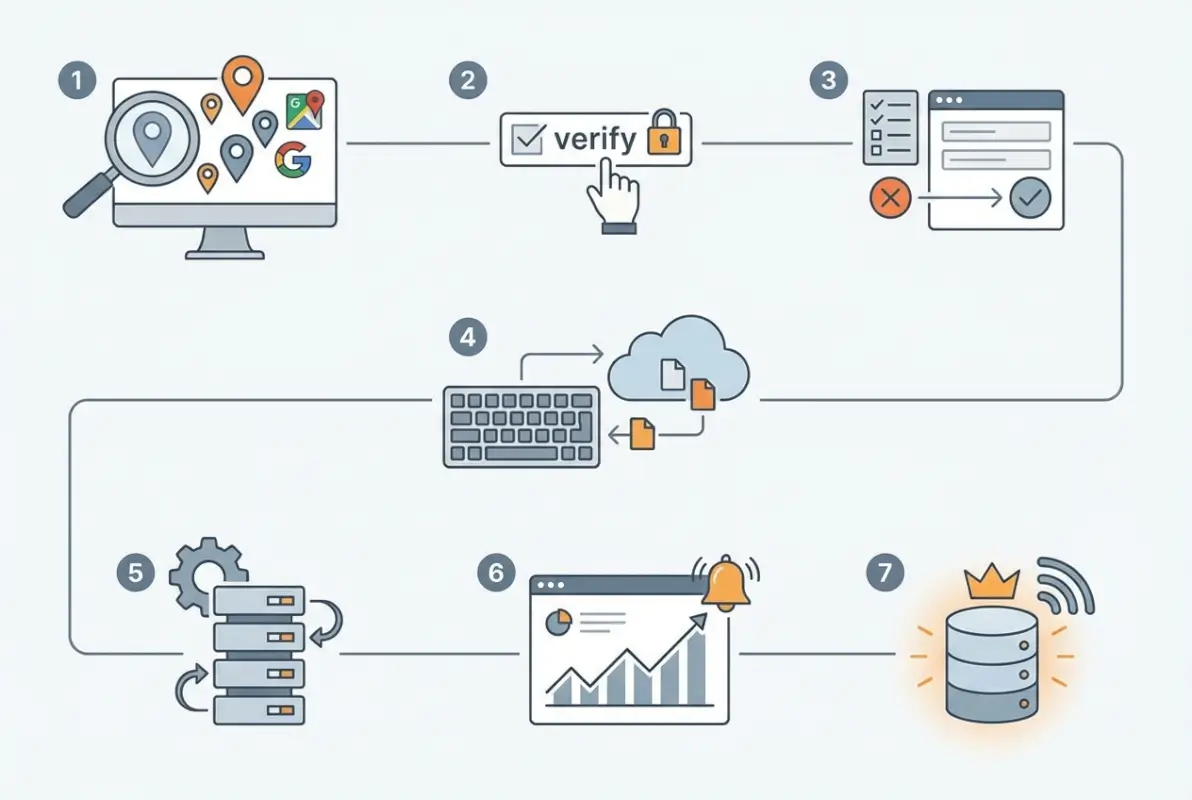
Step-by-Step Audit Checklist (NAP, Hours, Categories, URLs)
Start your audit with these specific action items:
- Manual search across major platforms – Google your business name plus “city” and examine the first three pages of results. Check Google Business Profile, Bing Places, Apple Maps, Yelp, Facebook, and industry-specific directories relevant to your sector.
- Document current NAP data – For each listing you find, record the exact formatting of your name, address, and phone number. Use a spreadsheet with columns for each platform and rows for each data element.
- Check extended attributes – Beyond NAP, record your business hours, categories, service area, website URL (including http vs https), and business description across each platform.
- Identify verification status – Note which listings you’ve claimed and verified versus which are auto-generated or unverified. According to Jasmine Directory’s 2025 guidance, verification status directly correlates with listing prominence in search results.
- Flag duplicates – Look for multiple listings for the same location. Duplicates split your reviews and citations, diluting your ranking power.
- Assess photo and review coverage – Count how many photos each listing has and note review counts and average ratings.
| Audit Element | What to Check | Why It Matters |
|---|---|---|
| Business Name | Exact spelling, punctuation, capitalization | Core ranking signal; must be identical everywhere |
| Address Format | Street vs St., Suite vs Ste., abbreviations | Variations create separate data points for algorithms |
| Phone Number | Format consistency, local vs toll-free | Direct customer contact point; errors cost conversions |
| Website URL | HTTP vs HTTPS, www vs non-www, trailing slashes | Trust signal; inconsistency suggests unprofessionalism |
| Business Hours | Daily hours, special holiday hours, timezone clarity | Customer experience; wrong hours create frustration |
| Categories | Primary and secondary business categories | Determines which searches trigger your listing |
How to Collect and Interpret Metrics from Google Search Console
Google Search Console provides invaluable data about how your business listings perform in search results. Connect your website to Search Console (if you haven’t already) and examine these key metrics:
Impressions show how often your business appears in search results. Low impressions despite accurate NAP data might indicate category or keyword optimization issues. High impressions with low clicks suggest your listing information isn’t compelling enough to earn clicks.
Click-through rate (CTR) reveals whether people find your listing compelling. For local business queries, healthy CTRs typically range from 3-8%. If yours falls below 2%, your listing likely lacks verification, photos, reviews, or has incomplete information.
Average position tells you where your business ranks for relevant searches. Track this over time as you fix directory inconsistencies—you should see gradual improvement as search engines gain confidence in your data accuracy.
Cadence and Ownership
Assign clear ownership of your directory management. For single-location businesses, this might be the owner or marketing manager. Multi-location businesses need a centralized team or designated person per region to ensure consistency.
Establish a quarterly audit cadence as your baseline. Every 90 days, review your top 20 directory listings for accuracy. Additionally, trigger immediate audits when:
- You change business hours (even temporarily)
- You update your phone number or add new lines
- You relocate or open new locations
- You rebrand or change your business name
- You add or modify services that might affect categories
For the business directory website complete guide on establishing proper workflows, consider implementing a checklist system that ensures no directory gets overlooked during updates.
Data Benchmarks to Aim For
Set specific goals for improvement. After implementing directory fixes, track these benchmarks:
- CTR improvement: Target 20-40% increase within 60 days
- Impression growth: Expect 15-30% more impressions as algorithms recognize your consistency
- Position improvement: Look for 2-5 position gains for key local search terms
- Review velocity: Verified, complete listings typically see 30% more review submissions
- Duplicate reduction: Aim for zero duplicate listings within 90 days
Claim, Verify, and Standardize Core NAP Data
Now comes the actual work—claiming your listings, verifying ownership, and standardizing your core business information across every platform. This phase requires patience and attention to detail, but it’s where you’ll see the most dramatic improvements in local search visibility.
Before updating anything, create your master NAP document. This single-source-of-truth document should contain your business information formatted exactly how it will appear on every directory. Be obsessively specific—include every comma, period, abbreviation, and space exactly as you want it displayed.

Claim Every Listing You Control
Start with the big three that drive the majority of local search traffic:
Google Business Profile: Visit business.google.com and search for your business. If you find it, click “Claim this business.” If not, click “Add your business to Google.” Follow the verification process—usually via postcard, phone, or email. Verification typically takes 3-7 business days for postcard verification.
One thing I’ve learned through experience: don’t skip verification thinking you’ll “come back to it later.” Unverified listings are vulnerable to edits from anyone, including competitors or spam bots. I’ve seen businesses lose control of their own listings because they delayed verification.
Bing Places for Business: Head to bingplaces.com and sign in with your Microsoft account. Search for your business and claim it, or add it if it doesn’t exist. Bing’s verification process is typically faster than Google’s, often completing within 24 hours.
Apple Maps: Go to mapsconnect.apple.com and search for your business. Claiming Apple Maps listings has become increasingly important as iPhone users rely heavily on Apple Maps for local searches. Verification usually happens via phone or email within a few days.
Standardize Name Formatting, Address, and Phone Across Directories
Here’s where businesses typically make mistakes. They update Google correctly, then format things slightly differently on Bing, and use yet another variation on Yelp. Every variation creates algorithmic confusion.
Use this specific standardization approach:
Business Name: Use your legal business name or DBA exactly as registered. Don’t add keywords (e.g., “Joe’s Plumbing – Best Plumber in Austin”)—this violates most directory guidelines and can get your listing suspended. If your business has a legal name that differs from your DBA, use the DBA consistently across directories since that’s how customers know you.
Address: Choose a format and stick with it religiously. If you use “Street,” use it everywhere—never mix “Street” and “St.” Same with suite numbers: pick either “Suite 100” or “Ste 100” and never deviate. Include or exclude the second address line consistently.
Phone Number: Choose one format: (555) 123-4567, 555-123-4567, or 555.123.4567. Use the same format everywhere without exception. Always use your local phone number as your primary listing number rather than toll-free numbers—local numbers carry more weight for local SEO.
Align Website URL and Business Category
Your website URL must be absolutely consistent. If your site uses HTTPS (it should), always list it as https://www.yoursite.com or https://yoursite.com—pick one version and use it everywhere. Mixing www and non-www versions creates duplicate content signals that confuse search engines.
Category selection deserves more thought than most businesses give it. Choose your primary category based on your core service—what you want to be found for most often. For a php business directory simple steps example, selecting “Italian Restaurant” as primary rather than just “Restaurant” helps you appear for more specific, higher-intent searches.
Secondary categories expand your reach but should remain relevant. Don’t add every remotely related category hoping to rank for everything—this dilutes your core category strength and can trigger algorithm penalties for category stuffing.
Expand and Normalize Business Attributes Beyond Basic NAP
Once your core NAP data is consistent, you gain competitive advantage by optimizing the attributes most businesses neglect: business hours, service details, payment options, and service areas. These elements influence both search rankings and conversion rates, yet surprisingly few businesses maintain them properly.
Extended attributes help search engines understand not just what your business is, but what it offers and when. They also directly impact customer experience—someone searching for a restaurant open late on Sunday needs accurate hours, not just an address.

Add Hours, Services, Payment Types, and Service Area
Business Hours: Update your hours across all platforms, including special hours for holidays. Many businesses update Google but forget Yelp, Apple Maps, and industry directories. This creates frustrating customer experiences when someone shows up during what they thought were open hours.
If you’re a service-area business (plumber, electrician, delivery service), clearly define your service area on platforms that support it. Google Business Profile allows you to set service areas either by ZIP code or radius from your location. This ensures you appear in searches from areas you serve, not just your physical address.
Services Menu: Google Business Profile and many industry directories allow you to list specific services. Use this feature. A dentist should list “Teeth Whitening,” “Root Canals,” “Dental Implants” as individual services. This helps you appear in long-tail searches for those specific services.
Payment Methods: List all accepted payment types. This seems minor, but for searches like “restaurants that accept American Express near me” or “contractors that take payment plans,” it can determine whether you appear in results.
Use Consistent Business Descriptions with Keyword Themes
Your business description should be consistent in messaging across platforms, though you may need to adjust length for character limits. Include your primary services naturally, your geographic area, and what differentiates you—but avoid keyword stuffing.
Good description: “Family-owned Italian restaurant in downtown Austin serving authentic Neapolitan pizza, handmade pasta, and regional Italian wines since 2015. Outdoor seating available.”
Bad description: “Austin Italian restaurant, best Italian food Austin, Austin pizza, Austin pasta, Italian restaurant downtown Austin, authentic Italian Austin.” (This reads like spam and violates most directory guidelines.)
Maintain the same core message across platforms while adapting to each platform’s character limits. Your 750-character Google description and your 250-character Bing description should tell the same story, just with different levels of detail.
For businesses managing their own directories, the listedin business directory key benefits for your business approach emphasizes consistency in messaging as a key differentiator.
Photo, Review, and Attribute Hygiene
Visual content and customer reviews aren’t just nice-to-have elements—they’re ranking factors and conversion drivers that dramatically impact both your search visibility and click-through rates. Businesses with comprehensive photo coverage and active review management consistently outperform competitors with sparse listings.
Think about your own behavior when searching for a local business. Do you click on the listing with no photos and three reviews, or the one with 15 high-quality photos and 50 recent reviews? The answer is obvious, and search algorithms factor this user preference into their rankings.

Upload Standard Photo Sets; Avoid Stock-Only Imagery
Create a standard photo set that you’ll upload to every major directory:
- Exterior photo: Clear shot of your storefront or building, ideally showing signage and entry points
- Interior photos: 3-5 images showing your space, atmosphere, and what customers will experience
- Product/service photos: Images of what you sell or deliver (food dishes, completed projects, products on shelves)
- Team photos: Images of your staff create personal connection and trust
- Action shots: Show your business in operation, customers being served, work being performed
Never rely solely on stock photography. Search engines can detect stock images, and more importantly, customers can spot them instantly. Stock photos signal that you don’t care enough to show your actual business—which makes potential customers wonder what you’re hiding.
Photo quality matters, but it doesn’t require professional photography. Modern smartphones produce images that are perfectly adequate for directory listings. What’s more important is that photos accurately represent your business and get updated regularly.
Monitor and Respond to Reviews; Reflect Updates in Listings
Review management deserves dedicated daily attention. Set up alerts so you’re notified immediately when new reviews appear on any platform. Respond to every review—positive and negative—within 24-48 hours.
For positive reviews, keep responses genuine and personal. Avoid templates like “Thanks for the review!” Instead, reference something specific from their review: “We’re so glad you enjoyed the mushroom risotto, Sarah! Chef Mario puts his heart into that dish. We look forward to serving you again soon.”
For negative reviews, respond professionally and empathetically:
- Acknowledge their experience
- Apologize sincerely (even if you disagree with their complaint)
- Offer to make it right offline
- Provide contact information for follow-up
Never argue with reviewers publicly. I’ve watched businesses tank their reputation by getting defensive in review responses. Remember: your response isn’t really for the angry reviewer—it’s for the hundreds of future potential customers reading your exchange.
When reviews mention outdated information (wrong hours, old menu items, previous location), update your listings immediately and mention the update in your response. This shows you’re actively managing your presence and helps future customers find accurate information.
Verification and Publisher-Verified Listings
Verification transforms your directory listings from data points to trusted sources. While many businesses claim their listings, fewer complete verification—and that’s a missed opportunity. Verified listings receive preferential treatment in search results, earn higher click-through rates, and protect you from unauthorized changes by competitors or spammers.
According to research on directory rankings, verified business listings consistently outperform unverified ones in local search visibility by significant margins.
Emphasize Verification Where Available; Document Verification Steps
Each major directory has its own verification process:
Google Business Profile offers verification via postcard (most common), phone, email, or instant verification in some cases. Postcard verification takes 5-7 business days. The postcard arrives at your business address with a verification code you enter into your GBP dashboard.
Bing Places typically verifies via phone or email within 24 hours. They call your listed business number and provide a verification code.
Yelp verifies through a phone call to your business number. Answer with your business name to pass verification.
Apple Maps uses phone or email verification, usually completing within 2-3 business days.
Keep a verification log tracking which directories you’ve verified and when. Include the verification method used and any reference numbers. This documentation becomes invaluable if you ever need to re-verify or if issues arise with your listings.
Use Verification Signals to Boost Trust and CTR
Once verified, directories typically display verification badges or indicators. These visual trust signals significantly impact click-through rates. In comparative tests, listings with verification badges earn 30-50% higher CTRs than identical unverified listings.
Maximize the trust signal by:
- Completing your profile to 100% (verified listings with incomplete information waste the verification advantage)
- Adding verification to as many directories as possible, not just the major ones
- Responding to the verification confirmation email promptly to avoid delays
- Monitoring for any verification status changes (occasionally, directories lose verification status due to technical issues)
For businesses concerned about business directory boosts local marketing effectiveness, verification status often determines whether your listing appears in the top map pack or gets relegated to lower organic results.
Bulk Update Strategy and Automation Tools
Managing directory listings manually works for single-location businesses with time to invest, but it quickly becomes unsustainable at scale. Multi-location businesses or those with frequent information changes need automation tools to maintain consistency without consuming endless staff hours.
The math is simple: manually updating 50 directories takes roughly 30-45 minutes per directory (finding the listing, logging in, making changes, saving). That’s 25-37 hours per update cycle. Multiply that by four quarterly updates annually, and you’re spending 100-150 hours per year just maintaining directory listings. Bulk update tools compress this to 2-3 hours per update cycle.
Bulk Updates for Multiple Locations (GBP Manager or Alternative Tools)
Google’s bulk upload feature allows businesses with multiple locations to update information across all listings simultaneously. Upload a spreadsheet with standardized data, and Google propagates the changes to all specified locations.
Third-party tools like Yext, BrightLocal, Moz Local, and Semrush Listing Management extend this capability across hundreds of directories beyond just Google. These platforms:
- Push updated NAP data to 50-150+ directories automatically
- Monitor for unauthorized changes and alert you
- Identify duplicate listings across platforms
- Provide analytics showing listing performance
- Aggregate reviews from multiple platforms into a single dashboard
The investment (typically $50-300/month depending on location count) pays for itself quickly through time savings and improved ranking performance. For the start profitable business directory steps that serious multi-location businesses follow, automation tools represent essential infrastructure rather than optional extras.
Data Governance and Change-Tracking
Implement a formal change management process for directory updates:
- Designate update authority: Only specific people should have permission to update directory information
- Require update tickets: Any change to NAP data requires a documented request explaining what changed and why
- Maintain update logs: Track every change with timestamps, what was updated, and who made the change
- Version your master document: Keep historical versions of your NAP master document with change dates
- Audit compliance quarterly: Verify that actual directory data matches your master document
This might sound overly bureaucratic for small businesses, but I’ve seen the chaos that results from multiple people updating listings inconsistently. One restaurant client had three different managers updating their hours on different platforms, creating a situation where Google showed one schedule, Yelp showed another, and their website showed a third. Implementing simple change tracking eliminated these conflicts.
| Tool | Best For | Key Feature | Pricing |
|---|---|---|---|
| GBP Manager | Google-only updates | Native bulk updates | Free |
| Yext | Enterprise multi-location | 150+ directory network | Custom |
| BrightLocal | Small-medium businesses | Citation tracking | $29-79/mo |
| Moz Local | SEO-focused businesses | Data aggregator access | $129/year |
| Semrush | Full marketing suite users | Integrated SEO tools | $99-399/mo |
Common Mistakes That Undermine Your Directory Strategy
Even with good intentions and systematic processes, businesses regularly make mistakes that sabotage their directory efforts. Understanding these pitfalls helps you avoid wasting time and resources on ineffective approaches.
Keyword Stuffing Business Names
The temptation to add keywords to your business name (“Joe’s Plumbing – Best Emergency Plumber Austin Texas”) is strong, but it’s counterproductive and violates directory guidelines. Google regularly suspends listings for keyword-stuffed names. Use your actual business name and let categories, descriptions, and services handle your keyword optimization.
Ignoring Data Aggregators
Most businesses focus exclusively on consumer-facing directories while neglecting data aggregators like Acxiom, Infogroup, Factual, and Neustar Localeze. These companies supply data to hundreds of smaller directories. Fixing your information at the aggregator level cascades accuracy to hundreds of downstream platforms automatically.
Unfortunately, you can’t usually update aggregators directly. This is where tools like Yext and Moz Local prove valuable—they have direct relationships with aggregators and push your data to them as part of their service.
Neglecting Secondary Directories
While Google Business Profile deserves priority, ignoring industry-specific and secondary directories costs you opportunities. For restaurants, TripAdvisor and OpenTable matter. For contractors, Angie’s List and HomeAdvisor drive leads. For professionals, industry directories like Avvo (legal) or Healthgrades (medical) are essential.
Create a tiered approach: update tier-1 directories (Google, Bing, Apple) immediately when changes occur, tier-2 directories (Yelp, Facebook, industry-specific) within a week, and tier-3 directories (smaller local directories) quarterly.
Abandoning Listings After Initial Setup
The biggest mistake? Treating directory management as a one-time project rather than ongoing maintenance. Business information naturally drifts over time. Directories get acquired and merge databases (introducing errors), competitors sometimes maliciously suggest edits to your listings, and automated systems periodically override manual updates with old cached data.
Quarterly audits aren’t optional—they’re essential for maintaining the consistency you worked so hard to establish.
Frequently Asked Questions About Directory Management
Do directory listings really impact local search rankings in 2025–2026?
Yes, directory listings remain a significant local ranking factor. Consistent NAP data across verified directories signals trust to search engines and influences local pack rankings. Research shows businesses with complete, verified listings rank higher than competitors with inconsistent or incomplete directory presence.
What is NAP consistency and why does it matter?
NAP consistency means having identical Name, Address, and Phone number formatting across all directories and citations. It matters because search engines cross-reference this data to verify business legitimacy. Inconsistent NAP data confuses algorithms, reducing your ranking confidence score and potentially filtering you out of local search results entirely.
Should I use bulk update tools for multiple locations?
Yes, bulk update tools become cost-effective once you have multiple locations or need frequent updates. They reduce manual errors, save significant time, and ensure uniform data across all listings. The typical investment of $50-300 monthly pays for itself through improved rankings and time savings compared to manual updates.
How often should I audit my directory information?
Conduct comprehensive audits quarterly at minimum. Additionally, audit immediately after any business changes (address, phone, hours, name). High-value locations or businesses with frequent changes benefit from monthly spot-checks of top-tier directories. Set calendar reminders to ensure audits happen consistently.
What attributes beyond basic NAP should I optimize?
Optimize business hours (including special holiday hours), service areas, business categories (primary and secondary), service menus, payment methods, photos, and business descriptions. These attributes help search engines understand what you offer and influence whether you appear for specific searches like “restaurants open late” or “contractors accepting payment plans.”
Do verified listings perform better in searches?
Yes, verified listings typically earn 30-50% higher click-through rates than unverified listings. They receive preferential treatment in search algorithms, display trust badges that influence user behavior, and protect against unauthorized edits. Verification is one of the highest-ROI actions you can take for directory optimization.
Can AI-driven local search affect how listings are shown?
AI-generated summaries and voice search responses pull from structured directory data. Inconsistent information reduces AI confidence in your listing, potentially causing it to skip your business entirely or provide incorrect details. Clean, consistent directory data ensures AI systems accurately represent your business in results.
What’s the best way to handle duplicate listings?
Claim both duplicate listings if possible, then request the platform merge them or delete the duplicate. For Google, use “Suggest an edit” to mark duplicates. For other platforms, contact support directly with evidence of duplication. Removing duplicates is critical—they split your reviews and citations, diluting ranking power.
Should I respond to every review on every platform?
Yes, respond to every review (positive and negative) within 24-48 hours. Responses show you care about customer feedback and influence future customers’ decisions. For negative reviews, respond professionally with empathy, acknowledge concerns, and offer offline resolution. Public responses aren’t for the reviewer—they’re for potential customers reading the exchange.
How do I prioritize which directories to update first?
Start with Google Business Profile, Bing Places, and Apple Maps since they drive the majority of local search traffic. Next, update major review sites like Yelp and Facebook. Then tackle industry-specific directories relevant to your business type. Finally, use bulk tools to handle long-tail directories efficiently.
Taking Control of Your Directory Presence
Fixing your business information across directory engines isn’t a weekend project—it’s an ongoing commitment that pays compounding dividends over time. The businesses that dominate local search results aren’t necessarily those with the biggest budgets or most locations; they’re the ones that maintain obsessive consistency across every directory, respond to every review, and audit their data quarterly without fail.
Start this week with a comprehensive audit using the checklist provided. Identify your top five inconsistencies, then systematically fix them starting with Google Business Profile. Within 30 days, you should have your tier-1 directories corrected. Within 90 days, implement automation tools to maintain consistency across all platforms.
The investment of time now—perhaps 10-15 hours for the initial cleanup—will save you hundreds of hours annually while driving measurable increases in local search visibility, click-through rates, and ultimately customer acquisition. Every hour you spend perfecting your directory listings returns exponentially through customers who find you instead of your competitors.
Your 90-Day Action Plan
Days 1-14: Complete audit, create master NAP document, claim and verify Google, Bing, and Apple listings
Days 15-45: Standardize NAP across top 20 directories, add photos and extended attributes, begin review monitoring
Days 46-90: Implement bulk update tool, expand to industry-specific directories, establish quarterly audit calendar
Day 90+: Maintain with quarterly audits, immediate updates when business changes occur, continuous review management
Remember, your competitors are either already doing this work or they’re not—and that creates your opportunity. The businesses that treat directory management as strategic infrastructure rather than administrative burden consistently outperform those that don’t.
Your customers are searching right now. Make sure they find accurate information when they do.
Was this article helpful?