6 Simple Steps to Create a Business Directory in WordPress Using FindAll

TL;DR – Quick Takeaways
- WordPress dominates – Powers over 43% of all websites, making it the ideal platform for scalable business directories
- FindAll simplifies directory creation – Pre-built features for listings, maps, reviews, and monetization save months of development time
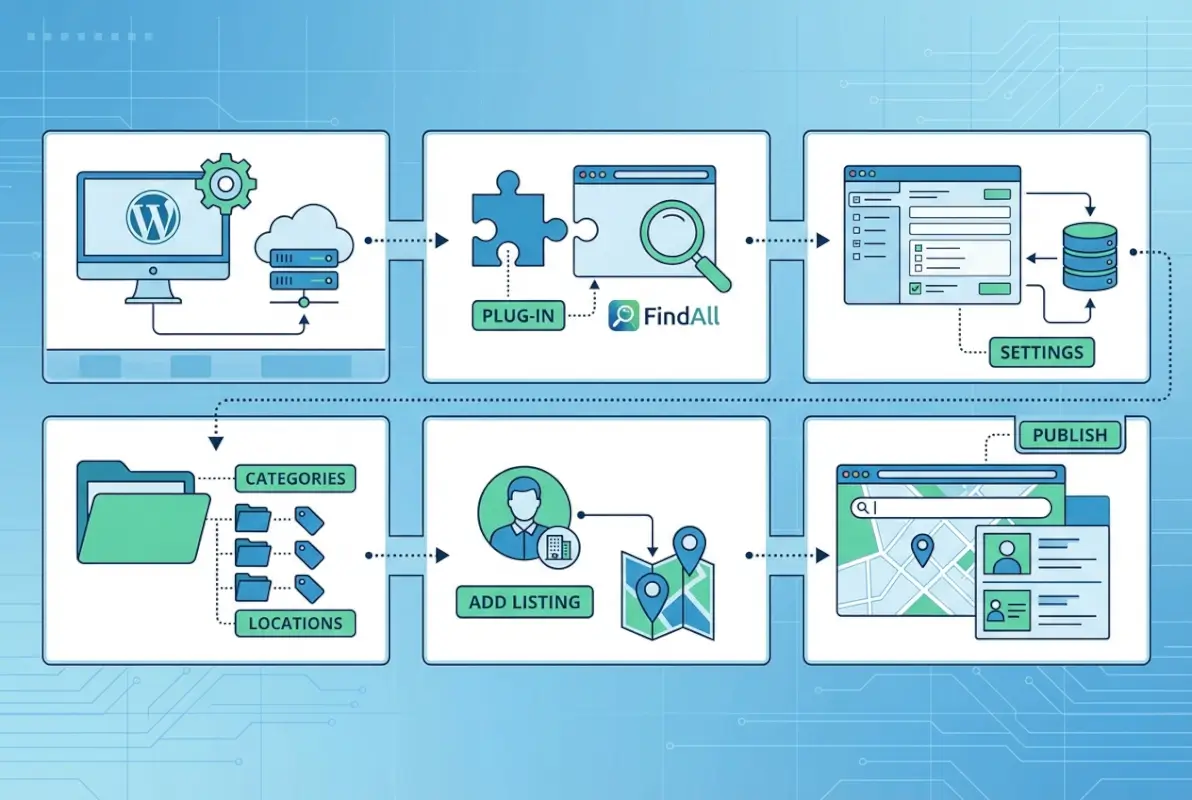
- Six core steps – Planning, setup, structure, search optimization, content strategy, and ongoing maintenance
- Monetization matters early – Build payment systems and featured listing options from day one for sustainable growth
- Local SEO drives traffic – Proper schema markup and NAP consistency can triple organic visibility within six months
Building a business directory in WordPress isn’t just another website project, it’s creating a digital ecosystem where local businesses and customers connect. The difference between a directory that languishes with twelve listings and one that grows to thousands comes down to planning and execution. WordPress powers approximately 43% of all websites globally, and within that massive ecosystem, business directories represent one of the fastest-growing verticals. The FindAll theme takes what used to require custom development and transforms it into a systematic process anyone can follow.

Most directory projects fail not from technical limitations but from unclear architecture decisions made in the first week. I’ve seen entrepreneurs spend six months building beautiful directories that nobody uses because they skipped fundamental questions about taxonomy structure and user submission workflows. This guide walks through six practical steps that address both the technical setup and the strategic thinking behind successful directory sites.
Understanding FindAll and the WordPress Directory Landscape
FindAll positions itself as a comprehensive solution for WordPress-based business directories, eliminating the plugin-juggling approach that often creates compatibility headaches. The theme includes native support for listing types, category hierarchies, review systems, map integrations, and WooCommerce connectivity for payments. Unlike plugin-dependent solutions where updates can break your site at 2 AM, FindAll consolidates core directory functions into a single, cohesive system.

The WordPress directory market has matured significantly, with multiple plugin options competing for attention. What sets FindAll apart is its theme-first approach, meaning the directory functionality integrates directly with your site’s design layer rather than bolting onto it. This architecture reduces conflict points and typically improves performance compared to heavy plugin stacks.
The competitive landscape reveals interesting patterns. Solutions like GeoDirectory and Business Directory Plugin dominate plugin-based approaches, while FindAll and similar themes offer integrated experiences. According to TechRadar’s analysis, the best choice depends on whether you prioritize flexibility (plugins) or cohesion (themes). For most directory projects aiming to attract quality listings, the integrated theme approach reduces long-term maintenance burden.
Why WordPress for Directories Still Makes Sense
WordPress maintains roughly 60% of the CMS market share, creating an enormous ecosystem of developers, plugins, and support resources. When you build on WordPress, you’re not betting on a niche platform, you’re leveraging the most established web infrastructure available. This matters tremendously when you need to hire a developer three years from now or integrate with third-party services.
The open-source nature means you own your data completely. Unlike SaaS directory platforms that lock you into monthly fees and data export limitations, a WordPress directory gives you full control. You can migrate hosts, customize any element, and never worry about a platform deciding to triple pricing or shut down.
Planning and Architecture
Directory architecture determines everything from user experience to SEO performance. The first question: what exactly gets listed? A restaurant directory needs hours, menus, and cuisine types. A contractor directory requires licenses, service areas, and project portfolios. Define your data model before touching WordPress, because retrofitting fields onto 500 existing listings creates chaos.
Your taxonomy structure should mirror how people actually search. If you’re building a local business directory, consider a two-tier system: primary categories (Restaurants, Services, Retail) and location-based subcategories (Downtown Portland, Eastside). The inverse structure (location-first, then category) works better for multi-city directories where users think geographically before categorically.
| Taxonomy Approach | Best For | User Mental Model |
|---|---|---|
| Category > Location | Single-city directories | “I need a plumber nearby” |
| Location > Category | Multi-city directories | “What’s in Denver?” |
| Hybrid with filters | National directories | “Flexible browsing” |
Data Quality and Moderation Workflows
User-submitted content creates a scaling mechanism but introduces quality control challenges. FindAll supports both open submission (publish immediately) and moderated submission (admin approval required). The right choice depends on your niche and capacity. High-trust industries like medical services demand moderation, while community event calendars can often accept immediate publication with post-moderation cleanup.
Implement a three-tier verification system: automatic spam filtering, manual review for new submitters, and trusted status for businesses that maintain accurate information. This approach keeps quality high without creating administrative bottlenecks that slow directory growth. According to research on successful directories, moderation response times under 24 hours correlate strongly with continued user submissions.
Monetization Strategy Foundation
Revenue models should integrate into your architecture planning, not bolt on later. FindAll supports free listings with paid upgrades, a proven freemium model that lowers barriers to entry while creating clear monetization paths. Featured placement, extended descriptions, photo galleries, and social media links make logical premium features that businesses readily pay for.
Membership tiers work exceptionally well for directories with repeat users. A basic free tier, a mid-level tier with enhanced features, and a premium tier with maximum visibility creates natural upgrade paths. WooCommerce integration enables subscription management, though it adds complexity that smaller directories might want to delay until they reach critical mass.
Setup and Technical Prerequisites
WordPress hosting matters more for directories than typical websites because you’re managing database-intensive operations, map integrations, and potentially thousands of listings. Shared hosting struggles once you exceed 500 listings with active searches. Managed WordPress hosts like WP Engine or Kinsta provide better performance, though they cost more. VPS hosting offers a middle ground if you have technical skills to manage server configuration.

PHP and MySQL versions follow WordPress core requirements, but directories benefit from the latest stable versions for performance. PHP 8.1 or higher provides noticeable speed improvements for database queries. SSL certificates are non-negotiable, both for SEO and for collecting payment information if you monetize listings. Most hosts include free SSL through Let’s Encrypt now.
Installing FindAll and Essential Plugins
The installation sequence matters. Install WordPress first, then add FindAll through the theme upload interface. Essential plugins for directories include a form builder (Contact Form 7 or WPForms), an SEO plugin (Rank Math or Yoast), and a caching solution (WP Rocket or W3 Total Cache). FindAll includes many directory-specific features natively, reducing plugin dependency compared to building from scratch.
Theme customization starts in the WordPress Customizer, where you’ll set color schemes, typography, and layout options. FindAll provides preset layouts for different directory styles, from map-heavy designs to category-focused browsing. Responsive behavior requires testing on actual devices, not just browser resizing, since touch interactions differ significantly from mouse clicks.
Performance Optimization for Growing Directories
Directory performance degrades in predictable ways as listings grow. Database queries multiply, map rendering slows, and search operations consume more resources. Object caching (Redis or Memcached) dramatically improves performance by storing frequently-accessed data in memory rather than repeatedly querying the database. This becomes critical above 1,000 listings.
Lazy loading prevents loading all listing images simultaneously, instead loading them as users scroll. FindAll typically includes this feature, but verify it’s enabled. Image optimization tools like ShortPixel or Imagify automatically compress uploaded photos, which matters tremendously when business owners upload 5MB phone photos directly to your directory.
Directory Structure and Listing Workflows
Your homepage sets expectations for the entire user experience. Search-first homepages work well when users arrive with specific needs (“find a dentist near me”). Category-first designs suit browsing behavior where users explore options (“what restaurants exist here?”). FindAll supports both approaches through different homepage templates, and you can A/B test to see which converts better for your audience.

Map integration on the homepage provides immediate context, especially for location-focused directories. However, maps add page weight and can slow initial load times. Consider lazy-loading the map or offering a toggle between map and list views. Some users prefer the spatial context maps provide, while others find them distracting when they want to browse categories systematically.
Listing Submission and Review Flow
Frontend submission forms should collect essential information without overwhelming users. Name, category, location, description, contact details, and photos cover the basics. Advanced fields like hours of operation, payment methods, and amenities can come later or apply only to specific categories. Progressive disclosure (showing fields only when relevant) keeps forms manageable.
The submission-to-publication workflow determines both quality and velocity. Immediate publication with spam filtering encourages submissions but risks quality issues. Manual approval ensures quality but creates delays that frustrate users and slow growth. A hybrid approach works well: immediate publication for users who verify email addresses or connect social media accounts, manual review for anonymous submissions.
| Submission Approach | Spam Risk | Growth Rate | Quality Control |
|---|---|---|---|
| Auto-publish all | High | Fastest | Low |
| Manual approval | Low | Slowest | High |
| Verified auto-publish | Medium | Fast | Medium-High |
Listing Detail Page Design
Individual listing pages need to convert visitors into customers for the businesses listed, because happy businesses renew premium listings and recommend your directory. Essential elements include prominent contact buttons (click-to-call on mobile), embedded maps with directions, business hours clearly displayed, photo galleries, and review sections. Social sharing buttons help businesses promote their listings organically.
Schema markup on listing pages tells search engines exactly what information means, improving rich snippet chances in search results. LocalBusiness schema should include name, address, phone, hours, and aggregate ratings. This structured data can triple click-through rates from search results compared to unmarked listings.
Search, Filters, and Map Features
Search functionality makes or breaks directory usability. Users expect to combine keyword searches (“thai restaurant”) with location filters (“within 5 miles”) and refinement options (“open now”). FindAll’s search system supports these patterns, though configuration determines how well they work. Keyword search should examine business names, descriptions, categories, and custom fields for comprehensive results.

Location-based search requires geocoding, the process of converting addresses into latitude/longitude coordinates. This happens either during listing submission (faster searches, more complex setup) or during searches (slower but simpler). For directories with over 100 listings, pre-geocoding during submission provides noticeably better search performance. When implementing advanced search features, consider what your users actually need versus what sounds impressive.
Filter and Facet Strategy
Filters help users narrow results, but too many filters overwhelm rather than assist. Start with three to five essential filters based on how people actually search in your niche. Restaurant directories need cuisine type, price range, and distance. Service directories need service type, availability, and credentials. Add filters based on user behavior data, not assumptions.
Dynamic filters that show only relevant options prevent frustration. If no restaurants in the current search results accept cryptocurrency, don’t show that payment filter. Progressive filter application (applying filters without page reloads) creates smoother experiences but requires more complex JavaScript implementation. FindAll includes AJAX search functionality that enables this smooth filtering.
Map Integration and Performance
Google Maps remains the most familiar option, though it requires API keys and comes with usage costs above free tiers. OpenStreetMap provides a completely free alternative through Leaflet.js, with comparable functionality for most directory needs. The choice often depends on whether you need Google’s extensive location data or whether basic mapping suffices.
Marker clustering prevents map overload when displaying hundreds of listings. Instead of showing 300 individual pins that create visual chaos, clustering groups nearby markers and shows counts. Users can zoom in to see individual locations. This dramatically improves both visual clarity and map performance, since rendering hundreds of markers simultaneously strains browsers.
Content and SEO Strategy for FindAll Directories
Directory SEO differs from typical website optimization because you’re optimizing both the directory infrastructure and individual listings. Infrastructure SEO focuses on category pages, location pages, and search functionality. Listing-level SEO optimizes individual business pages to rank for specific “business name + location” queries. Both matter for comprehensive directory visibility.
Title tag optimization for listing pages should follow the pattern “Business Name – Category – City – Your Directory Name.” This structure targets the long-tail searches people actually use while maintaining brand presence. Meta descriptions should emphasize unique value propositions and include clear calls-to-action, since they function as ad copy in search results.
Local SEO Implementation
NAP consistency (Name, Address, Phone) across all listings prevents confusion for both users and search engines. Implement validation during submission to standardize formats. Address abbreviations and phone number formats should follow consistent patterns. This consistency signals credibility to search engines and improves local ranking factors.
Citation building for your directory itself matters when you want the directory to rank for category + location terms. Submit your directory to business data aggregators like Data Axle and Neustar Localeze. These services distribute your directory information to dozens of other platforms, creating the citation network that supports local SEO. According to Moz’s local search research, citation volume and consistency remain important ranking signals.
Content Templates and Hub Pages
Category hub pages serve multiple purposes: they rank for broad category terms, they provide navigation structure, and they offer editorial context that pure listing pages can’t. A “Restaurants in Portland” hub page might include neighborhood guides, cuisine type overviews, and curated collections of notable establishments. This editorial content distinguishes your directory from pure databases.
City landing pages work similarly for multi-location directories. Instead of just listing every business in Denver, create rich content about Denver’s business landscape, neighborhood characteristics, and local economic context. This content attracts links, ranks for informational queries, and positions your directory as an authority rather than just a list.
Security, Compliance, and Maintenance
User-generated content introduces security vectors that static websites don’t face. SQL injection through search forms, cross-site scripting through listing descriptions, and spam floods all target directories. WordPress security plugins like Wordfence or Sucuri provide firewalls and malware scanning. Enable them from day one, not after you discover a breach.
File upload vulnerabilities represent particular risks when businesses can upload photos. Restrict file types to images only, implement file size limits, and consider using a service like Cloudinary or Uploadcare to handle image uploads entirely off your server. This offloads both security concerns and storage burden to specialized platforms.
Data Privacy and Consent
GDPR affects any directory serving European users, while CCPA applies to California residents. Both require explicit consent for data collection, clear privacy policies, and user rights to access and delete their data. WordPress plugins like Complianz or CookieYes help manage consent flows and generate compliant privacy policies. Don’t treat this as optional; enforcement and penalties continue increasing.
Review moderation policies need documentation to protect you from liability. Establish clear guidelines about acceptable review content, your moderation criteria, and the appeals process when you remove content. This documentation protects you legally and provides consistency for anyone helping with moderation.
Accessibility Considerations
Accessible directories reach broader audiences and comply with legal requirements in many jurisdictions. Keyboard navigation must work for all critical functions, including search, filtering, and listing submission. Screen reader compatibility requires proper heading hierarchy, alt text for images, and ARIA labels for interactive elements. Color contrast between text and backgrounds should meet WCAG AA standards at minimum.
Form accessibility matters especially for submission flows. Label elements properly, provide clear error messages, and ensure required fields are marked both visually and semantically. Many businesses submitting listings may have visual impairments or motor control challenges, making accessibility both ethical and practical for maximizing submissions.
Monetization and Growth Strategies
Featured listings create immediate revenue opportunities with clear value propositions. Businesses understand that top placement drives more calls and visits. Pricing should reflect the value delivered, start by calculating the average customer value a business gets from one directory-driven customer, then price featured placement at a fraction of that value. Monthly featured placement typically ranges from $25-$200 depending on directory traffic and niche.
Subscription models provide predictable revenue that one-time payments can’t match. Annual subscriptions with monthly payment options reduce churn compared to month-to-month billing. Offering tiered plans (basic, professional, premium) creates natural upgrade paths as businesses see results. Track which features drive upgrades and emphasize those in your marketing to free tier users.
Partnership and Affiliate Opportunities
Local chambers of commerce, business associations, and industry groups make natural partners for directory growth. They need to provide value to members, you need quality listings. Partnership arrangements where association members receive free or discounted premium listings benefit both parties and rapidly build your directory’s credibility.
Affiliate relationships with complementary services create additional revenue streams. Credit card processors, insurance providers, and business software companies will pay commissions for referrals. Integrate these offers tastefully into the post-listing workflow (“Now that your listing is live, protect your business with…”) rather than cluttering the user interface.
Analytics and Optimization
Track conversion funnels from homepage visit through listing submission completion. Identify where users drop off and test improvements. If 60% of users abandon during submission, simplify your form. If search results pages have high bounce rates, improve result relevance or add helpful filters. Google Analytics 4 provides event tracking that reveals these patterns when configured properly.
A/B testing ideas should focus on high-impact elements: homepage search prominence, call-to-action button text, featured listing placement, and pricing page structure. Small changes compound, a 10% improvement in submission conversion combined with a 15% improvement in premium upgrades significantly impacts revenue. Test systematically rather than redesigning everything simultaneously.
Migration and Data Import/Export
Importing existing listings into FindAll typically uses CSV files formatted to match FindAll’s data structure. Export your current data, create a mapping between your old fields and FindAll’s fields, then use WordPress import tools or FindAll’s built-in import functionality. Test imports with a small sample first, because fixing 2,000 incorrect imports takes longer than getting 20 right initially.
Duplicate detection during import prevents the same business appearing multiple times under slight name variations. Implement fuzzy matching on business name and address combined, catching duplicates even when one says “ABC Company” and another says “A.B.C. Company.” Manual review of potential duplicates works for hundreds of listings but requires automated solutions for thousands.
Export and Backup Strategies
Regular exports protect against catastrophic data loss and enable platform migrations if needed. Export both the database and uploaded files (business photos, documents) separately. Store backups off-server, ideally in multiple locations using services like Dropbox, Google Drive, or dedicated backup services like UpdraftPlus or BackupBuddy for WordPress.
Automated backup schedules remove the risk of forgetting manual backups. Daily database backups and weekly file backups balance protection with storage efficiency. Test restoration procedures occasionally, backups you can’t actually restore provide false security. A quarterly restoration test to a staging environment confirms your backups actually work.
Frequently Asked Questions
What is FindAll and how does it differ from other WordPress directory solutions?
FindAll is a WordPress theme specifically designed for business directories, integrating listing management, reviews, maps, and monetization features directly into the theme rather than relying on multiple plugins. This consolidated approach typically offers better performance and fewer compatibility issues compared to plugin-based directory solutions.
Is FindAll suitable for both local business directories and multi-city directories?
Yes, FindAll supports both single-location and multi-city directory structures through flexible taxonomy options. You can configure it for neighborhood-level detail in one city or scale across multiple cities and regions. The architecture adapts to your scope, though larger directories require more robust hosting and caching strategies.
How do I set up listing submission and moderation in FindAll?
FindAll includes frontend submission forms that business owners access through your site. Configure moderation settings to either publish listings immediately after spam filtering or require manual admin approval before publication. The theme provides a dashboard where you review pending submissions, approve or reject them, and communicate with submitters.
Which payment methods and monetization options work well with WordPress directories?
FindAll integrates with WooCommerce, enabling credit card processing through Stripe, PayPal, Square, and dozens of other payment gateways. Effective monetization models include featured listing placement, premium subscription tiers with enhanced features, and pay-per-listing options. Many successful directories combine free basic listings with paid upgrades.
How do I optimize a FindAll directory for local SEO?
Implement LocalBusiness schema markup on all listing pages, ensure NAP consistency across listings, create location-specific hub pages with original content, and build citations for your directory on business data aggregators. Encourage user reviews on listings, as review volume and quality influence local search rankings significantly.
What are the best practices for listing categories and taxonomy in FindAll?
Design your category structure based on how users actually search in your niche. Limit primary categories to five to eight broad types to avoid overwhelming users. Use subcategories for specificity but maintain clear hierarchies. Test your taxonomy with real users before launch, and track which categories get the most searches to refine over time.
How can I add maps and geolocation features to a FindAll directory?
FindAll includes built-in map integration supporting both Google Maps and OpenStreetMap options. Configure your preferred map provider through the theme settings, add your API key if using Google Maps, and enable marker clustering for directories with many listings. Geocoding can happen during listing submission or dynamically during searches.
How do I improve site speed and scalability as my directory grows?
Implement object caching (Redis or Memcached) to reduce database queries, enable lazy loading for images and maps, use a CDN to serve static assets, and upgrade to managed WordPress hosting or VPS when you exceed 500 active listings. Image optimization plugins and database cleanup also maintain performance as content grows.
What security measures should I implement for a user-generated directory?
Install a WordPress security plugin like Wordfence or Sucuri for firewall protection and malware scanning. Restrict file uploads to images only with size limits, implement CAPTCHA on submission forms to prevent spam, use SSL certificates for all pages, and maintain regular backups. Enable two-factor authentication for admin accounts.
Where can I find official FindAll documentation and support?
FindAll documentation is available through the Qode Interactive website at qodeinteractive.com, which includes setup guides, feature tutorials, and troubleshooting resources. Premium theme purchasers receive direct support through the Qode support ticket system. Community forums and Facebook groups also provide peer support from other FindAll users building directories.
Moving Forward with Your Directory Project
Building a business directory in WordPress using FindAll transforms from an overwhelming prospect into a systematic process when you follow structured steps. The six core phases, planning your architecture, setting up the technical foundation, structuring listings and workflows, optimizing search and filters, implementing content and SEO strategy, and maintaining security and growth, create a roadmap that works whether you’re launching a neighborhood restaurant guide or a national contractor database.
Success comes from the details you get right in week one. Your taxonomy structure determines whether users can find relevant listings six months from now. Your submission workflow determines whether you get 50 or 500 listings in your first quarter. Your monetization architecture determines whether this becomes a sustainable business or remains a hobby project that drains resources.
Start with a tight geographic or niche focus rather than attempting comprehensive coverage immediately. A complete directory of Portland food trucks provides more value than an incomplete directory of all Oregon businesses. You can expand scope after proving the model works and understanding your users’ actual needs through data rather than assumptions.
The WordPress and FindAll ecosystem gives you tools that would have required custom development budgets in the hundreds of thousands just a few years ago, use them strategically. Every hour you invest in planning saves ten hours of restructuring later. Every dollar you spend on proper hosting prevents future emergency migration costs. Every user you talk to before launch reveals assumptions you’d otherwise discover through painful failure.
Your directory won’t reach its potential in month one or month six, this is infrastructure that compounds value over time. Focus on sustainable growth strategies rather than viral tactics. Build relationships with the businesses you list. Create content that actually helps users make decisions. The directories that win long-term are the ones that become genuinely useful resources, not just databases.