How to Create a Business Directory Website: 7 Essential Steps for Success

Building a business directory website represents one of the most strategic digital ventures you can undertake in today’s marketplace. Unlike generic content sites that struggle to find sustainable revenue models, directories solve a fundamental problem: connecting people who need services with businesses that provide them. The beauty? Both sides are willing to pay for that connection when executed correctly.

I’ve watched countless entrepreneurs launch directories over the past decade, and the pattern is clear—those who follow a systematic approach succeed, while those who wing it typically abandon their projects within six months. The difference isn’t luck or budget; it’s understanding the foundational elements that separate thriving directories from digital ghost towns. From selecting the right technical infrastructure to implementing search functionality that actually works, each decision compounds to determine your platform’s ultimate success or failure.
What makes this opportunity particularly compelling right now is the democratization of directory technology. What once required $50,000+ in custom development can now be accomplished with WordPress and specialized plugins for under $2,000. This accessibility has opened opportunities for niche directories serving specific industries or geographic markets—areas where massive platforms like Yelp or Yellow Pages fall short. However (and this is critical), lowered barriers to entry don’t guarantee success. You still need to execute strategically across technical, content, and marketing dimensions.
TL;DR – Quick Takeaways
- Strategic Foundation First: Choose your niche, validate demand, and plan your monetization model before touching any code
- Platform Selection Matters: WordPress with directory plugins offers the optimal balance for 85% of projects
- Search is Everything: Users come for discovery—invest heavily in filtering, maps integration, and mobile responsiveness
- Solve the Cold Start: Populate 50-100 quality listings before launch to demonstrate immediate value
- Security Cannot Wait: Implement proper data protection and secure design from day one, not as an afterthought
- Local SEO Drives Growth: Structured data, location pages, and schema markup compound to dominate local search
- Multiple Revenue Streams: Premium listings, featured placements, and advertising create financial sustainability
This comprehensive guide walks through seven essential steps that form the blueprint for directory success. Whether you’re looking to create thriving local business directory for your community or build a specialized industry platform, these principles provide the foundation. Let’s dive into the systematic approach that transforms directory concepts into profitable realities.
Strategic Planning and Market Validation
The graveyard of failed directories is littered with platforms that skipped strategic planning and jumped straight to development. Before you register a domain or evaluate platforms, you need clarity on three fundamental questions: Who are you serving? What problem are you solving? How will you make money?
Your niche selection determines everything that follows. Broad directories competing with established giants rarely succeed—the SEO battle alone requires resources most entrepreneurs don’t have. Instead, identify underserved verticals or geographic markets where you can establish authority quickly. For example, instead of “restaurants,” consider “farm-to-table restaurants in the Pacific Northwest” or “certified organic eateries.” The narrower focus allows you to dominate specific search terms and build a passionate user base.
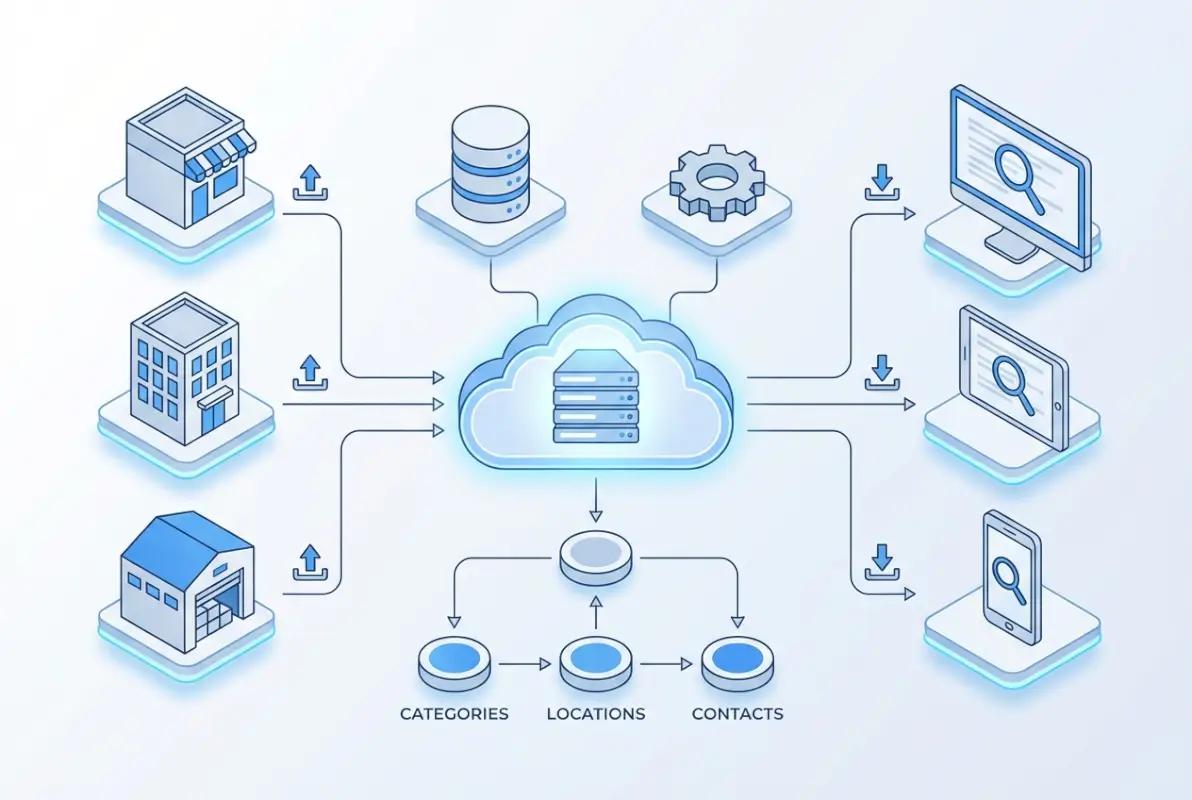
Market validation prevents costly mistakes. Before investing months of effort, verify actual demand exists for your directory concept. Search Google for your target keywords and analyze existing results. Are people searching for this information? What gaps exist in current solutions? Use tools to estimate search volume for terms like “[your niche] directory [location]” or “best [category] in [city].” If monthly searches fall below 100 for your core terms, you may struggle to attract organic traffic.
Talk to potential users and businesses before you build. I learned this lesson the hard way with my first directory attempt—I built what I thought users wanted, only to discover actual behavior differed dramatically from my assumptions. Spend time in relevant forums, Facebook groups, or industry associations. What frustrations do people express about finding businesses in your niche? What features do businesses wish existed? These conversations reveal the specific pain points your directory must address.
Define your business model early. The three primary approaches are free listings with premium upgrades, paid-only listings, or hybrid models with advertising. Each carries different implications for growth strategy and user acquisition. Free listings accelerate initial growth but require larger user volumes to generate revenue. Paid-only models create immediate income but slow listing accumulation. Most successful directories employ hybrid approaches—free basic listings attract volume while premium features and advertising generate revenue.
Competitive Analysis and Differentiation
Study your competitors methodically, not to copy them, but to identify gaps you can exploit. Analyze the top 5-10 directories in adjacent niches or different geographies serving similar audiences. What features do they offer? Where do users complain in reviews? What’s missing from their platforms that users clearly want?
Your differentiation strategy must be specific and defensible. “Better design” or “more listings” aren’t sustainable advantages—those can be copied quickly. Instead, focus on structural differentiation like exclusive partnerships with industry associations, proprietary verification processes that build superior trust, specialized features serving unique workflow needs in your niche, or hyperlocal expertise that national platforms cannot replicate.
Create a simple comparison matrix documenting how your planned directory differs from existing options. This exercise clarifies your unique value proposition and identifies which features deserve development priority versus nice-to-have additions that can wait.
Platform Selection and Technical Architecture
Choosing your technical foundation represents the most consequential decision in your directory journey. The platform determines not just current capabilities but future flexibility, scalability, and maintenance burden. Get this wrong, and you’ll face expensive migrations or limiting constraints down the road.
For most directory projects, WordPress combined with specialized directory plugins provides the optimal balance of functionality, cost, and ease of use. According to Google’s SEO Starter Guide, WordPress sites benefit from clean URL structures and extensive plugin ecosystems that simplify technical SEO implementation—critical advantages for directories competing in local search.

The WordPress directory ecosystem includes several mature options worth evaluating. Business Directory Plugin offers comprehensive features with flexible pricing and strong documentation. Directories Pro provides user-friendly interfaces with built-in monetization tools. GeoDirectory specializes in location-based directories with powerful mapping features. Each has strengths serving different use cases—the key is matching plugin capabilities to your specific requirements rather than choosing based on popularity alone.
| Platform Approach | Best For | Typical Cost | Time to Launch |
|---|---|---|---|
| WordPress + Plugins | Most directories, especially those starting out | $500-2,000 | 2-4 weeks |
| SaaS Platforms | Non-technical founders wanting simplicity | $50-300/month | 1-2 weeks |
| Custom Development | Unique requirements, well-funded projects | $15,000-75,000+ | 3-6 months |
SaaS platforms like Brilliant Directories offer all-in-one solutions with hosting included. These reduce technical complexity but sacrifice customization flexibility and lock you into monthly subscription costs. They work well for founders who want to validate concepts quickly without technical overhead, but scaling costs can become prohibitive as your directory grows.
Custom development makes sense only for directories with truly unique requirements that existing platforms cannot accommodate. Unless you have specific technical needs that justify the 10x cost increase, WordPress plugins provide 90% of the functionality for a fraction of the investment. Save custom development resources for unique features that differentiate your directory after you’ve validated the core concept.
Essential Technical Requirements
Regardless of platform choice, your directory must deliver core technical capabilities that users expect. Advanced search and filtering form the backbone—users should refine results by location radius, category hierarchies, price ranges, ratings, and custom attributes relevant to your niche. The search experience determines whether users find what they need or bounce in frustration.
Map integration has evolved from optional to essential for local directories. Interactive maps showing business locations with cluster markers for dense areas provide visual discovery that pure list views cannot match. Implement click-to-call buttons and direction features for mobile users who need immediate contact or navigation.
User account functionality enables businesses to claim and manage their listings while allowing users to save favorites, write reviews, and receive notifications. The claiming process is particularly important—it converts directory-created listings into engaged business participants who update information and potentially upgrade to paid tiers.
Payment processing integration becomes critical once you implement paid listings. Choose established providers like Stripe or PayPal that handle PCI compliance complexities. Build subscription management capabilities from the start, even if you launch with one-time payments—adding recurring billing later requires significant rework.
Data Architecture and Listing Quality Framework
The quality and structure of your listing data determines user satisfaction more than any other factor. Beautiful design and powerful search mean nothing if the underlying listings contain outdated information, missing details, or duplicate entries. Establishing robust data architecture and quality standards from day one prevents the expensive cleanup required when directories grow with poor foundations.
Design your listing schema thoughtfully before populating content. Required fields should include business name, primary category, complete address, phone number, and business description. Optional fields that enhance value include business hours, price range, accepted payment methods, services offered, photos and videos, social media profiles, and website links. The temptation is to require everything, but excessive mandatory fields reduce submission completion rates. Start lean and expand based on user feedback.

Category taxonomy design deserves careful consideration because changing it later disrupts SEO and user familiarity. Create logical hierarchies that users understand intuitively—test your categories with real people unfamiliar with your industry. Categories that make perfect sense to you as the expert may confuse casual users. Aim for 8-15 top-level categories with 3-5 subcategories each. Deeper nesting complicates navigation without improving discovery.
Implement structured data using Schema.org markup from launch. For directory listings, use LocalBusiness schema which provides properties for addresses, phone numbers, opening hours, and ratings. This structured data helps search engines understand your content and qualify for rich results in SERPs—a massive advantage for visibility and click-through rates.
Solving the Cold Start Problem
Every new directory faces the chicken-and-egg dilemma: businesses won’t list without users, and users won’t visit without comprehensive listings. Your initial content strategy breaks this impasse by providing immediate value to early visitors while demonstrating the platform’s potential to businesses.
Populate 50-100 seed listings before your official launch, focusing on the most popular categories and visible businesses. Create these listings from publicly available information, but be transparent about their source. Include a prominent notice like “This listing was created from public information. If you own this business, claim it to unlock premium features.” This transparency builds trust while creating opportunities for business owners to engage.
Prioritize quality over quantity in your initial listings. Ten complete, accurate listings with photos and detailed descriptions provide more value than fifty bare-bones entries with just names and addresses. Users judge your entire directory based on these first impressions—make them count.
As listings grow, implement quality control processes that scale. Automated verification checks phone numbers, validates addresses, and flags potential duplicates. Manual review catches subtler issues like inappropriate content or category mismatches. The balance between automation and human oversight evolves as your directory matures—start with higher manual involvement and automate repetitive patterns as they emerge.
Search Optimization and User Experience Design
Directory success hinges on two interconnected elements: helping users find exactly what they need quickly (search optimization) and making that discovery process intuitive and pleasant (user experience design). These aren’t separate concerns but complementary disciplines that must work together seamlessly.
Search functionality extends far beyond a simple keyword box. Users need to filter by location with radius options, refine by category and subcategory, sort by relevance, distance, rating, or price, and apply attribute filters specific to your niche (e.g., “wheelchair accessible” for venue directories or “organic certified” for food directories). Each filter option should display result counts before application, showing users which refinements actually narrow their search versus dead-ends with zero results.

Location-based search deserves particular attention for local directories. Implement geocoding that converts addresses to coordinates, radius search allowing “within X miles of location,” and boundary-based search for neighborhoods or zip codes. Map clustering groups nearby results at zoomed-out views, preventing marker overlap that obscures individual businesses. As users zoom in, clusters expand to reveal individual pins.
Mobile responsiveness isn’t negotiable for directories—according to research on global internet usage trends, mobile devices now account for the majority of local search traffic. Design touch-friendly interfaces with adequately sized tap targets (minimum 44×44 pixels), streamlined mobile navigation that doesn’t require precise clicking, and click-to-call functionality that initiates phone calls with a single tap. Test exhaustively on both iOS and Android devices across multiple screen sizes.
Creating Compelling Listing Pages
Individual listing pages serve as conversion points where browsing users become customers for listed businesses. These pages must balance comprehensive information with scannable layouts that don’t overwhelm. The information hierarchy should prioritize contact options and calls-to-action above the fold, followed by key business details (hours, location, services), then supporting content like descriptions and reviews.
Visual content dramatically increases engagement on listing pages. Businesses with photo galleries receive 3-4x more inquiries than those with text alone. Implement easy upload processes that encourage businesses to add multiple images showcasing their locations, products, teams, and work samples. Video embedding provides another engagement layer, particularly valuable for service businesses where demonstrating expertise builds trust.
| Page Element | Priority Level | Impact on Conversions |
|---|---|---|
| Contact Buttons | Critical | +340% |
| Photo Gallery | High | +280% |
| Customer Reviews | High | +190% |
| Business Hours | Medium | +85% |
| Detailed Description | Medium | +45% |
Review systems build credibility and provide social proof that influences decisions. Implement straightforward rating mechanisms (5-star scales work universally), text review capabilities with reasonable length limits, verification to prevent spam and fake reviews, and response capabilities allowing business owners to address feedback. Moderation strikes a balance between preventing abuse and allowing authentic negative reviews—overly sanitized review sections lose credibility.
Security, Privacy, and Technical Compliance
Security cannot be an afterthought for directory websites. You’re handling business information, user accounts, payment data, and user-generated content—all of which create legal and ethical obligations to protect that data appropriately. Implementing security from launch prevents the costly breaches and reputation damage that plague directories built without security considerations.
Follow guidance from resources like the OWASP Top 10 security risks to address common vulnerabilities in web applications. Key priorities include input validation to prevent injection attacks, proper authentication and session management, secure password storage with modern hashing algorithms, and protection against cross-site scripting (XSS) and cross-site request forgery (CSRF) attacks.

Data privacy regulations vary by jurisdiction but generally require transparent privacy policies explaining data collection and use, obtaining explicit consent before collecting personal information, providing users access to their data with deletion capabilities, and implementing reasonable security measures to protect stored data. If you operate in or serve users from the European Union, GDPR compliance becomes mandatory with significant penalties for violations.
Regular security maintenance prevents most breaches. Keep your CMS, plugins, and themes updated promptly—most successful attacks exploit known vulnerabilities in outdated software. Implement automated backup systems with off-site storage, maintain activity logs for security monitoring, use strong authentication for admin accounts (consider two-factor authentication), and limit user permissions to the minimum necessary for their roles.
Payment Security and PCI Compliance
If you process payments directly, Payment Card Industry Data Security Standard (PCI DSS) compliance becomes legally required. The easiest approach for most directories is using payment processors like Stripe or PayPal that handle PCI compliance on your behalf. These services process payments on their secure infrastructure, returning tokens to your application rather than exposing you to actual card data.
Never store complete credit card numbers, CVV codes, or other sensitive payment information in your database. Even if you think your security is solid, the liability and compliance burden isn’t worth the risk. Let established payment processors who invest millions in security handle this responsibility while you focus on building your directory’s core value.
Local SEO and Structured Data Implementation
Directory websites live or die by their search visibility. Unlike content sites that might succeed through social media or other channels, directories must rank well for relevant searches to attract both users and businesses. Local SEO becomes particularly critical for geographically focused directories competing for high-intent local searches.
Implement location-specific landing pages for each geographic area you serve. These pages should include unique content about the local market, listings specific to that location, and locally relevant keywords. A restaurant directory serving multiple cities needs dedicated pages like “Chicago Restaurants,” “Austin Restaurants,” etc.—not just a generic listings page with location filters.
Category pages deserve equal SEO attention as location pages. Each category and subcategory should have dedicated pages with descriptive content, relevant keywords, and clear value propositions. These pages target searches like “plumbing directory” or “find local electricians” where users seek specific business types rather than individual companies.
URL structure impacts both SEO and user experience. Implement clean, descriptive URLs that communicate page content without technical jargon. Good examples include “yourdirectory.com/chicago/restaurants” or “yourdirectory.com/plumbers/chicago.” Avoid parameter-heavy URLs like “yourdirectory.com/listings?cat=12&loc=45” which provide no semantic information to search engines or users.
Schema Markup and Rich Results
Structured data transforms how search engines understand and display your content. Implementing proper schema markup qualifies your pages for rich results—enhanced search listings with additional information like ratings, prices, images, and business details. These rich results occupy more screen space and attract significantly higher click-through rates than standard blue links.
For directory websites, prioritize LocalBusiness schema on listing pages, including properties for name, address, phone (NAP data), opening hours, price range, accepted payment methods, and aggregate ratings. Implement Organization schema on your homepage and about page, defining your directory as an entity in search engines’ knowledge graphs.
Add FAQPage schema to pages with frequently asked questions (like the FAQ section at the end of this article). This schema can trigger FAQ rich results in search, where your questions and answers display directly in search results—massive visibility that costs nothing to implement. Test your schema implementation using Google’s Rich Results Test tool to verify correct formatting before deployment.
Internal linking strategy distributes SEO authority throughout your directory. Link from high-authority pages (like your homepage) to important category and location pages. Connect related categories and create logical pathways for users and search engine crawlers to discover content. Avoid orphan pages that exist without any internal links pointing to them—these pages struggle to rank regardless of content quality.
Monetization Models and Revenue Optimization
A directory that doesn’t generate revenue is a hobby, not a business. Sustainable monetization requires balancing user value with business revenue in ways that feel natural rather than extractive. The most successful directories employ multiple revenue streams that work synergistically rather than relying on a single income source.
Premium listing packages form the foundation of most directory business models. Free basic listings provide volume and attract users, while paid premium listings with enhanced features generate revenue. The key is creating clear value differentiation—businesses must immediately understand why premium listings justify their cost. Enhanced visibility through priority placement in search results, expanded profiles with unlimited photos and videos, featured badges or visual differentiation, lead tracking and analytics, and removal of competitor advertising all provide tangible benefits worth paying for.
Tiered pricing accommodates businesses at different stages and budget levels. A typical structure includes Basic (free) with essential visibility and limited features, Pro ($25-75/month) with comprehensive features for established businesses, and Premium ($100-250/month) offering maximum exposure and exclusive benefits. Annual payment options with 15-20% discounts improve cash flow while reducing monthly churn.
| Revenue Stream | Typical Contribution | Implementation Difficulty |
|---|---|---|
| Premium Listings | 55-70% | Easy |
| Featured Placements | 20-30% | Easy |
| Display Advertising | 8-15% | Medium |
| Lead Generation Fees | 5-10% | Hard |
Featured placement opportunities provide additional revenue beyond standard premium listings. Homepage featured spots, category page highlights, and sponsored positions in search results all command premium pricing because they deliver maximum visibility. Rotate featured businesses to maintain fairness while creating scarcity that justifies higher pricing.
Display advertising works best once you’ve built consistent traffic. Direct sales to businesses in your niche typically generate higher CPMs than programmatic ad networks. A dental directory can sell banner ads to dental supply companies, practice management software, or insurance providers at rates far exceeding generic ad networks. Start with direct sales and add programmatic networks like Google AdSense as backfill for unsold inventory.
Lead generation represents advanced monetization for directories with substantial traffic. Instead of charging for listings, you charge per qualified lead delivered to businesses. This performance-based model aligns your incentives with business success but requires sophisticated tracking and higher traffic volumes to generate sufficient leads. Consider this approach after establishing your directory rather than as a launch strategy.
For additional insights on revenue optimization, explore proven strategies monetize business directory that covers advanced monetization tactics for established platforms.
Launch Strategy and Growth Marketing
Your launch determines the trajectory for months afterward. A poorly executed launch creates momentum challenges that take extensive effort to overcome, while a strategic launch establishes credibility and attraction from day one. The goal isn’t simply announcing your directory’s existence, but creating genuine interest among both users and businesses.
Pre-launch preparation matters more than most founders realize. Before announcing publicly, verify all functionality works flawlessly through comprehensive testing. Have friends or colleagues unfamiliar with your platform attempt common tasks—their struggles reveal usability issues you’ve become blind to through familiarity. Test the complete user journey from discovery through listing creation, search, and contact. Mobile testing deserves particular attention since most initial discovery happens on phones.
Build anticipation before your official launch through teaser campaigns. Create a coming soon page collecting email addresses from interested users and businesses. Share behind-the-scenes content on social media showing your directory’s development. Reach out to potential early adopters in your network, offering exclusive early access in exchange for feedback and testimonials.
Launch day coordination should create concentrated attention rather than a quiet release. Publish a launch announcement on your blog explaining your directory’s purpose and value proposition. Share across all social media channels with compelling visuals and clear calls-to-action. Email your pre-launch list with exclusive early access or promotional offers. Reach out to relevant media, bloggers, and influencers in your niche with personalized pitches. Submit to relevant online communities (forums, subreddits, Facebook groups) where potential users gather, following each community’s self-promotion guidelines.
Post-Launch Marketing and Growth
The weeks following launch determine whether early momentum compounds or fizzles. Content marketing establishes your directory as an authoritative resource beyond simple listings. Create guides, comparison articles, and how-to content related to your niche. A wedding venue directory might publish “How to Choose Your Wedding Venue: Complete Guide” or “Beach Weddings vs. Garden Weddings: Pros and Cons.” This content attracts organic search traffic while demonstrating expertise.
SEO efforts should target both directory-specific keywords and broader informational queries in your niche. Directory-specific terms like “[niche] directory” or “find [category] near me” have clear intent but often lower volume. Informational queries like “how to choose [service]” or “best [category] for [use case]” attract larger audiences who may not know they need a directory yet.
Email marketing provides direct communication with users and businesses. Segment your list between these audiences since their interests differ dramatically. For users, send new listing highlights, personalized recommendations based on browsing history, and helpful content related to your directory’s focus. For businesses, share success stories, feature spotlights, upgrade opportunities, and performance statistics demonstrating listing value.
Partnerships accelerate growth by leveraging established audiences. Identify complementary businesses, industry associations, chambers of commerce, or media outlets serving your target audience. Propose mutually beneficial collaborations like content exchanges, co-marketing campaigns, or affiliate relationships where partners earn commissions for referred business listings.
To understand the complete launch process, review the key steps launch successful business directory which covers preparation, execution, and post-launch optimization in greater detail.
Frequently Asked Questions
What is a business directory website?
A business directory website is an online platform that organizes and categorizes businesses, making them discoverable to potential customers through search and browsing. Modern directories include features like advanced filtering, user reviews, interactive maps, and detailed business profiles. They create value by connecting consumers searching for specific products or services with the businesses that offer them, functioning as specialized search engines for particular industries or geographic areas.
How much does it cost to create a business directory website?
Creating a business directory website typically costs between $500-2,000 for WordPress-based solutions using directory plugins, including domain registration, hosting, and initial setup. SaaS platforms charge $50-300 monthly with lower upfront costs but ongoing subscription fees. Custom development ranges from $15,000-75,000+ depending on complexity and features. Most successful directories start with WordPress solutions to validate their concept before investing in custom development.
What platform is best for building a business directory?
WordPress combined with specialized directory plugins offers the best balance of functionality, flexibility, and cost for most directory projects. Popular plugins include Business Directory Plugin, Directories Pro, and GeoDirectory. This approach provides 85-90% of required functionality at a fraction of custom development costs while maintaining customization capabilities. SaaS platforms work for non-technical founders prioritizing simplicity over flexibility, while custom development suits well-funded projects with unique requirements.
How do I attract businesses to list on my directory?
Attract businesses by demonstrating tangible value through user traffic statistics, search visibility benefits, and success stories from early adopters. Offer free basic listings to reduce entry barriers while providing clear upgrade paths to premium features. Implement easy claiming processes for directory-created listings, reach out personally to high-value businesses in your niche, and create targeted content showing how your directory helps businesses in their specific category reach customers.
What features are essential for a business directory website?
Essential features include advanced search with multiple filter options, location-based browsing with interactive maps, customizable business listings with photos and detailed information, user review and rating systems, mobile-responsive design, user account functionality for saving favorites and managing listings, and payment processing for premium listings. Additional valuable features include appointment booking, direct messaging, claim listing workflows, and analytics dashboards for business owners.
How can I monetize a business directory website?
Monetize through premium listing packages with enhanced visibility and features, featured placement opportunities in high-traffic areas, display advertising sold to relevant businesses, lead generation fees for qualified customer inquiries, and subscription models for ongoing access to premium benefits. Most successful directories employ hybrid approaches combining free basic listings with multiple paid upgrade options, creating revenue while maintaining listing volume that attracts users.
How do I optimize my directory for local SEO?
Optimize for local SEO by implementing location-specific landing pages for each geographic area, using LocalBusiness schema markup on listing pages, creating location-focused content and category pages, building local citations and backlinks from relevant sources, ensuring mobile responsiveness for local searches, and encouraging customer reviews which boost local search rankings. Maintain consistent NAP (name, address, phone) data across all listings and implement proper URL structures.
What security measures should I implement for my directory?
Implement SSL certificates for encrypted connections, regular software updates for CMS and plugins, strong password requirements and two-factor authentication for admin accounts, input validation to prevent injection attacks, automated backup systems with off-site storage, and activity logging for security monitoring. Use established payment processors to handle PCI compliance rather than storing payment data directly. Follow OWASP Top 10 guidelines to address common web application vulnerabilities.
How long does it take to launch a business directory website?
WordPress-based directories typically launch within 2-4 weeks from initial planning through deployment, including domain setup, platform configuration, initial listing population, and testing. SaaS platforms can launch faster (1-2 weeks) due to simplified setup, while custom development requires 3-6 months. However, launching is only the beginning—successful directories require ongoing optimization, content addition, and marketing efforts for 6-12 months before achieving sustainable traction and revenue.
How do I prevent duplicate listings in my directory?
Prevent duplicates through automated detection comparing business names, addresses, and phone numbers before accepting new submissions. Implement verification workflows requiring business owners to confirm listings, use unique identifiers like tax IDs or license numbers where applicable, and provide easy reporting mechanisms for users to flag duplicates. Regular database audits identify and merge duplicate entries, while clear submission guidelines help prevent duplicates from being created initially.
Taking Action: Your Directory Journey Starts Now
Building a successful business directory website requires systematic execution across strategic planning, technical implementation, content development, and ongoing marketing. The seven essential steps outlined in this guide provide the blueprint, but success ultimately depends on your commitment to consistent execution and willingness to iterate based on real-world feedback.
Start by validating your concept through market research and conversations with potential users and businesses. Don’t invest months building features nobody wants—validate demand first, then build. Choose your platform based on your specific requirements and technical capabilities, prioritizing flexibility and scalability over cutting-edge features you may never use. Implement security and structured data from day one rather than retrofitting them later when they become problems.
Focus your initial energy on creating genuine value for a small, focused audience rather than attempting to serve everyone immediately. A directory that serves 1,000 users exceptionally well will grow faster than one that serves 10,000 users poorly. As you gain traction, expand methodically into adjacent categories or locations rather than diluting focus across too many areas simultaneously.
Ready to Build Your Directory?
The opportunity to create a valuable, profitable business directory has never been more accessible. With modern platforms and tools, you can build professional directory websites that would have required six-figure budgets just a decade ago. The barriers are lower, but the fundamentals of success remain constant: solve real problems for specific audiences, execute systematically, and optimize relentlessly based on data.
Whether you’re looking to locate perfect business directory opportunities in underserved niches or create comprehensive platforms serving entire industries, these seven steps provide the foundation. Your unique perspective, domain expertise, and commitment to serving your audience will determine your ultimate success. What directory will you build?