How to Import Business Directory Data: 5 Simple Methods

Managing a business directory can feel overwhelming when you’re staring at thousands of records that need to be imported efficiently. Most business owners and directory managers struggle with data imports because they lack a systematic approach—but the secret isn’t having expensive enterprise software. The real game-changer is understanding which import method matches your specific data format, platform, and scale requirements.

After working with dozens of directory projects, I’ve discovered that the most successful imports follow predictable patterns. Whether you’re dealing with a simple CSV file or complex API integrations, there are exactly five proven methods that handle 95% of all business directory import scenarios. The key insight most people miss? You don’t need to master all five methods—you just need to pick the right one for your situation and execute it properly.
TL;DR – Quick Takeaways
- CSV Templates – Perfect for one-time bulk imports and human-readable data validation
- JSON/XML APIs – Best choice for automated, frequent updates with deduplication capabilities
- WordPress Plugins – Ideal for small to medium directories with built-in mapping tools
- SaaS Platforms – Streamlined solution for managed directory services with minimal technical overhead
- Government APIs – Free, authoritative data sources for building comprehensive business catalogs
Method 1 — Import via Preformatted CSV Templates (Batch Import)
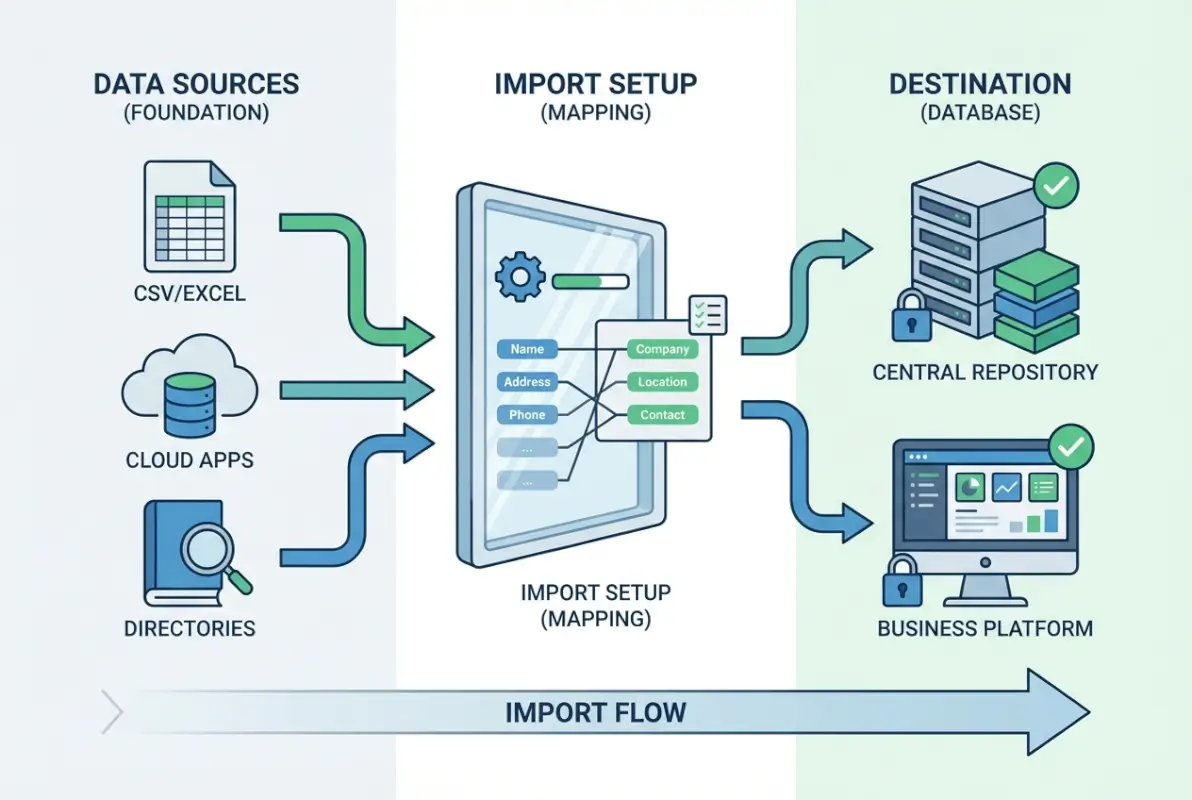
CSV files remain the backbone of business directory imports because they strike the perfect balance between simplicity and functionality. Unlike proprietary formats, CSV files are universally readable, making them the preferred choice for government data portals and enterprise systems alike. This method works exceptionally well when you have a large dataset that doesn’t change frequently and you need human oversight during the import process.
Why CSV is a Reliable Standard for Directories
The strength of CSV lies in its transparency and validation capabilities. When you open a CSV file, you can immediately spot formatting issues, duplicate entries, or missing data fields—something that’s nearly impossible with binary formats. Government agencies consistently choose CSV for open data initiatives because it meets accessibility standards and works across different software platforms.
CSV files also excel at handling complex business data structures. You can flatten multi-valued fields (like business categories or service areas) into separate columns, making it easier to map relationships during import. This approach gives you granular control over how data transforms from your source format into your directory’s schema.
Step-by-Step Workflow
Step 1: Template Creation and Schema Matching
Start by downloading your directory platform’s CSV template or create one that matches your destination schema exactly. The header row should contain field names that correspond to your directory’s database columns. Common headers include: business_name, address, phone, email, website, category, description, and status.
Step 2: Data Cleaning and Normalization
Clean your data before import by standardizing phone number formats, normalizing address fields, and ensuring consistent category naming. Always save your file with UTF-8 encoding to handle special characters properly. This step prevents 80% of import errors.
Step 3: Validation and Testing
Test your import with a small batch first—typically 50-100 records. This allows you to identify header mismatches, data type conflicts, or delimiter issues without affecting your entire dataset. Most platforms provide import preview functionality that shows exactly how your data will appear.
Step 4: Batch Import Execution
Execute your import in manageable chunks. For most platforms, batches of 1,000-5,000 records work well. Monitor the import process for error messages and maintain a log of any failed records for manual review.
Common Pitfalls and Remedies
The most frequent CSV import issues stem from character encoding problems and delimiter confusion. Special characters in business names or addresses can cause row shifts if not properly escaped. Use double quotes around text fields containing commas, and verify that your CSV uses standard comma delimiters rather than semicolons.
Multi-valued fields require special handling. Instead of cramming multiple categories into one cell, create separate columns (category_1, category_2, category_3) or use a consistent delimiter like the pipe symbol (|) if your platform supports it.
Configuration and Tools
Modern directory platforms offer sophisticated CSV import tools with field mapping interfaces. WordPress plugins like Business Directory Pro provide visual mapping tools that let you drag-and-drop CSV headers to match directory fields. SaaS platforms typically include data validation rules that catch errors before import completion.
For large imports, consider using CSV processing tools like OpenRefine to clean and transform your data before upload. This extra step significantly reduces import failures and improves data quality.
Method 2 — Import via JSON/XML APIs (Direct API Push)
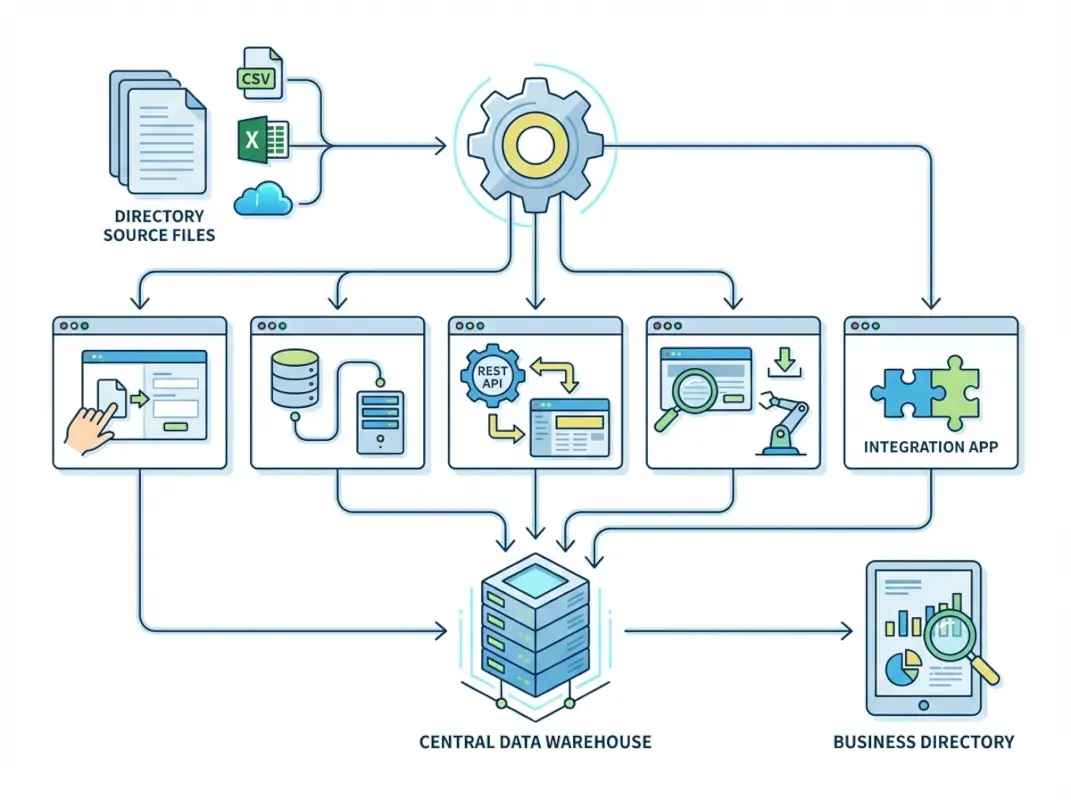
API-driven imports represent the gold standard for directory management because they enable real-time updates, sophisticated error handling, and seamless integration with other business systems. Unlike batch CSV imports, APIs support upsert operations—meaning you can update existing records or create new ones in a single operation. This capability becomes crucial when managing directories that require frequent updates or real-time synchronization.
Why API-Driven Imports Scale Better
APIs excel in environments where data freshness matters. Instead of replacing entire datasets, you can push incremental changes as they occur. This approach reduces server load, minimizes downtime, and ensures your directory stays current without manual intervention. Modern directory APIs also provide detailed response codes for each record, allowing you to handle errors gracefully and retry failed operations automatically.
The real advantage becomes apparent when you’re managing multiple data sources. APIs can consolidate information from various systems—CRM platforms, marketing databases, external feeds—into a unified directory without manual file manipulation.
Step-by-Step Workflow
Step 1: Schema Definition and Primary Keys
Define your destination schema and establish primary keys for deduplication. Most directory APIs use composite keys combining business name, address, and phone number to identify unique records. Document your field mappings carefully, including required fields, optional parameters, and data type constraints.
Step 2: Payload Preparation
Structure your JSON or XML payloads according to the API documentation. JSON is typically preferred for its simplicity and smaller payload size. Include all required fields and consider optional fields that enhance directory value like business hours, social media links, or geographic coordinates.
Step 3: Batch Processing and Error Handling
Implement batch processing with appropriate sizing—typically 50-200 records per API call depending on payload complexity. Build retry logic for failed requests and maintain detailed logs of all API responses. Many platforms provide bulk endpoints that accept arrays of records, significantly improving import speed.
Step 4: Validation and Monitoring
Monitor API responses for rate limiting, authentication issues, or validation errors. Successful API imports should provide response codes and unique identifiers for each processed record, allowing you to track import status and handle partial failures.
Data Quality and Encoding Considerations
API endpoints typically enforce strict data validation rules, which actually improves your final data quality. However, this means your source data must be cleaner before submission. Implement client-side validation to catch formatting errors, missing required fields, or invalid data types before making API calls.
UTF-8 encoding is standard for JSON payloads, but be mindful of special characters in business names or descriptions. Some APIs require HTML encoding for certain fields, while others accept raw text. Always consult the API documentation for specific encoding requirements.
Example Tooling and Platforms
Popular directory management platforms like business directory services often provide RESTful APIs with OpenAPI specifications. These self-documenting APIs include example requests, response formats, and interactive testing interfaces that simplify integration development.
For developers, tools like Postman or Insomnia help prototype API calls before building automated import scripts. Many platforms also provide SDKs in popular programming languages, reducing development time significantly.
Method 3 — Import via WordPress or CMS Directory Plugins (CSV/JSON Import)
WordPress directory plugins have evolved into sophisticated import systems that rival dedicated directory software. They combine the simplicity of CSV imports with the flexibility of custom field mapping, making them perfect for small to medium-sized directories that need professional features without enterprise complexity. The plugin ecosystem provides tested solutions for common import challenges while maintaining the familiar WordPress interface.

Why CMS-Based Directories Are Popular for Small to Mid-Size Catalogs
WordPress plugins eliminate the technical barrier that prevents many businesses from creating comprehensive directories. Instead of learning API programming or database management, you can leverage pre-built import tools with intuitive interfaces. These plugins handle the heavy lifting—database schema creation, field validation, duplicate detection—while giving you complete control over the import process.
The WordPress ecosystem also provides extensive customization options. You can combine directory plugins with SEO tools, payment processors, and design frameworks to create fully-featured directory websites. This integrated approach often costs less than dedicated directory software while providing more customization flexibility.
| Feature | WordPress Plugin | Dedicated Software |
|---|---|---|
| Setup Time | 1-2 hours | 1-2 weeks |
| Import Complexity | Visual mapping | Technical configuration |
| Customization | High (thousands of themes/plugins) | Limited to vendor options |
| Cost | $50-200/year | $500-5000/year |
Step-by-Step Workflow
Step 1: Plugin Selection and Installation
Choose a directory plugin with robust import capabilities. Popular options include Business Directory Plugin, GeoDirectory, and Connections Business Directory. Look for plugins that support CSV import, field mapping, and custom field creation. Install and configure the plugin according to your directory requirements.
Step 2: Template Preparation and Field Mapping
Most plugins provide CSV templates with predefined headers. Download the template and map your source data to the required fields. Pay special attention to required fields—typically business name, description, and contact information. The plugin’s import interface usually shows field mappings visually, making it easy to match your CSV headers to directory fields.
Step 3: Test Import and Validation
Upload a test CSV file with 10-20 records to validate your field mappings and identify any formatting issues. Check how the plugin handles empty fields, special characters, and multiple categories. This test run helps you refine your data before importing thousands of records.
Step 4: Full Import and Review
Execute your full import in batches if your plugin supports it. Monitor the import progress and review the results immediately. Most plugins provide import logs showing successful records and any errors encountered. Review a sample of imported listings to ensure formatting and categorization appear correctly.
Best Practices for Header Mapping and Field Matching
Successful WordPress directory imports depend on precise header matching. Plugin developers often use specific naming conventions for CSV headers—business_name instead of name, or business_phone instead of phone. Always use the exact header names provided in the plugin’s template to avoid mapping errors.
Custom fields require special attention. If your directory includes specialized fields like business hours, certifications, or service areas, ensure your plugin supports custom field imports. Some plugins require custom fields to be created before import, while others create them automatically during the import process.
Practical Considerations
WordPress hosting environments often impose memory limits and execution timeouts that affect large imports. If you’re importing more than 1,000 records, consider breaking your CSV into smaller files or using plugins that support background processing. Some managed WordPress hosts provide specific accommodations for large data imports—contact your hosting provider if you encounter limitations.
Plugin compatibility matters significantly. Ensure your chosen directory plugin works with your theme and other essential plugins. Test the complete functionality—import, display, search, filtering—before committing to a specific solution.
Method 4 — Import via Directory SaaS Platforms (Direct Bulk Import)
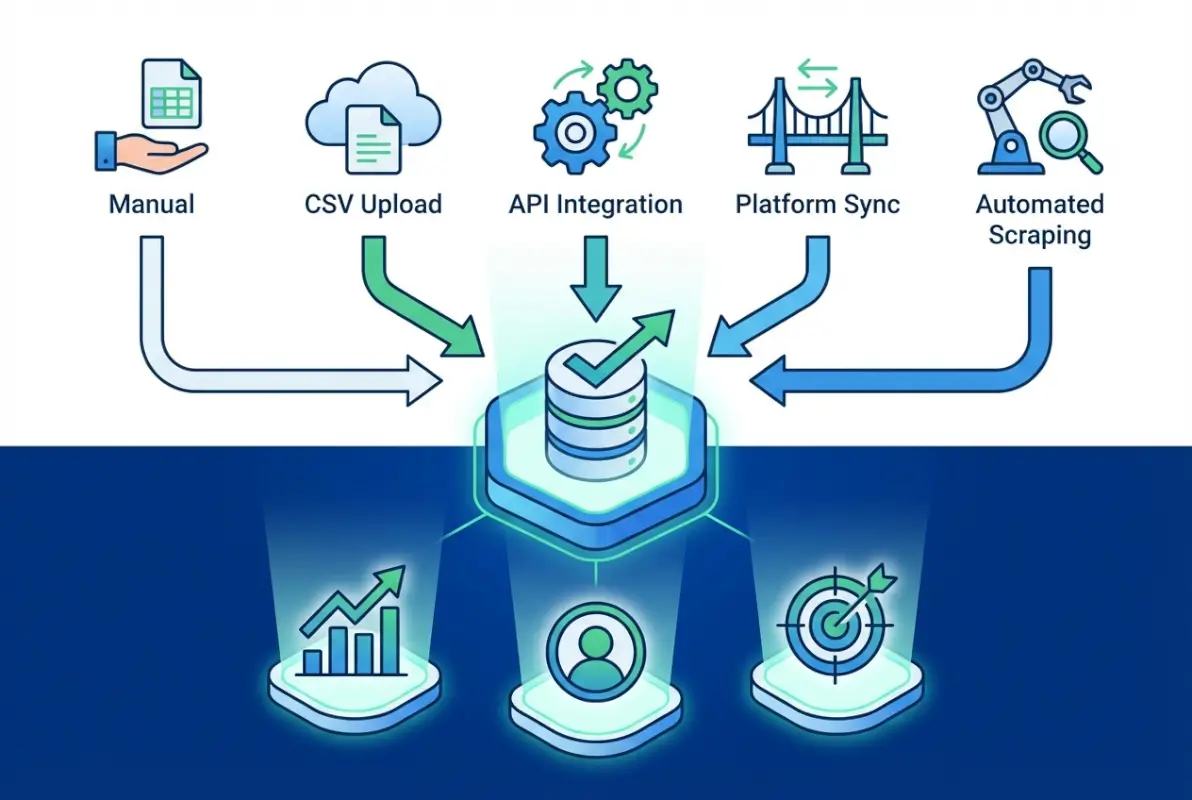
Directory SaaS platforms have revolutionized how businesses approach directory creation by providing turnkey solutions that eliminate technical complexity while offering enterprise-grade features. These platforms excel at bulk imports because they’re purpose-built for directory management, offering optimized import workflows, automatic data validation, and built-in deduplication systems. For businesses that want professional directory functionality without the overhead of custom development, SaaS solutions provide the ideal balance of power and simplicity.
Why Use a SaaS Directory Service
SaaS directory platforms remove the guesswork from directory management by providing tested, optimized import systems designed specifically for business listings. Unlike general-purpose content management systems, these platforms understand the unique challenges of directory data—duplicate detection, location normalization, category management, and search optimization. They’ve already solved the technical problems you’d encounter building a custom solution.
The maintenance advantage is equally compelling. SaaS platforms handle software updates, security patches, performance optimization, and backup management automatically. This allows you to focus on content quality and user experience rather than technical infrastructure, something that becomes increasingly valuable as your directory grows.
Step-by-Step Workflow
Step 1: Platform Selection and Setup
Research directory SaaS platforms based on your specific requirements—industry focus, geographic scope, feature requirements, and pricing structure. Popular platforms include specialized solutions for local business directories, professional service listings, and industry-specific catalogs. Most platforms offer free trials that include import testing capabilities.
Step 2: Data Preparation and Template Compliance
Download the platform’s import template and carefully map your source data to required fields. SaaS platforms typically have more sophisticated field requirements than simple directory plugins—including structured address formats, standardized phone numbers, and predefined category selections. Invest time in data cleaning to maximize import success rates.
Step 3: Bulk Import Execution
Use the platform’s bulk import tool, which typically includes automatic field mapping, duplicate detection, and error reporting. Most platforms process imports in background queues, allowing you to upload large datasets without timeout concerns. Monitor the import status and review any validation errors or warnings.
Step 4: Quality Assurance and Publication
Review imported listings for accuracy, completeness, and proper categorization. SaaS platforms often provide preview modes that let you see how listings will appear to end users before making them public. Use this opportunity to refine descriptions, verify contact information, and ensure proper search categorization.
Practical Tips
Start with smaller import batches (500-1000 records) to understand the platform’s validation rules and error handling. Each SaaS platform has unique requirements for data formatting, and testing with smaller batches helps you refine your import process before processing your complete dataset.
Document your field mapping decisions for future imports. As your directory grows, you’ll likely need to import additional data from various sources, and maintaining consistent field mapping ensures data integrity across imports.
Pay attention to the platform’s category taxonomy. Most SaaS directories use standardized category systems that may not match your original data categorization. Plan category mapping carefully, as this affects how users find listings through search and browsing.
Method 5 — Import via Public Data Portals / Government APIs (Open Data)
Government open data portals represent an untapped goldmine for directory builders because they provide authoritative, regularly updated business information that’s freely available for public use. These data sources have been validated by government agencies and often include details that are difficult to obtain elsewhere—licensing information, registration dates, compliance status, and official business classifications. Integrating government data elevates your directory’s credibility while providing a solid foundation for comprehensive business listings.

Why Government Open Data Portals Matter for Directories
Government data portals maintain business information as part of their regulatory and economic development functions, making this data inherently accurate and up-to-date. Unlike crowdsourced or scraped data, government datasets undergo verification processes and regular audits. This creates a trustworthy foundation for directories that need authoritative information.
The standardization aspect is equally valuable. Government agencies use consistent data formats, standardized address formats, and official business classification codes. This consistency simplifies import processes and reduces data cleaning requirements. When you build a directory on government data foundations, you inherit professional data standards that would be expensive to implement independently.
Step-by-Step Workflow
Step 1: Data Source Discovery and Evaluation
Identify relevant government datasets using portals like Data.gov, state economic development databases, or local business licensing systems. Focus on datasets that include essential directory information—business names, addresses, contact details, and industry classifications. Evaluate update frequencies and data completeness before committing to specific sources.
Step 2: API Integration or Data Download
Most government portals offer both API access and bulk download options. APIs provide real-time data access with query capabilities, while bulk downloads give you complete datasets for offline processing. Choose the method that matches your update requirements and technical capabilities. Government APIs typically use JSON format with well-documented endpoints.
Step 3: Data Normalization and Schema Mapping
Government datasets often include more fields than typical business directories—permit numbers, classification codes, compliance dates. Map relevant fields to your directory schema while preserving valuable government-specific information that adds credibility. Normalize address formats and business names to match your directory’s display standards.
Step 4: Integration and Ongoing Updates
Implement the import process with consideration for ongoing updates. Government data changes as businesses register, update licenses, or change status. Design your import workflow to handle incremental updates rather than complete replacements, preserving any enhanced information you’ve added to basic government records.
Compliance and Licensing
Government open data typically carries public domain or equivalent licensing that permits commercial use without restrictions. However, verify licensing terms for each dataset and maintain proper attribution when required. Some datasets may have specific use restrictions or update requirements that affect how you can integrate the data.
Document your data sources and update procedures for transparency. Users appreciate knowing that your directory includes verified government data, and this transparency can become a competitive advantage over directories using less reliable sources.
Example Datasets and Portals
The Small Business Administration provides business service provider APIs that include verified business information across multiple industries. Census Bureau APIs offer economic data that can enhance business listings with market context and industry statistics. State and local government portals often provide the most detailed information for specific geographic regions.
Consider combining multiple government sources for comprehensive coverage. Federal databases provide broad coverage with standardized classification, while state and local sources add detail and regional context. This layered approach creates directories with both breadth and depth of information.
When implementing SEO strategies for your directory, government data provides additional credibility signals that search engines value, helping your listings achieve better visibility.
Data Quality, Deduplication, and Master View (Cross-Method Considerations)
Regardless of which import method you choose, data quality management determines the success of your directory project. Poor data quality creates user frustration, damages search rankings, and undermines the credibility you’ve worked to build. Effective data quality management requires systematic approaches to deduplication, standardization, and ongoing maintenance that work consistently across all import methods.
Deduplication Strategies
Successful deduplication starts with establishing clear primary key strategies before your first import. The most effective approach uses composite keys combining business name, address, and phone number to identify unique records. However, business information changes frequently—companies relocate, change phone numbers, or rebrand—so your deduplication logic must handle variations intelligently.
Implement fuzzy matching algorithms that can identify likely duplicates even when data doesn’t match exactly. Common variations include abbreviated street names (St vs Street), different phone number formatting, or slight spelling differences in business names. Modern deduplication tools can identify these patterns and flag potential matches for manual review.
Consider the business lifecycle when designing deduplication rules. A restaurant that closes and reopens under new management at the same address represents a legitimate new business, not a duplicate. Conversely, a business that updates its phone number or website should update existing records rather than creating new entries.
Data Normalization and Field Mapping
Consistent data normalization creates a professional user experience and improves search functionality. Establish formatting standards for addresses, phone numbers, business hours, and category assignments before importing data from multiple sources. This upfront standardization prevents the accumulation of formatting inconsistencies that become difficult to correct later.
Address standardization deserves special attention because location data drives many directory use cases. Implement USPS address validation or similar services to ensure addresses follow postal standards. Consistent address formatting also improves integration with mapping services and location-based search features.
Category management becomes complex when importing from multiple sources with different classification systems. Create a master category taxonomy and map all imported data to this standard. This approach ensures consistent browsing experiences and accurate search results regardless of data source.
| Data Element | Standardization Rule | Example |
|---|---|---|
| Phone Numbers | (XXX) XXX-XXXX format | (555) 123-4567 |
| Addresses | USPS standard abbreviations | 123 Main St, Suite 4A |
| Business Hours | 24-hour format with day ranges | Mon-Fri: 09:00-17:00 |
| Website URLs | Include https:// protocol | https://example.com |
Scheduling and Automation
Directory data becomes stale quickly as businesses change information, close, or relocate. Implement automated update schedules that balance data freshness with system performance. High-volatility data sources like social media feeds might require daily updates, while government registration databases might only need monthly refreshes.
Design your automation systems to handle partial failures gracefully. Network issues, API rate limits, or source system maintenance can interrupt automated imports. Implement retry logic, queue management, and error notification systems that ensure imports complete successfully without manual intervention.
Consider user-generated updates in your automation strategy. Allow business owners to claim and update their listings, but implement approval workflows that prevent spam or malicious changes. This hybrid approach combines automated imports with crowd-sourced accuracy improvements.
Validation and Error Handling
Implement multi-level validation that catches errors at import time rather than after they affect user experience. Basic validation includes required field checking, format validation (email addresses, phone numbers), and data type verification. Advanced validation might include business address verification, phone number format checking, or website availability testing.
Create detailed error logging that helps diagnose import problems quickly. Log files should include record identifiers, error descriptions, and enough context to manually correct problems. This documentation becomes invaluable when troubleshooting import failures or data quality issues.
Validation, Testing, and Rollout (Before Going Live)
A systematic testing approach prevents costly mistakes and ensures your directory launch meets user expectations. Professional directory projects follow structured testing phases that validate both technical functionality and user experience before public release. This investment in pre-launch testing typically saves weeks of post-launch fixes and protects your directory’s reputation from day one.
Sandbox/Testing Strategy
Create a complete testing environment that mirrors your production setup but operates with sample data. This sandbox should include the same import tools, search functionality, and user interface as your live directory. Use representative test data that includes edge cases—businesses with unusual names, complex addresses, multiple locations, or specialized service offerings.
Test each import method you plan to use with progressively larger datasets. Start with 10-20 records to validate basic functionality, then scale to 100-500 records to test performance and error handling. This graduated testing approach identifies bottlenecks and limitations before they affect your complete dataset.
Document test scenarios that cover typical user workflows—searching by category, filtering by location, viewing business details, and submitting inquiries. Automated testing tools can validate technical functionality, but manual testing ensures the user experience meets expectations.
Change Management
Maintain version control for your import templates, field mappings, and configuration settings. As your directory evolves, you’ll modify schemas, add new data sources, or change validation rules. Version control ensures you can track changes, rollback problematic updates, and maintain consistency across development and production environments.
Create documentation that explains your import procedures, data sources, and quality standards. This documentation becomes crucial when team members change or when you need to troubleshoot complex import issues months after implementation. Include examples of successful imports and common error resolution steps.
Rollout Plan
Plan your launch in phases rather than attempting to go live with complete functionality immediately. Phase 1 might include basic business listings with search and categorization. Phase 2 could add enhanced features like user reviews, business claiming, or advanced filtering. This phased approach allows you to validate core functionality before adding complexity.
Prepare rollback procedures that can quickly restore previous versions if serious issues emerge after launch. This includes database backups, configuration snapshots, and clear procedures for switching between versions. Having confidence in your rollback capability makes launch decisions less stressful and reduces the impact of unexpected problems.
Monitor key metrics immediately after launch—search performance, user engagement, error rates, and mobile compatibility. Early detection of issues allows for quick corrections before they affect user adoption or search engine rankings.
Practical Workflows—Sample End-to-End Scenarios
Real-world directory projects rarely use single import methods in isolation. Instead, successful directories combine multiple approaches strategically, using each method’s strengths to address specific requirements. These hybrid workflows create resilient systems that handle both initial data loading and ongoing maintenance efficiently.
Scenario A — Weekly CSV Import with Deduplication
This workflow suits directories that receive regular data feeds from partners, industry associations, or government sources. The weekly schedule balances data freshness with system stability, while automated deduplication prevents duplicate accumulation over time.
Implementation Steps:
- Establish a secure FTP or cloud storage location for receiving weekly data files
- Implement automated validation that checks file format, required fields, and basic data quality
- Run deduplication algorithms against existing directory data using composite matching keys
- Process approved records through your chosen import method (CSV upload or API conversion)
- Generate import reports showing new records, updates, duplicates rejected, and errors encountered
- Maintain audit logs for compliance and troubleshooting purposes
Technical Considerations:
Weekly imports require robust error handling because you can’t manually review every batch. Implement automated quality scoring that flags records with potential issues—incomplete addresses, invalid phone numbers, or suspicious business names. High-quality records process automatically while questionable records queue for manual review.
Scenario B — Real-time Updates via API (Upsert)
API-driven real-time updates work best for directories that integrate with business management systems, POS platforms, or customer databases. This approach ensures directory information stays synchronized with source systems without manual intervention.
Implementation Steps:
- Design API endpoints that accept business data updates in JSON format
- Implement authentication and rate limiting to prevent abuse while allowing legitimate updates
- Create upsert logic that updates existing records or creates new ones based on primary key matching
- Build validation rules that automatically approve minor updates but flag major changes for review
- Implement webhook notifications that confirm successful updates to source systems
- Monitor API performance and error rates to ensure system reliability
Business Benefits:
Real-time updates significantly improve user experience because directory information stays current automatically. Business owners appreciate having their changes reflected immediately, which increases engagement and reduces support requests about outdated information.
For directories focusing on real estate or featured listings, real-time updates become crucial for maintaining competitive advantage and user trust.
Scenario C — Hybrid Approach: Initial CSV Load + API-Based Incremental Updates
The hybrid approach provides the best balance of simplicity and functionality for most directory projects. Use CSV imports for initial data loading and historical records, then switch to API-based updates for ongoing maintenance.
Phase 1 – Initial CSV Import:
- Clean and standardize historical business data using spreadsheet tools or data processing scripts
- Import complete dataset using your chosen CSV method to establish directory baseline
- Perform comprehensive quality assurance to ensure accurate categorization and formatting
- Optimize search indexes and test user-facing functionality with complete dataset
Phase 2 – API Integration:
- Develop API endpoints for receiving incremental updates from primary data sources
- Implement business owner self-service portals that use APIs for direct updates
- Create monitoring dashboards that track import success rates and data quality metrics
- Establish backup procedures that can restore CSV-based imports if API systems fail
Long-term Maintenance:
This hybrid approach scales effectively as your directory grows. The CSV foundation provides stability and easy backup/restore capabilities, while API updates ensure information stays current. You can add new data sources through either method depending on their capabilities and update requirements.
Frequently Asked Questions
How do I import a large business directory quickly without errors?
Use staged CSV imports with batches of 1,000-5,000 records, validate data format before importing, and implement per-record error logging. Test with small batches first to identify formatting issues, then scale up gradually while monitoring system performance and memory usage.
What file formats are best for importing directory data (CSV, JSON, XML)?
CSV works best for batch imports and human review, JSON excels for API-based updates and automated processing, while XML suits legacy system integrations. Choose CSV for initial imports and JSON for ongoing updates—most platforms support both formats effectively.
How can I prevent duplicate listings during import?
Implement composite primary keys using business name, address, and phone number combinations. Use fuzzy matching algorithms to catch variations in spelling or formatting, and enable upsert functionality in API imports to update existing records rather than creating duplicates.
How do I map fields from my source data to my directory schema?
Create a mapping table that connects source column headers to destination fields, standardize data formats before import, and validate required fields are populated. Most import tools provide visual mapping interfaces that simplify this process significantly.
Can I automate regular imports, and how often should I run them?
Yes, automated imports work well for API-based systems and scheduled file processing. Update frequency depends on data volatility—daily for social media or review data, weekly for business information, monthly for government datasets. Monitor system performance to find optimal schedules.
What encoding and line-ending standards should I use for CSV imports?
Use UTF-8 encoding to handle special characters properly, standard comma delimiters, and Unix-style line endings (LF) for maximum compatibility. Always test with a small batch first to verify your target system handles your file format correctly.
Do government open data sources provide APIs or downloadable CSVs for directories?
Most government portals offer both API access and bulk downloads in CSV format. SBA Open Data, Census Business APIs, and state business licensing databases provide structured data suitable for directory imports. Check data.gov for comprehensive source listings.
What are upsert vs. replace semantics, and when should I use each?
Upsert updates existing records or creates new ones based on primary keys, preserving enhanced data like reviews or additional fields. Replace overwrites entire records with new data. Use upsert for incremental updates, replace for complete data refreshes.
How should I handle custom fields in a directory when importing?
Map custom fields to additional columns in CSV imports or separate JSON objects in API calls. Ensure your directory platform supports custom field creation before import, and document field purposes for future maintenance and updates.
How do I test an import before going live?
Create a staging environment with representative test data, validate imports with small record batches, test all user-facing functionality, and document rollback procedures. Include edge cases like special characters, multiple locations, and complex business descriptions in your testing.
By following these proven import methods and best practices, you’ll create a robust business directory that serves users effectively while maintaining high data quality standards. Remember that successful directories evolve over time—start with the method that matches your current needs, then expand capabilities as your requirements grow. The key to long-term success lies in choosing sustainable approaches that can adapt to changing business requirements while maintaining the data quality that users expect.
Whether you’re building a local business directory or managing a specialized industry catalog, these five methods provide the foundation for reliable, professional directory management. Focus on data quality from day one, implement proper testing procedures, and don’t hesitate to combine multiple approaches when they serve your users better. When you’re ready to optimize your directory’s search visibility, consider implementing proven SEO strategies that help your listings achieve better search rankings and increased user engagement.