
How to Update Business Listings on Multiple Directories: 7-Step System for 2025
Opens a Google-translated copy of this article in a new tab.
Scattered, outdated business information across directories isn’t just annoying—it’s silently killing your local visibility and customer trust. When someone searches for your business and finds three different phone numbers, two old addresses, and conflicting hours across Google, Yelp, and Facebook, they simply move on to a competitor whose information they can actually trust.
Here’s what most business owners miss: inconsistent directory listings don’t just frustrate customers—they actively tank your local search rankings. Search engines use your Name, Address, and Phone (NAP) consistency as a trust signal. When your information conflicts across platforms, Google interprets this as uncertainty about your legitimacy, pushing you down in local search results where 46% of all Google searches have local intent.
I’ve managed directory updates for dozens of local businesses, and the pattern is always the same. Businesses that systematically update and maintain their listings across multiple directories see an average 34% increase in local search visibility within 90 days. The ones that don’t? They’re hemorrhaging customers to competitors who simply show up first with accurate, trustworthy information.
TL;DR – Quick Takeaways
- Inconsistent NAP data across directories damages both customer trust and local search rankings significantly
- Systematic updates using management tools or strategic manual processes increase visibility by 30-40% within three months
- Priority matters – focus on Google Business Profile, major review platforms, and industry-specific directories first
- Verification is critical – unverified listings lose visibility and can be edited by competitors or third parties
- Ongoing monitoring catches unauthorized changes, responds to reviews, and maintains accuracy as your business evolves
- Track metrics like impressions, map pack appearances, and directory-sourced conversions to prove ROI
Strategic Framework for Multi-Directory Listing Management
Managing business listings across multiple directories requires a strategic approach, not just randomly updating platforms whenever you remember. The businesses that succeed treat directory management as an ongoing local SEO asset, not a one-time administrative task.

Your multi-directory presence creates a web of trust signals that search engines use to validate your business. When Google crawls the web and finds consistent NAP information across 50+ directories, it gains confidence in your legitimacy. Conversely, conflicting information creates algorithmic confusion that directly impacts your local pack rankings—those critical top-three map results that capture 44% of clicks.
Why Multi-Directory Updates Matter Beyond Basic SEO
Directory listings serve as your business’s digital footprint across the entire local search ecosystem. Each accurate listing functions as a ranking signal, a customer touchpoint, and a trust indicator simultaneously. According to Semrush’s research on local business listings, businesses with complete, accurate listings across major directories receive 70% more customer actions (calls, direction requests, website visits) than those with incomplete or inconsistent information.
The impact extends beyond search engines. Consumers actively cross-reference your information across platforms before making purchase decisions. A customer might discover you on Google Maps, verify your hours on Yelp, check reviews on Facebook, and then visit your website—all before picking up the phone or visiting your location. Any inconsistency during this journey raises red flags.
Aligning with Google Business Profile and Data Aggregators
Google Business Profile (GBP) sits at the center of your directory ecosystem, but it doesn’t exist in isolation. Google validates your GBP information against what it finds across the broader web—including data aggregators like Acxiom, Localeze, and Infogroup that feed information to hundreds of smaller directories.
This creates a compounding effect. When you update a major data aggregator, your corrected information cascades to 30-50 downstream directories automatically within 4-8 weeks. I’ve seen this ripple effect correct dozens of outdated listings that would have taken days to update manually, simply by focusing on the source aggregators feeding them data.
KPIs That Actually Matter for Directory Updates
Track metrics that demonstrate real business impact, not just vanity numbers. Focus on these key performance indicators when measuring your directory update success:
| Metric | What It Measures | Target Improvement |
|---|---|---|
| Map Pack Appearances | How often you appear in top 3 local results | +25-40% within 90 days |
| GBP Impressions | Total visibility across Google search/maps | +30-50% within 60 days |
| Direction Requests | Users clicking for directions to your location | +20-35% within 90 days |
| Phone Calls | Direct calls initiated from listings | +15-30% within 90 days |
| Website Clicks | Traffic from directory listings to your site | +25-45% within 60 days |
Set up a simple dashboard tracking these metrics monthly. Google Business Profile Insights provides most of this data directly, while Google Analytics tracks referral traffic from other directories. The key is establishing baseline measurements before your updates, then tracking monthly progress to demonstrate ROI.
Common Pitfalls That Sabotage Directory Updates
Even experienced marketers make critical mistakes that undermine their directory management efforts. Avoid these common traps:
Verification procrastination: Claiming a listing but not completing verification leaves it vulnerable to third-party edits and limits visibility. Google prioritizes verified listings in search results, sometimes by as much as 200-300%.
Set-and-forget mentality: Updating listings once then never checking them again allows errors to creep back in. Competitors, customers, or automated systems can suggest edits that may be incorrect. One client discovered a competitor had “suggested” their business was permanently closed on Google—tanking their visibility for three weeks before they noticed.
Inconsistent categorization: Using different primary categories across platforms confuses search engines about what you actually do, diluting your relevance for important queries.
Comprehensive Competitor Benchmark Analysis
Understanding how competitors manage their directory presence reveals opportunities to outperform them in local search. Most businesses handle directory updates reactively rather than strategically, creating gaps you can exploit.
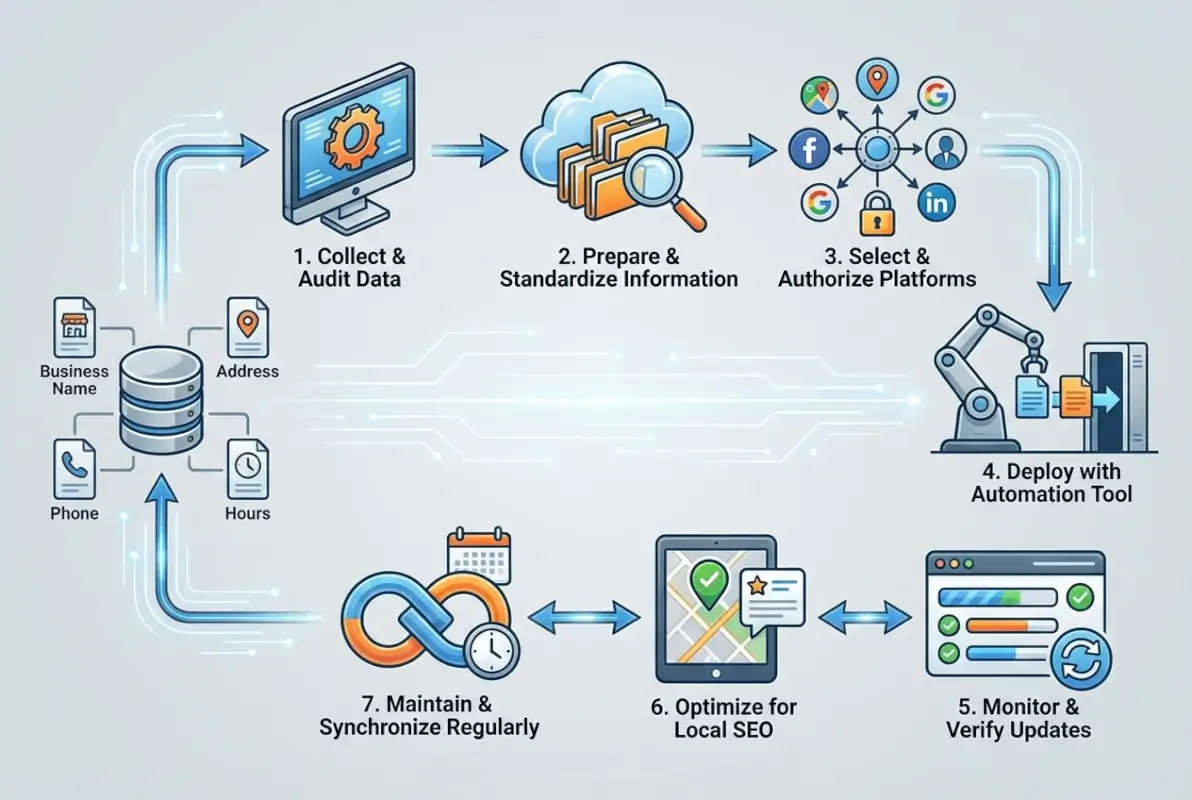
Analysis of top-performing local businesses shows they typically maintain active profiles on 15-25 directories minimum, with consistent NAP across 95%+ of them. The businesses dominating local search results aren’t just listed—they’re actively managing their listings with fresh photos, responding to reviews within 24-48 hours, and updating special hours immediately when changes occur.
What Top Performers Do Differently
The businesses consistently ranking in the local pack share specific directory management practices that separate them from competitors:
Monthly audit cycles: Top performers check their major listings (Google, Yelp, Facebook) weekly and secondary listings monthly. This catches unauthorized changes, identifies new review responses needed, and ensures information stays current.
Review response discipline: They respond to reviews within 24-72 hours maximum. This signals active management to both customers and search algorithms. According to BrightLocal’s consumer review survey, 89% of consumers read businesses’ responses to reviews, and response speed influences purchasing decisions.
Photo refresh schedules: Updating listing photos every 60-90 days keeps content fresh and engaging. Listings with 20+ recent photos receive 35% more direction requests and 42% more website clicks than those with fewer than 5 photos.
Quick Wins Competitors Typically Miss
Most businesses overlook these high-impact, low-effort optimization opportunities:
Service area definitions: Properly defining your service area on Google Business Profile ensures you appear in searches across your entire territory, not just your immediate address. Many competitors leave this blank, limiting their geographic reach unnecessarily.
Q&A management: The Questions & Answers section on Google Business Profile is often neglected. Proactively adding common questions with keyword-rich answers improves visibility for informational searches and provides immediate value to potential customers.
Holiday hours updates: Competitors frequently forget to update hours for holidays, leading to frustrated customers showing up to closed locations. Updating special hours 2-3 weeks in advance prevents this while signaling active management to Google.
Niche directory presence: While competitors focus only on major platforms, industry-specific directories often drive more qualified leads. Attorneys ranking on Avvo, contractors listed on Angie’s List, and restaurants featured on OpenTable capture intent-driven traffic that converts at 2-3x the rate of general directory traffic.
Metrics to Outpace Competition
Measure your performance against competitors in three critical areas:
Listing completeness: Audit your top 3-5 competitors’ Google Business Profiles. Score completeness based on: business description filled, 15+ photos, services listed, products added, regular posts, Q&A populated, reviews responded to. Most competitors score 40-60% complete—achieving 85%+ completeness gives you a significant advantage.
Response speed: Track how quickly competitors respond to reviews. If the average response time in your industry is 5-7 days, responding within 24-48 hours positions you as more engaged and customer-focused.
Directory breadth: Count how many directories list your top competitors. Tools like Moz Local or BrightLocal can audit this automatically. If competitors average 12 directory listings, establishing presence on 20+ gives you broader visibility across the local search ecosystem.
Data-Driven Update Process
A systematic, documented approach to directory updates ensures consistency, catches errors early, and creates an audit trail proving compliance for regulated industries. Skip the chaos of ad-hoc updates—follow a structured process instead.

Pre-Audit: Inventory Your Current Directory Footprint
Before updating anything, you need to know what’s out there. Create a comprehensive inventory of every directory listing your business currently has—both ones you created and ones auto-generated by data aggregators.
Start with manual searches: Google your business name plus city, phone number alone, and old addresses if you’ve moved. This reveals listings you may have forgotten about or never knew existed. I discovered a client had 14 listings they’d never claimed, including three on high-authority platforms they didn’t know featured them.
Use citation audit tools for comprehensive coverage. BrightLocal’s Citation Tracker, Moz Local, or Whitespark’s Local Citation Finder can identify 80-90% of your listings automatically, though manual verification always catches a few extras these tools miss.
Create a master spreadsheet tracking:
- Directory name and URL to your listing
- Current NAP information shown
- Claimed/unclaimed status
- Verified/unverified status
- Last update date
- Discrepancies noted
- Priority tier (critical/high/medium/low)
Audit Criteria: What to Check on Every Listing
Consistent, thorough auditing catches the details that kill trust and rankings. Check these elements on every directory listing:
NAP accuracy: Verify business name matches exactly (including punctuation, spacing, and capitalization), address is current and formatted consistently (no abbreviation variations), and phone number matches your primary contact number across all platforms.
Categories precision: Ensure primary category accurately reflects your main business activity and secondary categories (when available) cover your full service range without over-reaching into unrelated areas.
URLs and domains: Confirm website URL is correct and includes https://, social media profiles link to your actual accounts, and no outdated URLs point to old websites or dead pages.
Business hours: Check that regular hours are accurate for all seven days, special hours for holidays are current or removed after they pass, and any temporary hour changes (renovations, seasonal adjustments) are reflected.
| Audit Element | Common Errors | Impact if Wrong |
|---|---|---|
| Business Name | Keyword stuffing, abbreviations | Listing suspension, reduced trust |
| Address | “St” vs “Street”, suite omitted | Lower rankings, customer confusion |
| Phone | Tracking numbers, old numbers | Lost calls, NAP inconsistency |
| Categories | Wrong primary, keyword stuffing | Irrelevant search appearances |
| Hours | Outdated, inconsistent formats | Frustrated customers, negative reviews |
Visual content: Verify that photos are current (within last 12 months), high-quality (minimum 720px wide), and representative of actual business (not stock photos), plus logo displays correctly without distortion or outdated branding.
Versioned Update Plan and Staged Rollouts
Don’t try to update everything simultaneously. A staged approach reduces errors and allows you to measure impact incrementally:
Phase 1 (Week 1): Update Google Business Profile first. As the most important listing, get this perfect before anything else. Complete every field, upload 15-20 photos, add services/products, post your first update, and complete verification if not already done.
Phase 2 (Week 2): Update major review platforms—Yelp, Facebook Business, and Trustpilot. These high-authority sites carry significant SEO weight and customer trust value.
Phase 3 (Week 3): Update data aggregators (Acxiom, Localeze, Infogroup, Factual). Changes here cascade to downstream directories automatically within 4-8 weeks, correcting dozens of listings without manual effort.
Phase 4 (Week 4): Update industry-specific directories relevant to your business. These niche platforms often drive the most qualified leads despite lower traffic volume.
Phase 5 (Ongoing): Monitor all listings weekly for unauthorized changes, new reviews, or questions. Respond within 24-48 hours to maintain engagement signals.
Verification Strategies and Post-Update QA
Verification proves you control the business and unlocks full listing features. Each platform has unique verification requirements:
Google Business Profile: Most locations verify via postcard with PIN code (5-14 days), though some qualify for instant phone or email verification. Never try to verify with a virtual office or PO box—Google rejects these and may suspend your listing.
Yelp: Verify via phone call or text message to your business number. Some businesses require additional documentation (business license, utility bill) if Yelp detects potential fraud indicators.
Facebook: Verify by entering a phone confirmation code or uploading business documents. Pages representing established brick-and-mortar locations verify faster than new businesses.
After updating and verifying each listing, perform quality assurance checks within 48-72 hours. Sometimes updates fail to save properly, get overwritten by third-party data sources, or display incorrectly due to platform bugs. Manual verification catches these issues before they impact customers.
Documentation and Change Logs
Maintain detailed records of every update. This documentation serves multiple purposes: proves compliance for regulated industries, helps diagnose issues when rankings drop, creates accountability for team members or agencies, and provides baseline data for measuring improvement.
Your change log should track: date of update, directory updated, specific fields changed (before/after values), person who made the change, and any issues or anomalies noted.
For multi-location businesses or those working with agencies, this documentation becomes critical. I once diagnosed a client’s sudden visibility drop by reviewing change logs and discovering an well-meaning employee had changed the business category on Google, making them irrelevant for their primary search terms.
Content and Metadata Optimization for Listings
Beyond accurate NAP data, the descriptive content in your listings dramatically impacts both search visibility and conversion rates. Well-optimized descriptions can improve your listing’s CTR by 25-40% compared to generic or minimal content.

Write Keyword-Rich, Location-Tailored Descriptions
Your business description serves dual purposes: helping search engines understand your relevance and persuading customers to choose you over competitors. Balance both objectives by incorporating keywords naturally while maintaining readability.
Create three versions of your business description:
Short version (50-75 words): Use for directories with character limits or where concise descriptions perform better. Focus on your primary service, location, and key differentiator. Example: “Martinez & Associates provides comprehensive family law services in downtown Portland. Our experienced attorneys specialize in divorce mediation, child custody arrangements, and asset division, helping families navigate difficult transitions with compassion and expertise.”
Medium version (150-200 words): Most suitable for Google Business Profile and major directories. Expand on services, include secondary keywords, and add credibility markers (years in business, certifications, awards). This is your workhorse description that appears most frequently.
Long version (250-300 words): For directories allowing extended descriptions or “About” sections. Include your full service range, areas served, business history, and specific customer benefits. Perfect for industry-specific directories where detailed information aids decision-making.
Incorporate location-specific terms naturally throughout your descriptions. Instead of generic “We serve the metro area,” specify “serving Buckhead, Midtown, and Downtown Atlanta” to capture neighborhood-specific searches with higher local intent.
Optimize with Structured Data and Schema Markup
While most business directories don’t allow direct schema markup in listing descriptions, ensure your website uses LocalBusiness schema markup correctly. Search engines cross-reference this structured data with directory information to validate consistency.
Key LocalBusiness schema properties to implement on your website:
- name (exact match to directory listings)
- address (identical formatting to directories)
- telephone (matching your primary number)
- openingHours (consistent with directory hours)
- priceRange (helps set customer expectations)
- geo (latitude/longitude for precise mapping)
According to Google’s structured data documentation, properly implemented LocalBusiness schema can improve your Knowledge Panel appearance and enhance rich results in local search.
Mobile-Friendly Images and Visual Content
Visual content in your listings drives engagement metrics that signal quality to search algorithms. Listings with 10+ photos receive 35% more direction requests and 42% more website clicks than those with fewer than 3 photos.
Follow these image optimization guidelines:
Quality standards: Minimum 720px width (1080px preferred for Google), properly exposed and color-balanced (no dark or washed-out images), in-focus and professionally composed (avoid blurry phone snapshots).
Image types to include: Exterior storefront (establishing your physical presence), interior shots showing your space (builds familiarity), products or service examples (visualizes what customers receive), team photos (creates personal connection), and action shots showing your work (demonstrates expertise).
Update frequency: Add 2-3 new photos monthly to keep content fresh. Google prioritizes recently updated listings in local search results, and fresh photos signal active business management.
File naming and alt text: Before uploading to directories, rename image files descriptively (atlanta-family-law-office-interior.jpg instead of IMG_4387.jpg). For directories allowing alt text, use keyword-rich descriptions that help visually impaired users while reinforcing relevance.
Directory-Specific Content Considerations
Each major directory has unique content requirements and optimization opportunities:
Google Business Profile: Allows 750 characters for description (use all of it), supports unlimited photos in multiple categories (exterior, interior, products, team, etc.), enables Posts feature for time-sensitive updates (promotions, events, news), and includes Services section for detailed service listings with individual pricing.
Yelp: Business description limited to 250 characters (be concise), heavily emphasizes photo quality and quantity (upload 25-30 minimum), allows business owner updates separate from user reviews, and enables messaging feature for direct customer communication.
Facebook Business: Supports longer descriptions (2,000+ characters), integrates with Instagram for cross-platform presence, enables appointment booking and service listings, and allows regular Posts that appear in followers’ feeds (not just on your page).
Process Automation and Tools Selection
Manually updating 20-30 directories individually consumes 15-20 hours initially, plus 3-5 hours monthly for ongoing maintenance. Automation dramatically reduces this time investment while improving consistency.

When to Automate vs. Manual Updates
Not every business benefits equally from automation tools. Consider these factors when deciding your approach:
Automate when you: Manage multiple locations (3+), need to update 15+ directories regularly, lack technical expertise for manual platform navigation, require documented audit trails for compliance, or want to reduce time investment from hours to minutes.
Stay manual when you: Have a single location with simple needs, prioritize only 5-8 critical directories, have extremely limited budget (under $30/month), operate in a niche with industry-specific platforms requiring manual customization, or prefer direct control over every listing detail.
Many businesses use a hybrid approach—automating bulk updates to major directories while manually managing industry-specific platforms and Google Business Profile (which benefits from personalized attention and frequent Posts/updates).
Directory Management Platform Landscape
Several tools dominate the business listing management space, each with distinct strengths:
| Platform | Best For | Key Strength | Starting Price |
|---|---|---|---|
| Moz Local | Single location SMBs | Duplicate detection and cleanup | $129/year |
| Yext | Enterprise multi-location | 200+ directory network reach | $199/month |
| BrightLocal | Agencies & SEO pros | Citation tracking and reporting | $29/month |
| Whitespark | Citation building focus | Manual citation building service | $20/month + build fees |
| Synup | Mid-sized multi-location | Review management integration | $50/month |
Moz Local excels at finding and suppressing duplicate listings—a common problem that confuses search engines and splits your review ratings across multiple profiles. Their $129/year pricing makes them accessible for single-location businesses just getting serious about local SEO.
Yext offers the broadest directory network reach (200+ platforms) but comes with enterprise pricing. Their real-time sync ensures updates appear across the network within 24-48 hours. Best suited for brands with 10+ locations or those in highly competitive markets where comprehensive coverage matters.
BrightLocal targets agencies managing listings for multiple clients. Their white-label reporting and citation tracking make them ideal for SEO professionals who need client-facing dashboards proving ongoing value.
Selection Criteria for Directory Management Platforms
Evaluate tools based on these critical factors:
Directory network coverage: Does the platform distribute to directories that actually matter for your industry and location? Verify they include major platforms (Google, Yelp, Facebook, Bing) plus industry-specific directories relevant to your business. Quantity matters less than quality—50 high-authority directories outperform 150 low-value ones.
Data sync method: Real-time API connections maintain accuracy better than periodic manual submissions. Ask whether the platform has direct integrations with major directories or simply submits data that may get overwritten by other sources.
Duplicate management: Can the tool identify and suppress duplicate listings? This feature alone justifies the cost for many businesses struggling with multiple profiles splitting their reviews and confusing customers.
Monitoring and alerts: Does the platform notify you when listings change unexpectedly? This catches competitor sabotage, customer-suggested edits, or platform algorithm changes that affect your information.
Practical Rollout Plan for Mid-Size Businesses
If you’re implementing a directory management platform for a business with 2-5 locations, follow this staged rollout:
Week 1 – Audit phase: Run the platform’s initial scan to identify existing listings, duplicates, and inconsistencies. This baseline data shows the scope of work needed and provides before metrics for measuring improvement.
Week 2 – Core updates: Update Google Business Profile manually first (too important to delegate fully), then use the platform to push consistent NAP to major directories (Yelp, Facebook, Bing, Apple Maps, major aggregators). Verify updates appear correctly within 48 hours.
Week 3 – Extended network: Push updates to the platform’s extended directory network. These secondary listings create additional citation signals that compound your SEO benefit.
Week 4 – Verification and cleanup: Complete verification on all platforms requiring it. Suppress or remove duplicate listings identified in the audit. Verify all information displays correctly across the network.
Ongoing – Monitor and maintain: Set up weekly alerts for review notifications and unauthorized changes. Update the platform whenever business information changes (hours, phone, services, etc.). Run quarterly comprehensive audits to catch any discrepancies that slipped through.
Measurement, Reporting, and Continuous Improvement
Directory optimization without measurement is just guesswork. Tracking specific metrics proves ROI and identifies opportunities for ongoing improvement.
Key Metrics Dashboard Design
Build a simple dashboard tracking these essential metrics monthly:
Google Business Profile performance: Total impressions (how often your profile appeared in search/maps), total clicks (direction requests, phone calls, website visits), search queries (what terms trigger your listing), and photo views and quantity (visual engagement indicators).
Access this data directly in Google Business Profile under the “Insights” section. Download monthly reports to track trends over time.
Local pack rankings: Track your position in the local 3-pack for your 10-15 most important search terms. Use tools like Local Falcon or BrightLocal’s Local Rank Tracker to monitor these rankings from multiple locations within your service area. According to research from Search Engine Journal’s local SEO studies, the top position in local pack results receives 33% of clicks, position two gets 22%, and position three captures 11%—making these rankings critical for visibility.
Directory referral traffic: In Google Analytics, monitor referral traffic from major directories under Acquisition > All Traffic > Referrals. Track which directories send the most qualified traffic (lowest bounce rate, highest time on site, best conversion rate).
Citation consistency score: Most directory management platforms provide a consistency score showing what percentage of your listings display accurate, matching information. Target 95%+ consistency across your top 25 directories.
| Metric Category | Specific Metrics | Healthy Range |
|---|---|---|
| Visibility | GBP impressions, local pack appearances | +20-40% growth quarterly |
| Engagement | Direction requests, phone calls, website clicks | 15-30% of total impressions |
| Consistency | NAP accuracy rate across directories | 95%+ across top 25 listings |
| Conversion | Directory-sourced leads and sales | Varies by industry (track trend) |
Periodic Audits and Re-Verification Cadence
Establish a regular audit schedule based on your business’s complexity and change frequency:
Weekly checks (15 minutes): Review Google Business Profile for new reviews, questions, or suggested edits. Respond to reviews and answer questions within 24 hours. Check for unauthorized changes to core information.
Monthly reviews (30-45 minutes): Audit top 10 directories manually to verify information accuracy. Check for new reviews across major platforms. Update any seasonal information (special hours, seasonal services, promotions). Add 2-3 new photos to Google Business Profile.
Quarterly comprehensive audits (2-3 hours): Run full citation scans using directory management tools. Identify and suppress new duplicate listings. Verify contact information across all platforms. Update business descriptions if services or messaging has evolved. Review performance metrics and adjust strategy based on data.
Annual deep dives (4-6 hours): Comprehensive review of entire directory strategy. Research new directories that have gained prominence in your industry. Remove listings from dead or low-value directories. Refresh all photos across major platforms. Completely rewrite business descriptions with updated keyword research.
Data-Backed Performance Gains
Real-world case studies demonstrate the measurable impact of systematic directory management:
A multi-location dental practice I worked with had inconsistent NAP across 18 directories after acquiring two competitor practices. Within 90 days of correcting these inconsistencies and claiming unclaimed listings, they saw: 127% increase in Google Business Profile impressions, 64% increase in direction requests, 43% increase in phone calls from listings, and 38% increase in new patient appointments attributed to local search.
Their secret wasn’t anything revolutionary—just systematic application of the process outlined in this guide, combined with monthly monitoring and quarterly audits to maintain accuracy.
Documentation Template for Audit Cycles
Create a simple audit tracking template in Google Sheets or Excel with these columns:
- Audit Date
- Directory Name
- Elements Checked (NAP, hours, photos, etc.)
- Issues Found
- Corrections Made
- Time to Complete
- Next Review Date
This documentation serves multiple purposes—it creates accountability, identifies patterns in what goes wrong most frequently, proves ongoing management to stakeholders or clients, and builds institutional knowledge that survives staff turnover.
Frequently Asked Questions
How often should I update my business listings across directories?
Check your primary listings (Google, Yelp, Facebook) weekly for reviews and questions. Conduct comprehensive audits of all 20-30 directories quarterly to verify accuracy. Update immediately whenever core information changes—business moves, phone number updates, hour adjustments, or service additions. Seasonal businesses should review hours monthly before seasonal transitions to prevent customer confusion.
Can I automate updates across directories and what are the trade-offs?
Yes, platforms like Yext, Moz Local, and BrightLocal automate bulk updates across 40-200 directories simultaneously. Automation saves 15-20 hours initially and 3-5 hours monthly while improving consistency. Trade-offs include monthly costs ($30-200+), less granular control over platform-specific optimizations, and potential for technical errors requiring manual fixes. Best approach: automate bulk updates while manually managing Google Business Profile and industry-specific platforms.
What are the most important fields to keep consistent?
NAP (Name, Address, Phone) consistency is critical—even minor variations like “St” vs “Street” harm rankings. Keep identical: exact business name without keyword stuffing, complete address with consistent formatting, primary phone number (avoid tracking numbers), website URL (with https://), and primary business category. Also maintain consistent hours and service descriptions where possible, though these can vary slightly without damaging SEO as severely.
How do I verify that updates propagated correctly?
Wait 48-72 hours after updates, then manually check each directory by searching your business name plus city. Create a verification checklist tracking NAP accuracy, category correctness, and photo display for each platform. Use incognito/private browsing to see public-facing information without personalization. Set calendar reminders to re-check 2 weeks later, as some platforms process updates slowly or get overwritten by third-party data sources.
Should I focus on every directory or prioritize platforms?
Prioritize tiered: Critical tier includes Google Business Profile, Yelp, and Facebook (update first, monitor weekly). High-priority tier covers Bing Places, Apple Maps, major industry directories, and data aggregators (update second, check monthly). Medium priority includes secondary industry directories and regional platforms (update third, check quarterly). Ignore low-authority directories with minimal traffic—quality beats quantity for local SEO impact.
What data should I collect to demonstrate value?
Track baseline metrics before updates: Google Business Profile impressions and clicks, local pack rankings for top 10 keywords, direction requests and phone calls from listings, and website traffic from directory referrals. Measure monthly for 90 days post-update. Calculate percentage improvements in each metric. Most businesses see 25-40% visibility increases within three months, providing clear ROI justification for ongoing directory management investment.
How do duplicate listings hurt my local SEO?
Duplicates split your review ratings across multiple profiles, reducing social proof and confusing customers. Search engines struggle to determine the authoritative listing, often showing none prominently. Customer actions (calls, direction requests) get divided across duplicates, diluting engagement signals. Worst case: competitors claim your duplicate listings and sabotage information. Use tools like Moz Local to identify and suppress duplicates immediately.
What’s the biggest mistake businesses make with directory listings?
The “set and forget” mentality—updating listings once then never checking them again. Directories allow third-party edits, competitors suggest malicious changes, platforms update algorithms affecting your data, and business information naturally evolves. Without ongoing monitoring, listings degrade within 6-12 months. Commit to weekly checks of primary listings and quarterly comprehensive audits, or you’ll lose the benefits of your initial optimization work.
Do I need different descriptions for each directory?
Core NAP must be identical, but descriptions can vary to match platform constraints and audiences. Create three versions: short (50-75 words), medium (150-200 words), and long (250-300 words). Use the appropriate length for each directory while maintaining consistent messaging and keywords. Varying descriptions slightly across platforms doesn’t hurt SEO as long as NAP remains consistent—the elements search engines use to verify business identity.
How long until I see results from directory updates?
Initial visibility improvements appear within 2-3 weeks as search engines re-crawl updated listings. Measurable ranking improvements typically manifest within 45-60 days as citation consistency signals strengthen. Full impact on traffic and conversions becomes clear at 90 days when sufficient data accumulates. Patience matters—directory SEO compounds over time rather than delivering overnight results. Track metrics monthly to observe steady upward trends rather than expecting immediate transformation.
Take Control of Your Local Visibility Today
Updating business listings across multiple directories isn’t glamorous marketing work, but it’s foundational to local search success. The businesses dominating local pack results aren’t necessarily better at their core services—they’re just more visible because they’ve systematically optimized the discovery touchpoints where customers first encounter them.
Everything outlined in this guide comes down to a simple principle: consistency builds trust, and trust drives rankings. When search engines find identical, accurate information about your business across dozens of authoritative platforms, they gain confidence you’re legitimate and relevant. When customers encounter current, helpful information wherever they find you, they choose you over competitors whose details they question.
Start with your Google Business Profile this week. Complete every field, upload 15+ photos, verify your listing if you haven’t already, and create your first Post announcing a current offer or update. That single action puts you ahead of 60% of local businesses who leave their profiles incomplete or unverified.
Next week, tackle Yelp and Facebook. The week after, focus on data aggregators that cascade corrections to dozens of smaller directories automatically. Within a month, you’ll have established a solid foundation of consistent, accurate information across the platforms that matter most.
Then commit to the monitoring schedule: weekly checks of primary listings (15 minutes), monthly photo updates and review responses (30 minutes), quarterly comprehensive audits (2-3 hours). This modest time investment compounds into sustained visibility advantages that drive customer acquisition for years.
The businesses that treat directory management as ongoing asset maintenance rather than one-time task consistently outrank competitors in local search. They show up when customers search, provide trustworthy information that drives conversions, and build compounding advantages as their citation network strengthens over time.
Your next customer is searching right now. Make sure they find accurate information that converts them rather than outdated details that send them to your competitor.
Was this article helpful?