User-Friendly Business Directory Themes: Top 6 Designs

Generating summary...
When you’re building a business directory in 2026, your theme choice isn’t just about aesthetics—it’s about whether users can actually find what they need in under three seconds. Most directory sites fail because they prioritize feature bloat over clarity, burying listings under convoluted filters and slow-loading map widgets. The truth? A user-friendly business directory theme should feel invisible to your visitors while doing the heavy lifting of search, filtering, and conversion behind the scenes. In a landscape where 46% of all Google searches have local intent (according to research from Statista), your directory’s design can be the difference between becoming a trusted local resource or just another abandoned domain.
TL;DR – Quick Takeaways
- Visual hierarchy matters more than features – Users scan directories in an F-pattern; if your most important elements aren’t in that path, they don’t exist
- Accessibility is non-negotiable – Themes with poor contrast or keyboard navigation lose 15-20% of potential users immediately
- Mobile-first isn’t optional – Over 60% of local directory searches happen on mobile devices, making responsive design the baseline, not a bonus
- Monetization should be built-in – Retrofitting paid listings into a free theme creates friction; look for themes with native monetization hooks
- Speed beats polish – A beautiful directory that takes 4+ seconds to load will underperform a plain one that loads in under 2 seconds
Design Foundations for User-Friendly Directory Themes
Directory sites live or die by their visual hierarchy. When someone lands on your listings page, they’re not reading—they’re hunting. Their eyes skip across dominant headings, bold category labels, and prominent call-to-action buttons in a predictable pattern. If your theme presents everything with equal visual weight, you’ve created what designers call “cognitive overload,” where the user’s brain gives up before engaging. According to the Nielsen Norman Group’s visual design principles, effective hierarchy uses size, color, and spacing to guide attention to what matters most—in a directory, that means listing titles, quick-scan business details, and clear filter controls.

The best directory themes establish a consistent typographic scale across the entire site, with heading sizes that telegraph importance at a glance. I remember testing a directory theme years ago that used identical 16px font sizes for business names, categories, and addresses—users couldn’t differentiate listings from metadata. The fix was simple: bump business names to 24px (or 1.5em), keep categories at 14px (0.875em), and suddenly scanning became effortless. This isn’t just aesthetic preference, it’s rooted in how human vision processes information density. Platforms like TurnKey Directories and similar WordPress directory plugins now bake these hierarchy principles into their default templates, saving you from guesswork.
Visual Hierarchy and Clarity
Strong hierarchy in directory design means prioritizing three elements: listing summaries (business name, category, rating), actionable filters (location, price range, hours), and conversion points (contact buttons, website links). When these are visually distinct, users complete tasks faster. A common mistake is decorating filter sidebars with heavy borders or background colors that compete with the listings themselves. Instead, use subtle grays for filters and reserve high-contrast colors—blues or greens—for primary actions like “View Details” or “Get Directions.” This approach aligns with U.S. Small Business Administration brand guidelines, which emphasize restraint and clarity in interactive elements.
Scannable filters are just as critical as scannable listings. Users expect to see checkboxes or toggles for categories, not dropdown menus that hide options. If you’re using company directory software solutions, verify that filter controls are sticky on scroll or easily accessible on mobile without collapsing into a hidden menu. The visual language should communicate “here’s how to narrow your search” without requiring a tutorial.
Accessibility and Readability
Accessibility in directory themes starts with typography and contrast. The SBA’s typography standards recommend legible sans-serif fonts at minimum 16px body size with 1.5 line-height for sustained reading. Many directory themes ship with 14px defaults to cram more listings on-screen—this fails older users and anyone with mild visual impairment. Bump that base size to 16px (1rem) and watch engagement metrics improve. Color contrast matters too: aim for at least 4.5:1 between text and background (WCAG AA standard). Tools like WebAIM’s contrast checker can audit your theme before launch.
Keyboard navigation is where most themes stumble. Try tabbing through your directory without a mouse—can you reach every filter, every listing link, every map marker using only the keyboard? If not, screen-reader users and power users who rely on keyboard shortcuts are locked out. Choose themes that include focus states (visible outlines when an element is selected) and logical tab order. This isn’t a niche concern, approximately 15% of the global population experiences some form of disability, and accessible design expands your reach while future-proofing against legal risk.
Core Feature Design Patterns in Top Directory Themes
Search and filtering are the engine of any directory, but most themes treat them as afterthoughts. Users arrive with intent—”find a plumber near downtown” or “show me vegan restaurants open now”—and if your search can’t handle natural queries or your filters reset between pages, they bounce. The best directory themes in 2026 combine robust text search with faceted filters (category, location, rating, hours) and geolocation that defaults to the user’s current position. According to Portotheme’s analysis of top directory plugins, map integration is now table stakes—users expect to see pins on a map and toggle between list and map views without losing their filter state.
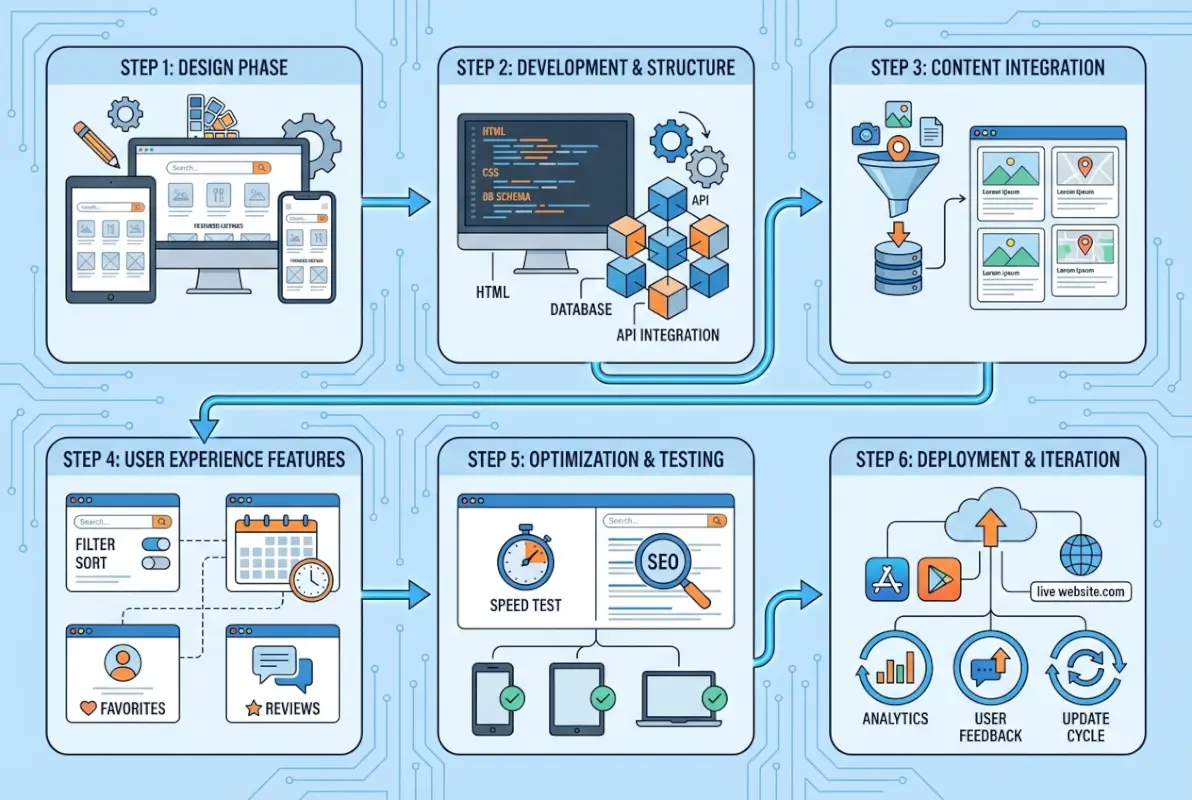
Saveable filters and search presets are emerging as differentiators. Imagine a user who regularly searches for “dog-friendly cafes in Brooklyn”—if your theme can save that query or offer one-click category presets, you’ve reduced friction for return visits. Platforms like TurnKey Directories now include this as a native feature, while older themes require custom plugins that often conflict with each other. Map UX is equally important: per-category map layers (show only restaurants, or only services) help users parse dense urban areas without visual clutter. If your directory covers multiple cities, ensure the map can zoom to a user’s selected region automatically rather than defaulting to a generic center point.
Robust Search, Filtering, and Map Integration
Fast local search depends on indexed fields—business name, category, tags, and address. If your theme’s search only queries titles, users miss relevant listings buried in descriptions. Verify that the theme supports full-text search across all custom fields and that results update instantly (AJAX) rather than requiring a page reload. Meaningful filter presets might include “Open Now,” “Verified Listings,” or “Featured,” which help users trust the results they see. When you’re evaluating what a company directory means for your audience, remember that filters shape user expectations—sparse or broken filters signal a low-quality directory.
Clear listing snippets in search results should display the business name, category, star rating, and a brief description or address—all above the fold on mobile. Resist the urge to show every detail on the results page; save comprehensive info for the listing detail view. This keeps the results page scannable and fast-loading. According to RGC Digital Marketing’s local SEO trends, mobile users now expect sub-2-second load times for local search results, making snippet brevity a performance necessity, not just a design choice.
Listing Detail Templates and Monetization-Ready Layouts
Listing detail pages are where conversion happens—users contact the business, visit the website, or claim a listing. Your theme’s detail template should include concise business info (address, phone, hours, website), a photo gallery, user reviews, and prominent CTAs like “Call Now” or “Get Directions.” PremiumPress notes that monetization readiness—built-in slots for featured listings, banner ads, or sponsored placements—is a key selection criterion. If you plan to offer premium listings, choose a theme with modular blocks that let you visually distinguish paid tiers (badge, highlighted border, top placement) without custom code.
Modular listing blocks give you flexibility. You might want to show a map widget on restaurant listings but hide it for online services, or display a booking form for salons but not for retail stores. Themes that use page builders (Elementor, Gutenberg blocks) or custom field groups (ACF-compatible) make this easy. The “ready to sell” packaging mentioned by major theme providers means pre-built pricing tables, submission forms that accept payment, and admin dashboards that track revenue per listing—all features that turn your directory from a hobby project into a business.
Performance, Reliability, and Platform Fit
Speed and mobile-first responsiveness
Mobile users now represent the majority of local directory queries, making speed and responsive design non-negotiable for engagement and search rankings. A directory theme that loads slowly on mobile or uses non-optimized images will drive users away before they even scan the first listing. Prioritize themes that ship with lazy-loading, optimized CSS and JavaScript, and flexible grid layouts that adapt smoothly from desktop to smartphone.

Test any theme candidate on real devices and use tools like Google PageSpeed Insights to measure Core Web Vitals before committing. Aim for a Largest Contentful Paint (LCP) under 2.5 seconds and a Cumulative Layout Shift (CLS) below 0.1. Themes that embed bloated page builders or excessive third-party scripts rarely meet these thresholds and will hurt both user experience and organic visibility.
Mobile-first design means touch-friendly tap targets, readable font sizes (at least 16 px base), and filters or menus that open without layout jumps. Directory pages often pack dense information—listings, maps, filters—so every pixel and interaction counts. Choose a theme that treats mobile as the primary canvas, not an afterthought.
Platform integration and maintainability
A directory theme must play well with the ecosystem it lives in, especially popular directory plugins, payment gateways, and review systems. Verify compatibility with leading WordPress directory solutions and check that the vendor documents integration steps for WooCommerce, Stripe, or any monetization tools you plan to use. Themes that ship with locked custom post types or proprietary frameworks make future plugin swaps painful and risky.
Long-term maintainability hinges on active support and regular updates—abandoned themes become security liabilities and compatibility nightmares. Review the vendor’s update cadence over the past 12 months, scan support forums for unanswered tickets, and confirm they publish changelogs and migration guides. Community discussions often flag “dead” themes early; avoid any theme that hasn’t seen a patch in six months or longer.
Documentation quality is a practical signal of maintainability: well-documented themes include setup wizards, video walkthroughs, and clear troubleshooting guides. If the vendor can’t explain how to configure listings or customize templates, you’ll spend hours reverse-engineering code. Prioritize themes with comprehensive docs, active developer forums, and demo sites that reflect real-world configurations.
User Experience and Trust Signals
Trust-building elements on listings
Users decide whether to contact a business within seconds of landing on a listing page, so trust signals must be immediate and legible. Display authentic business details—verified address, phone, hours, and photos—above the fold, and pair them with star ratings or review counts that provide social proof. Ambiguous or sparse listings trigger skepticism; transparent, data-rich profiles drive clicks and conversions.
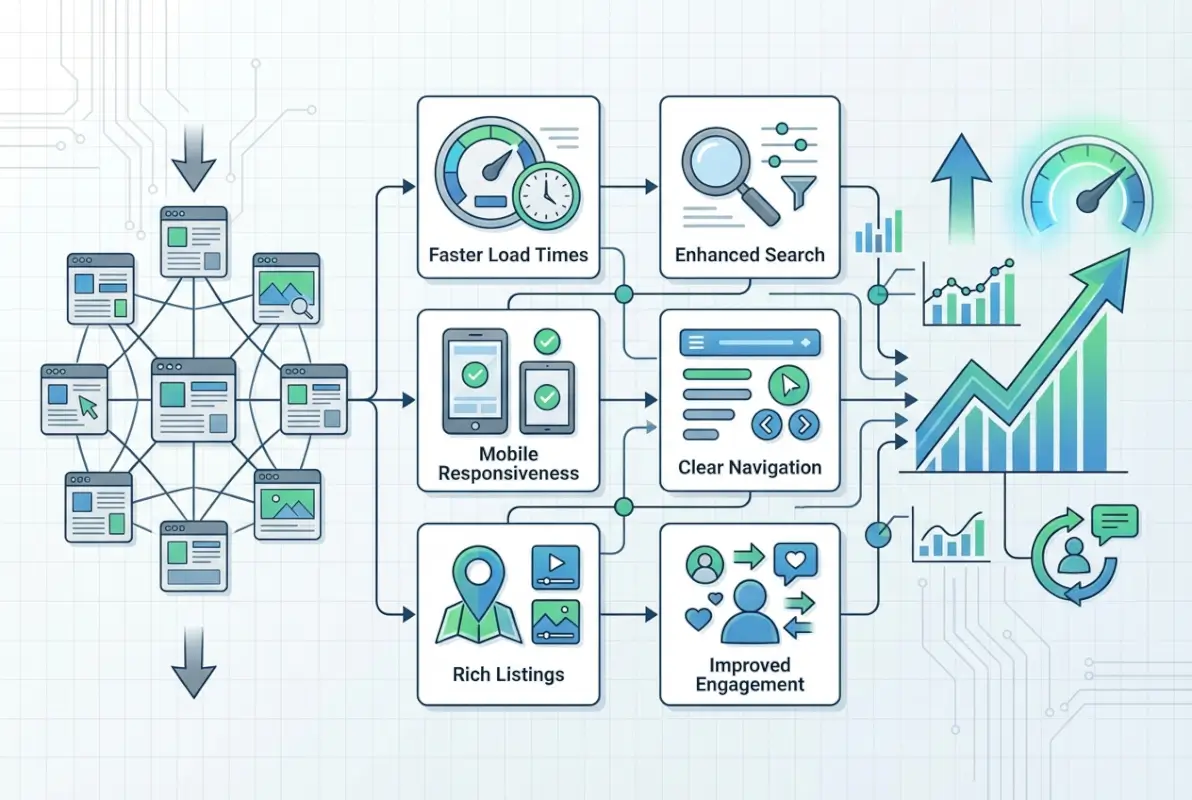
Reviews are the cornerstone of directory trust, but only if they feel genuine and recent. Showcase reviewer names, timestamps, and optional profile avatars to signal authenticity, and include a mix of positive and constructive feedback rather than a wall of five-star praise. Enable verified badges or “claimed listing” icons to differentiate businesses that actively manage their profiles from stale or unverified entries.
Accessible, legible design reinforces credibility—if users struggle to read hours or can’t tap a phone number on mobile, they’ll bounce. Use high-contrast text (WCAG AA minimum), generous line-height, and clear call-to-action buttons (e.g., “Call Now,” “Get Directions”) that stand out visually. Consistent visual hierarchy across all listings reduces cognitive load and signals that your directory is professional and well-maintained.
Visual identity consistency across directories
A cohesive brand system—colors, typography, iconography—builds recognition and makes navigation predictable, which is especially important for multi-category or multi-location directories. Establish a primary palette with two or three accent colors, a typographic scale with distinct weights for headings and body text, and a small icon library for categories, filters, and actions. Apply these elements uniformly across listing cards, detail pages, and search interfaces.
Inconsistent visual identity confuses users and erodes trust: if listing cards on the homepage use one typeface and detail pages switch to another, visitors question whether they’re still on the same site. Reference established brand guidelines—such as those from recognized organizations—to sanity-check your color contrast, typographic hierarchy, and spacing. These systems model accessible, scalable design that translates across devices and contexts.
Test your visual identity with real users or colleagues unfamiliar with your project; if they can’t instantly identify category badges or locate the search box, simplify and standardize. Consistency doesn’t mean monotony—it means predictable patterns that let users focus on content, not on decoding your interface. A strong identity system also future-proofs your directory: when you add categories or monetization features, you’ll drop them into a proven framework rather than reinventing layout and style.
| Trust Element | Design Implementation | User Benefit |
|---|---|---|
| Verified Listings | Badge or icon above business name | Instant credibility signal; reduces bounce |
| Recent Reviews | Timestamp, reviewer name, star rating | Social proof; helps compare options quickly |
| Clear Contact CTAs | High-contrast buttons (“Call,” “Directions”) | Lowers friction; improves conversion |
| Consistent Typography | Single type scale across all pages | Predictable navigation; professional feel |
Vendor Landscape and Selection Criteria
What to look for when evaluating top themes in 2026
Selecting a directory theme in 2026 requires balancing feature completeness, performance, monetization hooks, and vendor reliability. Start with a feature checklist: does the theme support multi-level categories, advanced search with filters, map integration, and user-submitted listings? If any core capability is missing or requires a third-party plugin workaround, expect ongoing maintenance headaches and compatibility risks.

Performance metrics matter as much as features—request a demo site and run it through PageSpeed Insights, GTmetrix, or WebPageTest on both desktop and mobile. Themes that score poorly out of the box will require extensive optimization work, and not all vendors provide clean, cacheable code. Prioritize themes that ship with lazy-loading, minified assets, and CDN-ready configurations; these signal a vendor who understands modern web performance.
Monetization readiness is critical if you plan to sell featured listings, premium placements, or subscriptions. Confirm the theme includes built-in payment-gateway integrations (Stripe, PayPal), tiered listing packages, and admin controls for approving or featuring content. Themes marketed as “directory solutions” often bundle these capabilities, while generic multipurpose themes leave you stitching together plugins and custom code.
Active maintenance and credible documentation separate professional vendors from hobbyists. Check the theme’s changelog for regular updates—monthly or quarterly patches are a good sign—and scan the support forum for response times and resolution rates. Read user reviews on independent marketplaces to spot recurring complaints about bugs, slow support, or abandoned features. A theme with a strong track record and transparent roadmap will save you far more time and money than a cheaper, poorly supported alternative.
| Criterion | What to Check | Red Flag |
|---|---|---|
| Feature Completeness | Search, filters, maps, user submissions | Core features require paid add-ons |
| Performance | PageSpeed score, mobile LCP <2.5s | Demo site scores below 50 on mobile |
| Monetization Hooks | Built-in payment gateways, listing tiers | No native monetization; plugin-only |
| Active Maintenance | Update frequency, changelog transparency | No updates in 6+ months |
| Documentation | Setup guides, video tutorials, FAQs | Sparse or outdated docs; no support forum |
How do I choose the best WordPress directory theme for my local business directory?
Assess feature completeness—search, filters, and maps—plus performance metrics and mobile responsiveness. Check for built-in monetization options and ongoing vendor maintenance. Review documentation quality and community feedback to ensure the theme remains actively supported and updated for future WordPress releases.
What UX practices boost trust on business directory listings?
Display clear listing details, authentic reviews, and accessible typography with strong contrast. Maintain consistent visual identity across your directory using established brand systems. Ensure critical business information is legible and discoverable at a glance, applying visual hierarchy principles to guide user attention.
Are map and location features essential for a directory site?
Yes, especially for local directories. Map-enabled listings with accurate geolocation improve conversion rates and mobile engagement. As mobile users dominate local search queries, visual context from integrated maps helps visitors quickly assess proximity and decide whether to contact a business.
What should I consider for 2026 when selecting a directory theme?
Prioritize speed and mobile-first design to match user expectations. Confirm monetization readiness with paid listing support and featured placement options. Review the vendor’s update cadence and community feedback to avoid abandoned themes. Verify compatibility with popular directory plugins for long-term flexibility.
How important are accessibility guidelines in directory themes?
Critical for broad usability and compliance. Choose themes with legible typography, sufficient color contrast, and keyboard navigation support. Accessible design benefits all users, improving scan-ability and engagement. Reference recognized brand guidelines for typography and color standards to ensure your directory meets readability benchmarks.
Can I monetize a directory theme with featured listings and ads?
Absolutely. Top directory themes include monetization hooks for featured listings, banner placements, and premium tiers. Look for themes with modular listing blocks and built-in controls for paid promotions. This flexibility enables you to scale revenue as your directory grows without custom development.
Should I prioritize speed or features when picking a directory theme?
Balance both. Fast page speed drives engagement and search rankings, while robust features—search, filters, maps—deliver the functionality users expect. Select themes that optimize asset delivery and responsive design without sacrificing core directory capabilities. Test performance with realistic content volumes before committing.
What makes a listing detail page user-friendly?
Concise business details, customer reviews, photo galleries, and prominent call-to-action buttons create a user-friendly listing page. Modular templates allow easy updates and consistent layout across listings. Ensure critical information—hours, contact, location—appears above the fold for quick decision-making.
Ready to Build Your User-Friendly Directory?
You now have a comprehensive framework for evaluating directory themes that deliver strong UX, performance, and monetization potential. Start by auditing your must-have features—search, filters, maps—and test candidate themes with real listing content. Measure page speed on mobile, confirm accessibility basics like contrast and keyboard navigation, and verify that the vendor actively maintains updates and documentation.
Apply the visual hierarchy and trust-building principles covered in this guide to craft a directory experience that turns visitors into contacts and listings into revenue. Whether you serve local businesses or niche industries, a well-designed, user-friendly directory theme in 2026 is your launchpad for sustainable growth and community engagement. Choose wisely, test thoroughly, and watch your directory thrive.
Was this article helpful?