How to Manage Business Listings: A Complete Guide to Local Visibility

Generating summary...
Your business exists online in dozens—maybe hundreds—of places you’ve never even visited. These digital footprints, called business listings, determine whether customers find you when they’re ready to buy. Every inconsistency, every outdated phone number, every missing attribute quietly pushes potential revenue toward your competitors.
Most business owners I’ve worked with are shocked when they discover their business information appears differently across platforms—sometimes with old addresses, disconnected phone numbers, or completely wrong categories. One restaurant owner couldn’t figure out why so few tourists visited despite prime downtown real estate. The problem? His business listing analysis revealed he was categorized as “fast food” on Apple Maps instead of “fine dining,” and his hours on Bing were two years outdated.
The mechanics of business listings have fundamentally changed. We’re not talking about digital Yellow Pages anymore. Modern listings feed AI assistants, power voice search results, and directly influence whether your business appears in that precious local map pack when someone searches nearby. Understanding how to create, audit, and optimize these listings isn’t optional—it’s the foundation of local visibility in 2026.
TL;DR – Quick Takeaways
- Listings are ecosystem connectors – They bridge your business to Google Maps, Apple Maps, voice assistants, and 100+ directories that feed local search results
- Consistency beats quantity – Five perfectly maintained listings outperform 50 inconsistent ones; focus on NAP (Name, Address, Phone) accuracy first
- Google Business Profile dominates – It influences 70%+ of local search visibility and feeds data to other platforms
- Reviews directly impact CTR – Businesses with 4+ star ratings see 3-5x higher click-through rates from search results
- Audit quarterly, update immediately – Regular listing businesses audits prevent the slow decay that kills local rankings
- Voice search changes everything – Conversational queries now dominate mobile; optimize for “near me” and question-based searches
What a Modern Business Listing Is (And How It Fits Into Local Search)
A business listing is any structured entry for your company across digital maps, directories, and platforms—containing at minimum your business name, address, phone number (NAP), category, and operating hours. But that basic definition misses the crucial part: these listings form the data backbone that search engines, AI assistants, and navigation apps use to understand where you exist and what you offer.
Think of your Google Business Profile as the master record—the single most important listing you’ll ever manage. When someone searches “coffee shop near me,” Google doesn’t just check websites. It queries this structured database of business information, cross-references reviews and engagement signals, then serves results in that local map pack you see at the top of mobile searches. According to DCMS business demographics data, there are over 5.5 million active businesses in the UK alone, all competing for visibility in these same local result spaces.

The distinction between platform types matters more than most realize. Your Google Business Profile (GBP) lives within Google’s ecosystem—it’s verified, claimed, and directly managed by you. Directory listings on Yelp, Facebook, or industry-specific sites might be claimed or unclaimed, and they pull data from various sources including data aggregators like Infogroup and Localeze. When these sources conflict, search engines lose confidence in your information accuracy.
The Current Landscape of Business Listings and Distribution
The modern listing ecosystem operates through three layers. First, core platforms like Google Business Profile, Apple Maps, and Bing Places serve as primary data sources that users interact with directly. Second, major directories—Yelp, Facebook, TripAdvisor—function as both discovery platforms and data validators. Third, data aggregators distribute your information to hundreds of smaller directories you’ll never directly touch.
Here’s what changed recently: zero-click search experiences. Google now answers 46% of searches without requiring a click to another website, according to industry research. For local queries, that number climbs higher. Users get your phone number, directions, and hours directly in search results. This makes listing completeness absolutely critical—you’re not competing for website visits anymore; you’re competing for immediate action from the search page itself.
AI-driven local results add another layer. When someone asks Siri “where’s the best Thai restaurant nearby,” the assistant pulls from Apple Maps data, which itself aggregates from multiple listing sources. Voice assistants prioritize businesses with complete, consistent information across platforms. A single outdated address can eliminate you from these results entirely.
The platform ecosystem keeps expanding. Beyond the obvious players, you’ve got specialized directories—Healthgrades for medical practices, Houzz for contractors, Avvo for attorneys. Each serves a specific user intent. Someone searching for a lawyer on Avvo is further down the decision funnel than someone Googling “lawyers near me.” Understanding which platforms your customers actually use determines where you should invest time.
Why Accurate Listings Drive Visibility, Trust, and Conversions
Correct business listings directly influence three ranking factors Google uses for local search: relevance, distance, and prominence. Relevance measures how well your listing matches search intent—get your categories wrong and you’re invisible to relevant searches. Distance is self-explanatory, but prominence combines your offline reputation with online signals like reviews, links, and citation consistency.
NAP consistency acts as a trust signal. When Google’s crawlers find identical name-address-phone combinations across 50 different websites, it confirms you’re a legitimate business at that location. Inconsistencies—even small ones like “Street” versus “St.” or different suite numbers—dilute this signal. I’ve seen businesses lose 40% of their local visibility simply because they listed their business as “ABC Plumbing Inc.” on Google but “ABC Plumbing” everywhere else.
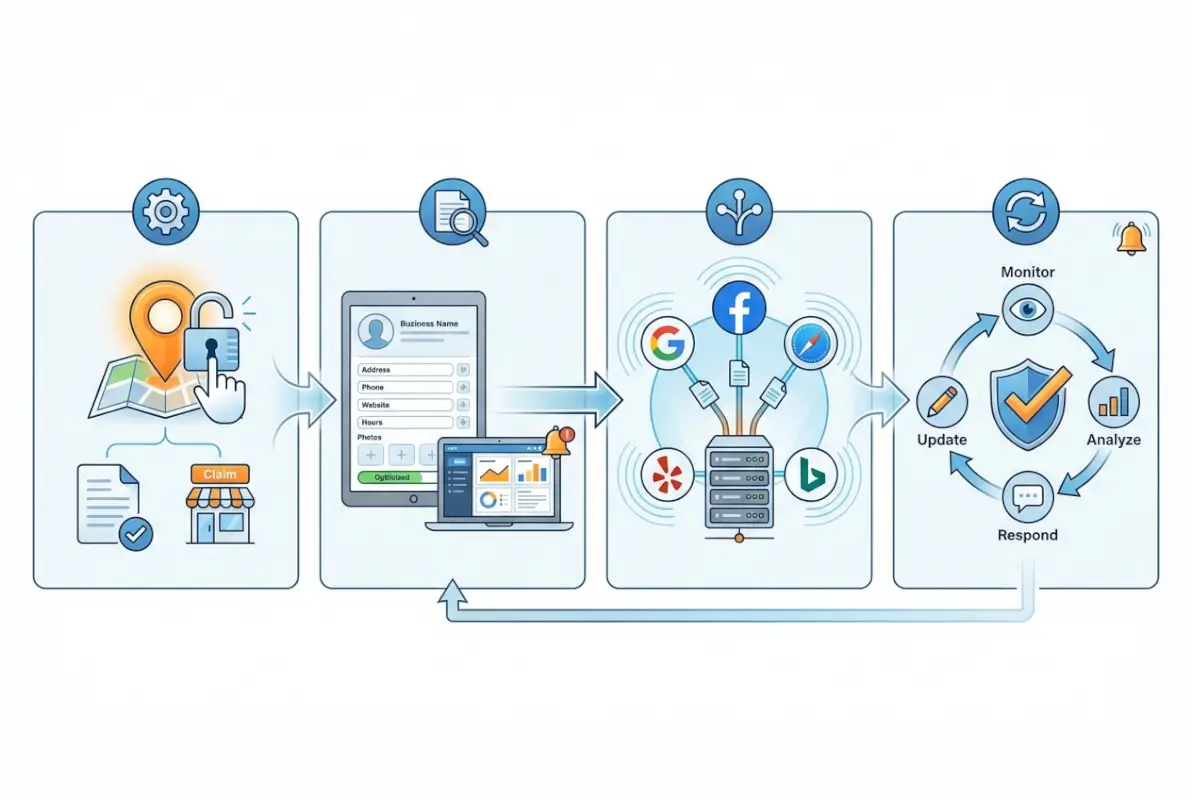
Visibility and Local Ranking Factors
The local pack—those three businesses with map pins appearing above organic results—captures the majority of clicks for local searches. Getting into this pack requires optimizing specific GBP elements: primary category (choose the single most accurate option), complete business description (include relevant keywords naturally), hours (keep them religiously updated), and attributes (wheelchair accessible, outdoor seating, etc.).
Reviews matter more than most realize. Businesses with 50+ reviews rank significantly higher than those with fewer, assuming similar quality scores. But it’s not just quantity—recency counts. A business with 100 reviews from two years ago often ranks below one with 25 recent reviews from the past three months. Google interprets fresh reviews as a signal of current relevance and activity.
The Q&A section on your Google Business Profile influences visibility in subtle ways. When you answer common questions proactively, Google can pull these answers into search results, expanding your real estate on the page. I worked with a dentist who added answers to “Do you accept new patients?” and “What insurance do you take?”—within two weeks, these answers started appearing in his knowledge panel, increasing click-through by 23%.
User Trust Signals and Engagement
Click-through rate from search results correlates directly with listing completeness. According to data from Backlinko’s Google Business Profile research, complete listings (100% profile completion) receive 7x more clicks than incomplete ones. But “complete” means more than filling required fields—it means adding 10+ photos, regular posts, full service descriptions, and responding to every review.
Photos drive engagement in measurable ways. Businesses with photos receive 42% more requests for directions and 35% more clicks to their websites compared to those without. But quality matters: professional photos of your actual location, products, and team outperform stock imagery. Google even has specific photo requirements—minimum 720px wide by 720px tall, well-lit, in focus, and accurately representing your business.
Response rate to reviews becomes a ranking signal. When you respond to reviews—particularly negative ones professionally—it signals active management and customer care. Google tracks how quickly you respond and factors this into prominence calculations. Businesses that respond to 90%+ of reviews within 48 hours typically rank higher than those that ignore reviews.
Listing elements affect on-site engagement after discovery too. When someone clicks through from a listing to your website, Google tracks bounce rate and time-on-site. If your listing promises “24/7 emergency service” but your website doesn’t prominently display this or make emergency contact easy, the disconnect creates a poor user experience that eventually impacts rankings.
How to Audit and Optimize Your Listings (Five-Platform Focus, Tight Scope)
Most businesses waste energy maintaining listings on platforms that generate zero traffic. The audit framework below helps you identify which platforms actually matter, then systematically improve them. Start with inventory, verify accuracy, optimize content, then monitor performance. This cycle repeats quarterly to catch drift before it damages rankings.
The five-step audit process works regardless of business size. First, inventory all existing listings—Google yourself, check major directories manually, and use a tool like Moz Local or BrightLocal to discover listings you didn’t create. Second, document NAP variations—every spelling difference, abbreviation inconsistency, or outdated detail. Third, validate categories and attributes against current platform options. Fourth, review all reviews and response rates. Fifth, score each listing on a simple 0-3 scale for completeness, accuracy, and optimization.
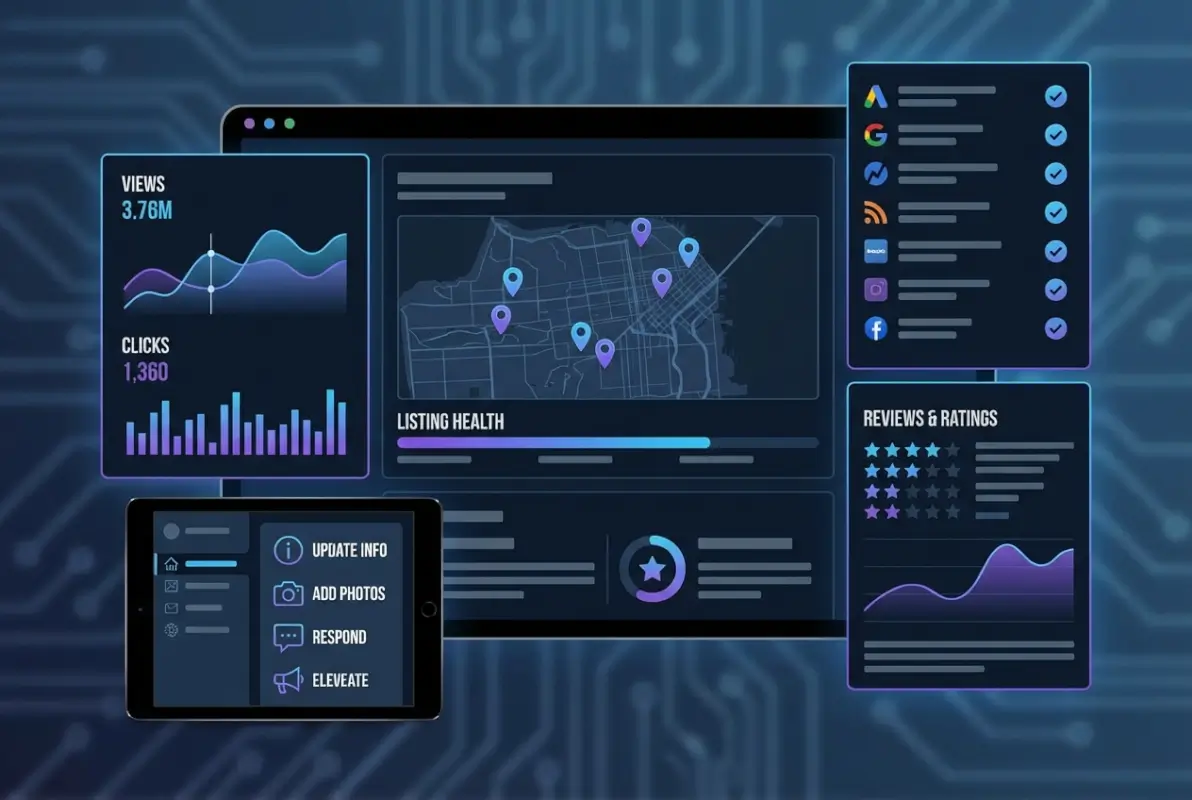
Core Audit Framework (Single, Repeatable Process)
The scoring rubric keeps audits objective. For each listing, rate: NAP accuracy (0 = wrong, 1 = partially correct, 2 = correct but inconsistent format, 3 = perfect), completeness (0 = minimal, 1 = basic fields, 2 = most fields, 3 = 100% complete), optimization (0 = no keywords/photos, 1 = minimal effort, 2 = decent content, 3 = fully optimized with descriptions, photos, posts), and engagement (0 = no reviews, 1 = few reviews/no responses, 2 = moderate reviews/some responses, 3 = active reviews/consistent responses).
Add these scores for each listing. Anything scoring below 8 out of 12 needs immediate attention. Anything at 10+ is performing well but can improve. This simple framework prevents subjective “looks fine to me” assessments that miss critical issues.
Document everything in a master spreadsheet: Platform name, URL to listing, current NAP exactly as shown, categories selected, last update date, review count, review rating, response rate, and your audit scores. Update this quarterly. The spreadsheet becomes your single source of truth for listing businesses strategy.
| Audit Element | What to Check | Red Flag |
|---|---|---|
| NAP Consistency | Exact match across all platforms | Any variation in spelling, abbreviations, formatting |
| Primary Category | Most specific accurate option | Generic category or wrong industry |
| Business Hours | Current, including special hours | Outdated, missing holiday hours |
| Photos | 10+ high-quality, recent images | No photos or only logo/exterior |
| Review Responses | 90%+ response rate, under 48hrs | Ignored reviews, defensive responses |
Section-by-Section Optimization Guide
Primary Platform Optimization (Google Business Profile Priority)
Start with Google Business Profile—it influences 70% of your local search visibility. Claim and verify your listing first (Google typically sends a postcard with verification code to your business address). Complete every field: business name (legal name only, no keywords), address (exactly as it appears on official documents), phone (local number, not tracking number), website, hours (including special hours for holidays), and primary category.
Your business description allows 750 characters—use them. Write naturally but include relevant service keywords in the first 250 characters, which often appear in search snippets. For a plumber: “ABC Plumbing provides emergency plumbing repair, water heater installation, drain cleaning, and leak detection services to residential and commercial customers in [City]. Licensed and insured with 24/7 emergency service available.”
Attributes matter more than most realize. Enable every relevant attribute: “Identifies as women-owned,” “Wheelchair accessible entrance,” “Free Wi-Fi,” “Outdoor seating,” “Accepts credit cards,” etc. These attributes filter search results—someone searching for “wheelchair accessible restaurants” only sees businesses with that attribute enabled.
Google Posts create fresh content directly in your knowledge panel. Post weekly about specials, events, new products, or helpful tips. Posts expire after seven days, so consistency matters more than occasional bursts. Each post supports photos, call-to-action buttons (Book, Order, Buy, Learn More), and up to 1,500 characters of text.
Secondary Directories and Citations (Selective High-Impact Approach)
After optimizing Google, focus on four additional platforms: Apple Maps (critical for iOS users), Bing Places (powers Bing and DuckDuckGo search), Yelp (feeds data to many aggregators), and Facebook (doubles as social proof and discovery). These five platforms provide 85%+ of listing-driven traffic for most local businesses.
For industry-specific directories, choose two maximum based on your field: TripAdvisor and OpenTable for restaurants, Healthgrades and Zocdoc for medical, Houzz for contractors, Avvo for attorneys. More listings aren’t always better—focus on platforms your customers actually use when researching your category.
When creating listings on secondary platforms, copy your master NAP data exactly. Use the same business name format, same address formatting (including suite numbers), same phone number, and same website URL. Even small variations confuse aggregators and create citation inconsistencies that hurt rankings.
If you operate multiple locations, consider using a listing management platform. Tools like Yext, BrightLocal, or even TurnKey Directories (if you’re building your own directory infrastructure) help maintain consistency across dozens of locations without manually updating each platform. For single-location businesses, manual management across five platforms takes 2-3 hours quarterly—manageable without paid tools.
Measuring Success: What to Track and How to Improve CTR
You can’t optimize what you don’t measure. Google Business Profile Insights provides data on how customers find and interact with your listing: total searches (how many people saw your listing), search queries (what they searched), views (how many viewed your full profile), actions (calls, direction requests, website clicks), and photo views. Check these metrics weekly to spot trends early.
The metric that matters most: click-through rate from impressions to actions. If 1,000 people see your listing in search results but only 20 click for directions or call, your 2% CTR indicates optimization problems. Healthy CTRs for local searches range from 5-15% depending on industry—service businesses typically see higher rates than retail.
[KBIMAGE_4]Key Metrics to Monitor
Track six core metrics monthly: impressions (how often your listing appeared in search), discovery searches vs. direct searches (people searching your business name vs. finding you through category searches), actions taken (calls, direction requests, website visits), photo views, post views, and review velocity (new reviews per month). Export this data monthly to spot patterns quarterly reports miss.
NAP consistency across platforms acts as a health metric. Use a citation audit tool quarterly to verify your business information appears identically across top platforms. Citation inconsistencies correlate directly with ranking drops—businesses with 95%+ NAP consistency rank significantly higher than those with variations.
Review metrics include total count, average rating, review velocity (reviews per month), sentiment (positive, neutral, negative), and response rate. The healthiest businesses maintain 4.0+ star averages, earn 2+ reviews monthly, and respond to 90%+ of reviews within 48 hours. Track these monthly to identify declining patterns before they impact rankings.
Practical Optimization Loops
Run micro-tests with Google Posts to improve engagement. Try different content types: product showcases, behind-the-scenes photos, customer testimonials, or educational tips. Track which post types generate the most views and clicks (GBP Insights shows this data). Double down on what works.
Test photos systematically. Upload a new primary photo monthly, rotating between exterior shots, interior ambiance, products/services, and team photos. Monitor which photo types correlate with increases in direction requests or calls. Restaurants often see best results from high-quality food photography; service businesses from team and project completion photos.
CTR optimization often comes down to your business description and primary category. If impressions are high but actions are low, rewrite your description to emphasize your unique value proposition and primary service keywords. If someone searches “emergency plumber” and your description emphasizes “scheduled maintenance,” they’ll skip your listing even if it appears.
Monitor the “queries used to find your business” section in GBP Insights weekly. This shows exactly what people searched to find you. If you’re ranking for irrelevant terms, adjust your categories and description. If you’re missing searches you should rank for, add those service keywords to your description and create posts targeting those terms.
Common Pitfalls, Future Trends, and Quick Wins
The mistakes that kill listing performance are surprisingly mundane. Businesses don’t fail because of sophisticated algorithm changes—they fail because they list inconsistent addresses, ignore reviews for months, or mark themselves as “temporarily closed” during a holiday weekend and forget to change it back. These operational failures compound over time, gradually eroding the trust signals search engines rely on.
I watched a home services company lose 60% of their local visibility over six months. The culprit? They’d changed their suite number after an office move but only updated Google and their website. Yelp, Bing, Facebook, and dozens of smaller directories still showed the old address. Google’s algorithm interpreted this inconsistency as uncertain data, progressively lowering their rankings until they finally conducted a listing audit.
[KBIMAGE_5]Pitfalls to Avoid in Listings Strategy
Inconsistent NAP remains the number one killer. Use your legal business name exactly as registered—no keywords, taglines, or service descriptions. Format your address identically everywhere: if you use “Street” on your website, use “Street” on every listing (not “St.”). Phone numbers should match exactly, including formatting (with or without dashes, parentheses for area code).
Stale business hours frustrate customers and damage rankings. Someone searching Saturday morning who sees you’re open but arrives to locked doors won’t return—and might leave a negative review. Update hours immediately for holidays, seasonal changes, or special events. Use the “special hours” feature in GBP for temporary closures rather than editing regular hours.
Duplicate listings fragment your reviews and citations across multiple profiles. Google often creates automatic listings from web scraping; if you claim one without realizing you have others, your reviews and data split across duplicates. This dilutes your ranking signals significantly. Search for your business name in Google Maps—if you see multiple pins at your location, request duplicate removal through the GBP support system.
Vague business descriptions waste your most valuable real estate. Descriptions like “We provide quality service and customer satisfaction” tell customers nothing. Specific descriptions work: “Family-owned HVAC company providing furnace repair, AC installation, and emergency heating service to residential customers in [City]. Licensed technicians available 24/7 with same-day service guarantees.”
Ignoring reviews—especially negative ones—signals abandonment to both algorithms and customers. According to research from local SEO studies, businesses that respond to reviews receive 15-25% more customer trust than those that don’t. Respond to every review within 48 hours with personalized, professional replies. Thank positive reviewers specifically; address negative reviewers with empathy and solutions.
| Common Mistake | Why It Hurts | Quick Fix |
|---|---|---|
| Using different business names | Confuses search engines, splits citation value | Standardize to legal name across all platforms |
| Tracking numbers as primary phone | Creates NAP inconsistency, triggers duplicates | Use real number on listings, track via website |
| Choosing too broad category | Reduces relevance for specific searches | Select most specific accurate primary category |
| Never updating photos | Signals inactive business, reduces engagement | Upload one new photo monthly minimum |
| Ignoring Q&A section | Misses opportunity to control messaging | Add 5-10 preemptive Q&As for common questions |
Emerging Trends Shaping Listings in 2026
AI-assisted information surfaces are fundamentally changing how users interact with business data. Google’s AI-generated overviews now appear above traditional results for many queries, pulling information directly from business listings, reviews, and Q&As. Optimize for this by adding detailed service descriptions, comprehensive Q&A sections, and regular posts that AI can surface as answers.
Zero-click search dynamics mean fewer users visit websites after finding you—they call, get directions, or place orders directly from search results. This makes your listing content your primary conversion tool. Add booking buttons, order links, and appointment scheduling directly in your GBP profile where platforms support it. Services like restaurants, salons, and medical practices can now enable reservations without users ever leaving Google.
Review features continue expanding beyond simple star ratings. Google now prompts reviewers for specific feedback: food quality, service speed, atmosphere, value. These granular ratings appear in your profile and influence rankings for specific query types. Someone searching “romantic restaurant” sees different results than “family-friendly restaurant” based partly on these detailed review signals.
Voice search optimization becomes non-negotiable as conversational queries dominate mobile. According to UK business registration data, new business formations continue growing, intensifying local competition exactly when voice search drives more discovery. Optimize for natural language: someone doesn’t voice-search “plumber Boston”—they ask “who’s the best plumber near me?” Include these conversational phrases in your descriptions and Q&As.
Platform consolidation and data sharing mean your information spreads further than ever. Apple Maps now pulls data from Yelp and other sources; Facebook shares with Instagram; data aggregators feed hundreds of directories. One inconsistency multiplies across the entire ecosystem within weeks. This makes quarterly audits even more critical than they were three years ago.
What exactly is a business listing and why does it matter for my company?
A business listing is a structured digital profile containing your name, address, phone number, hours, and other details on platforms like Google Maps, Yelp, and Apple Maps. It matters because these listings determine whether customers find you in local search results, maps, and voice assistants—often providing immediate contact options without requiring a website visit.
How do business listings affect my local search rankings and click-through rates?
Business listings influence local rankings through three factors: relevance (category accuracy), distance (proximity to searcher), and prominence (reviews, citations, consistency). Complete, accurate listings with recent reviews and consistent NAP data rank higher. Better rankings combined with compelling photos and descriptions improve CTR from 2-3% to 8-12% for most local businesses.
How many business listings should I create, and which platforms are most important?
Focus on five core platforms first: Google Business Profile (most critical), Apple Maps, Bing Places, Yelp, and Facebook. These drive 85%+ of listing traffic for local businesses. Add 1-2 industry-specific directories after optimizing these five. Quality and consistency matter far more than quantity—five perfectly maintained listings outperform 50 inconsistent ones.
What’s the best way to keep my business listings accurate across multiple platforms?
Create a master document with your exact NAP information formatted identically for all platforms. Conduct quarterly audits using tools like Moz Local or BrightLocal to identify inconsistencies. Update all platforms immediately when business information changes. For multiple locations, consider listing management platforms like Yext or BrightLocal to push updates across all directories simultaneously.
Which Google Business Profile signals matter most for local visibility?
Primary category selection ranks as the most critical factor—choose the single most specific accurate option. Next: NAP consistency, complete business information (100% profile completion), review quantity and recency (50+ reviews with activity in past 90 days), review responses (90%+ response rate), and fresh content like photos and posts uploaded at least monthly.
How often should I audit my business listings, and what tools can help?
Conduct comprehensive listing audits quarterly to catch inconsistencies before they impact rankings. Check Google Business Profile Insights weekly for performance trends. Tools that help include Moz Local and BrightLocal for citation tracking, Google Business Profile mobile app for quick updates, and ReviewTrackers for review monitoring across multiple platforms.
Do reviews really impact listing performance, and how should I respond to them?
Reviews directly impact both rankings and CTR—businesses with 4+ star ratings see 3-5x higher click-through rates. Respond to 90%+ of reviews within 48 hours with personalized, professional replies. Thank positive reviewers specifically, address negative reviewers with empathy and solutions, and never argue or make excuses. Response rate itself functions as a ranking signal.
Can I manage listings myself, or should I use listing management software?
Single-location businesses can effectively manage five core listings manually in 2-3 hours quarterly. Businesses with multiple locations benefit significantly from listing management platforms like Yext, BrightLocal, or TurnKey Directories to maintain consistency across dozens of locations. Evaluate based on location count and available staff time—manual management works until around 3-5 locations.
Take Control of Your Local Visibility This Week
The difference between businesses that dominate local search and those that struggle comes down to execution, not knowledge. You now understand the framework: audit your listings, optimize the big five platforms, monitor metrics weekly, and maintain quarterly consistency checks.
Start with a single action today—claim and verify your Google Business Profile if you haven’t already. Schedule 30 minutes Monday morning to upload three new photos and respond to any pending reviews. Add five Q&As covering your most common customer questions. These small, consistent efforts compound into significant visibility improvements within 4-8 weeks.
Your competitors are either maintaining their listings religiously or ignoring them completely. There’s no middle ground in local search anymore—choose which side you’ll be on.
Was this article helpful?