How to Build an Online Directory: A Comprehensive Guide for 2025

Generating summary...
Building an online directory isn’t just about throwing together a list of businesses and hoping people show up. It’s about creating a valuable resource that solves real problems—whether that’s helping people find the best dog groomers in Austin or connecting freelance developers with companies looking to hire. The truth is, directories never went away; they just evolved. While everyone else was chasing the next social media trend, smart entrepreneurs were quietly building niche directories that dominate search results and generate steady revenue.
Here’s something most people don’t realize: directories are one of the few online business models that become more valuable over time. As your content grows and your domain authority increases, your directory becomes a moat that’s incredibly difficult for competitors to cross. Unlike a blog that requires constant fresh content or an e-commerce store fighting on price, a well-built directory compounds its value with each listing, review, and backlink it earns.
This guide will walk you through everything you need to build, launch, and scale a profitable directory—from choosing a niche that actually has demand to implementing the technical architecture that supports growth. We’ll cover the mistakes that kill most directory projects before they launch and the strategies that separate six-figure directories from abandoned side projects.
TL;DR – Quick Takeaways
- Niche selection is everything – Broad directories fail; specific, underserved niches win
- Data quality beats quantity – 500 verified, detailed listings outperform 10,000 scraped entries
- Search UX determines success – If users can’t find what they need in 30 seconds, they bounce
- SEO is built-in, not bolted-on – Directory structure should optimize for local and long-tail searches from day one
- Monetization requires trust – Balance revenue goals with user experience or lose both
Market Fit, Niche Selection, and Strategy
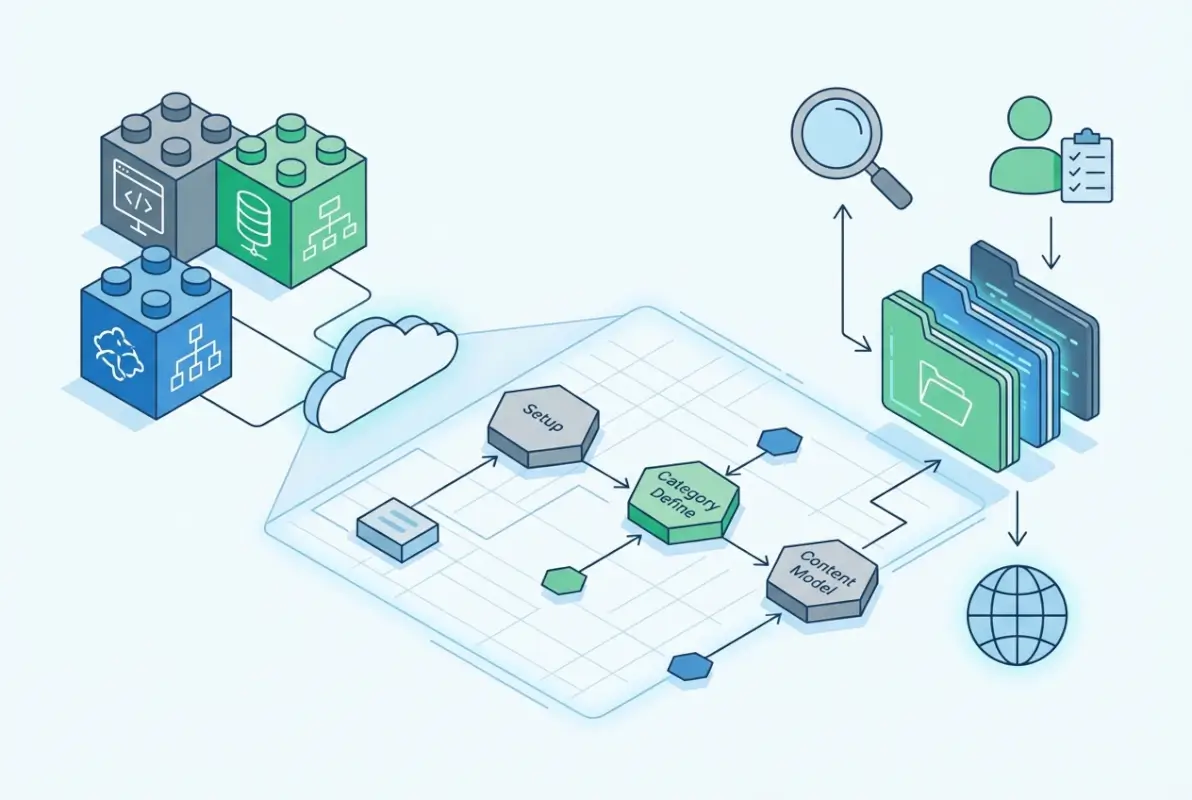
The biggest mistake I see aspiring directory builders make is trying to create “Yelp for everything” or “the LinkedIn of X industry.” Unless you have millions in funding and years to burn, broad directories are a dead end. The directories making money right now are laser-focused: directories for lactation consultants, vintage motorcycle repair shops, or DEI consultants for tech companies.
Define Your Niche and Audience
Start by asking yourself: who is desperate to find something they can’t easily discover through Google? That desperation is your opportunity. Maybe you’re in the wedding industry and you know photographers waste hours searching for reliable hair and makeup artists. Or perhaps you work in manufacturing and constantly hear suppliers complain they can’t find specialized machine shops.
Your niche should meet three criteria: searchable (people actively look for it), monetizable (businesses will pay for visibility), and manageable (you can reasonably verify and curate listings). A directory of “consultants” fails all three tests. A directory of “fractional CFOs for SaaS startups under $5M ARR” passes with flying colors.
Competitive Audit and Differentiators
Once you’ve identified a niche, spend a week researching every competing resource. I’m not just talking about other directories—look at Facebook groups, Reddit communities, industry associations, and even Instagram hashtags. Where are people currently going to find what your directory will offer?
Document what competitors do well and, more importantly, what they do poorly. Maybe existing directories have terrible mobile experiences. Perhaps they charge so much that most businesses can’t afford listings. Or they’ve neglected an entire geographic region or subcategory. These gaps are your positioning.
Revenue Model Options
Let’s talk money because a directory that doesn’t generate revenue is just an expensive hobby. You have several paths, and the right choice depends on your niche and audience:
- Freemium listings: Basic listings are free; businesses pay for enhanced profiles with photos, videos, and featured placement. This works well when there’s high competition among listings.
- Subscription tiers: All listings require payment, typically monthly or annually. Best for B2B niches where businesses expect to pay for lead generation.
- Lead generation: Free listings, but you charge per lead or inquiry sent to businesses. Requires robust tracking and works best with high-intent searches.
- Advertising: Display ads or sponsored listings. Usually a secondary revenue stream since you need significant traffic first.
- Affiliate partnerships: Earn commissions when users book services or make purchases. Works for directories in travel, software tools, or professional services.
| Revenue Model | Best For | Typical Monthly Revenue | Time to Monetize |
|---|---|---|---|
| Freemium | High competition niches | $2K-$15K | 3-6 months |
| Subscription | B2B services | $5K-$25K | 2-4 months |
| Lead Gen | High-value services | $3K-$20K | 6-9 months |
| Advertising | High-traffic directories | $500-$5K | 9-12 months |
Success Metrics and KPIs for Directories
Before you build anything, define what success looks like. For most directories, these metrics matter most: listing growth rate, search-to-listing click-through rate, user return rate, and revenue per listing. If you’re in lead generation, track inquiry volume and conversion rates.
Set realistic milestones. In your first 90 days, you might aim for 100 verified listings and 500 monthly visitors. By month six, maybe 300 listings and 2,000 visitors. The specific numbers matter less than having benchmarks you track religiously. According to recent data from the International Telecommunication Union, internet usage continues to grow globally, which means more potential users for well-positioned niche directories.
Planning the Directory — Data Model and Content Strategy
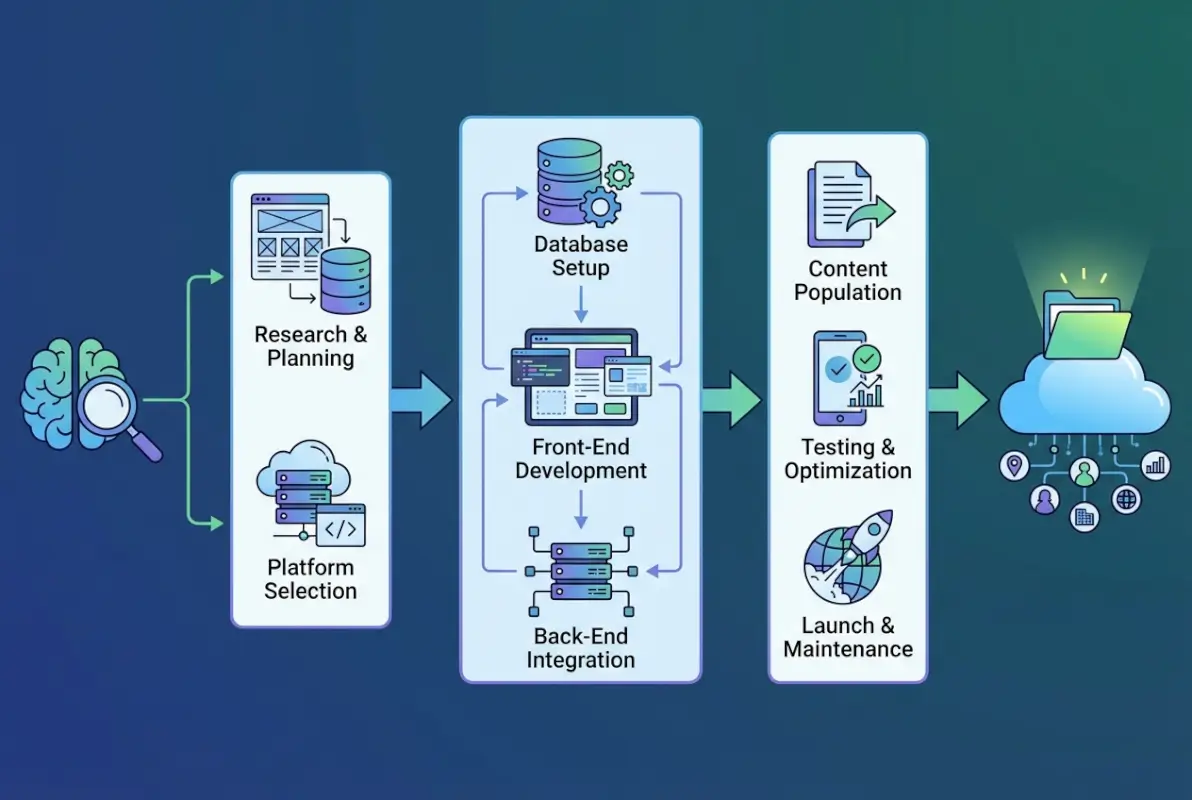
This is where most directory projects either build a solid foundation or create technical debt they’ll regret for years. Your data model—how you structure information about listings—determines everything from search capabilities to SEO performance. Get this wrong, and you’ll be doing painful database migrations when you have hundreds of listings.
Data Schema Design
At minimum, each listing needs: business name, category, location, contact information, description, and media (photos/videos). But the magic happens in the attributes you add beyond the basics. For a directory of restaurants, that might be cuisine type, price range, dietary options, and atmosphere. For contractors, it’s services offered, service area, licensing, and insurance verification.
Think about search filters users will want. If you can’t filter by it, don’t collect it. Every field should serve either discovery (helps users find listings) or conversion (helps users choose a listing). Vanity fields that sound nice but serve no purpose just clutter your interface and database.
Taxonomy and Category Tree Best Practices
Your category structure needs to balance breadth and depth. Too shallow (everything under five categories) and users can’t narrow searches. Too deep (seven levels of subcategories) and navigation becomes impossible. Most successful directories use 2-3 levels maximum.
Start with broad categories that match how people think about your niche. Under “Home Services,” you might have “Plumbing,” “Electrical,” “HVAC,” etc. Under “Plumbing,” perhaps “Emergency Plumbing,” “Drain Cleaning,” “Water Heater Installation.” Test your taxonomy with actual users before launching—ask them to find specific types of listings and watch where they struggle.
Data Quality Processes
Here’s a hard truth: bad data kills directories faster than bad design. If users click on three listings and all have disconnected phone numbers or wrong addresses, they never come back. You need verification workflows from day one. When learning how to build an online directory successfully, prioritizing data quality is non-negotiable.
For new listings, implement a multi-step verification: automated checks (phone number format, address validation), manual review for completeness, and business confirmation (email or phone verification that the business authorized the listing). Set up a process to refresh listing data quarterly—businesses close, phone numbers change, services evolve.
Content Strategy
Listings alone don’t build authority or rank well. You need content around those listings: neighborhood guides, service area pages, how-to articles, and comparison guides. This content serves three purposes: it brings in organic search traffic, it helps users make decisions, and it builds your domain authority.
Plan content that targets bottom-of-funnel searches. If your directory lists wedding photographers, write “How to Choose a Wedding Photographer in [City]” and “Questions to Ask Your Wedding Photographer.” These articles naturally link to relevant listings and capture users actively looking to hire.
Localization and Multilingual Considerations
If your directory serves multiple regions or countries, localization goes beyond translation. It’s currency formatting, date formats, local SEO optimization, and understanding regional search patterns. A directory for “solicitors” works in the UK; Americans search for “lawyers.”
Start with one market and language, prove the model works, then expand. Trying to launch globally from day one spreads your resources too thin and usually results in mediocre experiences across all markets.
Technology and Architecture (Tech Stack)
The technology question stresses people out unnecessarily. There’s no perfect tech stack—only the right stack for your skills, budget, and timeline. I’ve seen six-figure directories built on WordPress and abandoned custom platforms that cost $100K to develop.

Core Platform Choices
You essentially have three paths: WordPress with directory plugins, no-code platforms, or custom development. WordPress dominates the directory space for good reason—it’s flexible, SEO-friendly, and you can launch quickly. Plugins like GeoDirectory or Business Directory Plugin handle the heavy lifting.
No-code platforms (Webflow with Airtable, Bubble, etc.) work if you’re non-technical and want modern design without writing code. They’re faster to build but can become expensive as you scale, and you’re limited by platform constraints. Building directory websites with WordPress remains a popular choice for good reason.
Custom development makes sense if you have specific requirements no plugin solves, you’re building something truly innovative, or you plan to raise venture funding. Otherwise, it’s overkill. Most directories don’t need custom code—they need good execution of proven patterns.
Indexing and Search
Search is the heart of your directory. Users should be able to find what they need through text search, category browsing, filters, and location-based queries. At minimum, implement faceted search—the ability to combine multiple filters (category + location + price range + ratings).
If you’re using WordPress, plugins like SearchWP or FacetWP add powerful search functionality. For custom builds, Elasticsearch or Algolia provide sophisticated search capabilities but require technical implementation. Whatever you choose, speed matters—search results should load in under two seconds.
API Design and Integrations
Your directory needs to integrate with external services: Google Maps for location display and distance calculations, payment processors for paid listings, email services for notifications, and potentially review platforms or social proof APIs. Plan these integrations early because retrofitting them is painful.
If you’re building custom, design a REST or GraphQL API from the start. This lets you add mobile apps, third-party integrations, or alternative front-ends later. Even WordPress benefits from API thinking—choose plugins that expose REST endpoints.
Hosting, Caching, and Scalability
Start with managed hosting that handles the basics: automatic backups, security patches, and decent performance. For WordPress, hosts like WP Engine or Kinsta remove infrastructure headaches. As you grow, implement caching layers (Redis, CDN) to keep page load times fast.
Don’t over-engineer for scale you don’t have. A directory with 500 listings and 5,000 monthly visitors doesn’t need the same infrastructure as one with 50,000 listings and 500,000 visitors. Build for what you need now, with a path to scale later. Understanding business category structures can inform your technical architecture decisions.
Accessibility and Performance Benchmarks
Every directory should meet WCAG 2.1 AA standards at minimum: proper heading hierarchy, alt text on images, keyboard navigation, sufficient color contrast. Accessibility isn’t just good ethics—it’s good SEO and expands your user base.
Performance benchmarks to hit: page load under 3 seconds, Core Web Vitals in the green, mobile-responsive across devices. Use tools like Lighthouse and PageSpeed Insights to identify issues and track improvements.
UX / UI for Directory Websites
User experience makes or breaks directories. You’re competing with Google, with established directories, and with user habits of giving up quickly if something doesn’t work. Your UX needs to be so intuitive that someone who’s never seen your site can find what they need without instructions.

Search-First UX, Filters, and Navigation
Put search front and center—it should be visible and usable from every page. The best directory homepages have a prominent search box with location input, clear category buttons, and maybe popular or recent listings below. That’s it. Don’t clutter with ten different navigation paths that confuse users.
Filters need to be visible but not overwhelming. Progressive disclosure works well—show the most important filters (category, location, price) upfront, with an “Advanced Filters” option for additional criteria. Display active filters clearly and make them easy to remove.
Research from Pew Research Center shows consistent patterns in internet usage across demographics, with search and quick access being critical to user satisfaction.
Listing Layouts, Cards, and Media Handling
Search results work best as cards showing: business name, category, location, rating (if you have reviews), and one compelling image. Users should be able to scan results quickly and identify promising options. Avoid information overload—save detailed information for individual listing pages.
Individual listing pages need a clear hierarchy: hero image, key information (hours, contact, location), detailed description, additional photos, reviews, and call-to-action. Users should never have to hunt for how to contact a business or understand what services they offer.
Mobile-First Design and Responsive Layouts
More than half your traffic will come from mobile devices, especially for local directories. Design for mobile first, then enhance for desktop. That means: thumb-friendly tap targets, minimal typing (use dropdowns and buttons where possible), click-to-call functionality, and one-tap directions.
Test on actual devices, not just browser simulators. You’ll discover issues you’d never spot otherwise—buttons too close together, text too small, forms that cause the keyboard to cover submit buttons.
Accessibility and Inclusive Design
Design for everyone, including users with disabilities. That means: sufficient color contrast (4.5:1 minimum for normal text), keyboard navigation for all functionality, screen reader compatibility, and clear focus indicators. These aren’t nice-to-haves—they’re requirements.
Inclusive design also means considering different literacy levels, language preferences, and connectivity speeds. Use clear language, avoid industry jargon, and optimize images so pages load on slower connections.
Onboarding Flows for Contributors and Merchants
If businesses can add or claim their own listings, make the onboarding process frictionless. Every extra field or step costs you listings. Ask for essentials first, allow users to enhance their listing later. Provide clear benefits—”Complete your profile to appear higher in search results.”
Guide users through the process with progress indicators, helpful tips, and immediate previews of how their listing will appear. The easier you make it to list, the faster your directory grows.
Data Sourcing, Verification, and Quality Assurance
You’ve built the platform; now you need listings. This is where many directory projects stall—creating the shell is easier than filling it with quality data. You have several options, each with tradeoffs between speed, cost, and quality.

How to Source Initial Listings
Manual entry gives you highest quality but lowest speed. You research businesses, contact them for information, and build listings one by one. This works for specialized B2B directories where each listing is high-value and you can charge significant fees.
Web scraping can populate a directory quickly but raises ethical and legal questions. Scraping public information (business names, addresses) is generally legal, but copying content like descriptions might violate copyright. More importantly, scraped data is often outdated or inaccurate. If you scrape, plan to verify and enrich every listing.
Partnerships with industry associations, franchisors, or existing databases offer a middle path. You get bulk data but usually need to clean and standardize it. This works well for directories in established industries with organized trade groups.
User-submitted listings are free and can grow quickly, but quality varies wildly. You’ll need robust moderation and verification processes. Most successful directories combine approaches—seed the directory with verified listings, then open to submissions once you have credibility.
Verification Workflows
Every listing should go through verification before going live. First, automated checks: does the address exist, is the phone number valid, does the website load? These catch obvious errors without manual work. For implementation guidance, explore essential steps for directory success.
Second, manual review for completeness and quality. Is the description coherent? Are images appropriate? Does the business actually offer the services claimed? This step requires human judgment but ensures your directory maintains standards.
Third, business verification. Email the business contact with a verification link, or call to confirm they want to be listed. This builds trust—businesses know they’re represented accurately, and users know listings are legitimate.
Deduplication and Data Hygiene
Duplicate listings destroy user experience and search rankings. If “ABC Plumbing” appears three times with slightly different information, users don’t know which is correct and search engines may penalize your site for duplicate content.
Implement fuzzy matching algorithms that catch duplicates even when names don’t match exactly. Check business name, address, and phone number combinations. When you find duplicates, merge them intelligently—keep the most complete information and redirect old URLs to avoid breaking links.
Ongoing Enrichment
Listings should improve over time. Encourage reviews, prompt businesses to add photos, update service descriptions seasonally. Send quarterly emails asking businesses to review and update their information—frame it as “keeping your listing competitive” rather than work for them.
Consider social proof enrichment: integrate with platforms that show social media follower counts, recent activity, or third-party certifications. The more rich, updated information your listings have, the more valuable your directory becomes.
Compliance
Know the laws governing your directory data. GDPR in Europe, CCPA in California, and similar laws globally give people rights over their personal information. You need clear privacy policies, consent mechanisms, and data deletion procedures.
Business information is generally public, but employee names, email addresses, and similar details may require consent to publish. When in doubt, ask for permission. It’s better to have fewer listings than face legal issues over data you shouldn’t have published. The importance of proper directory services integration extends to compliance as well.
SEO, Content Marketing, and Directory Listing SEO
SEO isn’t something you add to a directory after building it—it’s baked into the architecture. Done right, every listing becomes a landing page optimized for relevant searches. Done wrong, your directory is invisible in search results no matter how good the content is.
Structured Data and Schema Markup
Implement Schema.org markup on every listing. For local businesses, use LocalBusiness schema with properties for name, address, phone, hours, price range, and reviews. This helps search engines understand your content and can earn rich snippets in search results.
Category pages should use CollectionPage or ItemList schema. Breadcrumbs need BreadcrumbList schema. Review aggregations need AggregateRating schema. Yes, it’s tedious, but it’s also the difference between appearing in featured snippets and being buried on page two.
Local SEO and Citation Consistency
For directories with local listings, NAP consistency (Name, Address, Phone) across the web is critical. Your directory should become a citation source for businesses—consistent information that reinforces their local SEO.
Create location-specific landing pages: “[Category] in [City]” pages that list relevant businesses and include local content. These pages target “near me” and location-specific searches that drive high-intent traffic.
Content Optimization
Every page needs unique, valuable content—not just listing data. Category pages should explain what that category includes, why someone might need these services, and how to choose a provider. Location pages need local context and neighborhood information.
Individual listings need substantial, unique descriptions. If you’re scraping or accepting user submissions, don’t publish thin content. A 50-word description won’t rank for anything. Aim for 300-500 words of useful, specific information about each business.
Link-Building Strategy
Directories have a natural advantage for link building—businesses want links back to their websites, so they have incentive to link to their listing page. But you need more than that. Create content worth linking to: ultimate guides, industry reports, best-of lists, and local area resources.
Reach out to industry publications, local news sites, and bloggers in your niche. Position your directory as a resource they can cite. Get listed in quality web directories (yes, directory inception) and industry resource pages. Each quality backlink boosts your domain authority and helps all your pages rank better.
Monitoring and Analytics
Track rankings for your target keywords (category + location combinations), organic traffic by landing page, and conversion rates from organic visits. Use Google Search Console to identify which pages perform well and which need work.
Monitor for technical SEO issues: crawl errors, broken links, slow-loading pages, mobile usability problems. Set up alerts so you catch and fix issues before they hurt rankings. A comprehensive approach to building online directories with key success elements includes robust monitoring.
Monetization and Growth Tactics
Now we get to the fun part—making money. But here’s the thing: you can’t monetize effectively until you have traffic and listings. Trying to charge for listings when your directory is empty doesn’t work. You need to build value first, then capture it.
Listing Pricing Models and Tiered Access
The freemium model works well: basic listings are always free, but businesses can upgrade to premium listings with enhanced features. What goes in each tier? Free might include: basic information, one photo, standard listing in search results. Premium adds: gallery of photos, video, featured placement in search, priority support, detailed analytics on listing views and inquiries.
Price tiers should offer clear value jumps. If premium is $50/month but only adds one extra photo, businesses won’t upgrade. If premium is $50/month and includes featured placement that generates 5x more inquiries, it’s an easy sell.
Featured Listings and Sponsored Content
Featured listings appear at the top of search results and category pages. They need clear labeling—”Sponsored” or “Featured”—to maintain user trust. Limit featured slots (no more than 20-30% of results) so they don’t overwhelm organic listings.
Sponsored content like “Best [Service] in [City]” articles can generate revenue but must maintain editorial integrity. Clearly label sponsored content and ensure recommendations are genuinely valuable. Users who feel tricked never return.
Partnerships and Affiliate Opportunities
If your directory serves professionals who use specific tools or services, affiliate partnerships make sense. A directory for web developers might earn commissions recommending hosting, design tools, or stock photo sites. Just be selective—only promote products you’d genuinely recommend.
Strategic partnerships with industry organizations can provide both revenue and credibility. Maybe a trade association wants to offer your directory as a member benefit, paying you per listing or member. Or a software company targeting your niche wants to advertise or sponsor a section of your directory.
Scale Strategies
Once you’ve proven your model in one market, expansion becomes easier. Geographic expansion (new cities or regions) works well for local service directories. Category expansion (adding related services) works for niche directories. International expansion requires more work but opens huge markets.
Whatever your expansion strategy, don’t spread too thin. It’s better to dominate three cities than have weak presence in twenty. Build depth before breadth.
| Growth Stage | Primary Focus | Key Metric | Monetization |
|---|---|---|---|
| 0-3 months | Launch MVP with 100+ listings | Listing count | Free, build value |
| 3-6 months | Drive traffic, SEO foundation | Monthly visitors | Test pricing |
| 6-12 months | Convert to paying customers | MRR growth | Active monetization |
| 12+ months | Scale and expand | Revenue per customer | Multiple revenue streams |
Data Security, Privacy, and Compliance
Security and privacy aren’t optional—they’re legal requirements and trust builders. A data breach or privacy violation can kill your directory overnight, so invest in getting this right from the start.
GDPR and Privacy Regulations
If you have any European users, GDPR applies to you. Key requirements: get clear consent before collecting personal data, allow users to access their data, enable data deletion on request, and report breaches within 72 hours. California’s CCPA has similar requirements.
Your privacy policy needs to be clear, not legal jargon. Explain what data you collect, why you collect it, how long you keep it, who you share it with, and how users can control their data. Make these policies easily accessible from every page.
User-Generated Content Safeguards
Reviews, comments, and user-submitted listings open you to spam, fake reviews, and malicious content. Implement moderation workflows—ideally, new content from unverified users goes into a review queue before publishing.
Give businesses the ability to report inaccurate information or inappropriate reviews. Have clear policies on what you’ll remove (spam, personal attacks, off-topic content) versus what you’ll keep (negative but honest reviews). Transparency builds trust on both sides.
Data Retention and Deletion
Don’t keep data forever just because you can. Define retention periods: maybe active listings stay indefinitely, but closed businesses archive after a year. User activity logs might delete after six months. This reduces your liability and complies with privacy regulations.
When users request deletion, actually delete their data—don’t just hide it. Document your deletion process so you can prove compliance if questioned.
Incident Response and Backups
Plan for the worst before it happens. How will you respond if your site goes down? What if you discover a data breach? Who makes decisions, and how do you communicate with users?
Automated daily backups are non-negotiable. Test your backup restoration process—backups you can’t restore are useless. Store backups in a separate location from your primary data so a single incident doesn’t take out both.
Launch, Marketing, and Growth Hacking
You’ve built the directory, filled it with quality listings, and optimized for search. Now you need to get users and listings in a virtuous cycle—more listings attract more users, more users attract more listings.
Pre-Launch Validation
Before a full launch, test with a small audience. Invite fifty people from your target market to use the directory and provide feedback. Watch how they navigate, where they struggle, what questions they have. Fix obvious issues before the real launch.
A soft launch to a limited geography or category helps you work out operational kinks. Can you handle listing submissions? Do payments process correctly? How long does verification take? Better to discover problems with 100 listings than 1,000.
Organic and Paid Acquisition
Organic search should be your primary long-term traffic source, but it takes time. While building SEO momentum, you need other channels. Content marketing—publishing valuable articles on your directory blog—brings traffic and establishes authority.
Partnerships with industry influencers, local publications, or complementary businesses can drive targeted traffic. Maybe a local newspaper features your directory in an article about the best places to find [your niche]. Or an industry influencer shares your directory with their audience.
Paid advertising makes sense once you’ve proven conversion rates. Google Ads targeting “find [service] in [city]” queries can drive high-intent traffic. Facebook ads work for building awareness in local communities. Just ensure your lifetime value per user justifies the acquisition cost.
Analytics Setup
Instrument everything from day one. Track not just page views but user journeys: how do people discover your directory, what searches they perform, which listings they view, and whether they contact businesses. This data tells you what’s working and where to improve.
Set up conversion tracking for your key actions: listing submissions, upgrade purchases, business inquiries. Calculate conversion rates and identify where users drop off. Maybe lots of people view listings but few contact businesses—that suggests your listing pages need work.
Post-Launch Iteration
Launch is the beginning, not the end. Plan monthly improvement cycles: review analytics, gather user feedback, identify the biggest problems, and fix them. Maybe users want additional filters, or category pages need better content, or the mobile experience has friction points.
Test changes systematically. If you’re considering a redesign, try it with 10% of traffic first. If conversion rates improve, roll it out; if they decline, iterate further. Data beats opinions every time.
Maintenance, Growth, and Evolution
Successful directories require ongoing care. Unlike content that can sit unchanged for years, directory data grows stale quickly. Businesses close, services change, contact information updates. Your directory is only as valuable as its data is current.
Data Refresh Cadence
Establish a regular refresh schedule. Contact businesses quarterly to confirm their information is current. Automated checks can catch some issues—broken websites, disconnected phone numbers—but human review catches more.
Incentivize businesses to keep their listings current. Maybe you send emails: “Your listing hasn’t been updated in six months—update now to maintain your search ranking.” Or offer free featured placement for a week to businesses who complete a profile refresh.
Platform Upgrades and Feature Roadmap
User expectations evolve, technology improves, and competitors add features. You can’t rest on your initial launch. Build a feature roadmap based on user requests, competitive analysis, and strategic priorities.
Maybe in quarter two you add video support for listings. Quarter three brings a mobile app. Quarter four launches a comparison tool that lets users view multiple listings side-by-side. Each improvement makes your directory stickier and harder to replace.
Community Building and Reputation Management
The best directories become communities, not just databases. Encourage interaction: let users favorite listings, follow categories, or receive alerts for new listings in their area. Build an email newsletter with directory highlights and industry news.
Monitor your directory’s reputation online. Set up Google Alerts for your directory name and respond to mentions—thank people for positive feedback, address concerns from negative feedback. Your reputation impacts whether new users trust your directory enough to use it.
Scaling International Directories
International expansion requires more than translating text. You need to understand local business cultures, payment preferences, and regulatory requirements. In some countries, businesses expect free listings; in others, they’re willing to pay. VAT rules in Europe, tax collection in the US—compliance gets complex fast.
Start with countries similar to your initial market. If you’ve succeeded with an English-language directory in the US, Canada or UK might be natural next steps before tackling markets with different languages and business cultures.
Metrics Review Cadence
Schedule monthly business reviews where you examine key metrics: listing growth, user growth, revenue, costs, and profitability. Are you on track toward your goals? What’s working better than expected? What’s underperforming?
Annual strategic reviews help you step back and assess the bigger picture. Is your niche still growing, or is it being disrupted? Are new competitors emerging? Should you pivot or double down on your current approach?
Accessibility, Compliance, and Ethical Considerations
Building a successful directory means doing it right—legally, ethically, and inclusively. Cutting corners might save time short-term but creates problems that can destroy your business long-term.
ADA and WCAG Compliance
The Americans with Disabilities Act applies to websites, and lawsuits against inaccessible sites are common. WCAG 2.1 Level AA is the standard you should meet. This includes keyboard navigation, screen reader compatibility, sufficient color contrast, and alternative text for images.
Accessibility isn’t just about avoiding lawsuits—it’s about serving all users. Accessible design benefits everyone: clear navigation helps all users, not just those using assistive technology. According to research from Statista on global internet usage, billions of people are online, and ensuring your directory is accessible expands your potential audience.
Ethical Listing Practices
Be transparent about what’s editorial content versus paid promotion. If a business pays for featured placement, label it clearly. If you write “best of” articles, disclose if featured businesses paid to be included or if you earn affiliate commissions.
Don’t create fake listings to make your directory look more complete. Don’t copy content from other directories without permission. Don’t artificially manipulate ratings or reviews. These practices might work short-term but destroy trust once discovered—and they always get discovered.
Moderation Policies
You need clear, public policies on what content you’ll allow and remove. This protects you legally (showing you’re actively moderating) and sets expectations for users. Your moderation policy might say: “We remove spam, personal attacks, off-topic content, and potentially illegal content. We don’t remove negative but honest reviews.”
When you remove content, explain why. If you refuse to remove content someone requested, explain your reasoning. Consistency and transparency in moderation build trust with both businesses and users.
Responsible Data Usage
Just because you can collect data doesn’t mean you should. Think carefully about what information you actually need and what benefits users. Collecting phone numbers makes sense for a directory; collecting birthdates probably doesn’t.
Be careful about how you use data. Sending occasional emails about new listings is reasonable; selling user email addresses to marketers violates trust. Using search data to improve your directory is good; using it to compete against your own listings is unethical.
Frequently Asked Questions
What is an online directory and why would I create one?
An online directory is a structured website that catalogs and organizes businesses, services, or resources into searchable categories. You’d create one to serve an underserved niche, generate revenue through listing fees or advertising, and build a valuable asset that grows more powerful over time through accumulated listings, reviews, and domain authority.
What are the best platform options to build a directory and why?
WordPress with directory plugins like GeoDirectory offers the best balance of flexibility, cost, and ease-of-use for most directories. It handles the technical complexity while letting you customize design and functionality. No-code platforms work for non-technical builders but can become expensive at scale. Custom development makes sense only if you have unique requirements no existing solution addresses.
How do I source listings and ensure data quality?
Start with manual entry of verified listings to establish quality standards, then expand through business-submitted listings with approval workflows. Implement automated checks for formatting and validity, manual review for completeness, and business verification to confirm accuracy. Establish quarterly refresh cycles to keep data current and remove closed businesses.
How can I monetize an online directory without alienating users?
Use a freemium model where basic listings remain free but businesses can upgrade to premium listings with enhanced features and visibility. Clearly label sponsored or featured listings to maintain transparency. Start monetization only after building sufficient traffic and value—trying to charge when your directory is empty doesn’t work and damages credibility.
What SEO strategies are essential for directory pages?
Implement Schema.org structured data on all listings and pages to help search engines understand your content. Create unique, substantial content for category and location pages targeting long-tail keywords. Build internal linking between related listings and categories. Focus on local SEO with consistent NAP information and location-specific landing pages. Build quality backlinks through content marketing and industry partnerships.
How often should I refresh listings and verify data?
Contact businesses quarterly to confirm information accuracy and prompt updates. Run automated checks monthly for broken links, disconnected phone numbers, and other technical issues. Remove or archive closed businesses within 30 days of discovery. High-activity directories might need more frequent updates, while stable B2B directories can refresh less often.
What privacy and legal considerations apply to directory data?
GDPR in Europe and CCPA in California require clear consent, data access rights, and deletion capabilities. Publish transparent privacy policies explaining data collection, usage, and retention. Business information is generally public, but personal information like employee emails requires consent. Implement strong security measures and have breach response plans ready.
Should I offer free listings or charge from the start?
Start with free listings to build inventory and attract users. You can’t monetize an empty directory effectively. Once you have 100+ quality listings and consistent traffic, introduce paid tiers with enhanced features. Make the value proposition clear—businesses should see premium listings generate enough additional inquiries to justify the cost.
How do I handle negative reviews or disputed information?
Establish clear policies upfront about what you will and won’t remove. Generally, remove spam, personal attacks, and factually incorrect information when businesses provide proof. Don’t remove honest negative reviews even if businesses complain. Offer businesses the ability to respond to reviews publicly, which often resolves concerns better than removal.
What’s a realistic timeline to profitability for a new directory?
Most directories take 6-12 months to generate meaningful revenue. Expect to spend the first 90 days building initial listings and site structure, months 3-6 driving traffic through SEO and content, months 6-9 introducing monetization, and months 9-12 optimizing conversion rates. Profitability timing depends on your niche, competition, and execution quality.
Your Directory Journey Starts Now
Building an online directory isn’t a get-rich-quick scheme—it’s a real business that requires planning, execution, and persistence. But here’s what makes it worth the effort: unlike most online businesses that fight constant churn or depend on platform algorithms, a well-built directory becomes more valuable every day. Each listing you add, each review you collect, each backlink you earn compounds over time.
The directories making serious money didn’t start with everything perfect. They started with a focused niche, a solid foundation, and commitment to continuously improving. They listened to users, adapted to feedback, and refused to cut corners on data quality or user experience. That’s your playbook.
- Days 1-30: Finalize niche, build site infrastructure, manually add 50-100 verified listings, set up analytics
- Days 31-60: Expand to 200+ listings, publish 8-10 content articles, implement basic SEO, soft launch to test audience
- Days 61-90: Open to business submissions with verification workflow, launch marketing campaigns, iterate based on user feedback, plan monetization testing
Don’t wait for perfect conditions or complete certainty. The best time to start was six months ago; the second-best time is today. Choose your niche, map out your data model, pick a tech stack you can actually execute with, and start building.
Remember: your directory doesn’t need to launch with 10,000 listings. It needs to launch with the best 100 listings in your niche, better organized and more useful than anything else available. Start there, and growth follows naturally. Your future users are searching for what you’re about to build—don’t keep them waiting.
Was this article helpful?