How to Register My Business to Alexa Directory: Complete Voice Search Setup Guide

Generating summary...
Here’s the reality most business owners don’t realize: there isn’t actually a standalone “Alexa directory” where you submit your business with one click and call it done. I learned this the hard way when a client asked me to “just add them to Alexa” and I spent two frustrating hours searching for a submission form that doesn’t exist. The truth is far more nuanced—and once you understand how Alexa actually discovers businesses, you’ll have a significant competitive advantage over the 80% of local businesses still waiting for that mythical submission portal.
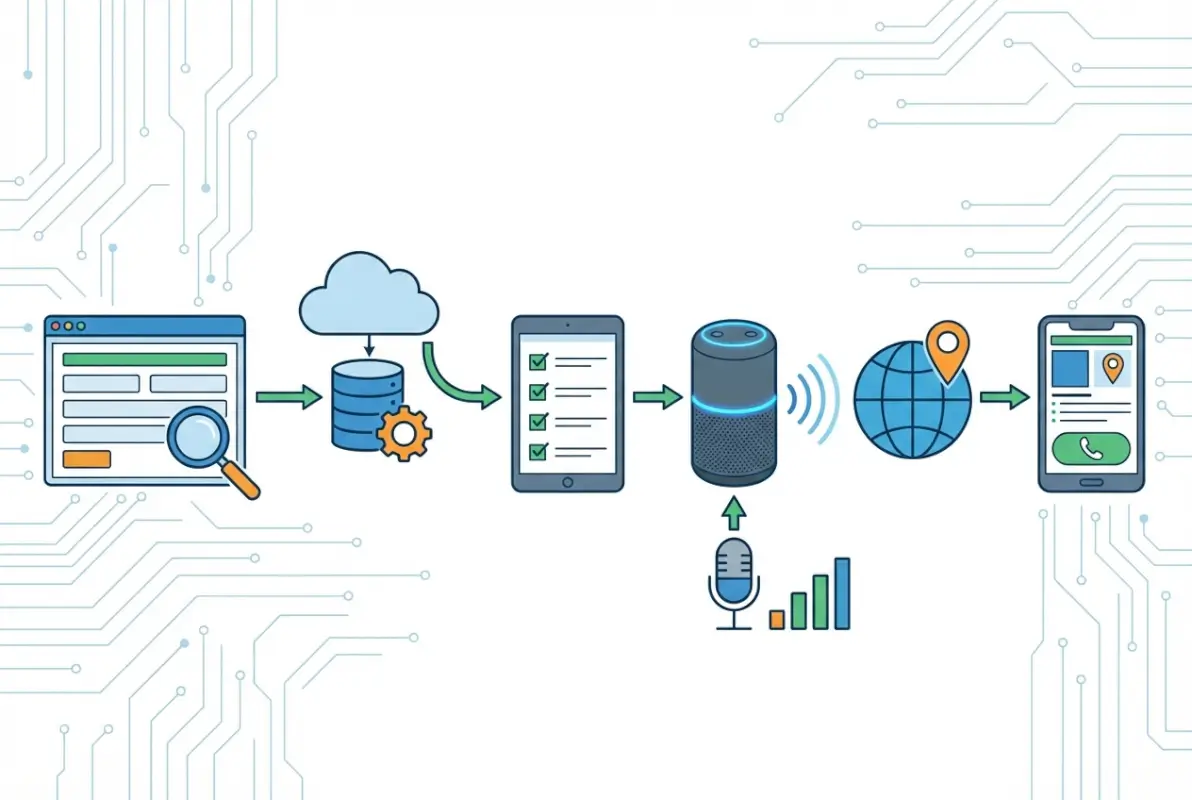
Amazon Alexa pulls business information from a complex ecosystem of data sources including verified business listings on platforms like Yelp and Bing Places, structured data markup on your website, and synchronized information across major data aggregators. When someone asks “Alexa, find a plumber near me,” the system queries multiple authoritative sources simultaneously, cross-references the data for consistency, and recommends businesses with the most complete and trustworthy information. Your job isn’t to add your business to a single directory—it’s to ensure your data is accurate, consistent, and optimized across the entire ecosystem that feeds Alexa’s recommendations.
This guide cuts through the confusion with a data-driven approach based on how voice search actually works in 2025 and beyond. You’ll learn the specific platforms that matter, the exact data consistency standards Alexa requires, and the on-site optimizations that dramatically improve your voice search visibility. No fluff, no outdated tactics—just the practical workflow that gets your business recommended when potential customers ask Alexa for help.
TL;DR – Quick Takeaways
- No single Alexa directory exists – Visibility comes from synchronized data across multiple platforms (Yelp, Bing Places, Google Business Profile) and on-site structured data
- Data consistency is critical – Your business name, address, phone (NAP) must be identical across all sources or Alexa won’t confidently recommend you
- Voice search queries are conversational – Optimize for 6-10 word natural language questions, not 2-3 word keyword phrases
- Primary data sources include – Yelp (strongest integration), Bing Places, major data aggregators, and LocalBusiness schema on your site
- Timeline expectations – Initial visibility typically appears within 2-4 weeks after establishing consistent listings; full optimization takes 6-8 weeks
- Reviews directly impact recommendations – Businesses with 10+ recent reviews and 4+ star ratings receive strong preference in voice results
Understanding Alexa’s Data Ecosystem (Not a Single Directory)
The first mental shift you need to make is abandoning the idea of a centralized Alexa business directory. Unlike some platforms where you create one profile and you’re done, Alexa operates as an aggregator that pulls from established data sources across the web. According to Amazon’s Works with Alexa program documentation, the platform prioritizes data quality and consistency over any single source of truth.

When someone asks Alexa about a local business, the system simultaneously queries multiple databases including Yelp’s business listings (which has particularly strong integration with Amazon’s ecosystem), Bing Places for Business, major data aggregators like Yext and Neustar Localeze, and structured data markup from business websites. The algorithm then cross-references this information looking for consensus—businesses with matching data across multiple authoritative sources get recommended, while those with conflicting information get filtered out.
This multi-source approach actually works in your favor once you understand it. Rather than being at the mercy of a single platform’s algorithm changes (remember when Google Business Profile updates used to wreak havoc?), you’re building a foundation of data authority across the entire local search ecosystem. The businesses that succeed with voice search are those that treat data accuracy as a core operational priority, not a one-time marketing task.
What makes this particularly relevant for your business listed directory assistance strategy is that voice search optimization inherently improves your overall local SEO. The same data consistency, structured markup, and review signals that help with Alexa also strengthen your visibility in Google Maps, Apple Maps, and other discovery platforms. You’re not optimizing for a single channel—you’re building fundamental digital infrastructure.
Primary Data Sources Alexa Uses for Business Discovery
Understanding exactly where Alexa sources business information helps you prioritize your efforts. The platform doesn’t publicly disclose its complete algorithm, but research from location marketing platforms like Uberall combined with developer documentation reveals the key data pipelines.
Yelp represents the strongest known integration, functioning almost as Alexa’s default local business database. When you ask Alexa for restaurant recommendations, coffee shops, or service providers, the response frequently pulls directly from Yelp listings including business hours, ratings, and location details. This makes your Yelp presence absolutely non-negotiable—it’s not optional if you want voice search visibility.
Bing Places for Business serves as another critical source, particularly for businesses in professional services and B2B categories. Microsoft’s partnership agreements with Amazon mean Bing data flows into Alexa’s knowledge graph, and businesses with verified, complete Bing Places profiles receive preferential treatment. The verification process takes 5-10 business days via postcard, so start this immediately if you haven’t already.
Major data aggregators including Yext, Neustar Localeze, Factual, and Foursquare distribute your business information to hundreds of directories and platforms simultaneously. While you could manually manage each destination, aggregators ensure consistency and handle updates automatically. For businesses with multiple locations, this becomes practically essential—managing 10 locations across 50+ directories manually is a recipe for data chaos.
| Data Source | Integration Strength | Setup Priority | Verification Timeline |
|---|---|---|---|
| Yelp for Business | Very High | Critical | Immediate (phone/email) |
| Bing Places | High | Critical | 5-10 business days |
| Google Business Profile | Medium-High | High | 3-7 days |
| Data Aggregators | Medium | Medium | Varies by platform |
| On-Site Schema Markup | Medium | High | Immediate (self-managed) |
Essential Prerequisites for Voice Discovery
Before diving into the tactical steps, you need certain foundational elements in place. Think of these as prerequisites that determine whether your optimization efforts will succeed or struggle. I’ve seen businesses spend months optimizing individual listings while ignoring these basics, then wonder why they’re still invisible in voice search.
The first prerequisite is claimed and verified ownership of your business on all major platforms. “Claimed” means you’ve taken control of the listing (which may have been automatically created from public data sources), and “verified” means you’ve proven to the platform that you have legitimate authority to manage it. Unverified listings have severely limited visibility and often don’t appear in API-driven results that voice assistants query.
Your second prerequisite is establishing a master data document that defines your official business information in exact formatting. This becomes your single source of truth for every platform. Include your legal business name (exactly as registered), DBA or branded name if different, complete street address with suite/unit numbers if applicable, primary phone number with consistent formatting, business category selections (primary and 2-3 secondary), standard hours of operation, service areas if you’re a service business, and a 150-250 word business description optimized for voice delivery.
On-Site Foundation: Structured Data and Voice-Optimized Content
Your website needs to speak the language that search engines and voice assistants understand—structured data markup. This is code that explicitly identifies business information in a machine-readable format, removing any ambiguity about what your business does, where you’re located, and how customers can contact you. According to Google’s structured data guidelines, LocalBusiness schema is essential for local discovery.
Implementing LocalBusiness schema involves adding JSON-LD code to your website (typically in the header or footer) that includes your business name, address, phone number, hours, geographic coordinates, price range, accepted payment methods, and service categories. You can use Google’s Structured Data Markup Helper to generate this code, then validate it with their Rich Results Test tool before deploying to your live site.
Beyond structured data, your website content needs optimization for natural language queries. Traditional SEO targets short keyword phrases like “Seattle plumber” or “emergency HVAC repair,” but voice search queries are conversational: “Alexa, who’s a reliable plumber in downtown Seattle that offers same-day service?” Your content should anticipate and answer these longer, question-based queries.
Create dedicated pages or FAQ sections that directly address common customer questions. Instead of a generic “Services” page, consider pages titled “Do you offer emergency plumbing service after hours?” or “What neighborhoods in Seattle do you serve?” This question-based content architecture aligns perfectly with voice search behavior while also improving your traditional SEO for featured snippets.
The Non-Negotiable: NAP Consistency Across All Touchpoints
NAP consistency—keeping your business Name, Address, and Phone number identical across every online mention—represents the single most critical factor for voice search visibility. Algorithms use NAP matching to verify that different listings actually refer to the same business. Inconsistencies create doubt, and when algorithms doubt, they simply don’t recommend you.
The challenge is that “identical” means truly identical down to punctuation, abbreviations, and spacing. “123 Main Street Suite 200” is technically different from “123 Main St. Ste 200” and also different from “123 Main Street, Suite 200” (note the comma). Choose one exact format and use it everywhere without exception. My recommendation: spell out “Street,” “Avenue,” and similar terms fully; use “Suite” not “Ste”; include commas only if grammatically necessary for the full address line.
Phone number formatting deserves special attention because it’s frequently inconsistent. The format (555) 123-4567 tends to work best across platforms and is easiest for voice assistants to pronounce clearly. Avoid formats like 555-123-4567 or 555.123.4567, and never include extensions in your primary business phone number field (extensions go in a separate field when available).
For businesses considering getting your business listed city directory profiles, NAP consistency becomes even more important because you’re multiplying touchpoints. Each additional listing is an opportunity to strengthen data consensus—or introduce confusion if the information doesn’t match perfectly.
Step-by-Step Implementation Workflow
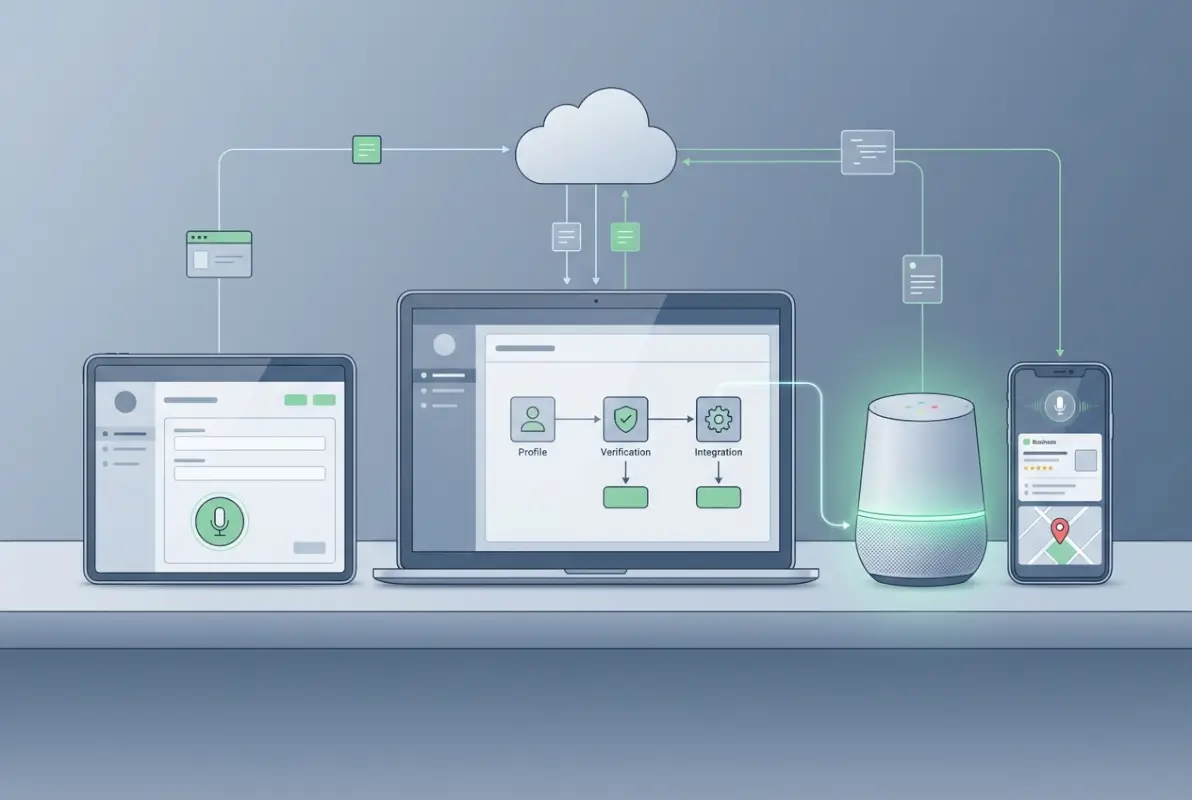
Now we get to the practical workflow that actually gets your business visible in Alexa voice search. This process requires attention to detail, but the steps themselves are straightforward. Budget approximately 4-6 hours for initial setup if you’re doing everything manually, or 1-2 hours if you’re using data aggregation services for distribution.
Step 1: Audit Your Current Listing Landscape
Start by discovering what business listings already exist for your company across the web. Many businesses are surprised to find listings they never created—platforms often auto-generate basic profiles from public data sources, business registrations, or user submissions. These unverified, unclaimed listings frequently contain outdated or incorrect information that’s actively hurting your voice search visibility.
Use free tools like Moz Local’s Check Listing or Yext’s Listing Scan to identify existing mentions of your business. Manually search Google for your business name plus city to find additional listings. Check the major platforms directly: Google Business Profile, Yelp, Bing Places, Facebook, Apple Maps, and industry-specific directories relevant to your business category.
Create a spreadsheet documenting every listing you find, noting the platform name, listing URL, current status (claimed/unclaimed, verified/unverified), visible NAP data, and any obvious errors or inconsistencies. This audit becomes your roadmap—you’ll work through this list claiming, verifying, and correcting each listing to match your master data document.
Step 2: Claim and Verify Priority Platforms
Begin with the three critical platforms that feed Alexa most directly: Yelp for Business, Bing Places for Business, and Google Business Profile. While Google doesn’t have known direct integration with Alexa, maintaining a complete Google profile strengthens your overall data authority and benefits your visibility across multiple discovery channels.
For Yelp, visit biz.yelp.com and search for your business. If a listing exists, claim it by following their verification process (typically phone or email). If no listing exists, create one using your master data document. Complete every available field including business description, hours, attributes (like “wheelchair accessible” or “accepts credit cards”), and photos. Yelp listings with 5+ photos receive significantly more engagement.
Bing Places requires verification via postcard in most cases, meaning you’ll receive a code at your business address within 5-10 business days. Start this process immediately since it represents your longest verification timeline. Visit bingplaces.com, search for your business, and follow the claim/create process. Microsoft has improved this platform substantially, and it now rivals Google in terms of features and data richness.
Google Business Profile verification varies by business type and history. Most businesses verify via postcard, though some qualify for instant phone or email verification. The key is completing your profile to 100%—Google explicitly states that complete profiles perform better in local search and voice results. This means adding all service categories, attributes, business description, hours including special hours for holidays, and regular photo updates.
Step 3: Implement and Validate Structured Data Markup
With your external listings underway, turn attention to your website’s structured data. This step is technical but manageable even for non-developers, and it’s absolutely critical for voice search visibility. Your goal is implementing LocalBusiness schema that explicitly identifies all key business details in a format that search engines and voice assistants can reliably parse.
If you’re using WordPress, plugins like Schema Pro or Rank Math SEO can add LocalBusiness markup through simple forms—no coding required. For custom sites or other platforms, you’ll need to manually add JSON-LD code. The basic structure includes your business type (choose the most specific category from schema.org’s hierarchy), name, address, phone, URL, hours of operation (use structured format with day names and times), geo-coordinates (latitude and longitude), price range (using $ symbols), and accepted payment methods.
After implementation, validate your markup using Google’s Rich Results Test at search.google.com/test/rich-results. Enter your website URL and confirm that the tool successfully reads your LocalBusiness data without errors. Common errors include missing required fields, improper formatting of hours or dates, and incorrect schema type selections. Fix any errors and revalidate until you get a clean result.
Remember that structured data isn’t just for Google—it’s a universal standard that Bing, Apple, and other platforms also consume. Proper implementation improves your visibility across the entire search ecosystem, not just a single platform. This is part of understanding the full scope of business directory listing steps in the voice search era.
Step 4: Synchronize Data Across Secondary Directories
Beyond the big three platforms, you need presence on secondary directories that feed data aggregators and contribute to overall data consensus. The specific directories that matter most vary by industry, but universal ones include Facebook Business Page, Apple Maps (via Apple Business Connect), MapQuest, YP.com, and industry-specific platforms relevant to your category.
This is where data aggregation services demonstrate clear ROI. Services like Yext (enterprise-level but powerful), Moz Local (mid-market sweet spot), or BrightLocal (great for agencies managing multiple clients) distribute your information to 50-100+ directories automatically and maintain ongoing synchronization. When you update your hours or phone number in the aggregator, the change propagates everywhere within 24-48 hours.
For businesses optimizing manually, prioritize directories based on domain authority and category relevance. A restaurant should definitely be on TripAdvisor and OpenTable; a medical practice needs Healthgrades and Vitals; a home service business benefits from Angi and HomeAdvisor. Check each platform for existing listings, claim them, and standardize the data using your master document.
Create a maintenance calendar for reviewing these listings quarterly. Set a recurring task to audit your top 20 directories every three months, checking for any data drift or unauthorized edits. Some platforms allow users to suggest edits to business listings, and occasionally these suggestions get approved automatically even when they’re incorrect.
Step 5: Develop a Systematic Review Generation Strategy
Voice assistants heavily weight review signals when deciding which businesses to recommend. According to consumer research from Statista, review ratings and quantity directly influence voice search rankings, with businesses having fewer than 5 reviews facing significant disadvantages.
Your review strategy needs three components: a systematic process for requesting reviews from satisfied customers, making the review process as frictionless as possible, and responding professionally to all reviews (positive and negative). For the request process, timing matters—ask within 24-48 hours after service completion when satisfaction is highest and the experience is fresh in the customer’s mind.
Use review request tools that send automated follow-up emails with direct links to your review profiles. Services like Podium, BirdEye, or even simple email automation through your CRM work well. The key is making the process take less than 60 seconds for the customer—one click to your review profile, no account creation required, no lengthy forms.
Focus review generation efforts on Yelp and Google since these have the strongest impact on voice search. While reviews on other platforms contribute to overall credibility, Yelp reviews in particular directly influence Alexa recommendations. Aim for a steady stream of new reviews (2-4 per month minimum) rather than sudden bursts that can trigger spam filters.
Advanced Voice Search Optimization Strategies
Once you’ve established the foundational elements—verified listings, NAP consistency, structured data, and active review generation—you can layer on advanced optimizations that separate category leaders from basic participants in voice search results.

Conversational Keyword Integration and Content Strategy
Voice search keywords fundamentally differ from typed search queries in length, structure, and intent. While someone might type “dentist 10014” into Google, they ask Alexa “who’s a good dentist in the 10014 zip code that takes my insurance and offers evening appointments?” Your content needs to anticipate and answer these longer, more specific queries.
Start by brainstorming the actual questions customers ask during initial phone calls or consultations. These real-world questions represent authentic voice search queries. Common patterns include location-based questions (“near me,” specific neighborhoods, “closest to downtown”), time-based questions (“open now,” “available today,” “emergency service after hours”), attribute-based questions (“accepts insurance,” “wheelchair accessible,” “family-friendly”), and comparison questions (“best,” “most affordable,” “highest rated”).
Structure your website content to directly answer these questions using natural language. Create an FAQ page or dedicated Q&A section with questions formatted exactly as customers ask them: “Do you offer same-day appointments for dental emergencies?” rather than a generic “Emergency Services” heading. The body text should provide a direct, concise answer in the first 1-2 sentences, then expand with additional details.
This approach simultaneously optimizes for voice search and featured snippets in traditional search, creating compound SEO benefits. Google often pulls featured snippet content from pages that directly answer questions in clear, well-structured formats—the same formats that work best for voice delivery.
Optimizing Business Descriptions for Voice Delivery
Business descriptions across your directory listings need optimization for how they’ll actually be heard when Alexa reads them aloud. This is qualitatively different from web copy designed for visual scanning. Voice-optimized descriptions are concise (150-200 words maximum), front-load the most important information in the first sentence, use short sentences and simple sentence structures, avoid jargon, acronyms, or industry terminology without explanation, and include natural transition phrases that work well when spoken.
Compare these two descriptions for a hypothetical business. Traditional version: “Premier HVAC services provider offering comprehensive solutions for residential and commercial clients. Est. 1987. Family-owned and operated. Full-service installation, maintenance, and repair. Licensed, bonded, and insured. 24/7 emergency service available. Serving greater metro area. Call today for free estimate.” This reads fine on a screen but sounds choppy and robotic when read aloud.
Voice-optimized version: “We’re a family-owned heating and cooling company that’s been serving homeowners and businesses since 1987. We handle everything from installing new systems to emergency repairs, and we’re available 24 hours a day when you need us most. We’re fully licensed and insured, and we offer free estimates throughout the metro area. Our customers appreciate our honest pricing and same-day service for urgent problems.” This flows naturally when spoken and conveys the same information more conversationally.
Test your descriptions by reading them aloud yourself or using text-to-speech tools. If the phrasing sounds awkward or unnatural when spoken, rewrite it. Voice assistants are getting better at natural delivery, but they still perform best with content written for the ear rather than the eye.
Category Selection and Specialization Signals
The business categories you select across platforms directly influence when you appear in voice search results. Alexa filters recommendations based on category relevance to the user’s query—if someone asks for a plumber and you’re categorized as a general contractor, you’re unlikely to appear even if you offer plumbing services.
Most platforms allow one primary category and 2-4 secondary categories. Your primary category should represent your core business function—the service or product you want to be known for and that generates the most revenue. Secondary categories can represent significant additional services, but adding too many dilutes your specialization signal and can actually hurt visibility for your primary offering.
Resist the temptation to select marginally related categories hoping to capture additional search traffic. A business that lists itself as a plumber, electrician, HVAC contractor, general contractor, and handyman looks unfocused to algorithms and may receive lower trust scores than a competitor positioned clearly as a specialized plumber. If you genuinely offer multiple distinct services, consider whether separate business profiles for each specialty might serve you better.
Research how competitors in your market are categorizing themselves and what categories appear in voice search results for relevant queries. You can test this by asking Alexa business-related questions and noting the categories of recommended businesses. This competitive intelligence helps you select categories that align with actual search behavior rather than guessing based on platform category lists.
Common Implementation Mistakes That Kill Voice Search Visibility
Even when businesses understand the theory of voice search optimization, practical implementation often goes wrong in predictable ways. I’ve consulted with dozens of businesses struggling with Alexa visibility, and the problems almost always trace back to one of these common mistakes.

Incomplete Listings and Missing Critical Fields
The most frequent mistake is treating business listings as checkbox exercises—claim the listing, fill in name and address, and move on. Platforms like Yelp and Google offer dozens of fields for business attributes, hours, services, and descriptions. Each empty field is a missed opportunity for voice search matching.
When someone asks Alexa for “a restaurant open late that accepts reservations and has outdoor seating,” the algorithm filters businesses based on those specific attributes. If your restaurant actually offers all those things but you didn’t mark the attributes in your listings, you won’t appear in the results. Competitor restaurants that completed their profiles completely get the recommendation instead.
Commit to 100% profile completion on your priority platforms. This means filling every single available field with accurate information—hours of operation including special hours for holidays, accepted payment methods, accessibility features, parking information, and service attributes. It’s tedious but directly correlates with visibility.
Ignoring Data Inconsistencies Across Platforms
Another killer mistake is achieving perfect consistency initially, then failing to maintain it as business information changes. You update your hours on Google Business Profile but forget about Yelp. You change your phone number and update most listings but miss a few older directories. These seemingly minor inconsistencies create major problems for voice search algorithms trying to verify your business information.
Data drift happens gradually and naturally—platforms occasionally reset information during updates, users suggest edits that get approved incorrectly, or your team updates some listings but not others when details change. Combat this through quarterly audits using your master data document as the benchmark. Set calendar reminders to review your top 20 listings every three months, checking each field for accuracy.
For businesses managing multiple locations, this maintenance challenge multiplies exponentially. A 5-location business with 20 listings per location is managing 100 individual listings that all need consistent data. This is where data aggregation services transition from “nice to have” to “business critical”—they maintain synchronization automatically, preventing the data drift that kills voice search visibility at scale.
Neglecting the Review Response and Management Component
Generating reviews is important, but responding to them is equally critical and frequently neglected. Response rates signal active business management to both algorithms and potential customers. Businesses that respond to reviews demonstrate engagement and attentiveness—qualities that voice search algorithms interpret as reliability indicators.
Develop a standard process for monitoring and responding to reviews within 24-48 hours of posting. For positive reviews, brief, genuine thank-you responses work well. For negative reviews, respond professionally and solution-focused—acknowledge the concern, apologize if appropriate, and offer to make it right without being defensive. Never argue with reviewers publicly; it reflects poorly regardless of who’s factually correct.
Track your review response rate as a key performance indicator. Aim for responding to at least 70% of reviews within 48 hours, with 90%+ response rate to negative reviews. This active management demonstrates the kind of customer attentiveness that builds both algorithmic trust and human trust.
Set-and-Forget Mentality in a Dynamic Ecosystem
Perhaps the most damaging long-term mistake is treating voice search optimization as a one-time project rather than ongoing business process. The platforms, algorithms, and best practices evolve continuously. Amazon updates Alexa’s data sources and ranking factors, major platforms change their requirements and features, and competitors implement improvements that raise the bar for everyone.
Build voice search optimization into your regular business operations rather than treating it as a special project. Assign clear ownership—someone on your team should be responsible for monitoring listings, managing reviews, and staying informed about platform changes. For small businesses, this might be the owner or office manager spending 2-3 hours monthly. Larger businesses might justify a dedicated local SEO coordinator position.
Stay informed about industry developments through resources like Search Engine Land, the Local Search Association, and platform-specific blogs from Google, Yelp, and Microsoft. When platforms announce new features or requirements, evaluate them quickly and implement relevant changes. Early adopters of new features often receive temporary visibility boosts as platforms incentivize uptake.
Measuring and Monitoring Voice Search Performance
Tracking the impact of voice search optimization requires different approaches than traditional digital marketing channels since direct attribution is challenging. Voice assistants don’t provide analytics showing which businesses they recommended and how users responded, so you need to use proxy metrics and qualitative data collection.
Tracking Mechanisms for Voice-Originated Traffic
Implement call tracking numbers that allow you to identify the source of phone inquiries. Advanced call tracking platforms can detect mobile voice search patterns based on timing, duration, and device type. When you receive a call from a mobile device immediately after business hours are queried or when the caller mentions “Alexa recommended you,” these signals indicate voice search origin.
Train your customer-facing staff to ask “How did you hear about us?” during initial interactions with new customers. Create standardized response categories in your CRM: voice search/virtual assistant, traditional web search, social media, referral, repeat customer, walk-in, etc. While this data isn’t scientifically precise, it provides directional insights about channel effectiveness.
Monitor your listing view and engagement metrics on platforms like Google Business Profile, Yelp, and Bing Places. These platforms provide analytics showing profile views, direction requests, phone calls, and website clicks. While they don’t specifically identify voice-originated actions, you can track trends correlating with your optimization efforts—if profile views increase 40% after implementing structured data and voice-optimized descriptions, that indicates positive impact.
Key Performance Indicators for Voice Search Success
Establish baseline metrics before beginning optimization so you can measure improvement over time. Track total number of verified business listings across all platforms, average review rating and total review count on priority platforms (Yelp, Google, Bing), monthly new review acquisition rate, listing view counts and engagement metrics, phone calls and direction requests from listings, and customer-reported discovery source (from your “How did you hear about us?” tracking).
Set realistic improvement goals based on these baselines. For example, if you currently have 15 business listings with an average completion rate of 60%, target 25 listings at 90%+ completion within 90 days. If you’re receiving 2-3 reviews monthly, target 5-7 monthly reviews within six months. These concrete goals create accountability and help measure ROI on your optimization efforts.
Competitive Monitoring and Market Positioning
Track how you compare to direct competitors in voice search visibility. Periodically test voice searches for your key service categories and locations, noting which businesses Alexa recommends. If competitors consistently appear while you don’t, audit their listings to identify what they’re doing differently—more reviews, better category selection, more complete profiles, or stronger local SEO signals.
Use competitive intelligence tools like SEMrush Local or BrightLocal to monitor competitor listing performance, review acquisition rates, and overall local search visibility. These tools can alert you when competitors make significant changes or when new competitors enter your market with strong voice search positioning.
Remember that voice search competition operates at the micro-local level. Someone searching for “coffee shop near me” receives different recommendations based on their exact location. Your goal isn’t necessarily beating every competitor citywide—it’s dominating voice search for your specific service area and target neighborhoods.
Frequently Asked Questions
Is there a direct Alexa business directory where I can submit my business information?
No, there is no standalone Alexa business directory with a single submission form. Alexa aggregates business information from multiple established data sources including Yelp, Bing Places, Google Business Profile, and major data aggregators. Your visibility in Alexa comes from maintaining accurate, consistent information across these platforms rather than submitting to a single Alexa-specific directory.
How long does it typically take for my business to appear in Alexa voice search results?
After establishing verified listings on priority platforms and ensuring data consistency, most businesses begin appearing in Alexa results within 2-4 weeks. Full optimization with strong visibility typically takes 6-8 weeks, depending on review acquisition rates and data synchronization timing across multiple platforms. Businesses with existing listings that just need optimization may see faster results.
What are the most important data sources that Alexa uses for business recommendations?
Yelp for Business represents the strongest known integration and should be your top priority. Bing Places for Business is also critical due to Microsoft’s partnership with Amazon. Google Business Profile, while not directly integrated, contributes to overall data authority. Data aggregators like Yext and Neustar Localeze distribute information to hundreds of directories that collectively influence voice search visibility.
Can my business succeed with Alexa voice search without having a Google Business Profile?
While technically possible, it’s not recommended. Google Business Profile contributes to your overall data authority and local SEO foundation, which indirectly supports Alexa visibility. Additionally, many data aggregators and directories cross-reference Google data when verifying business information. Skipping Google Business Profile saves minimal time while creating a significant gap in your local search foundation.
How do I know if my business information is consistent enough across platforms?
Use your master data document as the benchmark and manually audit your top 20 listings quarterly. Pay special attention to exact formatting of your business name, complete address including suite numbers, phone number format, and business hours. Tools like Moz Local or Yext offer automated consistency checking, flagging discrepancies across platforms. Even minor variations like “Street” vs “St.” count as inconsistencies.
What’s the minimum number of reviews I need to appear in Alexa recommendations?
While there’s no official threshold, research indicates businesses with fewer than 5 reviews face significant disadvantages. Target at least 10-15 reviews with an average rating of 4 stars or higher on priority platforms like Yelp and Google. Review recency matters as much as quantity—several recent reviews signal active operation and current customer satisfaction.
Should I use a data aggregation service or manage listings manually?
For single-location businesses with tight budgets, manual management is feasible though time-intensive. Budget 3-4 hours quarterly for audits and updates. For businesses with multiple locations or limited internal resources, data aggregators provide clear ROI through time savings and automated synchronization. Services range from $50-300 annually per location depending on features and distribution reach.
How often should I update my business listings and check for accuracy?
Review your priority listings (Yelp, Google, Bing) monthly for any unauthorized changes or data drift. Conduct comprehensive audits of all listings quarterly, checking every field against your master data document. Update immediately whenever business information changes—new hours, phone numbers, services, or location moves. Platforms prioritize recently updated listings as signals of active management.
Does my website need special voice search optimization beyond business listings?
Yes, on-site optimization significantly improves voice search visibility. Implement LocalBusiness structured data markup to explicitly identify your business information in machine-readable format. Create content that answers conversational queries using natural language. Develop FAQ sections addressing common customer questions. Ensure mobile-friendliness since most voice searches originate from mobile devices.
What should I do if I’m following best practices but still not appearing in Alexa results?
First, verify that all priority listings are actually claimed and verified, not just created. Check for NAP inconsistencies using automated tools. Ensure you have at least 10 reviews with recent activity. Test your structured data markup with validation tools. If everything checks out, the issue may be insufficient review signals or category mismatch—audit competitor listings to identify gaps in your approach.
Take Control of Your Voice Search Visibility Today
Voice search isn’t some distant future trend—it’s how millions of consumers find local businesses right now, today. The businesses succeeding with Alexa and other voice assistants aren’t necessarily the biggest or best-funded; they’re the ones that understand data consistency, maintain accurate listings across multiple platforms, and optimize specifically for how voice search actually works. Start with the fundamentals outlined in this guide: claim and verify your priority listings, establish NAP consistency, implement structured data on your site, and build systematic review generation into your operations. These aren’t complex strategies requiring expensive tools or specialized expertise—they’re practical steps any business can implement with attention to detail and consistent effort. The competitive advantage belongs to businesses that act now while the majority of their competitors are still waiting for that mythical “Alexa directory” submission form that will never exist.
Was this article helpful?