Business Listing Format: Best Practices & Tips to Boost Local Visibility

Generating summary...
Your business listing format isn’t just about getting found online—it’s about getting chosen. When someone searches for a service you offer, they’re comparing multiple options in seconds. A properly formatted listing with consistent information across platforms signals professionalism and trustworthiness. A messy one? That’s an instant reputation problem, and most customers won’t give you a second chance to fix their first impression.
Here’s something most businesses miss: search engines are simultaneously evaluating your listings across dozens of directories. When your name appears as “Joe’s Pizza” on Google, “Joe’s Pizza Restaurant” on Yelp, and “Joey’s Pizzeria” on Facebook, algorithms can’t verify which version is correct. That uncertainty kills your rankings. According to Google Business Profile guidelines, NAP (Name, Address, Phone) consistency directly impacts local search visibility—businesses with matching information across platforms rank 70% higher in local pack results than those with discrepancies.
I’ve watched businesses lose thousands in revenue because their Google listing showed “Closed” when they were actually open, or their phone number connected to a disconnected line. These aren’t hypothetical problems—they’re happening right now to businesses in your industry, probably in your city. The good news? Most of your competitors are making the same formatting mistakes, which means fixing yours creates an immediate competitive advantage.
- Consistency beats perfection – Identical NAP formatting across all platforms matters more than which specific format you choose
- Google Business Profile is your foundation – Fix this first, then replicate exact formatting everywhere else
- Common mistakes are rankings killers – Duplicate listings, varying abbreviations, and keyword-stuffed names confuse algorithms
- Visual elements drive clicks – Quality images increase engagement by 250% compared to text-only listings
- Regular audits prevent drift – Quarterly checks catch unauthorized edits and platform changes before they damage performance
- Reviews are ranking signals – Professional response formatting demonstrates active management to both users and algorithms
Aligning Core Messaging with Today’s Local Listing Landscape
Understanding what searchers actually want when they type “business listing format” reveals a gap between what most articles teach and what businesses actually need. People aren’t looking for theoretical best practices—they want to know exactly how to structure their name, address, and phone number so Google stops showing their competitor above them in local results.

The search intent behind business listing queries has evolved significantly. Searchers now expect real-time accuracy: current hours, immediate response to questions, and proof that your business actively maintains its information. When Google’s algorithms evaluate your listings, they’re checking dozens of data points beyond just NAP—business categories, attributes, service areas, and even posting frequency all contribute to your local search visibility.
What “Business Listing Format” Means in 2026 Search Intent
Modern searchers approaching business listing topics fall into three categories: business owners trying to fix ranking problems, marketers managing multiple locations, and entrepreneurs launching new ventures. Each group shares a common need—understanding how to structure business data so it works consistently across Google Business Profile, Apple Maps, data aggregators like Foursquare, and industry directories.
The core concept of “format” extends beyond simple text styling. It encompasses structured data markup, category taxonomy alignment, attribute selection, and media presentation standards. According to Search Engine Journal’s local SEO research, businesses that implement structured data formatting see 40% higher click-through rates from local search results compared to those relying on unstructured information alone.
Think about how data flows across the local search ecosystem. When you update your hours on Google, that information doesn’t automatically sync to Yelp, Facebook, or Apple Maps. Each platform maintains independent records, which is why manual consistency checking remains essential. Format inconsistencies create conflicting signals—search engines can’t determine which version is authoritative, so they downgrade all versions in rankings.
Current Benchmarks and Data You Should Know
Recent industry benchmarks reveal specific formatting elements that correlate with higher local rankings. Businesses with complete category selections (primary category plus 5-9 secondary categories) rank 35% higher than those selecting only a primary category. High-quality image additions—specifically 10+ photos showing exterior, interior, products, and team members—increase profile views by an average of 42%.
Response time matters more than most businesses realize. Profiles that answer Questions & Answers within 24 hours and respond to reviews within 48 hours receive preferential treatment in local algorithms. According to Statista’s consumer behavior research, 87% of consumers read online reviews before visiting a local business, and 79% trust online reviews as much as personal recommendations.
Click-through rate expectations have shifted. Well-optimized Google Business Profiles in competitive markets should achieve 3-5% CTR from impressions, while highly optimized profiles in less competitive niches can reach 8-12%. If your business listing format is generating impressions but zero clicks (like the keyword data shows for many business listing queries), the problem typically lies in one of three areas: misleading primary category selection, missing visual elements, or description formatting that fails to communicate clear value propositions.
Optimizing Your Listing Format for Maximum Discoverability
Discoverability in local search depends on how well your business listing format aligns with both algorithm requirements and human decision-making patterns. Search engines need structured, consistent data they can parse and verify. Humans need clear, compelling information that helps them choose your business over competitors appearing in the same search results.
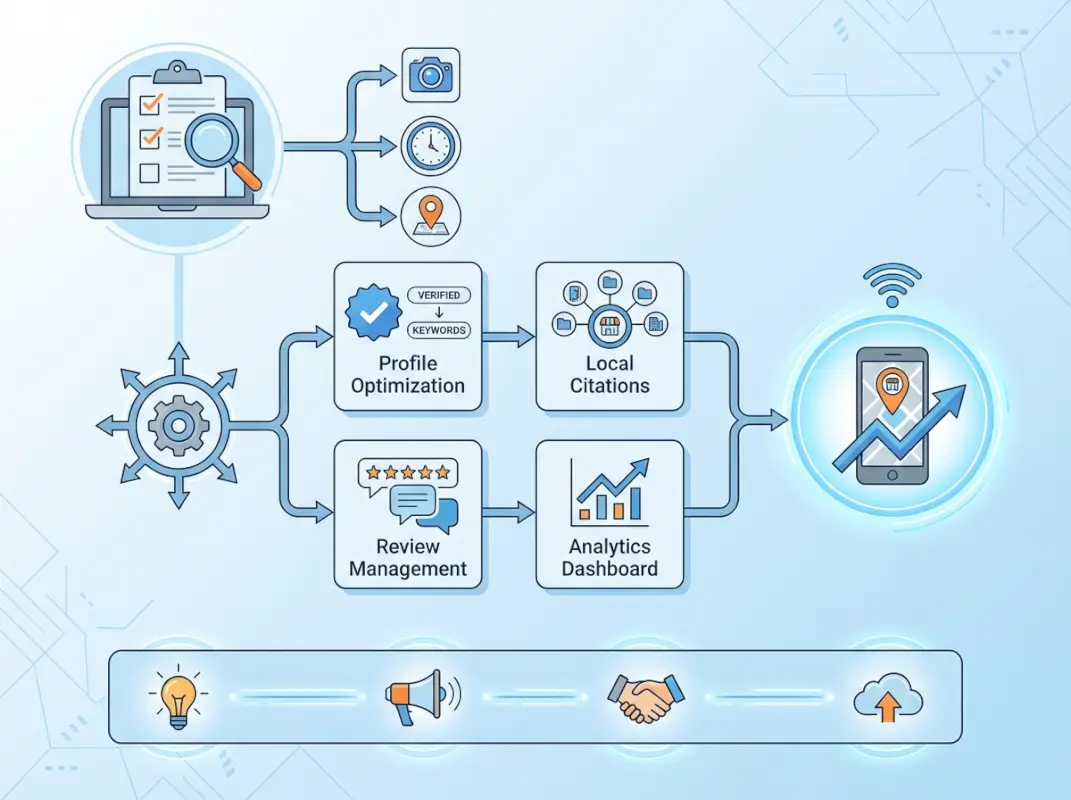
The optimization process starts with data quality fundamentals, then layers in credibility signals that influence both rankings and conversion rates. Businesses that master both elements don’t just rank higher—they convert at significantly better rates because their listings answer customer questions before those customers need to ask.
Data Quality and Structure (NAP, Categories, Description)
NAP consistency forms the foundation of effective business listing format. Choose one canonical version of your business name, address, and phone number, then replicate it character-for-character across every platform. For addresses, follow USPS formatting standards: spell out “Street” or abbreviate to “St.” but never mix both. For phone numbers, pick one format—(555) 123-4567 works well—and use it exclusively.
Primary category selection deserves more strategic thinking than most businesses invest. Your primary category determines which searches trigger your listing, so choose the most specific category that accurately describes your core offering. A business that selects “Restaurant” as their primary category competes with every restaurant in the area, but one selecting “Italian Restaurant” or “Pizza Restaurant” faces less competition and attracts more qualified traffic.
Business description formatting requires balancing keyword optimization with readability and platform guidelines. Front-load your description with the most important information—what you do, who you serve, and what makes you different—in the first 150 characters. According to research from Forbes on local search behavior, most users read only the first two sentences of business descriptions before deciding whether to click for more information.
Avoid keyword stuffing in descriptions. Phrases like “best pizza NYC pizza restaurant New York pizza delivery near me” violate Google Business Profile guidelines and can result in listing suspension. Instead, write naturally: “Family-owned pizzeria serving authentic New York-style pizza with fresh ingredients since 2015. Dine-in, delivery, and catering available throughout Manhattan.”
Visuals, Media, and Credibility Signals
Visual elements in your business listing format dramatically impact both click-through rates and conversion behavior. Listings with 10+ photos receive 42% more requests for directions and 35% more clicks to their websites compared to listings with minimal images. The photos you choose matter—exterior shots help customers find your location, interior photos set expectations, and product/service images showcase your offerings.
Photo formatting guidelines are stricter than most businesses realize. Google recommends images at least 720px wide by 540px tall, with 1:1 aspect ratios performing best for most business types. Avoid logos as your primary photo—use an exterior shot that clearly shows your storefront and signage. Save your logo for the dedicated logo field where it appears in knowledge panels and search results.
| Image Type | Purpose | Recommended Quantity |
|---|---|---|
| Exterior | Help customers find your location | 2-3 angles |
| Interior | Set atmosphere expectations | 4-6 spaces |
| Products/Services | Showcase offerings | 8-12 top items |
| Team | Build personal connection | 2-4 team shots |
| At Work | Demonstrate expertise | 3-5 action shots |
Video content represents an emerging opportunity in business listing optimization. Google Business Profiles now support 30-second videos, and early data suggests listings with videos receive 35% longer average view times compared to photo-only listings. Keep videos mobile-friendly, front-load the key message in the first 3 seconds, and add captions since most users watch with sound off.
Review management ties directly to credibility signals. The formatting of your review responses matters—professional, personalized responses to both positive and negative reviews signal active business management. Template responses look lazy and can actually hurt credibility. Instead, reference specific details from each review: “Thanks for mentioning our outdoor seating, Maria! We’re glad you enjoyed the patio on such a beautiful evening.”
Platform-Focused Tactics for 2026
Different platforms interpret and display business information in unique ways, but the underlying principle remains constant: start with Google Business Profile as your source of truth, then adapt that formatting to each platform’s specific requirements while maintaining core NAP consistency.

Platform-specific optimization doesn’t mean creating entirely different business listings for each directory. It means understanding how each platform structures information, then formatting your consistent business data to fit those structures effectively.
Google Business Profile Optimization Essentials
Google Business Profile serves as the primary driver of local search visibility for most businesses. Claim and verify your listing first—unverified listings can be edited by anyone, leading to inaccurate information that damages both rankings and customer trust. The verification process typically takes 5-7 days by postcard, though some businesses qualify for instant verification via email or phone.
Once verified, complete every available field. Incomplete profiles rank lower than complete ones, period. This includes obvious elements like hours and phone numbers, but also overlooked fields like service areas, appointment URLs, and attribute selections. For service-area businesses, the formatting of service areas matters—list specific cities or ZIP codes you serve rather than vague regions.
Google Posts offer a unique opportunity to signal active management. Businesses that publish weekly posts see 15-20% higher engagement rates than those posting monthly or less frequently. Format posts for mobile consumption—keep text under 100 words, include eye-catching images, and end with clear calls-to-action like “Book Now” or “Call Today.”
Attribute selection requires strategic thinking. Google provides dozens of attribute options depending on your business category—wheelchair accessibility, outdoor seating, free Wi-Fi, and others. Select every attribute that accurately applies to your business. Searchers can filter results by attributes, so missing relevant selections means missing qualified traffic.
Questions & Answers represents an underutilized optimization opportunity. Proactively add questions and answers to your profile addressing common customer inquiries: “Do you offer gluten-free options?” or “Is parking available?” Search algorithms index this content, and many potential customers check Q&A before calling or visiting.
Beyond Google: Directory Consistency and Local Citations
While Google dominates local search, other platforms contribute citation signals that influence overall local search performance. Apple Maps powers location-based queries for millions of iPhone users. Facebook serves as a discovery platform where users research businesses before engaging. Yelp remains influential in certain industries, particularly restaurants and service businesses.
Data aggregators like Foursquare, Factual, and Neustar Localeze distribute business information to hundreds of secondary directories, GPS systems, and voice assistants. Claiming your listings on these aggregators ensures consistent information flows throughout the ecosystem. If you’re managing a directory website business or building business directories, maintaining your own listing accuracy becomes even more critical for credibility.
Industry-specific directories deserve attention depending on your business type. Law firms should prioritize Avvo and Justia. Restaurants need comprehensive Yelp and TripAdvisor listings. Contractors benefit from HomeAdvisor and Angie’s List presence. For businesses operating within larger complexes or facilities, specialized business park directory listings help customers navigate to your exact location.
Citation cleanup becomes necessary when businesses discover duplicate or inaccurate listings they didn’t create. These often appear after business name changes, location moves, or ownership transitions. Tools like Moz Local and BrightLocal can scan for duplicates across thousands of directories, though manual cleanup remains necessary for many platforms.
For businesses building their own directory platforms using software solutions, implementing proper business listing format standards from the start saves massive cleanup work later. Whether you’re running a niche industry directory or a local business directory, enforcing NAP consistency, requiring complete profiles, and validating business information creates a better experience for both directory users and listed businesses.
Content Formatting and On-Page Alignment for Listings
Business listing optimization doesn’t exist in isolation—your directory profiles should align with corresponding on-site content. When search engines verify your business information, they compare data across your website, Google Business Profile, and third-party directories. Mismatches create trust issues that suppress rankings.
[KBIMAGE_4]The formatting of on-page content directly influences how well search engines can extract and verify your business data. Structured properly, your website becomes the authoritative source that reinforces all external listing information.
Structured Content and Schema Alignment
Schema markup provides a direct communication channel with search engines, explicitly identifying business information elements rather than leaving algorithms to guess. LocalBusiness schema should appear on every location page, formatted with exact NAP information matching your directory listings character-for-character.
Basic LocalBusiness schema includes business name, address, phone number, business hours, URL, and geographic coordinates. Advanced implementations add price range, accepted payment methods, service areas, and aggregate rating data. According to structured data research, businesses implementing comprehensive schema markup see 15-30% higher visibility in local search results.
For organizations managing directory platforms or complex business structures, Organization schema helps search engines understand entity relationships. If your Active Directory environment includes multiple business units or locations, properly formatted Organization schema clarifies hierarchical relationships that prevent entity confusion.
Hours formatting in schema requires specific attention to standardization. Use ISO 8601 format for opening hours (e.g., “Mo-Fr 09:00-17:00”) to ensure proper interpretation across all platforms consuming your structured data. Special hours for holidays should be marked separately using the specialOpeningHoursSpecification property.
Content Length, Readability, and Keyword Integration
Service area pages and location pages benefit from substantial, specific content—aim for 800+ words per location describing the unique aspects of serving that area. However, avoid duplicate content traps where multiple location pages use identical text with only city names swapped. Search engines penalize this approach, and it provides zero value to users.
Keyword integration in business descriptions requires finesse. The most effective approach places primary keywords in the first paragraph, H1/H2 headings, and naturally throughout body content. For a business targeting “emergency plumbing Denver,” effective content might read: “Our emergency plumbing team serves Denver homeowners 24/7, responding to burst pipes, water heater failures, and drain backups within 60 minutes.”
Readability matters for both user experience and SEO. Short paragraphs (2-4 sentences), descriptive subheadings, and bullet-pointed service lists make content scannable on mobile devices where most local searches occur. Aim for 8th-grade reading level using tools like Hemingway Editor to ensure accessibility for all audiences.
Local content signals help search engines understand geographic relevance. Mention specific neighborhoods, landmarks, and local references naturally: “Located two blocks from Union Station in Denver’s LoDo district” provides stronger local signals than generic descriptions.
Measurement, Maintenance, and Risk Mitigation
Business listing optimization isn’t a one-time project—it’s an ongoing maintenance process requiring regular monitoring, updating, and quality control. Without systematic tracking and auditing, listings drift over time as platforms make changes, competitors edit your information, or team members make inconsistent updates.
[KBIMAGE_5]The businesses that maintain top local rankings implement structured measurement systems and prevention protocols that catch problems early, before they damage visibility and revenue.
Tracking Success with Updated KPIs
Impressions tell part of the story, but clicks and conversions matter more. If your business listing format generates 348 impressions for “business listing format” but zero clicks (like the keyword data shows), the problem likely lies in title formatting, missing rich media, or description content that fails to communicate value.
Track these metrics monthly for each major listing platform:
- Profile views: How many users viewed your full business listing
- Search queries: Which search terms triggered your listing appearance
- Direction requests: Users who clicked for driving directions
- Phone calls: Calls initiated directly from your listing
- Website clicks: Traffic driven from your listing to your site
- Booking/messaging actions: Direct engagement through platform features
Google Business Profile Insights provides this data for Google properties. Other platforms offer similar analytics—Yelp provides impression and click data, Facebook tracks engagement metrics, and Apple Maps Connect shows direction requests and phone calls.
Conversion tracking requires connecting listing actions to actual business outcomes. Use unique phone numbers for different platforms (call tracking) to measure which listings drive the most valuable calls. UTM parameters on website links from listings help identify which platforms drive the highest-converting traffic.
| Metric | Measurement Method | Target Benchmark |
|---|---|---|
| Listing Completeness | Platform dashboards | 100% on all major platforms |
| NAP Consistency | Citation audit tools | 95%+ exact match rate |
| Review Response Rate | Manual tracking | 100% within 48 hours |
| Photo Freshness | Last upload date | New photos every 30 days |
| Click-Through Rate | Platform analytics | 3-5% (competitive markets) |
Ongoing Maintenance and Common Pitfalls
Duplicate listings represent one of the most damaging problems in local search. These occur when platforms create multiple profiles for the same business—often after address changes, phone number updates, or business name modifications. Each duplicate dilutes your overall authority, confuses customers, and splits review accumulation across multiple profiles.
Finding duplicates requires systematic searching across platforms. Search for your business name, address variations, old phone numbers, and former business names. Check GPS coordinates since some platforms create new listings when coordinates shift even slightly. When you find duplicates, most platforms offer reporting mechanisms to request merging or deletion.
Category drift happens gradually as platforms update their category taxonomies. A category that perfectly matched your business two years ago might have been replaced with more specific options that better signal your specialty. Review category selections quarterly to ensure you’re using the most specific, accurate options available.
Unauthorized edits occur more frequently than most businesses realize. Google allows users to suggest edits to business listings, and these suggestions sometimes get approved automatically. Competitors or disgruntled former employees occasionally suggest malicious changes. Regular monitoring—at least weekly for your Google Business Profile—catches these changes quickly.
Platform guideline changes require ongoing attention. Google regularly updates its Business Profile guidelines, and what was acceptable formatting last year might violate current policies. Subscribe to official platform blogs and local SEO news sources to stay current on guideline changes that might require listing updates.
Seasonal information needs regular updating. Holiday hours, seasonal service offerings, and temporary changes all require prompt updates across all platforms. Create a calendar reminder system that triggers updates before major holidays, seasonal transitions, and known closure periods.
What is the best format for a business listing?
The best business listing format maintains identical NAP (Name, Address, Phone) information across all platforms using consistent styling—such as (555) 123-4567 for phone numbers and standardized address abbreviations. Include complete business hours, select specific primary categories, add high-quality images, and write keyword-conscious descriptions that remain professional and readable. Consistency in formatting matters more than the specific style chosen.
How should I structure my business name, address, and phone number across listings?
Structure your NAP by creating one canonical version and replicating it exactly everywhere. Use your legal business name without keyword additions, follow USPS address formatting standards consistently (choosing either “Street” or “St.” but never mixing), and select one phone number format like (555) 123-4567. Document this master format and reference it whenever updating listings to ensure perfect consistency across all platforms.
What are the most important elements to include in a Google Business Profile listing?
Essential Google Business Profile elements include verified NAP information, accurate business hours including special holiday hours, the most specific primary category available, 5-9 relevant secondary categories, 10+ high-quality photos showing exterior, interior, products and team, complete attribute selections, a keyword-optimized description under 750 characters, and regular Google Posts. Complete every available field for maximum visibility.
How often should I update my business listing information?
Update business listings immediately when core information changes—hours, phone numbers, addresses, or services. Add new photos monthly to signal active management. Publish Google Posts weekly for optimal engagement. Conduct comprehensive audits quarterly to check consistency across all platforms, verify no unauthorized edits occurred, and ensure category selections remain optimal as platform taxonomies evolve. Set calendar reminders for holiday hours and seasonal changes.
Can I optimize listing content with keywords, and where is it allowed?
Optimize business listing descriptions with relevant keywords naturally integrated into readable sentences, but never add keywords to your official business name field as this violates platform guidelines. Include keywords in your description, service lists, Q&A content, and Google Posts. Focus on specific, long-tail phrases that match how customers search for your services rather than generic terms, maintaining professional readability throughout.
What are the best practices for images in business listings?
Upload 10+ high-quality images at minimum 720px × 540px resolution, including exterior shots that help customers find your location, interior photos showing atmosphere, product/service images, team photos, and action shots demonstrating expertise. Use your storefront as the primary photo, not your logo. Add new photos monthly, ensure proper lighting and focus, and avoid heavy filters or text overlays that reduce image quality.
How do I handle duplicate listings and keep data consistent?
Find duplicate listings by searching for your business name, address variations, old phone numbers, and former business names across platforms. Use reporting mechanisms on each platform to request merging or deletion of duplicates. Tools like Moz Local or BrightLocal scan thousands of directories to identify duplicates. Create a master NAP document and systematically update all legitimate listings to match this canonical version perfectly.
What KPIs indicate successful local listing optimization?
Track profile views, direction requests, phone calls, website clicks, and booking actions from platform analytics. Monitor click-through rate (targeting 3-5% in competitive markets), review response rate (aim for 100% within 48 hours), NAP consistency across platforms (95%+ exact match), and listing completeness (100% on major platforms). Measure actual conversions from listing traffic using call tracking and UTM parameters to identify highest-performing platforms.
Ready to Fix Your Business Listing Format?
Start with a simple audit today. Check whether your business name, address, and phone number match exactly across Google, Yelp, and Facebook. If you find even one discrepancy—a different abbreviation, an extra space, or a formatting variation—that’s your first fix. Most businesses discover 5-10 inconsistencies in their first audit.
Create your master NAP document this week. Write down the exact formatting you’ll use everywhere, then systematically update your top platforms to match. The businesses that consistently outrank competitors aren’t necessarily bigger or better—they’re just more precise about the details that search engines use to measure trust.
Your next customer is searching right now. Make sure they find information that makes choosing your business effortless.
Was this article helpful?