How Active Directory Benefits Small Businesses: Complete 2025 Guide

Generating summary...
Small businesses face a paradox in today’s IT landscape. The same sophisticated cyber threats that target Fortune 500 companies now menace 10-person startups, yet most small business owners still view enterprise-grade identity management as “too complex” or “not for us.” This mindset leaves companies vulnerable at precisely the moment when centralized access control has become essential for survival.
Here’s what most articles won’t tell you: Active Directory isn’t just scalable downward from enterprise—it’s fundamentally transformed for small business use through cloud integration and hybrid models. The barrier to entry has collapsed while the security imperative has skyrocketed. Organizations managing even five employees benefit from centralized identity management that would have seemed absurd a decade ago. With remote work normalizing and attack surfaces expanding, the question isn’t whether your small business needs Active Directory, but which implementation model fits your specific situation.
TL;DR – Active Directory for Small Business in 2025
- Centralized control – Manage all user accounts, permissions, and devices from a single interface, reducing IT administration by 70%
- Enhanced security – Multi-factor authentication, granular access controls, and automated password policies protect against modern threats
- Cloud flexibility – Azure AD (Microsoft Entra ID) eliminates hardware costs while providing enterprise-grade capabilities for $6-20/user/month
- Hybrid options – Combine on-premises control with cloud convenience through hybrid configurations that grow with your business
- Seamless integration – Single sign-on across 15,000+ business applications including Microsoft 365, Salesforce, and custom systems
- Compliance support – Built-in auditing and reporting simplify GDPR, HIPAA, and other regulatory requirements
Understanding Modern Identity Management for Small Businesses
Active Directory serves as the central nervous system for business IT infrastructure, authenticating users and controlling access to network resources through a hierarchical framework. Originally designed for large enterprises running Windows 2000 Server, AD has evolved into a sophisticated ecosystem that now extends seamlessly into cloud environments.
The modern implementation combines on-premises Active Directory Domain Services (AD DS) with cloud-based Azure Active Directory—recently rebranded as Microsoft Entra ID. This hybrid approach gives small businesses unprecedented flexibility: you can start entirely in the cloud with minimal investment, maintain traditional on-premises control, or blend both approaches as your needs dictate.

According to Microsoft’s Active Directory overview documentation, over 90% of Fortune 1000 companies rely on AD for identity management. What changed is accessibility—cloud options and simplified deployment have democratized these capabilities for organizations of any size.
For small businesses, directory services provide the critical foundation that was once exclusive to organizations with extensive IT departments. Whether you’re managing five employees or fifty, centralized identity management streamlines operations while dramatically improving security posture. The shift toward remote work and cloud applications has made proper identity infrastructure essential rather than optional.
The Cloud vs. On-Premises Decision Framework
Small businesses face a fundamental choice: traditional on-premises Active Directory, cloud-based Azure AD (Entra ID), or a hybrid configuration combining both. Each approach offers distinct advantages depending on your existing infrastructure and business model.
Cloud-first organizations with minimal legacy systems often benefit most from pure Azure AD deployment. You eliminate server hardware costs, reduce maintenance burden, and gain immediate access to modern security features like conditional access and risk-based authentication. Monthly per-user costs remain predictable and scale linearly with headcount.
On-premises AD makes sense for businesses with existing server infrastructure, specific compliance requirements demanding local data control, or applications that require traditional domain authentication. The upfront investment runs higher, but you maintain complete control over your identity infrastructure.
Hybrid configurations offer the best of both worlds for many small businesses—you retain on-premises control while extending identity to cloud applications. This approach provides migration flexibility as your organization evolves.
Key Security Benefits Driving Small Business Adoption
Security represents the most compelling driver for Active Directory adoption among small businesses. The system delivers multiple defensive layers that would be difficult or impossible to achieve with standalone systems, directly addressing identity and authentication failures identified in the NIST SP 800-63 Digital Identity Guidelines as critical vulnerabilities.
Modern threat actors don’t discriminate by company size—they target vulnerabilities wherever they exist. Small businesses without proper identity controls present attractive targets precisely because owners assume “we’re too small to be attacked.” This misconception leads to devastating breaches that could be prevented through basic identity governance.
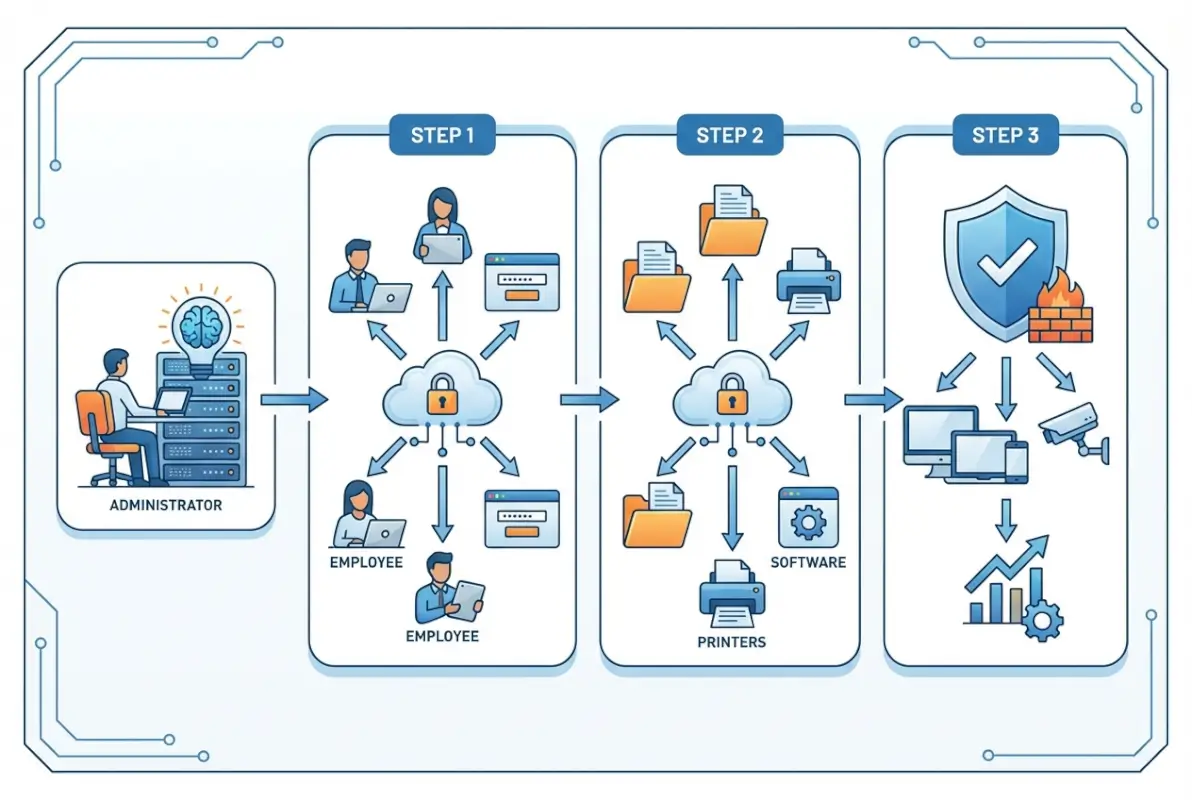
Active Directory provides comprehensive security capabilities that scale to any organization size:
- Multi-factor authentication enforcement adds verification layers beyond passwords, preventing credential-based attacks that represent the majority of successful breaches
- Granular permission controls implement least-privilege principles, ensuring users access only resources necessary for their specific roles
- Centralized policy enforcement guarantees consistent security configurations across all devices without manual intervention
- Real-time monitoring and alerting detects suspicious authentication patterns before they escalate into full breaches
- Automated password policies enforce complexity requirements and prevent common weak passwords organization-wide
- Account lockout mechanisms stop brute-force attacks automatically after configurable failed login attempts
I worked with a small accounting firm last year after they experienced a ransomware incident. Implementing Active Directory with proper security policies not only prevented similar attacks but uncovered several existing vulnerabilities that had remained undetected. The detailed audit logs revealed exactly what happened during the breach—invaluable information that shaped their entire security strategy going forward.
Compliance benefits extend beyond pure security. Active Directory’s logging and reporting capabilities help small businesses demonstrate compliance with GDPR, HIPAA, PCI-DSS, and other standards that increasingly apply regardless of company size. Auditors appreciate centralized identity controls that provide clear evidence of access governance.
Windows Server 2025 AD DS Security Enhancements
The latest Windows Server 2025 release introduces several security improvements specifically valuable for small business deployments. These enhancements focus on reducing attack surface and improving credential protection without requiring complex configuration.
Enhanced encryption capabilities protect authentication traffic more effectively, while improved monitoring provides earlier warning of potential compromise. The increased database page size (up to 32KB) improves performance for organizations with growing user bases, reducing the likelihood of performance-related security gaps.
For small businesses considering on-premises or hybrid deployment, Windows Server 2025 AD DS provides a solid foundation that anticipates future growth while delivering immediate security benefits. The platform’s NUMA improvements optimize performance on modern multi-core processors, ensuring responsive authentication even during peak usage periods.
Cost Efficiency and Real-World ROI for Small Businesses
Contrary to persistent misconceptions, Active Directory typically reduces overall IT costs for small businesses rather than increasing them. The centralized management approach minimizes hands-on IT intervention for routine tasks, translating to substantial labor savings that compound over time.
Cloud-based Azure AD eliminates capital expenses entirely. For organizations using Microsoft 365, basic Azure AD functionality comes included—you’re already paying for it whether you leverage the capabilities or not. Premium features that add conditional access, identity protection, and advanced security cost $12-20 per user monthly, far less than the productivity losses from a single security incident.

According to research from Forrester analyzing Microsoft Entra ROI, organizations achieved 240% return on investment over three years through reduced security incidents, lower administrative overhead, and improved user productivity. While this study focused on larger deployments, the proportional benefits scale effectively to small business environments.
| Deployment Model | Initial Investment | Monthly Cost (per user) | Best For |
|---|---|---|---|
| Cloud-Only (Azure AD) | $0-500 | $6-20 | Remote teams, Microsoft 365 users, minimal legacy apps |
| On-Premises AD DS | $2,000-4,000 | $0 (plus CALs) | Existing servers, compliance requirements, traditional apps |
| Hybrid Configuration | $2,500-5,000 | $6-20 | Mixed on-prem/cloud apps, migration flexibility |
The scalability factor delivers long-term value that’s easy to overlook. The same infrastructure supporting 10 employees scales to 100 without major architectural changes. I’ve seen companies avoid $20,000-40,000 in migration costs simply by implementing proper Active Directory from the start rather than cobbling together point solutions that eventually require replacement.
Labor savings accumulate quickly. Tasks requiring IT staff to physically visit workstations—password resets, permission changes, software deployment—now complete remotely in minutes. For a 25-person company, I calculated that proper AD implementation reduced IT administration from roughly 8 hours weekly to under 2 hours, freeing substantial time for strategic initiatives rather than repetitive maintenance.
Quantifying Productivity Improvements
Beyond direct cost savings, productivity improvements deliver substantial value. Single sign-on eliminates the friction of multiple login prompts throughout the workday. Employees spend less time on password-related support requests and more time on revenue-generating activities.
Automated provisioning transforms employee onboarding. New hires arrive on day one with all necessary access already configured through role-based templates. What previously consumed hours or days of IT setup time now happens in minutes, allowing new employees to become productive immediately.
Seamless Application Integration Through Single Sign-On
One of Active Directory’s most powerful capabilities—often underappreciated until experienced firsthand—is seamless integration with thousands of business applications through Single Sign-On (SSO). Users authenticate once in the morning and gain access to all authorized applications without repeatedly entering credentials.
This isn’t merely convenient; it’s a significant security enhancement. Password fatigue leads to dangerous practices like password reuse across multiple systems and writing passwords on sticky notes. SSO eliminates these risks while simultaneously improving user experience—a rare combination where security and usability align perfectly.
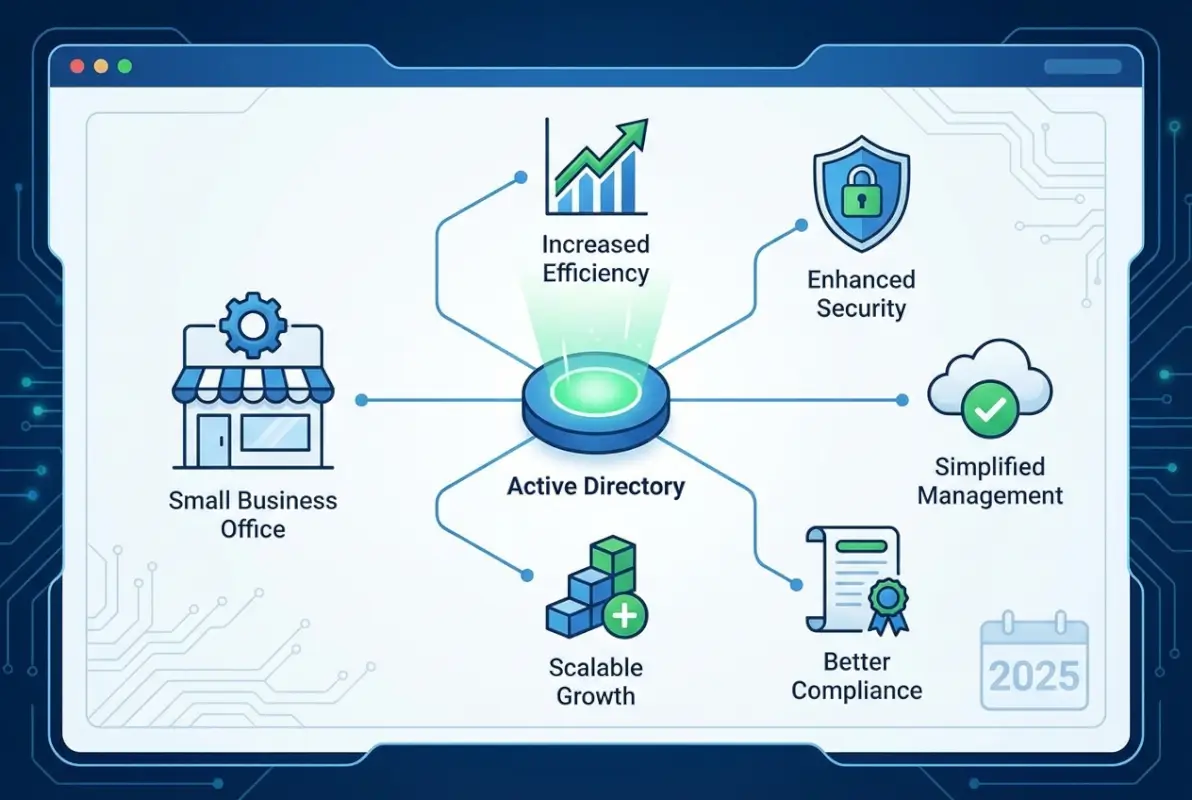
Modern Active Directory implementations integrate natively with:
- Microsoft 365 ecosystem (Outlook, Teams, SharePoint, OneDrive)
- Customer relationship management platforms including Salesforce and HubSpot
- Project management tools like Asana, Monday.com, Trello, and Jira
- Communication platforms including Slack, Zoom, and Microsoft Teams
- Cloud storage services such as Dropbox, Box, and Google Drive
- Custom web applications through SAML, OAuth, or OpenID Connect protocols
- Industry-specific applications across healthcare, finance, and professional services
Azure AD’s application gallery includes pre-configured integrations for over 3,000 popular business applications, making setup straightforward even without deep technical knowledge. For custom applications or less common tools, standard authentication protocols ensure compatibility with minimal development effort.
For businesses using WordPress-based systems or custom web applications, Active Directory integration provides unified authentication across your entire digital ecosystem. This creates consistency for both internal staff and external users while maintaining centralized control over access policies.
Implementing Active Directory: Practical Pathways for Small Businesses
Implementing Active Directory has become significantly more straightforward than in previous years, particularly with cloud options available. However, proper planning remains essential to avoid costly mistakes and ensure you build infrastructure that supports your business for years ahead.
The implementation journey differs substantially based on your chosen deployment model. Cloud-first organizations can have basic Azure AD operational within hours, while on-premises or hybrid deployments require more extensive preparation and configuration.

Prerequisites and Planning Essentials
Before beginning implementation, address several critical prerequisites:
- Infrastructure assessment – Evaluate whether cloud-only, on-premises, or hybrid deployment best matches your business requirements and existing IT resources
- Network readiness – Ensure your network infrastructure supports AD requirements including proper DNS configuration and adequate bandwidth
- Domain structure planning – Decide on domain naming conventions and organizational unit hierarchy (difficult to change later)
- Hardware evaluation – For on-premises deployments, verify server specifications meet performance and reliability requirements
- Licensing clarity – Understand your licensing model including client access licenses (CALs) or cloud subscription costs
- Security framework – Develop password policies, account lockout settings, and group structure before deployment
Taking time for thorough planning saves considerable headaches later. Many businesses benefit from consulting established directory step by step tutorial resources to understand how other organizations have structured their implementations.
Cloud-First Implementation with Azure AD
For organizations already using Microsoft 365 or planning cloud-first infrastructure, Azure AD (Microsoft Entra ID) provides the fastest path to production. The service comes pre-configured with basic identity capabilities, requiring primarily organizational customization rather than technical installation.
Start by configuring your tenant settings and security defaults. Enable multi-factor authentication organization-wide—this single step eliminates the vast majority of credential-based attacks. Configure conditional access policies that restrict access based on location, device compliance, or risk level.
Next, integrate your business applications through the Azure AD application gallery. Most popular SaaS applications offer one-click integration that establishes single sign-on within minutes. For custom applications, implement SAML or OAuth authentication following Microsoft’s detailed documentation.
Finally, establish user provisioning workflows. Configure automated user creation based on templates that assign appropriate permissions by department or role. Implement lifecycle management that automatically disables accounts for departing employees across all connected systems simultaneously.
On-Premises Active Directory Deployment
Traditional on-premises Active Directory requires more extensive technical implementation but provides complete control over your identity infrastructure. The process begins with server preparation and continues through domain controller promotion and policy configuration.
Start by installing Windows Server 2025 on appropriate hardware—minimum 4GB RAM and 32GB storage for small deployments, though 8GB RAM and 64GB storage provide better performance headroom. Configure static IP addressing and verify DNS settings work correctly, as AD depends heavily on proper DNS functionality.
Install Active Directory Domain Services through Server Manager’s Add Roles and Features wizard. The installation process adds necessary components and prepares the server for domain controller promotion. After installation completes, promote the server to a domain controller, creating a new forest with your chosen domain name.
Configure forest functional levels to Windows Server 2016 or later to access modern security features. Set a secure Directory Services Restore Mode (DSRM) password and store it safely—you’ll need this for disaster recovery scenarios. Complete the promotion wizard and allow the server to restart.
After the domain controller comes online, configure essential group policies for security baseline enforcement. Implement password complexity requirements, account lockout policies, and workstation security settings before joining client computers to the domain.
Hybrid Configuration for Maximum Flexibility
Hybrid Active Directory combines on-premises AD DS with Azure AD, providing the best capabilities of both worlds. This approach suits organizations with existing on-premises infrastructure who want to extend identity to cloud applications while maintaining local control.
Implement Azure AD Connect to synchronize on-premises user accounts to the cloud. This tool runs on a domain-joined server and replicates identity changes bidirectionally, ensuring consistent authentication across environments. Configure password hash synchronization or pass-through authentication based on your security requirements.
Hybrid configurations enable seamless single sign-on across on-premises and cloud applications. Users authenticate once and access resources regardless of location—internal file servers, cloud SaaS applications, or remote desktop services all work with the same credentials.
This flexibility proves invaluable during cloud migration. You can gradually move workloads to cloud services while maintaining existing on-premises systems, avoiding the disruption and risk of “big bang” migrations that attempt everything simultaneously.
Best Practices for Ongoing Active Directory Management
Implementing Active Directory represents just the beginning. Maximizing benefits and avoiding common pitfalls requires following established best practices that consistently work across different industries and company sizes.
Regular Backups and Disaster Recovery Planning
Active Directory contains critical information that must be protected. A corrupted AD database without proper backups can lead to extended downtime costing thousands of dollars per hour in lost productivity and potential data loss.
Implement comprehensive backup strategies: schedule daily system state backups for domain controllers at minimum, test restoration procedures quarterly to verify backup integrity, document disaster recovery processes with step-by-step instructions, and maintain offsite backup storage whether physical or cloud-based.
Even small businesses should consider deploying multiple domain controllers for redundancy. The incremental cost proves minimal compared to the business impact of prolonged authentication outages. If your primary domain controller fails, users continue working seamlessly while you address the issue without emergency pressure.
Effective User and Group Organization
Proper organization of users and groups forms the foundation of efficient Active Directory management. Without good structure, AD quickly becomes chaotic and difficult to manage as your business grows.
Implement consistent naming conventions for all objects—users, groups, computers—before creating your first account. Use Organizational Units (OUs) to logically group similar objects by department, location, or function. This structure simplifies group policy application and delegated administration.
Apply the principle of least privilege religiously. Grant only necessary permissions for each role, reviewing and adjusting access regularly as responsibilities change. Use security groups for permissions and distribution groups for email distribution to maintain clear separation of purposes.
Implement formal processes for account creation and termination with documented procedures. Regularly audit user accounts and group memberships monthly or quarterly, removing inactive accounts promptly to reduce security risks. Each orphaned account represents a potential attack vector.
Leveraging Group Policy for Consistency
Group Policy provides powerful centralized control over user environments and security settings. It’s one of Active Directory’s most valuable features, yet many small businesses significantly underutilize these capabilities.
Start with minimum necessary policies and expand gradually as you understand impacts. Test policies in non-production environments before deployment—create a test OU specifically for this purpose. Document the purpose and scope of each Group Policy Object thoroughly so future administrators understand the intent.
Use security filtering to apply policies to specific groups rather than entire domains, providing granular control that matches your organizational structure. Regularly review and update policies as business needs evolve, removing obsolete configurations that create confusion.
Implement standard security baselines from Microsoft’s Security Compliance Toolkit as your starting point. These pre-configured policies reflect current best practices and protect against common attack vectors without requiring deep security expertise.
Monitoring, Maintenance, and Performance Optimization
Active Directory requires ongoing monitoring and proactive maintenance to ensure optimal performance. Performance problems often develop gradually and may go unnoticed until they impact business operations significantly.
Monitor domain controller performance metrics continuously—CPU usage, memory consumption, and disk I/O patterns all indicate system health. Schedule monthly maintenance windows for updates and patches. Implement automated monitoring for critical events using Event Viewer or third-party tools that provide early warning of developing issues.
Regularly review and clean up stale objects including disabled accounts and old computer objects that clutter the directory. Schedule quarterly health checks of the entire directory structure, verifying replication status between domain controllers and investigating any anomalies immediately.
Track authentication failures and investigate patterns that might indicate brute-force attacks or misconfigured applications. Review security logs for suspicious activities that could represent reconnaissance or active compromise attempts.
Frequently Asked Questions About Active Directory for Small Businesses
Is Active Directory still relevant for small businesses in 2025?
Absolutely. Active Directory has become more relevant than ever for small businesses due to increased security threats, remote work requirements, and compliance demands. Cloud options like Azure AD make enterprise-grade identity management accessible without large upfront investments. Modern hybrid approaches provide flexibility that scales from five to five hundred employees seamlessly.
What’s the difference between Active Directory and Azure Active Directory?
Active Directory (AD DS) is traditional on-premises directory service managing internal network resources. Azure Active Directory (now Microsoft Entra ID) is cloud-based identity service focused on managing access to cloud applications. Many organizations use hybrid configurations connecting both systems for comprehensive identity management across on-premises and cloud resources with seamless single sign-on.
How much does Active Directory cost for a small business?
Costs vary by deployment type. Cloud-based Azure AD is included with Microsoft 365 Business Basic at $6/user/month, with premium features available at $12-20/user/month. On-premises AD requires Windows Server licenses ($500-1,000) plus client access licenses ($40 per user) and hardware. Most small businesses find cloud options more cost-effective due to eliminated infrastructure costs and reduced maintenance.
Can Active Directory work with Mac, Linux, and mobile devices?
Yes, modern Active Directory implementations fully support authentication and management for macOS, iOS, Android, and Linux devices. Azure AD particularly excels at cross-platform support, providing consistent identity management regardless of device type. This makes AD viable even for heterogeneous environments where employees use different operating systems and device types throughout the organization.
How does Active Directory improve security for small businesses?
Active Directory enhances security through centralized password policy enforcement, multi-factor authentication support, granular access controls implementing least-privilege principles, automatic account lockouts preventing brute-force attacks, detailed audit logging of authentication events, and ability to quickly disable compromised accounts across all systems simultaneously. These features collectively reduce security risks significantly compared to standalone systems.
What happens if my domain controller fails?
With proper planning and backup domain controllers, users typically won’t notice any disruption—authentication continues seamlessly using redundant controllers. If you have only one domain controller and it fails completely, users can’t authenticate until it’s restored. This is why even small businesses should maintain at least two domain controllers and regular system state backups for disaster recovery.
How long does it take to implement Active Directory?
Implementation timelines vary by complexity. Basic Azure AD setup completes within hours to days for cloud-first organizations. On-premises deployment takes 1-3 days for basic installation. Comprehensive configuration including group policies, security settings, application integrations, and user migration typically requires 1-2 weeks. Proper planning adds time but prevents costly mistakes ensuring long-term success.
Can Active Directory integrate with non-Microsoft applications?
Absolutely. Modern Active Directory supports standard authentication protocols like SAML, OAuth, and OpenID Connect, enabling integration with thousands of third-party applications including Salesforce, Google Workspace, Zoom, Slack, and custom web applications. Azure AD’s application gallery includes pre-configured integrations for over 3,000 popular business applications, making setup straightforward even without deep technical knowledge.
Is Active Directory too complex for small businesses without IT staff?
Not necessarily. While traditional on-premises Active Directory requires technical expertise, cloud-based options like Azure AD provide much functionality with significantly reduced complexity. Many small businesses successfully utilize managed service providers for initial setup and periodic maintenance while handling routine operations like user creation internally with minimal training and documentation.
How does Active Directory help with remote work and hybrid teams?
Active Directory, especially combined with Azure AD, provides seamless authentication for remote workers enabling secure access to company resources from anywhere. It supports multi-factor authentication, conditional access policies restricting access based on location or device state, and single sign-on to cloud applications—all critical capabilities for maintaining security in remote work environments without sacrificing user experience.
Building Your Identity Foundation for Long-Term Success
Active Directory has transformed from an enterprise-only solution to a practical necessity for modern small businesses of all sizes. The benefits—centralized management saving hours weekly, enhanced security protecting against sophisticated threats, cost efficiency through automation, and seamless application integration—create a compelling case for implementation regardless of your organization’s current size.
As your business grows, having a well-designed directory service foundation becomes increasingly valuable. You’ll avoid the painful migrations and security gaps that plague rapidly expanding small businesses without proper identity infrastructure. The investment you make today in Active Directory continues delivering returns for years as your team and technology needs evolve.
The question isn’t whether Active Directory makes sense for your small business—it’s which implementation approach best aligns with your specific needs. Cloud-only Azure AD suits remote-first teams using primarily SaaS applications. On-premises AD DS works for organizations with existing server infrastructure and compliance requirements. Hybrid configurations provide flexibility for businesses transitioning to cloud services gradually.
Ready to Transform Your Business Identity Management?
Start by assessing your current identity management challenges and exploring how Active Directory addresses them. Take these action steps:
- Audit current user management processes and calculate time spent on routine tasks
- Evaluate security vulnerabilities and compliance requirements specific to your industry
- Research cloud versus on-premises options based on existing infrastructure
- Consult with IT professionals familiar with small business requirements
- Develop an implementation timeline that minimizes business disruption
Remember that implementing Active Directory isn’t just about technology—it’s about building infrastructure that enables your business to scale securely and efficiently. Whether you’re a five-person startup planning for growth or a fifty-person company struggling with identity management chaos, the time to establish proper directory services is now. The longer you wait, the more complex and expensive the transition becomes, and the more vulnerable your organization remains to preventable security incidents.
Your future self—and your increasingly security-conscious customers—will thank you for making this investment in your business infrastructure. The small businesses that thrive in coming years will be those that prioritized solid identity foundations early, enabling them to adopt new technologies and scale operations without the constant friction of inadequate access controls and fragmented user management.
Was this article helpful?