How to Build an Online Directory: 7 Key Elements for Success

Building an online directory might seem straightforward—just create a list of businesses or services, add a search bar, and you’re done, right? Not quite. The directories that succeed in attracting thousands of monthly visitors and generating sustainable revenue share a set of carefully architected elements that go far beyond basic listings. In my experience working with directory builders, the difference between a ghost town and a thriving platform often comes down to how well you execute on a handful of critical design and business decisions that most guides gloss over.

Here’s what almost no one talks about: the most successful directories don’t try to be everything to everyone. They ruthlessly focus on a specific niche, solve one problem exceptionally well, and build trust through transparency rather than volume. Whether you’re building a local services directory, a professional network, or an industry-specific resource hub, the principles remain consistent—but the execution details will make or break your investment of time and money.
TL;DR – Quick Takeaways
- Niche focus beats broad scope – Directories that dominate a specific vertical outperform generic aggregators by establishing clear value propositions
- Search and categorization are your foundation – Users abandon directories with poor search functionality within seconds; invest here first
- Trust signals drive conversions – Reviews, ratings, and verification badges directly correlate with listing engagement and premium upgrades
- Mobile-first design is non-negotiable – Over 60% of directory searches happen on mobile devices; responsive design affects both UX and SEO
- Monetization requires balance – Free listings build critical mass, while premium features fund operations; the ratio matters more than the pricing
- Data quality determines longevity – Structured schemas, consistent fields, and moderation workflows separate sustainable directories from abandoned projects
1) Define Niche, Audience, and Value Proposition
Before you write a single line of code or configure any platform, you need absolute clarity on three foundational questions: Who exactly are you serving? What specific problem are you solving that existing solutions miss? And how will you measure whether you’re actually succeeding?

Clarify the Niche and Target Users
Generic directories face an uphill battle against established players like Yelp, Google Business Profile, and industry-specific incumbents. Your competitive advantage lies in specialization. Consider whether you’re targeting local services in a specific geographic area, professionals within a particular industry (like finding Christian business phone directories for faith-based networking), or businesses serving a distinct demographic.
The most successful directory projects I’ve seen start with a niche small enough that the founder can personally reach the first 50-100 listings through direct outreach. This isn’t just about market size, it’s about validation. If you can’t identify and contact your ideal listings easily, your users won’t find them either.
Articulate a Unique Value Proposition
Your value proposition must answer the question: “Why would someone use this instead of just googling it?” Maybe you verify every listing personally, maybe you aggregate reviews from multiple platforms, or maybe you provide specialized filters that generic search engines can’t match. Whatever your answer, it needs to be specific and defensible.
For example, a directory of accessibility-focused service providers might verify that listed businesses actually meet ADA compliance standards—something general directories can’t claim. A local food artisan directory might include behind-the-scenes stories and sourcing details that chain restaurant listings never provide.
Set Success Metrics
Define measurable goals before launch. How many listings will you need to be useful (typically 50-100 minimum for local, 200-500 for broader niches)? What percentage of visitors should convert to using the search function? What’s your target for premium listing upgrades? These metrics will guide every decision from design to marketing.
Understanding how to build an online directory means recognizing that metrics aren’t vanity numbers—they’re your feedback loop for what’s working and what needs adjustment.
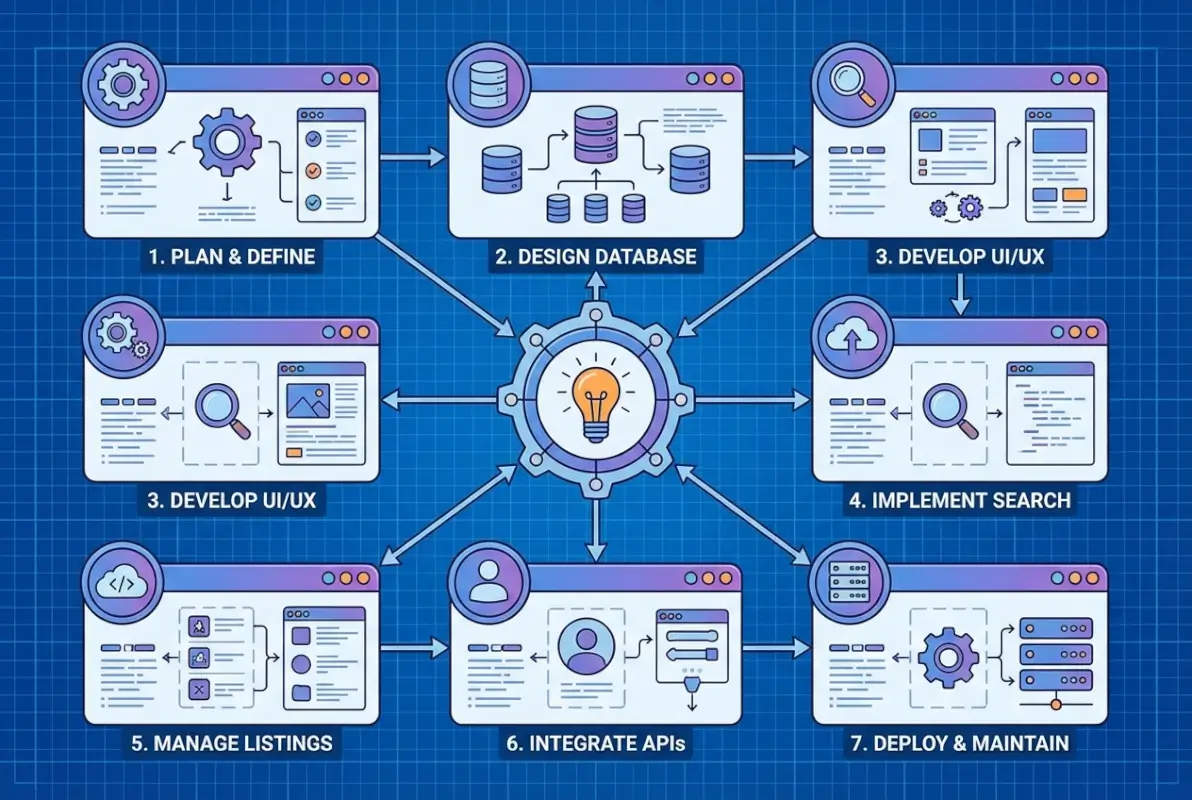
2) Data Architecture and Listings Model
The unsexy truth about directories is that your data structure will determine 80% of your long-term success or failure. Get this wrong, and you’ll spend months trying to retrofit features that should have been baked in from day one.
Data Schema Design
Every listing needs a core set of fields that balance completeness with simplicity. At minimum, plan for: business/listing name, category (primary and secondary), location (with geographic coordinates for mapping), contact information (phone, email, website), hours of operation, description, images, and social proof fields (ratings, review count, verification status).
But here’s where most builders go wrong—they either collect too little data (making listings useless) or too much (creating friction that prevents submissions). Strike a balance by making core fields required and advanced fields optional. A restaurant directory needs hours and location; a B2B supplier directory might need certifications and service areas instead.
| Field Type | Required Fields | Optional Fields |
|---|---|---|
| Local Services | Name, category, location, phone | Hours, photos, certifications, social links |
| Professional Network | Name, title, industry, contact | Bio, portfolio, recommendations, skills |
| Product/Supplier | Company, category, products, region | Pricing, minimum orders, certifications, samples |
Standardization and Moderation Workflows
Decide early whether listings are user-submitted, admin-curated, or hybrid. User-submitted scales faster but requires moderation. Admin-curated ensures quality but limits growth. Most successful directories use a hybrid: free self-submission with verification checkpoints, and premium assisted-listing services.
Build moderation into your workflow from day one. Even a simple three-state system (pending review, published, rejected) prevents spam and maintains quality. Consider auto-flagging for review any listing with certain keywords, external links, or missing required fields.
Import/Export and Data Quality Controls
You’ll want to bulk-import listings at launch (building to 50-100 listings manually is soul-crushing). Prepare CSV import templates with validation rules: required fields must be populated, phone numbers match a pattern, URLs are properly formatted, and categories match your taxonomy.
Equally important is deduplication logic—nothing destroys trust faster than seeing the same business listed three times with slightly different names. Implement fuzzy matching on name + location combinations before allowing new listings.
Structured Data and SEO Schema Markup
Implement Schema.org structured data (LocalBusiness, Organization, or Product schemas depending on your niche) on every listing page. This allows search engines to understand and potentially feature your listings in rich results. At minimum, mark up name, address, phone, hours, ratings, and price range where applicable.
This isn’t optional nice-to-have functionality anymore, it’s table stakes for directory page SEO and competitive visibility in search results.
3) Search, Filtering, and Navigation Experience
If users can’t find what they’re looking for within 10 seconds, they’ll leave. That’s not hyperbole, that’s measured behavior across hundreds of directory sites. Your search and filtering capabilities are not features to add later—they’re the core product.

Prominent, Fast Search with Auto-Complete
Place a large, impossible-to-miss search box above the fold on your homepage. Ideally, it should accept both keyword searches (“plumber”) and location inputs (“Chicago” or “60614”). Implement auto-complete suggestions that appear as users type—this serves dual purposes of speeding up searches and teaching users what’s available in your directory.
The technical implementation matters here. Search should feel instant (under 200ms response time). Use appropriate indexing, consider search engines like Elasticsearch or Algolia for larger directories, or leverage built-in database full-text search for smaller projects. Typo tolerance is essential—”resturant” should still find “restaurant” listings.
Location and Category Filters
Multi-faceted filtering turns a directory from a simple list into a research tool. Beyond basic category selection, consider: distance radius for local directories, price range filters, rating thresholds, open-now availability, verified-only toggles, and feature flags (wheelchair accessible, parking available, etc.).
Make filters persistent—if I search for “dog groomers within 5 miles,” then navigate to a listing and back, my filters should remain active. This seems obvious but you’d be surprised how many directories reset everything on each page load.
| Filter Type | Priority | Implementation Note |
|---|---|---|
| Category | Critical | Multi-select, hierarchical display |
| Location/Distance | Critical | Geolocation + manual input option |
| Rating | High | Minimum threshold slider |
| Price Range | Medium | $$$ indicators or numeric ranges |
| Features/Amenities | Medium | Checkbox list, niche-specific |
UI Patterns for Mobile-First Search
Mobile users need larger tap targets (minimum 44×44 pixels per W3C mobile accessibility guidelines), simplified filter interfaces (collapsible accordions work well), and map-based browsing options. Consider a bottom-sheet interface for filters on mobile rather than sidebar layouts that don’t translate well to small screens.
Test your search with actual devices, not just browser resizing. The experience of typing on a phone keyboard, dealing with autocorrect, and tapping small buttons reveals usability issues that desktop testing misses entirely.
Performance and UX Benchmarks
A well-implemented search function increases engagement dramatically. Directories with prominent search boxes see 40-60% higher session durations and 2-3× more page views per visit compared to those that bury search or rely solely on browsing categories.
4) Categorization, Taxonomy, and Listing Presentation
Categories are the skeleton of your directory’s information architecture. Too few, and users can’t narrow down options; too many creates choice paralysis and analysis paralysis. The research consistently shows 7-10 main categories as optimal for cognitive processing and decision-making.

Clear, Concise Main Categories
Your top-level categories should be immediately understandable without explanation. “Restaurants” is clear; “Culinary Experiences” is not. “Home Services” works; “Domestic Solution Providers” doesn’t. Use the language your target audience already uses, not industry jargon or creative rebranding.
Test your category names by showing them to people unfamiliar with your directory. If they can’t predict what they’ll find in each category within 2-3 seconds, revise until they can.
Hierarchical Categories Plus Tagging
Implement at least two levels of hierarchy for complex niches. For example: “Home Services” → “Plumbing,” “Electrical,” “HVAC,” etc. But don’t go more than three levels deep—that’s when navigation becomes a maze rather than a helpful structure.
Supplement rigid categories with flexible tags. A listing might be categorized under “Italian Restaurant” but tagged with “gluten-free,” “outdoor seating,” “family-friendly,” and “delivery available.” Tags enable cross-category discovery without forcing businesses into single boxes.
Consistent Listing Templates and Visual Design
Every listing should follow the same template structure: name/logo at top, category and location immediately visible, rating display, core contact information (click-to-call phone, website link), brief description, and action buttons (directions, save, contact). Consistency reduces cognitive load and builds user confidence.
Use iconography intentionally. A phone icon, location pin, star rating, and clock (for hours) convey information faster than text labels. But don’t overdo it—too many icons become visual clutter.
Visual hierarchy matters tremendously. The business name should be the largest text element, followed by category, then supporting details. Featured or premium listings can have subtle visual distinctions (light background color, “Featured” badge) without being obnoxious advertisements.
5) Monetization and Business Model
A directory without a monetization strategy is a hobby, not a business. The good news is directories offer multiple revenue streams that can work together rather than competing. The challenge is balancing revenue generation with user experience and growth.

Listing Pricing Models
The most common models include: free basic listings with paid upgrades, subscription tiers (bronze/silver/gold listing packages), featured placement fees, commission on leads or transactions, and display advertising. Most successful directories use a combination rather than relying on a single revenue source.
Free basic listings serve multiple purposes—they build critical mass, improve SEO through content volume, and create a conversion funnel for upselling premium features. Typically 10-20% of free listings will eventually upgrade if the value proposition is clear and the directory drives meaningful traffic or leads.
| Revenue Model | Best For | Typical Pricing |
|---|---|---|
| Featured Listings | Competitive local markets | $20-100/month per listing |
| Subscription Tiers | Professional networks, B2B | $50-500/month depending on features |
| Lead Generation | High-value service providers | $5-50 per qualified lead |
| Display Advertising | High-traffic directories | CPM or fixed monthly rates |
| Transaction Fees | Booking/reservation platforms | 5-15% of transaction value |
Free vs. Paid Listings Balance
Start with a generous free tier that provides real value—enough that businesses find it worthwhile to claim and maintain their listing. Then create premium tiers that offer tangible advantages: priority placement in search results, additional photos/videos, social media integration, enhanced analytics, or removal of competitor ads on their listing page.
The key is making the free tier useful enough to attract participants but limited enough that serious businesses see clear ROI in upgrading. Think of it like freemium SaaS: the free version solves real problems, the paid version solves them better and faster.
Checkout, Payments, and Churn Prevention
Make purchasing a premium listing as frictionless as possible. Support major payment methods (credit cards, PayPal, and increasingly digital wallets), offer both monthly and annual billing (with annual discounts to improve retention), and provide instant activation upon payment.
Churn prevention starts with delivering value. Send monthly reports to paid subscribers showing listing views, user interactions, and comparative performance. Automated emails highlighting engagement (“Your listing received 47 views and 8 phone calls this month”) remind subscribers why they’re paying and reduce cancellations.
Understanding why small businesses need a company directory presence helps you articulate value propositions that resonate with your target customers.
6) Trust, Social Proof, and Reputation Signals
Trust determines whether users act on what they find in your directory. All the SEO and traffic in the world won’t matter if visitors doubt the legitimacy of your listings or the credibility of your platform.
User Reviews, Ratings, and Business Responses
Reviews are perhaps the single most important trust signal for any directory. According to consumer behavior research, over 90% of users read reviews before making local business decisions, and ratings directly influence click-through rates and conversions.
Implement a straightforward rating system (five-star is standard for good reason—it’s universally understood), allow detailed written reviews, and critically, enable business owners to respond to reviews. That response capability serves dual purposes: it gives businesses a voice, and it demonstrates to users that listings are actively managed.
Displaying Recent Reviews and Trust Badges
Showcase the most recent 3-5 reviews prominently on each listing page, not buried at the bottom. Recency matters—a business with a 4.8-star rating from reviews written this month is more credible than one with 5 stars from three years ago.
Consider trust badges for verified listings, award winners, or businesses that meet specific criteria. A “Verified” badge (confirming you’ve validated the business exists and owns the listing) or “Top Rated” designation (for consistently high ratings) provides instant credibility shortcuts.
Privacy and Authenticity Controls
Combat fake reviews through multiple mechanisms: require email verification for reviewers, flag suspiciously rapid review posting (multiple reviews from the same IP in short periods), implement velocity limits (one review per user per business), and use text analysis to detect copy-paste review patterns.
Be transparent about your moderation policies. A published “Review Guidelines” page that explains what’s allowed and what’s not builds user confidence and provides grounds for removing problematic content.
Research from organizations like Yelp’s consumer trust surveys consistently shows that transparent moderation and authentic review ecosystems drive platform loyalty and repeated usage.
7) Accessibility, Mobile-First Design, and Technical Foundation
Accessibility isn’t just about compliance—though legal requirements are increasingly stringent. It’s about ensuring the maximum number of people can use your directory effectively, which directly impacts your addressable market and SEO performance.
Mobile-First Responsive Design Principles
Design for mobile from the beginning, then adapt for desktop. This forces you to prioritize ruthlessly—mobile screens don’t have room for clutter. Essential elements for mobile directory design include: large, tappable buttons (minimum 44×44 pixels), simplified navigation (hamburger menus or bottom navigation bars), thumb-zone optimization (place key actions where thumbs naturally rest), and fast loading times.
Mobile users are often searching on-the-go with specific intent (“I need a plumber NOW”). Your mobile experience should reflect that urgency with quick access to phone numbers, directions, and hours of operation.
Accessibility Basics Aligned with WCAG
Implement fundamental accessibility features: semantic HTML (proper heading hierarchy, landmark regions), keyboard navigation support (every interactive element reachable via Tab key), sufficient color contrast ratios (4.5:1 minimum for normal text), descriptive alt text for all images, and form labels properly associated with inputs.
Screen reader compatibility is non-negotiable. Test your directory with VoiceOver (iOS/Mac) or NVDA (Windows) to experience what visually impaired users encounter. You’ll quickly discover navigation patterns that don’t work without visual context.
Platform Choice Considerations
Your three primary platform categories are WordPress with directory plugins, SaaS directory platforms, and custom development. Each has distinct trade-offs:
WordPress + Plugins: Low initial cost, extensive plugin ecosystem (GeoDirectory, Directorist, Business Directory Plugin), easy content management, but potential performance issues at scale and ongoing maintenance burden.
SaaS Platforms: Managed hosting, automatic updates, built-in features, faster time-to-launch, but higher monthly costs, less customization flexibility, and dependency on the platform’s roadmap and stability.
Custom Development: Complete control, optimized performance, unique features, but significantly higher upfront investment, longer development timeline, and requirement for ongoing technical maintenance.
For most first-time directory builders, I recommend starting with WordPress or a SaaS solution. Prove your concept and business model before committing to custom development. The goal is to build an online directory website that validates your market before over-investing in technology.
8) Growth, SEO, and Content Strategy
A directory is only as valuable as its content volume and discoverability. SEO isn’t an afterthought—it’s the primary acquisition channel for most successful directories.
SEO-Friendly Category Pages and Listing Pages
Each category page should target specific keywords (“Italian restaurants in Chicago”), include unique descriptive content (not just a list of results), and implement proper heading structure. Listing pages need optimized titles (business name + category + location), meta descriptions, and structured data markup.
URL structure matters. Use clean, descriptive URLs like `/category/plumbers/chicago/` rather than `/cat.php?id=47&loc=23`. Search engines and users both prefer readable URLs.
Content Strategy for Ongoing Value
Beyond listings, publish supporting content that establishes authority and captures related search traffic: buying guides (“How to Choose a Wedding Photographer”), local area guides (“Best Family Activities in Austin”), industry trends, FAQ pages, and comparison content.
This content serves multiple purposes—it improves SEO through keyword coverage and backlinks, it provides value to users beyond simple listing discovery, and it positions your directory as an industry resource rather than just a list.
Link-Building and Directory Network Considerations
Acquire backlinks through listing outreach (businesses often link to their directory profiles), local partnerships, industry associations, and content marketing. Guest posting on relevant blogs, creating shareable research or infographics, and participating in industry events all generate link opportunities.
Consider submitting your directory to other business directories (yes, there are directories of directories). The backlink value varies, but it can provide early SEO momentum and referral traffic.
9) Platform and Implementation Options
The platform decision shapes everything from launch timeline to monthly operating costs to feature availability. Let’s break down your realistic options.
Three Core Foundations
WordPress with Plugins: The most popular starting point, WordPress combined with directory plugins like Directorist, GeoDirectory, or Business Directory Plugin offers extensive functionality at low cost (often $50-200 for the plugin plus hosting). You’ll need basic WordPress knowledge, but the learning curve is manageable and the community support is extensive.
SaaS Directory Builders: Platforms like Brilliant Directories, Ideal Directories, or Joobi provide all-in-one solutions with hosting included, typically $50-300/month. They handle technical infrastructure, security updates, and often provide marketing tools and templates. The trade-off is less flexibility and ongoing subscription costs.
Custom Development: Building from scratch (or using frameworks like Django, Laravel, or Node.js with custom frontend) gives you complete control but requires significant investment—expect $10,000-50,000+ for a professional custom directory, depending on complexity. Only viable if you have specific requirements that off-the-shelf solutions can’t address, or if you’re building something intended to scale to millions of users.
Trade-offs: Control, Speed to Market, Cost, and Scalability
WordPress and SaaS solutions get you launched in days to weeks; custom development takes months. Initial costs range from a few hundred dollars (WordPress) to thousands (SaaS annual contracts) to tens of thousands (custom). But ongoing costs invert—WordPress requires hosting and maintenance time, SaaS has perpetual subscription fees, and custom development needs occasional feature updates and security patches.
Control follows a similar gradient: SaaS offers the least (you’re dependent on the platform’s feature set), WordPress provides moderate control (extensive customization through code but within WordPress constraints), and custom gives you complete control (but also complete responsibility).
Quick-Start Pathways for Different Budgets
Almost Free ($100-500): WordPress with a directory plugin, shared hosting, free theme adapted for directory use. Suitable for testing concepts or very niche directories with limited growth expectations.
Mid-Range ($1,000-5,000): SaaS platform annual subscription or WordPress with premium plugin, managed WordPress hosting, custom design work. Appropriate for most serious directory projects with revenue expectations within 12-24 months.
Full Investment ($10,000+): Custom development or heavily customized WordPress/SaaS with professional design, advanced features, and marketing budget. Makes sense when you’re entering a proven market with clear competitive advantage and monetization strategy.
10) Launch Readiness and Metrics Tracking
You’re never 100% ready to launch, but there’s a minimum viable threshold you must hit before going public. Launching too early damages credibility; launching too late means you’re building in a vacuum without user feedback.
Pre-Launch Checklist
Ensure you have: at minimum 50-100 quality listings (local directories) or 200-500 (broader niches), all core categories populated with at least a few listings each, search and filtering fully functional, mobile responsiveness verified across devices, contact and support processes established, privacy policy and terms of service published, and basic analytics implementation (Google Analytics 4 at minimum).
Run through complete user journeys yourself: can someone search, find a relevant listing, view details, and contact the business without hitting broken links or confusing navigation? Have at least 3-5 people unfamiliar with your project attempt the same tasks—their feedback will identify blind spots you’ve stopped noticing.
Key Metrics to Monitor Post-Launch
Track metrics in three categories: Growth metrics (new listings per week, user registrations, returning visitor rate), Engagement metrics (search usage rate, average session duration, pages per session, bounce rate on listing pages), and Business metrics (conversion rate to premium listings, revenue per paying customer, customer acquisition cost, lifetime value).
Set up goal tracking for key actions: search performed, listing viewed, contact button clicked, directions requested, review submitted, premium listing purchased. These micro-conversions help you understand user behavior and identify optimization opportunities.
Iterative Improvement Loop
Plan monthly review cycles where you analyze metrics, gather user feedback, and prioritize improvements. Use A/B testing for significant changes (search bar placement, category layout, pricing structures) to validate hypotheses before rolling out changes universally.
Maintain a public roadmap (or at least communicate upcoming features to premium subscribers) to build anticipation and gather input. Users who feel heard are more likely to remain engaged and evangelize your directory.
Frequently Asked Questions
What makes a successful online directory homepage?
A successful directory homepage features a prominent search bar above the fold, clear category navigation, social proof (total listings or featured reviews), concise value proposition text explaining what makes this directory unique, mobile-responsive design, fast loading speed, and visible trust signals like verification badges or testimonials. The design should guide users to search or browse within seconds of landing.
How should I structure categories and filters for best usability?
Limit top-level categories to 7-10 options to prevent choice paralysis, use clear descriptive names that match user language, implement hierarchical subcategories for depth, supplement with flexible tagging, provide multi-select filtering options, and ensure filters persist across navigation. Test category names with users unfamiliar with your niche to verify clarity and intuitive understanding.
What is the best platform for starting a directory today?
WordPress with directory plugins like Directorist or GeoDirectory offers the best balance of cost, features, and control for most new directory projects. It provides extensive customization options, strong SEO capabilities, manageable costs, and a supportive community. SaaS platforms work well if you want faster setup and managed infrastructure, while custom development only makes sense for unique requirements or large-scale ambitions.
How can I monetize a new directory without driving away users?
Start with generous free basic listings to build critical mass and user trust, then offer premium upgrades with clear value (featured placement, enhanced profiles, analytics, lead generation). Maintain a 4:1 or 5:1 ratio of free to paid listings. Avoid intrusive advertising early on; focus on listing-based revenue. Communicate value transparently and provide monthly performance reports to paying customers to demonstrate ROI.
How important are user reviews, and how do I manage fake reviews?
Reviews are critically important—over 90% of users consult reviews before making business decisions. Manage fake reviews through email verification for reviewers, velocity limits, IP monitoring, text pattern analysis to detect duplicates, clear review policies, and transparent moderation. Enable business-owner responses to reviews and never delete negative reviews unless they violate explicit policies. Authenticity builds trust more than uniformly positive ratings.
What SEO practices are essential for directory pages and listings?
Implement Schema.org structured data on all listing pages, create unique content for each category page, use descriptive URLs with keywords, optimize title tags and meta descriptions, ensure mobile responsiveness and fast loading speeds, build internal linking between related listings and categories, acquire quality backlinks through outreach and content marketing, and publish supporting content beyond listings to establish topical authority.
What accessibility standards should I target for a directory site?
Target WCAG 2.1 Level AA compliance minimum, which includes semantic HTML structure, keyboard navigation support, sufficient color contrast (4.5:1 for normal text), descriptive alt text for images, proper form labels, screen reader compatibility, and mobile accessibility features. Test with actual assistive technologies like screen readers, and ensure core functions work without a mouse. Accessibility improves SEO and expands your addressable user base.
How many listings should I aim to launch with, and how do I grow listings quickly?
Launch with 50-100 quality listings minimum for local directories or 200-500 for broader niches—enough to demonstrate value in each major category. Grow quickly through direct outreach to businesses, offering free premium listings temporarily to early adopters, importing public data where legally appropriate, incentivizing user submissions, partnering with industry associations, and creating content that attracts businesses seeking visibility.
What security and moderation practices protect a directory from spam or abuse?
Implement CAPTCHA or similar anti-bot measures on submission forms, require email verification for user accounts, use velocity limits on listing and review submissions, maintain a moderation queue for new listings, create clear submission guidelines and terms of service, monitor for duplicate content and suspicious patterns, provide user reporting mechanisms, and establish defined escalation procedures for handling violations and appeals.
How do I design for mobile users without sacrificing desktop experience?
Use responsive design principles with mobile-first thinking—design for small screens first, then enhance for larger displays. Implement touch-friendly interface elements, simplified navigation for mobile, progressive enhancement that adds features on larger screens, and performance optimization that benefits all devices. Test on actual mobile devices regularly, and use analytics to understand your mobile versus desktop usage patterns to prioritize appropriately.
Building a successful online directory requires balancing multiple disciplines—information architecture, user experience design, business model planning, technical implementation, and ongoing growth strategy. The directories that thrive aren’t necessarily those with the most listings or the flashiest features; they’re the ones that solve a specific problem better than alternatives, build trust through transparency, and create genuine value for both users and listed businesses.
If there’s one principle to carry forward, it’s this: start focused, execute well on fundamentals, and expand gradually based on real user feedback rather than assumptions. The temptation to build everything at once is strong, but the directories I’ve seen succeed launched with strong foundations in search, categorization, mobile experience, and trust signals—then iterated based on what actually drove engagement and revenue.
Your directory’s long-term viability comes down to three pillars: data quality (listings are accurate, complete, and useful), user trust (reviews are authentic, moderation is transparent, and the platform works reliably), and frictionless experience (users find what they need quickly, on any device, without confusion or frustration). Master those elements, and you’ll build something that compounds in value rather than requiring constant maintenance to stay relevant.
Ready to Build Your Directory?
Choose your platform, populate your first 50 listings, and launch a beta version within the next 30 days. Real user feedback beats theoretical planning every time—start gathering that feedback now, and iterate toward product-market fit with actual data rather than assumptions.