How to List Your Business on Yelp: 5 Essential Steps

Picture this: a potential customer is searching for a business like yours right now. They’re on their phone, standing on a street corner, and they open Yelp to find their answer. If your business isn’t there—or worse, it’s there but unclaimed and outdated—you’ve just lost that customer to your competitor down the street. Yelp isn’t just another review site; it’s a critical discovery platform that can make or break local visibility, particularly for service-based businesses and restaurants. What most business owners miss is that simply existing on Yelp isn’t enough. The real magic happens when you claim your listing, optimize it strategically, and engage authentically with your audience. In this guide, we’ll walk through the five essential steps to list your business on Yelp in a way that actually drives leads and builds trust—not just another forgotten profile in the digital noise.

TL;DR – Quick Takeaways
- Claim ownership immediately – Verify your business through Yelp for Business Owners to unlock editing rights and engagement tools
- Complete every profile field – High-quality photos, accurate hours, and relevant attributes dramatically improve discoverability
- Respond to all reviews – Professional engagement with feedback (positive and negative) builds trust and influences purchase decisions
- Enable lead capture features – Message requests and quote forms turn browsers into qualified leads
- Monitor performance regularly – Track views, clicks, and calls to optimize your listing over time
Yelp’s platform has evolved significantly, and understanding how to leverage it properly in the current landscape can be the difference between a dormant listing and a lead-generating machine. Let’s dive into the specifics.
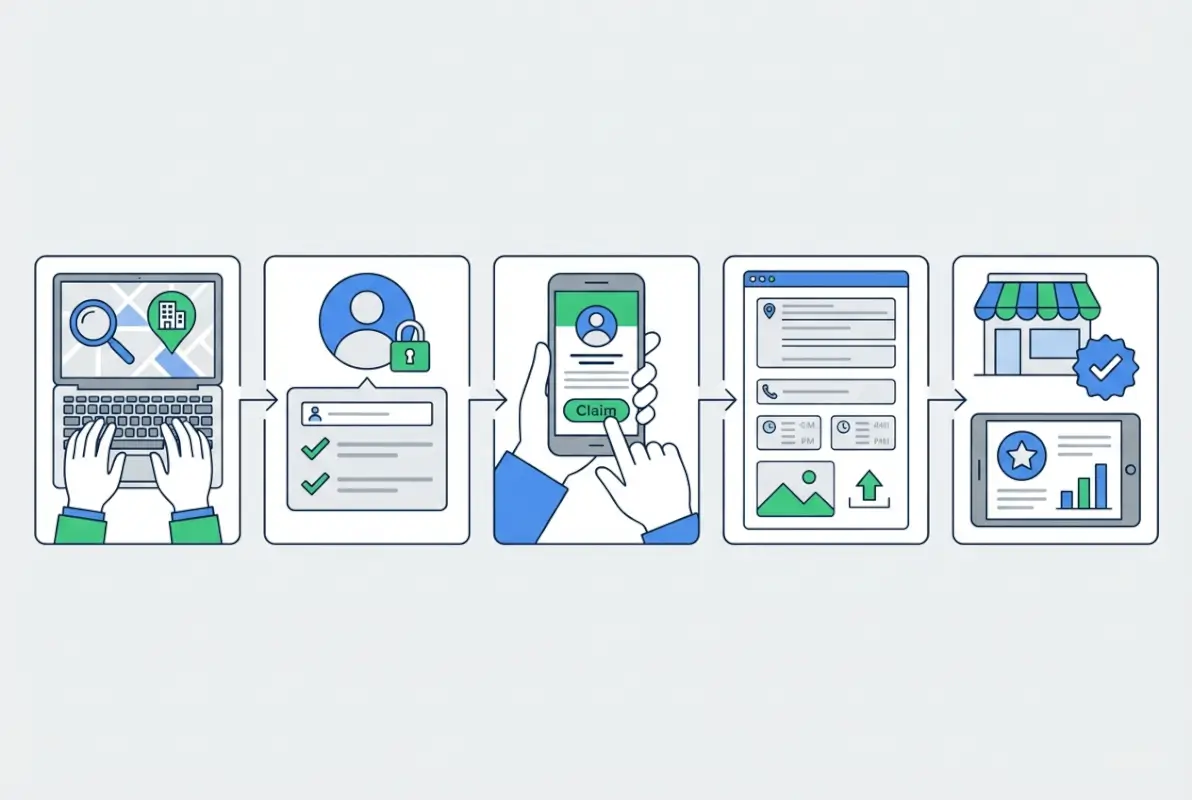
Step 1 — Verify Eligibility and Claim Your Yelp Page
Before you can do anything meaningful with your Yelp presence, you need to officially claim your business page. This process establishes you as the authorized representative and unlocks the full suite of tools available to business owners. The claiming process might seem straightforward, but there are nuances that can trip up even experienced marketers.

Confirm Eligibility for Your Business Location(s)
Not every business can be claimed on Yelp, and understanding the eligibility requirements upfront saves frustration later. Yelp typically allows claims for businesses with a physical location where customers can visit or that serve customers at their location. Virtual-only businesses or those without a legitimate physical presence may face restrictions.
The listing must be active and open to claim successfully. If your business shows as “Closed” on Yelp, you’ll need to address that status before proceeding with the claim. Additionally, each location needs to be claimed separately—there’s no automatic inheritance of ownership across multiple addresses, even for franchises or chains. Before starting the claim process, verify that your business information on Yelp matches your actual legal business details. Mismatches in business names, addresses, or phone numbers can delay or complicate verification.
Initiate the Claim (One Location or Multiple Locations)
For single-location businesses, the claim process starts at biz.yelp.com. You’ll search for your business by name and location, select the correct listing, and click the option to claim it. The interface guides you through providing contact information and choosing a verification method.
If you’re managing multiple locations—say, a regional chain or franchise operation—Yelp offers a dedicated pathway for bulk claiming. This enterprise approach streamlines the process and provides centralized management tools. The multi-location claim option is designed for brands that need to maintain consistency across numerous pages while giving appropriate access to local managers. It’s worth noting that brands with substantial location counts might benefit from exploring Yelp’s claiming API for automated workflows, though this requires technical resources.
Verification Methods and Expected Timelines
Yelp uses several verification methods to confirm you’re authorized to represent the business. The most common is phone verification, where Yelp calls a published business number and provides a code to enter online. Email verification is another option, sending a confirmation link to an address associated with the business domain. Some claims can be completed through the Yelp app, which streamlines mobile verification.
In certain cases—particularly for businesses in sensitive categories or with complex ownership structures—Yelp’s support team may manually review your claim. This can extend the timeline from a few minutes to several days. If you encounter delays or can’t verify through the standard methods, contacting Yelp support directly often resolves the issue. Just be prepared to provide documentation proving your authority to manage the listing (business license, EIN documentation, utility bills showing the business address, etc.).
Post-Claim Expectations
Once your claim is approved, you’ll receive confirmation and gain access to your business dashboard. This unlocks editing capabilities for your profile, the ability to respond to reviews, access to messaging features, and performance analytics. You might also receive follow-up communications from Yelp about advertising options or additional features, though claiming itself is completely free and doesn’t obligate you to purchase anything.
The dashboard becomes your command center for managing your Yelp presence. Familiarize yourself with its layout and available tools—this is where you’ll spend time refining your profile, tracking performance, and engaging with customers. Many businesses discover features they didn’t know existed simply by exploring the post-claim interface thoroughly.
Step 2 — Complete and Polish Your Yelp Business Page
A claimed but incomplete profile is a missed opportunity. Customers make snap judgments based on the completeness and professionalism of your Yelp page, and incomplete information signals neglect or lack of legitimacy. Your goal here is to create a comprehensive, compelling profile that answers every question a potential customer might have before they even think to ask.
Essential Profile Elements to Complete
Start with the fundamentals: business name, address, phone number (NAP), website, hours of operation, and business category. These aren’t just formalities—they’re trust signals and ranking factors. Ensure your business name matches exactly what’s on your signage and legal documents. Consistency across platforms (Google Business Profile, social media, your website) reinforces legitimacy and helps with local SEO.
Your phone number should be a direct line that’s answered during business hours. Nothing frustrates potential customers more than calling a number that goes to voicemail or isn’t monitored. If you have multiple phone numbers (main line, reservations, customer service), list the most appropriate one for the customer’s likely needs. Hours should be current and account for holidays or seasonal variations. Some businesses forget to update hours after temporary closures or schedule changes, leading to frustrated customers showing up when you’re closed.
The category selection is surprisingly important for discoverability. Yelp allows you to choose a primary category and several subcategories. Choose the most specific, accurate categories that describe what you do. If you’re a “Thai Restaurant,” don’t just select “Restaurant”—the specificity helps you appear in more targeted searches. You can explore how listing your business properly across platforms improves overall visibility on sites like Google Business Profile.
Add Rich Media and Attributes
Photos are perhaps the single most influential element on your Yelp page. Businesses with high-quality images receive significantly more user engagement than those with sparse or low-quality photos. Upload professional shots of your exterior (so customers can find you), interior (to showcase ambiance), products or dishes (to entice interest), and your team (to humanize your brand).
Video content, where appropriate, can showcase your business in action—a chef preparing a signature dish, a tour of your facility, or customer testimonials. Video engagement on business listings has grown substantially, and it differentiates you from competitors who rely solely on static images.
Attributes are those handy tags that appear on your profile: “Wheelchair Accessible,” “Wi-Fi,” “Outdoor Seating,” “Good for Groups,” “Accepts Credit Cards.” These aren’t just nice-to-haves—they’re filtering criteria for searchers. When someone searches for “dog-friendly restaurants near me,” having that attribute selected makes you eligible to appear. Recent data shows that certain attributes like “Outdoor Seating” and “Free Wi-Fi” are among the most popular, so if they apply to your business, make sure they’re selected.
Craft a Compelling Business Description
Your business description is your elevator pitch to Yelp users. It should be concise (typically 250-500 words), benefit-focused, and reflect your unique value proposition. Avoid jargon or overly salesy language—just clearly explain what you do, what makes you different, and what customers can expect.
Include relevant keywords naturally (your service area, specialties, unique offerings), but write for humans first. This description should complement—not duplicate—what’s already obvious from your photos and categories. For example, if you’re a boutique hotel, don’t just say “We’re a hotel in downtown.” Instead: “We offer intimate, locally-inspired accommodations in the heart of downtown, with personalized concierge service and rooftop access to the city’s best sunset views.”
Consistency with your website and other listings reinforces your brand and avoids confusion. If your website emphasizes farm-to-table dining, your Yelp description should too. Cross-platform consistency also supports broader local SEO efforts and builds a coherent brand presence. Learning how to optimize across various platforms is part of a comprehensive strategy—check out insights on free business directory listing approaches for broader context.
Verify and Test Customer Touchpoints
Your profile includes several ways for customers to contact you: the “Call” button, “Message the Business” feature, and potentially “Request a Quote” depending on your business type. Test each of these from a customer’s perspective. Does the phone number connect properly? Are messages routed to an email or app you check regularly? Do quote requests trigger a notification so you can respond promptly?
Too many businesses enable these features and then ignore them. A message or quote request that goes unanswered for days (or forever) creates a worse impression than not offering the feature at all. If you enable messaging, commit to monitoring and responding within a few hours during business days. Quick response times are visible to users and contribute to trust and conversion.
Step 3 — Engage with Your Audience on Yelp
Claiming and completing your profile is only the beginning. The businesses that truly win on Yelp are those that engage actively and authentically with their audience. This means responding to reviews, leveraging messaging features, and using free promotional tools to keep your profile dynamic and relevant.

Respond to Reviews (Positive and Negative)
Review responses are one of the most underutilized tools in the Yelp arsenal. Many business owners either ignore reviews entirely or only respond when they’re angry about a negative one (which, as you can imagine, doesn’t go well). The reality is that every review—positive, neutral, or negative—is an opportunity to demonstrate your professionalism and customer service philosophy.
For positive reviews, a simple, genuine thank-you goes a long way. Acknowledge specific details the reviewer mentioned to show you actually read their feedback. For example: “Thanks so much for highlighting our seasonal cocktail menu—our bartenders pour a lot of creativity into those drinks and it’s great to hear you enjoyed them!” This shows you care and reinforces what you do well.
Negative reviews are trickier but arguably more important. Research from institutions studying claiming behavior and review dynamics suggests that how a business responds to criticism can significantly influence prospective customers’ perceptions. When you respond professionally to a negative review—acknowledging the issue, apologizing if appropriate, and offering a solution—potential customers see that you’re accountable and committed to making things right.
Never argue publicly, get defensive, or attack the reviewer (even if you suspect the review is unfair or fake). Instead, address the concern calmly and invite the customer to contact you privately to resolve the issue. This shows other readers that you handle complaints maturely. For example: “We’re sorry to hear about your experience with our service wait times. We’ve been working on staffing adjustments to improve this. Please reach out to us directly at [contact info] so we can make this right for you.”
Leverage Messaging and Quote Requests
The “Message the Business” and “Request a Quote” features turn your Yelp page into a lead generation engine. When enabled, these tools allow potential customers to reach out directly from your profile without needing to call or visit your website. For service-based businesses—contractors, event planners, consultants—this can be a game-changer.
Set up notifications so you’re alerted immediately when a message or quote request comes in. The faster you respond, the higher your conversion rate. Prospective customers are often reaching out to multiple businesses simultaneously; the one who responds first (and most helpfully) usually wins the job. Aim for response times under an hour during business hours if possible.
Use messaging to qualify leads and start building a relationship. Ask clarifying questions, offer helpful information, and make it easy for the customer to take the next step (schedule a call, book an appointment, etc.). This is also an opportunity to showcase your expertise and customer service before a customer has even committed.
Promote Offers and Updates Without Paid Ads
Yelp offers several free tools to keep your profile fresh and attract attention. You can post updates about special events, limited-time offers, seasonal menu changes, or new services. These posts appear on your profile and can show up in users’ feeds, giving you organic visibility.
Think of these updates as mini social media posts for your Yelp audience. They don’t need to be elaborate—just timely and relevant. A cafe might post about a new pastry chef joining the team, a gym might highlight a free trial class weekend, or a boutique might announce a trunk show. Align these posts with your broader marketing calendar for consistency across channels.
While Yelp does offer paid advertising options (like sponsored search placement), the free tools are powerful enough for most small to mid-sized businesses. Don’t feel pressured to spend on ads until you’ve fully optimized your free presence and are seeing consistent engagement. Many successful Yelp users never pay for ads and still generate substantial leads from the platform. Understanding how free tools compare to paid options across different platforms can help—explore strategies used on free business directories for additional context.
Step 4 — Leverage Yelp for Visibility and Lead Generation
At this point, you have a claimed, polished, actively managed Yelp page. Now it’s time to think strategically about how to maximize its impact on your business. This involves understanding the free versus paid landscape, optimizing for discoverability, tracking performance, and benchmarking against industry standards.

Understand Free vs. Paid Options
It’s important to clarify: claiming your Yelp page and accessing the full suite of free business tools does not require any payment. You are never obligated to purchase advertising simply because you claimed your listing. Yelp does offer paid options—primarily sponsored search placement that boosts your visibility in search results—but these are entirely optional.
The free tools (profile editing, review responses, messaging, basic analytics) are robust enough that many businesses never need to pay. If you do consider paid ads later, approach them strategically: set a clear budget, define what success looks like (leads, calls, quote requests), and monitor performance closely. Some businesses find Yelp ads highly effective, especially in competitive local markets, while others see better ROI from organic optimization and engagement.
| Feature | Free (Claimed Page) | Paid (Advertising) |
|---|---|---|
| Profile Management | Full editing access | Same access |
| Review Responses | Unlimited responses | Same |
| Messaging & Quotes | Enabled | Same |
| Search Visibility | Organic ranking | Sponsored placement |
| Analytics | Basic metrics | Enhanced reporting |
Optimize for Discoverability
Yelp uses a variety of signals to determine which businesses appear in search results and how they’re ranked. While the exact algorithm is proprietary, we know several key factors influence your visibility:
Category accuracy: Be as specific as possible. A “Mexican Restaurant” will rank better in relevant searches than a generic “Restaurant.”
Completeness: Profiles with all fields filled, plenty of photos, and selected attributes signal quality and tend to rank higher.
Reviews and ratings: More reviews (particularly recent ones) and higher average ratings boost your position. This is why actively encouraging satisfied customers to leave reviews matters—though always within Yelp’s guidelines (never incentivize or pressure customers).
Engagement: Businesses that respond to reviews, update their profiles regularly, and use messaging features signal they’re active and attentive, which can positively influence ranking.
NAP consistency: Your Name, Address, and Phone number should match across all online platforms—Yelp, Google, your website, other directories. Inconsistencies confuse both users and algorithms. This ties into broader local SEO strategies, where maintaining consistency across platforms is crucial. For a comprehensive approach, consider how Google Business Directory optimization complements your Yelp efforts.
Behavioral signals: Yelp likely considers user behavior—clicks, calls, messages—as signals of relevance and quality. A listing that generates lots of engagement will naturally rank better over time.
Track Performance Metrics
Your Yelp business dashboard provides access to basic performance analytics. Pay attention to these key metrics:
- Profile views: How many people are viewing your page? Track trends over time—are views increasing, decreasing, or flat?
- User actions: Calls, website clicks, direction requests, and messages. These are high-intent actions that often lead to conversions.
- Review volume and sentiment: How many reviews are you receiving monthly? What’s the trend in your average rating?
- Search appearances: If available, track how often your business appears in search results for relevant queries.
Set a monthly cadence to review these metrics and identify patterns. If profile views spike after you post updates or upload new photos, that’s a signal to do more of it. If you notice a dip in calls, investigate potential causes (outdated hours, negative reviews, technical issues with the call button).
Learn from Broader Benchmarks (Industry Context)
Yelp regularly shares data about platform trends, popular categories, and user behavior. For instance, service-driven categories (home services, health, beauty) have shown strong growth in recent years, outpacing some traditional restaurant categories. Understanding these macro trends helps you contextualize your own performance.
If you’re a home services contractor and you’re seeing steady growth in leads, that’s great—but knowing that the overall category is booming helps you understand whether you’re keeping pace with the market or lagging behind. Similarly, if you’re in a declining category, you might need to work harder on differentiation and optimization to maintain visibility.
Industry data also highlights the importance of mobile optimization. The vast majority of Yelp searches happen on mobile devices, often from users who are nearby and ready to make a decision. This underscores the need for accurate location information, up-to-date hours, and quick response times—mobile users are impatient and will move on to the next option if yours isn’t accessible or responsive.
For businesses looking to expand their reach beyond Yelp, consider exploring business directories across the USA to maximize visibility across multiple platforms.
Step 5 — Maintain Compliance, Authenticity, and Trust
A strong Yelp presence isn’t built overnight, and it requires ongoing attention to maintain. This final step is about the long game: staying compliant with platform policies, keeping information current, and building genuine trust with your audience. Cutting corners here can undermine all the effort you’ve invested in the first four steps.

Adhere to Platform Policies
Yelp has clear guidelines around acceptable business practices, particularly regarding reviews. The platform strictly prohibits businesses from soliciting reviews in exchange for discounts, free products, or other incentives. It also forbids asking friends, family, or employees to post fake reviews, or paying for reviews from third-party services.
These policies exist to preserve the authenticity and trustworthiness of the platform. Violating them can result in penalties ranging from a consumer alert on your page (essentially a scarlet letter warning users about suspicious review activity) to complete removal of your listing. The short-term temptation to inflate your rating with fake reviews is never worth the long-term reputational damage.
Instead, focus on earning reviews organically by providing excellent service and gently reminding satisfied customers that you’d appreciate their feedback on Yelp. You can include Yelp links in follow-up emails, on receipts, or on signage in your business—just don’t condition anything on leaving a review or tell customers what to say.
Monitor for Changes and Keep Information Fresh
Your business evolves, and your Yelp profile should reflect that. Update your hours if they change seasonally or for holidays. Add new photos regularly to showcase recent work, new menu items, or renovations. If you add a new service line or expand to a new location, update your profile accordingly.
Stale information frustrates customers. I remember calling a restaurant listed on Yelp as open on a Monday, only to arrive and find it closed for a private event. That kind of experience erodes trust not just in the business, but in the platform itself. Regular audits of your profile—monthly or quarterly—ensure everything is accurate and current.
Also, monitor user-generated content. Sometimes users upload photos of your business that are outdated or unflattering. While you can’t delete customer photos, you can add newer, higher-quality images that push older ones down. Stay engaged with the Q&A section if your business has one; answer customer questions promptly and accurately.
Manage Risk and Ethics of Reviews
The review ecosystem is complex and sometimes messy. Occasionally, businesses receive reviews that seem unfair, are based on misunderstandings, or even appear fraudulent. While it’s natural to feel defensive, resist the urge to lash out publicly or attempt to game the system.
If you genuinely believe a review violates Yelp’s content guidelines (for example, it contains hate speech, threats, or is clearly from a competitor rather than a real customer), you can flag it for Yelp’s review team. However, Yelp rarely removes reviews simply because a business disputes the facts or feels the review is unjust. The platform errs on the side of allowing users to share their experiences, even if those experiences are negative.
The best response to negative reviews is to use them as feedback to improve your business. If multiple reviews mention slow service, that’s a signal to evaluate staffing or processes. If customers consistently praise one aspect of your business, double down on it. Reviews are free market research—use them wisely.
Academic research on review platforms has explored the dynamics of claiming and review patterns. Some studies suggest that after businesses claim their profiles and become more engaged, review patterns can shift—sometimes for the better as businesses become more responsive and attentive, and sometimes in complex ways as businesses navigate the challenges of public feedback. The key takeaway is that engagement matters, and authenticity builds trust over time.
Optional Advanced Considerations for Brands with Multiple Locations
If you operate a chain, franchise, or multi-location enterprise, managing Yelp at scale introduces additional complexity. Fortunately, Yelp offers tools specifically designed for these scenarios.
Bulk/Enterprise Claiming and Management
For brands with numerous locations, Yelp’s “Claim multiple pages” pathway allows you to claim and manage many listings from a centralized dashboard. This is particularly useful for maintaining brand consistency—ensuring that all locations have the same categories, descriptions (with local variations where appropriate), and attribute selections.
Enterprise tools also facilitate role-based access, so corporate marketing can manage brand-level elements while local managers handle location-specific details like hours and review responses. This balance between centralized control and local flexibility is crucial for franchise operations and multi-unit retailers.
API and Automation for Enterprise Needs
For brands with significant technical resources, Yelp offers a claiming API that allows programmatic management of claims and listings. This can be integrated into larger marketing automation platforms to streamline workflows—automatically flagging unclaimed locations, monitoring claim statuses, and syncing data across multiple systems.
The API is particularly valuable for brands that are rapidly expanding or have complex organizational structures. It reduces manual work and ensures that new locations are claimed and optimized as soon as they open. While this level of automation isn’t necessary for most small businesses, it’s a powerful tool for enterprises that manage hundreds or thousands of locations.
Practical Checklist by Section
To help you implement everything we’ve covered, here’s a step-by-step checklist you can use as a quick-start guide.
Step-by-Step Quick-Start Checklist
Pre-Claim: Gather Business Details and Access Rights
- Confirm your business exists on Yelp (search in incognito mode)
- Gather official business information: legal name, address, phone, EIN, business license
- Verify you have authority to claim the listing (owner, authorized manager, corporate representative)
- Prepare verification contact information (business phone, email on business domain)
Claim: Initiate Verification and Confirm Ownership
- Visit biz.yelp.com or use the multi-location pathway if applicable
- Search for your business and select the correct listing
- Choose a verification method (phone, email, app) and complete verification
- Check for confirmation email and access your business dashboard
Profile: Complete All Fields and Upload Media
- Verify and update NAP (name, address, phone)
- Set accurate hours of operation (including special hours for holidays)
- Select primary and secondary business categories
- Write a compelling business description (250-500 words)
- Add website URL and social media links
- Upload at least 10-15 high-quality photos (exterior, interior, products/services, team)
- Select all relevant attributes (accessibility, amenities, payment options, etc.)
- Add menu, price lists, or service offerings if applicable
Engage: Set Up Messaging and Review Response Protocols
- Enable “Message the Business” and test that notifications are working
- Enable “Request a Quote” if applicable to your business type
- Set up a system for monitoring new reviews (email alerts, regular dashboard checks)
- Create response templates for common review scenarios (thank-yous, addressing complaints)
- Commit to responding to reviews within 24-48 hours
- Post your first update or special offer to test the update feature
Measure: Establish Monthly KPIs and Review Cadence
- Identify key metrics to track (profile views, calls, website clicks, messages, reviews)
- Set a baseline by recording current numbers
- Schedule monthly reviews of dashboard analytics
- Track trends and correlate changes to actions (new photos, review responses, etc.)
- Set realistic growth targets based on industry benchmarks and your business goals
Controversies and Context (Optional Readers’ Note)
It’s worth acknowledging that Yelp, like any major platform, has been the subject of public debate and scrutiny. Some business owners have expressed frustration with aspects of Yelp’s review filtering algorithm, which hides certain reviews it deems unreliable or suspicious. Others have raised concerns about the relationship between advertising purchases and review visibility, though Yelp has consistently stated that ad purchases do not influence review filtering or ranking.
Academic research has explored various dynamics of review platforms, including how business claiming behaviors and engagement patterns influence review ecosystems. These discussions are nuanced and ongoing; if you’re interested in the deeper context, academic databases and business ethics journals offer credible analyses of these issues.
For most businesses, the practical takeaway is simple: focus on providing excellent service, encourage authentic reviews from real customers, and engage professionally with feedback. The vast majority of Yelp users—both consumers and businesses—find the platform valuable when used ethically and strategically.
Frequently Asked Questions
How do I claim my Yelp business page?
Visit Yelp for Business Owners at biz.yelp.com, search for your business, and click to claim it. You’ll verify ownership through phone, email, or the Yelp app. If you encounter issues with standard verification, contact Yelp support with documentation proving your authority to manage the listing.
Is claiming my Yelp page free?
Yes, claiming your Yelp page is completely free and provides access to all basic business tools including profile editing, review responses, messaging, and analytics. Advertising options are separate and optional; you are never required to purchase ads simply because you claimed your listing.
How long does it take Yelp to approve a claim?
Approval times vary based on verification method and complexity. Many claims are approved within minutes to a few hours for straightforward phone or email verifications. Some cases requiring manual review can take one to several days. If your claim is delayed beyond a week, follow up with Yelp support.
Can I manage multiple Yelp listings for many locations?
Yes, Yelp offers a “Claim multiple pages” option designed for brands with numerous locations. This allows centralized management while enabling local customization. For enterprise needs, Yelp also provides API access for programmatic claiming and management of large location portfolios.
What should I include on my Yelp page to attract customers?
Complete all basic information fields (name, address, phone, hours, website), upload high-quality photos showcasing your business, write a clear and benefit-focused description, select all relevant attributes, respond to reviews promptly, and enable messaging or quote request features to capture leads directly.
Do reviews on Yelp affect my business rating after claiming?
Your rating is determined by the reviews customers leave, regardless of claim status. After claiming, you can respond to reviews and engage more actively, which can influence how potential customers perceive your business. Professional, timely responses to both positive and negative feedback build trust and credibility.
Can I delete or remove negative reviews on Yelp?
Business owners cannot delete reviews themselves. You can flag reviews that violate Yelp’s content guidelines (hate speech, threats, fraudulent content), but Yelp rarely removes reviews simply because a business disputes the facts. The best approach is to respond professionally and use feedback to improve your service.
How often should I update my Yelp business page?
Conduct a thorough profile audit monthly or quarterly to ensure hours, photos, services, and contact information remain current. Post updates whenever you have relevant news—special offers, events, menu changes—to keep your profile dynamic and engaging. Respond to new reviews at least weekly, ideally within 24-48 hours.
Should I pay for Yelp advertising?
Start by maximizing your free tools—a well-optimized profile with active engagement often generates solid results without paid ads. Consider advertising only after you’ve fully leveraged free features and can clearly define ROI goals. Monitor ad performance closely and adjust based on lead quality and cost per acquisition.
What are the most important Yelp attributes to select for my business?
Select attributes that accurately describe your business and match what customers frequently search for. Popular attributes include accessibility features, payment options, Wi-Fi availability, outdoor seating, and family-friendly amenities. Choose all that apply—these tags improve discoverability and help customers quickly determine if your business meets their needs.
How do I encourage customers to leave Yelp reviews without violating policies?
You can politely ask satisfied customers to share their feedback on Yelp, include review links in follow-up emails or on receipts, and display signage inviting reviews. Do not offer incentives, discounts, or anything of value in exchange for reviews, and never tell customers what to say or pressure them.
What should I do if my business has multiple Yelp pages or duplicate listings?
Duplicate listings confuse customers and dilute your reviews and engagement. Report duplicates to Yelp support and request a merge. Provide evidence that the listings represent the same business (matching address, phone, website) to expedite the process. Once merged, claim the consolidated listing and ensure all information is accurate.
Your Yelp presence is more than just a digital listing—it’s a living representation of your business that can drive discovery, build trust, and generate leads when managed strategically. By following these five essential steps—claiming your page, completing your profile, engaging authentically, optimizing for visibility, and maintaining compliance—you position your business to compete effectively in the local search landscape. Remember, this isn’t a one-time setup task; it’s an ongoing commitment to keeping your information current, responding to feedback, and adapting to platform changes. The businesses that win on Yelp are those that treat it as a core component of their customer engagement strategy, not an afterthought. Start today, stay consistent, and watch how a well-maintained Yelp page transforms casual browsers into loyal customers.