How to List Your Business on Yelp for Free: 5 Simple Steps
Let’s be honest—most business owners treat their Yelp presence as an afterthought, something they’ll “get to eventually” when things slow down. But here’s the reality check: while you’re waiting for the perfect moment, your competitors are already capturing customers who are actively searching for businesses like yours right now. In my experience working with hundreds of local businesses, I’ve seen firsthand how a properly optimized Yelp listing can transform a struggling storefront into a thriving operation, often within just weeks of claiming their profile.

What makes Yelp particularly powerful isn’t just the visibility (though that matters tremendously). It’s the intent behind the searches. When someone finds you on Yelp, they’re not casually browsing—they’re ready to contact a business, make a reservation, or drive to your location that same day. The platform has built an ecosystem where many users take action within 24 hours of discovering a business, making it one of the most conversion-friendly platforms for local commerce.
This guide walks you through five straightforward steps to claim your free Yelp listing and optimize it for maximum impact—no paid features required, no complicated technical setup, just practical actions that drive real results.
TL;DR – Quick Takeaways
- Free setup is genuinely free – Yelp’s basic listing tools cost nothing and include profile management, photo uploads, and review responses
- Claim before optimizing – You must verify ownership to access editing features and management tools
- Complete profiles rank better – Businesses with full information (hours, photos, categories) appear higher in search results
- Response timing matters – Quick replies to reviews and messages significantly impact consumer trust and conversion
- Regular updates drive visibility – Seasonal adjustments and fresh content keep your listing relevant in Yelp’s algorithm
Step 1 — Prepare and Sign In (Free Yelp for Business Account)
Before you can claim or optimize anything, you need access to Yelp’s business portal. This isn’t the consumer-facing Yelp app where you read reviews of restaurants—this is the backend dashboard where business owners control their presence. The good news? Setting up this access costs absolutely nothing and takes about five minutes if you have your information ready.

Create or Sign In to a Yelp for Business Account
Navigate to the Yelp for Business portal and look for the sign-up or sign-in option. If you already have a personal Yelp account (maybe you’ve written reviews in the past), you can use those same credentials—Yelp will let you convert or link your personal account to business functionality later. If you’re starting fresh, you’ll need a valid email address and a password that meets their security requirements.
One thing that catches people off guard: Yelp takes ownership verification seriously. This isn’t like social media where you can claim anything you want, the platform has built-in safeguards to prevent fraudulent listings and ensure only legitimate business owners control their pages. This verification step protects you as much as it protects consumers—imagine if anyone could edit your business information or respond to reviews as if they represented your company.
Verify Ownership and Access
Verification typically happens through one of several methods: phone call to your listed business number, postcard sent to your physical address, or email confirmation if you’re using a business domain. The method Yelp offers depends on what information is already associated with your listing (if one exists) and what verification options are available for your business type.
I remember working with a restaurant owner who got frustrated during verification because the postcard took longer than expected. She almost gave up, but once the verification completed, she realized the delay was worth it—she gained immediate access to respond to reviews that had been sitting unanswered for months, and within two weeks her review response rate improved her overall rating perception significantly.
What Counts as “Free” on Yelp
Let’s clear up the confusion because this question comes up constantly: yes, Yelp offers genuinely free business listings with substantial functionality. The free tier includes your business page, the ability to add and update information, upload unlimited photos, respond to reviews publicly, and access basic insights about how people find your listing. These aren’t trial features that expire—they’re permanently free tools available to any verified business owner.
Yelp does offer paid advertising and enhanced features (like sponsored placements in search results or advanced analytics), but you absolutely do not need these to create and maintain an effective presence. Many successful businesses on Yelp have never spent a dollar on the platform and still generate consistent customer inquiries through their optimized free listings.
Step 2 — Locate or Create Your Business Profile (Free Listing Basics)
Here’s where things get interesting, your business might already exist on Yelp even if you’ve never created a listing yourself. Yelp populates its database from various sources including user submissions, public records, and data aggregators. This means someone could have added your business, or it might have been automatically generated from public information. Before creating anything new, you need to search for your business to see what already exists.
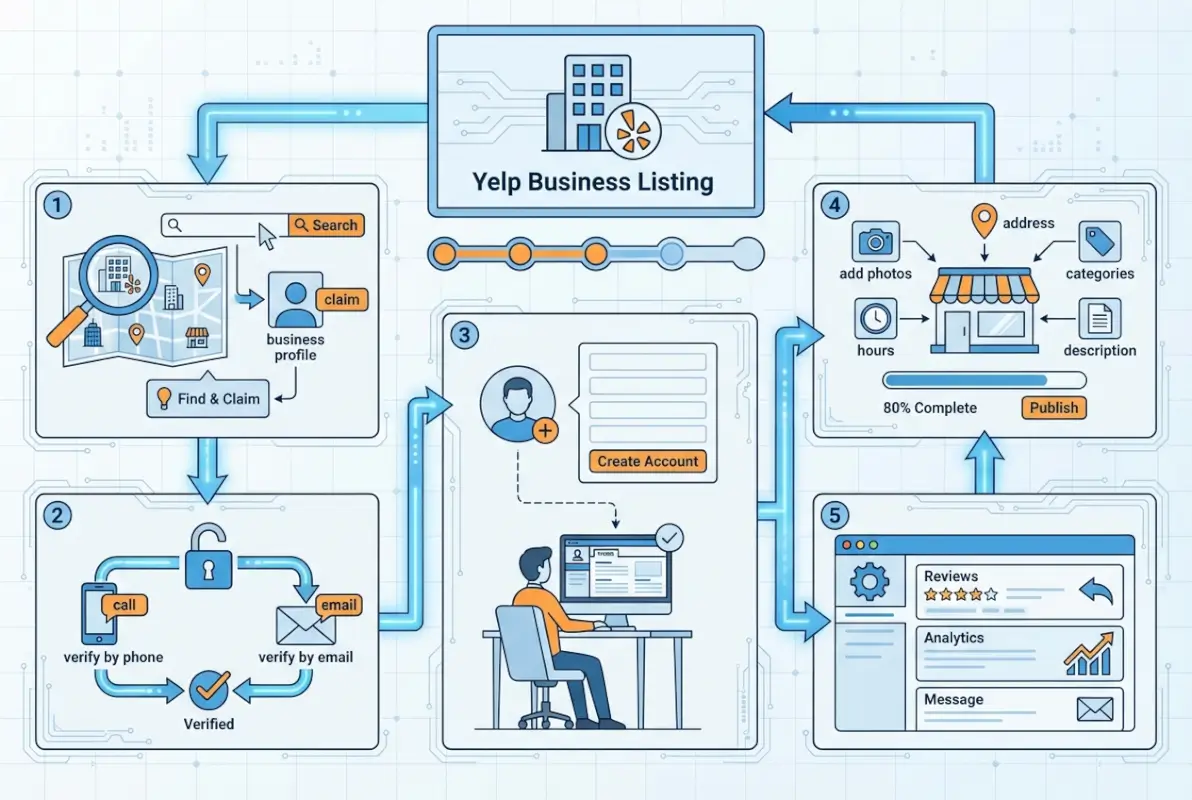
Find Your Existing Business on Yelp
Use the standard Yelp search function with your exact business name and location. Try variations if you don’t find it immediately (maybe your business name is listed with “LLC” at the end, or perhaps it’s under a former name). Check nearby neighborhoods too—sometimes businesses get geocoded to adjacent areas. If you find your business already listed, don’t create a duplicate. Instead, you’ll claim the existing listing in the next step.
When you locate your existing listing, take note of what information is already there. Is your phone number correct? Are the hours accurate? What photos are showing up? Some of this information might be outdated or incomplete, which is exactly why claiming ownership matters—you’ll gain control to fix these issues.
Add Your Business to Yelp for Free if Not Found
If your business genuinely doesn’t exist on Yelp yet, look for the “Add your business to Yelp for free” option. This is typically found in the business portal or by searching and selecting the option to add a business that’s not listed. Yelp will walk you through a form where you’ll enter foundational information that establishes your listing.
Creating a listing from scratch actually has an advantage over claiming an existing one: you start with a clean slate and can ensure accuracy from the beginning. However, you’ll still need to go through verification before the listing goes live and before you can manage it. For those considering business directory strategies for maximum exposure, understanding this process is crucial for multi-platform visibility.
Information to Prepare Before Adding
Don’t start the process without having these essentials ready: your exact business name as it should appear publicly, complete physical address (if you have a brick-and-mortar location), primary phone number where customers can reach you, website URL, regular business hours including any seasonal variations, and your primary business category (e.g., “Italian Restaurant” or “Plumbing Service”).
You’ll also want a concise business description—think of this as your elevator pitch that explains what you do and what makes you different. Avoid marketing fluff; focus on concrete information about services, specialties, and what customers can expect. Yelp users appreciate straightforward descriptions that help them quickly determine if you’re the right fit for their needs.
| Information Type | Required? | Impact on Visibility |
|---|---|---|
| Business Name | Yes | Critical for search |
| Address & Phone | Yes | Enables local search results |
| Business Hours | Yes | Affects “open now” filters |
| Category | Yes | Determines search relevance |
| Photos | Recommended | Significantly increases engagement |
| Description | Recommended | Helps with keyword relevance |
| Payment Methods | Optional | Moderate impact on filtering |
Step 3 — Claim and Set Up Your Yelp Page (Free and Owned)
Claiming your business page transforms you from passive observer to active manager. Without claiming, you can see your listing like any other user, but you can’t control the narrative, fix errors, or respond to feedback. Claiming establishes you as the verified representative of the business, unlocking all the management tools Yelp provides to free account holders.

Claim Your Business Page
Once you’ve located your existing listing (or created a new one), you’ll see a “Claim this business” option somewhere prominent on the page—usually near the top or in the business information section. Click this and Yelp will start the verification workflow. The exact steps depend on your business type and available verification methods, but the process is designed to be straightforward even for non-technical business owners.
Why does this matter so much? Claimed businesses appear more trustworthy to consumers—Yelp often displays indicators that show a business is actively managed by its owner. Additionally, only claimed businesses can access response features, detailed user insights, and the ability to correct misinformation that might have been added by well-meaning but inaccurate user submissions.
Create or Convert to a Business Account if You Already Have a Page
If you already had a personal Yelp account that you used to read reviews or interact as a consumer, you’ll need to either link it to your business or create a separate business login. Yelp allows both approaches—some owners prefer keeping personal and business accounts separate, while others find it more convenient to use a single login for both purposes.
For businesses with multiple locations, you’ll want to set up a business account that can manage all locations from one dashboard. This centralized approach makes it much easier to maintain consistent information across locations and allows you to add team members who can help manage specific locations without giving them access to your entire Yelp account. If you’re implementing strategies to generate leads through business directories, coordinating multiple listings becomes essential.
Verification Steps and Expected Timelines
Phone verification is typically instant—you receive an automated call with a verification code that you enter into the portal. Email verification happens within minutes if you’re using a business domain that matches your website. Postcard verification takes the longest, usually between 5-14 business days depending on postal service speed and your location. The postcard contains a verification code that you’ll enter once it arrives.
During this waiting period, you can often start editing your profile information, but changes won’t go live until verification completes. Use this time productively by preparing all your optimization materials—photos, descriptions, service lists—so you can complete your profile the moment verification clears. For a detailed walkthrough of the overall process, check out this comprehensive guide to listing your business on Yelp.
Step 4 — Optimize Your Profile (Free Enhancements You Can Do Now)
This is where most business owners drop the ball. They claim their listing, verify ownership, and then… nothing. They leave incomplete information, never add photos, and wonder why competitors with worse products or services somehow get more customer inquiries. Profile optimization isn’t optional—it’s the difference between a listing that generates leads and one that gets ignored.
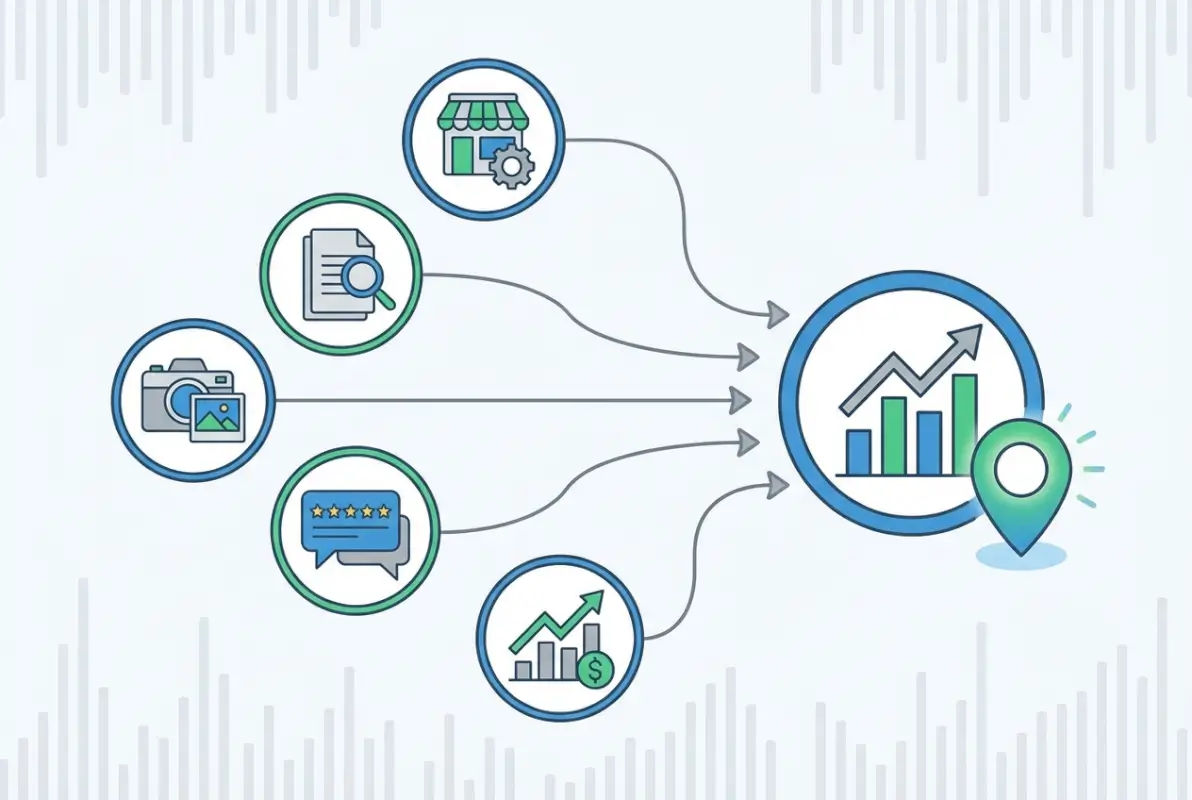
Complete and Accurate Business Information
Fill in every single field Yelp offers. Yes, even the ones that seem optional. Business hours should include special hours for holidays if applicable. Service areas (for businesses that travel to customers) should be specific—don’t just say “Greater Boston Area,” list the actual towns and neighborhoods you serve. Amenities and attributes matter tremendously: do you have wheelchair accessibility? Outdoor seating? Delivery options? Appointment-only requirements? Every detail you provide helps customers pre-qualify whether you’re the right fit for their needs.
Price range gives customers realistic expectations before they contact you. If you’re a premium service provider, indicating that upfront actually helps because you’ll attract customers who are looking for quality and willing to pay for it (rather than getting inquiries from bargain hunters who would never convert anyway). Payment methods accepted, parking availability, whether you’re family-friendly—these seemingly small details significantly impact whether someone clicks “Call” or keeps scrolling.
Visuals that Build Trust
Photos are not optional. Businesses with professional photos receive significantly more engagement than those without. You don’t need to hire an expensive photographer (though it helps), but you do need clear, well-lit images that accurately represent your business. Include photos of your storefront or office exterior, interior spaces where customers will be, your products or completed work samples, and your team if you’re in a service-based industry.
Update photos seasonally or whenever you make changes to your business. If you remodel, redecorate, or add new offerings, add new photos. Fresh content signals to both Yelp’s algorithm and to potential customers that you’re actively engaged with your listing. One tip that works exceptionally well: add captions to your photos explaining what they show. “Our outdoor patio area, open May through October” or “Example of our custom cabinet work” helps context and improves searchability within Yelp’s image search.
Descriptions, Specialties, and Offerings
Your business description should be informative and keyword-rich without sounding like spam. Think about what questions customers typically ask when they first contact you, and answer those proactively in your description. Specialties should highlight what distinguishes you from competitors—maybe you’re the only certified specialist in your area, or perhaps you offer same-day service, or you focus on eco-friendly materials. These differentiators matter immensely when customers are comparing multiple businesses.
For service-based businesses, list all your services even if some are more popular than others. You never know what someone is searching for, and having comprehensive service listings improves your chances of appearing in relevant searches. If you’re a plumber, don’t just list “plumbing services”—specify water heater installation, drain cleaning, pipe repair, leak detection, and bathroom remodeling if those are offerings. Specificity wins.
Use Free Tools and Badges to Stand Out
Yelp offers several free indicators that can appear on your profile. The “Find Us On Yelp” badge can be added to your website, creating a two-way connection between your site and your Yelp profile. Business highlights (features that Yelp displays prominently, like “Women-owned” or “Accepts cryptocurrency”) are available to claimed businesses and can increase visibility in specialized searches. Much like ranking strategies on Angie’s List, these verification badges build credibility across directories.
If your business is particularly busy or has limited capacity, use Yelp’s waitlist or reservation features if applicable to your industry. These tools not only provide convenience to customers but also demonstrate that you’re tech-savvy and organized—traits that build consumer confidence.
Managing Reviews and Responses
This deserves its own section because review management is one of the most powerful free tools Yelp offers. When someone leaves a review—positive or negative—you can respond publicly. This response isn’t just for the reviewer; it’s for everyone else reading reviews and deciding whether to contact you. I’ve watched businesses completely change their reputation trajectory simply by responding professionally to negative reviews and graciously to positive ones.
For positive reviews, keep responses brief but genuine. “Thank you, Sarah! We’re so glad you enjoyed your experience, and we look forward to seeing you again soon.” For negative reviews, never get defensive. Acknowledge the concern, apologize if appropriate, and explain what you’ve done or will do to address the issue. “We’re sorry your visit didn’t meet expectations. We’ve discussed your feedback with our team and have implemented additional quality checks to prevent this in the future.” This shows future customers that you’re responsive and committed to improvement.
Yelp’s policies explicitly prohibit soliciting reviews in exchange for discounts or incentives, and they have sophisticated filters to detect and remove reviews that appear incentivized or fake. Don’t try to game the system—it backfires. Instead, focus on providing excellent service and making it easy for satisfied customers to leave reviews organically (for example, by including your Yelp profile link in follow-up emails or on receipts).
Step 5 — Engage and Grow (Free Actions that Drive Results)
Profile setup is just the foundation. The businesses that generate consistent results from Yelp are those that treat their profile as a living asset requiring ongoing attention. This doesn’t mean spending hours every day, but it does mean regular check-ins and proactive engagement with the features Yelp provides for free.

Respond to Reviews Promptly
Set up notifications so you know immediately when someone leaves a review. Aim to respond within 24-48 hours. Quick responses show that you’re attentive and that you value customer feedback. Even a brief acknowledgment makes a difference—customers notice when businesses are actively engaged versus those where reviews pile up unanswered.
Keep in mind that reviews contribute to your overall rating, but how you respond to reviews impacts perception potentially even more than the rating itself. A business with a 4.2-star rating and thoughtful responses to all reviews often converts better than a business with a 4.5-star rating and no responses at all. The engagement signals that there’s an actual human behind the business who cares about the customer experience.
Leverage Free Messaging and Profiles for Inquiries
When someone messages you through Yelp, respond quickly and comprehensively. Treat these initial inquiries as pre-qualified leads—these people are already interested enough to reach out, so give them the information they need to make a decision. Provide clear pricing (if appropriate), explain your process, and suggest next steps whether that’s scheduling an appointment, visiting your location, or calling for more details.
Your response rate and response time are visible on your profile. Businesses that respond to most messages within a few hours earn a “Highly Responsive” badge, which builds trust and can influence whether someone chooses to message you versus a competitor. This is one of the easiest ways to gain a competitive advantage using only free features. Similar principles apply across platforms, as seen in directory optimization strategies for local businesses.
Encourage Legitimate, Non-Solicitation Customer Interactions
You can’t directly ask customers to leave reviews (Yelp’s algorithms detect and suppress reviews that appear solicited), but you can make it easy for satisfied customers to find your Yelp profile naturally. Include a link to your profile in email signatures, on your website’s “Reviews” page, and on printed materials like business cards or receipts. The key is passive availability—you’re making the option visible without explicitly requesting a review.
Focus your energy on creating review-worthy experiences rather than trying to manipulate review generation. When customers are genuinely impressed by your service, they’ll often think to leave a review on their own. The businesses with the strongest review profiles aren’t those with elaborate solicitation strategies; they’re the ones that consistently exceed expectations and make the review process convenient.
Monitor Page Performance and Adjust
Check your Yelp dashboard regularly to see how many people are viewing your profile, where they’re coming from, and what actions they’re taking (clicking your website, calling, getting directions). This data reveals what’s working and what needs improvement. If you’re getting lots of profile views but few calls or messages, maybe your description needs clarification or your photos don’t accurately represent your offerings. If you’re barely getting profile views at all, you might need to expand your service listings or adjust your category to improve search visibility.
Seasonal businesses should update their hours and availability proactively. Nothing frustrates customers more than calling a business during listed hours only to find out they’re actually closed for the season. Keep your information current, especially during holidays or if your business hours change. These updates take minutes but prevent customer frustration and lost opportunities.
Additional Validation and Compliance (Free vs. Paid Considerations)
As your Yelp presence grows, you’ll inevitably encounter sales pitches for paid features. Let’s be clear about what you actually need versus what’s nice to have. The foundation of a successful Yelp strategy can be built entirely on free features—complete profile, quality photos, prompt review responses, and active engagement with messaging. These core elements drive the majority of your results.
What Yelp’s Reliability and Safety Materials Imply for Business Pages
Yelp publishes extensive trust and safety guidelines that explain how the platform maintains integrity across its millions of listings. As a business owner, understanding these guidelines helps you operate within Yelp’s ecosystem effectively. The platform uses sophisticated fraud detection to identify and remove fake reviews, whether they’re positive reviews from business owners trying to inflate ratings or negative reviews from competitors trying to damage rivals.
Your job is to maintain honest, accurate information and to engage authentically with customers. Don’t try to manipulate reviews, don’t create fake competing businesses to redirect traffic, and don’t violate Yelp’s content policies by including promotional content where it doesn’t belong. Operating transparently and ethically not only keeps you in compliance but also builds the genuine reputation that drives long-term success.
When to Consider Paid Enhancements (Optional)
Paid features on Yelp primarily involve advertising—sponsored placements that appear above organic search results, competitor ad removal, and enhanced call-to-action buttons. For most small businesses, these paid features are unnecessary, especially when you’re just starting out. Build your free foundation first, optimize thoroughly, and generate organic traction before even considering paid options.
If you do eventually explore paid features, treat them as supplements to an already-strong free presence, not as replacements for optimization. A business with an incomplete profile, no photos, and unanswered reviews won’t see good ROI from paid ads because the profile itself doesn’t convert visitors effectively. Fix the free elements first, then layer paid promotion on top if you determine it makes sense for your specific business goals and budget.
| Feature | Free Tier | Paid Options |
|---|---|---|
| Business listing | Full profile included | Enhanced placement |
| Photo uploads | Unlimited | Slideshow features |
| Review responses | Unlimited public replies | Same capability |
| Messaging | Full messaging included | Same capability |
| Search visibility | Organic results only | Sponsored top placement |
| Analytics | Basic insights | Detailed reports |
| Call tracking | Not included | Available with ads |
Quick-Start Checklist (Summary)
If you’re ready to set up your Yelp presence today, here’s your action plan distilled into the essential steps:
- Step 1: Create your free Yelp for Business account – Sign up at business.yelp.com and initiate the verification process for your business.
- Step 2: Find or create your listing – Search for your business name to claim an existing listing, or add your business for free if it doesn’t exist yet.
- Step 3: Claim ownership and verify – Complete the verification process (phone, email, or postcard) to gain full control of your profile.
- Step 4: Optimize your complete profile – Add comprehensive business information, upload high-quality photos, write a detailed description, and fill in all optional fields.
- Step 5: Engage consistently – Respond to reviews within 24-48 hours, reply to messages promptly, update information seasonally, and monitor your performance metrics.
Frequently Asked Questions
How do I add my business to Yelp for free?
Search for your business on Yelp first to see if it already exists. If not found, visit the Yelp for Business portal and select “Add your business to Yelp for free.” Enter your business name, location, category, and contact information, then complete the verification process to claim ownership. The entire setup is free and requires no payment information.
Is Yelp free for business owners?
Yes, Yelp offers completely free business listings with substantial functionality including profile management, unlimited photo uploads, review responses, and customer messaging. While paid advertising and enhanced features exist, they’re entirely optional. Many successful businesses maintain effective Yelp presences using only the free tier and never spending money on the platform.
How long does it take to claim a Yelp listing?
The timeline varies by verification method. Phone verification is instant, email verification takes minutes, while postcard verification typically requires 5-14 business days for postal delivery. Once verification completes, you gain immediate access to manage your profile. You can begin preparing optimization materials during the waiting period to launch quickly after verification.
Can I edit my Yelp business page after claiming?
Absolutely. After claiming and verifying ownership, you can edit virtually all aspects of your profile including business hours, services offered, photos, description, amenities, and pricing information. Keep your profile updated as your business changes—accurate current information improves both search visibility and customer trust. Updates appear on your live profile immediately or after brief review periods.
Why isn’t my Yelp business page showing up in search?
Common causes include incomplete profile information (especially missing category or hours), recent changes requiring indexing time, incorrect address formatting affecting local search, or verification not yet completed. Ensure all required fields are filled accurately and that your business name and address match exactly across all online directories. If problems persist after thorough completion, contact Yelp support for assistance.
What free elements should I optimize first on Yelp?
Prioritize these high-impact items: complete business hours and contact information, accurate primary category selection, at least 5-10 high-quality photos showing your location and offerings, a comprehensive business description with relevant keywords, and all applicable amenities and attributes. Then enable messaging and commit to responding to reviews within 24 hours to maximize conversion rates from profile views.
Can I manage multiple business locations on one Yelp account?
Yes, Yelp for Business accounts support multi-location management. You can add multiple locations and manage them from a single dashboard, which is particularly useful for businesses with branches in different neighborhoods or cities. You can also assign team members to manage specific locations without granting access to your entire account, which helps maintain security while distributing management responsibilities.
How do I handle negative reviews on Yelp?
Respond professionally and constructively within 24-48 hours. Acknowledge the customer’s concern without getting defensive, apologize if appropriate, and explain steps you’ve taken to address the issue. Remember that your response isn’t just for the reviewer—it’s for everyone reading reviews and evaluating your business. A thoughtful response to criticism often builds more trust than having only positive reviews.
Should I ask customers to leave Yelp reviews?
Yelp’s policies discourage direct review solicitation, and their algorithms can detect and suppress reviews that appear incentivized or solicited. Instead, make your Yelp profile easily accessible through passive methods like including the link on your website, email signature, and receipts. Focus on providing exceptional service that naturally motivates satisfied customers to share their experiences rather than explicitly requesting reviews.
What happens if someone creates a duplicate listing for my business?
Contact Yelp support immediately to merge the duplicate listings. Multiple listings for the same business confuse customers, fragment your reviews across profiles, and can cause both listings to rank poorly in search results. Yelp’s support team can consolidate reviews and information into a single authoritative listing once you demonstrate ownership of the business through the standard verification process.
Take Control of Your Yelp Presence Starting Today
The difference between businesses that generate consistent customer inquiries from Yelp and those that don’t isn’t luck or budget—it’s intentional optimization and consistent engagement with free features that are available to everyone. You now have a complete roadmap to establish and optimize your presence without spending a dollar on the platform.
Start with Step 1 today. Create or sign in to your Yelp for Business account, initiate the verification process, and use the waiting period to gather your optimization materials. Within a week or two, you can have a fully optimized profile that competes effectively with businesses spending thousands on paid advertising, simply by taking advantage of free tools most of your competitors are ignoring or using poorly.
The businesses winning on Yelp aren’t necessarily the ones with the best products or services (though that helps), they’re the ones with complete profiles, professional presentations, and consistent engagement with reviews and messages. These are all actions within your control, actions that cost nothing but a bit of time and attention. And unlike paid advertising where results stop the moment you stop paying, optimization work you do today continues driving results months and years into the future.
Set aside an hour this week to complete your initial setup and optimization, then commit to just 15 minutes weekly to respond to reviews, update information, and check your performance metrics. That small consistent investment will transform your Yelp profile from a neglected listing into a genuine lead generation asset for your business.