
Best Business Listing Sites 2025: 25+ Platforms for Maximum Local Visibility
Opens a Google-translated copy of this article in a new tab.
If you’ve ever wondered why some local businesses dominate search results while others remain invisible, the answer often lies in their business listing strategy. Most small business owners underestimate the compounding effect of multiple, well-optimized directory listings working together across the web. It’s not just about being on Google anymore—it’s about creating a strategic web of citations that tells search engines (and customers) exactly who you are, where you are, and why you matter.
The landscape of business listings has evolved dramatically. We’re no longer dealing with simple yellow pages replicas. Today’s directories integrate reviews, real-time updates, social proof, Q&A features, and direct messaging—essentially becoming mini-websites for your business. According to recent industry research, 97% of consumers now search online before visiting a local business, with 46% of all Google searches having local intent. That’s nearly half of all searches looking for businesses in a specific geographic area.
TL;DR – Quick Takeaways
- Business listing sites act as digital storefronts across the web, multiplying your discovery opportunities
- Consistent NAP (Name, Address, Phone) across 10+ directories significantly boosts local search rankings
- Google Business Profile remains king but relying on it alone means missing 60% of potential customers who search elsewhere
- Industry-specific directories often convert better than general platforms due to higher purchase intent
- Review management across listings matters more than review quantity on any single platform
Why Business Listing Sites Matter More Than Ever in 2025
The business listing ecosystem has matured into something far more sophisticated than most business owners realize. These aren’t just static directory entries anymore—they’re dynamic, interconnected signals that search engines use to validate your business’s legitimacy and relevance. Think of each listing as a vote of confidence in your business’s existence and authority.
What’s changed in 2025 is the sheer volume of data aggregators and platforms pulling information from primary sources. When you optimize your Google Business Profile, that information doesn’t just stay on Google. Data aggregators like Acxiom, Infogroup, and Localeze distribute your business information to hundreds of secondary directories, apps, and GPS systems. This creates a ripple effect where a single well-maintained listing can propagate across dozens of platforms automatically.

The authenticity signals from business listings have become critical ranking factors. Search engines analyze consistency patterns across multiple sources to determine trustworthiness. If your business name appears identically across 20 authoritative directories, that’s a strong signal. If it varies wildly—”Smith & Sons Plumbing” on one, “Smith and Sons Plumbing LLC” on another, “Smith Bros Plumbing” on a third—search engines become confused about which entity is real, and your rankings suffer accordingly.
I remember working with a bakery client who couldn’t understand why their Google rankings fluctuated wildly despite having a perfect 4.9-star rating. After an audit, we discovered 14 different variations of their business name across various directories, some still listing their old address from three years prior. Within six weeks of correcting these inconsistencies, they jumped from position 8 to position 2 in the local pack for their primary keyword. The listings themselves didn’t change much—just the consistency.
The Strategic Advantages of Multi-Platform Listing Management
When you maintain listings across multiple business directory platforms, you’re essentially playing a numbers game—but a smart one. Each platform captures a different segment of your target audience based on their search habits, device preferences, and demographic characteristics. Younger consumers might default to Instagram or TikTok for recommendations, while older demographics still trust established directories like Yellow Pages or BBB.
The SEO benefits compound in ways most people don’t anticipate. Citations (mentions of your business NAP) function as off-page SEO signals that boost your overall domain authority and local search visibility. Research consistently shows that citation signals rank among the top five factors influencing local pack rankings—those coveted three business listings that appear at the top of local search results with a map.
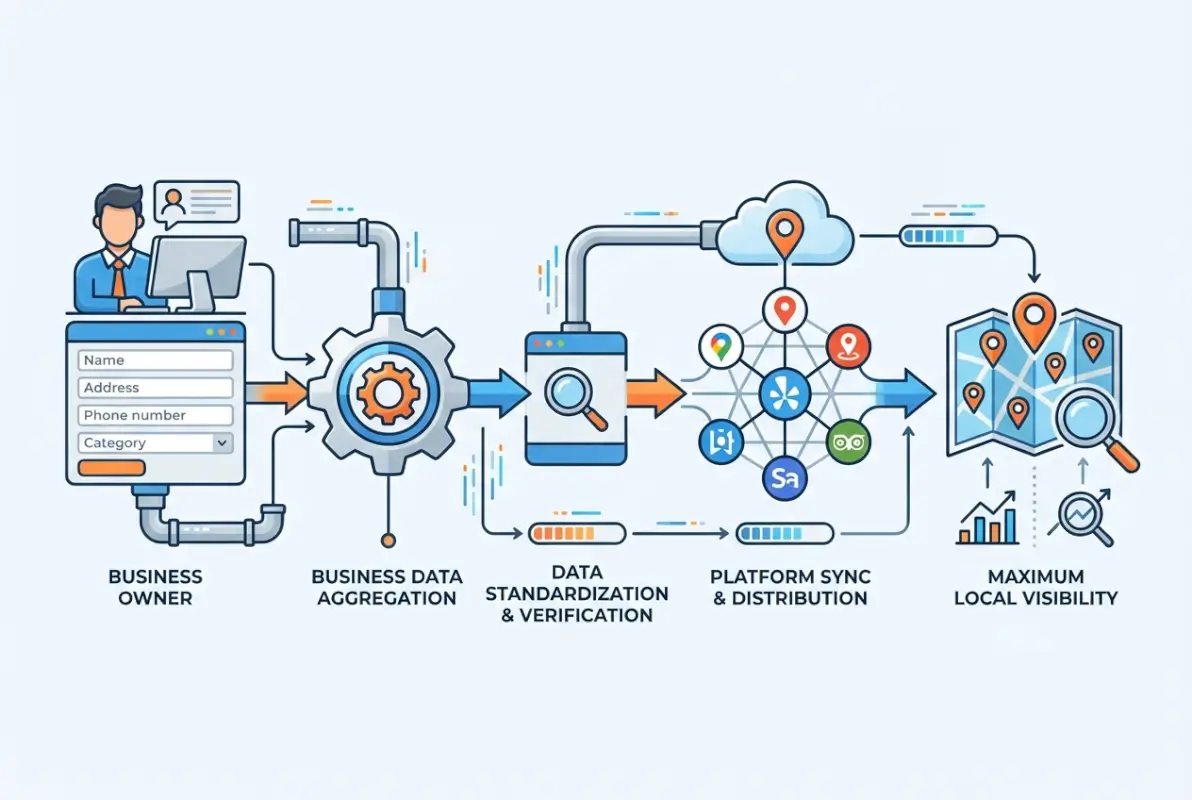
Beyond raw SEO value, business listings create multiple conversion pathways. Someone might discover you on Yelp, verify your legitimacy on BBB, check your hours on Google, and then finally call you from their Apple Maps app—all within ten minutes. Each touchpoint reinforces credibility and moves them closer to conversion. If you’re only listed on one or two platforms, you’ve lost them at step two or three.
The engagement opportunities available through modern business listings shouldn’t be underestimated. Features like Google Posts, Q&A sections, and direct messaging transform static listings into interactive customer service channels. I’ve seen businesses generate 30-40% of their total monthly leads solely through Google Business Profile’s messaging feature—completely free, no advertising spend required.
Top 25+ Business Listing Sites for 2025-2026
Universal Platforms (Every Business Needs These)
These are the non-negotiables. Regardless of your industry, business model, or target audience, these platforms should be your foundation. They command the largest user bases, have the highest domain authority, and feed data to countless secondary platforms.
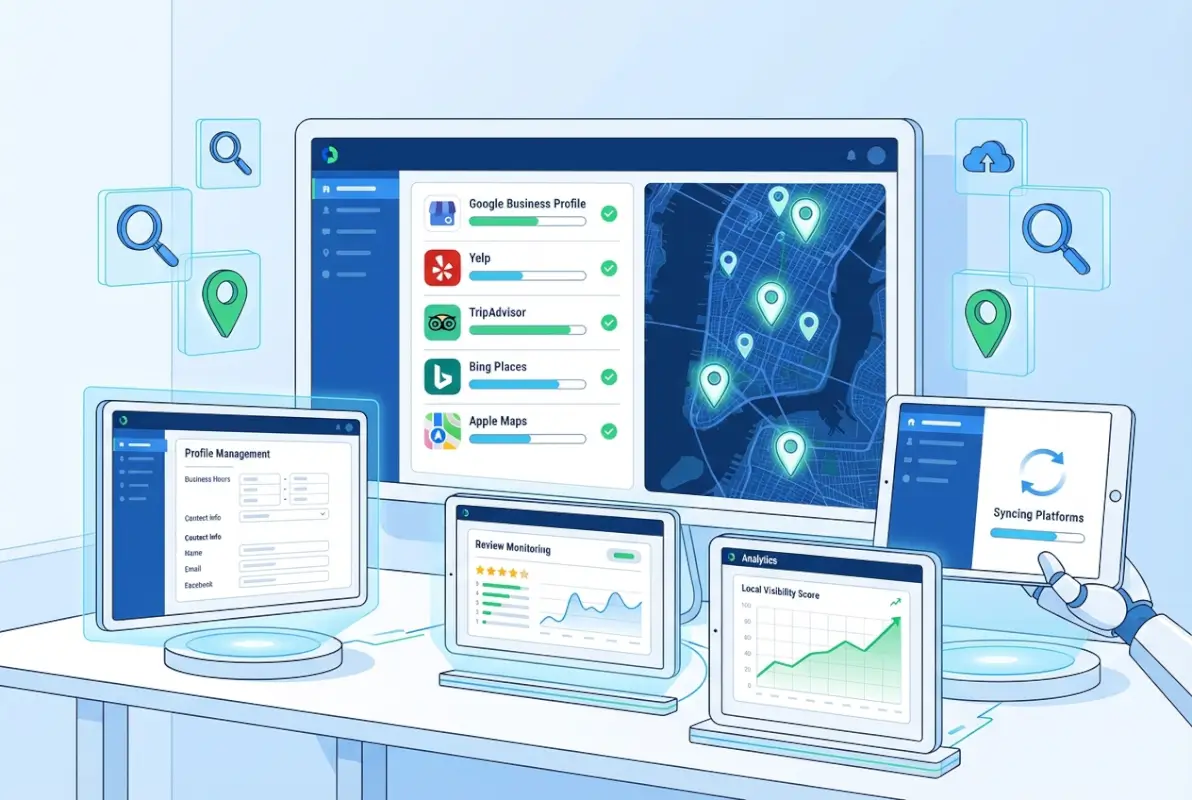
1. Google Business Profile – Still the undisputed champion. With over 3.5 billion searches daily, Google processes more local searches than all other platforms combined. The integration with Google Maps and the local pack makes this your single highest-impact listing. Complete every field, add 20+ photos, post weekly updates, and respond to every review within 24 hours. Businesses with complete GBP listings receive 7x more clicks than incomplete ones.
2. Apple Maps (Apple Business Connect) – Often overlooked but increasingly critical. With roughly 60% of mobile devices in the US being iPhones, Apple Maps captures a massive audience. The platform integrates with Siri, making it the default for voice searches from Apple users. Claiming your listing through Apple Business Connect lets you add photos, special offers, and ensure accuracy when iOS users search for businesses like yours.
3. Bing Places for Business – Microsoft’s search engine powers about 36% of desktop searches in the US and is the default on all Windows computers. The platform synchronizes with your Google Business Profile, making maintenance simple. With less competition than Google, you can often rank more easily in Bing’s local results, capturing an audience that skews slightly older and more affluent.
4. Facebook Business Pages – With 2.9 billion monthly active users, Facebook functions as both a social network and a business directory. The platform’s social nature allows for organic reach through shares and recommendations from friends. The messaging feature, events calendar, and review system create multiple engagement opportunities. Plus, Facebook’s advertising platform offers unmatched demographic targeting if you decide to invest in paid promotion.
| Platform | Monthly Users | Best For | Key Feature | Cost |
|---|---|---|---|---|
| Google Business Profile | 3.5B+ searches/day | All local businesses | Local pack dominance | Free |
| Yelp | 178M | Restaurants, services | Review authority | Free + Premium |
| Apple Maps | 1B+ iOS users | Mobile-first | Voice search | Free |
| Bing Places | 1B+ | Desktop users | Lower competition | Free |
| Facebook Business | 2.9B | Consumer brands | Social engagement | Free + Ads |
High-Value General Directories
5. Yelp – Remains the gold standard for customer reviews, particularly in restaurants, retail, and service industries. With 178 million monthly users who specifically seek out reviews and recommendations, Yelp drives highly qualified traffic. The platform integrates with Apple Maps, meaning your Yelp listing appears across multiple touchpoints. Response to reviews matters tremendously here—Yelp displays your response rate prominently.
6. Better Business Bureau (BBB) – Provides credibility that other platforms simply can’t match. The BBB rating (A+ through F) based on complaint history and business practices serves as a trust signal, particularly valuable for service businesses where consumers face higher perceived risk. While BBB accreditation requires a fee (typically $200-$500 annually depending on business size), the trust factor often justifies the investment for professional services, contractors, and B2B companies.
7. Yellow Pages (YP.com) – Yes, it’s still relevant. YP.com successfully transitioned from print to digital and maintains strong domain authority that helps listings rank well in organic search. The platform sees particularly strong usage among older demographics who grew up with traditional Yellow Pages. Free basic listings are available, with enhanced options for additional visibility.
8. Nextdoor – The neighborhood-focused platform offers hyper-local targeting that few others can match. With verified members organized by actual neighborhoods, recommendations from neighbors carry exceptional weight. For businesses with defined service areas (plumbers, landscapers, pet groomers), Nextdoor generates highly qualified leads from nearby customers who prefer supporting local businesses. The platform explicitly encourages community recommendations, making it easier to generate organic word-of-mouth.

B2B and Professional Service Platforms
9. LinkedIn Company Pages – Essential for B2B companies and professional services. With over 900 million members, LinkedIn provides access to business decision-makers that consumer platforms can’t match. A complete Company Page establishes legitimacy, supports recruitment efforts, and allows thought leadership content sharing. For businesses focusing on white label business directory software solutions or other B2B services, LinkedIn often generates higher-quality leads than consumer-focused platforms.
10. Manta – Specifically designed for small businesses, Manta offers free business listings with options to upgrade for enhanced visibility. The platform focuses on B2B networking and includes company profiles, products/services listings, and customer reviews. With strong SEO performance, Manta listings often appear in search results for company names and industry-specific searches.
11. Angi (formerly Angie’s List) – Premium platform for home service providers with a user base actively seeking contractors, plumbers, electricians, and other service professionals. While premium features require payment, the platform delivers high-intent leads from homeowners ready to hire. The verified review system adds credibility that general directories lack.
Industry-Specific Directories (Choose Based on Your Business)
12. TripAdvisor – Non-negotiable for hospitality businesses. Hotels, restaurants, attractions, and tour operators must maintain active TripAdvisor listings to remain competitive. With 463 million monthly users planning travel and dining experiences, the platform drives enormous traffic for qualifying businesses.
13. Healthgrades – Essential for healthcare providers. Patients research doctors, dentists, and medical facilities extensively before booking appointments. A complete Healthgrades profile with accurate credentials, accepted insurance, and patient reviews significantly impacts appointment bookings.
14. Avvo – The legal industry equivalent of Healthgrades. Potential clients research attorneys extensively, and Avvo’s rating system (based on experience, disciplinary history, and peer endorsements) heavily influences hiring decisions. Free listings are available with premium options for enhanced visibility.
15. Houzz – Critical for home renovation, interior design, and related industries. The platform combines a directory with a portfolio showcase, allowing businesses to display completed projects. With users actively planning renovation projects, Houzz delivers high-intent leads with strong conversion potential.
Regional and Local Directories
16-20. Local Chamber of Commerce, City/Regional Business Directories – Don’t overlook local chambers and municipal business directories. These often have strong local domain authority and appear prominently in geo-specific searches. Most chambers offer directory listings as part of membership, which also provides networking opportunities and community credibility.
21. Foursquare – While not as prominent as it once was, Foursquare still powers location data for numerous apps and services. Claims and optimizes your listing ensure accuracy across the broader ecosystem.
22. MapQuest – Still processes millions of searches monthly, particularly among users who prefer alternatives to Google Maps. Free business listings are simple to claim and maintain.
Data Aggregators (The Behind-the-Scenes Power Players)
23. Acxiom – One of the largest data aggregators feeding information to hundreds of secondary directories, GPS systems, and apps. Ensuring accuracy with Acxiom helps propagate correct information across dozens of platforms automatically.
24. Infogroup (Data Axle) – Another major aggregator distributing business data widely. Claiming and verifying your listing helps maintain accuracy across the broader ecosystem.
25. Localeze – The third major aggregator worth prioritizing. Between Acxiom, Infogroup, and Localeze, you’re covering the data sources for the majority of secondary business directories in North America.
Optimization Best Practices for Maximum Listing Performance
Creating listings is just the beginning. The businesses seeing exceptional results from directory sites follow systematic optimization processes that go far beyond basic NAP information. Here’s what actually moves the needle based on real performance data.

Start with absolute NAP consistency. Your business name, address, and phone number must be identical across every platform—character for character. This means deciding on one canonical version and using it everywhere. If your legal business name is “Smith & Sons Plumbing, LLC,” but you want to be found as “Smith and Sons Plumbing,” you need to choose one and stick with it. Variations confuse search engines and dilute your citation strength.
Category selection matters more than most people realize. Choose the most specific primary category available on each platform. Don’t select “Restaurant” when “Italian Restaurant” or “Pizza Restaurant” exists. The specificity helps search engines match you to more targeted queries. Google Business Profile allows multiple categories—use all relevant options, but prioritize carefully. Your primary category carries the most weight.
| Optimization Element | Impact Level | Implementation Difficulty | Update Frequency |
|---|---|---|---|
| NAP Consistency | Very High | Medium | When changes occur |
| Photos (10+ images) | High | Low | Monthly |
| Review Responses | Very High | Low | Within 24 hours |
| Business Description | Medium | Low | Quarterly |
| Posts/Updates | Medium | Low | Weekly |
Photo optimization deserves serious attention. Businesses with photos receive 35% more clicks than those without, according to Google’s own data. But it’s not just about quantity—photo types matter. Include exterior shots that help customers recognize your building, interior images showcasing your atmosphere, product photos, team member pictures, and action shots of your service being delivered. Each platform has specific dimension requirements, so size appropriately to avoid cropping or distortion.
Your business description should be keyword-rich but genuinely informative. Avoid keyword stuffing (“Best plumber plumbing services water heater repair Dallas plumber”). Instead, write naturally while incorporating relevant terms: “Family-owned plumbing company serving Dallas since 1985, specializing in water heater repair, drain cleaning, and emergency plumbing services for residential and commercial properties.” The description should answer the question “Why should someone choose your business?”
Review Management Strategy That Actually Works
Reviews have become the currency of local search. Not just the quantity, but the recency, diversity, and your response rate all factor into rankings. Here’s the approach that generates consistent, authentic reviews without violating platform guidelines.
First, identify your natural review generation moments—points in the customer journey where satisfaction is highest. For a restaurant, it’s right after a great meal. For a contractor, it’s immediately after project completion. For a doctor, it’s after a particularly helpful visit. Build review requests into these moments through simple, non-pushy prompts.
Make it ridiculously easy. Create short links (bit.ly or similar) that go directly to your review form. Put these links in follow-up emails, text message confirmations, or on printed receipts. The fewer clicks required, the higher your conversion rate. According to recent review platform data, businesses that reduce friction in the review process see 3-5x more reviews than those requiring multiple steps.
Respond to every review—positive and negative—within 24 hours. Thank reviewers for positive feedback with specific, personalized responses (not templates). For negative reviews, acknowledge the issue, apologize sincerely, explain what you’re doing to fix it, and offer to make it right offline. Your response isn’t just for the reviewer—it’s for every potential customer reading that review.
I worked with a dental practice that transformed their reputation by implementing a systematic response strategy. Instead of generic “Thanks for your review!” responses, they referenced specific details: “So glad Dr. Martinez could help with your crown replacement, Susan. We’ll pass along your kind words to our hygiene team as well.” Six months later, they went from a 4.1 to a 4.8-star average, and patient acquisition costs dropped by 40% as more prospects converted directly from Google searches.
Common Mistakes That Tank Listing Performance
Even experienced business owners make critical errors that undermine their listing effectiveness. Here are the most damaging mistakes to avoid, along with how to fix them if you’ve already made them.
Incomplete Listings: The biggest amateur mistake. Every empty field represents a missed opportunity. Platforms like Google explicitly state that complete listings perform better in search results. If there’s a field for business hours, fill it in. Payment methods accepted? Add them. Appointment URL? Include it. The completeness signal matters for both search algorithms and user experience.
Inconsistent NAP Across Platforms: We’ve touched on this already, but it bears repeating because it’s so common and so damaging. Citation inconsistencies can drop your local search rankings by 6-7 positions according to industry studies. If you’ve moved locations, changed phone numbers, or rebranded, you must update every single listing. Use a spreadsheet to track where you’re listed and verify accuracy quarterly.
Ignoring Secondary Platforms: Too many businesses optimize Google Business Profile and ignore everything else. This approach leaves massive opportunities on the table. Someone searching on Apple Maps won’t see your beautiful GBP listing. A potential customer researching on Yelp won’t see your Google reviews. Diversification matters, understanding ways to access business park directory resources can help expand your reach strategically.
Review Neglect: Failing to respond to reviews signals that you don’t value customer feedback. Platforms like Google and Yelp factor response rate into their algorithms. More importantly, potential customers judge businesses harshly for ignored reviews—especially negative ones. A single negative review with no response can cost you dozens of potential customers.
Generic, Keyword-Stuffed Descriptions: Writing descriptions that read like they were created by a robot (“Best pizza pizzeria Italian restaurant Dallas near me open now delivery”) hurts more than it helps. Modern search algorithms are sophisticated enough to recognize and penalize obvious keyword stuffing. Write for humans first, search engines second.
Measuring ROI: Tracking What Actually Matters
You can’t improve what you don’t measure. Yet most businesses have no idea which listing platforms drive actual results. Here’s how to implement tracking that reveals true ROI and guides resource allocation.
Start with platform-native analytics. Google Business Profile Insights shows profile views, search queries, website clicks, direction requests, and phone calls. Yelp Analytics provides similar data for their platform. Facebook Insights tracks page visits and engagement. Export this data monthly and track trends over time.
Implement call tracking for listings that display phone numbers. Use unique phone numbers for different platforms or call tracking services that dynamically insert trackable numbers. This reveals which platforms generate actual phone inquiries versus just profile views.
Set up UTM parameters for website links in your business descriptions. Create custom URLs like yourwebsite.com/location?utm_source=yelp&utm_medium=listing so your analytics platform can attribute website traffic and conversions back to specific directories.
Track customer source systematically. Train staff to ask every new customer “How did you find us?” and record responses. While self-reported data has limitations, patterns emerge over time that validate your analytics data. If customers consistently mention finding you on Yelp but your analytics show minimal Yelp traffic, there’s a tracking gap to investigate.
Calculate platform-specific conversion rates, not just traffic. A platform generating 100 profile views with 5 conversions (5% conversion rate) is more valuable than one with 500 views and 10 conversions (2% conversion rate). Quality matters more than quantity, and understanding these patterns helps you prioritize optimization efforts.
For more sophisticated operations, key steps run successful directory website business models often involve integration with CRM systems to track the complete customer journey from directory discovery through sale and beyond.
Frequently Asked Questions
What are the best free business listing sites for small businesses in 2025?
Google Business Profile, Bing Places, Facebook Business Pages, Apple Maps, and Nextdoor offer robust free listings with significant reach. These five platforms should form the foundation of any small business listing strategy, providing access to billions of potential customers without any financial investment beyond time.
How do business listing sites improve local SEO rankings?
Listings create citations (NAP mentions) that search engines use to validate business legitimacy and relevance. Consistent citations across 10+ authoritative directories signal trustworthiness, directly impacting local pack rankings. Reviews, update frequency, and engagement metrics from listings also serve as ranking factors for local search algorithms.
Should I list my business on industry-specific directories or just focus on major platforms?
Both are essential. Major platforms like Google provide broad reach, while industry-specific directories (Healthgrades for doctors, Houzz for contractors, TripAdvisor for restaurants) deliver higher-intent traffic with better conversion rates. The ideal strategy combines 4-5 major platforms with 3-4 industry-specific directories relevant to your business category.
How often should I update my business listings?
Update basic information (hours, phone, address) immediately when changes occur. Add new photos monthly, post updates or offers weekly on platforms like Google Business Profile, and conduct comprehensive audits quarterly to verify accuracy across all platforms. Respond to reviews within 24 hours to maintain high engagement signals.
Do I need instant approval business listing sites or are all directories equally valuable?
Instant approval sites offer faster visibility but aren’t inherently more valuable. Focus on directory quality and relevance rather than approval speed. Authoritative directories like Google and Yelp require verification processes, but their traffic quality and SEO impact far exceed instant-approval directories with minimal oversight and lower domain authority.
What’s the minimum number of business listings needed for effective local SEO?
Aim for consistent presence across at least 10-15 directories, including the four major platforms (Google, Bing, Apple, Facebook) plus 6-11 industry-specific or regional directories. This provides sufficient citation diversity to signal authority while remaining manageable for small teams. Quality and consistency matter more than quantity beyond this threshold.
How do I handle negative reviews on business listing sites professionally?
Respond within 24 hours, acknowledge the specific concern without making excuses, apologize sincerely, explain corrective actions you’re implementing, and offer to resolve the issue offline with direct contact information. Your response demonstrates customer service commitment to future prospects reading the review, often mattering more than the original complaint.
Can I use the same business description across all listing platforms?
Yes, maintaining consistent messaging reinforces brand identity, but customize when platforms have different character limits or audiences. Your LinkedIn Company Page description might emphasize B2B value propositions while your Yelp listing focuses on customer experience. Core information should remain consistent while adapting tone and emphasis to platform-specific audiences.
Are paid enhanced listings worth the investment compared to free options?
Enhanced listings deliver ROI when you’ve already maximized free options and face high competition. Premium features like removing competitor ads (Yelp), sponsored placement, or enhanced media typically increase engagement by 20-40%. Test paid features on your highest-performing platforms first, measure results for 60-90 days, then expand based on proven ROI.
How long does it take to see ranking improvements from optimized business listings?
Initial improvements in profile views and engagement metrics typically appear within 2-4 weeks of comprehensive optimization. Meaningful local search ranking improvements generally manifest within 8-12 weeks as search engines process citation updates. Review accumulation and reputation building compound benefits over 6-12 months, creating sustained competitive advantages in local search results.
Was this article helpful?