What Is a Business Directory Website? 6 Key Features & Benefits

Generating summary...
If you’ve ever searched for “plumbers near me” or browsed a list of local restaurants by cuisine, you’ve used a business directory website—whether you realized it or not. These platforms are the digital descendants of the yellow pages, but with superpowers: instant search, real-time reviews, map integration, and the ability to filter thousands of businesses in milliseconds. Here’s what most people miss: business directories aren’t just convenient for consumers—they’re foundational infrastructure for local SEO, trust signals, and lead generation. In a world where 97% of people search online for local businesses (according to recent research from major market analysts), directories remain the unsung heroes connecting searchers with services. This guide will walk you through what a business directory website actually is, its six non-negotiable features, and why it still matters in an era of AI-powered search and social commerce.
TL;DR – Quick Takeaways
- Business directories are searchable databases – They organize companies by category, location, and service type with structured profiles (name, address, phone, reviews, hours).
- Six core features define modern directories – Structured data, advanced search/filtering, user reviews, monetization options, SEO-ready markup, and robust moderation.
- Directories boost discoverability and credibility – Listings improve local SEO rankings, drive referral traffic, and provide trust signals through verified reviews.
- Directories differ from review sites and maps – They focus on comprehensive profiles and niche categorization, not just ratings or navigation.
- Monetization sustains quality – Free basic listings plus paid tiers (premium placement, enhanced profiles) keep directories viable long-term.
What a Business Directory Website Is (Definition, Scope, and How It Differs from Other Listings)
A business directory website is an online platform that aggregates and organizes business listings—think of it as a searchable database where each entry contains structured information like company name, address, phone number, website URL, operating hours, service categories, and customer reviews. Unlike a static list, directories let users filter by location (ZIP code, city, radius), category (restaurants, contractors, consultants), and attributes (price range, certifications, availability). The content directory structure behind these platforms uses taxonomies (categories and tags) to ensure every listing is discoverable through multiple pathways, whether someone searches “vegan bakery Chicago” or browses the Food & Beverage → Bakery → Vegan subcategory.
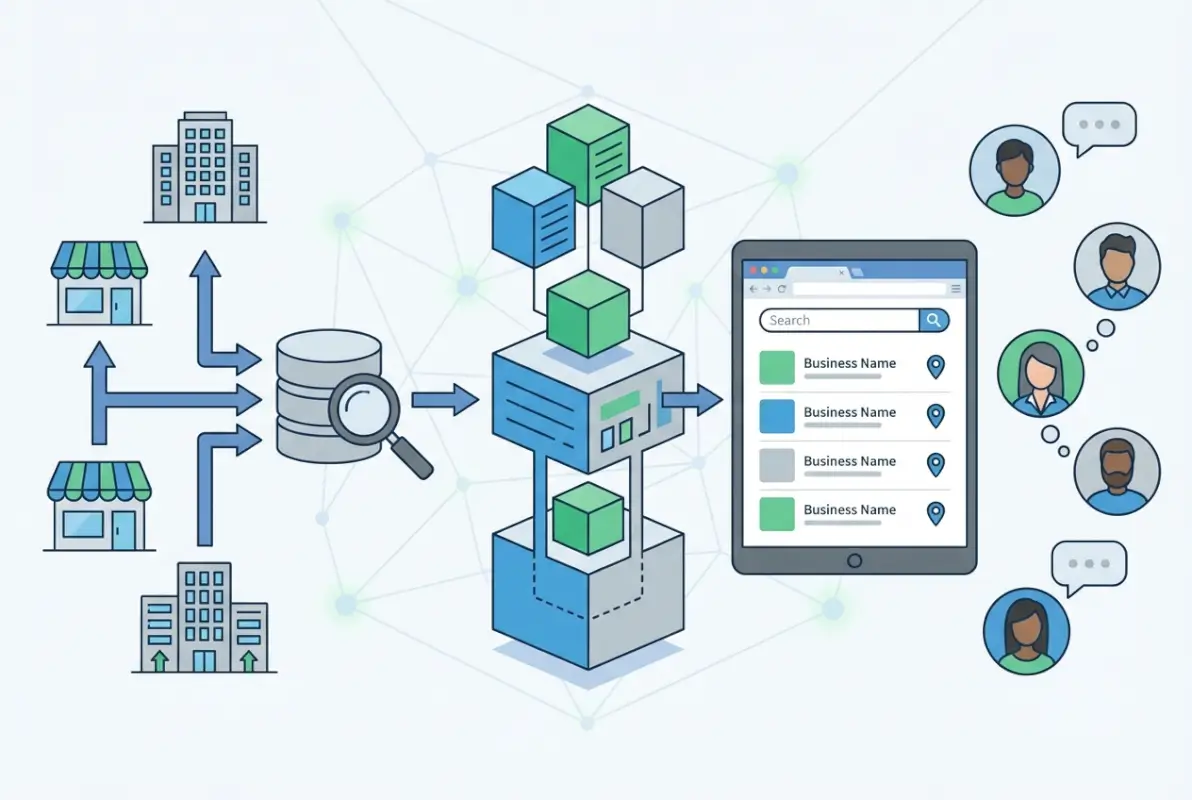
Most directories serve one of two broad audiences. Consumer-facing directories—like Yelp, Google Business Profile (formerly Google My Business), or local chamber of commerce sites—help people find nearby services, read reviews, and compare options on a map. B2B and niche directories (think ThomasNet for manufacturers, Clutch for agencies, or industry-specific event directories) cater to procurement managers, partnership scouts, and professionals looking for vetted suppliers or service providers. Both types share the same core engine: a database of structured profiles, robust search, and mechanisms for trust (reviews, certifications, verified status). The U.S. Census Bureau’s County Business Patterns dataset illustrates the sheer scale—millions of establishments registered across hundreds of NAICS categories—which directories attempt to organize into human-friendly interfaces.
What makes directories “directories” and not just glorified spreadsheets? Interactivity and enrichment. Users can claim listings (proving ownership), upload photos and videos, respond to reviews, and update hours or services in real time. Many directories integrate with mapping APIs (Google Maps, Mapbox) to show locations and calculate distances. Some offer appointment booking, quote request forms, or lead-capture tools embedded directly in profiles. This combination of structured data, user-generated content, and actionable features transforms a simple list into a dynamic marketplace where businesses compete for attention and users make informed decisions. If you’re evaluating or building a directory, well-known directory websites demonstrate these principles at scale.
Core Concept and Components
At minimum, every directory listing contains NAP data—name, address, phone—because consistency across directories is a critical local SEO ranking factor (according to Moz’s local search guides). Beyond NAP, modern directories add fields for website URL, email, social media links, business description (150–300 words), operating hours (often with holiday exceptions), and primary/secondary categories. Many allow or require rich media: logo uploads, photo galleries (storefront, products, team), and even embedded videos or virtual tours. Advanced platforms support custom fields—certifications, years in business, languages spoken, payment methods accepted—that help users filter and compare. The data model is typically relational: a business can belong to multiple categories, serve multiple locations, and link to multiple tags (e.g., “wheelchair accessible,” “women-owned,” “eco-friendly”).
Organization happens through taxonomies (hierarchical categories) and folkonomies (user-generated tags). A bakery might sit under Food & Beverage → Bakery → Wedding Cakes, and also carry tags like “gluten-free,” “custom orders,” “same-day delivery.” Search interfaces expose these layers: users can drill down through category trees, enter keywords (“organic coffee”), apply location filters (within 10 miles of 90210), and sort results by relevance, rating, distance, or recency. Maps are standard; clicking a pin opens a mini-profile with quick actions (call, get directions, visit website). The best directories maintain company listing websites that sync with external platforms (Google Business Profile, Apple Maps) to ensure data consistency and maximize reach.
Claimed versus unclaimed status is a defining split. Unclaimed listings are often seeded from public databases (business registries, yellow pages, web scraping) and may contain outdated or incomplete information. Claimed listings—where the owner verifies identity via phone, postcard, or email—gain editing rights, premium features, and credibility badges. This distinction signals trust to users and incentivizes businesses to maintain accurate profiles, creating a virtuous cycle of data quality.
Distinctions from Related Concepts
Business directories are often confused with review sites (Yelp, Trustpilot), mapping apps (Google Maps, Waze), and standalone business websites. The core difference is scope and structure. Review sites prioritize user-generated ratings and narrative feedback; directories prioritize comprehensive, categorized listings that may or may not include reviews. Mapping apps focus on navigation and real-time location data; directories emphasize discovery through filtering and comparison. A business’s own website is a single-entity asset; a directory is a multi-tenant platform where competing businesses coexist and vie for top placement. For context, according to Forbes Advisor’s website statistics, 71% of small businesses have a website, but 90%+ maintain at least one directory listing because directories aggregate demand and drive referrals that individual sites struggle to capture alone.
B2B directories have distinct characteristics. They often feature lead-generation forms (request quote, schedule demo), detailed service descriptions (case studies, portfolios, technology stacks), and advanced filters (company size, industry served, certifications like ISO or SOC 2). Consumer directories lean on photos, operating hours, and quick contact methods (tap-to-call, instant chat). Niche directories carve out verticals: legal (Avvo, Martindale-Hubbell), healthcare (Healthgrades, Zocdoc), or creative services (Behance, Dribbble). Each niche tailors data fields and search facets to its audience—lawyers need bar numbers and practice areas; photographers need portfolios and availability calendars. If you’re building a niche directory, consider using a flexible WordPress directory plugin like TurnKey Directories alongside dedicated platforms to customize fields and workflows without reinventing the wheel.
Traditional yellow pages were print directories organized alphabetically and by category, with paid display ads interspersed. Digital directories inherit that category structure but add real-time updates, multimedia, user interaction, and algorithmic ranking. Unlike yellow pages (static annual editions), online directories evolve continuously—new businesses appear daily, reviews accumulate, and search algorithms surface the most relevant or highest-quality listings. This dynamism makes directories living ecosystems rather than static catalogs, which is why they remain relevant decades into the internet era.
Six Key Features Every Business Directory Website Should Have
Feature parity separates viable directories from ghost towns. Users expect certain capabilities; missing even one can tank engagement and trust. The six features below are non-negotiable table stakes, drawn from analysis of top-performing directories and practitioner guides. Think of them as the directory equivalent of a restaurant needing a menu, a kitchen, seating, and a health permit—skip any, and you’re not really in business. We’ll cover the first two features here (robust profiles and powerful search/filtering), then continue with the remaining four in the next sections.

This statistic underscores why profiles must be rich and trustworthy. A bare-bones name-address-phone listing won’t convert browsers into customers when competitors offer photos, reviews, hours, and one-click actions. Let’s break down what “robust” means in practice, and how search/filtering turns a database dump into a discovery engine.
Robust Business Profiles with Structured Data
A complete profile is a sales page, not just a database record. Essentials include name (official legal or DBA), full address (street, city, state, ZIP, country), phone number (ideally click-to-call on mobile), website URL, and operating hours with timezone and holiday exceptions. Categories should be multi-select (a café might be Coffee Shop, Breakfast Spot, Wi-Fi Available) to appear in multiple browse paths. The business description—150 to 300 words—is where owners pitch their unique value, weave in keywords for SEO, and answer “Why choose us?” Questions like service area, years in business, accepted payment methods, and accessibility features (wheelchair ramps, ASL interpreters) help users pre-qualify before contacting. According to research by major analytics firms, listings with complete information receive 2–3× more engagement (views, clicks, calls) than sparse profiles.
Media galleries are critical. A logo builds brand recognition; cover photos (storefront, team, flagship product) humanize the business; and photo galleries (work samples, interiors, before/after shots) provide social proof. Video embeds—welcome messages, facility tours, testimonials—can increase conversion rates by 20–30% (per Wyzowl’s video marketing stats). Claimed versus unclaimed status should be visually distinct (badge, checkmark) so users know the listing is owner-verified. Verification badges (email verified, phone verified, government ID verified) add layers of trust, especially in directories with high fraud risk (real estate, financial services). Some directories issue premium badges (Featured, Top Rated, Certified Partner) to paying customers or businesses meeting quality thresholds.
Structured data markup—specifically Schema.org LocalBusiness or Organization types—is non-negotiable for SEO. When Google crawls a directory page, properly marked-up profiles can generate rich snippets in search results (star ratings, hours, phone number) that increase click-through rates. Many company email directory systems also benefit from schema to surface contact info quickly. Implementing JSON-LD or Microdata for every listing might seem tedious, but it’s the difference between “another web page” and “a search-engine-friendly business record.”
Powerful Search and Filtering
Search is the heartbeat of a directory. Users arrive with intent—”find X near Y”—and expect instant, relevant results. Location-based search is foundational: users enter a city, ZIP, or address, and the directory returns businesses within a configurable radius (1, 5, 10, 25 miles). Geolocation APIs (Google Maps Geocoding, Mapbox) convert text addresses into latitude/longitude coordinates, enabling distance calculations and map plotting. Category filters let users narrow by taxonomy (Restaurants → Italian → Pizza) or multiple categories simultaneously (Pet Grooming + Mobile Service). Keyword search scans business names, descriptions, and tags—implementing full-text search (MySQL FULLTEXT, Elasticsearch, Algolia) dramatically improves relevance over basic SQL LIKE queries.
Advanced filters enrich the experience. Price/service level ($ to $$$$), certifications (licensed, insured, bonded), attributes (open now, wheelchair accessible, accepts crypto), and user ratings (4+ stars) help users pre-qualify candidates. Sort options—relevance (keyword match + quality score), distance, highest rated, most reviewed, newest—let users prioritize what matters most. Faceted search (checkboxes that update result counts in real time) is now table stakes; users expect to see “Italian (127)” and “Open Now (43)” before committing to a filter. According to Baymard Institute’s e-commerce research, 68% of users abandon sites with poor search or filtering, a lesson that applies equally to directories.
Map integration is non-negotiable for local directories. Embedding Google Maps, Mapbox, or OpenStreetMap lets users visualize results geographically, click pins to preview profiles, and get turn-by-turn directions. Clustering (grouping nearby pins at low zoom) prevents map clutter and improves performance when displaying hundreds of listings. Mobile responsiveness is critical—over 60% of local searches happen on smartphones, so search interfaces must support tap-friendly filters, collapsible category trees, and swipeable result cards. Lazy loading (fetching results as users scroll) and AJAX-based filtering (updating results without page reloads) keep the experience snappy and modern. If you’re implementing search from scratch, consider whether a dedicated search engine (Elasticsearch, Meilisearch) or a plugin-based solution (like those offered by TurnKey Directories or similar WordPress tools) best fits your scale and budget.
6 Key Features (cont.) — Continued with Two More Essential Capabilities
User-Generated Content and Trust Signals
User-generated reviews and ratings are the lifeblood of modern business directories, providing social proof that influences up to 93% of consumer purchasing decisions according to recent web behavior statistics. Every quality directory platform must offer intuitive review submission forms, star-rating systems, and the ability for business owners to respond publicly to feedback. This two-way dialogue not only builds trust with prospective customers but also signals to search engines that your directory contains fresh, authentic content worth ranking.

Moderation workflows are equally critical to maintain credibility and prevent spam or malicious reviews from undermining your platform. Implementing AI-assisted flagging for suspicious patterns—duplicate text, extreme sentiment shifts, or off-topic content—combined with human oversight ensures that only genuine feedback reaches your audience. Verification badges for claimed listings, visible indicators of business response rates, and transparent timestamps on all reviews further cement your directory’s reputation as a trustworthy resource rather than a Wild West of unvetted claims.
Authentication mechanisms such as email confirmation, SMS-based verification, or even integration with official business registries (like the UK Companies Register) help distinguish real businesses from fraudulent entries. By requiring proof of ownership before a listing can be claimed or edited, you reduce the risk of competitors hijacking profiles or scammers posting fake contact details. These safeguards may add friction to onboarding, but they pay dividends in long-term user confidence and reduced support overhead.
Finally, transparent display of review counts, average ratings, and recency metrics allows users to assess credibility at a glance. A business with 150 reviews averaging 4.7 stars over the past six months carries far more weight than one with three five-star reviews from three years ago. Surface these metadata points prominently in search results and profile headers, and consider offering filters that let users sort by “most reviewed” or “highest rated in the past 90 days” to spotlight consistently excellent performers.
Engagement and Monetization Options
A sustainable directory platform balances free access for basic discoverability with premium tiers that unlock enhanced visibility and lead-generation tools. The most common model offers free listings with essential fields (name, address, phone, website, hours) while charging for features like featured placements, photo galleries beyond a single logo, video embeds, and priority support. Government data on digital business adoption, such as Malaysia’s Q1 2025 business tendency statistics, shows that SMEs increasingly allocate budget to online visibility, making tiered subscriptions a viable revenue stream.
Lead-capture mechanisms—contact forms, request-a-quote buttons, and click-to-call tracking—are high-value premium features because they directly connect listed businesses with qualified prospects. By gating these tools behind a paid tier, you create clear ROI for business owners while generating recurring revenue for your directory. Transparent analytics that show how many leads were delivered each month further justify the subscription cost and reduce churn, turning your platform from a static listing into an active sales channel.
Alternative monetization paths include pay-per-lead models, where businesses only pay when a user submits a contact form or initiates a call, and advertising slots that let businesses buy banner placements on category pages or search results. Some directories also offer one-time “boost” packages that elevate a listing to the top of relevant searches for 30 or 90 days. Mixing recurring subscriptions with à la carte upgrades gives you revenue flexibility and lets businesses experiment with premium features before committing to annual plans.
| Monetization Model | How It Works | Best For |
|---|---|---|
| Freemium Subscriptions | Free basic listing; paid tiers unlock photos, analytics, featured placement | General directories with broad SME appeal |
| Pay-Per-Lead | Charge per form submission or phone call initiated | High-ticket B2B or service directories |
| Advertising Slots | Sell banner or sponsored-listing placements on category/search pages | High-traffic directories with strong SEO |
| One-Time Boosts | Temporary top placement for 30–90 days | Directories with seasonal demand spikes |
6 Key Features (cont.) — Continued with Two More
Data Integrity, SEO, and Discoverability
Consistent NAP (Name, Address, Phone) data across every listing is non-negotiable for local SEO performance, as search engines use citation matching to validate business legitimacy and relevance. Even minor discrepancies—”St.” versus “Street,” an outdated suite number, or a deactivated phone line—can dilute trust signals and push your listings down in local pack results. Automated data normalization during submission, coupled with periodic audits that flag stale or conflicting information, keeps your directory’s data clean and authoritative.

Structured data markup (Schema.org LocalBusiness or Organization types) embedded in each listing page tells search engines exactly what your content represents, enabling rich snippets, knowledge panels, and enhanced map integrations. According to Forbes Advisor’s 2025 website statistics, pages with schema markup enjoy click-through rates up to 30% higher than those without, because searchers see star ratings, business hours, and other metadata directly in results. Implementing JSON-LD schema for every profile page is a low-effort, high-impact SEO win.
Integration with Google Business Profile, Apple Maps, and other major platforms ensures your listings feed into the ecosystems where users actually search. Many directories offer automated sync features that push updates from your platform to Google’s index, reducing manual double-entry for business owners and keeping data fresh across the web. These integrations also open backlink opportunities, as map providers and review aggregators often cite authoritative directories as source references, compounding your domain authority over time.
Finally, URL structure and internal linking matter: use human-readable slugs like /restaurants/seattle/best-pizza rather than /listing?id=12345, and interlink related categories and nearby businesses to distribute link equity throughout your site. A well-architected directory with clean permalinks and a shallow click-depth hierarchy will index faster, rank higher, and provide a better user experience than one that buries listings under convoluted navigation paths.
Analytics and Business Insights for Listed Companies and Site Operators
Robust analytics dashboards transform your directory from a static listing hub into a performance-tracking engine that demonstrates ROI for both business owners and your platform. At a minimum, offer each listed business a view of profile impressions, click-throughs to their website, phone-call initiations, and direction requests, segmented by date range and traffic source. Transparency around these metrics builds trust and justifies premium subscription fees, as businesses can see exactly how many leads your directory delivers each month.
For directory operators, aggregate analytics reveal which categories and locations drive the most engagement, informing content strategy and paid-promotion targeting. Tools like Google Analytics 4 or open-source alternatives (Matomo, Plausible) can track user journeys from search query to listing view to conversion event, letting you optimize funnel drop-off points and A/B test search result layouts. Data on average session duration, bounce rates, and repeat-visitor patterns also help you identify and fix usability issues before they erode user trust.
Lead attribution is particularly valuable in B2B or service directories, where a single qualified inquiry can be worth hundreds or thousands of dollars. By tagging outbound links and phone numbers with UTM parameters or unique tracking identifiers, you enable businesses to trace closed deals back to your directory, strengthening renewals and referrals. Some platforms even integrate with CRM systems (Salesforce, HubSpot) to automate lead handoff and closed-loop reporting, making your directory an indispensable part of a business’s marketing stack.
| Metric | What It Measures | Why It Matters |
|---|---|---|
| Profile Impressions | Number of times a listing appeared in search results | Indicates visibility and relevance of category/keywords |
| Click-Through Rate (CTR) | Percentage of impressions that resulted in a profile view | Shows how compelling titles, images, and ratings are |
| Conversion Actions | Website clicks, calls, direction requests, form submissions | Direct measure of lead generation and business value |
| Traffic Source | Organic search, direct, referral, social, paid | Helps businesses optimize marketing mix and directory operators prioritize SEO or partnerships |
6 Key Features (cont.) — Closing Pair
Moderation, Authenticity, and Anti-Spam Controls
Effective moderation systems protect your directory’s reputation by filtering out duplicate listings, fake businesses, and low-quality spam before they reach live pages. Rule-based automation—flagging entries with generic email addresses, missing physical addresses, or suspiciously similar descriptions—catches the majority of junk submissions, while a human review queue handles edge cases and appeals. According to insights on business IT usage and online ordering trends in Hong Kong, platforms that maintain high data quality see 40% higher user retention because searchers trust the results they find.

AI-assisted tools can analyze submission patterns—unusual bursts of listings from the same IP, recycled phone numbers across multiple businesses, or text copied verbatim from competitor sites—and assign risk scores that trigger manual review. Integrating CAPTCHA or reCAPTCHA v3 at submission points deters bots without adding friction for legitimate users, while email and SMS verification confirm that contact details are active and owned by the submitter. These layered defenses ensure that only authentic businesses populate your index.
Transparency around your moderation policies builds user trust and sets clear expectations for business owners. Publish guidelines that specify prohibited content (hate speech, misleading claims, competitor sabotage), typical review timelines (e.g., “new listings approved within 48 hours”), and appeal processes for rejected submissions. A public-facing FAQ on moderation demonstrates accountability and reduces support tickets from confused or frustrated users.
Regular audits of existing listings—flagging those with no recent activity, outdated contact information, or zero reviews—help you prune dead weight and maintain a high signal-to-noise ratio. Automated emails prompting business owners to update their profiles every six months keep data fresh and give you a reason to re-engage lapsed subscribers, turning a maintenance task into a retention opportunity.
Administrative Tooling for Directories
A powerful admin dashboard is the control center of your directory, enabling you to manage thousands of listings, moderate submissions, and configure site-wide settings from a single interface. Essential features include bulk import/export (CSV, JSON) for onboarding legacy data or migrating from other platforms, batch editing to update categories or tags across multiple listings at once, and role-based access control so you can delegate moderation duties to team members without granting full system privileges. Tools like WordPress with the Directorist or Business Directory Plugin, or headless CMS solutions paired with custom admin panels, offer these capabilities out of the box.
API access unlocks advanced integrations, allowing businesses to sync their listings programmatically with their own CRM, POS, or marketing automation tools. A RESTful or GraphQL API also lets third-party developers build mobile apps, browser extensions, or niche vertical directories that pull data from your platform, expanding your ecosystem and brand reach. Offering a well-documented, rate-limited API as a premium feature can become a revenue stream in its own right, especially for B2B directories where enterprises value seamless data exchange.
Plugin and extension ecosystems provide the flexibility to add specialized functionality without custom development—payment gateways (Stripe, PayPal), SMS verification (Twilio), mapping (Mapbox, Google Maps Platform), or SEO tools (Yoast, RankMath). A marketplace of vetted add-ons reduces time-to-market for new features and lets you tailor your directory to niche requirements, whether that’s multi-language support, event ticketing, or membership tiers with granular permissions.
Finally, comprehensive logging and audit trails ensure you can troubleshoot issues, track user actions, and meet compliance requirements (GDPR data access requests, financial audits). Logs that capture who edited a listing, when it was published, and what fields changed provide accountability and simplify dispute resolution when business owners claim their profile was tampered with or reviews were unfairly removed.
Frequently Asked Questions
What is a business directory website?
A business directory website is a centralized online platform that lists businesses organized by category, location, or industry. It includes searchable profiles with key information like name, address, phone, website, hours, and customer reviews, helping users discover and connect with relevant companies.
How does a business directory differ from a review site?
While review sites focus primarily on user-generated ratings and experiences, business directories emphasize comprehensive, structured listings with verified business data. Directories prioritize discovery through search and filtering, whereas review platforms center on social proof and community-driven content to guide purchase decisions.
What features should I look for in a quality directory website?
Look for robust search and filtering, structured business profiles with accurate NAP data, user reviews and ratings, verification badges, analytics dashboards, and schema markup for SEO. Advanced directories also offer monetization tools, API access, and moderation systems to maintain listing quality and trustworthiness.
Are business directories free to join?
Most business directories offer free basic listings that include essential contact information and a profile page. Premium tiers typically unlock enhanced features like priority placement, extended media galleries, lead capture forms, analytics, and featured badges. Pricing models vary from one-time fees to monthly subscriptions.
How can directory listings improve local SEO?
Directory listings strengthen local SEO by providing authoritative citations that reinforce NAP consistency across the web. They generate backlinks, increase online visibility through additional entry points in search results, and enhance trust signals via verified profiles and customer reviews, all of which boost search engine rankings.
How do I evaluate the quality of a business directory?
Assess domain authority, user traffic volume, moderation practices, and the presence of verification systems. Quality directories maintain accurate, up-to-date listings, enforce anti-spam controls, and provide transparent review policies. Check whether profiles include schema markup and whether the platform integrates with major mapping services.
Can small businesses benefit from directory listings?
Absolutely. Directory listings level the playing field by giving small businesses visibility alongside larger competitors. They drive referral traffic, generate qualified leads, and improve local search rankings without requiring large marketing budgets. Verified profiles with positive reviews also build credibility and customer trust quickly.
Should I claim and optimize my business directory profiles?
Yes. Claiming your profiles allows you to control the information displayed, respond to reviews, upload photos, and access analytics. Optimization with accurate NAP data, targeted keywords, and complete service descriptions increases your visibility in search results and drives higher-quality traffic and conversion rates.
Take Action: Build or Optimize Your Directory Presence Today
Business directory websites remain essential infrastructure for local discovery, B2B sourcing, and search engine credibility. Whether you’re building a new directory platform or evaluating where to list your business, the fundamentals remain the same: accurate, structured profiles; robust search and filtering; authentic reviews and verification; and scalable monetization that sustains long-term growth.
For directory operators, start with a minimal viable feature set. Focus on clean profile data, intuitive search, and basic moderation. Measure listing engagement, lead quality, and user retention over your first 90 days, then iterate based on real behavior. For businesses, prioritize claiming and optimizing your profiles on high-authority directories. Maintain NAP consistency, respond to reviews, and use analytics to track which platforms drive the highest-quality traffic and conversions.
The competitive advantage lies not in feature bloat but in execution. Directories that enforce data integrity, moderate spam rigorously, and deliver measurable lead quality will earn trust and repeat traffic. Businesses that treat their directory profiles as living assets—updating hours, uploading fresh media, engaging with customer feedback—will outperform those that set and forget.
Ready to Get Started?
If you’re launching a directory, validate your niche with a small pilot: recruit 50–100 quality listings, solicit feedback, and refine your search and moderation flows. If you’re a business owner, audit your top five directory profiles this week—claim unclaimed listings, correct outdated information, and upload high-resolution images. Track referral traffic in your analytics for 30 days and double down on the platforms that deliver.
The opportunity is clear. The execution is yours.
Was this article helpful?