Directory vs Business Portal: Key Differences & When to Use Each
Opens a Google-translated copy of this article in a new tab.
The confusion between directories and business portals has cost countless businesses time, money, and missed opportunities. I’ve watched companies pour resources into building complex portal infrastructure when a simple directory would have delivered better results—and vice versa. Here’s the truth most digital consultants won’t tell you: these two platforms serve fundamentally different purposes, yet the industry constantly conflates them, creating expensive mistakes and strategic misalignment.
Understanding the precise distinction between directories and portals isn’t just semantic nitpicking. It directly impacts your technology choices, budget allocation, user experience design, and ultimately, your business outcomes. This guide cuts through the marketing noise to show you exactly what separates these platforms, when each makes strategic sense, and how to avoid the costly trap of choosing the wrong foundation for your digital presence.
TL;DR – Quick Takeaways
- Core distinction: Directories organize and display business listings for discovery; portals provide authenticated, personalized environments for transactions and ongoing engagement
- Functionality gap: Directories excel at categorization and search; portals integrate multiple systems, user accounts, and interactive services
- Cost reality: Directory implementation typically costs 60-70% less than full portal development
- Hybrid evolution: Modern platforms increasingly combine directory listings with portal-like features, blurring traditional boundaries
- Strategic choice: Select based on primary user need—if discovery-focused, start with directory; if workflow-focused, build portal
What Is a Directory? Core Definitions and Use Cases
A directory represents a curated, organized collection of business listings structured to facilitate discovery. Think of it as the digital evolution of the Yellow Pages, but with sophisticated categorization, search functionality, and often user-generated content like reviews and ratings. The fundamental architecture centers on three elements: listings (individual business entries), taxonomy (hierarchical categorization system), and discovery mechanisms (search and browse functionality).
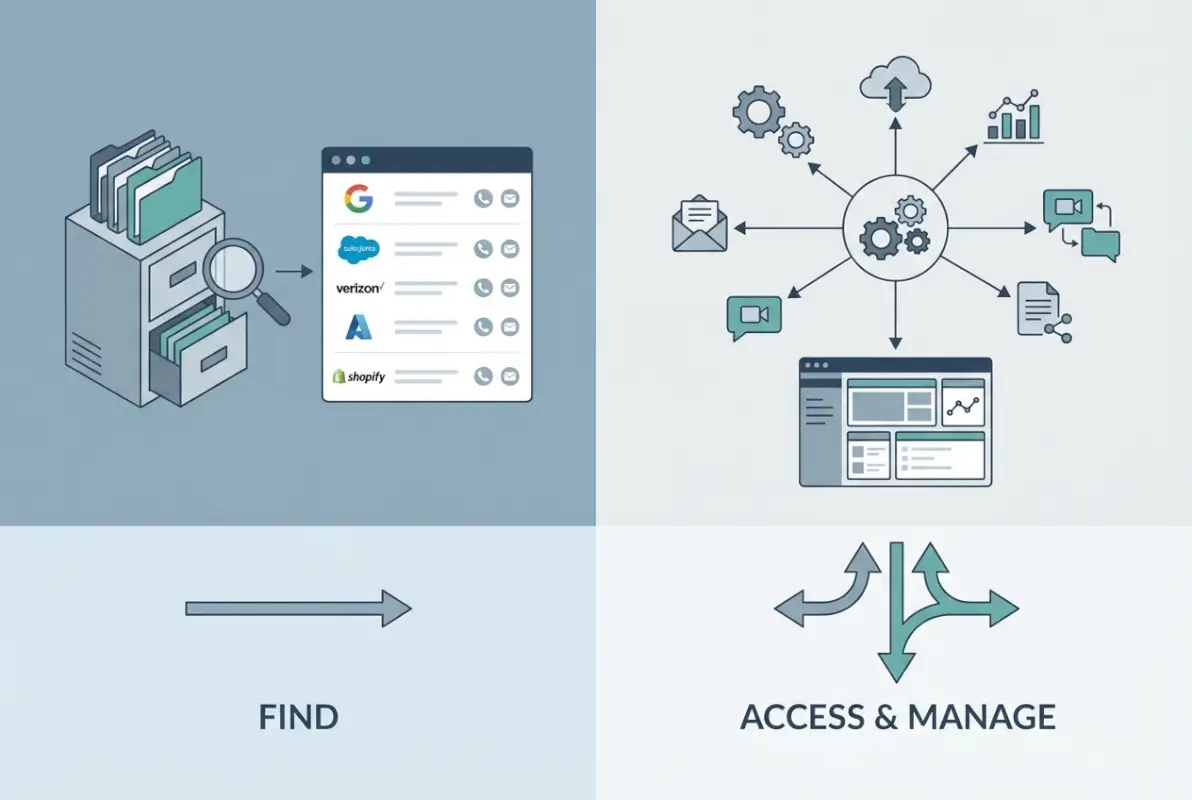
The primary purpose of any directory is connecting seekers with providers. When someone needs a plumber, attorney, or restaurant, they consult a directory to find relevant options within their geographic area or specialty requirements. This discovery-first orientation defines the directory’s design philosophy—everything serves the goal of helping users find the right business quickly and efficiently.
Directories vary significantly in scope and specialization. General directories like the traditional Yellow Pages or Yelp cover multiple industries and categories. Niche directories focus on specific sectors—Avvo for attorneys, Healthgrades for medical providers, or Houzz for home improvement professionals. Geographic directories emphasize local businesses within specific cities or regions, while B2B directories like ThomasNet connect business buyers with suppliers and manufacturers.
What a Business Directory Typically Includes
Standard directory entries contain structured data fields designed for comparison and filtering. Essential elements include business name, physical address, phone number (collectively known as NAP data in SEO terminology), website URL, operating hours, and category classifications. Enhanced listings often add descriptions, photos, customer reviews, pricing information, service areas, and credentials or certifications.
The data structure follows a consistent template across all listings within a directory, enabling users to compare options efficiently. This standardization contrasts sharply with the varied, customized content typical of business websites or the personalized interfaces characteristic of portals.
According to W3C semantic web standards, structured data markup helps directories provide machine-readable information that search engines can parse and display in enhanced search results. This technical foundation makes directories particularly valuable for local SEO and organic discovery.
Typical Goals of Directories
Directories serve several business objectives, depending on their operator and audience. For directory owners, monetization typically comes from premium listing fees, advertising placements, lead generation arrangements, or subscription models. For listed businesses, directories provide visibility, credibility through association with established platforms, backlinks for SEO value, and direct customer connections.
From a user perspective, directories solve the discovery problem—they answer the question “where can I find a business that does X?” efficiently. The value proposition centers on curation, organization, and often social proof through reviews and ratings that help users make informed decisions.
What Is a Web/Business Portal? Core Definitions and Use Cases
A business portal functions as a centralized digital gateway that provides authenticated users with personalized access to information, applications, and services. Unlike the open, browse-oriented nature of directories, portals typically require user accounts and deliver customized experiences based on user roles, preferences, and permissions. The defining characteristic is integration—portals bring together multiple systems, data sources, and functionalities into a unified interface.
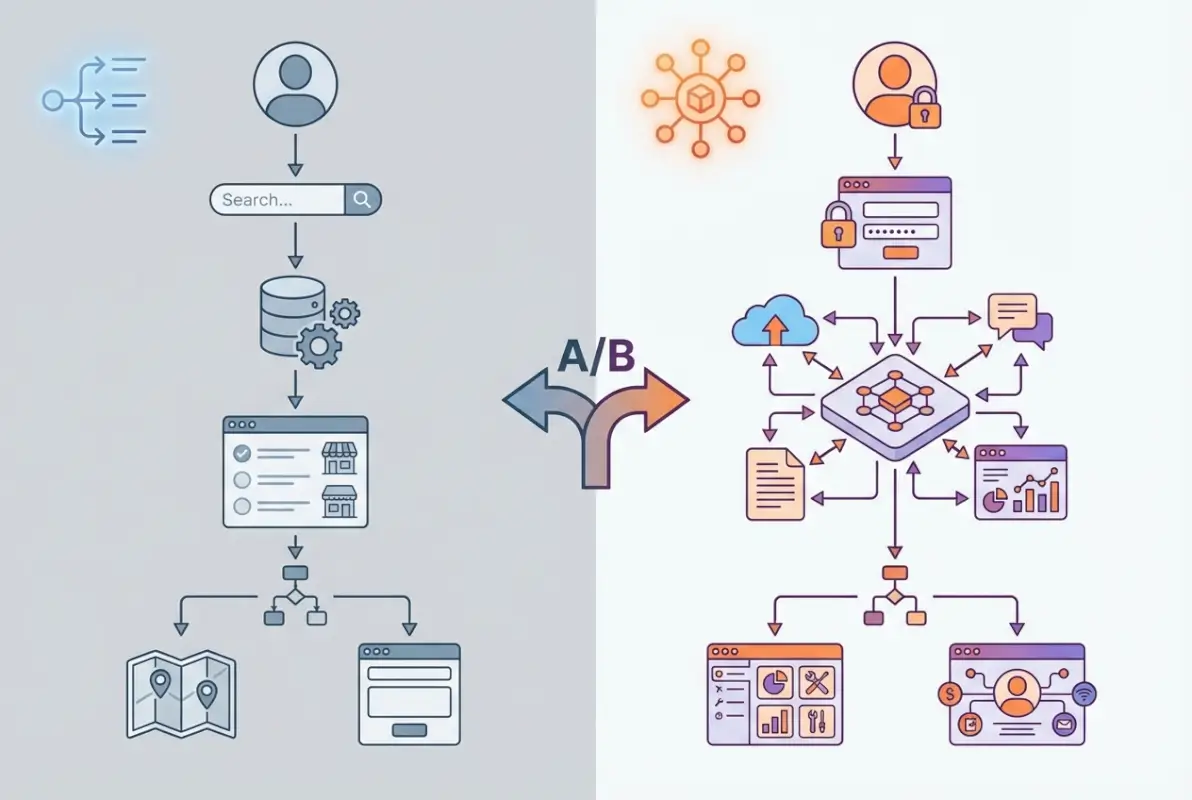
Portals serve as command centers rather than discovery tools. Users don’t visit portals to find businesses; they visit to accomplish specific tasks, access personalized information, complete transactions, or interact with integrated services. An employee portal might provide access to HR systems, company news, collaboration tools, and business applications. A customer portal might enable account management, support ticket submission, order tracking, and knowledge base access.
The architecture of portals involves several sophisticated layers: authentication systems, user profile databases, content management systems, integration middleware connecting various backend systems, personalization engines, and often workflow automation. According to Techopedia’s definition of web portals, these platforms serve as “a specially designed website that brings information from diverse sources together in a uniform way.”
Portal Fundamentals: Authentication, Personalization, and Integration
Three core capabilities separate portals from simpler web platforms. First, authentication and authorization systems control who can access what information and functionality. Users log in with credentials, and the portal delivers appropriate content and tools based on their roles and permissions. This security layer is fundamental—portals handle sensitive information and transactions that can’t be openly accessible.
Second, personalization engines customize the interface and content for individual users. A portal remembers your preferences, tracks your activity, recommends relevant content, and presents information tailored to your needs. This adaptability creates unique experiences for each user rather than the standardized listings characteristic of directories.
Third, integration capabilities connect the portal to various backend systems—CRM platforms, ERP systems, payment processors, communication tools, and databases. This integration creates a unified workspace where users can accomplish complex tasks without switching between multiple applications. I once worked with a manufacturing company whose customer portal integrated order management, shipment tracking, invoice access, support ticketing, and product documentation—all presented through a single interface that eliminated the friction of juggling separate systems.
| Portal Type | Primary Users | Key Functions | Common Examples |
|---|---|---|---|
| Employee Portal | Internal staff | HR access, collaboration, company resources | SharePoint, Workday |
| Customer Portal | External clients | Account management, support, transactions | Bank portals, utility account access |
| Partner Portal | Business partners, vendors | Collaboration, data sharing, joint workflows | Vendor management systems, channel partner portals |
| Government Portal | Citizens, businesses | Service access, applications, payments | USA.gov, state service portals |
Internal vs External Focus: Different Portal Orientations
Portal design philosophy splits along the audience dimension. Internal portals (intranets) focus on employee productivity, information sharing, and workflow automation within organizations. They centralize access to business applications, facilitate collaboration, distribute company communications, and provide self-service HR and IT functions. Security concerns are paramount but authentication is simplified by organizational identity systems.
External portals serve customers, partners, or citizens outside the organization. These platforms extend business processes beyond organizational boundaries, enabling self-service transactions, relationship management, and information access without direct staff involvement. The challenge involves balancing accessibility with security, delivering personalized experiences to potentially millions of users, and integrating with both internal systems and external data sources.
Hybrid portals serve multiple audiences with segmented functionality—perhaps employees see internal tools and resources while customers access account management and support features, all within the same underlying platform but with strictly controlled permissions determining who sees what.
Key Differences: Directory vs Portal
The distinction between directories and portals becomes clear when examining their fundamental characteristics across multiple dimensions. These aren’t just technical differences, they reflect entirely different strategic purposes and user relationships.
Primary User Journeys: Discovery vs Transaction vs Management
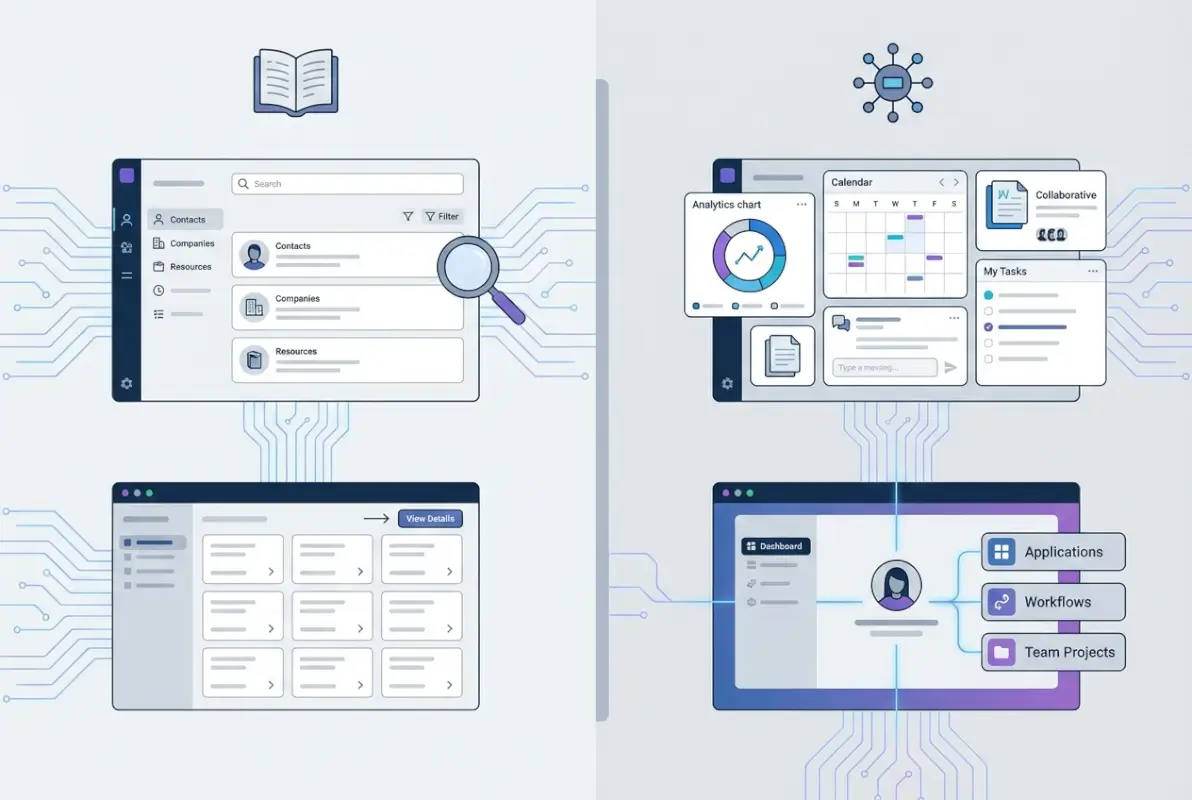
User journeys reveal the clearest functional distinction. In a directory, the typical path follows this pattern: arrive with a need → search or browse categories → review options → select a business → leave the directory to contact or visit the chosen business. The directory facilitates the connection but doesn’t typically host the relationship or transaction. Session times are short—users accomplish their discovery goal and move on.
Portal journeys are fundamentally different: log in → access personalized dashboard → complete tasks within the portal → potentially collaborate or communicate with others → log out. Users return repeatedly to accomplish ongoing work, manage their accounts, or access services. The portal becomes a destination rather than a stepping stone, and engagement patterns reflect repeated, extended sessions rather than quick discovery visits.
This difference profoundly impacts design priorities. Directories optimize for browsing efficiency and comparison, while portals optimize for task completion and workflow management. A directory succeeds when it quickly connects users with external resources; a portal succeeds when it keeps users engaged within its environment to accomplish their objectives.
Data Architecture and Integration Implications
Directories typically employ relatively straightforward database structures optimized for categorization and search. Each listing contains standardized fields—name, address, category, description, ratings—stored in relational databases with efficient indexing for quick retrieval. The data is largely static, updated periodically when businesses change their information, and doesn’t require real-time synchronization with other systems.
Portals demand significantly more complex architectures. They integrate multiple databases and external systems, manage user profiles and permissions, handle real-time data updates, process transactions, and often include content management systems for dynamic information. A typical customer portal might connect to CRM systems for relationship data, billing systems for invoice access, support platforms for ticket management, and payment processors for transactions—all while maintaining security and delivering personalized interfaces.
This architectural complexity translates directly to development cost and maintenance requirements. Building a functional directory might take a small team several weeks using modern frameworks or existing platforms like white label business directory software solutions. Building a comprehensive portal often requires months of development, larger teams, and ongoing technical resources for maintenance and updates.
User Experience Patterns: Search-Centric vs Role-Based Access
Directories organize around search and browse paradigms. The homepage typically features a search box and category navigation, users filter results by various criteria, and listings display in scannable formats that facilitate comparison. The interface remains consistent for all users—everyone sees the same directory structure and listings, though search results vary based on queries.
Portals organize around user roles and workflows. After authentication, users see personalized dashboards displaying relevant information and available actions based on their permissions. Navigation reflects common tasks rather than categorical structures. The experience varies dramatically based on user type—an administrator sees entirely different options than a basic user, and personalization engines further customize the interface based on individual preferences and activity patterns.
I remember consulting for a healthcare organization struggling with this distinction. They had built what they called a “provider portal” that was essentially just a searchable directory of doctors with login-protected basic information. Users were confused and frustrated because they expected portal functionality—appointment scheduling, medical record access, secure messaging—but encountered only static provider listings. The terminology mismatch created expectation failures that damaged user satisfaction.
Security, Authentication, and Permissions Considerations
Most directories function as publicly accessible resources requiring no authentication. Users browse freely, and business information is openly available to anyone. Security concerns are minimal beyond protecting the directory platform itself from attacks and ensuring listing accuracy through verification processes.
Portals are fundamentally defined by authentication and authorization. User identity verification, role-based access control, data encryption, session management, and audit logging are core requirements rather than optional features. According to OWASP security guidelines, portals handling sensitive information require comprehensive security architectures addressing authentication, authorization, data protection, and secure communication.
This security requirement significantly impacts development complexity and ongoing compliance obligations. Portals processing personal data must comply with regulations like GDPR or CCPA, implement proper data handling procedures, and maintain security measures that directories typically don’t need to address.
When a Directory Functions as a Portal (and When It Does Not)
The boundary blurs when directories add portal-like features. A business directory that allows users to create accounts, save favorite listings, receive personalized recommendations, or manage their own business profiles starts incorporating portal characteristics. However, these features alone don’t transform a directory into a full portal unless they fundamentally change the platform’s purpose from discovery to engagement and transaction.
Consider Yelp: it’s primarily a directory, but user accounts add social and personalization features. You can save searches, follow reviewers, and manage a profile. These portal elements enhance the directory without changing its fundamental nature as a discovery tool. Contrast this with Amazon, which combines directory-style product listings with comprehensive portal functionality for account management, order tracking, personalized recommendations, and seller management—it’s truly a hybrid platform where portal and directory elements are equally central.
Hybrid Models: When a Directory Also Acts Like a Portal
The digital landscape increasingly features hybrid platforms that combine directory and portal characteristics, offering the discovery benefits of directories with the engagement and transaction capabilities of portals. Understanding these hybrid models helps businesses make informed architectural decisions and avoid false dichotomies.
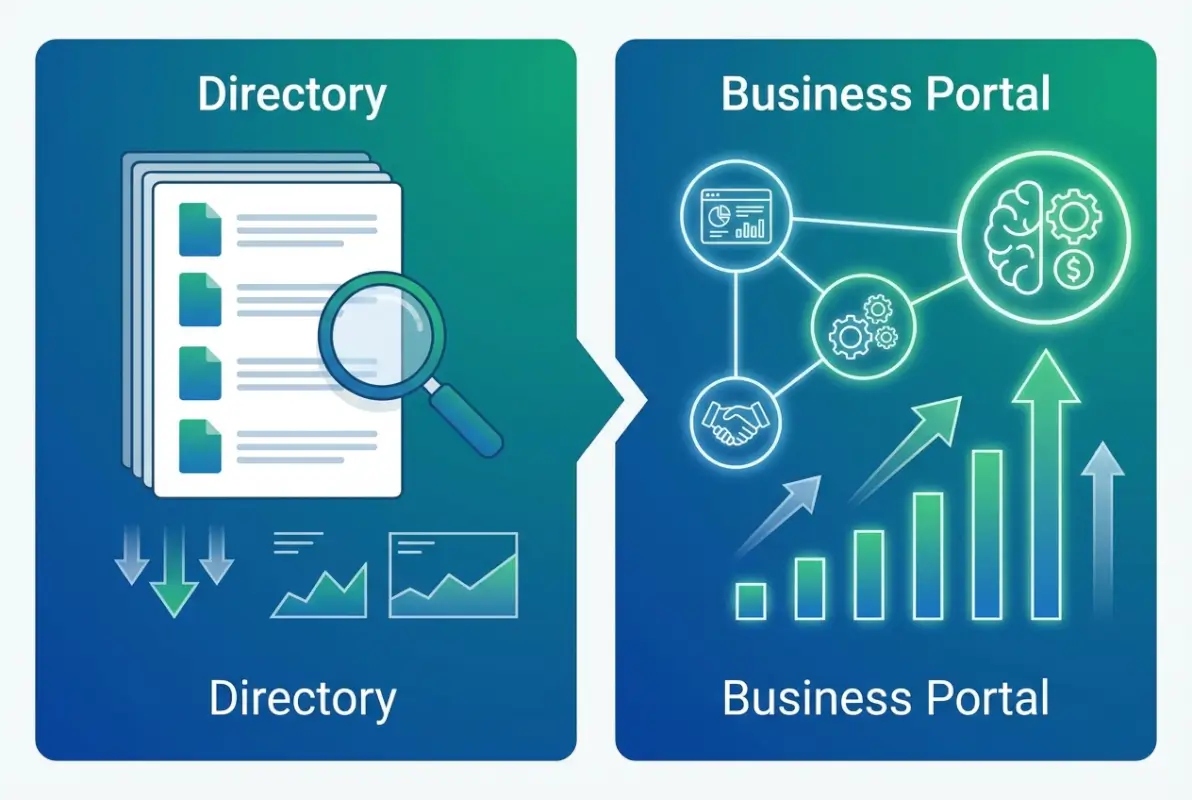
Directory Portals: Listings That Feed User-Specific Experiences
Directory portals start with comprehensive business listings but layer on authenticated user experiences. Healthcare provider directories that allow patients to schedule appointments, access medical records, and communicate with providers exemplify this model. The directory component helps patients find appropriate providers; the portal component facilitates ongoing relationship management and care coordination.
Real estate platforms like Zillow similarly blend models—they provide searchable property listings (directory function) while offering saved searches, price alerts, mortgage calculators, and agent dashboards (portal functions). The directory serves as the foundation, but portal features drive engagement and enable transactions.
This hybrid approach particularly suits marketplaces where discovery leads to ongoing relationships or transactions. The directory attracts initial users seeking specific services or products, then portal features retain them through personalized experiences and transaction facilitation.
Portal-Enhanced Directories: Personalization and Business Dashboards
Some platforms remain primarily directories but incorporate select portal features to enhance value. User accounts enable saved searches, alerts for new listings matching preferences, and review management. Business accounts provide dashboard interfaces where listed companies can update their information, respond to reviews, view analytics, and manage enhanced listings.
These portal elements improve the directory experience without fundamentally changing its purpose. Users still primarily visit for discovery, but personalization makes that discovery more efficient and relevant. Listed businesses gain self-service capabilities that reduce directory operator overhead while giving them more control over their presence.
The key distinction: in portal-enhanced directories, the authentication and personalization serve the core directory function rather than replacing it. Remove the portal features, and you still have a functional directory; remove the directory, and the portal features have no purpose.
Decision Criteria for Choosing Architecture
When planning a digital platform, several factors should guide your architectural decision between directory, portal, or hybrid approaches:
- Primary user goal: Discovery suggests directory; ongoing task management suggests portal
- Authentication requirement: Public access suits directory; sensitive information demands portal security
- Transaction involvement: Referral-based models work with directories; direct transactions require portal capabilities
- Personalization value: Generic information suits directories; user-specific data requires portal infrastructure
- Development resources: Limited budgets favor directory simplicity; larger investments enable portal sophistication
- Maintenance capacity: Small teams can manage directories; portals demand ongoing technical support
Many organizations benefit from phased approaches—start with a directory to establish presence and validate market need, then add portal features as user base and resources grow. This evolutionary strategy reduces initial risk while preserving the option to expand functionality based on actual user behavior rather than assumptions.
Current Data and Trends Shaping Directories and Portals
The directory and portal landscape continues evolving rapidly, driven by technological advances, changing user expectations, and shifting business models. Understanding current trends helps businesses future-proof their platform choices and anticipate emerging opportunities.

Market Size and Adoption Trends for Directories
The global business directory market has demonstrated resilience despite predictions that search engines would make curated directories obsolete. Specialized niche directories continue growing, driven by users seeking expert curation and verified information within specific industries or communities. Local business directories remain essential for small business discovery, with 87% of consumers using online directories when searching for local services according to BrightLocal research.
The growth area isn’t general directories competing with Google or Yelp—it’s specialized platforms serving specific industries, professions, or communities. Legal directories, healthcare provider listings, sustainable business directories, and countless niche platforms thrive by offering deeper categorization, verification, and relevant information than general platforms can provide.
Portal adoption has accelerated dramatically, particularly in customer experience and employee productivity contexts. The shift to remote work intensified demand for employee portals providing centralized access to tools and information. Digital transformation initiatives across industries drive customer portal development as businesses seek to reduce service costs through self-service while improving customer experience through 24/7 access.
Impact of AI and Structured Data on Discoverability
Artificial intelligence fundamentally transforms how directories and portals function. For directories, AI enables intelligent categorization automatically assigning businesses to relevant categories based on comprehensive analysis of their descriptions, reviews, and online presence. Natural language processing allows conversational search replacing rigid keyword matching—users can describe what they need naturally, and AI interprets intent to surface relevant listings.
Recommendation engines leverage machine learning to suggest relevant businesses based on user behavior, preferences, and similarity to other users with comparable patterns. This personalization traditionally associated with portals increasingly appears in sophisticated directories, creating better user experiences and higher conversion rates.
Structured data markup following Schema.org standards has become essential for directory visibility. Search engines increasingly display rich results pulling structured data directly from directories—business hours, reviews, pricing, availability—without users needing to visit the directory site. This changes directory business models and value propositions, requiring platforms to differentiate beyond basic listings that search engines can scrape and display.
For portals, AI powers chatbots handling routine inquiries, predictive analytics anticipating user needs, and intelligent workflows automating complex processes. These capabilities reduce operational costs while improving user experiences through faster, more relevant interactions.
SEO Implications for Directories vs Portals
Directories and portals face different SEO challenges and opportunities. Directories benefit from their page multiplication—each listing creates a unique page targeting specific keywords and locations. A well-structured directory naturally builds comprehensive coverage of industry and location combinations that rank for long-tail queries. The key steps run successful directory website business include SEO optimization as a fundamental component.
However, directories face thin content concerns if listings lack sufficient unique information. Search engines may devalue pages with minimal content or duplicate information across multiple listings. Success requires encouraging detailed, unique listing content—descriptions, photos, reviews—that provides genuine value beyond basic NAP data.
Portals present different SEO dynamics. Much of their valuable content sits behind authentication walls, invisible to search engine crawlers. Public-facing content—login pages, general information, marketing material—typically represents a small fraction of total portal functionality. This limits organic search opportunity unless portals thoughtfully expose appropriate content to crawlers while protecting sensitive information.
Some portals address this by maintaining public content sections alongside authenticated areas—knowledge bases, blog posts, resource libraries—that attract organic traffic and demonstrate expertise while the portal functionality serves authenticated users. This hybrid content strategy captures search visibility without compromising security.
Practical Examples and Use Cases
Examining real-world implementations clarifies how businesses successfully deploy directories, portals, and hybrid models to achieve specific objectives. These examples demonstrate strategic thinking behind platform architecture decisions.
Local Business Directory vs General Business Directory
Local business directories like Google Business Profile prioritize geographic relevance and proximity-based discovery. Users typically search by location plus service type—”plumbers near me” or “restaurants in downtown Chicago.” The directory optimizes for mobile users seeking immediate, nearby solutions, emphasizing maps, directions, hours, and quick contact options.
General business directories like Yellow Pages or Yelp offer broader geographic coverage and category diversity. Users might research options across multiple locations or browse categories to discover options they hadn’t specifically considered. These platforms emphasize comparison features, extensive filtering, and user reviews helping decision-making.
The strategic difference: local directories prioritize immediate conversion of high-intent users, while general directories serve both immediate needs and browsing behaviors. Local directories succeed through map integration and mobile optimization; general directories through comprehensive coverage and rich comparison tools.
Industry-Specific Directories: Healthcare, Legal, Tech Examples
Industry-specific directories address unique requirements of particular sectors. Healthgrades specializes in healthcare provider listings, incorporating credentialing information, accepted insurance, hospital affiliations, and patient satisfaction data relevant to medical decision-making. This specialization delivers value that general directories can’t match—the directory becomes a trusted resource within its vertical.
Legal directories like Avvo similarly provide attorney-specific information—practice areas, bar admissions, disciplinary records, peer endorsements—that help potential clients evaluate legal representation. The directory’s expertise in legal credentials and verification creates trust that generic platforms lack.
Technology directories such as G2 or Capterra focus on software and service providers, emphasizing verified user reviews, feature comparisons, and integration capabilities. These platforms serve buyers researching complex purchasing decisions requiring detailed evaluation, and the specialized focus enables relevant categorization and comparison tools.
The lesson? Industry-specific directories succeed by deeply understanding their vertical’s unique requirements and implementing specialized features, categorization, and verification processes that generic platforms can’t economically justify. Understanding how to search businesses in fslocal directory tips becomes easier when directories tailor search functionality to their specific industry context.
Portal Use Cases: User Dashboards, Saved Lists, Account Personalization
Customer portals in service industries exemplify portal value through personalized account management. A telecommunications company’s customer portal allows users to view bills, upgrade services, troubleshoot technical issues, schedule appointments, and manage account settings—all without contacting customer service. This self-service capability reduces operational costs while improving customer satisfaction through 24/7 access and faster issue resolution.
Partner portals in channel sales models provide resellers and distributors with resources, tools, and information supporting their sales efforts. These portals might include product catalogs, marketing materials, deal registration systems, training resources, and performance dashboards showing their sales metrics and available incentives. The portal becomes the central hub for partner relationships, reducing the manual overhead of partner support while providing better partner experiences.
Employee portals consolidate access to HR systems, business applications, company communications, and collaboration tools. Rather than remembering multiple logins for payroll, benefits, time tracking, project management, and communication platforms, employees access everything through a unified portal interface. This consolidation improves productivity while simplifying IT management.
Frequently Asked Questions
What exactly is a web portal, and how is it different from a website?
A web portal is a specialized website requiring user authentication that provides personalized access to information, applications, and services integrated from multiple sources. Unlike standard websites offering the same content to all visitors, portals deliver customized experiences based on user roles and permissions, functioning as gateways to personalized digital environments rather than static information repositories.
Can a business directory be considered a portal?
A basic business directory is not a portal—it’s a publicly accessible collection of business listings organized for discovery without requiring authentication or delivering personalized experiences. However, directories that add user accounts, personalized recommendations, saved searches, and business dashboards incorporate portal characteristics, creating hybrid platforms that blend directory discovery with portal engagement features.
What features define a “directory portal” as a hybrid model?
Directory portals combine searchable business listings with authenticated user features including personalized dashboards, saved searches and favorites, custom alerts for new listings, account management for listed businesses, transaction capabilities, messaging systems, and analytics. The directory component facilitates initial discovery while portal features drive ongoing engagement and enable transactions within the platform.
How do I optimize a directory for search engines when CTR is low?
Improve directory CTR by creating compelling title tags with clear value propositions, writing descriptive meta descriptions that differentiate from competitors, implementing schema markup for rich results, ensuring each listing page has substantial unique content including detailed descriptions and photos, encouraging user reviews, optimizing for featured snippets with concise answers to common questions, and improving site speed and mobile experience.
What data standards should I apply to directory listings?
Apply Schema.org structured data markup appropriate to your directory type—LocalBusiness for local directories, Organization for general business listings, or specialized schemas like Restaurant, Attorney, or MedicalOrganization for industry-specific directories. Implement consistent NAP (Name, Address, Phone) data across all listings, include hours, pricing information, and use ImageObject markup for photos to enable rich search results.
What are best practices for keeping directory listings accurate?
Maintain accuracy through business verification processes confirming ownership before allowing listings, providing self-service portals where businesses can update their own information, implementing regular data validation cycles checking for outdated information, monitoring user reports of inaccurate data, periodically contacting listed businesses to confirm details, and using automated systems to detect inconsistencies across listings.
Which metrics matter most for directories vs portals?
Directories prioritize discovery metrics—impressions for visibility, CTR for listing appeal, bounce rate indicating user satisfaction, conversion rate to external sites or contact actions, and time-to-conversion measuring discovery efficiency. Portals emphasize engagement metrics—login frequency, session duration, task completion rate, feature adoption, user retention, and satisfaction scores measuring ongoing platform value.
When should a business build a portal instead of using a directory?
Build a portal when your business model requires authenticated user relationships, personalized experiences based on individual data, integration of multiple business systems, transaction processing within your platform, ongoing engagement rather than one-time discovery, or workflow automation serving specific user needs. Start with directory listing if your primary goal is increasing discoverability and generating leads.
What are the cost differences between directory and portal development?
Directory development typically costs $5,000-$25,000 for basic platforms using existing software or frameworks, with timeline of 4-12 weeks. Portal development ranges from $50,000-$250,000+ depending on complexity, integration requirements, and features, with timelines of 6-18 months. Ongoing maintenance costs follow similar ratios, with portals requiring significantly more technical resources for security, integration management, and feature updates.
How do directories and portals handle mobile users differently?
Directories optimize mobile experiences for quick discovery—prominent search fields, location-based results, click-to-call buttons, map integration, and minimal content between user and desired information. Portals prioritize task completion on mobile through responsive dashboards, touch-optimized interfaces, mobile apps for frequent access, and simplified workflows adapted to smaller screens while maintaining functionality. Both require mobile-first design but serve different user contexts.
Making Your Strategic Choice: Directory, Portal, or Hybrid
The directory versus portal decision ultimately hinges on understanding your users’ primary needs and your business objectives. If your audience mainly needs to discover and connect with businesses or services, a directory provides the most efficient, cost-effective solution. If they need to accomplish ongoing tasks, manage relationships, or access personalized information and services, portal infrastructure becomes essential despite higher complexity and cost.
The increasingly common hybrid approach offers a strategic middle path—start with directory functionality to establish market presence and validate demand, then incrementally add portal features as your user base grows and their needs evolve. This phased strategy reduces initial investment risk while preserving architectural flexibility for expansion.
Remember that terminology matters—calling a directory a “portal” creates user expectations you may not fulfill, while labeling portal functionality as a simple “directory” undersells your capabilities. Clarity about what you’re building and why helps align development priorities, set appropriate user expectations, and communicate value effectively.
Whether you choose directory simplicity, portal sophistication, or a hybrid approach, success depends on deeply understanding your users’ jobs-to-be-done and building specifically to solve their problems efficiently. The best platform isn’t the most technically impressive—it’s the one that delivers maximum user value relative to implementation complexity. Start there, measure results, and evolve thoughtfully based on actual user behavior rather than assumptions about what features sound impressive.
Was this article helpful?